In This Article

Should you connect Claude to your Microsoft 365 tenant? What about ChatGPT Enterprise? Your board just read a LinkedIn post about Glia's banking-specific AI that 700+ financial institutions are using. The CTO wants answers. The CISO wants a risk framework. Here is the conversation your leadership team needs to have before approving any third-party AI access to your corporate data.
A Reddit thread in r/sysadmin about Anthropic's new M365 connector pulled 112 upvotes and 172 comments. The discussion split into two camps: practitioners excited about Claude's read-only access model, and security teams concerned about expanding the AI attack surface beyond Microsoft's perimeter. Both sides had valid points. The answer depends on your institution's governance maturity, not the technology itself. Before connecting any external AI to sensitive data, run the Copilot governance dashboard review to confirm your baseline monitoring is already in place.
This is not the same question as shadow AI. Shadow AI is about employees using unauthorized tools without IT's knowledge. This article is about IT deliberately evaluating whether to allow external AI access to your tenant. Governance decision versus rogue usage. Completely different risk profile, completely different conversation.
Short on time? Governing shadow AI in your tenant.
Blocking every third-party AI tool pushes employees toward unsanctioned ones, which are harder to govern than any approved connector. The answer is controlled adoption: approve specific connectors, scope their permissions, monitor activity, and keep the audit trail your examiner expects.
Watch the 60-second versionThe Permission Models Are Not Equal
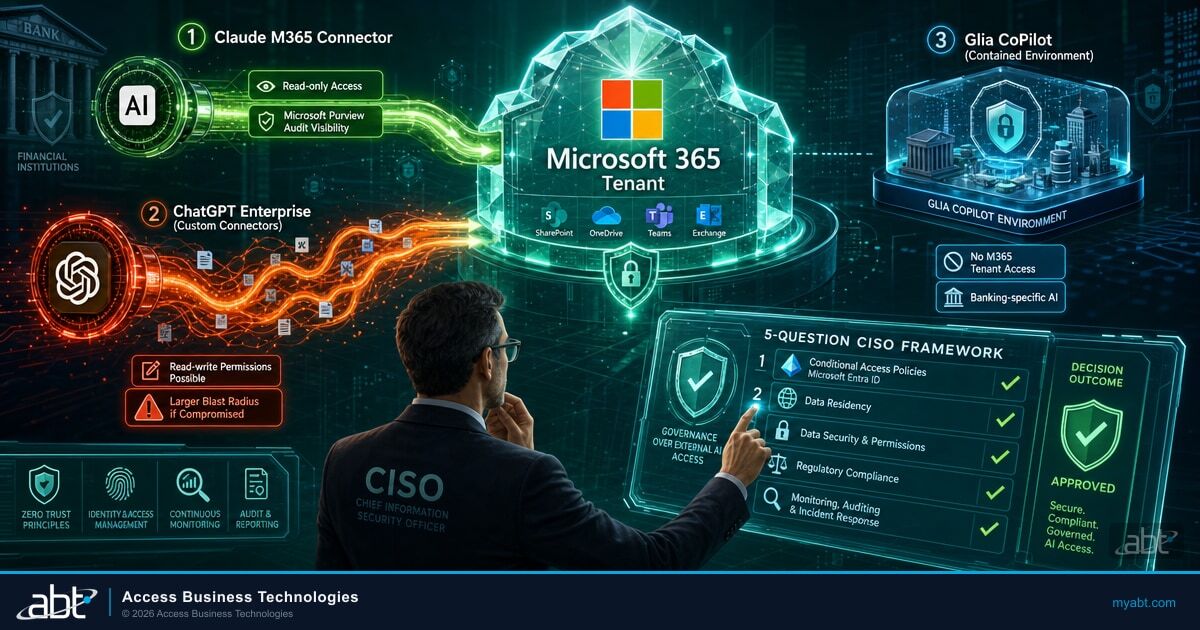
Not all AI connectors ask for the same level of access. The risk varies dramatically based on the permission model, data residency commitments, and whether the connector is read-only or read-write. Before your team evaluates any connector, map its permissions against your data classification policy. The differences between these three options are significant enough to change your entire governance approach.
Read-only access. Claude can search and read emails, calendar events, OneDrive files, and SharePoint documents within the authenticated user's permission scope. It cannot modify, delete, or send anything. The connector registers two Entra ID applications ("M365 MCP Client for Claude" and "M365 MCP Server for Claude") and uses OAuth 2.0 On-Behalf-Of flow with PKCE. Data processing stays within Anthropic's Enterprise terms with no training on customer data. Refresh tokens expire after 90 days of inactivity, and all Graph API requests are logged in Microsoft Purview audit logs.
ChatGPT Enterprise does not have a native Microsoft 365 integration equivalent to Claude's connector. Organizations typically build custom connectors through API workflows, Power Automate, or browser-based access. These custom integrations can request read and write permissions depending on configuration, including sending emails, creating documents, and scheduling meetings. The broader and less standardized permission scope creates a larger blast radius if the integration is compromised. Each custom connector requires individual security review because there is no single permission model to evaluate.
The scenario comparison highlights the architectural difference, but your governance team needs the detailed permission breakdown to build a proper risk assessment. The table below maps each connector across the seven dimensions that matter most for a vendor security review at a regulated institution.
| Capability | Claude M365 Connector | ChatGPT Enterprise | Glia CoPilot |
|---|---|---|---|
| Access Type | Read-only (delegated) | Read-write (custom connectors) | Contained environment |
| M365 Tenant Access | Email, Calendar, OneDrive, SharePoint | Varies by connector configuration | No tenant access required |
| Data Training | Prohibited (Enterprise terms) | Prohibited (Enterprise terms) | Banking-specific DSLMs only |
| Authentication | OAuth 2.0 OBO + PKCE, Entra ID | Varies (API keys, OAuth, SSO) | Banking platform SSO |
| Purview Audit Visibility | Full Graph API logging | Depends on integration method | Separate audit trail |
| Blast Radius if Compromised | Data exposure (read-only) | Data exposure + modification | Customer interaction data only |
| Financial Services Focus | General enterprise | General enterprise | 700+ banks and credit unions |
The blast radius column is the one your CISO should focus on first. A read-only connector limits the worst case to data exposure within the authenticated user's existing permission scope. A read-write connector expands the worst case to include unauthorized modifications, sent emails, and deleted content. Those are fundamentally different risk categories that require different mitigation strategies.
Glia CoPilot: The Banking-Specific Alternative
Glia's AI platform serves 700+ financial institutions with a banking-specific Copilot that operates within a contained environment rather than connecting to your full M365 tenant. It focuses on customer interaction workflows (chat, voice, video) and uses domain-specific language models trained on 1,000+ banking and credit union tasks. Glia claims a zero-hallucination guarantee for its banking-specific responses, and the platform automates up to 80% of routine banking inquiries. For institutions that want AI for customer-facing operations without tenant-wide data access, Glia represents a different risk category entirely. The trade-off: Glia does not help your employees work faster inside M365. It solves the customer service AI problem, not the internal productivity AI problem.
The distinction matters because your governance framework needs to account for all three categories: tenant-connected AI (Claude's model), custom-integrated AI (ChatGPT's model), and purpose-built AI that stays outside the tenant entirely (Glia's model). Each category requires different controls, different audit trails, and different vendor risk assessments.

Conditional Access Policies for Third-Party AI
Approving a third-party AI connector without configuring Conditional Access policies is like giving someone a building key without setting up the security cameras. Entra ID Conditional Access is where you enforce the controls that turn an approved connector into a governed connector. Here are the four policy layers your team should configure before any third-party AI tool touches your tenant. These map directly to the controls in our Conditional Access policies for financial institutions guide and to the broader Entra ID security assessment audit framework.
Register the third-party AI application in Entra ID and create a Conditional Access policy scoped specifically to that app. For Claude's connector, target the two registered Entra ID apps by their client IDs. For custom ChatGPT integrations, register each connector separately. Do not rely on blanket policies that cover all cloud apps. AI connectors need targeted controls.
Set sign-in frequency to 24 hours or less for AI connector sessions. Disable persistent browser sessions for unmanaged devices. Enable app-enforced restrictions on SharePoint and OneDrive to prevent downloads, copying, or printing when the AI connector accesses documents through browser sessions. These controls limit token lifetime and reduce the exposure window if a session is compromised.
Require device compliance or Hybrid Entra ID join for any device accessing AI connectors. Block unmanaged and personal devices from authenticating with AI tools that have tenant access. For financial institutions, this prevents data from flowing through unmanaged endpoints where your DLP policies have no reach. Intune device compliance policies should verify OS version, disk encryption, and threat protection status.
Deploy Microsoft Purview DLP policies scoped to AI workloads. Configure sensitive information type detection for GLBA-regulated data (account numbers, SSNs, loan identifiers) so that DLP policies fire before the AI tool processes the content. For third-party connectors outside Purview's native scope, use Microsoft Defender for Cloud Apps to extend DLP monitoring to the connector's data pathways.
These four layers build on each other sequentially. App filtering isolates the AI connector so your policies target it specifically. Session controls limit the exposure window for each authenticated session. Device compliance keeps data off unmanaged endpoints. DLP integration catches sensitive content before it reaches the connector. Deploying all four before granting tenant access is what separates a governed AI deployment from an approved-but-uncontrolled one.
Key Implementation Detail
Entra ID P1 licensing is required for basic Conditional Access. Entra ID P2 adds risk-based policies that can detect anomalous sign-in patterns (impossible travel, unfamiliar locations) and automatically block or require step-up authentication. For financial institutions evaluating third-party AI, P2 is the recommended tier because risk-based signals catch compromised sessions that static policies miss.
Need Help Configuring AI Governance Policies?
ABT's team has configured Entra ID and Purview policies for 750+ financial institutions.
The 5-Question CISO Framework
Before approving any third-party AI connector, run it through these five questions. If you cannot answer all five with documented evidence, the connector is not ready for your environment. This framework applies equally to Claude, ChatGPT, Glia, and any future AI tool that requests access to your corporate data.
Map every permission the connector requests against your data classification policy. Read-only to email is different from read-write to SharePoint. Document the exact scope and compare it to what the tool actually needs to function. For Claude's M365 connector, verify the delegated permissions on both Entra ID app registrations. Check whether the connector can access all mailboxes or only the authenticated user's mailbox. Confirm whether SharePoint access includes all sites or only sites the user has permission to view. The principle of least privilege applies to AI connectors the same way it applies to human users.
Identify the vendor's data processing location, retention policy, and whether your data is used for model training. Anthropic's Enterprise terms prohibit training on customer data. Verify this for every vendor. For GLBA-regulated data, confirm the vendor's data residency meets your compliance requirements. Ask specifically: Where are the API endpoints hosted? Is data processed in the U.S. or routed internationally? How long is conversation context retained? Does the vendor subcontract data processing to third parties? Your examiner will ask these questions. Have the answers documented before you need them.
Define the blast radius. A read-only connector exposes data. A read-write connector can also modify or delete data. Document the worst-case scenario for each permission level and verify that your DLP policies cover the connector's data pathways. For a read-only connector like Claude, the worst case is data exposure limited to the authenticated user's permission scope. For a read-write custom connector, the worst case includes unauthorized emails sent from user accounts, documents modified or deleted, and calendar events manipulated. Quantify the exposure: how many mailboxes, how many SharePoint sites, how many OneDrive accounts could be affected?
If the connector operates outside Purview's visibility (most third-party connectors do), you need a separate audit trail. Agent 365 provides this for AI tools connecting to your M365 tenant. Without monitoring, you have no evidence for your examiner. Verify that you can answer: Which users authenticated with the AI connector this month? What data did each session access? Were any sessions flagged for anomalous behavior? Can you produce a 90-day activity report within 48 hours of an examiner request? If the answer to any of these is no, your monitoring gap is a finding waiting to happen.
Traditional vendor risk assessments may not cover AI-specific risks: prompt injection, training data contamination, model behavior changes after updates, and autonomous action capabilities. Update your vendor assessment template to include AI-specific questions before approving any connector. Add these to your assessment: Does the vendor allow prompt injection testing? How does the vendor handle model updates that change behavior? What autonomous actions can the AI take without human approval? Does the vendor have an AI incident response plan? 63% of organizations lack AI governance policies entirely, which means your vendor assessment template was likely written before AI connectors existed.

Data Residency and Regulatory Compliance
For U.S. financial institutions, the data residency question is not theoretical. GLBA requires safeguarding customer financial information, and your examiner expects documented evidence that data processed by third-party tools stays within your compliance boundary. When a CISO evaluates a third-party AI connector, the data residency conversation needs to cover four specific areas.
GLBA and Third-Party AI: What Your Examiner Expects
The Gramm-Leach-Bliley Act requires financial institutions to protect nonpublic personal information (NPI) and implement a written information security plan. When an AI connector processes email content, calendar data, or SharePoint documents, it is processing data that likely contains NPI. Your examiner will want to see: (1) a documented risk assessment for each AI tool with tenant access, (2) evidence that the vendor's data handling meets your information security program's requirements, (3) proof that you can revoke access and delete data if the vendor relationship ends, and (4) audit logs showing what data the connector accessed and when. If you connected an AI tool to your tenant without completing these steps, that gap becomes a finding in your next examination.
Anthropic processes Claude connector data through U.S.-hosted API endpoints under its Enterprise terms, which prohibit using customer data for model training. But "Enterprise terms" are a contract, not a technical control. Your governance framework needs both: contractual protections through the vendor agreement and technical controls through Conditional Access, DLP, and monitoring. One without the other leaves a gap.
The vendor risk assessment for AI tools should also address model updates. Unlike traditional software where you control the update cycle, AI models can change behavior after updates without any action on your end. A response that was accurate last month might produce different output this month because the underlying model was updated. Document which model version you evaluated, and require vendor notification before model changes that could affect your compliance posture.
The 90-Day Token Expiration Window
Claude's M365 connector refresh tokens expire after 90 days of inactivity. This is a security feature, but it also creates an operational consideration. If a user authenticates with Claude, stops using it for 91 days, and then returns, they need to re-authenticate and re-consent. For compliance purposes, this 90-day window means that inactive connector sessions self-terminate. Your team should document this in the risk assessment as a mitigating control and set calendar reminders to review active connector sessions quarterly.
ABT's Governance Answer
The question is not whether to block all third-party AI. That is the approach that drives employees to use unauthorized tools, creating the shadow AI problem that is harder to govern than any approved connector. The answer is controlled AI adoption through Agent 365 governance: approve specific connectors, scope their permissions, monitor their activity, and maintain the audit trail your examiner expects. Before you connect anything, read Microsoft's own security warning for banks deploying AI and run the prompt injection risk review that applies to every Copilot-like system.
Controlled adoption means three things in practice. First, you maintain a registry of approved AI tools with documented risk assessments for each one. Second, you enforce Conditional Access policies that limit how those tools interact with your tenant data. Third, you monitor every AI session through Agent 365 for third-party tools and Purview for Microsoft-native AI, so you always have a complete picture of AI activity across your environment.
Blanket blocking of third-party AI drives 80% of employees to bring their own tools anyway, creating ungoverned data flows. Blanket approval without governance creates examiner findings. The middle path requires Agent 365 for third-party tools and Purview for Microsoft-native AI, working together to provide a unified governance layer across all AI touchpoints. In 2025, enterprises reported an average of 3.3 AI-related security incidents per day, with finance and healthcare accounting for over 50% of cases. The average cost of an AI-related security incident reached $4.8 million. Governance is not a nice-to-have. It is the difference between controlled adoption and an incident report.
The cost data makes the governance case for you. When your board asks whether the investment in Agent 365 and Purview configuration is justified, $4.8 million per AI-related incident is the denominator. The governance stack costs a fraction of that per year across your entire tenant. The question is not whether you can afford governance. It is whether you can afford not to have it documented before your next exam.
78% of C-suite executives cite cybersecurity as their top barrier to AI adoption. This is not irrational caution. AI-related data security incidents nearly doubled from 27% to 40% of organizations between 2023 and 2024. The solution that unlocks the other 22% is not better AI. It is better governance. Controlled adoption through documented frameworks turns the CISO from a blocker into an enabler. When the board asks whether you are adopting AI responsibly, a documented framework with audit trails is the answer they need to hear.
Claude just connected to Microsoft 365. Should you allow it?
Should a Third-Party AI Touch Your M365 Data at All?
Connecting Claude or ChatGPT to your tenant is a CISO-level decision with real data-governance consequences, not a checkbox. An AI Readiness assessment shows where your Microsoft 365 controls would hold and where they would leak before you wire anything in.
Frequently Asked Questions
Claude's M365 connector uses read-only access limited to the authenticated user's permission scope, and Anthropic's Enterprise terms prohibit training on customer data. These are strong defaults. However, "safe" depends on your institution's specific risk tolerance, data classification policy, and governance framework. Run it through the 5-question CISO framework above before approving.
Copilot has the advantage of operating within Microsoft's security perimeter, respecting sensitivity labels, and being fully visible to Purview governance. However, different AI tools have different strengths. The governance question is the same regardless of the tool: what data can it access, where does it go, and can you monitor it? A well-governed third-party tool may be appropriate alongside Copilot for specific use cases.
Shadow AI is employees using AI tools without IT's knowledge or approval. This article addresses IT deliberately evaluating whether to allow specific AI tools to access corporate data. The risk profiles are different: shadow AI has no governance at all, while deliberate third-party AI adoption can be governed, monitored, and audited if done with the right framework.
Frame it as a governance decision, not a technology decision. Present the 5-question framework, show which tools pass and fail, and recommend controlled adoption with monitoring rather than blanket approval or blanket blocking. Boards respond well to risk frameworks with documented evidence.
Yes. Agent 365 governs what AI tools connect to your tenant, monitors their data access patterns, and maintains audit trails. This is specifically designed for the third-party AI governance gap that Purview does not cover. Combined with Purview DLP configured through ABT's Guardian operating model, it provides unified visibility across first-party and third-party AI.
Entra ID P1 provides basic Conditional Access policies for app filtering, session controls, and device compliance. Entra ID P2 adds risk-based policies that detect anomalous sign-in patterns and automatically adjust access requirements. For financial institutions governing third-party AI connectors, P2 is recommended because it catches compromised sessions that static policies miss.
Need a Third-Party AI Governance Framework?
ABT's Agent 365 governs every AI tool connecting to your tenant. Combined with Purview DLP configured through ABT's Guardian operating model, it is the complete governance stack for institutions that want AI productivity without ungoverned risk. 750+ financial institutions trust ABT to get this right.