In This Article
- The data your institution can't afford to lose
- Does Microsoft 365 back up your data? Not the way you think
- Why Microsoft Purview retention is governance, not a backup
- The three failure modes native Microsoft 365 doesn't cover
- What examiners and your records rules actually expect
- How ABT closes the Microsoft 365 backup gap
- Frequently Asked Questions
Think about what lives inside your Microsoft 365 tenant right now. Years of member email and loan correspondence. Closing disclosures and underwriting files in SharePoint. The OneDrive folders where your processors and lenders keep work in progress. The Teams channels where decisions actually get made. For a bank, a credit union, or a mortgage company, that's not just productivity software. It's the operational record of the institution, and a meaningful slice of it exists nowhere else.
Now ask a harder question. If a ransomware crew encrypted that content this afternoon, or a departing administrator deleted it on the way out, or a configuration mistake quietly purged a SharePoint site, could you get it all back? Most IT directors assume the answer is yes, because Microsoft runs the platform and Microsoft is, well, Microsoft. That assumption is where the trouble starts.
Microsoft 365 has real resilience built in. It has a recycle bin, deleted-item recovery, and retention controls, and Microsoft keeps the underlying service highly available and replicated across its datacenters. What it does not give you by default is an independent, point-in-time backup of your own data that you can restore from after a malicious or accidental loss. That distinction is the gap. It's narrow, it's technical, and for a regulated institution it's the difference between a bad afternoon and a reportable event.
The data your institution can't afford to lose
Start with the operational reality, because that's what actually drives the urgency. Your team produces work inside Microsoft 365 every day, and that work is the institution. A loan file isn't real until the documents are gathered, reviewed, and stored. A member dispute isn't resolved until the correspondence is on record. The email thread that documents who approved an exception is, in a very practical sense, the exception's audit trail. Lose access to that, even briefly, and the work doesn't just pause. It can disappear.
People reach for the recycle bin and assume that covers them. It covers a narrow case well, an accidentally deleted file or a mailbox someone cleaned out too aggressively, and only for a limited window. It does nothing for the scenarios that actually take institutions down: a ransomware attacker who encrypts a share, a compromised admin account that purges content on purpose, or a slow data-loss problem nobody catches until the recovery window has already closed. The recycle bin is a convenience feature. It was never designed to be your disaster-recovery plan.
Here's the part that catches IT directors off guard. Microsoft itself is clear about whose job this is, and it isn't theirs. The faster you internalize that, the faster you stop carrying a risk you didn't know you had. The decision about how you bought and who manages your Microsoft 365 environment turns out to matter here too, which is something we explore in our look at why who sold you Microsoft 365 shapes your breach recovery.
Why this matters for financial institutions
A retailer that loses a folder of marketing assets has a bad day. A credit union that can't produce member records, or a mortgage lender missing closing files, has a compliance problem. Records-preservation rules, breach-notification clocks, and examiner expectations all assume you can recover your data on demand. When the assumption fails, the consequences are measured in regulatory findings and member trust, not just lost hours.
Does Microsoft 365 back up your data? Not the way you think
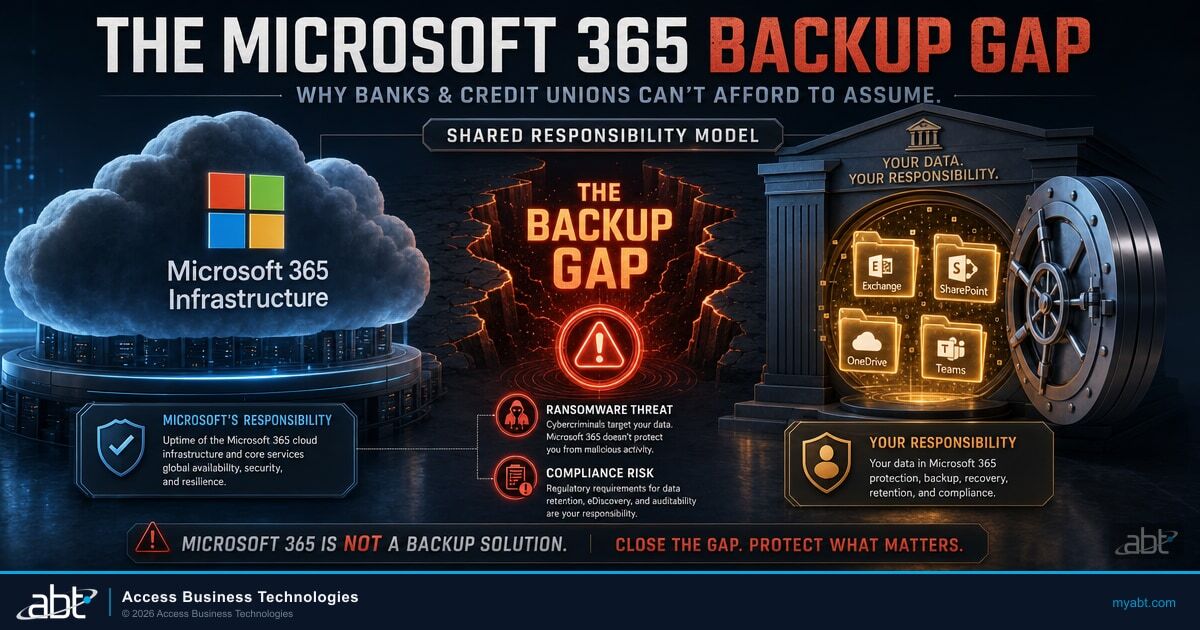
This is the question buried at the center of the whole topic, and the honest answer is more useful than a slogan. Microsoft 365 protects your data in some ways and not in others, and the line between the two is exactly where institutions get hurt. The framework Microsoft uses to draw that line is called the shared responsibility model, and it's worth understanding because it's the foundation for everything else.
Under that model, Microsoft operates the infrastructure: the physical datacenters, the network, the servers, and the service code that keeps Exchange, SharePoint, OneDrive, and Teams running and available. You, the customer, own your data and your identities. Microsoft's own documentation puts it about as plainly as it can: "For all cloud deployment types, you own your data and identities. You're responsible for protecting the security of your data and identities." Microsoft 365 is software as a service, and across every deployment type the responsibility for the data itself stays with the customer, including data classification, data protection, and a backup and recovery strategy.
Microsoft's shared responsibility documentation goes a step further than most readers notice. Alongside the responsibility matrix, it names "insufficient backup and disaster recovery" as a customer-side failure mode, describing backups that "may be infrequent, untested, or stored on-site, leaving data vulnerable to ransomware or physical disasters." Read that as the platform vendor telling you, in writing, that backing up and being able to restore your Microsoft 365 data is your job, not Microsoft's. Examiners read the same documentation.
So what does Microsoft actually do with deleted content? It gives you time-boxed recovery, which is genuinely useful and frequently mistaken for backup. In SharePoint Online and OneDrive, deleted items are recoverable for a total of 93 days across both stages of the recycle bin, after which they're permanently removed. In Exchange Online, deleted-item retention defaults to 14 days and can be configured up to a 30-day maximum. Those are real safety nets for everyday mistakes. They are not a backup, and the windows matter.
| Microsoft 365 workload | Native deletion-recovery window | What it is | What it is not |
|---|---|---|---|
| SharePoint Online and OneDrive | 93 days total across both recycle-bin stages | Deletion recovery for accidental loss | Not a point-in-time backup |
| Exchange Online mailboxes | 14 days by default (configurable to a 30-day maximum) | Deleted-item recovery | Not a point-in-time backup |
| Teams | Chat and channel data follow the underlying Exchange and SharePoint windows | Limited deletion recovery | Not a point-in-time backup |
Notice the precise framing. These are recovery windows, not backups. Recover within the window and you're fine. Discover the loss after it closes, which is exactly what happens when a problem goes unnoticed for a few weeks or when an attacker deliberately empties the recycle bin, and the content is gone. A backup, by contrast, gives you independent, restorable copies that don't expire on Microsoft's deletion schedule and don't sit in the same tenant an attacker just compromised.

Why Microsoft Purview retention is governance, not a backup
At this point a well-prepared IT director usually raises a fair objection: "We use Microsoft Purview retention policies. Doesn't that cover us?" It's a good question, and the answer requires care, because Purview is valuable and the temptation is to either oversell it or dismiss it. Neither is right.
Microsoft Purview retention policies and retention labels, part of Data Lifecycle Management, are compliance and records-management controls. They preserve or delete content on a schedule you define, which is genuinely important for meeting recordkeeping obligations and for keeping content discoverable for eDiscovery. If you're a regulated institution, you should be using them. They do real work. We dig into how the broader Microsoft 365 control surface maps to examiner expectations in our guide to building examiner-ready Microsoft 365 controls.
What retention is not is a backup. The distinction is purpose and recovery model, and it's the kind of nuance examiners and auditors are increasingly fluent in. Retention holds content according to a policy. A backup gives you an independent copy you can restore from a specific point in time. Retention doesn't offer granular point-in-time restore, and it doesn't deliver backup-style recoverability against a malicious or compromised administrator or a ransomware purge the way a true, independent backup does. The two tools answer different questions. "Did we keep this record long enough?" is a Purview question. "Can we restore everything to how it looked last Tuesday after this attack?" is a backup question.
Retention answers "did we keep it long enough." Backup answers "can we get it all back." A defensible institution needs an answer to both.
The mistake we see most often is treating one of these tools as if it were the other. An institution configures retention beautifully, passes a records review, and feels protected, then gets hit with ransomware and discovers there's no independent copy to restore from. The retention policy did its job. It just wasn't the job that mattered that day.
The three failure modes native Microsoft 365 doesn't cover
Strip away the jargon and there are three specific ways data disappears from a Microsoft 365 tenant that the native recovery windows don't protect against. Naming them is the fastest way to see the gap clearly, because each one is a real incident pattern, not a hypothetical.
The first is ransomware. An attacker who gains a foothold can encrypt or mass-delete content across Exchange, SharePoint, and OneDrive, and a sophisticated one will deliberately empty the recycle bins to remove your easy recovery path. The second is malicious or compromised-admin deletion. A privileged account, whether a disgruntled insider or an attacker who has stolen admin credentials, can purge content with the same authority your own team has, including blowing past the recycle bin. The third is the quiet one: silent data loss after the recovery window lapses. A file gets deleted, nobody notices for a month, and by the time someone goes looking, the 93-day or 14-day clock has run out. Strong account-takeover defenses like phishing-resistant multifactor authentication reduce how often the first two happen, but they don't change what you can recover once they do.
A compromised account at a community bank runs ransomware across a shared SharePoint site holding loan documentation, then empties the site's recycle bins to cover the attacker's tracks. The encryption is discovered the next morning.
With only native recovery, the bank's options are thin: the recycle bins are empty, retention policies hold records but offer no clean point-in-time restore, and the data the examiner will ask about is locked or gone. With an independent, immutable backup, the same site restores to its pre-attack state, and the incident becomes a recovery exercise instead of a loss.
The defensible posture isn't complicated to describe, even if it takes work to implement. You pair correctly configured native retention and Purview, which handle records management and routine recovery, with an independent, immutable backup of Exchange, SharePoint, OneDrive, and Teams, plus documented, tested recovery. Immutable matters because it means the backup copies can't be altered or deleted by the same compromised credentials that hit the tenant. Tested matters because a backup you've never restored from is a hope, not a capability. This is the same defense-in-depth logic behind getting full value from the security tooling you already own, which we cover in our piece on the Microsoft 365 E5 security features most institutions never turn on.
The gap most institutions don't see until it's too late
Native Microsoft 365 recovery is built around accidental deletion inside a short window. It was never designed to recover from a determined attacker or a problem discovered after the window closes. If your data-protection plan stops at the recycle bin and a retention policy, you have a gap precisely where the worst incidents live.
What examiners and your records rules actually expect
Here's where the operational risk meets the regulatory one, and the picture sharpens. The obligations aren't a single clean rule that says "thou shalt back up Microsoft 365." They're a set of overlapping expectations that vary by what kind of institution you are, and together they assume you can preserve and recover your data. Getting the specifics right matters, because examiners notice when an institution waves at "compliance" without knowing which rule applies to it.
For federally insured credit unions, the National Credit Union Administration's records-preservation rule, 12 CFR Part 749, requires a written records-preservation program and storage of duplicate vital records off-site at a vital records center, a location far enough away to avoid losing both copies in the same event. For banks, the Gramm-Leach-Bliley Act's section 501(b) safeguards obligation, implemented through the Interagency Guidelines Establishing Standards for Safeguarding Customer Information, requires a written information security program to protect customer information. For mortgage companies, finance companies, and other non-bank financial institutions under Federal Trade Commission jurisdiction, the FTC Safeguards Rule, 16 CFR Part 314, requires a written information security program plus secure disposal procedures. Different regulators, different charters, same underlying premise: you are responsible for safeguarding and preserving the data, and that responsibility doesn't transfer to your cloud vendor.
A misattribution to avoid
The FTC Safeguards Rule (16 CFR Part 314) governs non-bank financial institutions such as mortgage lenders and finance companies. It does not govern banks or federally insured credit unions, which fall under their own banking-agency and NCUA rules. Likewise, SEC Rule 17a-4 WORM recordkeeping applies to SEC-registered broker-dealers, so it's relevant only if your institution has a broker-dealer arm, not to banks and credit unions generally. Knowing which rule applies to you is itself an examiner-readiness signal.
On top of those codified requirements sits supervisory guidance that examiners actively apply. The Federal Financial Institutions Examination Council's Business Continuity Management IT Examination Handbook sets the expectation that institutions maintain data backup, regularly test backup restoration against their recovery objectives, and keep documented evidence of that testing. This is examiner expectation rather than a line of the Code of Federal Regulations, but the practical effect is the same: when an examiner asks how you'd recover your Microsoft 365 data and you can't show a tested process with results on file, that's a finding waiting to happen.
The useful way to think about it is as an evidence checklist. Examiners don't just want a policy that says you back up. They want proof you've tested recovery and that the proof is current. Here's what a defensible Microsoft 365 data-protection posture puts on the table.

Walk through each item below and ask one question: could your institution produce this evidence today, on demand, if an examiner asked for it?
Exchange, SharePoint, OneDrive, and Teams backed up to copies that a compromised tenant credential cannot alter or delete.
Restore tests run on a schedule, measured against your recovery time and recovery point objectives, with results and remediation kept on file per FFIEC BCM guidance.
For credit unions, the 12 CFR Part 749 program with off-site duplicate vital records. For banks and non-bank lenders, the GLBA or FTC Safeguards information security program.
Purview retention policies and labels set to your recordkeeping requirements, documented as part of the program rather than left at default.
Find out where your Microsoft 365 data protection actually stands
Most institutions assume they're covered until someone asks for a tested restore. A short data-protection posture review shows you exactly where your backup, retention, and recovery story holds up and where it doesn't.
How ABT closes the Microsoft 365 backup gap
This is where the question stops being a problem to worry about and becomes one to solve. ABT is a Tier-1 Microsoft Cloud Solution Provider, and we manage the Microsoft 365 tenant for more than 750 banks, credit unions, and mortgage companies. Managing the tenant means Microsoft hosts the infrastructure and ABT manages the environment on your behalf, which puts us in the right position to close this gap on three fronts at once.
First, we configure the native controls correctly. Retention policies and labels, recovery windows, and the rest of the Microsoft Purview surface get set to your actual recordkeeping requirements instead of being left at default and assumed adequate. That alone resolves a surprising number of "we thought we were protected" situations, and it's the baseline before any backup conversation makes sense.
Second, as your Cloud Solution Provider and through the M365 Guardian managed operating model, we implement and manage independent, immutable backup of your Exchange, SharePoint, OneDrive, and Teams data, with documented, tested recovery. To be clear about what this is and isn't, there's no branded "ABT Backup" box you buy off a shelf. It's a managed capability: the right immutable backup platform configured for your tenant, operated and monitored as part of the Guardian model, with restore testing run and recorded so the capability is proven rather than assumed.
Third, we produce the exam evidence. The tested-recovery results, the records-preservation documentation, and the configuration proof that an examiner asks for become artifacts we help you maintain, not a scramble the week before an exam. Detection and response, when an attacker does get in, is a separate and complementary capability we deliver through Guardian MxDR, our managed detection and response built on the Microsoft security stack. Backup is about getting your data back. Guardian MxDR is about catching and containing the attacker in the first place. You want both, and they're distinct offerings for a reason.
Key Takeaway
Microsoft 365 keeps your service running and gives you short-window deletion recovery, but it does not back up your data, and Microsoft says so in writing. For a bank, credit union, or mortgage company, the defensible posture pairs correctly configured native retention and Purview with an independent, immutable backup and documented, tested recovery. That's the combination that protects your operations, survives a ransomware or admin-deletion event, and gives your examiner the evidence they expect.
The reassuring part is that none of this changes how your team works inside Microsoft 365. The apps are the same, the data is the same, the daily experience is the same. What changes is whether you can confidently answer the one question that decides how a bad day ends: if we lost it, could we get it back? If you're not certain, that's worth a conversation before the afternoon you find out the hard way.
Make "could we get it back?" a question you can answer with confidence
ABT manages Microsoft 365 for more than 750 financial institutions, configuring native retention, implementing independent immutable backup with tested recovery, and producing the exam evidence to match. Let's review your data-protection posture and show you exactly where you stand.
Frequently Asked Questions
Not in the way most people assume. Microsoft 365 keeps the service highly available and replicated, and it provides short-window deletion recovery: 93 days total across both SharePoint and OneDrive recycle-bin stages, and a 14-day default (30-day maximum) for Exchange Online deleted items. That is deletion recovery, not an independent point-in-time backup. Under Microsoft's shared responsibility model, the customer always owns their own data and is responsible for a backup and recovery strategy. Microsoft operates the infrastructure; backing up your data is your responsibility.
No. Microsoft Purview retention policies and labels are compliance and records-management controls that preserve or delete content on a schedule. They are valuable for recordkeeping and eDiscovery, and regulated institutions should use them. But retention does not provide granular point-in-time restore and does not give you backup-style recoverability against a malicious or compromised administrator or a ransomware purge. Retention answers whether you kept a record long enough. A backup answers whether you can restore everything to a specific point in time after an incident.
Three failure modes in particular. The first is ransomware that encrypts or mass-deletes content and deliberately empties the recycle bins. The second is malicious or compromised-admin deletion, where a privileged account purges content with full authority. The third is silent data loss discovered after the native recovery window has lapsed, when the 93-day or 14-day clock has already run out. The defensible posture pairs native retention and Purview with an independent, immutable backup of Exchange, SharePoint, OneDrive, and Teams, plus documented, tested recovery.
The obligations vary by charter, but they all assume you can preserve and recover your data. Federally insured credit unions follow NCUA's 12 CFR Part 749, which requires a written records-preservation program and off-site duplicate vital records. Banks fall under GLBA section 501(b) and the Interagency Guidelines. Mortgage companies and other non-bank financial institutions under FTC jurisdiction follow the FTC Safeguards Rule, 16 CFR Part 314. On top of those, the FFIEC Business Continuity Management IT Examination Handbook leads examiners to expect data backup, regularly tested restoration against recovery objectives, and documented evidence of that testing. An institution that cannot show a tested recovery process risks a finding.
Because the threats you most need to recover from come from inside the tenant. A ransomware attacker or a compromised administrator operates with the same credentials that control your Microsoft 365 environment, so a backup stored in that same environment can be altered or deleted by the attack itself. An independent, immutable backup keeps restorable copies that a compromised tenant credential cannot touch, and it doesn't expire on Microsoft's deletion schedule. Pairing immutability with regularly tested restores is what turns a backup from a hope into a capability you can prove to an examiner.
As a Tier-1 Microsoft Cloud Solution Provider managing Microsoft 365 for more than 750 financial institutions, ABT closes the gap on three fronts. We configure native retention and Purview correctly so your recordkeeping controls are set to your requirements, not left at default. As your CSP and through the M365 Guardian managed operating model, we implement and manage independent, immutable backup of Exchange, SharePoint, OneDrive, and Teams with documented, tested recovery. And we maintain the exam evidence, the tested-recovery results and configuration proof, that examiners ask for. There is no separate branded backup product; it is a managed capability operated as part of the Guardian model.