In This Article
- Why everyday admin rights cost more than they save
- What Endpoint Privilege Management does
- Which Microsoft 365 plans include Endpoint Privilege Management
- Taking existing admin rights away
- Writing elevation rules that hold up
- Support-approved requests and your help desk
- A rollout plan for banks, credit unions, and lenders
- Windows Administrator protection and the October 2026 update
- What the Safeguards Rule and the Interagency Guidelines ask
- Licensing, and how ABT helps
- Frequently Asked Questions
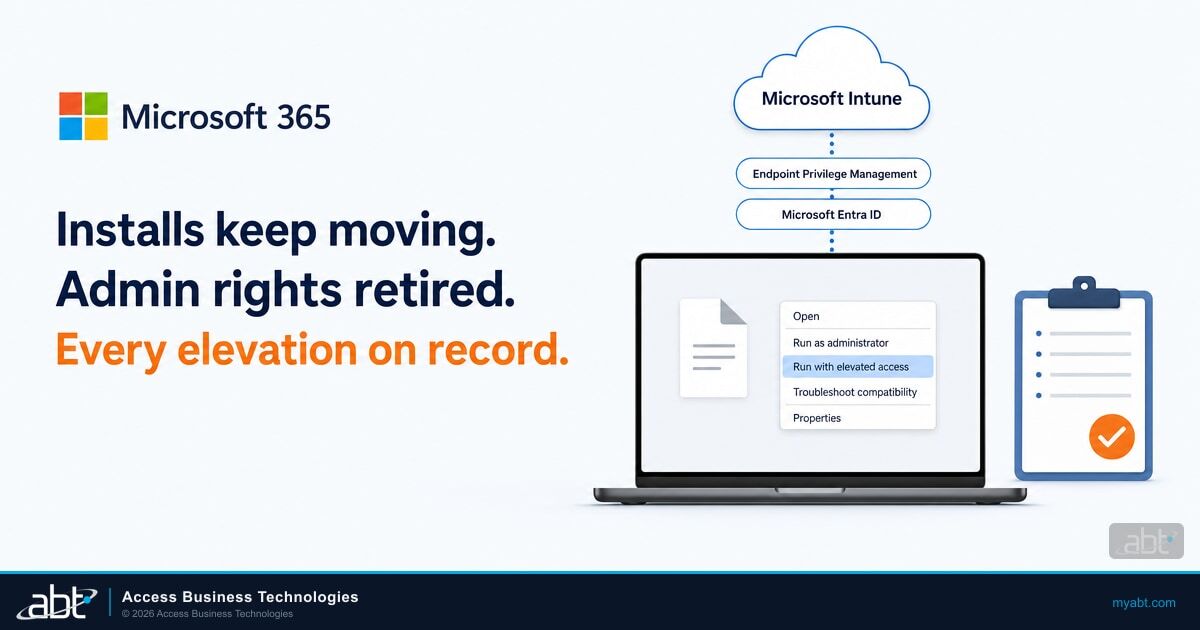
A loan processor's e-signature plugin needs an update at 9:40 on a Monday, with a closing at 11. If she is a local administrator on her laptop, she runs the installer herself and gets back to the file. If your institution took her admin rights away, she opens a ticket and waits. Microsoft Intune Endpoint Privilege Management (EPM) gives you a third answer: she right-clicks the installer, chooses Run with elevated access, and the update installs under a rule your IT team wrote, while her account stays a standard user.
Microsoft describes EPM as a way to remove "broad local admin rights while still allowing users to complete approved tasks that require elevation." Your staff keep installing and updating the tools their jobs depend on. The accounts they sign in with every day stop carrying the rights that let any program they run change the device itself. And Intune keeps a record of what was elevated, by whom, and with which elevation type.
Two changes this year make it timely. Since July 1, EPM has been included in Microsoft 365 E5. On Microsoft 365 Business Premium, the plan Microsoft offers organizations of up to 300 users, it is an add-on. And the October 2026 Windows security update turns on Windows Administrator protection by default for organizations that use Windows security baselines, adding a Windows Hello check before administrator actions.
ABT, a Tier-1 Microsoft Cloud Solution Provider serving 750+ financial institutions, wrote this guide for IT teams moving staff to standard users. It covers which plans include EPM, how to take existing admin rights away, and how to keep your staff working while you do it.
Why everyday admin rights cost more than they save
Admin rights usually spread for a practical reason: work needs software installed, updated, or repaired, and an administrator account lets the user do it without waiting. Microsoft Entra ID adds to the habit. When a user joins a Windows device to Microsoft Entra ID, Microsoft says "By default, Microsoft Entra ID adds the user performing the Microsoft Entra join to the administrator group on the device." Many fleets end up with an administrator at every desk without anyone deciding it.
That default puts full rights behind every installer, script, and settings change a user starts, including the ones an attacker tricks them into starting. Standard users with EPM change the arrangement.
Every user is a local administrator
- Any installer or script a user runs gets full rights on the device
- The person who joined the device stays an administrator by default
- IT has no central view of what ran elevated, or why
- Removing the rights means every install becomes a help desk ticket
Standard users with Endpoint Privilege Management
- Users work as standard users by default
- Approved applications elevate under rules IT writes
- Files without a rule go to the help desk for approval, or are denied
- Intune logs every elevation with detailed metadata
EPM is a different control from Windows Local Administrator Password Solution (Windows LAPS). Windows LAPS keeps the built-in local administrator password unique on every managed device and gets the help desk back in when it's needed. EPM decides which of your users need administrator rights at all. Most institutions want both.
What Endpoint Privilege Management does
With EPM, Microsoft says your users "can run as a standard user (without administrator rights) and complete tasks that require elevated privileges," such as application installs, device driver updates, and certain Windows diagnostics. For most elevation types, EPM runs the elevated process through a virtual account that is isolated from the signed-in user's account, and neither account is added to the local Administrators group.
Each file EPM manages follows one of five elevation types, set in an elevation rule:
| Elevation type | What the user does | Where it fits |
|---|---|---|
| Automatic | Nothing. EPM elevates the file without input from the user. | Trusted files that must run elevated. Microsoft warns that broad automatic rules can have widespread impact on your security posture. |
| User confirmed | Right-clicks the file and chooses Run with elevated access. You can require Windows authentication, a business justification, or both. | Approved tools users run occasionally, such as a plugin updater. |
| Elevate as current user | Runs the file elevated under their own signed-in account. | Applications that need the user's profile paths or settings. Microsoft notes this mode introduces a broader attack surface, so keep it to the files that need it. |
| Support approved | Submits a request with a business reason and waits for an administrator to approve it. | Files without a rule that a user needs to get a job done. |
| Deny | Nothing. The file can't run elevated. | Known files you never want elevated. Deny rules always take precedence. |

Three pieces of configuration make it run. An elevation settings policy turns EPM on for a device and sets the default response for files that have no rule. Elevation rules policies define how specific files elevate, identified by file hash, publisher certificate, file name, and path. Reusable settings groups hold certificates you use across many rules.
The client works on 64-bit Windows 11 version 24H2, and on earlier supported Windows 11 and Windows 10 releases with the updates Microsoft lists in its deployment planning guide. Windows 10 reached end of support on October 14, 2025, and Microsoft says functionality on it can vary. Devices must be Microsoft Entra joined or hybrid joined, and enrolled in Intune or co-managed with Microsoft Configuration Manager. EPM also needs a license, which is where 2026 changed the math.
Which Microsoft 365 plans include Endpoint Privilege Management
EPM requires "a subscription in addition to Microsoft Intune Plan 1 or Plan 2." That entitlement can come from the EPM add-on, from the Intune Suite, or now from Microsoft 365 E5 itself. On July 1, 2026, Microsoft's Intune team said the packaging changes announced in December 2025 are now in effect: advanced Intune Suite capabilities are included in Microsoft 365 E5, with select capabilities in Microsoft 365 E3. The Intune release notes for the week of June 29, 2026 spell out who gets what.
Microsoft 365 Business Premium
Includes Intune Plan 1. EPM is an add-on, listed at $3.00 per user per month, paid yearly, or as part of the Intune Suite at $10.00 per user per month.
Microsoft 365 E3
Gains Remote Help, Advanced Analytics, and Intune Plan 2 through the 2026 change. EPM stays an add-on.
Microsoft 365 E5
Includes EPM, Enterprise Application Management, and Microsoft Cloud PKI, on top of everything in E3.
Trial
Microsoft offers a 90-day trial of the advanced Intune capabilities for up to 250 users per tenant.
Microsoft lists the add-on prices on its Intune plans and pricing page. The E5 rollout was gradual: Microsoft's July 1 announcement says eligible tenants are provisioned automatically, with a notice in the Microsoft 365 admin center 30 days before the change takes effect, and that existing customers "will have access by August 2026." If you hold E5 today, check Intune for EPM before you buy anything. Our comparison of E3, E5, and Business Premium covers when an institution outgrows Business Premium.
Check admin accounts and device enrollment before you price the add-on
EPM needs devices enrolled in Intune and running a supported Windows release. The free ABT Security Assessment reviews Intune enrollment status and operating system patch levels across your devices, plus admin account hygiene in your identity settings, and hands you a written report. When you buy the add-on through ABT, you pay Microsoft's price.
Taking existing admin rights away
EPM works alongside a second policy
Turning on EPM lets standard users elevate approved files. Removing the admin rights users already hold is a separate step. Microsoft's guidance is direct: "To remove local admin permissions, you can deploy account protection policies to manage the local user group membership." Plan both policies together.
The Intune account protection policy has a local user group membership profile that edits the built-in Administrators group on Windows devices. Its Add (Replace) action works like a Restricted Group: Microsoft says "any group members that aren't specified in the policy are removed." That's the action that clears out accumulated administrators. Name every account that should stay, including the ones your IT staff and Windows LAPS rely on, and confirm your help desk can still get into a pilot device before you assign it more widely.
Two more settings keep new devices from refilling the group:
- Windows Autopilot profiles: the profile's User account type setting chooses Administrator or Standard user for the person who sets up the device. Our Windows Autopilot guide covers the rest of the profile.
- Microsoft Entra roles for IT staff: Microsoft Entra ID adds the Microsoft Entra Joined Device Local Administrator role to the local Administrators group at join. Members of that role administer every Microsoft Entra joined device, and you manage who they are from Entra ID. Microsoft notes a role change can take up to 4 hours, plus a sign-out and sign-in, to reach a device where the user is already signed in, and this join-time process applies to Microsoft Entra joined devices.
For the IT staff who keep administrator access, pair it with time limits. Our guide to just-in-time admin for financial compliance covers the identity side.
Writing elevation rules that hold up
A rule is only as narrow as the attributes you define for it. Microsoft's deployment planning guide and its elevation rules guidance give specific recommendations, and they translate into a short checklist for every rule your team writes.
Microsoft recommends Require support approval or Deny as the default response for files without a rule. If you leave the setting Not Configured, EPM denies all requests.
Microsoft recommends file path restrictions in all rule types, pointing at secured locations. Files on network shares aren't supported in rules.
Automatic rules require a file hash. Hash rules match one exact file version, so plan to update them when the vendor ships a new build.
A certificate rule can let any app signed by that certificate elevate. Microsoft advises caution with vendors who sign all their apps with the same certificate.
Applications with broad access or scripting ability get more restrictive rules. For PowerShell, Microsoft suggests script-specific rules.
Set child process behavior so anything an elevated program launches must match its own rule before it runs elevated.
When rules overlap, EPM resolves the conflict predictably: a Deny rule always wins, a rule deployed to a user takes precedence over one deployed to a device, a rule with a file hash counts as the most specific, and otherwise the rule with the most defined attributes wins. Treat installers and the running application differently, too. Microsoft says "Elevation for installers should be tightly controlled" and runtime elevation kept to a minimum.
Support-approved requests and your help desk
Support approval is the path for everything your rules don't cover yet. The user right-clicks the file, chooses Run with elevated access, and submits a request with a business reason. An Intune administrator with the right permission reviews it on the Elevation requests tab, which shows pending requests and requests from the last 30 days.
Five details shape how your help desk runs it:
- Nobody gets paged. Microsoft says "Intune doesn't have a way to notify admins about new elevation requests," so assign someone to check the tab on a schedule.
- Approval lasts 24 hours. An approval lets that user run that file elevated for the next 24 hours, starting when the administrator approves it. Microsoft offers no custom period and no early cancellation.
- Denials need a person. Intune tells the user when a request is approved and stays silent on a denial, so the reviewer lets the user know.
- Shared devices are covered. Since April 2026, EPM supports support-approved requests from all users of a device, which helps on shared workstations.
- Authoring and approving are separate permissions. Intune has an Endpoint Privilege Management Policy Authoring permission and an Elevation Requests permission. The built-in Endpoint Privilege Manager role holds both; a custom role lets you give approvers only the second.
Every request that comes in is also a candidate rule. When the same file gets approved week after week, write a user confirmed rule for it and take it off the queue.
A rollout plan for banks, credit unions, and lenders
Microsoft's deployment guide lays out five phases, starting in audit and repeating phases 2 to 5 continuously so your users have least privilege. Here's an adapted version for an institution with a small IT team, with a licensing check added first.
Endpoint Privilege Management Rollout in Microsoft Intune
Check whether E5 already brought EPM into your tenant, or plan the add-on or trial. Confirm devices run a supported Windows release and are Microsoft Entra joined or hybrid joined and enrolled in Intune.
Deploy an elevation settings policy that turns on EPM and its reporting. Microsoft recommends starting with an audit policy, even when you are replacing another product, and watching what your users actually elevate.
Identify personas with common requirements: tellers and member service staff, loan officers and processors, finance, and IT. Each group gets its own rule set.
Write elevation rules for the files each persona elevates most, using the checklist above, and set the default response to require support approval.
Use the account protection local user group membership policy to remove administrator rights one group at a time, and set Autopilot profiles to Standard user for new devices.
Review the reports and the request queue, turn repeat approvals into rules, and retire rules when the software they cover is retired. Microsoft's guide repeats this loop continuously.

The reports carry two timing details worth planning around. EPM report data is processed once every 24 hours, so new elevations can take up to a day to appear. And the data is retained for 30 days, so keep your own record of what each review found. The readiness tiles help with step 5: one shows users who have only unmanaged elevations, the elevations EPM doesn't yet manage, which tells you which groups still need rules before their admin rights go.
Windows Administrator protection and the October 2026 update
A separate Windows feature to test alongside EPM
Windows Administrator protection requires a user to verify their identity with Windows Hello before an action that needs administrator privileges, such as installing software or changing system settings. Microsoft made it available with KB5120998, off by default, and says that if your organization uses Windows security baselines, "Administrator protection becomes enabled by default with the October 2026 Windows security update." If you deploy those baselines, test it on your pilot devices alongside your EPM rules.
EPM and Windows User Account Control are also separate features. Microsoft says EPM "doesn't interfere with user account control actions (or UAC) that are run by an Administrator on the device." Microsoft also suggests reviewing the elevation prompt behavior for standard users once they move off administrator rights, so the prompts they see make sense.
What the Safeguards Rule and the Interagency Guidelines ask
Local admin rights are an access control question, and the federal safeguards rules for lenders, banks, and credit unions each ask some version of it. For mortgage companies and other non-bank lenders, the Federal Trade Commission (FTC) Safeguards Rule puts it plainly.
Limit authorized users' access only to customer information that they need to perform their duties and functions, or, in the case of customers, to access their own information;
The same section asks for controls "designed to monitor and log the activity of authorized users" at 314.4(c)(8). Banks work from the Interagency Guidelines, which list measures each institution must consider, starting with "Access controls on customer information systems, including controls to authenticate and permit access only to authorized individuals." Credit unions find the same measure, written for member information systems, in the National Credit Union Administration (NCUA) Guidelines for Safeguarding Member Information.
Standard users with EPM give you evidence for both halves of that question. The account protection policy defines who holds administrator rights on your devices. EPM's reports show which files ran elevated, for which user, and with which elevation type, and the Intune audit logs record how each elevation request was handled.
Three habits we recommend:
- Export the EPM reports at least every four weeks, because Intune keeps the data for 30 days.
- Keep the approved elevation rules with your change records, with the business reason for each.
- Review the account protection policy's named administrators each quarter alongside your access reviews.
Licensing, and how ABT helps
For most community banks, credit unions, and mortgage companies under 300 users, Microsoft 365 Business Premium is the practical fit. Microsoft lists it at $22.00 per user per month, paid yearly, with Intune Plan 1 included, and EPM adds on top. Institutions on Microsoft 365 E5 already have EPM included.
ABT sells Microsoft 365 licensing at Microsoft's price, on its own line, including the Intune add-ons. When your licensing runs through ABT, M365 Guardian Foundation, the hardened tenant baseline, is included at no additional charge. Guardian covers Intune compliance policies, BitLocker encryption, OS security baselines, and Conditional Access gates, and it watches for configuration drift, the settings that silently weaken over time. Our guide to risk-based device compliance with Intune covers how compliance feeds Conditional Access.
- See where you stand: the free ABT Security Assessment reviews admin account hygiene in your identity settings and Intune enrollment, compliance, patch levels, and encryption across your devices, with a written report.
- Plan the move with ABT: bring your plan mix and device inventory to an ABT financial services IT strategist and work out whether EPM comes through E5, the add-on, or the trial, and which group your team moves to standard user first.
Move staff to standard users with Microsoft 365 licensed through ABT
ABT quotes Business Premium and the EPM add-on at Microsoft's price, and Guardian Foundation comes included at no additional charge when your licensing runs through ABT. Bring these to the conversation:
- Which Microsoft 365 plan each user holds today, and whether Endpoint Privilege Management is already in it
- Who holds local admin rights on your Windows devices, and how they got them
- The applications your staff elevate most often, so your first rules cover them
- Who on your team will review support-approved elevation requests
Frequently Asked Questions
Endpoint Privilege Management (EPM) is an Intune capability that lets users run Windows as standard users and still complete tasks that need elevated privileges, such as installing or updating approved applications. Administrators write elevation rules that decide which files can elevate and how, and Intune logs every elevation.
Business Premium includes Intune Plan 1, and EPM is an add-on to it, listed by Microsoft at $3.00 per user per month, paid yearly, or as part of the Intune Suite. Since July 1, 2026, EPM is included in Microsoft 365 E5. Microsoft 365 E3 gained other Intune capabilities in the same change, and EPM remains an add-on there.
EPM lets standard users elevate approved files. Removing the administrator rights users already hold is a separate step: Microsoft says you can deploy an Intune account protection policy to manage local user group membership. Its Add (Replace) action removes every member of the Administrators group that the policy does not name.
A support-approved elevation lets the requesting user run the approved file elevated for the next 24 hours, starting when the administrator approves the request. Intune offers no custom period or early cancellation, and it does not notify administrators of new requests, so someone should check the Elevation requests tab on a schedule.
EPM supports 64-bit Windows 11 version 24H2, plus earlier supported Windows 11 releases and Windows 10 versions 22H2 and 21H2 with the updates Microsoft lists. Windows 10 reached end of support on October 14, 2025, and Microsoft says functionality on it can vary. Devices must be Microsoft Entra joined or hybrid joined and enrolled in Intune or co-managed.
The Safeguards Rule asks institutions to limit authorized users' access to the customer information their duties require and to monitor and log authorized users' activity. Standard users with EPM limit what everyday accounts can change, and EPM's reports record which files ran elevated. Banks and credit unions find the same access control measure in the Interagency and NCUA guidelines.