In This Article
- The Two Reasons to Leave Business Premium
- What Your M365 License Tier Actually Determines
- Business Premium: Better Security at Lower Cost
- Migrating From Office 365 E3 to Business Premium
- When M365 E3 Actually Makes Sense
- M365 E5: When Entra P2 and Advanced Compliance Are Required
- The Copilot Business Advantage
- The ABT Recipe Approach
- Frequently Asked Questions
Somewhere between 300 seats and an OCC examination prep session, many financial institutions end up paying significantly more for Microsoft 365 licensing than their actual needs require. The most common pattern we see: a credit union or community bank on Microsoft 365 E3 at $39 per user per month since July 1, 2026, paying a 77 percent premium over Business Premium, without knowing that Business Premium includes endpoint detection and response capabilities that E3 does not include by default.
The inverse problem is equally real. Some institutions choose Business Premium because it is cheaper, then discover they need eDiscovery capabilities for a regulatory investigation, or they add enough staff to exceed the 300-seat ceiling, and the conversation becomes expensive and disruptive to restart. Getting the license tier right the first time matters.
This guide gives credit unions, banks, and mortgage companies a clear framework for choosing between Microsoft 365 Business Premium, E3, and E5. The math has changed in 2026, and so have some of the included features. Here is what you need to know before your next renewal.
The License Confusion That Costs FIs Thousands Per Year
Most financial institutions land on a license tier for one of three reasons: the previous IT provider recommended it, a Microsoft partner quoted it, or an IT director saw "enterprise" and assumed it was correct for a regulated environment. What rarely happens is a structured decision based on what each tier actually includes. Microsoft 365 E3 and Business Premium both include Microsoft Entra ID P1 and Intune. The differences sit in endpoint detection and response, compliance tooling, and seat limits. Those differences drive the pricing gap. Understanding them is how you stop overpaying.
The Two Reasons an FI Under 300 Seats Might Need to Leave Business Premium
Before working through the full feature comparison, here is the rule that determines whether you should even be considering an upgrade past Business Premium. There are exactly two reasons a financial institution under 300 seats might need to step up to Microsoft 365 E3 or E5, and even then, only for specific users, not the whole tenant.
The Two Reasons Rule
Reason 1: Active eDiscovery case management. If your institution runs eDiscovery cases (legal holds, regulatory investigations, internal employee misconduct reviews), the people who manage, search, hold, or export those cases need Microsoft 365 E3 or higher at the user level. This typically means three to five users: counsel, the compliance officer, an HR investigator, the audit lead, and one IT admin. The custodians whose data is being preserved do NOT need to upgrade. They stay on Business Premium and their mailboxes, OneDrive, Teams chats, and SharePoint content are still preservable, searchable, and exportable by the case managers above. A 300-seat institution does not need 300 E3 seats just because it puts one employee on legal hold.
Reason 2: Examiner findings requiring Windows 11 Enterprise features. Specifically Credential Guard and the other Windows Enterprise-only security features. These are rare findings at sub-300-seat institutions. Most FFIEC, OCC, FDIC, and NCUA findings about access control, MFA enforcement, audit log retention, vendor management, and cloud configuration are addressable with Business Premium plus targeted add-ons (the Microsoft Defender Suite for Microsoft 365 Business Premium, which carries Microsoft Entra ID P2 for PIM and risk-based Conditional Access along with Defender for Endpoint Plan 2, Defender for Office 365 Plan 2, Defender for Identity, and Defender for Cloud Apps, and the Purview Suite for Business Premium for advanced eDiscovery and Records Management). Going to E3 because of an examiner finding is the exception, not the rule.
For everything else, the right answer is Business Premium with a tailored set of add-ons. The rest of this article walks through what each tier actually includes, why Business Premium covers more security ground than most institutions realize, and how the ABT recipe approach typically lands sub-300-seat FIs at 30 to 40 percent lower licensing cost than full E5 plus Copilot Premium for equivalent functional outcomes.
What Your Microsoft 365 License Tier Actually Determines
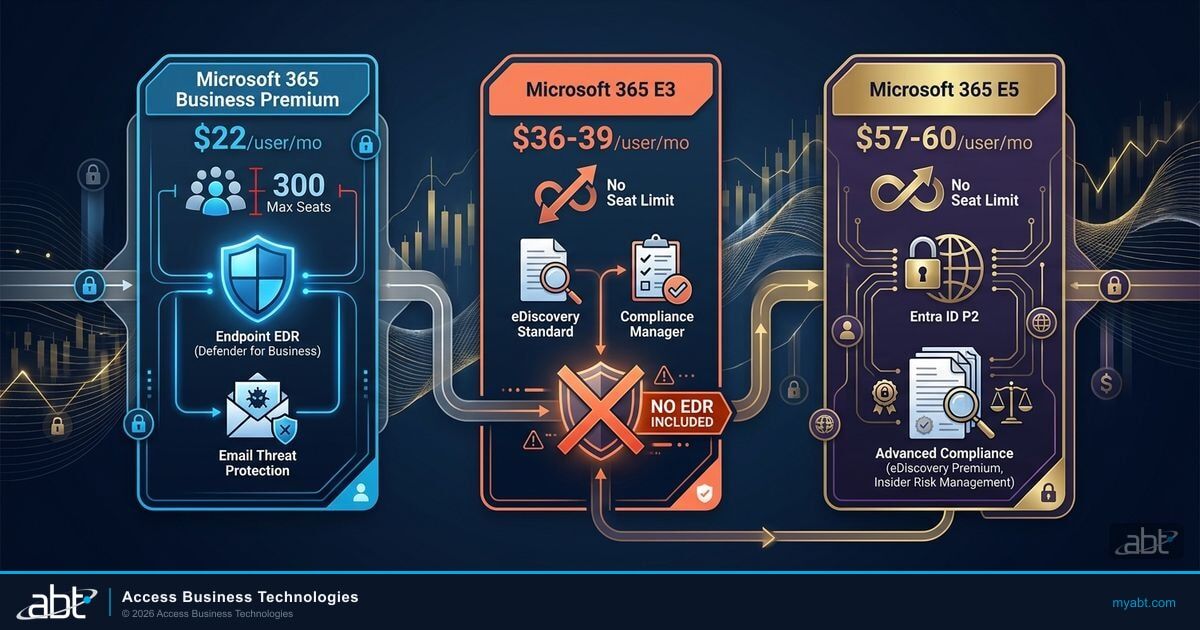
Microsoft 365 license tiers control three things that matter for regulated financial institutions: security tooling included by default, compliance capabilities available without add-ons, and the number of users you can license under that product family. The Microsoft 365 Business plans (Basic, Standard, and Premium) are capped at 300 seats total across all Business-family licenses in a single tenant. The Enterprise plans (E1, E3, E5) carry no seat cap.
Both Business Premium and M365 E3 include Microsoft Entra ID P1, giving you Conditional Access policies, MFA enforcement, and risk-based sign-in detection. Both include Microsoft Intune for device management and mobile application management. The meaningful security differences start with endpoint detection and response, email threat protection, and compliance tooling.
| Feature | Business Premium | Microsoft 365 E3 | Microsoft 365 E5 |
|---|---|---|---|
| Annual list price | $22/user/mo | $39/user/mo (since July 1, 2026) | $60/user/mo (since July 1, 2026) |
| Seat cap | 300 max | No limit | No limit |
| Microsoft Entra ID P1 | Included | Included | Included (P2) |
| Microsoft Entra ID P2 (PIM, Identity Governance) | Not included | Not included | Included |
| Microsoft Intune | Full capabilities | Full capabilities | Full capabilities |
| Defender for Business (endpoint EDR, up to 300 users) | Included | Not included | Not included (Defender P2 instead) |
| Defender for Office 365 Plan 1 (email threat protection) | Included | Included (rolling out from July 2026) | Included (Plan 2) |
| eDiscovery Standard (legal holds, case management) | Not included | Included | Included (Premium) |
| Compliance Manager, Audit Standard | Not included | Included | Included (Audit Premium) |
| Communication Compliance, Insider Risk Management | Not included | Not included | Included |
| Microsoft Copilot Business eligible | Yes ($32/user bundled with BP) | No (requires Business SKU) | No (requires Business SKU) |
| Windows 11 licensing | Pro Upgrade rights included | Enterprise E3 included | Enterprise E5 included |
| Windows Enterprise-only features (Credential Guard and other Enterprise-only features) | Not included (Pro tier) | Included | Included |
July 1, 2026: Prices Changed
Microsoft's pricing update took effect July 1, 2026. Microsoft 365 Business Premium stays at $22/user/month. Microsoft 365 E3 rose from $36 to $39/user/month. Microsoft 365 E5 rose from $57 to $60/user/month. The gap between E3 and Business Premium is now $17 per user per month, a 77 percent premium. Existing subscriptions move to the new prices at their next renewal after July 1, 2026.
Business Premium: Better Security at Lower Cost for FIs Under 300 Seats
For financial institutions with fewer than 300 users, Microsoft 365 Business Premium delivers more endpoint and email security than M365 E3 at significantly lower cost. Business Premium costs $22/user/month on an annual commitment. M365 E3 costs $39/user/month since July 1, 2026. At 100 users, that difference is $1,700 per month, or $20,400 per year.
The security advantage is not incremental. Business Premium includes Microsoft Defender for Business, an endpoint detection and response solution built specifically for organizations with up to 300 users. Defender for Business continuously monitors devices for suspicious activity, automatically isolates compromised machines, blocks macro-based malware and credential theft attempts, and reduces attack surface across managed endpoints. M365 E3 does not include Defender for Business. It includes Microsoft Defender for Endpoint Plan 1, which covers next-generation antimalware and attack surface reduction but leaves out endpoint detection and response, a Plan 2 capability. To get EDR with an E3 subscription, you would add Defender for Endpoint Plan 2 as a separate add-on, adding per-user cost on top of the already higher E3 price.
For every Business Premium tenant, ABT recommends the Microsoft Defender Suite for Microsoft 365 Business Premium as the minimum add-on: $10 per user per month paid yearly, for up to 300 seats, adding Microsoft Entra ID P2, Defender for Endpoint Plan 2, Defender for Office 365 Plan 2, Defender for Identity, and Defender for Cloud Apps. That is the identity and endpoint coverage most institutions would otherwise step up to E5 for, and it is what lets risk-based Conditional Access policies enforce, because Microsoft Entra ID Protection requires Entra ID P2. License it for every seat: Microsoft does not support mixed Defender licensing in one tenant, so a partial purchase leaves every device on the Defender for Business experience.
Business Premium also includes Microsoft Defender for Office 365 Plan 1, which protects against phishing campaigns, ransomware delivered via email attachments, and business email compromise through Safe Links and Safe Attachments. Microsoft's December 2025 packaging update adds Defender for Office 365 Plan 1 to Microsoft 365 E3 and Office 365 E3 as part of the same change that raised the E3 price on July 1, 2026, so email threat protection stops being a gap between the two plans once the capability lands in your tenant; check your tenant's service plans before you count on it.
Microsoft 365 E3 at $39/user/month
- Entra ID P1 (Conditional Access) included
- Intune included
- No endpoint detection and response
- Defender for Office 365 Plan 1 rolling out from July 2026
- Requires separate add-on for EDR
- eDiscovery Standard included
- Compliance Manager included
Business Premium at $22/user/month
- Entra ID P1 (Conditional Access) included
- Full Intune included
- Defender for Business (endpoint EDR) included
- Defender for Office 365 Plan 1 included
- No add-ons needed for baseline endpoint protection
- eDiscovery Standard not included (add Purview Suite)
- Compliance Manager not included natively
The 300-Seat Rule
The Business Premium 300-seat limit is not per plan, per entity, or per location. It is total Business-family seats across your entire Microsoft tenant. A credit union with 280 employees and 30 contractors sharing the same tenant has 310 Business-family seats, which exceeds the limit. Before choosing Business Premium, confirm your realistic total user count including part-time staff, shared accounts, and contractor access. If you are at or near 300 today, plan for E3 from the start.
For credit unions, community banks, and mortgage companies that are well under the 300-seat ceiling and do not have active legal hold or eDiscovery requirements, Business Premium delivers better endpoint and email security at a substantially lower cost. The GLBA Safeguards Rule technical requirements, NCUA cybersecurity examination criteria, and FFIEC security guidelines are all addressable with Business Premium's included tooling, particularly when combined with ABT's Guardian configuration baseline. If your examiner expects Conditional Access policies, MFA enforcement, device management, and endpoint monitoring, Business Premium covers each of those requirements.
Not Sure Which License Tier Is Right for You?
ABT's M365 licensing specialists have helped 750+ financial institutions identify overspend and compliance gaps across every license tier.
Migrating From Office 365 E3 to Business Premium
One of the most common license migrations ABT runs for financial institutions is moving from Office 365 E3 to Microsoft 365 Business Premium. The two SKUs have similar list pricing ($26 versus $22 per user per month since July 1, 2026) but very different scope, and most FIs on Office 365 E3 are paying for things they would not knowingly choose if they understood the comparison.
Office 365 E3 Is Not the Same as Microsoft 365 E3
Office 365 E3 at $26 per user per month does NOT include Windows licensing. Microsoft 365 E3 at $39 per user per month includes Windows 11 Enterprise. Microsoft 365 Business Premium at $22 per user per month includes Windows 11 Pro Upgrade rights. Many financial institutions on Office 365 E3 are paying for Windows licenses separately from Office 365 E3, often without realizing they could fold Windows licensing into a Microsoft 365 plan and reduce overall cost. If you are on Office 365 E3 today, the migration to Business Premium is usually a cost reduction, not an upgrade expense.
What Office 365 E3 customers gain by migrating to Business Premium for a lower headline price: Windows 11 Pro Upgrade rights (so your Windows licensing folds into one bill instead of two), Microsoft Defender for Business (endpoint EDR not included in Office 365 E3 at any tier), Microsoft Intune Plan 1 (mobile device management and mobile application management), Defender for Office 365 Plan 1 (advanced phishing and email threat protection, which the July 2026 packaging update also brings to Office 365 E3), and Copilot Business compatibility (Copilot Business requires a Business-family license and is not available on Office 365 plans).
What Office 365 E3 customers give up: Office 365 E3 carries no seat cap, while Business Premium is limited to 300 seats total across all Business-family licenses in the tenant. For institutions over 300 seats currently on Office 365 E3, the migration target is Microsoft 365 E3 (which adds Windows Enterprise plus EMS to Office 365 E3 for a $13 per-user-per-month difference) rather than Business Premium.
When Microsoft 365 E3 Actually Makes Sense
The two cases where Microsoft 365 E3 is the right answer over Business Premium for a sub-300-seat institution are eDiscovery case management for specific users and seat count above 300. Beyond those, the lift to E3 is rarely justified for FIs in the Business Premium-eligible size range.
The eDiscovery case management case is narrow but real. If your institution runs active legal holds, regulatory investigations, or internal compliance reviews, the people who manage and search those cases need Microsoft 365 E3 or higher at the user level. Per Microsoft Learn's Purview eDiscovery licensing guidance, the user-level requirement applies to anyone who creates cases, places holds, runs searches, or exports content, regardless of department. Custodians (the employees whose data is being preserved) do not need an E3 license. Their data is preservable on Business Premium. The practical pattern: three to five E3 seats for the case management team plus Business Premium across the rest of the institution, rather than upgrading the whole tenant to E3.
The seat count case is the cleanest. If your organization has more than 300 users, Business Premium cannot cover everyone. Microsoft enforces the 300-seat ceiling across the Business family, the seats above it go to E3 or E5, and for most institutions that size the whole-tenant comparison becomes E3 versus E5.
For seat counts below 300 with no active eDiscovery program, Microsoft 365 E3 is rarely the right answer. The compliance and identity capabilities most FIs cite as the reason for considering E3 (Conditional Access, MFA enforcement, audit logs, eDiscovery for the legal team, records retention) are addressable with Business Premium plus targeted add-ons at lower total cost. The ABT recipe section below covers how that combination typically lands.

The Business Premium Purview Suite add-on exists for institutions that want eDiscovery and compliance tooling without leaving the Business Premium baseline. It adds many E5 Compliance capabilities, including advanced eDiscovery, insider risk management, advanced DLP, Records Management, and enhanced audit logging. For sub-300-seat institutions, Business Premium plus Purview Suite typically costs less than E3 plus equivalent compliance add-ons, and substantially less than E5.
Microsoft 365 E3 also includes Windows 11 Enterprise licensing, which adds Credential Guard and other Enterprise-only Windows security features on top of Windows 11 Pro. For most community banks, credit unions, and mortgage companies, Windows 11 Pro (which Business Premium includes via the Pro Upgrade entitlement) is the right tier and Enterprise features are not required. The exception is institutions with examiner findings or risk program requirements that specifically call for Windows Enterprise capabilities, in which case the E3 step-up is the right move for those devices.
For a deeper look at GLBA and OCC compliance configuration for M365, see our article on Microsoft 365 compliance for GLBA and OCC requirements, which covers the specific configurations that examiners look for regardless of which license tier you choose.
Microsoft 365 E5: When Entra P2 and Advanced Compliance Are Required
Microsoft 365 E5 at $60/user/month since July 1, 2026 is the right choice for a specific set of financial institutions. The two capabilities that most often drive an E5 decision are Microsoft Entra ID P2 and Microsoft Purview Advanced Compliance. Neither is available in Business Premium or E3 without separate add-on purchases.
Microsoft Entra ID P2 adds Privileged Identity Management, Identity Protection, and Entitlement Management to the Entra P1 capabilities included in lower tiers. PIM is the capability that allows just-in-time elevation of administrative privileges, requiring explicit approval before any admin action can be taken and automatically expiring that elevation after a defined time window. GLBA Safeguards Rule guidance on access controls, FFIEC information security examination booklet criteria, and OCC examination expectations for privileged access management all point toward PIM-style controls for institutions with significant administrative accounts. E5 is the only tier that includes PIM without a separate Entra P2 add-on purchase.
A community bank with 450 users and four IT administrators maintains standing global administrator privileges in their Microsoft 365 tenant. During an OCC IT examination, an examiner asks for documentation showing that privileged access is time-limited, logged, and approved before use. The bank cannot demonstrate this because permanent admin privileges leave no approval trail.
The examiner cites the bank for insufficient access control documentation, resulting in a matter requiring attention finding that must be addressed before the next examination cycle. Remediating this without PIM requires manual controls and audit logging that are operationally burdensome. With Microsoft 365 E5 and Entra ID P2, PIM handles approval routing, time-bounding, and audit trail generation automatically.
Purview Advanced Compliance in E5 adds eDiscovery Premium, Insider Risk Management, Communication Compliance, and Audit Premium. For institutions subject to SEC recordkeeping requirements on electronic communications, or that carry meaningful insider threat risk due to their access to non-public financial information, these capabilities address requirements that E3 Compliance Manager and Audit Standard cannot fully satisfy. Communication Compliance alone, which monitors Teams, Exchange, and other channels for potential policy violations, is a frequently cited gap during FINRA and SEC examinations for broker-dealers.
Most community banks and credit unions under 500 users do not need E5. The question is whether your compliance program, your examiner's documented expectations, or your legal and HR team's requirements push you into the capabilities that only E5 delivers. If the answer to any of those is yes, E5 is the right tier. If the answer is no, you are paying $21 to $38 more per user per month for capabilities that are not deployed in your environment. For related context on our approach to NIST CSF 2.0 and security assessments, see our NIST CSF 2.0 assessment for financial institutions.
The Copilot Business Advantage: An Exclusive Benefit of Business Plans
One frequently overlooked differentiator for Business Premium is Copilot Business eligibility. Microsoft 365 Copilot Business, the AI productivity assistant for organizations up to 300 users, requires a Business-family license as a prerequisite. It cannot be added to E3 or E5. Organizations on E3 or E5 that want Copilot must purchase Microsoft 365 Copilot at $30/user/month, which adds AI capabilities to enterprise plans.
Copilot Business is priced at $21/user/month at list, or $18/user/month at the 15% promotional rate Microsoft is running through December 31, 2026. The SMB-first lineup applies to community banks, credit unions, and mortgage companies under 300 users, and it also includes a Business Basic plus Copilot Business bundle at $21/user/month (25% off through December 31, 2026) and a Business Standard with Copilot SKU at $23.50/user/month. When bundled with Business Premium, the combined price is $32/user/month, a permanent SKU Microsoft introduced on July 1, 2026, versus $43/user/month if the two line items were purchased separately at list. An E3 subscriber adding Copilot at the enterprise tier pays $39 plus $30, totaling $69/user/month. Even bought separately at list without the bundle SKU, Business Premium with Copilot Business is 38 percent less expensive than E3 with Copilot.
Microsoft's commercial AI deployment data shows that financial institutions deploying Copilot Business through a Business Premium base license reach consistent daily AI usage faster than comparable deployments on Enterprise licensing. The Business Premium deployment path requires fewer configuration steps and carries lower data governance risk because Copilot Business works within the existing SharePoint and Exchange permission model. For FIs that have already configured Conditional Access and Entra ID P1 through Business Premium, the AI deployment readiness baseline is effectively already met. The $32/user bundle pricing for Business Premium plus Copilot Business represents the most cost-effective entry point for regulated FI Copilot adoption that Microsoft currently offers.
If your institution is considering Copilot deployment in the next 12 months and you have fewer than 300 users, the license tier decision becomes even more consequential. Business Premium with Copilot, the permanent SKU Microsoft introduced on July 1, 2026 for institutions under 300 users, runs $32/user/month, roughly ten dollars over Business Premium alone at $22/user. That is a $37/user monthly difference compared to the E3 plus Copilot enterprise combination at $69. At 100 users, that difference is $3,700 per month, or $44,400 per year. Because the bundle is a permanent SKU rather than a promotion, the math no longer hinges on a deadline. For more context on Copilot readiness and deployment governance for FIs, see our analysis of Microsoft Copilot deployment for financial operations.

There is one meaningful limitation to Copilot Business at the product level: it is designed for organizations up to 300 users and does not include all enterprise AI governance controls that Microsoft 365 Copilot on E3/E5 provides. For FIs with specific AI governance requirements, advanced data residency controls, or audit log requirements for AI prompts, the enterprise-tier Copilot may be necessary even at higher cost. That evaluation should be part of any BSA/AML and M365 configuration review if Copilot will be used by staff with access to transaction monitoring or customer due diligence workflows.
Deploying Copilot at Your FI? See Where You Stand First.
Business Premium opens the most cost-effective Copilot path for financial institutions under 300 seats. ABT's AI Readiness Scan evaluates your license tier, configuration, and data governance posture before you deploy.
The ABT Recipe Approach: Business Premium Plus Tailored Add-Ons
The license decision is not one size fits all, but it follows a consistent pattern across the 750+ financial institutions ABT manages. Most sub-300-seat FIs end up at the same destination: Business Premium as the foundation, plus a tailored set of compliance and identity add-ons matched to their specific examiner posture, AI roadmap, and risk profile. The combinations vary because the inputs vary. What stays consistent is the cost outcome.
The Recipe Outcome (Not the Recipe Itself)
Business Premium plus the right targeted add-ons typically lands sub-300-seat FIs at 30 to 40 percent lower total licensing cost than full Microsoft 365 E5 plus Copilot Premium for equivalent functional outcomes: PIM, risk-based Conditional Access, advanced DLP, eDiscovery for the compliance team, advanced audit, Records Management, and AI through Copilot Business. The specific combination of add-ons depends on what your examiner is asking for, what your AI deployment plan looks like, and which compliance gaps you actually have. There is no single recipe that works for every institution. There is a consistent approach.
The four questions that determine the right combination for your institution:
What is your realistic total user count including contractors and shared accounts? Over 300: Business Premium cannot cover everyone, and the comparison becomes E3 versus E5 for the seats above the cap. Under 300: continue to step 2.
Do you have an active eDiscovery program with case managers (counsel, compliance, HR investigator, audit lead, IT admin)? Yes: those three to five users need M365 E3 at the user level. The rest of the institution stays on Business Premium. No: continue to step 3.
Does any documented examiner finding specifically require Windows 11 Enterprise features (Credential Guard and other Enterprise-only features) or capabilities only available in E5 (Audit log retention beyond 180 days, eDiscovery Premium, advanced Insider Risk)? Yes: those requirements drive the upgrade for the affected users or devices only. No: continue to step 4.
For the Business Premium baseline, identify which add-ons your specific compliance and AI roadmap requires: the Microsoft Defender Suite for Microsoft 365 Business Premium (Entra ID P2 for PIM and risk-based Conditional Access, plus Defender for Endpoint Plan 2, Defender for Office 365 Plan 2, Defender for Identity, and Defender for Cloud Apps, at $10 per user per month paid yearly for up to 300 seats), the Purview Suite for Business Premium for advanced DLP and Records Management, Copilot Business for AI productivity, and other targeted add-ons. ABT's M365 engineering team builds this in a 30-minute scoping call.
The recipe approach matters because the cost difference is real. A 200-seat institution on full E5 plus Copilot Premium at list pricing is paying roughly 30 to 40 percent more per year than the same institution on Business Premium plus a targeted recipe that delivers the same functional security and compliance outcomes. For a 200-seat FI, that difference compounds into significant annual savings, with the saved budget often redirected toward the strategic projects (NIST CSF 2.0 alignment, FFIEC IT exam readiness, Copilot deployment governance) that the licensing decision was supposed to enable in the first place.
If you have fewer than 300 seats, no active eDiscovery program requiring case management licensing, and no examiner finding specifically requiring Windows 11 Enterprise features, Microsoft 365 Business Premium plus a tailored set of add-ons is almost certainly the right answer. The specific recipe depends on your institution. The consistent outcome is 30 to 40 percent lower cost than full E5 plus Copilot Premium for equivalent functional capabilities. ABT scopes the right combination in a 30-minute call.
Find Out What Your License Is Actually Buying You
ABT's security grade assessment delivers:
- Your M365 license tier mapped against your actual compliance requirements
- 160+ security controls checked against your tenant configuration
- License overspend or gap identification across Business Premium, E3, and E5
- Specific next steps: stay on current tier, add a Purview Suite, or migrate
Frequently Asked Questions
Microsoft 365 Business Premium costs $22 per user per month (annual) and includes Defender for Business endpoint detection and response, Defender for Office 365 Plan 1 for email protection, and Windows 11 Pro Upgrade rights. Microsoft 365 E3 costs $39 per user per month since July 1, 2026 and includes eDiscovery Standard, Compliance Manager, Audit Standard, and Windows 11 Enterprise, but does not include Defender for Business, and only gained Defender for Office 365 Plan 1 with the July 2026 packaging update. Business Premium is capped at 300 users. E3 has no seat limit. For sub-300-seat financial institutions, Business Premium is the right baseline for almost all use cases, with E3 reserved for the few users who manage active eDiscovery cases or for institutions with specific Windows 11 Enterprise feature requirements.
No. Per Microsoft Learn's Purview eDiscovery licensing guidance, the user-level E3 requirement applies only to the people who manage, search, hold, or export cases. Custodians (the employees whose data is being preserved) do not need to upgrade. Their mailboxes, OneDrive, Teams chats, and SharePoint content are still preservable, searchable, and exportable by the case management team while they themselves stay on Business Premium. The typical pattern at a sub-300-seat financial institution is three to five E3 seats for the case management team (counsel, compliance officer, HR investigator, audit lead, IT admin) plus Business Premium across the rest of the institution. A 300-seat institution does not need 300 E3 seats just because one employee is on legal hold.
Office 365 E3 at $26 per user per month does NOT include Windows licensing. Microsoft 365 E3 at $39 per user per month includes Windows 11 Enterprise plus Enterprise Mobility + Security on top of Office 365 E3. The two SKUs are commonly confused because of the similar names and the Office 365 E3 price being close to Business Premium ($22). For financial institutions currently on Office 365 E3, the migration to Business Premium is one of the most common license consolidations ABT runs because Business Premium adds Windows 11 Pro Upgrade rights, Defender for Business, Intune, and Defender for Office 365 Plan 1 at a lower headline price ($22 versus $26), while reducing the need to purchase Windows separately.
Yes. Microsoft 365 Business Premium includes the core security components that map to GLBA Safeguards Rule technical requirements: Microsoft Entra ID P1 for Conditional Access and MFA enforcement, Microsoft Intune for device management, Defender for Business for endpoint monitoring and response, and data loss prevention for sensitive information types. When configured by a knowledgeable Microsoft partner against a GLBA baseline, Business Premium covers the access control, device security, and monitoring requirements that examiners assess. What Business Premium does not include natively is eDiscovery for legal holds and Compliance Manager for audit documentation, which requires the Purview Suite add-on or an upgrade to E3.
Microsoft 365 Business Premium is priced as an SMB product with a 300-seat ceiling, while E3 is priced as an enterprise product with no seat cap. Business Premium includes Defender for Business, which is Microsoft's endpoint detection and response product built specifically for organizations under 300 users. E3 does not include Defender for Business because the enterprise equivalent, Defender for Endpoint, is positioned as a separate add-on for enterprise plans. Microsoft chose to bundle Defender for Business with the SMB tier to drive adoption, which creates the counterintuitive situation where the cheaper plan includes more built-in endpoint security. If you are under the 300-seat ceiling and your compliance program does not require E3's eDiscovery tools, Business Premium delivers a better security-per-dollar ratio than E3.
The 300-seat limit applies to your entire Microsoft 365 tenant across all Business-family plans combined. That includes Microsoft 365 Business Basic, Business Standard, and Business Premium. If your tenant has 200 Business Premium users and 120 Business Basic users, your total Business-family seat count is 320, which exceeds the limit. Organizations near or above 300 total users need to plan for M365 E3 or a mixed licensing strategy reviewed with their Microsoft partner. The limit is enforced at the tenant level by Microsoft and cannot be extended for Business-family plans.
Microsoft 365 E5 at $60 per user per month since July 1, 2026 makes sense for financial institutions that require Microsoft Entra ID P2 for Privileged Identity Management or Identity Governance, advanced threat hunting and investigation through Defender for Office 365 Plan 2 or Defender for Endpoint Plan 2, or Purview Advanced Compliance capabilities including eDiscovery Premium, Insider Risk Management, Communication Compliance, or Audit Premium. Institutions subject to SEC or FINRA communication recordkeeping requirements, those with documented examiner findings around privileged access controls, or those building a mature zero-trust architecture with time-limited administrative privileges are the most common E5 candidates. Most community banks and credit unions under 500 users do not need E5 today, but some will reach that threshold as compliance program expectations increase.
Yes. Microsoft 365 E3 includes eDiscovery Standard, which provides case management, legal hold, custodian management, and export capabilities for Exchange mailboxes, SharePoint, OneDrive, and Teams content. This allows your IT or legal team to place litigation holds, preserve content from deletion or modification, search across communication sources, and produce content in response to regulatory requests or subpoenas. E3 also includes Compliance Manager and Audit Standard for policy tracking and activity logging. For institutions needing eDiscovery Premium, which adds review sets, predictive coding, and advanced hold management, that requires Microsoft 365 E5 or an E5 Compliance add-on.
No. Microsoft 365 Copilot Business requires a Business-family license (Business Basic, Business Standard, or Business Premium) as a prerequisite. Organizations on M365 E3 or E5 must purchase Microsoft 365 Copilot, the enterprise-tier AI add-on, at $30 per user per month. At $39 per user for E3 plus $30 per user for Copilot, the combined cost is $69 per user per month. An organization on Business Premium at $22 per user moving to the Business Premium with Copilot bundle, a permanent SKU priced at $32 per user per month, adds roughly ten dollars per user and comes in $37 per user per month below the enterprise combination. For financial institutions under 300 seats considering Copilot deployment, this cost difference makes Business Premium the significantly more economical choice, provided eDiscovery and other E3-specific compliance tools are not required.