

In This Article
- What entitlement management is
- Who is licensed for it
- Build an access package around a job
- Separation of duties with incompatible access packages
- Expiration, approvals, and reviews inside the policy
- Auditors and vendors: guest access that ends on its own
- How it maps to FFIEC and the FTC Safeguards Rule
- An entitlement management rollout in five stages
- Entra licensing and the free Security Assessment through ABT
- Frequently Asked Questions
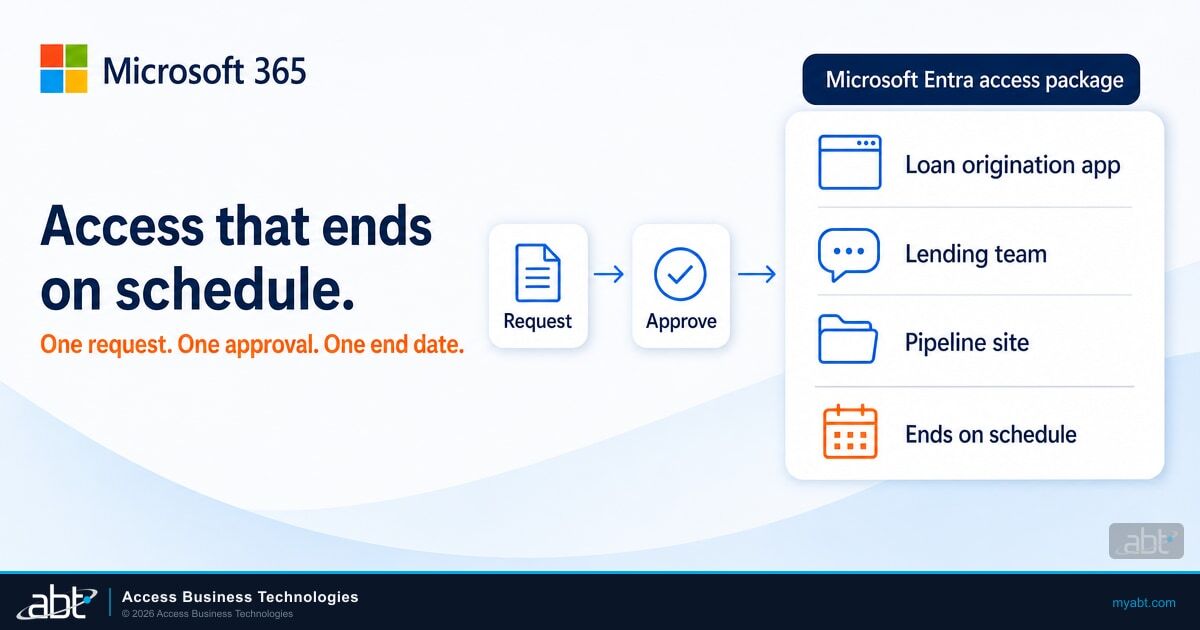
Microsoft Entra entitlement management lets a new loan officer, a temporary auditor, or a branch manager covering for a colleague request everything a job needs in one step. The request covers the loan origination app, the team site, the Teams channel, and the security groups. A manager approves once, the access lands, and it comes off on the date the policy sets. Microsoft's entitlement management overview describes the job as "automating access request workflows, access assignments, reviews, and expiration."
For a credit union, bank, or mortgage company, that last word matters most. Access that expires on schedule is access nobody has to remember to remove.
A processor covers the funding desk for six weeks while a colleague is on leave. IT adds her to the funding group and the wire approval app by hand. The colleague returns, and the processor goes back to processing.
Eight months later, an access review finds a processor who can still approve wires. The grant was right on the day it was made. The removal was a task nobody owned, and the review records a separation of duties gap that sat open for months.
ABT, a Tier-1 Microsoft Cloud Solution Provider with 25+ years in regulated IT and 750+ financial institutions served, sells Microsoft 365 licenses at the same price as Microsoft and hardens the tenant through M365 Guardian. This guide is for IT and compliance teams at credit unions, banks, and mortgage companies. It covers what entitlement management is, which Entra license turns it on, and how incompatible access packages enforce separation of duties. Later sections show how guest access ends on its own and how the records line up with what examiners and the Federal Trade Commission (FTC) Safeguards Rule ask for.
What entitlement management is
Entitlement management is part of Microsoft Entra ID Governance. It replaces one-off group adds with four building blocks.
Access package
Microsoft defines it as "a bundle of all the resources with the access an identity needs to work on a project or perform their task."
Resources and roles
Security groups, Microsoft 365 Groups and Teams, applications, and SharePoint Online sites, each with a role such as member or owner.
Policy
Who can request the package, who approves, how long the access lasts, and whether it gets reviewed.
Catalog
A container of resources and packages. Microsoft says "Catalogs are used for delegation, so that nonadministrators can create their own access packages."
Delegation is the part that changes the workload. Microsoft's delegation guidance hands access decisions to business owners "because they're the ones who know which users need access." A lending manager can own the lending catalog, and a nonadministrator can only add the resources they already own. IT sets up the catalog once, and the people who know the job keep it current.
Entitlement management sits beside two tools you may already use. Entra ID access reviews check whether existing access still fits, and Lifecycle Workflows, covered in our Microsoft 365 employee offboarding guide, run the joiner and leaver tasks. Entitlement management governs the grant itself.
Who is licensed for it
Microsoft's overview states the license plainly: entitlement management "requires Microsoft Entra ID Governance or Microsoft Entra Suite subscriptions, for your organization's users." The same page adds: "Some capabilities, within this feature, may operate with a Microsoft Entra ID P2 subscription." The identity governance licensing page shows which ones.
| License | Entitlement management | Where it comes from |
|---|---|---|
| Microsoft Entra ID P1 | No entitlement management features in Microsoft's licensing table | Microsoft 365 E3 and Microsoft 365 Business Premium |
| Microsoft Entra ID P2 | The core: user requests, administrator assignment, approvals, expiration, guest lifecycle, and separation of duties | Microsoft 365 E5 or E7, standalone, or Microsoft Defender Suite for Business Premium |
| Microsoft Entra ID Governance or Microsoft Entra Suite | The core plus automatic assignment policies, custom extensions, sponsors from the user's profile as approvers, and governed guests | An add-on that needs Entra ID P1 or P2 already in the tenant, or Microsoft 365 E7 |
Two lines on that page shape the decision. Microsoft says "no new Identity Governance & Administration (IGA) features or capabilities will be added to the Microsoft Entra ID P2 SKU," so new governance features arrive in Entra ID Governance. And the Governance add-on runs on top of a product that already carries the Entra ID P1 or P2 service plan, and Microsoft offers a Step Up option for tenants that already have P2.
Business Premium: start with Defender Suite
Microsoft 365 Business Premium includes Microsoft Entra ID P1, which carries none of the entitlement management rows. Microsoft's Defender Suite for Business Premium page says the add-on brings "Microsoft Entra ID P2, which adds advanced security and governance features with Microsoft Entra ID Protection and Microsoft Entra ID Governance." That one license carries the core entitlement management features and the risk-based Conditional Access that, in the words of ABT's M365 Guardian page, "examiners increasingly expect." For a Business Premium institution, start with Defender Suite, and add Entra ID Governance when you want automatic assignment policies or custom extensions.
Microsoft's pages read differently in one place: the newer access review page for packages names Entra ID Governance or Entra Suite, while the licensing table lists earlier P2 review capabilities under P2. Confirm what your tenant shows before you plan reviews around P2 alone. For the broader plan decision, see our Microsoft 365 E3 vs E5 vs Business Premium comparison for financial institutions.
Build an access package around a job
Start from a role your institution hires for repeatedly, such as loan officer, member service representative, or teller. List what that person needs on day one, and put it in one package in the lending or operations catalog. The request path then looks the same every time.
The employee requests the package from the My Access portal, with a business justification if the policy asks for one. On Entra ID Governance, a manager can also request it on the employee's behalf.
One to three approval stages, such as the manager and then the application owner. Nobody approves their own request.
Every group, Team, app role, and site in the package is granted together, and the assignment is logged.
The assignment ends on its date, and the access comes off as a set. Where the policy runs recurring reviews, reviewers decide whether it continues.
Build packages by job, and keep each one small enough that an approver can judge it. A package called "Loan officer, standard" with the origination app, the lending Team, and the pipeline site is easy to approve. A package called "Lending" with every lending resource is hard to approve and harder to review.
Tenants on Entra ID Governance can go one step further with automatic assignment policies. A rule on a user attribute, such as department equals Lending, adds the package when someone joins the department and removes it when they leave. Only administrators can create these policies.

Separation of duties with incompatible access packages
Examiners look for segregation of duties wherever one person could start and finish a sensitive transaction. The Federal Financial Institutions Examination Council (FFIEC) states the expectation in its IT Examination Handbook.
Management should incorporate independent reviews or approvals for individuals who perform multiple functions to minimize the potential for fraud, irregularities, and errors.
Entitlement management turns that expectation into a rule the tenant enforces. Mark two access packages, or a package and a group, as incompatible. Microsoft says a user who already holds one "can't request another access package," "nor can an administrator make a new assignment that would be incompatible." The block covers new access package assignments an administrator makes as well as self-service requests, including one made in a hurry by the help desk.
- Wire initiation and wire approval. The person who keys a wire stays out of the package that releases it.
- Loan processing and loan funding. A processor covering the funding desk gets a time-limited package and gives up the conflicting one for the duration.
- Vendor setup and payment approval. The accounts payable clerk who creates a vendor can't approve the first payment to it.
Two details decide whether the control holds. Each incompatible relationship is "unidirectional," so set it on both packages. And the setting stops new grants: people who already hold both are listed for download, and someone on your team removes the extra access by hand. Download that list the day you turn the rule on, and keep it with the cleanup record.
Incompatible access packages turn a segregation of duties policy into a rule the tenant enforces. Set them in both directions, clean up the existing overlaps first, and the tenant blocks new conflicting requests and assignments for you.
Expiration, approvals, and reviews inside the policy
The policy on each access package carries the lifecycle. Three settings do most of the work.
Expiration. Assignments can end on a date, after a number of days from 0 to 3660, after a number of hours, or never. If the policy lets users extend access, Microsoft emails the user "14 days before, and then one day before, their access package assignment is set to expire," and extensions can require approval. When an assignment ends, entitlement management removes "all access associated with that access package." Pick a default by package: a year for standard job packages, the length of the engagement for contractors, and hours or days for coverage packages.
Approvals. Microsoft describes up to three approval stages. Approvers "aren't able to approve their own access package requests," a request nobody approves within the timeout is "automatically denied," and both the requestor and the approver can be required to give a justification. Requests can be forwarded to alternate approvers once a day has passed, and alternate approval needs a request timeout of at least four days, which keeps a request moving when the manager is out.
Reviews. A policy can run recurring reviews of its assignments annually, bi-annually, quarterly, or monthly. You choose what happens when a reviewer doesn't respond: no change, remove access, or take Microsoft's recommendations, and a helper can flag users who haven't signed in for 30 days. Set "remove access" for packages that reach customer information, so a skipped review ends the access.
Keep the evidence past 30 days
Microsoft's logging guidance says entitlement management keeps audit events for up to "30 days in the audit log." Route them to Azure Monitor for longer retention, and use the built-in reports, such as access packages for a user, when an examiner asks what one person can reach and how they got it.
Auditors and vendors: guest access that ends on its own
External auditors, loan origination vendors, and consultants often need a Team or a site for a few weeks. Guest accounts created for those jobs tend to outlive them. Entitlement management closes that loop for guests it invites.
When an approved guest isn't in your directory yet, Microsoft says "entitlement management will first invite the user." When that guest's last assignment ends, the default settings block the account: "they're blocked from signing in to your directory. After 30 days, their guest user account is removed." Set the audit package to expire when fieldwork ends, and the auditor's access ends with it.
- Set a sponsor or approver inside the institution for every external package, so a named employee owns each guest.
- Plan the guest billing. Governing guests under Entra ID Governance uses Monthly Active User licensing that "requires an Azure subscription."
- Keep the guest packages small. An auditor package with the audit Team and one evidence site is easy to approve and easy to read later.
For the tenant-wide settings that sit behind these packages, see our guide to Microsoft 365 guest access for financial institutions.

How it maps to FFIEC and the FTC Safeguards Rule
The FFIEC Information Security booklet describes the user access program examiners expect, and the FTC Safeguards Rule sets the access control requirement for mortgage companies and other nonbank lenders. Here is where entitlement management helps, and what your institution keeps.
| Expectation | Where entitlement management helps | What your institution keeps |
|---|---|---|
| FFIEC II.C.7(b): "Principle of least privilege, which recommends minimum user profile privileges for both physical and logical access based on job necessity." | Job-based access packages with an expiration on every assignment | The definition of each job's access and the owner who approves it |
| FFIEC II.C.7(b): "Timely notification from human resources to security administrators to adjust user access based on job changes, including terminations." | Automatic assignment policies on HR attributes, where licensed, add and remove packages as departments change | The HR process that keeps those attributes accurate |
| FFIEC II.C.7(b): "Periodic independent reviews that ensure effective administration of user access, both physical and logical." | Assignment reports and audit events give an independent reviewer the population to test | The independent reviewer. A package owner reviewing their own package doesn't fill this role. |
| FFIEC II.C.7(c): "independent reviews or approvals for individuals who perform multiple functions" | Incompatible access packages, multi-stage approvals, and no self-approval | The list of conflicting duties and the cleanup of existing overlaps |
| FTC 16 CFR 314.4(c)(1), for mortgage companies and other nonbank lenders: "Implementing and periodically reviewing access controls," limiting users to customer information "they need to perform their duties and functions" | Expiration, recurring reviews inside the policy, and the access packages for a user report | The written access policy and the review record |
The split is the same in every row. The tenant enforces the mechanics on every request and every assignment, and your institution makes the judgment calls that examiners ask management to own.
What the tenant enforces
- Who can request each package, and who approves
- The end date on every assignment
- The block on incompatible packages
- Guest sign-in blocks and removal
What your institution decides
- Which duties conflict
- How long each job's access should last
- Who reviews independently, and how often
- How long to keep the evidence
Section II.C.7 leaves the cadence to you, so write it into policy and keep to it. ABT's exam readiness work, quoted as its own engagement, maintains your security policies, assembles your Microsoft 365 audit evidence, and maps your controls to what examiners test. Mortgage companies under the FTC Safeguards Rule should note that 16 CFR 314.4(c) applies at every size. For privileged roles, pair entitlement management with just-in-time admin access through Privileged Identity Management.
An entitlement management rollout in five stages
This order starts with one job and one conflict, and leaves automation for the end.
If you write automatic assignment rules, avoid rules built on group membership: Microsoft's page says that "Starting November 3, 2026, automatic assignment policies whose membership rule uses memberOf are quarantined." Use department, job title, or another HR attribute instead. If your tenant used entitlement management earlier this year, our note on the entitlement management server-side request forgery (SSRF) vulnerability covers the checks that applied then.
Entra licensing and the free Security Assessment through ABT
ABT is a Tier-1 Microsoft Cloud Solution Provider serving 750+ financial institutions. ABT sells the same Microsoft 365 licenses at the same price as Microsoft, quoted on their own line. Run your licensing through ABT and Guardian Foundation, the hardened tenant baseline, is included at no additional charge, and your Guardian rate is lower for every user whose license sits with ABT. Microsoft supports more than one partner relationship on the same tenant, so ABT can hold its own access alongside whoever sells your base licenses.
ABT's M365 Guardian page puts it this way: Business Premium "includes Microsoft Entra ID P1," and "examiners increasingly expect risk-based Conditional Access (Microsoft Entra ID P2)." Guardian's identity and access work covers Conditional Access, multifactor authentication enforcement, sign-in risk policies, and guest access controls through Entra ID, and its 90-day plan starts by hardening identities in the first 30 days. Your institution licenses Entra ID P2 or Entra ID Governance, and ABT manages the tenant under delegated administrative access that you grant. Your Microsoft 365 subscription and tenant stay under your control.
The first step is a clear picture of where your tenant stands today. ABT's free Security Assessment starts there with a read-only review whose identity and access area covers multifactor authentication coverage, Conditional Access policies, legacy authentication exposure, admin account hygiene, and guest access settings. You receive a written report and a review call with an ABT security engineer, and most assessments complete within two weeks. When you want ABT to remediate the findings, that becomes a Guardian engagement starting with a 90-day hardening sprint.
Put an end date on every grant of access
An ABT financial services IT strategist can confirm which Entra license your tenant carries today and what entitlement management needs on top. Run your Microsoft licensing through ABT, and Guardian Foundation, the hardened tenant baseline, is included at no additional charge.
Frequently Asked Questions
Entitlement management is the part of Microsoft Entra ID Governance that bundles groups, Teams, applications, and SharePoint sites into access packages. Users request a package, approvers grant it, and the policy sets how long the access lasts and whether it gets reviewed. Business owners can manage their own catalogs, so access decisions sit with the people who know the job.
For entitlement management, Microsoft names Microsoft Entra ID Governance or Entra Suite, and its licensing table shows the core features, including requests, approvals, expiration, and separation of duties, also working with Entra ID P2. Automatic assignment policies and custom extensions need Entra ID Governance. Entra ID P1, included in Business Premium and Microsoft 365 E3, carries no entitlement management features.
Yes. Business Premium includes Entra ID P1, so start with Microsoft Defender Suite for Business Premium, an add-on that brings Entra ID P2. P2 covers the core entitlement management features, including requests, approvals, expiration, and separation of duties. Entra ID Governance adds automatic assignment policies and custom extensions. ABT can confirm what your tenant carries and license the add-on.
When two access packages are marked incompatible, a user who holds one cannot request the other, and an administrator cannot assign it. Each relationship is one-way, so set it on both packages. People who already hold both keep that access until someone removes it, so download the list Microsoft provides and clean up the overlaps first.
For guests that entitlement management invited, the default settings block sign-in to your directory when their last assignment ends, then remove the guest account after 30 days. Both are entitlement management settings you can change. Set an auditor or vendor package to expire when the engagement ends, and the guest's access ends with it.
Entitlement management supports FFIEC access control expectations. Job-based packages with expiration support least privilege, incompatible packages and multi-stage approvals support segregation of duties under Section II.C.7(c), and assignment reports give an independent reviewer the population to test. Examiners judge the whole user access program, so your institution keeps the policy, the conflict list, and the review record.