In This Article
- What Microsoft 365 employee offboarding really means for a financial institution
- The stakes: keep the work moving, reclaim the empty seat
- The secure offboarding sequence: revoke access first, then everything else
- Retain before you remove: mailbox, retention, and the 30-day window
- Reclaim the license, and the Copilot seat
- Automate it: Lifecycle Workflows versus a manual checklist
- What examiners expect: prompt deprovisioning as a core control
- Frequently Asked Questions
An employee gives notice on a Wednesday, or worse, is walked out on a Friday afternoon, and the same question lands on the IT director's desk every time: what happens to their Microsoft 365 account now? Do it well and the work never stops. A colleague still answers the customer who emails the departed loan officer, the loan file stays open in the right hands, and the seat you were paying for gets recycled by Monday. Microsoft 365 employee offboarding, done right, is one of the quiet wins in a financial institution's IT program.
Do it badly and you get the opposite: an orphaned account that nobody remembered to disable, a mailbox that bounces the customer, a loan file locked behind a login that no longer has an owner, and a paid license, sometimes a paid Microsoft 365 Copilot license, still billing every month for a person who left in the spring. For credit unions, banks, and mortgage companies, that same orphaned account is also the thing an examiner will ask about first.
Employee offboarding at financial institutions carries a weight it does not at a general business, and this guide walks the full sequence a bank, credit union, or mortgage company should run when someone leaves: how to revoke access the moment they walk out, how to keep the correspondence and the records without paying for a license, how to reclaim the seat, and how to automate the whole thing so nothing gets missed. ABT manages Microsoft 365 for more than 750 financial institutions, and offboarding is one of the routines we run inside those tenants so a departure never becomes a gap.
What Microsoft 365 employee offboarding really means for a financial institution
Offboarding is not one action. Deleting the user is the last step, not the first, and treating it as a single click is where most of the damage starts. In Microsoft 365, a departing employee's account is really several things bundled together: an identity in Microsoft Entra ID that grants sign-in and access to apps, a mailbox in Exchange Online full of customer correspondence, files in OneDrive and SharePoint, membership in groups and Teams, and a paid license attached to all of it. Each of those needs its own decision, and the order you make them in matters.
A financial institution has one extra layer that a general business does not. The data that employee touched is regulated: account numbers, Social Security numbers, income documents, member contact lists, closed and denied loan files. That means offboarding is not only an IT hygiene task. It is a control that has to cut off access quickly, preserve records the institution is required to keep, and leave a documented trail an examiner can follow.
Why the order matters for banks, credit unions, and mortgage companies
Two mistakes recur. The first is deleting the account fast to be safe, which erases the mailbox and files a colleague or an examiner still needs. The second is the opposite: leaving the account active for weeks "until we sort out the handoff," which is exactly the orphaned access a departing insider can exploit and a regulator will cite. The right sequence does both jobs at once. It severs access in the first minutes, then retains the data on purpose, then reclaims the license last.
Get that sequence right and offboarding stops being a scramble. It becomes a repeatable checklist that protects the institution, keeps the business running, and costs less than the ad-hoc version that leaves seats and access lying around. The rest of this guide is that checklist.
The stakes: keep the work moving, reclaim the empty seat
Start with the part that pays for itself, because it is the part most offboarding advice skips. When someone leaves, two things are on the line that have nothing to do with a breach: whether the work keeps moving, and whether you keep paying for a seat nobody sits in.
The continuity problem is concrete. A customer replies to the last email a departed loan officer sent them and expects an answer. A processor needs a document that lived in the departed employee's OneDrive. A manager needs to know what was in the pipeline. If offboarding erased the mailbox and the files, that knowledge is gone and the customer waits. If offboarding preserved them and handed them to the right colleague, the customer never feels the gap. Microsoft 365 has purpose-built ways to do exactly that, which we cover in the retention section below.
The cost problem is just as concrete and easier to measure. Microsoft 365 licenses are priced per user per month, and a Microsoft 365 Copilot seat sits on top of that at its own per-user list price. A paid license sits idle on a departed employee until someone reclaims it, and you keep paying for that seat under your subscription whether anyone is using it or not. Multiply one forgotten seat by the turnover a growing institution sees in a year and the waste is real. Reclaiming the seat lets the next hire reuse it instead of buying a net-new license, and it lowers your seat count at renewal where your subscription terms allow, which is why the reclaim step has the clearest return over a year.
That number is a cross-industry average, not a figure specific to financial services or to any one institution, and the point of citing it is not fear. It is proportion. A departing employee who keeps working access after their last day is the low-cost, high-consequence gap in the picture, and the reason to sever access in the first minutes of offboarding, rather than the first week, is that the insider vector is the expensive one to get wrong. If you want the broader program view, our guide on insider risk management for financial institutions covers how Microsoft 365 watches for the departing-employee pattern before the last day even arrives.
The secure offboarding sequence: revoke access first, then everything else
Here is the step almost everyone gets wrong. When an employee leaves, resetting their password is not the cleanest way to cut access. A password reset does force the account to re-authenticate, and it invalidates the refresh tokens, but the account itself stays enabled and a short-lived access token that was already issued can keep working until it expires. If the goal is to cut access the moment they walk out, a password change alone is not the step to rely on.
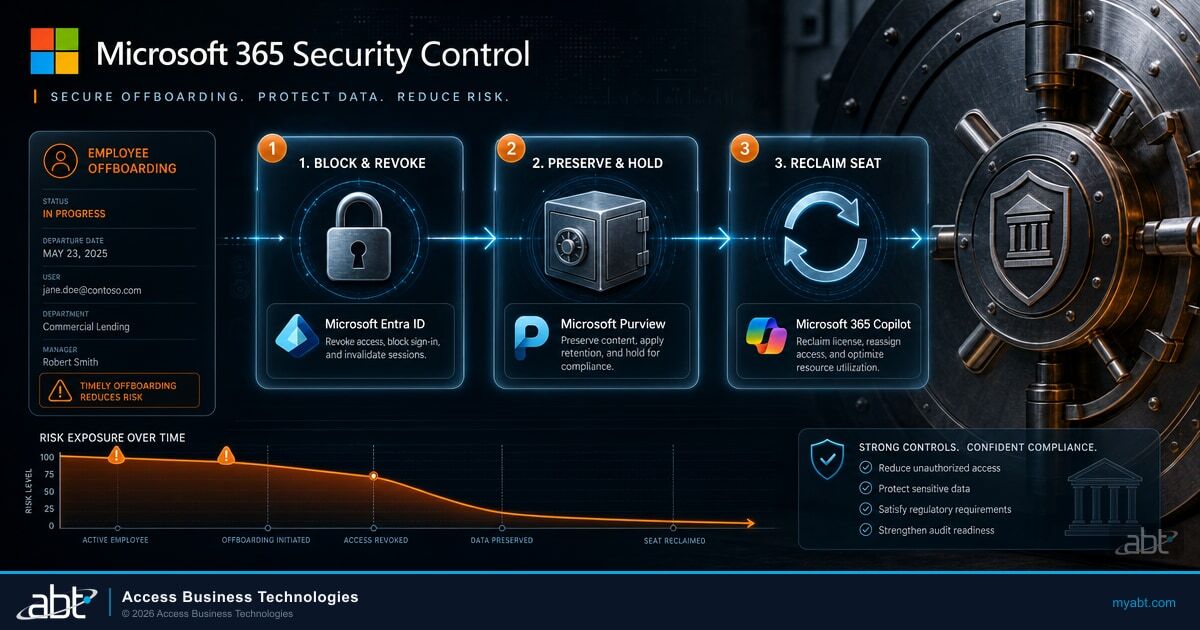
The deliberate action is to block sign-in and revoke the user's active sessions in Microsoft Entra ID. Blocking sign-in stops new authentication, so the account cannot get a new token. Revoking sessions invalidates the refresh tokens that keep the laptop, the phone, and the open browser tab signed in, so none of those devices can renew access. One honest caveat: an access token that was already issued is short-lived but can remain valid until it expires, usually within about an hour, so turn on Continuous Access Evaluation to have Exchange Online, SharePoint, and Teams honor the revocation in near real time. That sequence, which follows Microsoft's guidance for removing a former employee, closes access deliberately rather than by assumption. The rest of the offboarding steps can then proceed at a normal pace, because the risk window is already closing.
Block sign-in and revoke active sessions in Microsoft Entra ID, and turn on Continuous Access Evaluation, rather than relying on a password reset alone.
Apply retention or a legal hold in Microsoft Purview before anything is deleted, then plan the mailbox and file handoff.
Convert the mailbox to shared, transfer OneDrive and SharePoint ownership, and set an auto-reply for external senders.
Remove the paid Microsoft 365 and Copilot licenses once the data is safe, and recycle the seat to a new hire.
Notice what is deliberately last: deleting or unlicensing the account. Everything that protects the institution, cutting access and preserving records, happens before the account is touched in a way that removes data. That ordering is the difference between an offboarding that closes cleanly and one that either leaks access or destroys something a colleague or examiner needed. Multifactor and Conditional Access matter here too, because a strong sign-in policy is only as good as the moment you switch it off cleanly, a theme our guide on the Conditional Access password-spray gap for financial institutions takes up in detail.
Not sure your offboarding actually cuts access on day one?
As a Tier-1 Microsoft Cloud Solution Provider, ABT builds the block-sign-in-and-revoke step into a repeatable routine inside your managed tenant, so a Friday departure never leaves an active session behind.

Retain before you remove: mailbox, retention, and the 30-day window
Once access is cut, the next job is to keep what the institution needs before anything is deleted. This is where a rushed offboarding does lasting harm, because deletion in Microsoft 365 runs on a clock. The timing is worth getting right. Delete the user and the account is recoverable in Microsoft Entra ID for 30 days. Remove only the license and the mailbox contents generally remain for about 30 days before Microsoft clears them, while OneDrive, SharePoint, and anything under a Microsoft Purview retention policy or hold follow their own separate rules. The pattern to remember is that the default windows are short and vary by workload, so thirty-odd days can pass before a customer dispute or an examiner request surfaces in month two and the records are already gone.
So the discipline is simple: preserve on purpose, do not rely on the recovery window. The cleanest way to keep a departed employee's correspondence available is to convert their mailbox to a shared mailbox. Colleagues can then open it, search it, and answer from it, and the customer who replies to that last email still reaches a real person. The part that matters for cost: a shared mailbox does not require a paid license on its own, so the correspondence stays alive without a seat attached to it.
The caveat generic checklists leave out
A shared mailbox is free of a license only up to a point. If the shared mailbox grows beyond 50 GB, or if you place it on litigation hold or need to archive it, Microsoft requires a license for that mailbox. For a financial institution, litigation hold and archiving are not edge cases: they are how you preserve records for disputes and exams. So the honest planning answer is that some departed-employee mailboxes stay free as shared mailboxes, and some, the ones under hold or over the size limit, still need a license. Knowing which is which before you convert is the difference between a clean plan and a surprise on the next invoice.
Retention is the other half of preserving records, and it should happen before deletion, not after. A Microsoft Purview retention policy or a legal hold applied to the mailbox and content ensures the data survives regardless of the 30-day account clock, which is exactly what a bank or credit union needs for correspondence and loan documentation subject to recordkeeping rules. Our guide on Microsoft 365 data retention and email archiving for financial institutions covers how to set those policies so a departure never erases a record you are required to keep.
The files are the last piece. A departed employee's OneDrive holds documents the team may still need, so transfer ownership of that OneDrive content to their manager or a colleague before the account is removed, and reassign ownership of any SharePoint sites or files they owned. Setting an automatic reply on the mailbox for external senders, pointing them to the right contact, closes the loop so no customer email vanishes into an unwatched inbox. None of these steps are exotic; they are just easy to skip when offboarding is a Friday-afternoon scramble instead of a checklist. The same departure window is also when data is most likely to walk out the door in the wrong direction, which is why the M365 Guardian operating model pairs offboarding with the data protection controls in our guide on data loss prevention for financial institutions, so a leaving employee cannot quietly copy member data on the way out.
Reclaim the license, and the Copilot seat
With access cut and the data preserved, the final step is the one with the clearest cost return: reclaim the license. A Microsoft 365 seat assigned to a departed employee stays a purchased, paid-for seat until someone unassigns it, and the same is true, at a higher price point, for a Microsoft 365 Copilot license. This is the deprovision-user step where a bank or credit union frees that seat and gets the capacity back for the next hire instead of buying another one.
The mechanics are straightforward once the retention decisions are made. Remove the license from the departed user, which frees the seat in your subscription. If you unlicense the account rather than fully delete it, the account stays intact and the mailbox contents generally remain for about 30 days, so the reclaim step does not have to be irreversible on day one. The reclaimed seat then goes back into the pool and can be assigned to a new employee, which is why offboarding and onboarding are really two ends of the same license-management loop.
The reclaimed seat is capacity you already bought
Every Microsoft 365 license left on a departed employee is a paid seat doing no work, and a stranded Microsoft 365 Copilot seat, which sits on top of the base license, is the most expensive version of that. Reclaiming the seat the moment offboarding is complete, then recycling it to the next hire instead of buying net-new, is the offboarding step with the clearest return. Across a year of normal turnover, the seats a growing institution reuses this way, and the ones it can drop at renewal, add up to real money.
This is also where working with a Tier-1 Microsoft Cloud Solution Provider changes the math. ABT manages the license inventory across the tenant, so a reclaimed Copilot seat does not just get removed and forgotten. It gets recycled through CSP license management and re-assigned where it is needed next, which keeps the institution from paying twice, once for the empty seat and again for a new one. For the leaders who want to see how license posture ties into overall security, our guide on Microsoft Secure Score for financial executives connects the housekeeping to the board-level picture.
Automate it: Lifecycle Workflows versus a manual checklist
Everything so far has described a manual checklist, and a well-run checklist is a perfectly legitimate way to offboard. But a checklist depends on a human remembering to run it, on the right Friday, for the right departure, with nothing skipped. The failure mode is human: the busy week, the departure nobody flagged to IT, the step that got missed. Microsoft's answer to that fragility is automation.
Microsoft Entra ID Governance provides Lifecycle Workflows, which include a post-offboarding template built for exactly this. The workflow automates leaver tasks such as removing the user from groups and applications and revoking access, and it can be triggered by days relative to the employee's last day of work, so the sequence runs on a schedule instead of a memory. The honest caveat: Lifecycle Workflows require Microsoft Entra ID Governance licensing, so it is a capability to scope and license deliberately, not one that appears for free in every tenant.
Manual offboarding checklist
- Depends on a person remembering to run it for every departure
- Missed steps are the common failure: an active session, a stranded license
- No built-in record that each step actually happened
- Works, but only as well as the discipline behind it
Entra ID Governance Lifecycle Workflows
- Triggers automatically on days-from-last-day, no memory required
- Removes group and app access and revokes access as scheduled tasks
- Produces a consistent, repeatable trail of what ran
- Requires Microsoft Entra ID Governance licensing to use
The right answer for most institutions is not purely one or the other. It is a documented manual sequence as the baseline for every departure, with automation layered on where the licensing supports it and the volume justifies it. What matters is that the block-sign-in-and-revoke step, the retention step, and the license-reclaim step all happen every time, whether a person or a workflow drives them. Consistency is the control; the mechanism is a choice.
The offboarding that fails is almost never the one that was planned. It is the Friday-afternoon departure nobody told IT about, where the account stays active over the weekend and the license bills for another month. As part of the M365 Guardian operating model, ABT runs offboarding as a standing routine inside the managed tenant: sign-in blocked and sessions revoked the moment we are notified, the mailbox converted or held, retention applied in Microsoft Purview, OneDrive and SharePoint ownership transferred, and the Microsoft 365 and Copilot licenses reclaimed and recycled through CSP license management. Nothing depends on a single person remembering the checklist. The institution keeps the judgment calls; ABT makes sure no step gets skipped and no access is left orphaned.

What examiners expect: prompt deprovisioning as a core control
Everything to this point has a payoff beyond good housekeeping: it is what your examiner expects to see. Federal financial regulators treat prompt removal of access when an employee leaves as a core security control, not a nice-to-have. The FFIEC IT Examination Handbook's Information Security booklet addresses access-rights administration, including timely deprovisioning of terminated users, as part of the controls an institution is expected to run. An orphaned account for a departed employee is precisely the kind of finding that examination is designed to catch.
For non-bank financial institutions such as independent mortgage lenders and brokers, the requirement is written into the FTC Safeguards Rule, which implements the Gramm-Leach-Bliley Act and requires access controls that limit who can reach customer information.
Implementing and periodically reviewing access controls, including technical and, as appropriate, physical controls to: Authenticate and permit access only to authorized users to protect against the unauthorized acquisition of customer information.
Read that with a departing employee in mind. Limiting access to authorized users is not a one-time setup; it is an ongoing obligation, and it includes removing access the moment someone stops being an authorized user. A former employee whose account still works is, by definition, unauthorized access that the institution permitted. Banks and federally insured credit unions sit under parallel Gramm-Leach-Bliley information-security expectations enforced through the FFIEC handbook and their prudential regulators, and the practical question is the same through every door: how quickly do you cut access when someone leaves, and can you show it?
That last clause, can you show it, is why the documented sequence matters as much as the sequence itself. An examiner does not just want access removed; they want evidence that removal is a consistent, repeatable control rather than a hope. A defined offboarding routine, whether run by a person or by Lifecycle Workflows, that blocks sign-in, revokes sessions, preserves records, and reclaims licenses, and leaves a trail of each, is the answer that closes the finding. Offboarding done this way protects the productivity your team already has, secures the data the moment an employee leaves, and produces the governance evidence the exam is looking for.
Make employee offboarding a control your examiner credits
ABT runs Microsoft 365 offboarding inside your managed tenant: sign-in blocked and sessions revoked on day one, records retained in Microsoft Purview, licenses reclaimed and recycled, and every step documented for the exam.
Frequently Asked Questions
Block the user's sign-in and revoke their active sessions in Microsoft Entra ID. This matters more than resetting the password, because a password reset leaves the account enabled and does not, on its own, force every device off. Revoking the sessions invalidates the refresh tokens that keep the laptop, phone, and browser signed in, so none of those devices can renew access, and because sign-in is blocked, they cannot get a new token. One caveat to know: a short-lived access token already issued can remain valid until it expires, usually within about an hour, so enable Continuous Access Evaluation to have Microsoft 365 honor the revocation in near real time. Doing this first closes the access window quickly, so the remaining offboarding steps, such as preserving the mailbox and reclaiming the license, can proceed at a normal pace.
Not completely. A password reset does force a re-authentication and invalidates the refresh tokens, but the account stays enabled and a short-lived access token that was already issued can keep working until it expires. So a password change by itself is not the fastest or most complete cutoff. The deliberate action is to block sign-in and revoke the user's active sessions in Microsoft Entra ID, which stops any device from renewing access, and to enable Continuous Access Evaluation so Microsoft 365 honors the revocation in near real time. For a financial institution cutting off a departing employee, that combination is the difference between access that is deliberately closed and access that is only assumed closed.
Convert the former employee's mailbox to a shared mailbox. Colleagues can then open, search, and reply from that mailbox, so a customer who emails the departed person still reaches a real contact, and a shared mailbox does not require a paid license on its own. There is one important caveat: a license is still required if the shared mailbox exceeds 50 GB, or if it is placed on litigation hold or needs archiving. For a bank, credit union, or mortgage company, litigation hold and archiving are common because of recordkeeping obligations, so some departed-employee mailboxes stay free as shared mailboxes while others still need a license. Deciding which applies before you convert avoids a surprise on the next invoice.
It depends on what you remove and how it is configured. Delete the user and the account is recoverable for 30 days. Remove only the license and the mailbox contents generally remain for about 30 days, while OneDrive, SharePoint, and any Microsoft Purview retention policy or hold follow their own separate rules. Those default windows are short, a safety net rather than a retention strategy, and they are easily exceeded when a customer dispute or an examiner request surfaces a month or two after a departure. For that reason, a financial institution should preserve records on purpose before deletion, by converting the mailbox to a shared mailbox for correspondence and by applying a Microsoft Purview retention policy or legal hold so the data survives regardless of any default clock. Relying on the recovery window alone is how institutions lose records they were required to keep.
Yes. Microsoft Entra ID Governance provides Lifecycle Workflows, which include a post-offboarding template that automates leaver tasks such as removing the user from groups and applications and revoking access. The workflow can be triggered by days relative to the employee's last day of work, so the sequence runs on a schedule rather than depending on someone remembering to do it manually. The one requirement to know is that Lifecycle Workflows need Microsoft Entra ID Governance licensing, so it is a capability to scope and license deliberately. Most institutions run a documented manual checklist as the baseline for every departure and layer this automation on where the licensing and the volume of departures justify it, so the block-sign-in, retention, and license-reclaim steps happen consistently every time.