In This Article
Your institution shares files outside its walls every day. The appraisal goes to the appraiser. The audit workpapers go to the accounting firm. The loan file goes to the correspondent. Counsel marks up the contract and sends it back. None of that is a security failure. It is the job.
What has changed is that Microsoft has quietly rebuilt the plumbing underneath all of it. Through May, June, and July of 2026, Microsoft moved every tenant's external sharing in SharePoint and OneDrive onto Microsoft Entra B2B, removed the switch that let administrators opt out, and started denying access to outside collaborators who do not have a real guest account in the directory.
For most banks, credit unions, and mortgage companies, this lands as good news wearing an inconvenient costume. The upside is that outside people who can reach your data are now visible identities you can govern. The bill is that once the list is complete, "we are not sure who has access" stops being an acceptable answer to an examiner.
What changed in your tenant this summer
For years, Microsoft 365 had two different ways to let an outside person open a file. One created an account in your directory. The other did not.
The second path, SharePoint's own one-time passcode authentication, was the convenient one. Someone typed an email address into a sharing box, the recipient got a code, and the file opened. No guest object appeared in Microsoft Entra ID. No Conditional Access policy applied. Nothing showed up in a directory report. The access was real and the record of it was thin.
That path is closing. Microsoft's documentation is unusually direct about it:
Starting May 2026, Microsoft enables SharePoint and OneDrive integration with Microsoft Entra B2B for all tenants, regardless of the tenant's setting for EnableAzureB2BIntegration. Once rolled out, this setting has no effect on sharing behavior, and the ability to disable the integration is removed.
Three details matter for anyone who has to explain this to a board or an examiner. There is no opt-out. Tenants were selected automatically by Microsoft's rollout systems rather than choosing a date. And the change applies at the tenant level and cannot be scoped to individual sites.
The consequence arrived in July. Microsoft's guidance on whether outside collaborators keep their access is conditional, and the condition is the whole story: they keep it only if they already hold a Microsoft Entra B2B guest account in your directory. Where no such account exists, the collaborator sees access denied.
Your appraisal management partner opens a link to a folder your lending team shared last year. The link previously worked through a one-time passcode. There is no guest account for that person in your directory.
They get an access denied message rather than the folder. The fix is to create the guest account in Microsoft Entra B2B or to reshare the content, which creates the account automatically.
Worth knowing before you go hunting: Microsoft's own documentation is inconsistent here. The SharePoint feature page says users need to reshare files, folders, and sites with external collaborators, while the rollout FAQ says previously shared links do not need to be reshared. Both statements are reconciled by the condition above. Access survives where a guest account already exists and fails where one does not. If your team reads only one of those two pages, they will either panic or relax, and both reactions are wrong.
Why This Matters for Financial Institutions
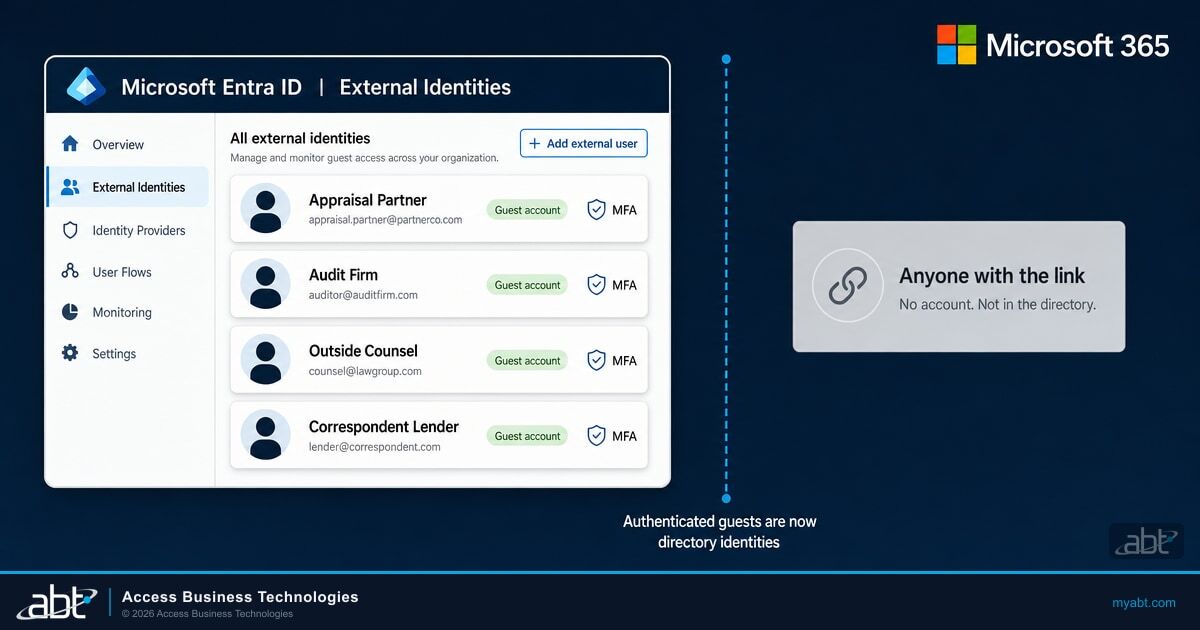
Outside people who authenticate to reach your content, meaning everyone who used to come in through the old SharePoint passcode path, are now identity objects in Microsoft Entra ID rather than invisible passcode recipients. That means Conditional Access applies to them. Multifactor authentication applies to them. They can be put in an access review, given an expiration date, and removed on a schedule.
In other words, the hardest population to evidence to an examiner just became one of the easier ones. That gain is real, and it is worth claiming out loud in your next examination. It is also partial, and the next section explains exactly where it stops.
Guest access, external access, and Anyone links are three different doors
A great deal of confusion in this area comes from treating "external sharing" as one setting. It is at least three, they are configured in different admin centers, and they carry very different risk.
In Microsoft Teams, external access and guest access are separate features that sound almost identical. External access lets your people find, call, and chat with people at other organizations who have Microsoft identities. Guest access invites someone into a team, where they can collaborate on files. The practical distinction is that external access users cannot reach Teams resources and cannot share files, while guests can do both. Microsoft also notes that external access is enabled by default.
Guest access
The outside person receives a Microsoft Entra B2B guest account in your directory. They can be added to a team, open files, and collaborate.
Governable. Conditional Access, multifactor authentication, access reviews, and expiration all apply because there is an identity to attach them to.
External access (federation)
Chat, calls, and meetings with people who hold Microsoft identities at other organizations. No directory object is created. No access to Teams resources and no file sharing.
Lower exposure, separate control. It is a communication surface, so govern it, but it is not a data access path.
Anyone links
A link that works for whoever holds it. Microsoft describes these as links that anyone who has the link can use to open the file or folder without authenticating.
The real problem. No identity, no directory object, and no reliable record of who used it.
If your team has been treating all three as "we allow external sharing," the first useful move is to stop. They are separate decisions with separate settings, and only one of them creates the kind of untraceable exposure that turns into a finding.

The blind spot moved. It did not close.
Here is the part that gets missed in most coverage of the Entra B2B migration, and it is the single most important paragraph in this article.
The migration does not touch Anyone links. Microsoft states plainly that the retirement of SharePoint one-time passcode authentication and the move to Entra B2B has no impact on Anyone or anonymous links. So the change converts authenticated external access into governable directory identities, and leaves unauthenticated link sharing exactly as opaque as it was before.
That matters because of what Microsoft says about those links in its own administrative documentation. Describing the default sharing link type, Microsoft writes:
Forwarded links work internally or externally, but you can't track who has access to shared items or who has accessed shared items.
Read that as an examiner would. A control you are expected to be able to evidence is, by the vendor's own description, not evidenceable in that configuration. That is not a Microsoft defect. It is a design tradeoff that is entirely reasonable for a design studio sharing mockups and entirely unreasonable for a folder holding member loan files.
The takeaway
After this change, your directory is a much better answer to "who outside the institution can reach our data." It is still not a complete answer, because Anyone links do not appear in it. Finish the job by restricting Anyone links where nonpublic customer information lives, not by assuming the migration handled it.
This is the same lesson our clients learned when Microsoft 365 Copilot started surfacing internal files that had been quietly overshared for years. We wrote about that pattern in how financial institutions fix Copilot data access before rollout, and about the search-scoping side of it in the Restricted SharePoint Search retirement. The through line is consistent: permissions that nobody audited were fine right up until a new capability made them visible.
Worth noticing that the two problems are the same problem viewed from opposite sides. Microsoft 365 Copilot exposed which insiders could reach data they should not. The Entra B2B migration exposes which outsiders can. An institution that did the Copilot permissions cleanup already owns half the muscle memory for this one, and the guest population is the smaller and more tractable half. When ABT runs this as a managed service under M365 Guardian, both sides are inventoried against the same standard, because an examiner asking "who can see member data" does not care whether the answer wears an employee badge.
The defaults that surprise people
Most institutions never chose their external sharing posture. They inherited it. That is worth saying without judgment, because the defaults are not obviously wrong, they are simply built for a collaboration-first company rather than a regulated one.
The one that stops people in meetings is who is allowed to invite an outside person into your tenant. Microsoft's current documentation states it directly: by default, all users in your organization, including B2B collaboration guest users, can invite external users to B2B collaboration.
Read the end of that sentence again. Guests can invite guests. A vendor you added to one team can, in the default configuration, bring in someone you have never heard of.
Two more defaults worth checking today
Guests can see each other. The default directory setting gives guests limited access to properties and memberships of directory objects, and under it guests can see the membership of all non-hidden groups. Microsoft separately documents that a guest who belongs to a group can see the other members of that group. If your guest population includes competing vendors, opposing counsel, or two appraisal firms bidding for the same work, that is a disclosure worth deciding about deliberately.
Turning sharing off and back on restores guest access. Microsoft warns that if you turn off external sharing for the organization and later turn it back on, guests regain access. A temporary lockdown is not a cleanup.
The four organization-level external sharing settings in SharePoint and OneDrive are worth knowing by name, because the choice between them is a policy decision that an IT team should not be making alone.
| Setting | What it permits | Typical fit for a regulated institution |
|---|---|---|
| Anyone | Links usable without authenticating, plus sharing with new and existing guests | Rarely appropriate where customer information lives |
| New and existing guests | Recipients must sign in with a work, school, or Microsoft account, or verify with a code | The common landing spot for collaboration sites |
| Existing guests | Sharing only with guests already in your directory | Strong fit for sites with a stable, known vendor population |
| Only people in your organization | External sharing off | Correct for core, examination, and member data sites |
Two structural rules make this manageable rather than overwhelming. A site's sharing setting must be at the same or a more restrictive level than the organization setting, so the tenant-level choice is a ceiling rather than a mandate. And the OneDrive setting can be more restrictive than the SharePoint setting but never more permissive. There is also a precedence rule across services: where a Microsoft Entra organizational relationship setting is more restrictive than a SharePoint or OneDrive setting, the Entra setting wins.
The practical read is that you can set a conservative ceiling for the tenant and then open specific sites deliberately, which is a far better posture than a permissive ceiling you intend to tighten later.
What your regulator actually expects
Nothing in this section requires a particular product, and any vendor telling you the regulation mandates their tooling is overselling. What the guidance does require is that you can describe and evidence how access is granted, limited, and reviewed. Guests are users. The expectations do not carve them out.
Which body of guidance applies depends on what kind of institution you are, and this trips people up more often than it should.
Banks and federally insured credit unions are not subject to the FTC Safeguards Rule. They sit under their prudential regulators, the OCC, FDIC, Federal Reserve, and NCUA, and the interagency information security standards those agencies enforce. The FFIEC IT Examination Handbook is the examination guidance those agencies work from.
Ongoing reviews by business line and application owners to verify appropriate access based on job roles with changes reported on a timely basis to security administration personnel. Periodic independent reviews that ensure effective administration of user access, both physical and logical.
That section also names the principle of least privilege as a required element of the program. Note the two-layer structure, because it shapes what a good answer looks like: the owner who knows the relationship reviews the access, and someone independent verifies that the review process is actually working. A guest list that only IT has ever looked at satisfies neither layer.
Mortgage lenders, mortgage brokers, account servicers, and credit unions that are not federally insured are in different territory. They fall under the FTC Safeguards Rule, which is explicit about periodic review.
Implementing and periodically reviewing access controls, including technical and, as appropriate, physical controls to: (i) Authenticate and permit access only to authorized users to protect against the unauthorized acquisition of customer information; and (ii) Limit authorized users' access only to customer information that they need to perform their duties and functions.
Two neighboring provisions land directly on guests. Section 314.4(c)(5) requires multifactor authentication for any individual accessing any information system, which is exactly the control the Entra B2B migration makes enforceable for outside collaborators. Section 314.4(c)(8) requires monitoring and logging the activity of authorized users and detecting unauthorized access, which is the provision an Anyone link makes difficult to satisfy.
To be precise about what the guidance does and does not say: it expects periodic access reviews and independent verification, and examiners can ask for evidence that both happen. It does not mandate a specifically named report in a defined format, and expectations vary across agencies and institutions. Build the review so it produces evidence, then let your examiner tell you what form they want it in.
If vendor access is the pressure point in your next examination, the adjacent question is how you vetted the firms in the first place. We covered that in what examiners now expect from technical due diligence on fintech vendors, and the cost of getting it wrong in what the Marquis breach teaches about vendor risk.
What to do in the next 30 days
This is a short list on purpose. The migration already happened, so the work is inventory and cleanup rather than a project.
One expectation to set with your team before they start: revocation is not instant, but it is fast. Microsoft states that if you restrict or turn off external sharing, guests typically lose access within one hour of the change.

The durable version of steps 2 and 5 is a recurring access review of guests rather than an annual scramble. Microsoft Entra access reviews can run automatically across Microsoft 365 groups, ask either the guest or a business owner to attest, and apply the result without anyone transcribing a spreadsheet. Configured fully, the action on a denied guest can be set to block sign-in for 30 days and then remove the account from the tenant, which gives you a reversal window before anything is deleted.
There is a licensing catch, and it is the same one that governs employee recertification. Creating access reviews for guests requires Microsoft Entra ID P2 or Microsoft Entra ID Governance. Business Premium and Microsoft 365 E3 include Entra ID P1, so for a large share of community institutions the recertification tooling is not in the box, while the supervisory expectation to review access applies regardless of which license you bought. We worked through that same gap for employee access in our guide to Entra ID access reviews for financial institutions.
This is the point where the license question stops being an IT purchasing decision and becomes a compliance one, and it is worth being deliberate about it. There are three honest paths. Add the governance licensing for the population that actually needs it, which is usually far smaller than the full staff count. Build the review as a documented manual process and keep the evidence yourself, which is legitimate and is what many institutions do. Or have it run for you. As a Tier-1 Cloud Solution Provider, ABT sits directly in the licensing relationship rather than reselling through a distributor, so we can model what governance coverage would actually cost against what a manual review costs you in staff hours, and tell you when the answer is that you do not need to buy anything. That is a conversation most institutions never get to have, because the party explaining the license is usually the party selling it.
Microsoft is clear that this change reaches all tenants and that tenants are selected automatically by its rollout systems, so every institution lands inside the same Microsoft-managed rollout window without choosing a date. What differs is how much warning each one gets. ABT manages Microsoft 365 tenants for more than 750 banks, credit unions, and mortgage companies through delegated administration, which means we watch a change like the Entra B2B migration land across a whole portfolio rather than one tenant at a time. That is the difference between reading a message center post and knowing which of your sites actually had passcode guests on them. (The rollout facts here are Microsoft's, cited below; the portfolio figure is ABT's own.)
Where ABT does this work as a managed service, it runs under M365 Guardian. The guest inventory, the invite-permission posture, the Anyone link exposure, and the recurring recertification become monitored configuration rather than an annual fire drill, and the records an examiner is likely to ask for accumulate as a byproduct of running the control instead of being reconstructed the week before an examination. No vendor can promise you an examination outcome, and anyone who does is selling something. What a mechanism buys you is that the answer exists before the question is asked. The institutions that struggle with this are rarely the ones that lack a policy. They are the ones whose policy has no mechanism behind it.
One last thing to settle before anyone touches a setting: decide who owns this. In practice the durable answer is that the information security officer owns the standard, the business line owner attests to their own vendors because they are the only person who knows whether that relationship is still active, and IT owns the mechanism. When the guest list belongs to IT alone, it gets reviewed by the one group with no way to know which relationships ended, which is exactly the two-layer structure the FFIEC guidance is describing. If you are the person who read this far, you are probably the one who has to start that conversation.
Find out who outside your institution can reach your data
We will inventory your guest population, your Anyone link exposure, and your invite permissions, then walk you through what we found and where it sits against the access review expectations in the guidance.
Frequently Asked Questions
Guest access invites someone from outside your organization to join a team or site, and Microsoft creates a Microsoft Entra B2B guest account for them in your directory. External access is a Teams feature that lets your people find, call, and chat with people who have Microsoft identities at other organizations, and it does not create a directory account. The practical difference is that external access users cannot reach Teams resources and cannot share files, while guests can do both. Microsoft notes that external access is enabled by default.
Microsoft moved external sharing in SharePoint and OneDrive onto Microsoft Entra B2B for all tenants starting in May 2026. Beginning in July 2026, external collaborators who do not have a Microsoft Entra B2B guest account in your directory see access denied on content that was previously shared with them through SharePoint one-time passcode authentication. Access is preserved where a guest account already exists. The fix is to create the guest account in Microsoft Entra B2B or to reshare the content, which creates the account automatically.
No. Microsoft states that the change applies to all tenants, that tenants are selected automatically by its rollout systems rather than choosing a date, and that the change cannot be scoped to individual sites. The EnableAzureB2BIntegration setting no longer affects sharing behavior and the ability to disable the integration has been removed.
No. Microsoft states that the retirement of SharePoint one-time passcode authentication and the move to Microsoft Entra B2B does not affect Anyone or anonymous links. Those links still let a holder open content without authenticating, and Microsoft's own guidance notes that with forwarded links you cannot track who has access to shared items or who has accessed them. Restricting Anyone links where customer information lives is a separate decision you still need to make.
By default, all users in your organization, including B2B collaboration guest users, can invite external users to B2B collaboration. That means guests can invite other guests. Microsoft provides four settings ranging from anyone in the organization down to no one including administrators, and a Guest Inviter role that lets specific people invite without holding a broader administrative role.
Creating Microsoft Entra access reviews for guest users requires Microsoft Entra ID P2 or Microsoft Entra ID Governance. Microsoft 365 Business Premium and E3 include Entra ID P1, so many community institutions do not have the recertification tooling included in their current licensing even though the supervisory expectation to review access applies regardless of which license they hold.
Microsoft states that if you restrict or turn off external sharing, guests typically lose access within one hour of the change. One caution: if you turn off external sharing for the organization and later turn it back on, guests regain access. A temporary shutdown is not the same as removing a guest, so use it as a containment step rather than a cleanup.