In This Article
Picture the Monday morning a loan officer dreads. Forty borrower threads sitting in the inbox, three rate locks expiring this week, a pipeline report due to the branch manager, and a closing at nine. Now picture an assistant that already drafted every follow-up, built the pipeline summary, and posted it to the team's channel before anyone poured a coffee. That assistant is real. It shipped on June 16, 2026, and Microsoft calls it Copilot Cowork.
Microsoft 365 Copilot Cowork is what Microsoft calls the agentic layer of Copilot. Where the Copilot you already know answers questions and drafts text, Cowork takes the next step and actually does the work. It drafts and sends email in Outlook, posts in Teams channels and chats, builds Word documents and Excel models, runs deep research, and keeps recurring tasks moving on a schedule. It reached worldwide general availability on June 16, 2026, after about three months in Microsoft's Frontier early-access program. And here is the part that matters to anyone who has watched the latest wave of AI tools: Cowork runs on Anthropic's Claude, the Opus 4.8 and Sonnet 4.6 models, the same frontier engines behind today's leading AI agents.
Here is the shift worth pausing on. For years, an AI that could actually do the work, not just answer questions, was a tool for developers and technicians, the people who run modern coding agents. Cowork brings that same power to the people who run a financial institution, the loan officer, the processor, the underwriter, the operations lead, inside the Microsoft 365 apps they already use. The engine is the same; the audience just got much larger. ABT builds with this exact technology every day, which is how we know what it actually takes to make an agent safe to turn on, not in theory, but in a tenant an examiner will inspect.
It does not act unsupervised, though, and that distinction is the whole reason a regulated institution can take it seriously. Before Cowork sends an email or posts a message, it stops and asks you to approve. Hold that thought, because it is the hinge between a productivity win and a governance problem.
This is the plain-English tour for financial institutions. We will show you three things Cowork actually does, walk through how a mortgage lender would use it day to day, and then get honest about the part the launch posts skip. A tool this powerful is not something you flip on without a plan. For a bank, a credit union, or a mortgage company, the difference between a productivity win and an examiner finding is governance. That is the work, and it is exactly the work ABT does.
What Copilot Cowork Actually Is
The easiest way to understand Cowork is to set it next to the Copilot you already have. Standard Microsoft 365 Copilot, the Chat experience and the helpers inside Word, Excel, Outlook, and Teams, is an assistant. You ask, it answers. It summarizes the thread, drafts the reply, explains the spreadsheet, and hands the work back to you to finish. Cowork is a coworker. You describe the outcome you want, and it breaks the job into steps and carries them out across your Microsoft 365 apps, showing you each step as it goes.
In the Microsoft 365 Copilot app, Cowork sits in a toggle right next to Chat. You pick Chat when you want a conversation. You pick Cowork when you want a job done.
Cowork (the agent)
You describe an outcome. It plans the steps and executes them.
Acts across apps: sends email, posts in Teams, builds documents.
Runs recurring jobs automatically on a schedule.
Learns custom skills you write for your own process.
Asks for your approval before any sensitive action.
Standard Copilot Chat (the assistant)
You ask a question. It answers or drafts within one app.
Suggests content. You take the next action yourself.
Runs only when you prompt it, one turn at a time.
Built-in capabilities only, no custom skills.
Generates drafts; it does not send or post on its own.

Out of the box, Cowork ships with built-in skills for Word, Excel, PowerPoint, PDF, email, scheduling, calendar management, meetings, daily briefings, enterprise search, communications, deep research, and adaptive cards. It can generate images, run web tasks in Edge using your existing sign-ins, and search across your organization. As we will see in the third demo, you can also teach it skills of your own. Three examples make the picture concrete, so let us put Cowork to work for a mortgage lender.
Demo 1: A Pipeline Briefing That Posts Itself to Teams
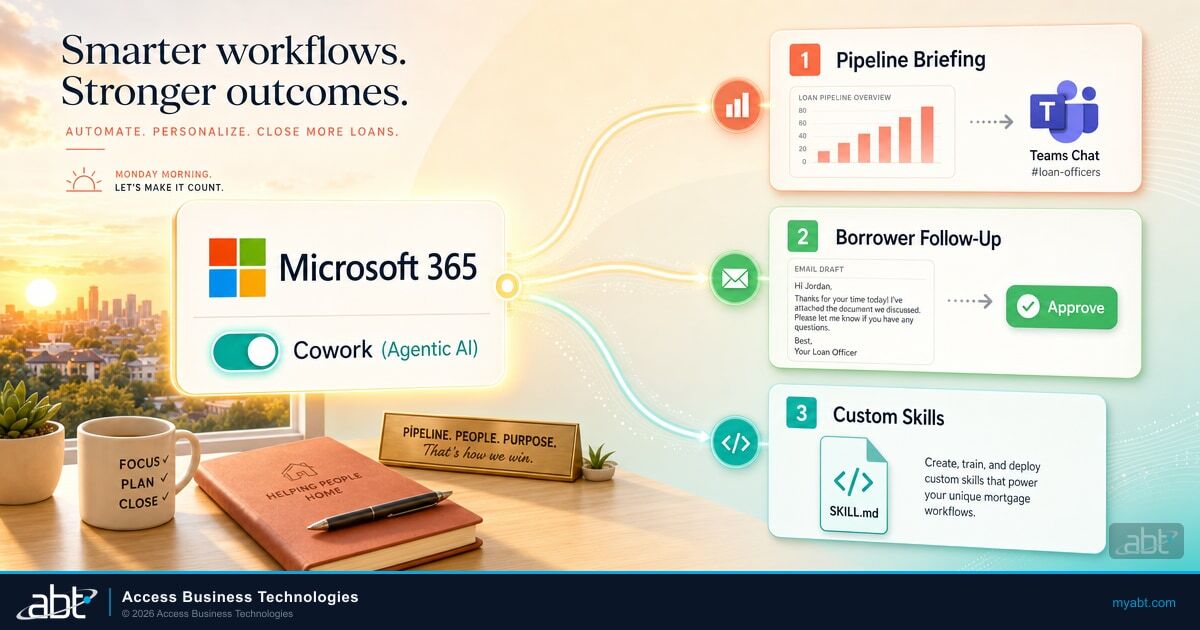
Cowork can run a prompt on a schedule, so a recurring task happens automatically without anyone kicking it off. For a mortgage team, that turns the morning pipeline scramble into a standing routine. You set it up once in plain language, something like, "Every weekday at seven, build a pipeline briefing from this week's loans and post it to our Operations channel."
Cowork reads the relevant data, emails, and calendar from your Microsoft 365 environment through Work IQ, the context layer that grounds Copilot in your organization's own systems.
It builds the briefing: loans clear to close, rate locks expiring this week, conditions still outstanding, and the day's closings, organized the way your team reads it.
It posts the briefing to your Teams channel every weekday morning, on schedule, so the team starts the day already oriented instead of digging for it.
One honest caveat, because a mortgage CTO will ask it immediately: Cowork works over what lives in Microsoft 365 and what reaches it through an approved connector or plugin. It does not reach into a separate loan-origination system on its own. So the pipeline data has to be visible to it, in SharePoint or Excel, in email, or through a connector to your loan system. Wiring that data path safely is part of the setup, and it is part of what we do. Cowork includes a Daily Briefing skill built for exactly this kind of digest, and you can set up to five scheduled prompts per person. It is the same kind of routine we covered in our look at how loan officers, processors, and underwriters use Microsoft 365 Copilot, except now it runs itself.
Demo 2: Borrower Follow-Ups You Approve Before They Send
The second job is the inbox. Cowork can triage a full inbox, sort messages into folders, summarize threads, and draft the follow-ups a loan officer would otherwise type one at a time. For a borrower pipeline, that means every thread that needs a nudge gets a drafted, on-brand reply ready to go.
Forty borrower and referral-partner threads need a follow-up. Some are waiting on conditions, some on a status update, some on a simple thank-you after a closing.
Cowork drafts a tailored reply for each thread and lines them up for review. You read each one, edit if needed, and approve the sends. The work that ate the first hour now takes a few minutes.
Here is the safety mechanism that matters most for a regulated lender. Before Cowork sends an email, posts in Teams, or schedules a meeting, it stops and asks. A dialog shows you a preview of exactly what it plans to do, with a risk-level indicator on medium and high-risk actions, and a button labeled for the action, Send or Post or Create. You approve, edit, or cancel. Cowork does not take a sensitive action without your go-ahead, and Microsoft is explicit that its output is a draft to review, not a decision to rubber-stamp. It is not built for unreviewed high-stakes actions like legal filings or financial transactions.
Why This Matters for Financial Institutions
A borrower-facing email, an adverse-action timeline, a rate-lock confirmation: these are not things you want an agent firing unreviewed. The human-in-the-loop approval is the foundation of the control story, not the whole of it. It keeps a person on every outbound action, with a preview and a risk indicator, so the speed of an agent never becomes the liability of an unsupervised one. The rest of the controls, the ones an examiner will ask about, live in governance, and we get to those below.
Demo 3: Teach It Your Process in a Text File
The built-in skills are useful. The custom skills are where Cowork becomes yours. You can teach Cowork a new skill by dropping a plain text file into OneDrive. Inside your OneDrive, under Documents, then Cowork, then skills, you create a subfolder named for the skill, with a file called SKILL.md inside it. That file opens with a short header that names the skill and describes what it does, followed by the instructions written in plain Markdown. Cowork discovers it automatically at the start of your next conversation, and you can author up to fifty of them.
If you have ever watched someone hand an AI agent a skill file and watch it follow the playbook, this is the same idea, brought to the people who close loans.
This will look familiar to anyone who has used a modern AI coding agent. The skill file, a short description plus instructions in Markdown, is nearly identical to the format those tools use. ABT runs more than thirty of these skill files to drive its own content and operations, so we know the pattern well. For a lender, it means Cowork can be taught your exact process: how your shop writes a conditional approval, what belongs in a referral-partner update, the format your underwriters expect. It is also the idea behind a specialized agent like ABT MortgageGuide, our mortgage-trained Copilot, which encodes mortgage expertise that generic Copilot does not have.
Work IQ
Microsoft's context layer over your Microsoft 365 data. It is how Cowork grounds a task in your real emails, files, meetings, and people instead of generic information.
Scheduled prompt
A prompt Cowork runs automatically on a recurring schedule, such as a daily briefing or a weekly report. You get up to five per person.
Custom skill (SKILL.md)
A plain Markdown file in OneDrive that teaches Cowork a repeatable task in your own words. Up to fifty per user.
Copilot Credit
The unit Cowork bills in, priced at one cent each. Every task draws credits based on the model, context, tools, and runtime it uses.
What It Runs On, and What It Costs
Microsoft confirmed at general availability that Copilot Cowork runs on Anthropic's Claude, specifically the Opus 4.8 and Sonnet 4.6 models, with GPT-5.5 available to Frontier customers and a lower-cost Microsoft model on the way. A model picker lets admins steer routine tasks to cheaper models and reserve the frontier engines for the hard ones.
Cowork is not bundled into your license. It is usage-based, and that is the single most important thing for a finance team to understand. First, every user needs a Microsoft 365 Copilot license, about thirty dollars per user per month. On top of that, Cowork bills by consumption in Copilot Credits, priced at one cent per credit, where each task draws credits based on the model it uses, the context it retrieves, the tools it calls, and how long it runs. Microsoft offers pay-as-you-go or a discounted pre-commitment. We went deep on this in our guide to Copilot Credits and usage-based billing for financial institutions.
How big can the bill get? Microsoft publishes a cost estimator for exactly this, and worked examples of a roughly 125-employee organization with heavy use land in the tens of thousands of dollars a month in Cowork charges on top of licenses. That figure is an illustration, not a quote, and the point is its shape: a usage-based agent that runs all day can cost real money if nobody is watching the meter. Industry analysts have put the effective cost near sixty dollars per user per month once typical usage is included. For where Cowork sits relative to the Copilot license tiers, see our Copilot Business pricing breakdown for community banks and credit unions.
The good news is that Microsoft gives admins a Cost Management Dashboard and per-user and per-group spend limits, including hard caps, so the bill cannot run away. Setting those budgets sensibly is part of turning Cowork on well. One timing note: tenants that piloted Cowork in the Frontier program have a grace period and are not billed for Cowork until July 1, 2026. Everyone enabling it fresh after general availability is billed from the moment it is switched on.
Why You Cannot Just Flip It On
Everything above is the productivity story, and it is a good one. The rest of this article is the part that keeps a chief information security officer or a compliance officer up at night, and the part a launch blog will not tell you. There are four reasons Cowork is not a switch you flip on a Friday afternoon.
First: Anthropic Has to Be Enabled in Your Tenant
Cowork runs on Anthropic's Claude, and Anthropic is a Microsoft subprocessor that an administrator has to enable in your tenant before Cowork will work. It is off by default in some European, United Kingdom, and government cloud environments, and blocked in others. For a financial institution, that is not a checkbox. It is a subprocessor and data-flow decision your vendor-management and compliance teams should make on purpose, not discover after the fact.
Second, least privilege suddenly matters more. Cowork runs under the signed-in user's identity and permissions. It can only reach what that person can already reach, which is good news and a warning at once. If a user has overly broad access, so does the agent acting for them. The data-access cleanup that Copilot rollouts already demand becomes more urgent when an agent is the one doing the browsing. We covered exactly this in our guide to fixing Copilot oversharing before rollout.
Third, the governance has to be wired up. Cowork's actions flow through Microsoft Purview: audit logging, eDiscovery, Insider Risk, data lifecycle, and your sensitivity labels carry through what the agent does. Standing those controls up for agents is the same discipline we mapped in our piece on Microsoft Purview for AI agents. Cowork also carries the enterprise certifications a regulated buyer expects, including SOC 2 Type II, ISO 27001, ISO 42001, and HIPAA support.
Fourth, the custom skills and plugins that make Cowork powerful are not validated by Microsoft. Their quality and safety depend on who wrote them. A skill that encodes a sloppy process scales a sloppy process across your whole team. Someone has to write the good ones.

That is the work, and it is what ABT does. As the Tier-1 Microsoft Cloud Solution Provider that manages the Microsoft 365 tenants of more than 750 banks, credit unions, and mortgage companies, ABT turns Cowork on the right way. We run the readiness and governance so the agent only ever reaches the data it should. We write the custom skills that teach it your industry and your process. And we set the budgets, spend limits, and usage forecasts so the bill stays predictable. We manage the tenant Cowork runs in, so you get the productivity without the surprises.
The Short Version
- Cowork is the agentic Copilot that acts. It drafts and sends email, posts in Teams, and runs multi-step work on a schedule, on Anthropic's Claude.
- It is usage-billed and runs under your users' permissions, so cost governance and least-privilege access are not optional extras.
- Turning it on safely in a regulated tenant, the readiness, the custom skills, and the budgets, is exactly what a Tier-1 Microsoft CSP is for.
Bring Copilot Cowork into your institution without the surprises
Get a free Copilot readiness assessment from the Tier-1 Microsoft CSP that manages Microsoft 365 for more than 750 banks, credit unions, and mortgage companies. We will show you where your data access, governance, and budgets stand before you turn an agent loose.
Frequently Asked Questions
Copilot Chat is an assistant: you ask a question and it answers or drafts content in one app. Copilot Cowork is an agent: you describe an outcome and it plans the steps and carries them out across your Microsoft 365 apps, sending email, posting in Teams, building documents, and running recurring jobs on a schedule. Cowork reached general availability on June 16, 2026, and sits in a toggle next to Chat in the Microsoft 365 Copilot app.
At general availability, Microsoft says Cowork runs on Anthropic's Claude models, specifically Opus 4.8 and Sonnet 4.6, with GPT-5.5 available to Frontier customers and a lower-cost Microsoft model on the way. An admin model picker lets you route routine tasks to cheaper models and reserve the frontier engines for harder work. For image generation, Microsoft's documentation says Cowork uses Google's Imagen 2 model.
Cowork is usage-based and layered on top of a Microsoft 365 Copilot license, which is about thirty dollars per user per month. Cowork itself bills in Copilot Credits at one cent per credit, where each task draws credits based on the model, context retrieval, tool calls, and runtime it uses. Microsoft offers pay-as-you-go or a discounted pre-commitment, and provides a Cost Management Dashboard with per-user and per-group spend limits so administrators can cap spending.
No. Before any sensitive action, such as sending an email, posting in Teams, or scheduling a meeting, Cowork shows an approval dialog with a preview of what it plans to do and a risk-level indicator for medium and high-risk actions. You approve, edit, or cancel. A "Don't ask again" option can skip prompts for similar actions, but only within the current conversation, not permanently. Microsoft is explicit that Cowork is not built for unreviewed high-stakes actions like legal filings or financial transactions.
Yes. Each user needs a Microsoft 365 Copilot license, usage-based billing has to be enabled, and an administrator must enable Anthropic as a subprocessor in the tenant, which is off by default in some European, United Kingdom, and government clouds. Because Cowork runs under each user's permissions, you should also tighten data access and least-privilege controls and wire up Microsoft Purview governance, including audit logging and sensitivity labels, before going live. This readiness work is where a Tier-1 Microsoft Cloud Solution Provider like ABT does the heavy lifting.
ABT manages the Microsoft 365 tenants of more than 750 banks, credit unions, and mortgage companies as a Tier-1 Microsoft Cloud Solution Provider. For Cowork, that means three things: readiness and governance so the agent only reaches the data it should, including the subprocessor decision, least-privilege access, and Purview controls; custom skills written for your industry and your process; and cost governance, with budgets, spend limits, and usage forecasts so the usage-based bill stays predictable. The starting point is a free Copilot readiness assessment.