In This Article
The pressure to deploy Microsoft 365 Copilot is real. Board members read about it in The Wall Street Journal. Vendors pitch it at every conference. Microsoft's own sales team is calling your CFO directly. And somewhere in the middle, the IT Director or CISO at a financial institution is being asked a question they may not be ready to answer: "When are we getting Copilot?"
The honest answer, for most financial institutions, should be: "Not until we fix the foundation it runs on."
Copilot is not a standalone product. It is an AI layer that sits on top of your existing Microsoft 365 tenant. It reads everything your users can read. It surfaces files from SharePoint. It pulls data from Teams chats, emails, and OneDrive. If your tenant permissions are messy, your data classification is incomplete, or your Conditional Access policies have gaps, Copilot will find those problems faster than any auditor.
This article walks through every prerequisite a regulated financial institution needs to address before deploying Copilot. Not the marketing version. The real one.
The Rush to Deploy Copilot, and Why Readiness Matters More Than Speed
Microsoft reported 15 million paid Copilot seats as of January 2026, up from 8 million in August 2025. That sounds like momentum. Look closer: 15 million seats against 450 million commercial Microsoft 365 subscribers is a 3.33% conversion rate. Even among Fortune 500 companies, where 70% had adopted Copilot by late 2025, most were running limited pilots rather than full enterprise deployments.
The reason for that gap is not budget. At $30 per user per month (or $21 for organizations under 300 seats), Copilot is priced within reach of most mid-market financial institutions. The gap is readiness. Organizations that bought licenses before fixing their tenant architecture are now spending more on remediation than they saved in productivity.
For financial institutions specifically, the stakes are higher. An investment bank employee seeing a teammate's compensation data is embarrassing. A credit union loan officer surfacing another member's financial records through a Copilot prompt is a regulatory violation.
In June 2025, security researchers disclosed CVE-2025-32711, a critical zero-click vulnerability in Microsoft 365 Copilot (CVSS 9.3) that could exfiltrate data from chat logs, OneDrive, SharePoint, and Teams without user interaction. Microsoft patched it server-side before exploitation occurred. But the vulnerability existed because Copilot's access scope is broad by design. Your governance must match that scope.
Your Data Governance Gaps Are Showing
AI agents need guardrails. Your M365 tenant configuration determines whether AI tools help your institution or expose it. Find out where you stand.
The Data Governance Foundation You Need First
Before Copilot can be deployed safely, three layers of data governance must be in place. Not "in progress." In place.
SharePoint Permission Hygiene
Copilot searches across every SharePoint site and document library a user has access to. In most tenants we assess, permission sprawl is the norm. Sites created years ago with "Everyone except external users" sharing. Project folders shared with entire departments. Former employees' permissions never revoked.
The fix starts in the SharePoint admin center's Permission State Report, which Microsoft introduced specifically for Copilot governance. This report flags overshared sites, broken inheritance, and groups with excessive membership. Before Copilot touches your tenant, every site flagged in this report needs remediation.
Specific actions:
- Audit every SharePoint site for "Everyone" and "Everyone except external users" permissions
- Remove broken permission inheritance on document libraries containing sensitive data
- Enable Restricted Content Discovery (RCD) on sites containing board materials, HR records, and merger/acquisition documents
- Enforce a minimum of two owners per SharePoint site to prevent orphaned sites
Sensitivity Labels and Data Classification
Microsoft Purview sensitivity labels are no longer optional for organizations running Copilot. Labels control what Copilot can surface, what it can summarize, and what it must exclude. Without labels, Copilot treats all content equally.
For financial institutions, the classification taxonomy should include at minimum:
- Public - Marketing materials, published reports
- Internal - Standard business documents, policies
- Confidential - Member/customer financial data, loan files, account records
- Highly Confidential - Board materials, M&A activity, regulatory examination responses, executive compensation
Auto-labeling policies should be configured for common patterns: Social Security numbers, account numbers, loan application data. Manual labeling alone does not scale.
Data Lifecycle and Retention
Copilot surfaces old content just as readily as new content. If your tenant has 10 years of unmanaged documents, Copilot will search all of them. Retention policies must be defined and enforced before deployment, particularly for content that should have been purged under your existing record retention schedule.
The Oversharing Problem: Why Copilot Amplifies Permission Gaps
Oversharing is not a new problem. Every M365 tenant has it. What Copilot does is make oversharing visible and exploitable at speed.
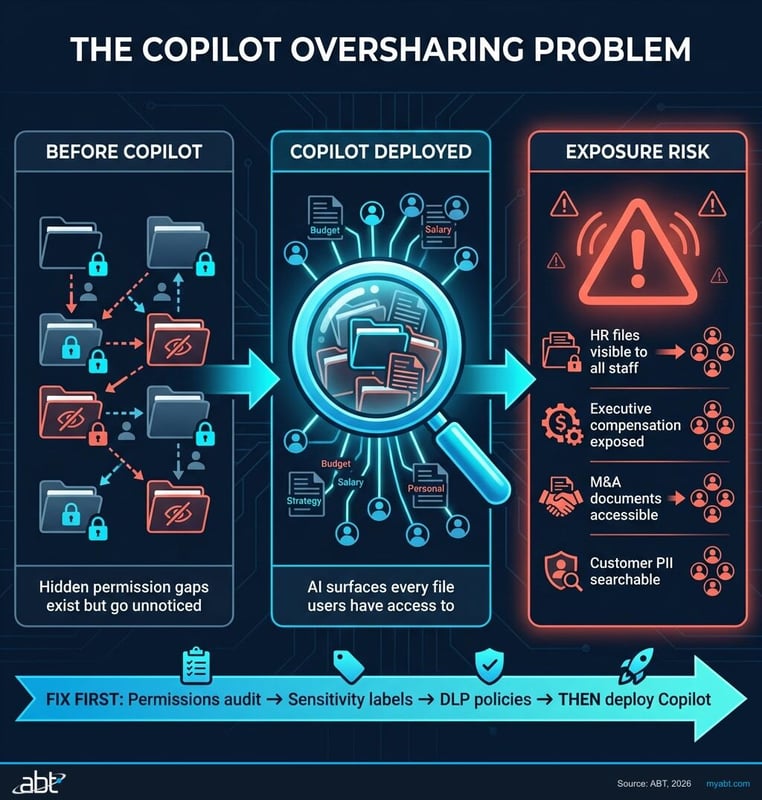
Before Copilot, an employee with overly broad SharePoint permissions would need to manually browse through sites, guess at folder names, and stumble into sensitive content. The probability of accidental exposure was low because the effort was high. Copilot eliminates that friction entirely. A natural-language prompt like "show me the latest compensation spreadsheet" will surface that file instantly if the user has read access, regardless of whether that access was intentional.
"Copilot doesn't create new security holes. It finds the ones you've been ignoring and makes them trivially easy to exploit."
ABT Tenant Assessment Finding, 2025Concentric AI's analysis of more than 550 million records found that organizations average 802,000 files at risk from oversharing, with 16% of business-critical data exposed to users who should not have access. In a financial institution, "business-critical data" includes loan files, member account records, regulatory correspondence, and internal audit findings.
The remediation path is not optional. It is a prerequisite. If you are not willing to fix permissions first, you are not ready for Copilot. We covered the specific security warnings Microsoft published about this problem in a previous article.
Identity and Access Prerequisites
Copilot inherits every identity and access control in your Entra ID configuration. If those controls are weak, Copilot's access is weak. Here is what must be configured before deployment.
Conditional Access Policies Targeting Copilot
Microsoft recommends creating Conditional Access policies that specifically target Copilot applications. These policies should enforce:
- Device compliance - Copilot should only be accessible from Intune-managed, compliant devices. No personal phones. No unmanaged laptops.
- Insider risk conditions - Users flagged with moderate or elevated insider risk scores should have Copilot access restricted or blocked.
- Terms of use acceptance - Require users to accept your organization's AI usage policy before accessing Copilot.
- Location-based restrictions - Block Copilot access from untrusted networks or geographies where your institution does not operate.
These policies require Entra ID P1 licensing at minimum. Most financial institutions running Business Premium or E3 already have this. If you are running Business Standard, you do not, and Copilot deployment without Conditional Access is reckless.
Privileged Identity Management (PIM)
Any administrator with standing access to sensitive systems should not have always-on Copilot access to those systems. PIM should be configured so that elevated roles are just-in-time and time-limited. This prevents Copilot from surfacing admin-level content during normal work activities.
Guest and External User Access Review
Guest accounts in Entra ID can access Copilot if they have Microsoft 365 licenses assigned. Before deployment, run a complete guest access review:
- Remove guest accounts that are no longer active
- Restrict remaining guests to specific SharePoint sites via access policies
- Disable Copilot for all guest accounts by default
Security Configurations That Must Be in Place
Data Loss Prevention (DLP) Policies
DLP policies must be configured in Microsoft Purview to prevent Copilot from including sensitive data in generated content. Specific policies to implement:
- Block Copilot from summarizing content tagged with "Highly Confidential" labels
- Prevent Copilot-generated emails from containing account numbers, SSNs, or other PII patterns
- Alert compliance teams when Copilot surfaces content from restricted SharePoint sites
Audit Logging and Monitoring
Microsoft Purview audit logs capture Copilot interactions, including what content was accessed, what prompts were used, and what responses were generated. These logs must be enabled and routed to your SIEM before deploying Copilot. For regulated institutions, this is not optional. FFIEC examiners will expect to see audit trails for AI-assisted data access.
Configure unified audit log retention to meet your regulatory requirements (typically 7 years for financial institutions). Set up alerts for anomalous Copilot usage patterns: high-volume queries, queries accessing cross-departmental content, or queries from unusual locations.
Information Barriers
If your institution has compliance walls between departments (common in banks with both commercial lending and investment operations), information barriers must be configured in Microsoft Purview before Copilot deployment. Without barriers, Copilot can surface content across compliance walls, creating regulatory violations that are difficult to detect after the fact.
Licensing: What You Actually Need (and What You're Overpaying For)
Copilot licensing is straightforward, but the prerequisites are not. Here is what you actually need.
| Requirement | What You Need | Monthly Cost |
|---|---|---|
| Base license | Business Standard, Business Premium, E3, or E5 | $12.50 - $57/user |
| Copilot add-on | Microsoft 365 Copilot | $30/user ($21 for <300 seats) |
| Conditional Access | Entra ID P1 (included in Bus Premium, E3, E5) | Included or $6/user |
| Data classification | Microsoft Purview (E5 or add-on) | Varies |
| DLP + audit | Microsoft Purview DLP (E5 or Compliance add-on) | Varies |
The common mistake: buying Copilot licenses on a Business Standard base. Business Standard does not include Conditional Access, Intune device management, or advanced Purview features. You end up paying for Copilot and then paying again for the security infrastructure to govern it.
If you are running Business Standard today, upgrading to Business Premium ($22/user/month) before adding Copilot is almost always the correct move. Business Premium includes Intune, Conditional Access, Defender for Office 365, and basic Purview capabilities. We published a detailed M365 license audit guide that walks through this analysis step by step.
For larger institutions (300+ seats), the E3 + Copilot combination ($66/user/month) provides the governance foundation. E5 ($57/user + $30 Copilot = $87/user) adds Defender for Identity, advanced Purview, and Sentinel integration, which most regulated institutions will eventually need.
A 5-Step Readiness Assessment Framework
Before purchasing a single Copilot license, work through these five steps in order. Skipping any step creates risk that compounds as you scale.
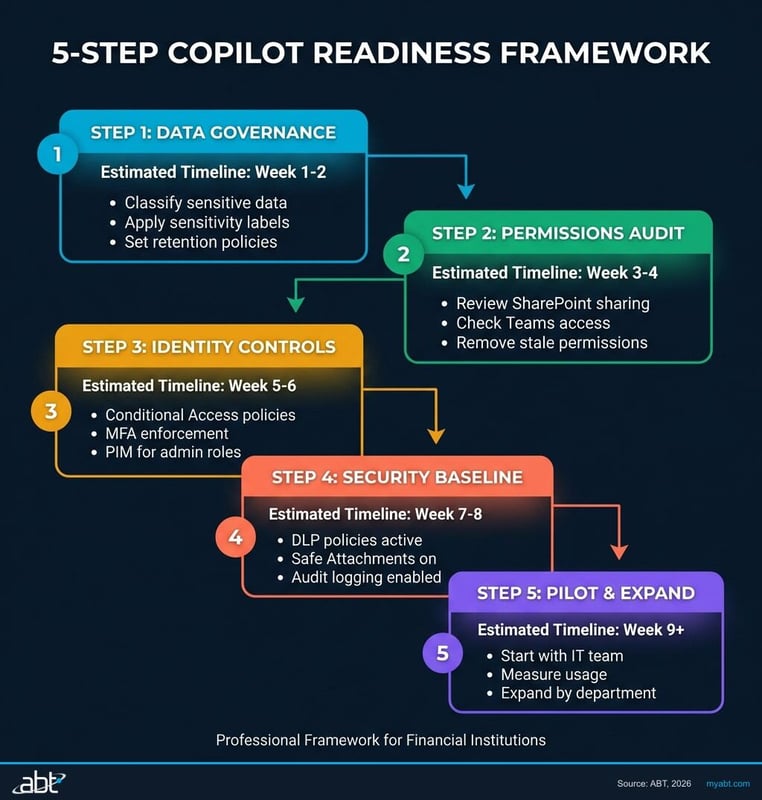
Tenant Permission Audit
Run the SharePoint Permission State Report. Inventory every site with "Everyone" permissions. Identify all SharePoint sites with broken inheritance. Document guest account access across the tenant. Fix every critical finding before proceeding.
Timeline: 2-4 weeks for a 500-person organization.
Data Classification Deployment
Define your sensitivity label taxonomy. Configure auto-labeling policies for regulated data patterns (SSN, account numbers, loan data). Deploy labels to SharePoint, OneDrive, Exchange, and Teams. Train users on manual labeling for content that auto-labeling cannot catch.
Timeline: 4-6 weeks, including user training.
Identity and Access Hardening
Deploy Conditional Access policies targeting Copilot applications. Configure PIM for all administrative roles. Run a guest access review and remove stale accounts. Verify MFA enforcement is universal, with no exclusions.
Timeline: 1-2 weeks if Conditional Access is already in use; 4-6 weeks if starting from scratch.
Security Controls Configuration
Implement DLP policies for Copilot-generated content. Enable unified audit logging with appropriate retention. Configure information barriers if your institution requires compliance walls. Set up SIEM integration for Copilot activity monitoring.
Timeline: 2-4 weeks.
Pilot Deployment and Validation
Start with 10-25 users in a low-risk department (marketing, HR operations, or internal communications). Monitor Copilot access logs daily for the first two weeks. Verify that no sensitive content surfaces in pilot users' Copilot results. Expand only after confirming governance controls are working as designed.
Timeline: 4-6 weeks pilot before broader rollout.
Total readiness timeline: 13-24 weeks for a mid-market financial institution. That is 3-6 months of preparation before your first production Copilot deployment. Organizations that try to compress this into 30 days are the ones that end up in our AI readiness assessments after the fact, paying more to fix problems than they would have spent preventing them.
Know Your AI Readiness Score
The institutions deploying AI successfully aren’t the early adopters, they’re the well-prepared ones. See if your foundation is ready for what’s coming.
Frequently Asked Questions
Copilot requires a qualifying base license: Microsoft 365 Business Standard, Business Premium, E3, or E5. However, Business Premium or E3 is the practical minimum for financial institutions because Business Standard lacks Conditional Access, Intune, and advanced Purview features that are necessary to govern Copilot safely. The Copilot add-on costs $30 per user per month, or $21 for organizations under 300 seats.
For a mid-market financial institution, expect 3-6 months of preparation. This includes a tenant permission audit (2-4 weeks), data classification deployment (4-6 weeks), identity and access hardening (1-6 weeks depending on current state), security controls configuration (2-4 weeks), and a pilot deployment (4-6 weeks). Compressing this timeline creates governance gaps that are expensive to fix after the fact.
Data oversharing. Copilot reads everything a user has permission to access, including files shared through overly broad SharePoint permissions that were set years ago and never reviewed. In 2025, Concentric AI found that organizations average 802,000 files at risk from oversharing, with 16% of business-critical data exposed to users who should not have access. Copilot makes this exposure trivially easy to exploit through natural language prompts.
Yes, if the site uses "Everyone except external users" permissions, which is a common default in many tenants. Copilot follows existing Microsoft 365 permissions exactly. If a SharePoint site grants read access to all internal users, Copilot can surface that content in responses. Enabling Restricted Content Discovery (RCD) on sensitive sites prevents Copilot from discovering content even if users technically have access.
Not yet specific to Copilot, but the FFIEC IT Examination Handbook's guidance on data access controls, audit trails, and vendor risk management all apply directly. Examiners expect to see documented controls over any system that accesses customer data, including AI tools. The OCC and NCUA have both signaled increased scrutiny of AI usage in financial institutions. Deploying Copilot with full Purview audit logging enabled creates the compliance trail regulators will ask for.
Always use a phased approach. Start with 10-25 users in a low-risk department. Monitor Copilot access logs daily for at least two weeks. Validate that sensitive content is not surfacing in Copilot results. Only expand to additional departments after confirming governance controls are working. Most financial institutions that deploy Copilot successfully reach full rollout 6-9 months after their initial pilot.