In This Article

On April 21, 2026, Microsoft published Message Center notification MC1286300. The subject line: Microsoft 365 Copilot transition to the cloud.microsoft domain. For most organizations, it landed as one of dozens of routine admin notices. For financial institutions, it should have triggered an immediate emergency change request. Microsoft's published rollout window closes today, April 30, 2026.
The notice announced that Microsoft 365 Copilot APIs are moving from the office.com domain to cloud.microsoft. Microsoft scheduled the rollout to begin and complete in late April 2026, with April 30 listed as the published completion date in the Microsoft 365 release calendar. The change cannot be disabled, delayed, or opted out of. Once your organization's endpoints shift to cloud.microsoft traffic, any network device that doesn't recognize the new domain silently drops Copilot connections. Users open Word, Teams, or Outlook and find their AI assistant gone.
For a commercial organization with permissive network policies, this might be a minor IT ticket. For a credit union or community bank where every outbound HTTPS connection passes through a next-gen firewall, an SSL inspection engine, and a cloud access security broker, this is a potential week-long Copilot outage waiting to happen during one of the busiest administrative weeks in the spring calendar.
Three Actions Required Before Your Copilot Goes Dark
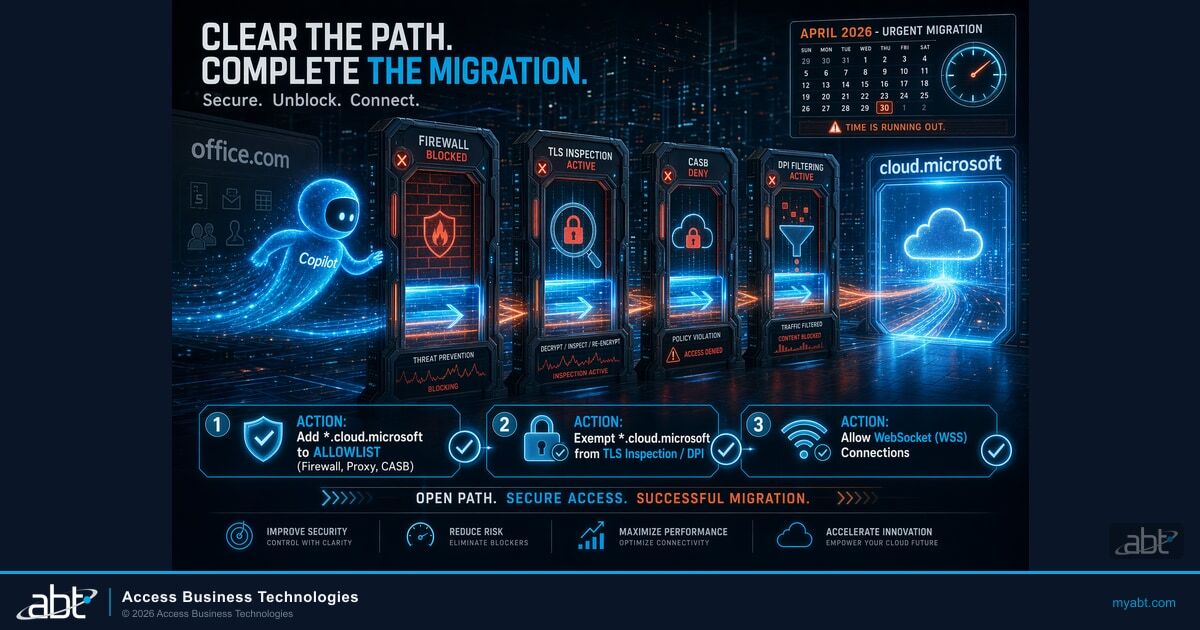
Microsoft's MC1286300 requires three network configuration changes. All three must be completed before the migration reaches your tenant. Missing any one of them can result in silent Copilot failures that your helpdesk will struggle to diagnose:
- Add *.cloud.microsoft to your allow list in every firewall, proxy, and CASB policy that controls outbound HTTPS traffic.
- Allow WebSocket (WSS) connections to *.cloud.microsoft without protocol downgrade or timeout.
- Exempt *.cloud.microsoft from TLS inspection, deep packet inspection, and network-level DLP. Microsoft explicitly prohibits inspection of this traffic.
Short on time? Why your network controls matter for the Copilot move.
Financial institutions run strict outbound firewall rules and universal TLS inspection that most industries do not. Those same controls are what can quietly break Microsoft 365 Copilot when its traffic moves. Here is the piece most coverage misses.
Watch the 60-second versionThe Migration That Arrived Without Warning
MC1286300 is not the first Microsoft network change to catch financial institution IT teams off guard. The pattern is familiar: a Message Center notice with a short timeline, an "enabled by default, cannot be disabled" designation, and a technical requirement that intersects with compliance-driven network controls in ways Microsoft's documentation doesn't fully anticipate.
What makes this particular change more consequential than most is the combination of tight timing and irreversibility. Microsoft's rollout window for the cloud.microsoft domain transition is late April 2026 to late April 2026. That is not a typo. The start and end of the rollout window fall within the same month, and Microsoft's release calendar lists the completion date as today, April 30, 2026. Depending on when your tenant was migrated within this window, you may have had days, not weeks, to update network configurations before Copilot connections began failing.
Microsoft's official position is that this change "does not introduce changes to the Microsoft 365 Copilot user interface and will not impact user experience, provided your environment follows published Microsoft 365 and Copilot network configuration requirements." That qualifier ("provided your environment follows published requirements") is where the risk lives for financial institutions.
Most organizations with 200 or fewer employees in unregulated industries are already running permissive enough network policies that the migration will proceed without incident. They allow outbound HTTPS by default, they don't inspect TLS traffic, and they don't run CASB solutions that require manual allowlisting of new Microsoft domains. Financial institutions are the opposite. Their network controls exist specifically because regulators expect them to.

Why Financial Institutions Face Higher Risk
The same compliance infrastructure that protects member data creates structural blind spots during Microsoft network migrations. Financial institutions operate network controls at a level that most Microsoft documentation doesn't account for. When a new Microsoft domain appears in outbound traffic, it doesn't automatically pass through every layer of an FI's network stack.
Three categories of FI-specific controls are most likely to break Copilot after the cloud.microsoft migration:
TLS Inspection: The Silent Copilot Killer
Most financial institutions apply SSL/TLS inspection to all outbound HTTPS traffic as a standard compliance practice. It's required under many examiner frameworks as proof that encrypted traffic isn't bypassing content controls. But TLS inspection on Microsoft 365 endpoints is explicitly prohibited by Microsoft. The service uses certificate pinning and relies on end-to-end encryption that breaks when a proxy intercepts it. For cloud.microsoft specifically, TLS inspection will cause WebSocket connections to fail silently, presenting to end users as Copilot "not responding."
Firewall and proxy allowlists. Credit unions, community banks, and mortgage companies running next-generation firewalls from Palo Alto Networks, Cisco, Fortinet, or similar vendors typically maintain explicit allowlists for approved outbound domains. cloud.microsoft is new. It is not in pre-existing Microsoft 365 allowlists that were built before April 2026. Unless your network team has proactively updated those lists, connections to cloud.microsoft will be blocked by default, silently, with no user-visible error message that points to the missing allowlist entry.
Cloud access security brokers (CASB). Microsoft Defender for Cloud Apps, Netskope, Zscaler Internet Access, and similar CASB solutions protect against data exfiltration by monitoring and controlling SaaS traffic. These platforms maintain catalogs of approved cloud apps and domains. cloud.microsoft is a new domain that may not yet appear as a pre-categorized Microsoft 365 service in your CASB vendor's catalog. If your CASB policy blocks unrecognized cloud traffic by default (which most FI CASB policies do), Copilot connections will fail the moment they hit cloud.microsoft endpoints.
Deep packet inspection (DPI) engines. Some FIs run inline DPI for network-level DLP, inspecting packet contents for data patterns like account numbers or Social Security numbers before allowing traffic to exit. Microsoft explicitly prohibits this type of inspection on cloud.microsoft traffic. The service cannot function when packet payloads are intercepted mid-stream. DPI engines need an explicit bypass rule for *.cloud.microsoft before migration reaches your tenant.
| Network Control Type | Risk Level | Symptom If Not Updated | Fix Required |
|---|---|---|---|
| Firewall allowlist (Palo Alto, Cisco, Fortinet) | HIGH | Copilot fails to load; users get generic "service unavailable" errors | Add *.cloud.microsoft to outbound allow rule |
| Proxy server (Zscaler, Symantec, Squid) | HIGH | WebSocket connections time out; Copilot loads but hangs | Allow WSS protocol; increase connection timeout for cloud.microsoft |
| TLS/SSL inspection engine | HIGH | Certificate validation failure; Copilot stops mid-session silently | Add TLS inspection bypass rule for *.cloud.microsoft |
| CASB — Microsoft Defender for Cloud Apps | LOW | Microsoft 365 services are on MDCA's nonblockable applications list; manual sanctioning is not required | None required — verify no custom policy overrides Microsoft Online Services protection |
| CASB — third-party (Netskope, Zscaler, Symantec, iboss) | HIGH | Traffic blocked or logged as "unknown SaaS app"; Copilot blocked | Verify *.cloud.microsoft is in the vendor's Microsoft 365 category; add a manual allow rule if not |
| Deep packet inspection / network DLP | HIGH | Intermittent failures; packet drops without clear log entry | Add explicit bypass rule for *.cloud.microsoft traffic |
| Zero-trust network access (ZTNA) | MEDIUM | Copilot accessible from some locations but not others | Update ZTNA policy to include cloud.microsoft in Microsoft 365 category |
One more risk factor specific to financial institutions: change management cadence. Most FIs require a formal change request, technical review, and approval window before any firewall or proxy modification goes to production. That process typically takes 24-72 hours under normal conditions. For organizations that haven't started the request yet, the approval window may close after the migration has already reached their tenant.
The Three Network Changes Your Team Must Make
Microsoft's published requirements for the cloud.microsoft migration are specific. The following three changes are not optional. They are the documented prerequisites for Copilot to continue functioning after your tenant is migrated. Each one requires action from a different part of your IT or security team.
Organizations that restrict access to the cloud.microsoft domain or restrict WSS connectivity may experience Microsoft 365 Copilot performance or reliability issues.
The three required changes map to the three network layers that most financial institutions inspect. Your firewall controls domain-level access, your TLS inspection engine controls what traffic it decrypts, and your WebSocket policy controls which persistent connections are permitted. All three must be updated before Microsoft migrates your tenant's Copilot traffic.
In every network control layer that inspects or filters outbound HTTPS traffic, add *.cloud.microsoft as an approved destination. This includes your next-gen firewall, your proxy server, your CASB application policy, and any URL filtering rules. Use the wildcard form *.cloud.microsoft, not just cloud.microsoft, because Microsoft routes Copilot services across multiple subdomains. If your firewall vendor maintains a Microsoft 365 application category or URL group, check whether cloud.microsoft is already included. Most vendors updated their catalogs in early 2026, but not all have pushed the update to on-premises appliances automatically.
Several Copilot integrations rely on the WebSocket protocol (WSS) for real-time AI responses. That is the streaming effect you see when Copilot types its answers in real time. If your proxy server doesn't support WSS passthrough, or if it enforces short connection timeouts that close idle WebSocket connections, Copilot responses will fail mid-stream. Verify that your proxy configuration allows WSS connections to *.cloud.microsoft without downgrading to standard HTTP, and that connection timeout values are set to at least 5 minutes for WSS sessions to this domain. If you're running Zscaler Internet Access, review your SSL policy for WSS bypass rules. If you're running Palo Alto Prisma Access, check your URL category and SSL decryption profiles for cloud.microsoft.
This is the step most FI IT teams will push back on, because it conflicts with compliance-driven practices. Microsoft explicitly states that *.cloud.microsoft traffic must be exempt from TLS decryption, packet inspection, and network-level DLP. The reason: Copilot traffic uses certificate pinning and encrypted payloads that break when a man-in-the-middle proxy intercepts them. The fix is a bypass rule in your TLS inspection engine that explicitly excludes *.cloud.microsoft from decryption. This is the same approach Microsoft recommends for other M365 services like Teams real-time media endpoints. If your compliance team requires documentation for the exception, Microsoft's published network requirements (MC1286300 and the Copilot admin documentation) provide the regulatory basis for the bypass.
If you are unsure which of these three changes applies to your environment, start with the Microsoft Copilot Network Connectivity Test in the next section. It will tell you exactly which connection types are failing before you open your first change request.

How to Test Your Network Before Copilot Breaks
Microsoft provides a dedicated diagnostic tool for this migration: the Microsoft 365 Copilot Network Connectivity Test. It runs from a browser tab on your network and tests whether your environment can reach the cloud.microsoft endpoints Copilot needs. Run it before you submit your change requests, and run it again after each change is deployed to production.
Running the Copilot Network Connectivity Test
Open a browser on a machine that sits inside your production network (not through a VPN or remote desktop session that bypasses your on-premises controls). Navigate to connectivity.m365.cloud.microsoft. The tool tests your connection to cloud.microsoft endpoints and reports which specific protocols and domains are passing or failing. If WebSocket connections are failing, the report will show it. If TLS inspection is intercepting traffic, the certificate check will fail. Each failed test maps directly to one of the three required configuration changes.
Run this test from workstations in each of your locations that have separate network policies: branch offices, remote users on split-tunnel VPN, and any locations with dedicated firewall policies may have different results from your main branch.
Symptoms of an already-failing cloud.microsoft connection are predictable once you know what to look for. Users will report that Copilot "stopped working" without a specific error message. In some cases, Copilot will load in the sidebar but fail to respond to prompts. In Teams, Copilot meeting summaries will fail to generate. In Outlook, the AI drafting suggestions will stop appearing. None of these symptoms are self-diagnosing. A user's first assumption will be that Copilot is down globally, which will produce helpdesk tickets referencing a service outage that doesn't exist.
If your helpdesk has been receiving Copilot failure tickets and your users report that Copilot stopped responding in Outlook, Teams, or Word, the cloud.microsoft connectivity test should be your first diagnostic step. Cross-reference the test results against your firewall logs for outbound traffic to *.cloud.microsoft. Blocked entries in your firewall log confirm the diagnosis. A clean firewall log with failed connectivity test results points to the TLS inspection layer or CASB policy as the source.
ABT Tier 1 CSP Field Guidance
Across the 750+ financial institutions ABT manages as their Microsoft Tier 1 Cloud Solution Provider, the consistent failure pattern with cloud.microsoft is the WebSocket handshake. Microsoft's official documentation confirms it: "several Copilot integrations rely on WebSockets (WSS) to deliver a streamlined user experience. Some customer networks might not be configured to handle WSS connections properly, which can result in Copilot application failures."
Our field experience across hundreds of FI tenants confirms WSS is the silent failure mode. Most institutions that hit a Copilot outage don't realize their CASB or proxy is timing out the WebSocket connection until users complain. The Copilot Network Connectivity Test at connectivity.m365.cloud.microsoft diagnoses the failure layer in under five minutes. Run it from a production workstation before filing the change request, not after.
Your 24-Hour Action Plan
The phrase "change management" in financial institution IT has a very specific meaning. It is not a metaphor for moving fast. It is a formal process with documentation requirements, approval chains, and scheduled maintenance windows. That process exists because regulators expect it. The challenge with MC1286300 is that it arrived with a timeline that doesn't accommodate a standard change management cycle.
Here is how FI IT teams can move at the speed the situation requires without bypassing the controls that compliance requires:
Run connectivity.m365.cloud.microsoft from three locations: your main branch, a satellite office, and any VPN-connected remote worker machine. Document the results. Failed tests create the technical basis for an emergency change request.
Submit an emergency change request (or equivalent in your change management system) citing MC1286300 and the April 30, 2026 rollout completion date. Attach the connectivity test results. Emergency classification bypasses the standard review queue. The business impact justification: Copilot outage affecting N licensed users, loss of productivity tools purchased under your Microsoft agreement.
The *.cloud.microsoft allowlist addition is the lowest-risk of the three changes. It adds a new approved destination without removing any existing controls. This should be deployable within a single maintenance window. Target the firewall first, then the proxy, then the CASB policy update.
This is the change that requires compliance sign-off. Document that Microsoft prohibits TLS inspection on cloud.microsoft traffic (cite Microsoft Learn: "Exempt traffic to *.cloud.microsoft from intrusive network actions such as: TLS decryption"). Note that Microsoft applies the same prohibition to Teams real-time media endpoints, which your compliance team has already approved. The precedent exists. This is an extension, not a new exception.
If you use Microsoft Defender for Cloud Apps, no manual sanctioning is required. Microsoft 365 services, which include the cloud.microsoft domain, are on MDCA's nonblockable applications list, Microsoft Online Services cannot be unsanctioned through the Cloud App Catalog or by policy. The work is on third-party CASBs. In Netskope, Zscaler Internet Access, Symantec CloudSOC, or iboss, verify that *.cloud.microsoft is categorized under Microsoft 365 and that your existing Microsoft 365 policy permits outbound access. If your CASB vendor hasn't yet updated their Microsoft 365 category to include cloud.microsoft, create a manual allow rule for the domain.
Re-run the network connectivity test from each location after each change is deployed. All tests should pass. Verify that Copilot responds normally in Word, Outlook, and Teams. Check your firewall logs for any remaining blocked connections to *.cloud.microsoft. Document the completed changes and close the emergency change request with test results attached.
One practical note on compliance documentation: the TLS inspection bypass does not mean you have removed the inspection policy. You have added an explicit exclusion for a single domain that Microsoft prohibits you from inspecting. Your TLS inspection coverage for all other outbound domains remains fully in place. This framing matters for examiner conversations. You are not weakening your security posture. You are following your security vendor's (Microsoft's) documented requirements for their service to function correctly.
Is Your Copilot Deployment Network-Ready?
The cloud.microsoft migration is one item on a longer checklist of Copilot readiness requirements for financial institutions. ABT's AI Readiness Scan maps your current M365 environment against the full list (network, governance, compliance, and user readiness) in a single session.
Tenant Configuration Drift After the Migration
Completing the three network changes before your tenant migrates solves the immediate problem. It does not solve the ongoing tenant configuration management challenge that follows.
Network policies in financial institutions change. Firewall vendors push firmware updates that reset custom URL categories. CASB vendors update their application catalogs in ways that reclassify domains. New security tools get deployed that inherit existing TLS inspection policies without inheriting the exceptions. Six months after you update your allowlists and bypass rules today, a routine security hardening pass or a new CASB deployment could re-introduce the blocks that broke Copilot in the first place. Those network-layer changes need to be tracked by your network monitoring tooling, your firewall change-management process, or a managed firewall service. They happen at the perimeter, outside the Microsoft 365 tenant.
What is often overlooked is the other half of the picture: the Microsoft 365 tenant configuration itself. Tenant policies drift too. A Conditional Access policy gets modified during an unrelated change request. A Purview retention rule gets adjusted during examiner prep. A Copilot governance setting gets toggled during a license review. These changes are invisible to network monitoring tools because they happen inside the tenant, not at the perimeter. Six months from now, the cause of an outage might not be your firewall at all. It might be a tenant setting that quietly drifted from its known-good state.
ABT's Guardian operating model addresses this side of the problem. Guardian continuously monitors a client's Microsoft 365 tenant configuration against a 160-control baseline. For Copilot specifically, that baseline covers tenant-side readiness indicators: whether Copilot is licensed and enabled, whether the required Microsoft 365 apps are deployed and current, and whether tenant-level privacy and governance settings that affect Copilot availability are still configured correctly. When Guardian detects drift from a known-good tenant configuration state, it surfaces the change in the Security Insights dashboard so your IT team sees the change before it becomes a helpdesk issue.
To be clear about scope: Guardian does not monitor your firewall, your proxy, your CASB, or your TLS inspection engine. Those are separate systems with their own monitoring requirements, and the network team that owns them is the right team to keep them aligned with each new Microsoft 365 endpoint addition. The point of pairing Guardian's tenant-side monitoring with your network team's perimeter monitoring is that a Copilot outage diagnosis becomes faster: the tenant configuration is either drifted (Guardian flags it) or it isn't (look at the network layer next). Without a known-good tenant baseline to rule out, every Copilot ticket starts with the same multi-hour investigation.
Financial institutions that have been through a Copilot outage know how difficult the diagnosis is without that baseline. The helpdesk ticket says "Copilot stopped working." The Microsoft admin center says services are healthy. The firewall log shows blocked traffic to an unfamiliar domain. Finding the connection between those three data points can take hours when neither side of the picture has a documented known-good state.
Frequently Asked Questions
The cloud.microsoft domain migration affects all Microsoft 365 tenants with Copilot licenses, regardless of whether those licenses are Business Premium, E3, E5, or the new Copilot Business SKU. Any organization running Microsoft 365 Copilot and any variant of the license needs to complete the three network changes. The admin impact is the same across all license tiers because the underlying Copilot API infrastructure is the same. If your credit union or community bank is running Business Premium with Copilot Business add-ons, the MC1286300 requirements apply in full.
No. Microsoft classified MC1286300 as "enabled by default and cannot be disabled." There is no opt-out, no tenant-level setting to delay the migration, and no way to request that Microsoft hold your tenant on the office.com endpoints while you complete your change management process. The migration is happening at the service infrastructure level, not at the tenant configuration level. This is what makes the timing urgency real: your network changes must be in place before Microsoft migrates your tenant's Copilot traffic to cloud.microsoft endpoints. There is no safety net after the fact.
Microsoft provides the Copilot Network Connectivity Test at connectivity.m365.cloud.microsoft. Open it in a browser on a machine that sits inside your production network, not through a VPN tunnel that bypasses your on-premises controls, and not through a remote desktop session to a cloud-hosted machine. The tool tests connectivity to cloud.microsoft endpoints directly from your network and reports which specific protocols and domains are passing or failing. Run it from each physical location that has its own network policy. A passing result from your main branch does not guarantee a passing result from a branch office with a separate firewall configuration. The test takes under five minutes and gives you the diagnostic basis for your change requests.
No manual sanctioning is required in Microsoft Defender for Cloud Apps. Microsoft 365 services, which include the cloud.microsoft domain, are on MDCA's nonblockable applications list. Per Microsoft's published documentation: "To prevent users from accidentally blocking business-critical services and causing downtime, the following services can't be blocked using Defender for Cloud Apps, via the UI or policies." Microsoft Online Services is on that list, and apps onboarded via inline proxy or app connector are auto-sanctioned in Cloud Discovery. The behavior is different if you use a third-party CASB such as Netskope, Zscaler Internet Access, Symantec CloudSOC, or iboss. Those vendor catalogs are maintained independently of Microsoft and may lag in adding new Microsoft-owned domains. For third-party CASBs, verify that *.cloud.microsoft is recognized as a Microsoft 365 sanctioned domain in the vendor's catalog, and that any block-by-default policy on unrecognized apps includes an exception for Microsoft 365 service domains.
Run the Microsoft Copilot Network Connectivity Test at connectivity.m365.cloud.microsoft immediately from an affected workstation on your production network. The test output will show which specific connections are failing. Simultaneously, pull your firewall logs and filter for outbound connections to *.cloud.microsoft and look for "denied" or "blocked" entries in the last 24 hours. If you see blocked entries, your firewall allowlist needs immediate updating. If the firewall log is clean but the connectivity test is still failing, the issue is in your TLS inspection layer or your proxy configuration. Contact your firewall or security vendor's support line and reference MC1286300. Most major vendors have pre-staged guidance for this change. If you need ABT's help running the diagnosis and implementing the fix, the Talk to an Expert page on myabt.com connects you directly to our M365 engineering team.
Adding a TLS inspection bypass for *.cloud.microsoft does not disable TLS inspection for any other outbound domain. Your inspection policy remains fully active for all traffic that is not explicitly excluded. The exemption works by adding cloud.microsoft to the bypass list in your TLS inspection engine, a list that most financial institutions already maintain for other Microsoft 365 endpoints like Teams real-time media and SharePoint content delivery. You are extending an existing category of Microsoft 365 bypass rules, not creating a new security exception. Microsoft's published documentation (MC1286300 and the Copilot admin requirements page) provides the regulatory basis for the bypass if examiners ask. The exemption also applies to your packet inspection and network-level DLP engines for the same domain. Microsoft prohibits those forms of inspection on cloud.microsoft traffic as well.
Related reading for financial institution IT administrators:
- BSA/AML Compliance and Your Microsoft 365 Environment: What Financial Institutions Must Configure
- Microsoft 365 E3 vs. E5 vs. Business Premium: The Financial Institution's License Decision
- Entra ID Security Assessment: What Your Financial Institution's Baseline Should Look Like
Need Help with the cloud.microsoft Network Update?
ABT's M365 engineering team works with credit unions, community banks, and mortgage companies across the country on exactly these kinds of urgent Microsoft change management situations. We can run the network diagnostics, help you draft the emergency change request, and implement the firewall and CASB updates, usually within one business day.
Three things your network team must do before Microsoft moves Copilot