In This Article
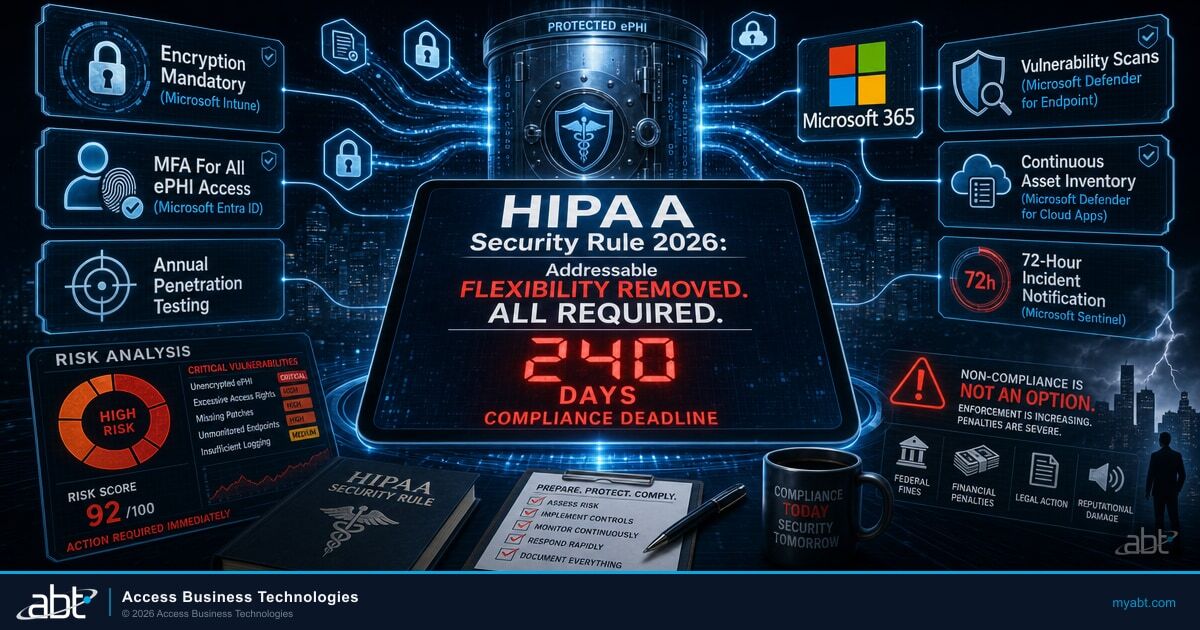
HHS published a proposed overhaul of the HIPAA Security Rule on January 6, 2025, the biggest change to ePHI protection in two decades. The Notice of Proposed Rulemaking sits at 90 FR 800, and HHS Office for Civil Rights (OCR) has signaled a 2026 final-rule target. When the rule finalizes, covered entities and business associates get 240 days from publication to comply. Most healthcare practices are not ready.
The Security Rule has not been substantively updated since 2013. The proposed rule eliminates the longstanding "addressable" flexibility, makes every implementation specification required, and introduces six concrete technical controls that previously sat under the label of "industry best practice." For compliance officers, practice administrators, and IT directors at small to mid-size healthcare organizations, this changes what counts as adequate ePHI protection.
The Proposed Rule and the 240-Day Window
HHS published the NPRM at 90 FR 800 on January 6, 2025 under docket number RIN 0945-AA22. Comments closed March 7, 2025. OCR has not yet issued a final rule, but timing patterns point to a 2026 finalization, with mid-year frequently cited. The exact date is not yet confirmed.
The compliance window is fixed. Once the rule lands, covered entities get 180 days, business associates get an additional 60 to update agreements, for a total of 240 days. That is eight months. For a practice running aging on-premises servers, a partial cloud footprint, and informal device management, eight months is not enough time to assess, procure, implement, document, and train. Work starts before the final rule publishes.
Every healthcare practice already has a risk analysis obligation under the current rule. The proposed rule does not create the duty; it tightens it. Practices doing a thorough annual risk analysis have a head start. Practices with a binder labeled "Risk Analysis" containing a 12-page document from 2019 are in trouble.
Addressable Becomes Required
The current Security Rule (45 CFR Parts 160 and 164) splits implementation specifications into two categories: "required" and "addressable." Required specifications must be implemented as written. Addressable specifications gave covered entities flexibility: implement as written, implement a reasonable equivalent, or document why the specification is not reasonable.
That flexibility was meant to accommodate the range of HIPAA-regulated entities, from solo dental practices to multi-state hospital systems. In practice, it became a loophole. Many practices treated "addressable" as "optional" and skipped controls like encryption at rest, audit logging, and automatic logoff. When breaches occurred, the documentation justifying the skip was usually absent or contradicted by the breach itself.
The flexibility that was supposed to make HIPAA workable for small practices is exactly what OCR is removing, because the same flexibility kept controls from being implemented anywhere.
The proposed rule eliminates the addressable category. Every implementation specification in 45 CFR 164.308, 164.310, 164.312, and 164.316 becomes required. There is no documentation pathway to skip a control.
Why This Matters for Small Healthcare Practices
Compliance officers who have relied on the addressable flexibility to defer technical controls now face a binary choice: implement the control or accept non-compliance. The risk analysis that supported deferral under the current rule will not support it under the proposed rule, and OCR has signaled this clearly in the NPRM preamble and in 2024-2025 enforcement actions.
Six Concrete Changes That Will Hit Your IT Operations
The proposed rule contains dozens of changes, but six new technical requirements will land hardest on day-to-day IT operations. Each moves a control from "best practice" or "addressable" to mandatory, and each maps directly onto Microsoft 365 capabilities most practices already license.
Encryption of ePHI becomes required both at rest and in transit. Under a Microsoft 365 BAA, that means enforcing TLS for all email and file transfer, and confirming every laptop, desktop, and mobile device has full-disk encryption enabled through BitLocker or FileVault managed by Microsoft Intune.
MFA is required for any access to systems containing ePHI: clinicians, billing, contractors, vendors, remote workers. In Microsoft 365, this is Entra ID Conditional Access enforcing MFA on every sign-in to an ePHI app. Phishing-resistant where feasible, FIDO2, Windows Hello for Business, or certificate-based, not SMS one-time codes.
The current rule does not require penetration testing. The proposed rule does, conducted annually by qualified personnel, separate from routine vulnerability scans. Most small practices contract a qualified third-party firm or managed security provider, and the test results become part of the risk analysis documentation.
Vulnerability scanning at least every six months becomes required, with remediation timelines tied to severity. Microsoft Defender for Endpoint runs continuous vulnerability assessment and produces the six-month scan evidence as a side effect. The compliance lift is configuration, not procurement.
A continuously updated inventory of every system, device, and application processing ePHI becomes required, plus current network maps. Microsoft Intune produces the device inventory, Entra ID produces the user and application inventory, and Microsoft Defender for Cloud Apps captures SaaS data flows.
A 72-hour internal notification timeline applies to security incidents, with documented restoration objectives for ePHI systems. This is separate from the existing 60-day notification to affected individuals; the 72-hour clock is internal response. Microsoft Sentinel or Defender XDR provides the detection that makes this feasible.
None of these requires technology that does not exist today. They require configuration, documentation, and ongoing monitoring, the operational discipline practices have historically deprioritized.

See How Your Practice Would Score Against the Proposed Rule
Our security assessment evaluates the same six controls the proposed HIPAA Security Rule will require:
The OCR Settlement Pattern Driving This
The proposed rule did not emerge from theory. Every major settlement OCR has announced in 2024 and 2025 cites the same underlying failure: inadequate risk analysis. The financial stakes are well-documented: the average healthcare breach now costs $7.42 million, the highest of any industry for the 14th consecutive year. The table below summarizes four representative settlements with the same finding, six-figure penalties tied directly to the failure to conduct, document, and act on an accurate risk analysis.
| Settlement | Entity Type | Settlement Amount | Primary Finding |
|---|---|---|---|
| BayCare Medical Group | Physician group | $800,000 | Inadequate risk analysis |
| Assured Imaging | Radiology imaging | $375,000 | Inadequate risk analysis |
| Axia Women's Health | Women's health group | $320,000 | Inadequate risk analysis |
| Star Group (formerly Petersen-Dean) | Healthcare operations | $245,000 | Inadequate risk analysis |
In every case, OCR found that the underlying problem was not a one-time technical failure. The entity could not produce a current, accurate risk analysis identifying the vulnerability and tracking its remediation. The breach was the symptom. The missing risk analysis was the diagnosis. The proposed rule's mandatory technical controls, continuous monitoring, and documentation requirements are a direct response to this pattern. The full enforcement record is available at the HHS Office for Civil Rights enforcement page.
Readiness Checklist for Small Practices
If your practice has 1 to 50 clinicians or providers, the work below is achievable inside the 240-day window, but only if you start before the final rule lands. These are the highest-impact actions that close the gap between where most small practices are today and where the proposed rule will put them.
Confirm an active BAA covers Exchange Online, SharePoint, OneDrive, Teams, and any other Microsoft 365 service touching ePHI. See the Microsoft HIPAA and HITECH BAA documentation.
Deploy Entra ID Conditional Access policies that require MFA on all sign-ins. Move from SMS to phishing-resistant methods (FIDO2, Windows Hello for Business, or certificate-based) where staff and budget allow.
Enable BitLocker on Windows and FileVault on Mac, enforced and reported through Microsoft Intune. Service-side encryption handles ePHI in SharePoint and OneDrive at rest.
Onboard every workstation and server. The continuous inventory satisfies the six-month scan requirement and produces the evidence trail your risk analysis needs.
Pull device inventory from Intune, user and application inventory from Entra ID, and SaaS discovery from Defender for Cloud Apps. Document the data flow in a one-page map and update quarterly.
If you have not contracted a qualified third party, line up procurement now. Scope must cover every system that stores, processes, or transmits ePHI, including cloud applications under BAA.
Define who gets notified when an alert fires from Defender XDR, Sentinel, or your SOC. Document the escalation path. Confirm administrator and compliance officer are reachable inside the 72-hour window.
Replace the static binder with a living document tied to monitoring outputs from Defender, Entra ID, Intune, and Purview. Risk analysis becomes the executive summary on top of operational telemetry.

Continuous Monitoring Is Automated Risk Analysis
Most practices miss this connection. The HIPAA risk analysis obligation is not a once-a-year exercise that produces a PDF. It is a continuous duty to identify, assess, and remediate threats to ePHI confidentiality, integrity, and availability. The proposed rule clarifies what OCR has been saying in settlement after settlement: risk analysis is operational, not documentary.
That reframing changes what the right tool looks like. The right tool is not a consulting engagement that produces a snapshot. It is a monitoring and policy platform that continuously evaluates ePHI systems against a baseline, surfaces drift, and produces evidence of remediation. Microsoft 365 under a BAA, configured with the right policies, is exactly that tool. That is the operating model behind M365 Guardian for Healthcare: configuration, continuous monitoring, and evidence production wrapped around the Microsoft 365 tenant.
Microsoft offers a HIPAA Business Associate Agreement at no additional cost to qualified Microsoft 365 customers. As a Tier-1 Microsoft CSP, ABT configures Entra ID Conditional Access, Microsoft Purview Information Protection and DLP, Defender for Endpoint, and Intune to produce the technical evidence that maps to each of the six new requirements. The same operating model we apply to 750+ financial institutions translates directly to healthcare practices once the BAA is in place.
The Microsoft 365 stack already produces the telemetry. Purview Audit logs every ePHI access event. Defender for Endpoint runs continuous vulnerability assessment. Entra ID logs every sign-in, MFA challenge, and risky activity. Intune produces device inventory and confirms encryption. The work is configuring those tools so the evidence is structured, retained, and surfaced when OCR or your auditors ask.
You probably already license most of the services the proposed rule will require. What you may not have is the configuration, the policies, the documentation, and the operational rhythm that turn licenses into evidence.
For practices that have layered newer Microsoft tools on top of the foundation, the same prerequisites apply. Ambient clinical documentation workflows like Microsoft Dragon Copilot for physician practices operate inside the same Microsoft 365 BAA framework, which means the proposed rule's MFA, encryption, audit logging, and incident notification requirements apply uniformly across older and newer workflows alike.
Key Takeaway
The proposed HIPAA Security Rule does not invent new technology requirements. It codifies what OCR has been demanding in enforcement actions for years: continuous identification, assessment, and remediation of ePHI risk, with evidence. Microsoft 365 under a Business Associate Agreement provides the technical foundation for every one of the six new requirements when configured correctly. The compliance work is configuration and documentation, not procurement.
Get a HIPAA Gap Assessment Before the Final Rule Publishes
Practices that start their gap assessment before publication finish with time to spare. Practices that wait will be scrambling. Our team configures Microsoft 365 to produce the technical evidence OCR will expect, using the same Guardian operating model we run for 750+ regulated organizations. The licenses are the platform; Guardian is the operating discipline that makes the technical evidence OCR expects actually exist.
Frequently Asked Questions
The proposed rule was published in the Federal Register on January 6, 2025 at 90 FR 800. The comment period closed March 7, 2025. HHS OCR has not yet published a final rule. Industry analysts forecast 2026 publication with mid-year frequently cited, but the exact date is not yet confirmed. Once the final rule publishes, covered entities and business associates have 240 days to comply, 180 days for substantive requirements plus 60 days for business associates to update agreements.
Yes. Encryption of ePHI moves from addressable to required, both at rest and in transit. Narrow technical exceptions remain, but documentation for those exceptions tightens significantly. Under a Microsoft 365 BAA, encryption at rest is handled by Microsoft service-side encryption for SharePoint, OneDrive, and Exchange Online, and encryption in transit by TLS. The practice's work is enforcing endpoint encryption through BitLocker and FileVault managed by Microsoft Intune.
The proposed rule requires MFA for all ePHI access and references phishing-resistant authentication as the standard where feasible. SMS-based one-time codes are no longer considered phishing-resistant by NIST or federal cybersecurity guidance. Practices should plan to move to FIDO2 security keys, Windows Hello for Business, or certificate-based authentication. Microsoft Entra ID Conditional Access enforces each of these methods at the application or user-group level.
They address different audiences. The existing Breach Notification Rule requires covered entities to notify affected individuals within 60 days of breach discovery. The proposed 72-hour requirement is internal: the covered entity must identify, document, and begin responding to security incidents within 72 hours of detection, regardless of whether the incident is later confirmed as a reportable breach. Microsoft Sentinel or Defender XDR provides the detection capability that makes 72-hour notification operationally feasible.
The proposed rule does not exempt small practices. Every covered entity, regardless of size, must conduct an annual penetration test of systems that store, process, or transmit ePHI. Scope and depth should be proportionate to the practice's risk profile, but the requirement applies. Most small practices satisfy it by contracting a qualified third-party firm or a managed security provider. Test results become part of the risk analysis documentation.
OCR expects a current asset inventory that enumerates every device, application, and system storing or processing ePHI, with detail on owner, data classification, and security controls. The network map should show ePHI flow between systems, including connections to business associates and cloud applications. Microsoft Intune produces the device inventory, Entra ID produces the user and application inventory, and Microsoft Defender for Cloud Apps surfaces SaaS usage. The practice supplies the data-flow context on top of those sources.