In this article:

Microsoft patched six actively exploited zero-day vulnerabilities in a single Patch Tuesday update this month. Six flaws that attackers were already using against real organizations before the fix existed.
If your IT team found out about these vulnerabilities the same way you did, from a news headline, that tells you something about how your patch management process actually works. For financial institutions operating under regulatory scrutiny from the FFIEC (Federal Financial Institutions Examination Council), NCUA (National Credit Union Administration), OCC (Office of the Comptroller of the Currency), or FTC Safeguards Rule, the gap between "we run Windows Update" and "we manage Microsoft 365 patch compliance" is exactly what your examiner will find.
This article breaks down what happened, why it matters to financial institutions, banks, credit unions, and mortgage lenders alike, and what your IT provider should have done the day those patches dropped.
Short on time? February Patch Tuesday, by the numbers.
Six exploited zero-days in a single Patch Tuesday is the new normal, and AI is narrowing the gap between disclosure and exploit. The Short gives you the month's numbers in under a minute. The long walkthrough below shows what a realistic 7/14/30-day patch SLA looks like for a community bank running Intune + Defender for Endpoint.
Watch the 60-second versionWhat Happened in February 2026
Microsoft's February 2026 Patch Tuesday included 58 total vulnerability fixes. Six of those were zero-days, meaning attackers were already exploiting them in the wild before Microsoft shipped the patch.
Here's what made this month particularly dangerous for financial institutions:
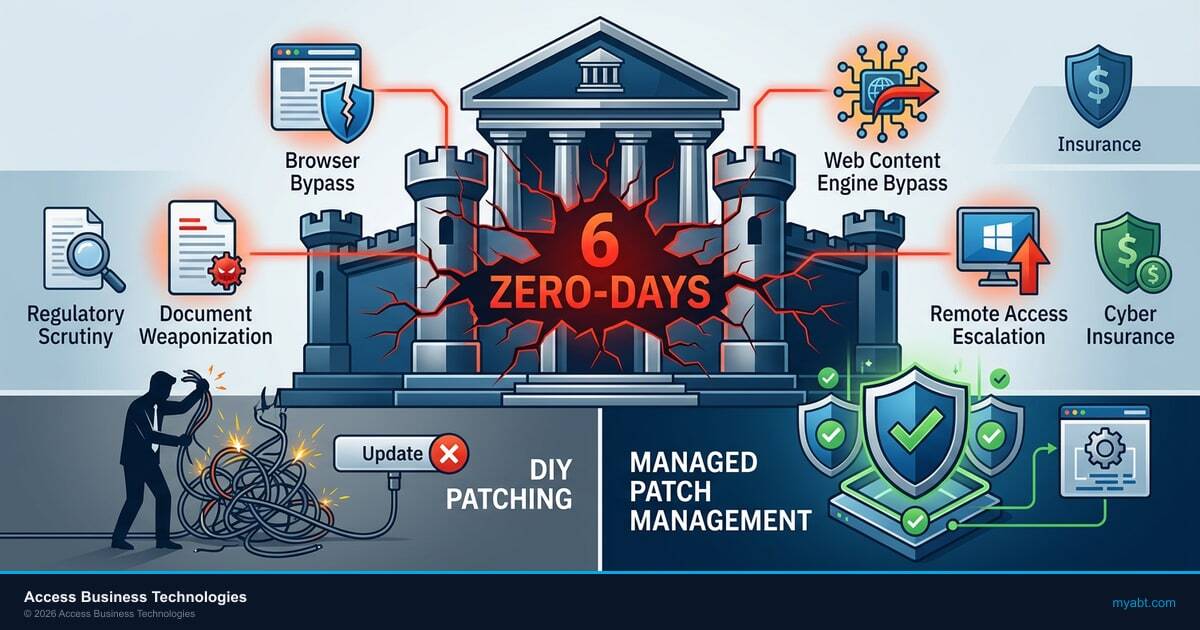
- Browser protection bypass (CVE-2026-21510, severity 8.8/10). Attackers can get past SmartScreen, the built-in layer that prevents users from downloading malicious files. When this protection fails, phishing attacks that would normally get blocked reach the user's desktop.
- Document weaponization (CVE-2026-21514). Opening a rigged document triggers an attack automatically, no macros, no special settings needed. The file looks normal but runs malicious code when opened. Every loan processor, loan officer, or teller who opens email attachments is a potential entry point.
- Web content engine bypass (CVE-2026-21513). Attackers can get past security controls through MSHTML, the rendering engine Windows uses behind the scenes for web content. This affects applications beyond just the web browser.
- Remote access escalation (CVE-2026-21533). An attacker with basic access can promote themselves to full administrator. For institutions using Remote Desktop Protocol (RDP) for vendor access or remote branch management, this is a direct path to network-wide compromise.
These aren't theoretical research findings. Attackers were using all six against real targets before the patches existed. The window between exploitation and patch availability is the window your institution was exposed.
Why This Matters Right Now
The four zero-day exploit paths, browser bypass, document weaponization, content engine exploit, and remote access escalation, map directly to how people work at financial institutions every day. Loan officers open documents, tellers click links, branch staff connect remotely. The attack surface these vulnerabilities target overlaps almost perfectly with daily operations at banks, credit unions, and mortgage lenders.
Zero-Days Won’t Wait for Your Next Maintenance Window
Know your exposure now. ABT’s assessment maps your patching gaps against the vulnerabilities actively targeting financial institutions.
Why This Matters for Financial Institutions
Every financial institution has patch management somewhere in its security program. But most treat it as an IT maintenance task: run the updates, check the box, move on. Six simultaneous zero-days expose why that approach fails.
Regulatory Expectations Are Specific
FFIEC examiners don't just ask "do you patch?" They ask how quickly. They want to see your deployment timeline, your testing process, and your documentation when a patch breaks something. They expect proof that critical patches, the ones for zero-days already being exploited, get different, faster treatment than routine updates.
NCUA examiners evaluate the same areas for credit unions. OCC examiners hold community banks to the same standard. Mortgage lenders and servicers face equivalent expectations under the GLBA (Gramm-Leach-Bliley Act) and the FTC Safeguards Rule, which now requires documented vulnerability management programs. Your IT examination preparation depends on having this documentation ready before the examiner arrives, not two weeks after they send the pre-exam request list.
Cyber Insurance Asks the Same Questions
Every cyber insurance renewal questionnaire now includes patch management questions. How quickly do you deploy critical patches? What is your process for zero-day vulnerabilities? Can you produce patch compliance reports for the last 90 days?
If your IT provider can't generate those reports on demand, your insurance premium reflects that risk. Or worse, your claim gets denied because you couldn't demonstrate timely patching after an incident.
The Attack Surface Matches the Exploit
Look at the four vulnerabilities again. One targets web browsing. One targets document opening. One targets content rendering. One targets remote access.
That's exactly how people work at financial institutions every day. Loan officers and mortgage processors open documents from borrowers. Tellers click links in emails. Branch managers and remote staff connect via Remote Desktop. Whether you're a community bank with 50 employees or a mortgage lender processing a thousand loans a month, the attack surface these zero-days target overlaps almost perfectly with your daily operations.

Patching Is One Layer. Managing Security Is the Whole Stack.
Here's what most institutions miss about a month like this: the patch itself only addresses one layer of the problem.
When attackers can bypass your browser's built-in download protections, your login and device policies, what Microsoft calls Conditional Access, need a backup plan. What other controls prevent a malicious file from reaching the user's machine? Are your device management policies (Intune) set to quarantine machines that fall out of compliance?
When a normal-looking document can trigger an attack just by being opened, your email filtering and data protection rules need to catch threats that look legitimate. Standard attachment blocking won't flag a file that passes every automated check but runs malicious code when a loan officer opens it.
Patching fixes the specific vulnerability. Configuration management prevents the exploit path from working even if the vulnerability existed. Your IT provider should be doing both simultaneously.
If your provider's response to six zero-days was "we pushed the patches," they handled one-third of the problem.
A generic MSP that treats every client the same way runs the patches and moves on. A provider that understands financial services asks: "Now that we know this vulnerability existed, what else in our configuration needs to change?"
What Your IT Provider Should Be Doing When Zero-Days Drop
When a Patch Tuesday includes actively exploited zero-days, a financial services IT provider should be running three parallel workstreams:
This is where the Microsoft stack starts paying for itself. Microsoft Intune handles managed patch deployment and device compliance enforcement, ring-based rollouts to your loan officers, branch staff, and back-office workstations with the testing gates examiners want to see. Microsoft Defender for Endpoint surfaces the vulnerability signals, which machines are exposed to CVE-2026-21510, which are missing the February cumulative update, which ones already show indicators of compromise that match the zero-day attack paths. Guardian MxDR sits on top as the 24x7 triage layer, correlating Defender's signals with Microsoft Sentinel telemetry and Conditional Access events so a six-CVE month becomes a managed incident response instead of a fire drill. Together, Microsoft Intune for patch enforcement, Microsoft Defender for Endpoint for vulnerability signals, and Guardian MxDR for triage and response is the zero-day response stack financial institutions actually need.
1. Managed Patch Deployment With Testing Gates
Not "push updates to all machines immediately." Managed deployment means patches go through a testing ring first. A subset of machines validates the patch doesn't break core banking integrations, loan origination system (LOS) connectivity, or other business-critical applications. Once validated, deployment rolls out to production with monitoring for issues.
For zero-days, this testing window compresses from days to hours. The urgency is real, but so is the risk of a bad patch breaking production systems. Your provider needs a process that handles both.
2. Configuration Review Against the Exploit Path
Every zero-day has an attack path. Browser protection bypass? Review your login and device compliance policies. Document weaponization? Review your email filtering and data loss prevention (DLP) rules. Remote access escalation? Review who has Remote Desktop access and whether those sessions are monitored.
Your provider should be mapping each vulnerability to the specific configuration controls that reduce exposure, independent of the patch itself.
3. Looking for Signs You Were Already Hit
Zero-days mean attackers were active before the patch existed. Your provider should be reviewing logs for signs, what security teams call indicators of compromise (IoCs), that any of these exploits were attempted against your environment during the exposure window. Unusual sign-in patterns, unexpected document activity, and remote access connections from unfamiliar locations all need retrospective review.
If your provider's response to six zero-days was "we pushed the patches," they handled one-third of the problem.

Three Patch Management Questions to Ask Your IT Team
Whether you manage IT in-house or use a managed IT provider for your financial institution, these three questions will tell you where your patch management stands: For more details, see our guide on why generic MSPs fail at security.
- When were the February patches deployed? Not "are we up to date." When. If the answer isn't a specific date within 72 hours of Patch Tuesday for critical zero-days, that's a process gap.
- Did any of the six zero-days require configuration changes beyond the patch? If the answer is a blank stare, your team is treating patching as a standalone task instead of part of a security management process.
- Can you produce a patch compliance report for the last 90 days in under an hour? Your FFIEC examiner will ask for this. Your cyber insurance carrier will ask for this. If the answer is "we'd need a few days to pull that together," that's an audit finding waiting to happen.
Patch management for a financial institution is not the same as managing updates for a law firm or a marketing agency. The regulatory expectations are specific, the reporting requirements are documented, and the consequences of a gap show up in your next examination.
The Bottom Line
Six zero-days in one month isn't an anomaly, it's the new normal. Patching alone handles one layer of the problem. Financial institutions need an IT provider that simultaneously deploys patches, reviews configurations against each exploit path, and hunts for signs of compromise during the exposure window. If your provider's entire response was "we pushed the updates," they handled one-third of the job.
That three-workstream response is what ABT productizes as the M365 Guardian operating model. Most financial institutions run a DIY version, IT manually pushes updates from Windows Update or WSUS, someone checks a dashboard once a week, and zero-day configuration review only happens after a vendor advisory or examiner question prompts it. The M365 Guardian operating model runs the workstreams as a managed program across the same Microsoft Intune, Microsoft Defender, Microsoft Sentinel, and Microsoft Entra ID surface ABT operates for 750+ financial institutions. Patch SLAs are documented, Defender vulnerability signals feed managed remediation queues, Guardian MxDR analysts triage zero-day exposure during the days between disclosure and full deployment, and a community bank or credit union gets the same patch posture a large institution would build in-house, without standing up its own SOC or hiring a vulnerability management team. The DIY version handles February's six zero-days as six fire drills. The Guardian operating model handles them as one Tuesday.
Don't Let the Next Zero-Day Catch You Off Guard
ABT's security assessment evaluates your patch management posture, Conditional Access policies, and compliance configuration, the controls that determine whether a zero-day becomes a breach.
Frequently Asked Questions
A zero-day vulnerability is a software flaw that attackers exploit before the vendor releases a patch. Financial institutions face elevated risk because their daily operations, including opening documents, processing transactions, and using remote access, align directly with common zero-day attack vectors. Regulatory frameworks like FFIEC require documented response procedures for these events.
Actively exploited zero-day patches should deploy within 24 to 72 hours after testing validates no conflicts with core banking systems. FFIEC and NCUA examiners expect documented patch timelines showing critical vulnerabilities receive priority treatment. Routine patches typically follow a 14 to 30 day deployment cycle with standard testing gates.
Patch management installs vendor-provided fixes for known vulnerabilities. Security management includes patching plus configuration review, Conditional Access policy updates, indicator-of-compromise monitoring, and compliance documentation. Financial institutions need both because examiners evaluate the complete security posture, not just whether updates are current.
FFIEC examiners expect documented patch management policies covering deployment timelines, testing procedures, exception handling, and compliance reporting. They review patch compliance history, typically for the previous 90 days, and evaluate whether critical vulnerabilities received prioritized treatment. Missing documentation is an examination finding that affects your cybersecurity maturity rating.
Cyber insurance carriers require evidence of timely patch deployment during underwriting and claims review. Questionnaires ask about patch timelines for critical vulnerabilities, automated deployment capabilities, and compliance reporting. Institutions that cannot demonstrate consistent patch management face higher premiums, coverage limitations, or claim denials after a security incident.
CVE-2026-21510 bypasses Microsoft SmartScreen, the browser-based protection that blocks malicious downloads. CVE-2026-21513 exploits the MSHTML rendering engine to circumvent Mark of the Web protections. Both vulnerabilities allow attackers to deliver payloads that bypass standard endpoint controls. Financial institutions using Conditional Access policies tied to device compliance should review their Intune configuration and DLP rules in response.
Technical Reference
For IT teams and security professionals, technical details on the vulnerabilities and terms discussed in this article.
February 2026 Patch Tuesday Zero-Days
| CVE | Component | CVSS | Impact |
|---|---|---|---|
| CVE-2026-21510 | SmartScreen | 8.8 | Bypass browser download protection; enables phishing payload delivery |
| CVE-2026-21514 | Office OLE | , | Remote code execution via weaponized documents; no macro dependency |
| CVE-2026-21513 | MSHTML | , | Mark of the Web (MotW) bypass via Windows rendering engine |
| CVE-2026-21533 | RDP | , | Privilege escalation from standard user to administrator via Remote Desktop |
Glossary
- Conditional Access
- Microsoft Entra ID (Azure AD) policy framework that controls login requirements based on device compliance, user location, risk level, and application sensitivity.
- CVSS (Common Vulnerability Scoring System)
- Industry-standard severity rating for vulnerabilities, scored 0-10. Scores above 7.0 are "high" severity; above 9.0 are "critical."
- DLP (Data Loss Prevention)
- Policies that detect and prevent sensitive data from leaving the organization via email, file sharing, or other channels. In Microsoft 365, configured through Purview Compliance.
- FFIEC (Federal Financial Institutions Examination Council)
- Interagency body that sets examination standards for banks and credit unions. Their Cybersecurity Assessment Tool (CAT) and IT Examination Handbook define patch management expectations.
- Intune
- Microsoft's endpoint management platform. Controls device compliance policies, application deployment, and security configuration across laptops, phones, and tablets.
- IoC (Indicator of Compromise)
- Evidence that a security breach may have occurred, unusual login locations, unexpected file access patterns, anomalous network traffic.
- MSHTML
- The HTML rendering engine built into Windows, used by Internet Explorer and other applications for displaying web content. Still active even on systems using Edge or Chrome.
- OLE (Object Linking and Embedding)
- Microsoft technology that allows documents to contain embedded objects from other applications. Attackers weaponize OLE to execute code when a victim opens a document.
- RDP (Remote Desktop Protocol)
- Microsoft protocol for remote computer access. Commonly used for vendor support, remote branch management, and work-from-home access at financial institutions.
- SmartScreen
- Microsoft's browser and OS-level protection that warns users before downloading or running potentially malicious files. Part of Microsoft Defender.
When six zero-days ship in a single Patch Tuesday, your patch SLA becomes your exam posture.