In This Article
- What One Team Actually Creates
- Who Can Create a Team in Your Tenant Right Now
- The Guests Who Are Still in Your Directory
- The Private Channels Nobody Is Counting
- Governance Is What Makes a Copilot Rollout Approvable
- Retention Does Not Cover What You Think It Covers
- The Governance Baseline
- Frequently Asked Questions
A loan officer at a community bank starts a team for a commercial deal. She adds the underwriter, the credit analyst, someone from the title company, and outside counsel. The deal closes in nine weeks. Everybody moves on.
Fourteen months later that team is still there. So is the SharePoint site behind it, holding the borrower's financials. So is the title company contact, still a guest account in the directory, still able to sign in. Nobody decided to keep any of it. Nobody decided to delete it either, because deleting it was never anybody's job.
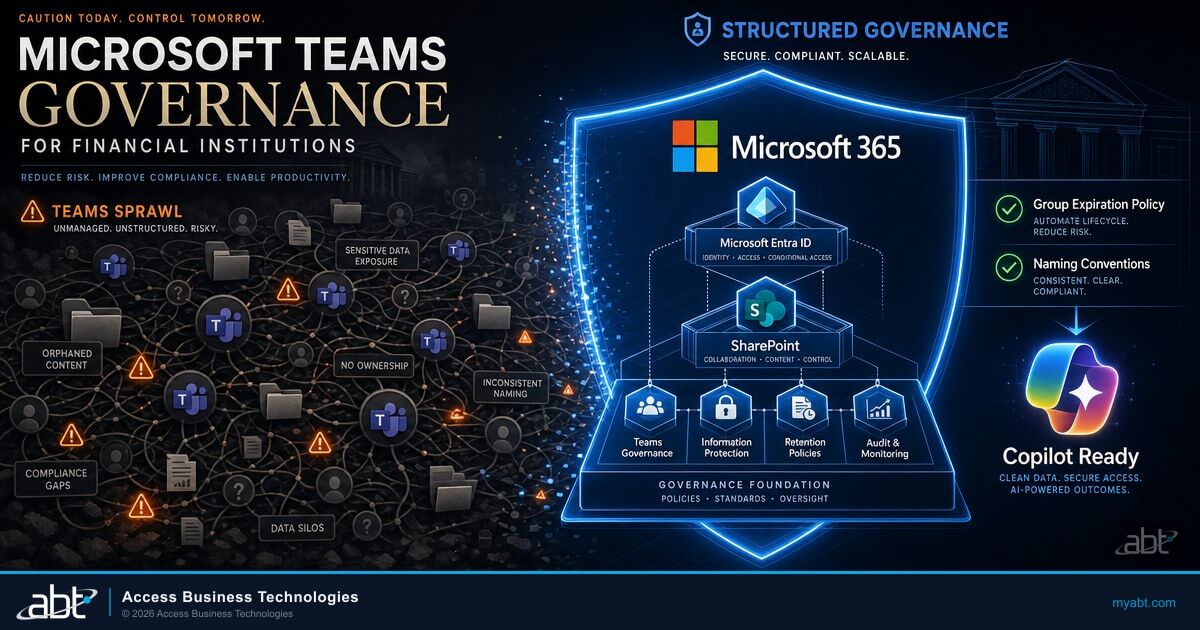
We see this in nearly every tenant we assess. ABT manages Microsoft 365 for more than 750 financial institutions, and the stale deal room is one of the first things that turns up in any engagement. It is not a sign that an institution is badly run. It is the arithmetic of a platform that makes creating a workspace easy and makes retiring one nobody's job. Multiply it by every deal, every branch, and every quarter since you rolled out Microsoft Teams, and you have what people mean by Teams sprawl.
The default is deliberate, and Microsoft says so
Microsoft's guidance on group creation is unambiguous: "By default, all users can create Microsoft 365 groups. This is the recommended approach because it allows users to start collaborating without requiring assistance from IT."
That speed is worth protecting. A lender who has to file a ticket and wait two days to start a deal room will use email attachments instead, and now the borrower's tax returns are in six inboxes. Teams governance keeps the speed and decides in advance what happens to a workspace after the work inside it is finished. Done properly it is also the thing standing between an IT director and the Copilot rollout the chief executive has started asking about, which is the section most readers of this article skip to.
What One Team Actually Creates
The reason Teams sprawl is expensive rather than merely untidy is that a team is not one object. Creating a team provisions a Microsoft 365 group, a SharePoint site, a group mailbox, and the connected services that ride along with the group.
Channels compound it. Microsoft states the behavior plainly: "When you create a new team, private channel, or shared channel in Microsoft Teams, a team site in SharePoint gets automatically created." A private channel does not live inside the parent team's site. It gets a site of its own.
| What a user clicks | What Microsoft 365 provisions | Where the files land |
|---|---|---|
| Create a team | Microsoft 365 group, SharePoint team site, group mailbox, Planner plan, OneNote notebook | The team's SharePoint site |
| Add a standard channel | A folder in the existing team site | The team's SharePoint site |
| Add a private channel | A separate SharePoint site with its own permissions | That channel's own site |
| Add a shared channel | A separate SharePoint site | That channel's own site |
The bottom two rows are where the estate quietly multiplies. A private or shared channel is not a folder inside the team you already know about. It is a separate site with its own permissions, and it is counted separately by anyone auditing where customer information lives.
The ceiling is far higher than anyone plans for: Microsoft raised the private channel cap so that private channels are "no longer limited to 30 channels per team" and instead count against the overall support limit of "up to 1,000 channels per team." The SharePoint estate your examiners ask about is the sum of every one of those decisions, made by people who were trying to close a loan.

Who Can Create a Team in Your Tenant Right Now
When we run a tenant assessment, the answer is almost always everybody. That is the shipped default, and it stays the default until somebody changes it on purpose.
Changing it is a single, tenant-wide switch. You nominate one security group, and only its members can create Microsoft 365 groups. Microsoft is specific about the limit: "Only one group in your organization can be used to control who is able to create Microsoft 365 Groups." You can nest other groups inside it, but there is exactly one door.
Two things surprise people here. The first is scope: restricting group creation is not a Teams setting. Microsoft lists the services it touches as Outlook, SharePoint, Viva Engage, Microsoft Teams, Planner, Power BI (classic), and Project for the web. Turn it on without telling anyone and the first complaint comes from a marketing manager who can no longer create a Planner plan.
The second is licensing. The controls that make Teams governable are Microsoft Entra ID features, not Teams features, and they carry Entra licensing.
| Control | License Microsoft requires | Who has to be covered |
|---|---|---|
| Restrict who can create groups and teams | Microsoft Entra ID P1 or P2 | Assigned to the admin who configures it and to every member allowed to create groups |
| Group naming policy (prefix, suffix, blocked words) | Microsoft Entra ID P1 | Possessed, not necessarily assigned, for each unique user who is a member of one or more groups |
| Group expiration policy | Microsoft Entra ID P1 or P2 | Possessed, not necessarily assigned, for the members of all groups the policy applies to |
Read the third column carefully, because the wording is doing real work. For the naming and expiration policies Microsoft says you must "possess but not necessarily assign" the licenses. For restricting group creation, it says the licenses must be "assigned to them." Those are different obligations, and an institution that budgets for one and gets billed for the other has a conversation with its finance team it did not expect.
Here is the part that decides whether any of this happens this quarter or next year: most institutions reading this already own the license.
Business Premium already includes Entra ID P1
Microsoft's licensing documentation states it directly: "EMS E3, Microsoft 365 E3, and Microsoft 365 Business Premium includes Microsoft Entra ID P1. EMS E5 or Microsoft 365 E5 includes Microsoft Entra ID P2."
Microsoft 365 Business Premium is the plan most community banks, credit unions, and mortgage companies under 300 seats are already on. If that is your tenant, the group creation restriction, the naming policy, and the expiration policy are available to you today at no additional license cost. They are sitting unconfigured, not unavailable. Institutions on Business Standard are the ones who need a licensing conversation before they need a governance conversation.
Which plan you hold, what it already entitles you to, and what a change would cost are the questions ABT answers as a matter of course, because the same Tier-1 Microsoft Cloud Solution Provider sells the license and configures the tenant. Our breakdown of Microsoft Teams licensing for financial institutions maps the tiers if you want to check your own before the conversation.
A naming policy is the cheapest governance you will ever deploy, and it pays off years later during discovery. A prefix or suffix built from fixed strings or from Entra attributes such as Department or Office makes a team name carry its own provenance. The blocked words list comes with two caveats worth knowing before you promise anything to compliance: it caps at 5,000 phrases, and matching is exact rather than substring, so blocking "Payroll" does not block "Payroll2024." Global Administrator and User Administrator are exempt from the policy entirely.
Set the naming policy before the sprawl, not after
Microsoft applies the naming policy to new groups. For groups that already exist, "the policy isn't immediately applied at the time of configuration," and it only bites when somebody edits that group's name. A naming policy turned on today does not retroactively organize the four hundred teams you already have. It stops number four hundred and one from joining them.
The Guests Who Are Still in Your Directory
External collaboration is the part of Teams that earns its keep in lending. Title companies, outside counsel, appraisers, correspondent partners, and auditors all need a place to work with your people, and a guest in a team beats emailing a closing package around.
It is also the setting most institutions believe they have configured and have not, because it is not one setting. Microsoft is explicit that "Guest access in Teams requires configuring other settings in Microsoft 365, including settings in Microsoft Entra ID, Microsoft 365 Groups, and SharePoint." Four control planes have to agree and the most restrictive one wins, so when a team owner reports that a guest cannot see a file, the answer is usually in a plane nobody checked. Expect lag when you change any of it: Microsoft notes that "after a guest is added to a team, it can take up to 12 hours for them to have access." An admin who flips a setting, tests it immediately, sees nothing, and flips it back has not tested anything.
A guest leaving a team does not leave your tenant
This is the single line most worth pinning to your access review procedure. Microsoft's guidance: "Leaving the team doesn't remove the guest account from your organization's directory. Your Microsoft Entra admin must remove the guest account."
The title company contact from that nine-week deal can leave the team, be removed by the team owner, or simply be forgotten, and the account still exists. It still counts as an identity in your tenant. It is still in scope for the examiner who asks who has access to customer information.
Two controls turn that from an open-ended liability into a managed one. The Guest Inviter role narrows who can extend an invitation in the first place, so guest creation stops being an everybody-decision. And Microsoft Entra access reviews can be pointed at guests in groups and teams on a recurring schedule, which converts guest cleanup from a project somebody remembers into a job that runs. Budget for this one before you plan it: access reviews sit a tier above the P1 discussed earlier, in Microsoft Entra ID P2 or Microsoft Entra ID Governance, and Microsoft licenses reviews by everyone in scope rather than by reviewer, so a review of a 75 member group with one owner reviewing counts as 76. Governing guests adds a separate monthly active user billing model that requires an Azure subscription. Standing those up is most of the work, and we walked through the mechanics in Entra ID access reviews for financial institutions and the org-wide sharing posture underneath them in Microsoft 365 guest access for financial institutions.
One practical note for your audit file: adding a guest in Teams is logged in Microsoft Entra as the activity "Added member to group." If your evidence package needs to show when an external party gained access to a deal room, that is the record it comes from.
The Private Channels Nobody Is Counting
Private channels are the feature that makes Teams usable for a bank. Compensation discussions, a problem loan, an internal investigation, and a merger all need a room inside an existing team rather than a whole new team that signals what it is by existing.
They are also the feature that quietly breaks the mental model your administrators are working from. Microsoft states the access boundary directly: "Only people with owner or member permissions in the channel have access to the channel site. People in the parent team and admins don't have access unless they're also channel members."
A team owner can look at a private channel in the member list and still have no way to open the files inside it. That is the design, not a misconfiguration.
Which raises the question an IT director has to answer for the audit committee: if a team owner cannot open these sites and an administrator does not hold access to them by default, how do you know how many exist and which ones still have an outside party attached? Answering it starts with reading the tenant rather than writing a policy. That is where an M365 Guardian engagement begins, on the settings that decide the shape of the estate: who can create groups and teams, who can invite guests, which outside organizations already reach in through shared channels without a guest account ever being created, and whether any lifecycle policy is running at all. You cannot write a baseline for an estate you have not counted.
Creation is controllable, and at two levels. By default, any team owner or team member can create a private channel, and guests cannot. Microsoft notes that "the ability to create private channels can be managed at the team level and at the organization level," with policies controlling which users in the organization are allowed to create them.
There is one more behavior worth writing into your offboarding runbook, because it survives the step most people believe closes it out. Microsoft's guidance on private channel notebooks: "If a user is granted access to a notebook in a private channel through SharePoint, removing the user from the team or private channel doesn't remove the user's access to the notebook."
Why this matters at termination
Removing a departing employee from a team feels like it revokes their access, and for channel conversations it does. Any access granted directly through SharePoint, including a notebook shared into a private channel, is a separate grant that has to be revoked separately. If your departure checklist stops at team membership, it has a gap in it, and that gap is the one that shows up in a post-incident review.
The full sequence, including the SharePoint-level grants that outlive group membership, is in our walkthrough of Microsoft 365 employee offboarding for financial institutions.
Governance Is What Makes a Copilot Rollout Approvable
Every permission decision above used to be housekeeping. Microsoft Copilot turned it into the gating item on the single most visible technology project most of these institutions will run this year.
The upside is why the chief executive is asking. A credit analyst who can ask for the covenant terms across a portfolio instead of opening eleven documents gets time back that goes straight into loan volume. A compliance officer can summarize a policy change across every affected procedure in an afternoon. That case holds. What stalls it is not the technology. It is that nobody can answer what Copilot will surface on day one.
Microsoft's position is that Copilot "only surfaces organizational data to which individual users have at least view permissions," and that it is on the customer to get those permissions right, "including permissions you give to users outside your organization through inter-tenant collaboration solutions, such as shared channels in Microsoft Teams." Copilot does not widen access. It removes the friction that used to hide the access you already granted.
Set that against what the earlier sections established. Anyone can create a team. Guests stay in the directory after they leave one. Private channels carry their own permissions that an administrator does not hold by default. Those three facts were survivable when finding a document meant knowing which site it lived in. They stop being survivable when an employee can ask a question in plain language and get an answer assembled from every file their account can reach.
So the governance work in this article is the AI project's first phase. An institution that does it arrives at the Copilot decision able to say yes. One that skips it arrives at the same decision with nothing to tell the audit committee. We described the same dynamic from the SharePoint side in the retirement of Restricted SharePoint Search. One naming note for anyone comparing Microsoft's documentation against older internal notes: Microsoft 365 Copilot is now named Microsoft Copilot, and Microsoft 365 Copilot Chat is now Microsoft Copilot Chat.
See what M365 Guardian finds in your Teams estate
An M365 Guardian assessment reads the settings that decide how far a Copilot prompt can travel: who can create teams, who can invite guests, which outside organizations reach into your tenant through shared channels, and whether lifecycle and retention policy is running or merely written down.
Retention Does Not Cover What You Think It Covers
Institutions that have done the work of writing a records retention schedule often assume Teams is handled once a Purview retention policy exists. Three details in Microsoft's documentation say otherwise, and each one has cost somebody an awkward answer during an examination.
Teams retention does not cover Teams files. Retention policies for Teams reach chats, channel messages, private channel messages, shared channel messages, and call logs. Microsoft states the exclusion directly: "Emails and files that you use with Teams aren't included in retention policies for Teams. These items have their own retention policies that use the Microsoft 365 Group mailboxes and sites or SharePoint classic and communication sites locations." The loan documents in a deal room are SharePoint objects and need SharePoint coverage.
Teams messages are not covered by your Exchange policy either. Teams messages are stored behind the scenes in hidden mailbox folders, which leads people to assume a mailbox retention policy sweeps them up. It does not: "Teams chats and channel messages aren't included in retention policies that are configured for Exchange user or group mailboxes." Teams needs its own locations selected, explicitly.
The Teams app is not a compliance record. This is the sentence to read twice.
Read this before you certify anything from a screenshot
Microsoft: "Messages visible in the Teams app are not an accurate reflection of whether they're retained or permanently deleted for compliance requirements." A message a user deleted can still be discoverable. A message still on screen can already be scheduled for deletion. The authoritative answer comes from eDiscovery, never from scrolling the channel.
The timing is counterintuitive too, and worth knowing before you promise a regulator a deletion window. When a user deletes a Teams message it disappears from the app immediately, but "the message doesn't go into the SubstrateHolds folder for 21 days." The Exchange timer job that processes retention "typically takes 1-7 days to run." Microsoft works the arithmetic through in its own example and lands on a number that surprises people: a delete-only policy configured at one day "could take 16 days before the message is permanently deleted so that it's no longer returned in eDiscovery searches."
One default deserves a line of its own, because almost nobody sets it deliberately: "By default, Teams call logs are retained indefinitely." If your retention schedule has a disposition rule for telephony metadata, Teams is not following it until you build a policy that says so. The wider picture is in our guides to Microsoft 365 data retention for financial institutions and Microsoft 365 audit log retention.
The Governance Baseline
The decisions here are few. The enforcement is continuous, which is the part institutions underestimate: a baseline nobody holds drifts back within a couple of quarters as owners leave, exceptions get granted, and nobody re-reads the policy that was set in a meeting eighteen months ago.
Start with lifecycle, because it is the control that empties the attic on its own. The Microsoft 365 group expiration policy deletes groups that nobody is using and renews the ones people are actually working in. Microsoft's activity-based renewal counts ordinary use as a vote to keep: uploading a file in SharePoint, reading a group message in Outlook, or simply visiting a Teams channel triggers automatic renewal roughly 35 days before expiry. A team in daily use never expires. The deal room from fourteen months ago does.
The mechanics are worth getting right the first time:

The rest is short. Restrict team creation to a nominated group. If you leave creation open, which is defensible for a smaller institution that wants the speed, understand the trade: the estate grows at whatever rate your staff work, and lifecycle expiration plus recurring access reviews become the only things standing between you and an inventory nobody can enumerate. Turn on a naming policy so a team's name says which department owns it. Narrow guest invitation to the Guest Inviter role. Put recurring access reviews on guests and on the teams that hold customer information. Extend retention coverage to Teams locations and to the SharePoint sites behind them, including the separate sites created by private and shared channels. Make revoking direct SharePoint grants part of offboarding.
For mortgage lenders, mortgage brokers, and other non-bank financial institutions, two of those items are not housekeeping. They map onto the FTC Safeguards Rule.
"Implement and periodically review access controls. Determine who has access to customer information and reconsider on a regular basis whether they still have a legitimate business need for it." And: "Securely dispose of customer information no later than two years after your most recent use of it to serve the customer."
A stale deal room holding a borrower's tax returns, with a title company guest still attached, is a periodic-access-review finding and a disposal-clock question in the same object. Banks and federally insured credit unions are examined under the interagency GLBA guidelines and the FFIEC handbooks rather than the FTC rule, but the question an examiner asks is the same one: who has access to customer information, and how do you know it is still appropriate?
The answer an IT director wants to give is that the platform enforces it. The answer nobody wants to give is that a team owner who left in March was supposed to handle it.
M365 Guardian sets the baseline and holds it
ABT manages Microsoft 365 tenants for more than 750 financial institutions as a Tier-1 Microsoft Cloud Solution Provider. M365 Guardian sets the lifecycle, guest, and retention baseline in your tenant and keeps it there as owners change and exceptions get requested, so Teams stays fast for the people using it and defensible for the people examining it.
Frequently Asked Questions
Everyone. Microsoft's documented default is that all users can create Microsoft 365 groups, and therefore teams, without IT involvement. You can restrict creation to the members of one nominated security group, but that restriction applies tenant-wide and affects every service that relies on groups, including Outlook, SharePoint, Viva Engage, Planner, and Project for the web. It also requires Microsoft Entra ID P1 or P2 licenses assigned to the configuring administrator and to every user allowed to create groups.
Often not. The group creation restriction, the naming policy, and the expiration policy are Microsoft Entra ID features rather than Teams features, and Microsoft states that Microsoft 365 Business Premium and Microsoft 365 E3 include Microsoft Entra ID P1, while Microsoft 365 E5 includes Microsoft Entra ID P2. Institutions already on Business Premium, which is the common plan below 300 seats, can configure all three controls without buying anything further. Institutions on Business Standard need a licensing change first, so confirm the actual plan and seat count in the tenant before planning the work.
No. Microsoft states that leaving a team does not remove the guest account from your organization's directory, and that a Microsoft Entra administrator has to remove the account separately. Guest accounts therefore accumulate long after the engagement that created them ended. Recurring Microsoft Entra access reviews aimed at guests are the practical way to keep that population accurate, and limiting invitations to the Guest Inviter role keeps it from growing faster than you can review it.
No. Retention policies for Teams cover chats, channel messages, private channel messages, shared channel messages, and call logs. Microsoft is explicit that emails and files used with Teams are not included, and that those items need their own retention policies using the Microsoft 365 Group mailboxes and sites location or the SharePoint locations. Teams chats and channel messages are also not covered by retention policies configured for Exchange mailboxes, so the Teams locations must be selected explicitly.
Not through normal access. Each private channel has its own SharePoint site, and Microsoft states that only people with owner or member permissions in the channel can reach that site, with people in the parent team and administrators excluded unless they are channel members themselves. For compliance and investigation, the supported path is eDiscovery: Microsoft delivers compliance copies of private channel messages to the group mailbox, and messages stored in those mailboxes remain searchable with eDiscovery tools.
No. Microsoft states that Copilot only surfaces organizational data to which the individual user has at least view permissions, using the same access controls as other Microsoft 365 services. The practical effect is different from the technical one: Copilot makes existing over-permissioning easy to discover, because a user can ask a question in plain language instead of knowing where a file lives. Microsoft specifically notes this includes permissions granted to people outside your organization through shared channels in Teams, which is why permission cleanup usually precedes a Copilot rollout.