In This Article
- Start With the Tenant, Not the Policy Binder
- What the Cloud Password Policy Actually Enforces
- Two Gaps Between the Written Policy and the Tenant
- Changing a Legacy Expiration Setting Safely
- What the Rules Require, and Which Institutions They Reach
- Writing a Password Policy Your Examiner File Can Defend
- Frequently Asked Questions
Ask an IT director at a bank, a credit union, or a mortgage company what the password policy is, and the answer usually comes from a document. Ninety days. Twelve characters. Three of four character types. No reuse of the last twenty-four. The document is confident, it has a revision history, and somebody signed it.
Then read the tenant. In a large number of Microsoft 365 environments the two do not match, and the mismatch runs in both directions. Settings the document promises are not being enforced because the cloud password policy cannot enforce them. Settings nobody chose are being enforced because a tenant created years ago inherited a default that was never revisited.
That gap costs staff time every week in forced resets and helpdesk calls. It costs security, because rotation pressure pushes people toward patterned passwords they can predict themselves. And it is the kind of finding an examiner writes up, because the institution asserted a control it could not demonstrate. This article shows how to read what your tenant enforces today, what you can change, what you cannot, and how to write the decision down so it holds up.
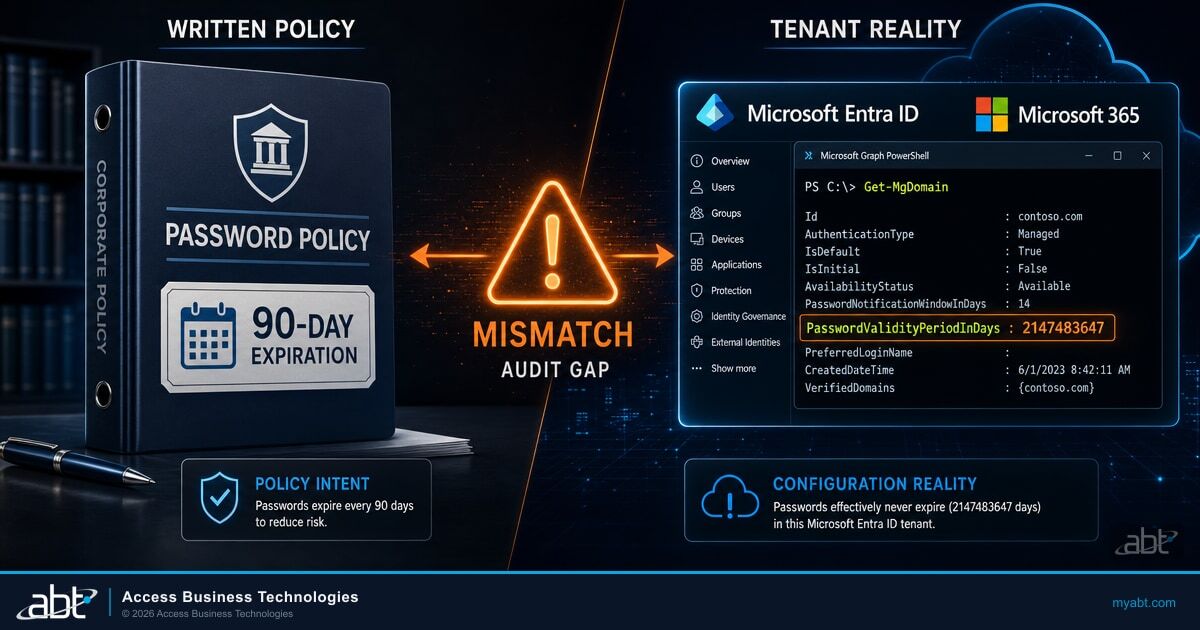
PasswordValidityPeriodInDays shows in Microsoft's published example output for a domain whose passwords do not expire. A tenant still carrying the legacy default shows 90 instead.Start With the Tenant, Not the Policy Binder
Microsoft's current documented default is that passwords do not expire. The Microsoft 365 admin documentation states it plainly: "By default, passwords never expire for your organization." The checkbox in the admin center that controls it is labeled "Set passwords to never expire (recommended)."
There is a second sentence that matters more to a financial institution, and it sits in the Microsoft Entra password policy reference rather than the admin guide. Microsoft writes that the password expiry default is "No expiration", and then adds: "If the tenant was created before 2021, it has a 90 day expiration value by default."
Read those together and the picture is not contradictory, it is chronological. A tenant provisioned recently starts with no expiration. A tenant provisioned before 2021 started with ninety days. Banks, credit unions, and mortgage companies tend to have tenants that predate 2021, which means a meaningful number of them may still be carrying a ninety-day expiration that no one at the institution ever selected.
The word to hold onto is "may". Plenty of institutions changed the value deliberately, and a ninety-day setting can be a considered choice rather than an inherited one. The point is not that your tenant is misconfigured. The point is that the answer lives in the tenant, and it takes about a minute to get it.
Connect with the Microsoft Graph PowerShell module and read the domain object. The two properties that matter are PasswordValidityPeriodInDays and PasswordNotificationWindowInDays:
Connect-MgGraph -Scopes Domain.Read.All
Get-MgDomain | Format-List Id, PasswordValidityPeriodInDays, PasswordNotificationWindowInDays
In the example output Microsoft publishes on its own cmdlet reference page, a domain shows PasswordNotificationWindowInDays : 14 and PasswordValidityPeriodInDays : 2147483647. That second number is the maximum value of a 32-bit integer, and it is what a non-expiring domain shows. A tenant on the legacy setting returns 90.
Run it against every verified domain, not only the primary one. Microsoft's guidance on the admin side notes that a newly added domain, or one converted from federated to managed, keeps the default policy until the organization password policy is re-applied. An institution that acquired a branch network or rebranded a domain can end up with two domains answering the same question differently.

Record the value with the date you read it. That single line, kept alongside the policy document, is what turns a later conversation about password expiration from a debate into a reconciliation.
Scope and as-of date
Everything described here reflects Microsoft's published documentation as of September 2026, for commercial cloud tenants. Microsoft states that the banned-password algorithm and list "can and do change at any time in Azure based on ongoing security analysis and research", and the government cloud carries different lockout defaults. Treat the specific values as current readings rather than fixed constants, and confirm them in your own tenant before writing any of them into a policy document.
What the Cloud Password Policy Actually Enforces
For user accounts created and managed directly in Microsoft Entra ID, the password policy is largely fixed. Microsoft introduces the settings table with the line "Unless noted, you can't change these settings", and the enforced rules are narrower than most written policies assume: a minimum of 8 characters and a maximum of 256, requiring three out of four character types from lowercase, uppercase, numbers, and symbols.
Within that table, expiration is the part an administrator can change. Microsoft's own summary is that "Password expiration is the only part of the policy that can be changed." That sentence describes the cloud-only password policy table specifically, and it is worth reading narrowly, because other password-related controls in Microsoft Entra ID are configurable. Banned password lists and smart lockout values both are, and both are covered below.
The practical consequence is straightforward. An internal policy promising a fourteen-character minimum for cloud-only accounts is describing something the cloud password policy does not enforce on its own. The policy is not wrong to want it. It is describing a control that has to come from somewhere else.

The comparison is worth walking row by row, because each mismatch has a different remedy. Some are closed by an on-premises policy, some by amending the document, and one is simply a value to go and read.
| What the policy document usually says | What the cloud-only policy enforces | Where the difference has to be closed |
|---|---|---|
| Minimum 12 or 14 characters | Minimum 8, maximum 256 | Not enforceable in the cloud-only policy. Source it from an on-premises policy for synchronized accounts, or amend the document to match what is enforced |
| All four character types required | Three of four required | Usually an acceptable difference once documented |
| Cannot reuse the last 24 passwords | Cannot reuse the last one, on a change | Not closable in the cloud-only policy. Document the real behavior |
| Passwords expire every 90 days | Whatever PasswordValidityPeriodInDays returns | Read the tenant, then decide deliberately |
| Dictionary and common passwords blocked | Global banned password list, always applied | Already enforced. Add a custom list for your own terms |
| Accounts lock after repeated failures | Smart lockout, always on | Already enforced. Tune the values with Entra ID P1 |
Two controls that are already doing real work
Microsoft Entra Password Protection applies a global banned password list to every tenant. Microsoft describes it as automatic: the list "is automatically applied to all users in a Microsoft Entra tenant. There's nothing to enable or configure, and can't be disabled." When a password is set, it is normalized, checked with fuzzy matching against the banned terms, and scored. Microsoft's published scoring gives one point per banned term found and one point per remaining character, and a password needs at least five points to be accepted.
A custom banned password list sits on top of it, capped at 1,000 terms, and it is the part worth configuring at a financial institution. The terms that belong there are the institution's own: the brand, the charter name, the town the headquarters sits in, the core banking platform, the mascot on the sign. Microsoft's guidance is to block short base terms rather than variants, because the normalization and fuzzy matching expand each base term automatically.
Smart lockout is the second. Microsoft states that it "is always on for all Microsoft Entra customers", locking an account after 10 failed attempts in the commercial cloud, with an initial lockout duration of 60 seconds that lengthens on repeated failures. It also tracks the last three bad password hashes so that a user retyping the same wrong password does not advance the counter. Microsoft is careful about what it promises, and the article should be too: "Using smart lockout doesn't guarantee that a genuine user is never locked out."
Where synchronized identities change the answer
Everything above describes accounts mastered in the cloud. If your institution synchronizes accounts from on-premises Active Directory, the on-premises policy governs the password by default, and enabling EnforceCloudPasswordPolicyForPasswordSyncedUsers is what applies the Microsoft Entra password policy to those synchronized accounts instead. The cloud expiration setting covered earlier is narrower still: Microsoft documents it for cloud-only users and notes that by default only accounts that are not synchronized through Microsoft Entra Connect can be configured not to expire. Confirm which of these describes your accounts before reading any value as the answer for your whole population.
Two hybrid details are easy to miss and expensive to discover during an incident. First, Microsoft's ordering guidance for lockout is directional: the Microsoft Entra lockout threshold has to be lower than the Active Directory threshold, and the Microsoft Entra lockout duration has to be longer than the Active Directory duration, so that cloud-side lockout absorbs an attack before it reaches on-premises accounts. Second, the hash-tracking behavior that keeps a user from locking themselves out by retyping one wrong password is not available on tenants using pass-through authentication, because the authentication happens on-premises.
The licensing line in Microsoft's password protection documentation catches institutions off guard. Cloud-only users get the global banned password list on Microsoft Entra ID Free, and need Entra ID P1 or P2 only for a custom list. Users synchronized from on-premises Active Directory need P1 or P2 for both, including the global list. Microsoft 365 Business Premium includes Entra ID P1, so a bank or credit union running hybrid identity on that plan holds the entitlement. Holding it is not the same as enforcing it: extending password protection into on-premises Active Directory additionally requires installing the Microsoft Entra Password Protection components on your servers, so the licence and the deployment are two separate things to confirm. An institution on a plan without P1 is synchronizing accounts the banned password list is not reaching at all. Tuning smart lockout values away from the defaults also requires P1 or higher.
Two Gaps Between the Written Policy and the Tenant
Two behaviors in Microsoft Entra ID surprise nearly everyone who reads them for the first time, and both matter to a policy statement an examiner may test.
The first is password history. For accounts managed directly in Microsoft Entra ID, the history depth is one. Microsoft states that a user "can't reuse their last password when they change a password", and that this "can't be modified." A policy asserting that the last twenty-four passwords are blocked is describing something the cloud-only policy does not do.
The second is sharper, because it is the difference between two things users experience as the same action. Changing a password and resetting a forgotten password are not governed identically.
A user who knows their current password changes it. Microsoft Entra ID has the old password available and blocks reuse of it. The last password cannot be used again.
The same user goes through self-service password reset instead. Microsoft states that for cloud-only users, reset "doesn't have the user's old password and can't check for or prevent password reuse." The previous password can be set again.
Read plainly, a user who wants to keep the password they have can route around history by choosing "I forgot my password" rather than changing it. That is not a vulnerability so much as a documented property of how the two paths differ, and it is worth knowing before an institution writes a reuse-prevention claim into a policy or an examination response. It also pairs with a detail worth checking in your own environment: after a smart lockout, Microsoft notes that a user choosing "I forgot my password" during self-service password reset has the lockout duration reset to zero, while choosing "I know my password" leaves the lockout timer running.
None of this argues against self-service password reset, which reduces helpdesk load and gets people working again faster. It argues for describing the control accurately. If your institution has already worked through registered-method requirements for self-service password reset, the same discipline applies here.
Find out what your tenant actually enforces
An identity configuration review reads the settings your policy document claims, compares them to what Microsoft Entra ID is enforcing today, and hands you the differences in writing.
Changing a Legacy Expiration Setting Safely
Suppose the check in the first section returns 90, the institution decides deliberately to stop expiring passwords, and someone flips the setting. There is a documented behavior here that deserves attention before the change, not after.
Microsoft warns that passwords set with -PasswordPolicies DisablePasswordExpiration "still age based on the LastPasswordChangeDateTime attribute." The clock keeps running even while expiration is switched off. The consequence lands when the setting is reversed.
Read this before reversing a never-expire setting
Microsoft's warning is specific: if you change the expiration back to -PasswordPolicies None, every password with a LastPasswordChangeDateTime older than 90 days requires the user to change it at next sign-in, and this "can affect a large number of users." That is a forced password change at sign-in rather than an account lockout, and it can arrive for a large share of staff at once. The remedy is to look at password age across the population before making the change, and to stage the work rather than discovering the volume on a Monday morning.
Before changing either direction, pull the distribution of LastPasswordChangeDateTime across your users and see what you are holding. A tenant where most passwords were set in the last month behaves very differently from one where half the population last changed a password two years ago. The same query tells you something useful on its own, because a set of accounts with very old passwords and no multi-factor registration is worth attention regardless of which expiration setting you land on.
What the Rules Require, and Which Institutions They Reach
Banks, credit unions, and mortgage companies do not answer to the same regulator, and the instruments people cite in this conversation do not apply to the same institutions, and treating them as one stack is how a policy discussion goes wrong. Sort them before using them.
"Verifiers and CSPs SHALL NOT require subscribers to change passwords periodically. However, verifiers SHALL force a change if there is evidence that the authenticator has been compromised."
That is the clearest statement anyone will find, and its audience needs stating once, clearly. The Digital Identity Guidelines are written for federal agency systems. They are not independently binding on an institution merely because that institution is a bank, a credit union, or a mortgage company. They can still bind a specific institution, through a contract that incorporates them, through adoption into the institution's own written policy, or through a program-specific obligation. They are also widely read by the people who write examination material, which is why they carry weight in the conversation even where they do not carry force.
The GLBA safeguards obligations reach different institutions through different regulators, and this is the distinction most often collapsed. The FTC Safeguards Rule at 16 CFR Part 314 states its own scope: it applies to "all financial institutions over which the Federal Trade Commission ('FTC' or 'Commission') has jurisdiction", meaning those not otherwise subject to another regulator's enforcement authority. The examples the rule itself lists include mortgage lenders, mortgage brokers, account servicers, finance companies, and non-federally insured credit unions.
"Implement multi-factor authentication for any individual accessing any information system, unless your Qualified Individual has approved in writing the use of reasonably equivalent or more secure access controls"
That last sentence needs care in both directions. The rule not imposing an interval is not the rule granting permission to abandon one. Regulatory silence is silence. It means the choice sits with the institution and has to be justified on its own terms rather than by pointing at a rule.
For banks and federally insured credit unions the FTC rule is not the operative instrument, and the safeguards program comes through the prudential regulator instead. On the authentication question specifically, the FFIEC issued Authentication and Access to Financial Institution Services and Systems on August 11, 2021, which the OCC transmitted to national banks and federal savings associations in Bulletin 2021-36 and which replaced the FFIEC members' 2005 and 2011 authentication guidance. It is supervisory guidance rather than a rule, and that status describes its legal form rather than its practical weight: its emphasis on the insufficiency of single-factor authentication for high-risk users and high-risk transactions is exactly the kind of expectation examiners carry into a review. Institutions comparing their own posture against it often find the gap is in phishing-resistant multi-factor authentication rather than in password mechanics.
Two federal instruments were examined for this article: 16 CFR Part 314 and the FFIEC's 2021 authentication guidance. Neither imposes a password expiration interval. That is a narrow finding and it should be used narrowly, because other obligations can and do require periodic change. Card-network contractual standards apply where an institution handles cardholder data. Cyber-insurance applications ask direct questions and the answers become commitments. A customer or counterparty contract can specify controls. And the institution's own written policy binds it until the policy is formally changed.
Writing a Password Policy Your Examiner File Can Defend
The goal is not a particular expiration number. Institutions land in different places for defensible reasons. The goal is that the number in the document and the number in the tenant are the same number, and that somebody can explain how it was chosen.
PasswordValidityPeriodInDays for every verified domain, with the date you read it. This is the baseline the rest of the decision sits on.Two settings are worth handling in the same pass, because they cost little and close real gaps. Populate the custom banned password list with your institution's own terms, which requires Entra ID P1 or P2. And review your smart lockout values against Microsoft's ordering guidance if you run hybrid identity, since defaults that were never compared against the on-premises thresholds can leave Active Directory accounts exposed to lockout from cloud-side attacks.
Most institutions do this work once, during an examination cycle, against a single tenant. That is the hardest way to see it. Reading one tenant tells you what your settings are; reading many tells you which of your settings are unusual, and unusual is the thing worth a second look. ABT manages Microsoft 365 tenants for more than 750 banks, credit unions, and mortgage companies, which means the legacy ninety-day value, the domain added after an acquisition that kept its own policy, and the synchronized population sitting outside the banned password list are patterns rather than surprises. What ABT does here is specific and worth stating plainly: read the tenant, document what it enforces against what the policy claims, and hand back the differences with the commands used to find them. Microsoft Entra ID enforces the password policy. The work is knowing what it is enforcing and whether that is what the institution decided.
Password configuration also sits inside a larger identity posture. The controls that matter most against the attacks financial institutions actually see, including password spray, are usually multi-factor authentication coverage and Conditional Access policy rather than the expiration interval. A password review that surfaces a gap in either is worth more than the password finding that started it. If your institution is preparing for an examination, the same reconciliation discipline applies across the whole IT examination readiness file.
The takeaway
Microsoft's current default is that passwords do not expire, and Microsoft labels that choice as recommended in its own admin center. Tenants created before 2021 started at ninety days instead. Neither fact tells you what your tenant is doing right now, and one command does. Read PasswordValidityPeriodInDays, compare it to what your policy document claims, and make the difference a decision somebody chose rather than a default nobody noticed.
One command answers the question. The rest of the tenant takes longer.
ABT manages Microsoft 365 tenants for more than 750 banks, credit unions, and mortgage companies, and hosts the Microsoft Azure environments that run alongside them. An identity configuration review documents what your tenant enforces today and what it would take to match the policy you already published.
Frequently Asked Questions
Connect with the Microsoft Graph PowerShell module using the Domain.Read.All scope and run Get-MgDomain, then read the PasswordValidityPeriodInDays property. In Microsoft's published example output, a domain whose passwords do not expire shows 2147483647, which is the maximum value of a 32-bit integer. A tenant carrying the legacy default shows 90. Check every verified domain rather than only the primary one, because a domain added later or converted from federated to managed can keep a different value.
Two separate points. First, scope: 16 CFR Part 314 states that it applies to financial institutions over which the Federal Trade Commission has jurisdiction, meaning those not otherwise subject to another regulator's enforcement authority, and the examples it lists include mortgage lenders, mortgage brokers, and non-federally insured credit unions. Banks and federally insured credit unions receive their safeguards obligations through their prudential regulator instead. Second, content: section 314.4 does not impose a password expiration interval or a composition rule. It does require multi-factor authentication at 314.4(c)(5) unless the Qualified Individual approves reasonably equivalent or more secure controls in writing.
Not through the cloud-only password policy. For accounts created and managed directly in Microsoft Entra ID, the history depth is one: Microsoft states that a user cannot reuse their last password when they change a password, and that this setting cannot be modified. A forgotten-password reset behaves differently again, because Microsoft states that for cloud-only users the reset path does not have the old password and cannot check for or prevent reuse. If your written policy asserts a 24-password history, reconcile it with what the tenant enforces, or source that control from an on-premises policy for synchronized accounts.
Passwords keep aging while expiration is off. Microsoft warns that passwords set with the DisablePasswordExpiration policy still age based on the LastPasswordChangeDateTime attribute, and that changing the expiration back means every password older than 90 days requires the user to change it at next sign-in, which can affect a large number of users. This is a forced password change at sign-in rather than an account lockout. Pull the distribution of LastPasswordChangeDateTime across your population before making the change so you know the volume in advance.
It depends on how the account is mastered. Microsoft's licensing table gives cloud-only users the global banned password list on Microsoft Entra ID Free, with P1 or P2 required for a custom banned password list. Users synchronized from on-premises Active Directory need P1 or P2 for both, including the global list. Customizing smart lockout values away from the defaults also requires P1 or higher. Microsoft 365 Business Premium includes Entra ID P1, so many financial institutions already hold the entitlement and have not configured the custom list.
NIST Special Publication 800-63B-4, published July 2025, states at section 3.1.1.2 that verifiers and credential service providers shall not require subscribers to change passwords periodically, and shall force a change where there is evidence of compromise. The Digital Identity Guidelines are written for federal agency systems, so they are not independently binding on an institution merely because it is a bank, a credit union, or a mortgage company. They can bind a particular institution through a contract that incorporates them, through adoption into its own written policy, or through a program-specific obligation. Treat the guidance as influential and widely read rather than as a rule that decides the question for you.