In This Article
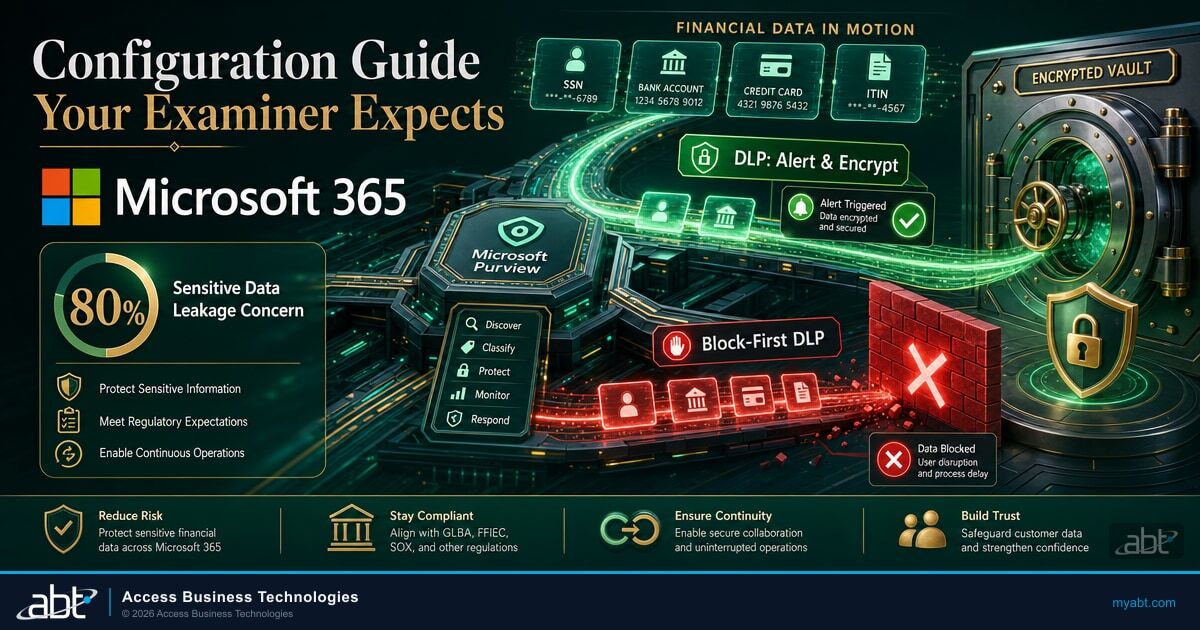
ABT's Guardian operating model configures Microsoft Purview to alert on SSN, bank account numbers, credit cards, and ITIN. Purview never blocks the email. That design decision is intentional, and it is the second half of a two-part strategy. The first part? Sensitive data should never be riding on email in the first place. Mature financial institutions move sensitive files through secure portals like ABT's DocumentGuardian. DLP is the safety net for when someone falls back to email under pressure.
Data loss prevention in financial services is not the same problem as DLP in retail or healthcare. Your employees need to exchange sensitive data with regulators, examiners, counterparties, and customers as part of normal business operations. The right answer is to move that exchange through a secure portal like DocumentGuardian, where the data never sits in an email inbox and every transfer is logged and auditable. But people fall back to email under pressure: a loan officer on deadline, a compliance officer in front of an examiner, a processor at end of day. That is where DLP earns its role as the safety net that catches sensitive data when it accidentally lands in email, alerts your security team, and encrypts the attachment so business keeps moving. DLP for financial institutions needs to detect, alert, and encrypt, not detect and block.
This article is the configuration guide for all financial services verticals on FFIEC-regulated Microsoft 365 environments. For the broader examiner context, see FFIEC CAT's retirement and the shift to NIST CSF 2.0.
Why Alert, Not Block
The blocking DLP model works for industries where sensitive data should never leave the perimeter. Financial services isn't one of those industries. Your business requires controlled sharing of sensitive data across organizational boundaries. The question isn't whether sensitive data leaves your environment. It's whether you know when it does, where it goes, and whether it's encrypted in transit.
The Guardian DLP philosophy is alert-and-encrypt, not block-and-frustrate. ABT configures Purview to detect every instance of sensitive data movement, alert the security team, and auto-encrypt the content to protect it in transit. If a loan officer emails a file containing an SSN, Purview does not stop the email. It encrypts the attachment, logs the event, and alerts the security team. The loan officer's workflow continues. The sensitive data is protected. The compliance team has evidence.
A compliance officer tries to email member account data to an NCUA examiner during an audit. The DLP policy blocks the email. The officer calls IT. IT creates an exception. The exception takes 45 minutes to process. The examiner waits. The officer is now motivated to find a workaround for next time, which usually means a personal email account or a USB drive.
The same compliance officer sends the same email. Purview detects the sensitive data, encrypts the attachment automatically, and alerts the security team. The email reaches the examiner in seconds. The security team reviews the alert during their normal review cadence. No workflow disruption. No workaround incentive. Full audit trail preserved.
This distinction matters because DLP systems that block legitimate communication train employees to circumvent security controls. Shadow IT adoption increases when security tools create friction in daily work. A 2024 Gartner study found that employees at organizations with overly restrictive security policies were 3x more likely to use unsanctioned file-sharing tools. The alert-and-encrypt model removes the friction that drives workarounds while maintaining the visibility and evidence your compliance program requires.
A DLP system that blocks legitimate business communication trains employees to find workarounds. Those workarounds are always less secure than the original email.
The GLBA Safeguards Rule (16 CFR Section 314.4) requires financial institutions to protect against unauthorized access to customer information. It does not require blocking all outbound communication containing that information. The regulatory expectation is controls, monitoring, and evidence. Alert-and-encrypt satisfies all three requirements while keeping your operations running.

Guardian's Two-Stack DLP Architecture
Guardian deploys two parallel DLP stacks, each serving a different purpose. Understanding both is essential for your examiner conversation and for configuring policies that match your institution's risk tolerance.
Stack 1: Alert-Only
Covers: Exchange, SharePoint, OneDrive, Teams
Action: Detect and alert (no modification to content)
Purpose: Visibility into all sensitive data movement
Detects: SSN, bank account numbers, credit card numbers, ITIN
Uses: Microsoft's 4 built-in GLBA sensitive information types
Stack 2: Auto-Encrypt
Covers: Exchange only (outbound email)
Action: Detect, alert, and auto-encrypt attachments
Purpose: Protect sensitive data leaving the organization
Detects: Same 4 GLBA types as Stack 1
Encryption: Applied automatically to outbound attachments
The two-stack design is intentional. Stack 1 provides complete visibility across all M365 workloads. Every time sensitive data moves within your environment, whether an employee shares a file in Teams or uploads a document to SharePoint, the security team knows. Stack 2 adds encryption specifically at the outbound email boundary, where data is most likely to leave your organization's control. This layered approach means your internal collaboration stays frictionless while outbound communication gets the additional protection of automatic encryption.
Both stacks feed into the same alert pipeline. Your security operations team reviews DLP alerts in the Microsoft Defender XDR portal, where DLP events are correlated with other security signals. If the same user triggers a DLP alert and also has a risky sign-in from an unusual location, Defender surfaces that as a correlated incident. This integration turns DLP from a standalone tool into part of your broader threat detection posture.
Why ABT Uses Microsoft-Maintained Detection Patterns
ABT configures Purview with Microsoft's 4 built-in GLBA sensitive information types rather than custom patterns. The reason is maintenance. Microsoft's security team actively updates these detection patterns: new credit card number ranges, refined checksum validation, improved contextual keyword matching, and updated confidence scoring. Your institution gets the latest detection logic automatically without anyone touching the policy. Custom SITs are static. You write a regex once, and it stays exactly as you wrote it until someone manually updates it. Over time they drift, produce false positives on patterns that have changed, and miss new formats entirely. Microsoft-maintained patterns avoid that maintenance burden and keep your detection current. If your institution needs to detect data types beyond the GLBA four, like internal loan numbers or member IDs, ABT can add custom SITs as a targeted extension.

The Four GLBA Sensitive Information Types
The Purview DLP policies ABT configures as part of the Guardian operating model rely on Microsoft's four built-in GLBA sensitive information types (SITs). These are not custom regex patterns. They are Microsoft-maintained detection engines with built-in validation logic, checksum verification, and contextual keyword matching. Understanding what each SIT detects and how it validates matches is important for both configuration and for explaining your DLP coverage to an examiner.
| Sensitive Info Type | Pattern | Validation | FI Use Case |
|---|---|---|---|
| U.S. Social Security Number (SSN) | 9-digit number (XXX-XX-XXXX format or unformatted) | Luhn-like range validation, contextual keywords ("social security," "SSN," "SSNID") | Loan applications, account opening, regulatory filings |
| U.S. Bank Account Number | 8-17 digit number | Contextual keywords ("account number," "checking," "savings," "routing") | Wire transfers, ACH processing, account statements |
| Credit Card Number | 13-19 digit number (Visa, Mastercard, Amex, Discover patterns) | Luhn checksum validation, issuer prefix matching | Payment processing, dispute documentation, fraud alerts |
| U.S. Individual Taxpayer Identification Number (ITIN) | 9-digit number starting with 9, 4th digit is 7 or 8 (9XX-7X-XXXX or 9XX-8X-XXXX) | Format validation, contextual keywords ("ITIN," "taxpayer") | Mortgage processing, tax document handling, account compliance |
These four types cover the data categories that financial institution examiners focus on during GLBA compliance reviews. SSN and ITIN detection protects member and borrower identity data. Bank account number detection covers the financial account data that GLBA specifically targets. Credit card detection addresses PCI DSS requirements that overlap with GLBA obligations for institutions that process card transactions.
Microsoft's built-in SITs use confidence levels (low, medium, high) based on how many corroborating signals are present. A 9-digit number alone is low confidence. A 9-digit number next to the words "Social Security Number" in an email with a subject line containing "loan application" is high confidence. ABT configures the Purview DLP policies to alert on medium and high confidence matches, which reduces false positives without missing genuine sensitive data. Your examiner will want to know this threshold, because it demonstrates that your DLP is not just pattern-matching numbers but intelligently identifying sensitive data in context.
Why Microsoft-Maintained Beats Custom-Built
Microsoft's built-in GLBA types are tested against millions of documents, updated by Microsoft's security team when formats change, and recognized by examiners as industry-standard detection patterns. Custom SITs require ongoing tuning, documentation, and validation that most IT teams deprioritize after the initial deployment. For the four data categories that matter most under GLBA, the built-in types are more reliable and more current than anything custom-built. If your institution needs to detect additional data types beyond these four (like internal loan numbers or member IDs), ABT can configure custom SITs as a targeted addition to the standard baseline.
The Configuration Guide Your Examiner Expects
When your examiner asks about DLP, they want to see documented policies, evidence of monitoring, and a clear explanation of what happens when sensitive data is detected. Here's the configuration framework that maps to GLBA Safeguards Rule requirements.
Configure DLP policies to detect the 4 built-in GLBA types: U.S. Social Security Number, U.S. Bank Account Number, Credit Card Number, and U.S. Individual Taxpayer Identification Number (ITIN). These are Microsoft's built-in SITs, not custom definitions. In the Purview compliance portal, create a new DLP policy and select the "U.S. Financial Data" template as your starting point. This template pre-selects the relevant SITs with appropriate confidence thresholds. Scope the policy to Exchange, SharePoint, OneDrive, and Teams. Set the instance count threshold to 1 or more for high confidence matches and 5 or more for medium confidence to balance detection sensitivity with false positive management.
DLP policies covering Exchange, SharePoint, OneDrive, and Teams should detect and alert without blocking. Internal sharing of sensitive data is necessary for business operations. The alert provides the audit trail your examiner needs. In the policy action settings, select "Send notifications" and "Generate incident reports" without enabling "Restrict access" or "Block content." Configure user notifications so that employees see a policy tip in Outlook or Teams when they share content containing sensitive data. This awareness step builds a security-conscious culture without disrupting operations.
When sensitive data leaves your organization via email, automatic encryption protects it in transit. Create a separate DLP policy scoped to Exchange only, with the action set to "Encrypt email messages" using Microsoft Purview Message Encryption. This applies the Encrypt-Only template to outbound messages containing GLBA data types. The encryption is transparent to the sender. The recipient accesses the content through the OME portal with a one-time passcode. If the email is intercepted or sent to the wrong recipient, the content remains protected.
Guardian's "Internal Use Only" label with encryption gives users a manual option to protect documents beyond what DLP auto-detects. This is a single label, not a taxonomy. Users choose to apply it from the Sensitivity button in Word, Excel, PowerPoint, and Outlook. When applied, the label encrypts the document so only members of your organization can open it. This protects content that DLP might not catch, like proprietary strategic documents, board meeting minutes, or internal audit reports that don't contain the four GLBA data types but still need protection.
DLP alerts need a documented review process. Define who receives alerts (your security team, compliance officer, or CISO), how quickly they're reviewed (within 24 hours for high-severity, within 72 hours for low-severity), and what constitutes an incident versus a normal business operation. Configure DLP alerts to route to the Microsoft Defender XDR portal, where they correlate with other security signals. Set up email notifications for high-severity alerts so the right people are notified immediately. Document this review process in your information security policy. Your examiner will ask about the review cadence, not just the policy existence.
These five steps form a complete configuration that maps directly to what your examiner evaluates. Steps 1 through 3 are the technical controls. Step 4 gives users a manual option for content that falls outside the four GLBA data types. Step 5 ensures the alerts actually reach someone who reviews them on a documented schedule.
Start in Test Mode
Microsoft recommends starting DLP policies in "Test with notifications" mode before enforcing. This lets you see how often policies trigger without affecting user workflows. Run in test mode for 2-4 weeks, review the match volume, identify any false positives, and adjust confidence thresholds before switching to enforcement. This approach prevents the most common DLP deployment failure: policies that generate so many false alerts that the security team starts ignoring them.
DLP for Microsoft 365 Copilot
Purview DLP for Microsoft 365 Copilot is now generally available. This is relevant for every financial institution that has deployed or plans to deploy Copilot. Without DLP controls, Copilot can surface sensitive data from across your tenant in chat responses, including data the user technically has access to but would never normally encounter in their daily workflow.
The DLP controls for Copilot work in two ways. First, you can configure DLP policies to block Copilot from processing files and emails with specific sensitivity labels. If a document is labeled "Internal Use Only" with encryption, Copilot will not reference that document in its responses. Second, the new DLP for Copilot web search control (in public preview as of March 2026) lets you selectively block Copilot prompts containing sensitive information types from being sent to external web search. This targets only the web-grounding path. Copilot can still respond using your organization's M365 data when a prompt contains an SSN. It just won't send that SSN to Bing as part of a web search.
A branch manager asks Copilot: "Find all recent communications about account 4532-XXXX." Copilot searches across Exchange, SharePoint, and Teams, surfacing emails from the compliance team's internal investigation. The branch manager now sees data they were never intended to see. No alert is generated.
The same query runs, but Copilot skips documents with sensitivity labels that the DLP policy covers. The compliance team's investigation files remain invisible. If the prompt itself contains a full SSN, the web search DLP control prevents it from reaching external search. An alert is logged for the security team's review.
For financial institutions, Copilot DLP is not optional. It's the control that prevents AI from becoming an inadvertent insider threat by surfacing sensitive data across permission boundaries that were technically open but practically obscure. Guardian's governance framework includes Copilot DLP configuration as part of the standard deployment for institutions that license Copilot Business.
Microsoft also announced DLP for Copilot Studio at RSA 2026. This brings inline, real-time DLP controls to custom agents built in Copilot Studio. If your institution builds agents that access customer data, DLP policies now detect sensitive information types in prompts sent to those agents and block the prompts before the agent processes them. This is a significant control for the emerging agent ecosystem in financial services. For the governance angle on what happens when CISOs connect external AI to the same tenant, see our third-party AI decision framework.
The Purview Integrations Arriving in 2026
Microsoft's Purview DLP roadmap for 2026 addresses the biggest gap in current M365 DLP: unmanaged devices and network-level data flows. The announcements from RSA 2026 (March 2026) and the April 2026 roadmap introduce integrations that extend DLP coverage well beyond the traditional M365 perimeter.
Purview DLP integrates with network-level security gateways SASE to detect and block sensitive data in transit over the network. This covers sensitive data sent in prompts and responses to unmanaged AI apps via HTTP/HTTPS. The integration uses the same classifiers, SITs, and sensitivity labels as your existing Purview policies. Rolling out mid-April through mid-May 2026 in preview, with GA expected late October 2026.
Purview now integrates directly into secure enterprise browsers and Island Extension. Island enforces Purview data security controls as users type, paste, upload, or share information in the browser. These controls use the same Purview classifiers and DLP policies that cover your M365 estate. This enables consistent protection for data shared with AI and web applications even on devices not onboarded to Purview endpoint DLP.
The Devices dashboard in Purview DLP now confirms policies have synced to devices within 30 minutes of policy application. The dashboard also shows which user profile is logged into each device. This reduces the window between policy creation and enforcement from hours to minutes.
The Data Security Posture Agent now detects exposed credentials, private keys, and API tokens across your M365 environment. This is separate from DLP but feeds into the same Purview dashboard. For financial institutions, this means automated detection of passwords or API keys accidentally stored in SharePoint documents or Teams chats.
DLP event data is now accessible through the Microsoft Graph API. This simplifies SIEM integration and enables custom automation workflows. If your institution uses a third-party SIEM or SOAR platform, DLP events can now flow directly into those systems without manual export.
For financial institutions with remote workers, branch offices, and BYOD policies, the Prisma Access and secure enterprise browsers integrations close the coverage gap that examiners have been flagging: "Your DLP covers managed devices. What about the laptop your employee uses at home?" With these integrations, DLP policies follow the data across managed browsers, unmanaged browsers, network traffic, and endpoint file systems. The policy is the same. The classifiers are the same. The coverage is now continuous.
Microsoft launched the Purview Security Store within the Purview portal at RSA 2026. Administrators can now discover and deploy Purview DLP integrations from partners including Palo Alto Networks, Island, Netskope, and iBoss directly from the Purview console. This centralized deployment model means your security team doesn't need to manage separate configuration interfaces for each integration.
One additional note for institutions considering these integrations: the network-level security gateways Access and secure enterprise browsers integrations require Purview pay-as-you-go billing to be enabled on your tenant. This is a separate billing configuration from your standard M365 licensing. Your ABT account team can walk you through the setup and cost implications before enabling.
Your Examiner Documentation Checklist
When your NCUA, OCC, or FDIC examiner asks about data loss prevention, they aren't looking at your Purview console. They're reading your documentation. The configuration matters, but the evidence package is what gets reviewed. Here's what your DLP documentation binder should contain.
A narrative document (not a screenshot) that describes your DLP philosophy, what data types are covered, what actions are taken when sensitive data is detected, and how the DLP controls map to GLBA Safeguards Rule sections. This is the document your examiner reads first.
Export your DLP policies from Purview to show the specific rules, conditions, actions, and scopes. This proves the written policy matches the technical implementation. Include the policy name, locations covered, SITs used, confidence levels, and action settings.
A record showing that DLP alerts are actually reviewed. Include the reviewer's name, review date, alert description, disposition (legitimate business use vs. incident), and any follow-up actions taken. A policy that generates alerts no one reads is worse than no policy at all.
A matrix connecting each DLP policy to the specific GLBA Safeguards Rule subsection it satisfies. ABT's Guardian operating model maps 62 of its 80 configured policies to GLBA subsections (78% coverage), including every DLP policy. This mapping shows your examiner the direct line from regulatory requirement to technical control.
Documentation for what happens when a DLP alert reveals an actual data loss event. Who is notified? What is the escalation path? How is the affected data contained? What are the notification obligations under your state's breach notification law? Your examiner will test this with a scenario question.
The documentation package is as important as the configuration itself. Examiners review documentation, not dashboards. An institution with perfectly configured DLP policies but no written policy document, no alert review log, and no GLBA control mapping will receive a finding. The five items above give your compliance team a complete evidence binder that answers every question before the examiner asks it.
The GLBA Safeguards Rule (16 CFR Section 314.4) requires financial institutions to implement controls that protect against the unauthorized access to or use of customer information. DLP is the direct implementation of this requirement for electronic communications. 62 of Guardian's 80 policies are formally mapped to GLBA Safeguards Rule subsections (78% coverage), including every DLP policy. Each policy includes a per-policy relevance explanation, automation classification, and evidence description. This mapping gives your examiner the compliance evidence trail from regulatory requirement to technical control to monitoring evidence.
Is Your DLP Configuration Ready for the Examiner's Questions?
Mapping each DLP policy to a GLBA Safeguards subsection is what turns "we have DLP" into an evidence trail your examiner can follow from requirement to control to monitoring proof. A security assessment shows where your Microsoft 365 configuration already holds up, and where the gaps are, before the exam date is on the calendar.
Frequently Asked Questions
Financial institutions routinely share sensitive data with regulators, examiners, counterparties, and customers as part of normal operations. Blocking this data flow would create operational paralysis. Alert-only provides visibility and the compliance audit trail without disrupting legitimate business communication. Outbound email gets auto-encryption as additional protection.
ABT's standard deployment uses Microsoft's 4 built-in GLBA sensitive information types: SSN, bank account number, credit card number, and ITIN. These are Microsoft-maintained detection patterns that update automatically when formats change, so your institution always has current detection logic without manual maintenance. If you need to detect additional data types beyond the GLBA four (like internal loan numbers or member IDs), ABT can add custom SITs as a targeted extension to the standard baseline.
Purview DLP for M365 Copilot is now generally available. You can configure DLP policies to block Copilot from processing files and emails with specific sensitivity labels. The new web search DLP control (in preview) selectively blocks Copilot prompts containing sensitive information types from external web search while still allowing Copilot to respond using permitted M365 enterprise data. DLP for Copilot Studio (also in preview) extends these controls to custom agents.
Microsoft's 2026 Purview roadmap includes network-level security gateways Access integration (network-level DLP) and secure enterprise browsers integration (browser-level DLP), both in preview as of March 2026. These extend policy enforcement to unmanaged and personal devices, closing the coverage gap that financial institution examiners have been flagging for remote and BYOD scenarios. Both integrations use the same Purview classifiers and DLP policies as your existing M365 deployment.
62 of Guardian's 80 policies are formally mapped to GLBA Safeguards Rule (16 CFR Section 314.4) subsections (78% coverage). Every DLP policy includes a per-policy relevance explanation, automation classification, and evidence description. This mapping connects your technical DLP controls directly to the regulatory requirements your examiner evaluates, providing the compliance evidence trail from requirement to implementation to monitoring.
As of the March 2026 Purview update, DLP policies sync to endpoint devices within 30 minutes of policy application, down from the previous 2-hour SLA. The Purview Devices dashboard now confirms sync status and shows which user profile is logged into each device, giving administrators real-time visibility into policy coverage.
Is Your DLP Configuration Examiner-Ready?
ABT's DLP assessment covers:
- GLBA-aligned DLP policy review across all M365 workloads
- Alert routing and review cadence documentation
- Copilot DLP configuration for AI governance
- Examiner-ready evidence package preparation