In This Article
- GLBA Safeguards Rule: The IT Requirements Your Examiner Will Check
- OCC Examination: How Examiners Evaluate Your M365 Environment
- Critical M365 Configurations for GLBA Compliance
- The Compliance Trifecta: DLP, Retention, and eDiscovery
- Common Compliance Gaps ABT Finds in Bank M365 Tenants
- Building an Examination-Ready M365 Environment
- How ABT Operationalizes M365 Controls for GLBA and OCC Examiners
- Frequently Asked Questions

Your community bank runs on Microsoft 365. Email, SharePoint, Teams, OneDrive. Every loan document, every board packet, every customer communication flows through it. But when OCC or FDIC examiners walk through your door, they are not asking whether you have Microsoft 365. They want to know how you configured it. And that distinction is where most community banks get caught.
GLBA compliance is not about buying the right software. It is about configuring the software you already own to meet specific regulatory requirements. The Gramm-Leach-Bliley Act Safeguards Rule, codified in 16 CFR Part 314, mandates that financial institutions implement administrative, technical, and physical controls to protect nonpublic personal information (NPI). For national banks, the OCC enforces these same standards through 12 CFR Part 30, Appendix B.
This article maps the specific Microsoft 365 configurations your community bank needs to satisfy GLBA and OCC examination requirements. No theory. No generalities. Configuration by configuration.
OCC Bulletin 2023-17 says your autonomous agent is a vendor. Your examiner will ask for the documented controls.
An acceptable use policy for autonomous AI is now a compliance control, not an internal nice-to-have. The Short maps five agent controls directly to OCC Bulletin 2023-17 third-party risk management, and the article shows the GLBA and OCC playbook ABT uses to document them before the next exam.
Watch the 60-second versionGLBA Safeguards Rule: The IT Requirements Your Examiner Will Check
The 2021 amendments to the FTC Safeguards Rule (effective June 2023) turned vague guidance into prescriptive requirements. While the FTC directly oversees non-bank financial institutions, banking regulators like the OCC and FDIC enforce equivalent standards through the Interagency Guidelines Establishing Information Security Standards.
Here is what your bank's information security program must include, and where Microsoft 365 fits into each requirement:
Designated Qualified Individual
Someone must own your information security program. This person reports directly to the board at least annually on the program's status, risk assessments, and material incidents. If your bank outsources this role, the board remains responsible for oversight.
Written Risk Assessments
Annual risk assessments must identify internal and external threats to customer NPI across every system that stores, processes, or transmits it. Your Microsoft 365 tenant is one of those systems. The risk assessment needs to cover email (Exchange Online), file storage (SharePoint/OneDrive), collaboration (Teams), and identity management (Entra ID).
Access Controls and MFA
The Safeguards Rule requires multi-factor authentication for all users accessing customer information systems. Not just remote users. Not just admins. All users. In Microsoft 365 terms, that means Conditional Access policies enforcing MFA across every app and every sign-in scenario.
Encryption
NPI must be encrypted both in transit and at rest. Microsoft 365 handles transport encryption by default (TLS 1.2+), but at-rest encryption requires proper configuration of sensitivity labels, BitLocker enforcement through Intune, and message encryption policies for outbound email containing sensitive data.
Monitoring and Testing
Annual penetration testing and semi-annual vulnerability assessments are now required. Your Microsoft 365 environment needs continuous monitoring through unified audit logs, sign-in logs, and anomaly detection in Microsoft Defender.
Incident Response and Breach Notification
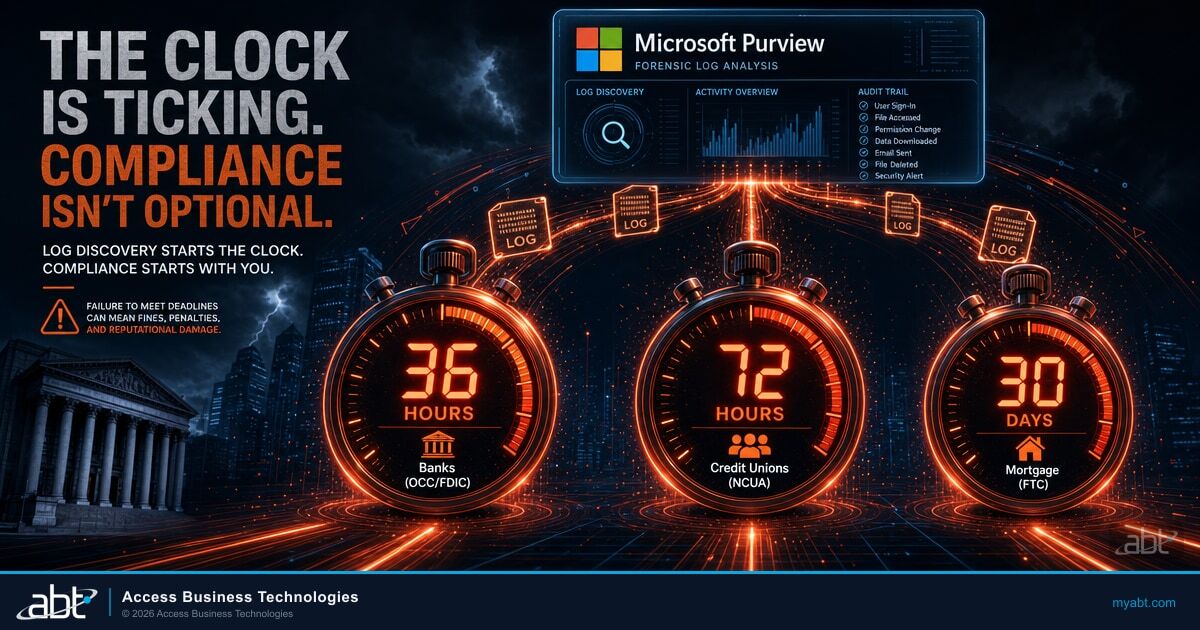
Your bank needs a written incident response plan. As of May 2024, the FTC requires non-bank financial institutions to report breaches affecting 500+ consumers within 30 days. Banking regulators have their own notification requirements under the Computer-Security Incident Notification Rule (effective April 2022), which requires banks to notify their primary regulator within 36 hours of a material security incident.
Know Where You Stand Before Your Examiner Does
Most security gaps are not missing tools, they are misconfigured ones. See yours, mapped to the OCC and GLBA controls ABT applies across 750+ financial institutions.
OCC Examination: How Examiners Evaluate Your Microsoft 365 Environment
OCC examiners conduct IT assessments during every supervisory cycle. They use the FFIEC Uniform Rating System for Information Technology (URSIT) framework and the FFIEC IT Examination Handbook to evaluate your bank's ability to identify, measure, monitor, and control IT risks.
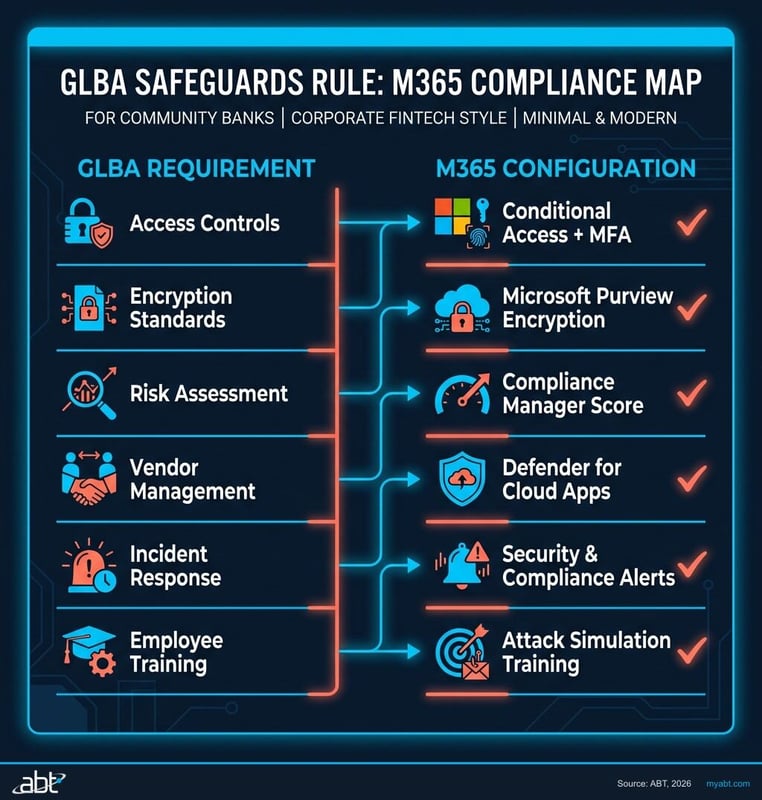
The OCC's FY2025 Bank Supervision Operating Plan lists operational resilience and cybersecurity as top priorities. Their examiners are specifically looking at:
- Information security program compliance with 12 CFR 30, Appendix B (Interagency Guidelines Establishing Information Security Standards)
- Risk assessment quality covering all customer information systems, including cloud platforms
- Authentication practices and whether MFA is universally enforced
- Third-party risk management for cloud service providers (Microsoft included)
- Patch management and end-of-life systems across your technology stack
- Data loss prevention controls and encryption enforcement
- Audit logging and monitoring capabilities
The FFIEC sunset its Cybersecurity Assessment Tool (CAT) on August 31, 2025, after a decade of use. Banks that relied on the CAT for self-assessment must now map their controls to NIST Cybersecurity Framework 2.0, CIS Critical Security Controls, or equivalent frameworks. Examiners have shifted to risk-focused, institution-specific evaluations rather than standardized checklists. If your bank has not updated its cybersecurity self-assessment methodology since the CAT retirement, your next examination will be uncomfortable. For a broker-dealer-side view of the same multi-tenant management approach a Tier-1 Cloud Solution Provider uses across federated entities, see Deploying Microsoft 365 Lighthouse for Broker-Dealer Compliance Standardization.
Examiners rate IT controls as strong, satisfactory, or weak. Deficiencies result in Matters Requiring Attention (MRAs) or, in serious cases, formal enforcement actions including cease-and-desist orders and civil money penalties. The OCC published 12 formal enforcement actions in October 2025 alone.
Critical M365 Configurations for GLBA Compliance
Here are the specific Microsoft 365 settings that map directly to GLBA and OCC requirements. This is not a feature tour. These are the configurations your examiner will ask about.
Conditional Access Policies (Entra ID)
Conditional Access is the enforcement engine for your identity and access management program. You need, at minimum:
- MFA for all users, all apps: No exceptions for legacy protocols. Block legacy authentication entirely.
- Risk-based policies: Block sign-ins flagged as high-risk by Entra ID Protection. Require password changes for users flagged as compromised.
- Device compliance: Require Intune-managed, compliant devices for access to NPI. Unmanaged personal devices should be restricted to web-only access with no download capability.
- Session controls: Enforce sign-in frequency (8-12 hours). Disable persistent browser sessions for sensitive applications.
- Location-based restrictions: Block sign-ins from countries where your bank has no operations.
Intune Device Management
Every device accessing customer NPI needs to be enrolled, configured, and monitored. Key policies:
- Encryption enforcement: BitLocker required on all Windows devices. FileVault on macOS.
- OS version compliance: Set minimum OS versions. Devices running unsupported operating systems cannot access corporate data.
- App protection policies: Prevent copy/paste of NPI from managed apps to personal apps on mobile devices.
- Remote wipe capability: Required for any device that may contain NPI, per incident response plan requirements.
Email Authentication (Exchange Online)
Examiners check your email authentication stack because phishing remains the top attack vector against financial institutions:
- SPF records: Configured to include all authorized senders
- DKIM signing: Enabled for your domain with 2048-bit keys
- DMARC policy: Set to
p=reject(notp=none) with aggregate reporting enabled - Anti-phishing policies: Mailbox intelligence, impersonation protection for executives and board members
Microsoft Defender Configuration
Defender for Office 365, Defender for Endpoint, and Defender for Identity form your detection and response layer:
- Safe Attachments: Dynamic delivery mode (detonates attachments in sandbox before delivery)
- Safe Links: URL scanning and time-of-click protection enabled for all users
- Automated investigation and response: Enabled for medium and high-severity alerts
- Endpoint detection: Defender for Endpoint deployed to all managed devices with tamper protection enabled
The Compliance Trifecta: DLP, Retention, and eDiscovery
These three Purview features are where GLBA compliance either holds together or falls apart. Examiners specifically look for evidence that you can control data flow, retain records, and produce them on request.
Data Loss Prevention (Microsoft Purview DLP)
Purview includes a built-in GLBA DLP template that detects financial data patterns including account numbers, credit card numbers, and Social Security numbers. Start there, then customize:
- Apply the U.S. GLBA DLP policy template to Exchange Online, SharePoint, OneDrive, and Teams
- Configure sensitivity labels for NPI classification: Confidential, Highly Confidential, Internal Only
- Block external sharing of documents with sensitivity labels above Internal Only
- Require business justification when users attempt to override DLP blocks
- Enable endpoint DLP to prevent NPI from being copied to USB drives or printed without authorization
"The OCC uses a risk-based supervision process focused on evaluating banks' risk management, identifying material and emerging concerns, and requiring banks to take corrective action when warranted."
OCC Cybersecurity and Financial System Resilience Report, July 2025Retention Policies (Purview Data Lifecycle Management)
GLBA does not specify a single retention period, but your bank's record retention schedule (often dictated by state law, OCC guidance, and internal policy) typically requires:
- Email retention: 6-7 years minimum for correspondence related to customer accounts
- Document retention: 6 years for loan documents, 5 years for BSA records, 3-7 years for general business records
- Immutable retention: Enable Preservation Lock on retention policies to prevent administrators from shortening or disabling retention periods
- Automatic labeling: Use auto-apply retention labels for content matching GLBA-sensitive patterns
eDiscovery Readiness
When examiners request records, or when your bank faces litigation, you need to produce relevant communications and documents quickly:
- Content Search: Test your ability to search across all M365 workloads by custodian, date range, and keyword
- Legal holds: Process documented for placing custodians on hold within 24 hours of notice
- Audit logs: Unified audit log retention set to at least 1 year (10 years with E5 licensing)
Common Compliance Gaps ABT Finds in Bank M365 Tenants
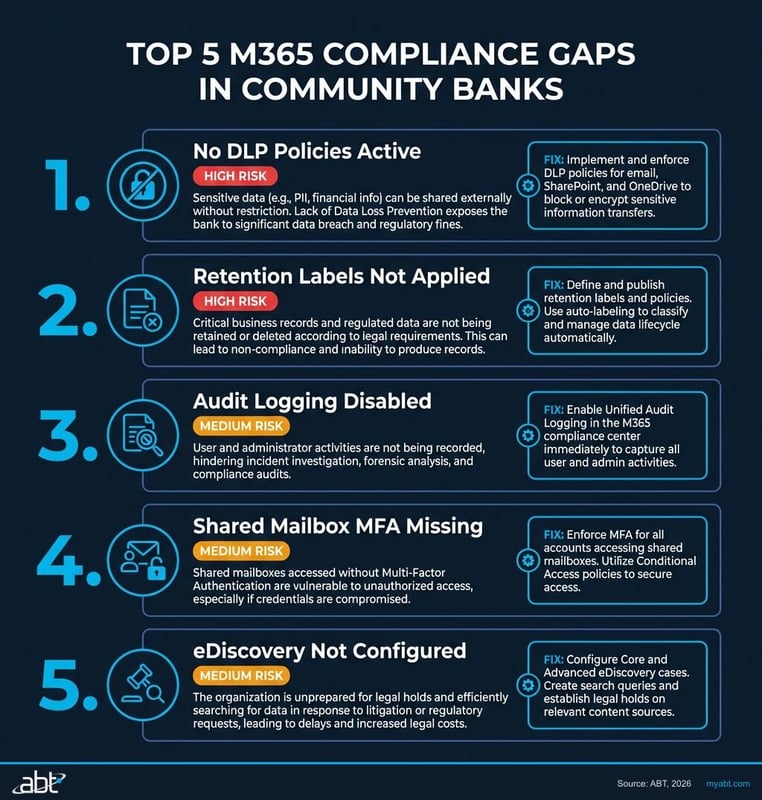
After configuring Microsoft 365 environments for 750+ financial institutions over 25 years, we see the same gaps repeatedly. These are the configurations that trip up community banks during OCC and FDIC examinations.
MFA Exceptions That Should Not Exist
The most common finding: MFA enforced for most users, but service accounts, break-glass accounts, or specific executive accounts exempted. Examiners check the Conditional Access policy report. Every exception needs documented justification, compensating controls, and regular review.
Legacy Authentication Still Enabled
Legacy protocols (POP3, IMAP, SMTP AUTH) bypass MFA entirely. If any of these protocols are enabled in your tenant, your MFA deployment is incomplete. Block them in Conditional Access and migrate any remaining dependencies.
Audit Logging Disabled or Under-Retained
Some banks never enabled unified audit logging, or enabled it but kept the default 180-day retention. Examiners expect at least 1 year of searchable audit data. Without it, you cannot demonstrate continuous monitoring or investigate incidents that were not discovered immediately.
No DLP Policies or DLP in Audit-Only Mode
Deploying DLP policies in audit-only mode is a reasonable starting point, but leaving them there for months (or years) signals to examiners that data loss prevention is not a priority. Policies should move from audit to enforcement within 30-60 days of deployment.
External Sharing Wide Open in SharePoint/OneDrive
Default SharePoint sharing settings allow external sharing with "Anyone" links. For a bank handling NPI, this needs to be restricted to "Specific people" or "Existing guests" at minimum. Many banks we audit have never changed the default.
No Sensitivity Labels Deployed
Without sensitivity labels, your bank has no systematic way to classify and protect NPI. Examiners increasingly expect to see data classification as part of the information security program. Labels tie directly into DLP enforcement, encryption, and access controls.
Building an Examination-Ready M365 Environment
Passing an OCC or FDIC IT examination is not about checking boxes the week before examiners arrive. It is about building a tenant configuration that generates its own evidence of compliance, continuously.
The Evidence Trail Examiners Want
Every configuration listed in this article should produce auditable evidence:
- Conditional Access sign-in logs proving MFA enforcement across all sessions
- DLP incident reports showing policy matches, user justifications, and override decisions
- Retention policy compliance reports confirming records are being preserved
- Device compliance reports from Intune showing encryption status and OS patching
- DMARC aggregate reports proving email authentication is working
- Secure Score trending demonstrating continuous security improvement
Map Controls to Regulatory Requirements
Create a control mapping document that links each M365 configuration to the specific GLBA section, OCC guideline, or FFIEC handbook reference it satisfies. Microsoft Compliance Manager includes a GLBA assessment template that provides a starting framework, but customize it to your bank's specific risk profile and examiner expectations.
Test Before They Test You
Run your own tabletop exercises quarterly. Can your team:
- Produce all emails from a specific user for the past 6 years?
- Demonstrate that DLP blocked a specific data exfiltration attempt?
- Show the Conditional Access policy that would have blocked a sign-in from an unmanaged device in a foreign country?
- Prove that a terminated employee's access was revoked within your defined SLA?
If the answer to any of these is "not sure," you have work to do before your next examination.
How ABT Operationalizes Microsoft 365 Controls for GLBA and OCC Examiners
The controls listed in this article are not optional features. They are the configurations OCC and FDIC examiners ask about during every supervisory cycle, and most of them resolve to specific products inside the Microsoft 365 stack your bank already pays for. Microsoft Purview Audit produces the time-stamped trail of every create, modify, and delete action across Exchange Online, SharePoint Online, OneDrive, Teams, and Microsoft Entra ID. Microsoft Purview Data Loss Prevention enforces the GLBA Safeguards Rule's at-rest protection of nonpublic personal information across email, SharePoint sites, OneDrive accounts, and Teams chat. Microsoft Purview sensitivity labels classify NPI at the file level, bind encryption to the label, and feed the DLP enforcement engine. Microsoft Entra ID Conditional Access enforces the multi-factor authentication, device-compliance, and risk-based session controls the OCC's Interagency Guidelines Establishing Information Security Standards under 12 CFR Part 30, Appendix B treats as table stakes. Microsoft Intune carries the device-side compliance posture, and Microsoft Defender for Office 365 and Defender for Endpoint sit on top of the detection layer. Every one of these maps to a specific GLBA Safeguards Rule section under 16 CFR Part 314 and a specific FFIEC IT Examination Handbook expectation.
The question for a community bank CIO is not whether the Microsoft 365 controls exist. They exist in any reasonably licensed tenant. The question is whether someone is keeping them configured, monitored, and audit-ready as the bank grows, as Microsoft ships new product surface, and as the regulatory bar shifts. That layer has a name at ABT: M365 Guardian. Guardian is ABT's productized operating model on top of Microsoft Purview, Microsoft Entra ID, Microsoft Intune, Microsoft Defender, and Microsoft Sentinel, calibrated to the controls a community bank's next OCC or FDIC examiner is going to ask about. ABT applies the GLBA-aligned Conditional Access baseline, the Purview retention and Audit Premium posture, the DLP policy set tuned to NPI patterns banks actually move through email, and the sensitivity label taxonomy that satisfies the OCC's expectation for systematic data classification. ABT then monitors drift continuously, surfaces exceptions in time to fix them before they become Matters Requiring Attention, and produces the cross-tenant evidence reports a bank's information security officer hands to the examiner without spending three weeks pulling screenshots. The bank keeps its Microsoft 365 licensing and tenant ownership. The Guardian operating model is added through the partner relationship.
For a community bank chasing OCC and FDIC examination readiness, the path through Microsoft 365 runs through three products in particular. Microsoft Entra ID supplies the identity layer the GLBA Safeguards Rule and the OCC's Interagency Guidelines treat as the gating control, with Conditional Access in Grant mode, MFA on every privileged account, and risk-based session enforcement on every sign-in. Microsoft Purview supplies the books-and-records layer, with Audit Premium for the time-stamped trail, DLP for at-rest NPI protection, sensitivity labels for the classification taxonomy, retention policies bound to the records schedule, and Communication Compliance for off-channel correspondence review. Microsoft Defender for Office 365 and Defender for Endpoint hold up the detection side, feeding into Microsoft Sentinel as the SIEM of record for the Computer-Security Incident Notification Rule's 36-hour clock. ABT manages the Microsoft 365 tenant under delegated administrative privileges, applies the GLBA- and OCC-tuned baseline through the M365 Guardian operating model, and keeps the configuration consistent across the bank's footprint as it grows.
Walk Into Your Next OCC Exam With Evidence in Hand
Your bank already licenses most of the controls in this article. ABT configures them to the GLBA Safeguards Rule, monitors drift, and hands your information security officer examiner-ready evidence on demand.
Frequently Asked Questions
See Your Security Posture in 48 Hours
Our security assessment gives you what your examiner will ask for:
- Gap analysis against NIST CSF 2.0 Functions (the FFIEC's post-CAT successor reference since August 2025) and NCUA examination procedures
- Prioritized remediation roadmap aligned to your examination timeline
- Evidence collection mapped to regulatory examination objectives
- 30-minute review with a specialist who has been through hundreds of exams
No. Microsoft 365 provides the tools for GLBA compliance, but the default tenant configuration does not satisfy regulatory requirements. You must configure Conditional Access, DLP policies, retention policies, sensitivity labels, and audit logging specifically for your institution's compliance obligations.
Microsoft 365 Business Premium is the minimum tier for most community banks. It includes Conditional Access, Intune, Defender for Office 365, and basic DLP. Banks needing advanced eDiscovery, 10-year audit log retention, or insider risk management should evaluate E5 licensing or compliance add-ons.
The OCC typically issues Matters Requiring Attention with specific remediation timelines. Repeated or serious deficiencies can escalate to formal enforcement actions including cease-and-desist orders and civil money penalties. The OCC conducts periodic follow-up to verify your bank has corrected identified deficiencies.
GLBA itself does not mandate a specific email retention period. However, OCC examination standards and state banking regulations typically require 6 to 7 years for correspondence related to customer accounts. Your bank's record retention policy should define periods by content category, enforced through Microsoft Purview retention policies.
Most community banks do not need GCC or GCC High for GLBA compliance. Standard commercial Microsoft 365 with proper configuration meets GLBA requirements. GCC High is designed for organizations handling CUI under ITAR or CMMC requirements, which is a different compliance framework than GLBA.
The FFIEC Cybersecurity Assessment Tool was retired on August 31, 2025. Banks should transition their self-assessment methodology to NIST Cybersecurity Framework 2.0 or CIS Critical Security Controls. Microsoft Compliance Manager provides built-in assessment templates for NIST CSF that can replace the CAT for evaluating your M365 environment.