In This Article
Microsoft's Copilot licensing just got complicated. On April 15, 2026, the free AI features built into Word, Excel, PowerPoint, and OneNote get relabeled "M365 Copilot Basic" across all commercial tenants. Every organization running Microsoft 365 wakes up on April 15 to a new label on their Copilot experience and a smaller set of capabilities than they had the day before.
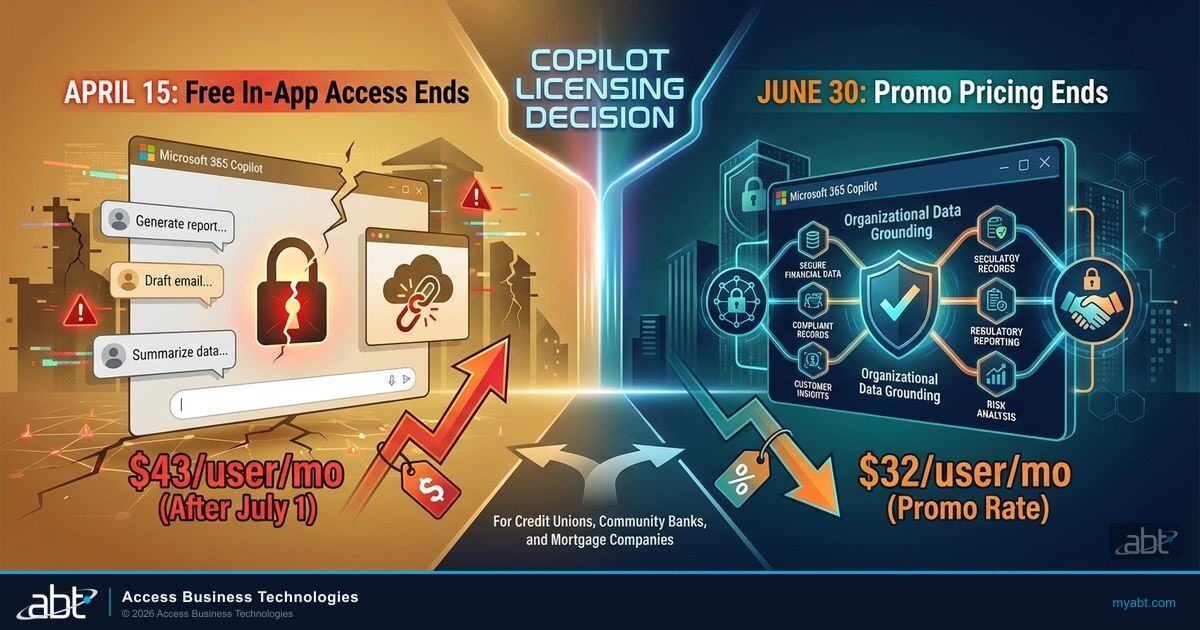
The relabeling matters less than what comes with it. Basic users keep the chat pane and some editing features. They lose organizational data grounding, full Teams integration, deep reasoning models, and access to advanced agents. Microsoft is drawing a line between the AI you get for free and the AI you pay for. For credit unions, community banks, and mortgage companies evaluating their M365 licensing strategy, this is the moment to understand every version of Copilot, what each one costs, and what decisions need to happen before June 30.
This article is the guide we wish existed when Microsoft first announced the split. No fearmongering, no pressure. Just the facts about what changed, what it costs, and what it means for regulated financial institutions.
- M365 Copilot Basic
- The free tier of Copilot available in Microsoft 365 apps after April 15. Includes chat, basic editing, and web-grounded responses. No organizational data access.
- M365 Copilot Premium
- The paid tier ($21-30/user/month depending on SKU). Full organizational data grounding, Teams integration, advanced agents, model choice, and priority access.
- Work IQ
- Microsoft's term for organizational data grounding. Copilot reasons over your emails, SharePoint files, Teams chats, and calendar. Available only in Premium.
- Copilot Cowork
- A new collaboration mode announced at Microsoft Ignite where Copilot acts as a persistent team member in meetings, chats, and documents. Rolling out mid-2026 for Premium users.
Every Version of Copilot, Explained
Microsoft currently offers Copilot across multiple products, price points, and licensing tiers. The naming is inconsistent, the feature overlap is confusing, and the April 15 changes add another layer. Here's what actually exists today and how each version maps to financial institution use cases.
| Copilot Version | Base Requirement | Price | Key Capability |
|---|---|---|---|
| M365 Copilot Basic | Any M365 commercial plan | Free (after April 15) | Chat pane, Edit with Copilot, web-grounded responses, limited file uploads |
| Copilot Business (Premium) | M365 Business Standard or Premium | $21/user/mo ($18 promo) | Full Work IQ, Teams integration, agents, model choice, up to 300 seats |
| M365 Copilot Enterprise (Premium) | M365 E3 or E5 | $30/user/mo | Same as Business + enterprise compliance tools, unlimited seats |
| Agent 365 | Copilot Premium license | $15/user/mo (GA May 1) | Agent governance, registry, Entra identities for agents, audit trails |
| M365 E7 (Frontier Suite) | None (all-in-one) | $99/user/mo (May 1) | E5 + Copilot Enterprise + Agent 365 + frontier model access |
The confusion stems from Microsoft using "Copilot" to describe both a free chat experience and a $30/month enterprise productivity tool. After April 15, the labels clarify this. Basic is the free tier. Premium is the paid tier. The features between them are not close.
For most financial institutions running M365 Business plans with under 300 users, Copilot Business at $21/month (or $18 at the current promotional rate) is the relevant SKU. Institutions on E3 or E5 need the Enterprise version at $30/month. Both deliver identical in-app AI capabilities, but Enterprise includes compliance tools designed for larger organizations and supports unlimited seats.
What Basic vs. Premium Actually Means
The April 15 relabeling isn't just cosmetic. Microsoft is formally separating what free users can do from what paid users get. Here's the complete feature comparison, verified against Microsoft's official documentation.
M365 Copilot Basic (Free)
- Chat pane in Word, Excel, PowerPoint, OneNote
- Edit with Copilot (basic text generation)
- Web-grounded responses only
- Limited file uploads per message
- Some agent access (basic)
- Availability may vary during high demand
- No Work IQ (no org data grounding)
- No deep reasoning or model choice
M365 Copilot Premium (Paid)
- Full in-app AI across all M365 apps
- Work IQ: reasons over email, SharePoint, Teams, calendar
- Full Teams meeting summaries and action items
- Extended file uploads per message
- Advanced agents and Copilot Studio access
- Priority access with no throttling
- Deep reasoning models and model choice
- Copilot Analytics and governance dashboards
The single biggest difference is Work IQ. With Basic, Copilot answers questions using publicly available web data. It doesn't know your institution. It can't summarize your board meeting notes, find that email from your examiner, or draft a response using your compliance documentation. It's a generic AI assistant that happens to live inside your Office apps.
With Premium, Copilot connects to the Microsoft Graph and reasons over your entire organizational dataset. It knows who sent that email, what the attached spreadsheet contained, what was discussed in yesterday's Teams call, and what documents sit in your compliance SharePoint library. That's the difference between a chatbot and a productivity tool that actually understands your work.
What This Means for IT Directors
After April 15, your staff will still see the Copilot button in Word and Excel. They'll still be able to ask it questions. But the answers won't reference internal data. When a loan officer asks Copilot to summarize a borrower's file history, Basic will return web results about mortgage documentation. Premium will return the actual file history from SharePoint. The gap between those two experiences will generate help desk tickets fast.
Need Help Sorting Through the Copilot Versions?
ABT has guided 750+ financial institutions through every Microsoft licensing transition since 1999.
The Complete Pricing Guide for Financial Institutions
Microsoft structures Copilot pricing differently depending on your base M365 plan. Microsoft's July 1, 2026 list-price increase and the current Copilot promotions make some paths cheaper than others, so timing matters. Here's every pricing scenario, verified against the Microsoft Tech Community blog, the Microsoft licensing news, and CSP partner documentation.
| Your Current Plan | Add Copilot How | Current Price | On July 1, 2026 |
|---|---|---|---|
| Business Standard ($12.50/user) | Standard + Copilot bundle | $22/user/mo (promo through June 30) | $23.50/user/mo (permanent SKU) |
| Business Premium ($22/user) | Premium + Copilot bundle | $32/user/mo (promo through June 30) | $32/user/mo (permanent SKU, price holds) |
| Business Premium (mid-term) | Copilot Business standalone add-on | $18/user/mo add-on (promo through Dec 31) | $21/user/mo add-on (list) |
| M365 E3 ($36/user, rising to $39 July 1) | M365 Copilot Enterprise | $30/user/mo add-on | $30/user/mo |
| M365 E5 ($57/user, rising to $60 July 1) | M365 Copilot Enterprise or E7 | $30/user/mo or $99/mo E7 bundle | Same |
Three numbers stand out. The Business Standard + Copilot bundle at $22/month is lower than Business Premium alone, but it comes without the security stack that regulated institutions need. The Business Premium + Copilot bundle at $32/month is about $10 more than Business Premium alone, and on July 1 that $32 becomes Microsoft's permanent price for the bundle rather than rising to a higher rate. And the standalone Copilot Business add-on at $18/month, promotional through December 31, 2026, is available immediately for institutions not approaching renewal.
The deadline that matters for most institutions is the annual term, not the Copilot bundle. Microsoft raises list prices on most Microsoft 365 plans on July 1, 2026, and starting or renewing an annual term before then locks today's rates until your next renewal. Business Premium itself holds at $22, but Business Standard, Business Basic, the Enterprise suites, and most add-ons all rise. A 200-seat institution on Business Standard, for example, avoids roughly $3,600 a year by locking its annual term before the increase.
One important clarification: these CSP promotional rates are available to both new and existing Microsoft 365 customers. Earlier guidance suggested restrictions for existing customers, but Microsoft confirmed in February 2026 that CSP promos apply to "new or existing customers transacting via CSP." The one-time-only restriction was also removed, so customers can renew at promotional rates.
Microsoft's cost consolidation analysis shows that Business Premium at $22/user/month delivers $45/user/month in equivalent value when compared to purchasing identity management, endpoint protection, device management, conditional access, and data loss prevention as separate tools. For institutions evaluating Standard vs. Premium, the security features alone close the gap before Copilot enters the conversation. ABT recommends Business Premium as the minimum for any regulated financial institution.

Four Dates That Matter
The Copilot licensing timeline involves four dates between now and July 1. Missing any of them changes the economics of the decision.
Free in-app Copilot relabeled M365 Copilot Basic across all commercial tenants. Work IQ, full Teams integration, and advanced agents restricted to Premium licenses.
Agent 365 launches at $15/user/month for enterprise agent governance. E7 Frontier Suite bundles E5 + Copilot + Agent 365 at $99/user/month.
Most Microsoft 365 list prices rise July 1. Renewing or starting an annual term by June 30 locks your current rates for the term. The $22 Business Standard + Copilot bundle promo ends now (it becomes a $23.50 permanent SKU); the $32 Business Premium + Copilot bundle continues as a permanent Microsoft SKU at the same price.
M365 E3 rises from $36 to $39/user/month, E5 from $57 to $60, and most add-ons follow. Business Premium holds at $22. Copilot SKUs are excluded from the increase: the Business Premium + Copilot bundle stays $32 and Business Standard + Copilot becomes a $23.50 permanent SKU.
The gap between April 15 and June 30 is the decision window. After April 15, your team experiences the Basic limitations firsthand. Before June 30, you can lock your annual term at current rates. After July 1, most Microsoft 365 plans cost more, though Business Premium and the Copilot SKUs hold. That window is 76 days.

Why Business Premium Is the Floor for Regulated FIs
For general-purpose businesses, Business Standard with Copilot at $22/month is a strong deal. For credit unions, community banks, and mortgage companies, it's incomplete. Business Premium includes the entire security and compliance stack that examiners expect to see. The difference isn't marginal.
Business Standard ($12.50/user)
- Basic anti-spam and malware filtering
- No Conditional Access policies
- No DLP policies for sensitive data
- No device management (Intune)
- No sensitivity labels for loan files
- No Defender for Business (EDR)
Business Premium ($22/user)
- Defender for Business (EDR + threat detection)
- Entra ID P1 with Conditional Access
- Purview DLP for financial data classification
- Intune device management and compliance
- Sensitivity labels for NPI and loan documents
- Safe Links and Safe Attachments (anti-phishing)
When you add Copilot on top of Business Standard, the AI has no guardrails. No DLP policies govern what Copilot can surface. No sensitivity labels prevent loan documents from being summarized in an uncontrolled context. No Conditional Access policies restrict which devices can run AI queries against your organizational data.
When you add Copilot on top of Business Premium, every existing security control extends to the AI. Purview DLP policies apply to Copilot interactions. Sensitivity labels prevent Copilot from surfacing protected content to unauthorized users. Conditional Access ensures Copilot only runs on compliant, managed devices. For a deeper look at how these controls protect against specific Copilot risks, see the Gartner analysis of five Copilot security risks.
This isn't a theoretical advantage. It's the difference between an AI deployment your examiner approves and one that generates a finding. The recent Excel zero-click vulnerability demonstrated exactly why Copilot deployments need the DLP and sensitivity label controls that only Business Premium provides.
What's Coming Next: Cowork, Agent 365, and E7
The April 15 split is the beginning, not the end, of Microsoft's AI licensing evolution. Three announcements from the last 90 days signal where the platform is headed.
Copilot Cowork was announced at Microsoft Ignite as a new collaboration mode where Copilot acts as a persistent participant in meetings, document editing sessions, and Teams channels. Instead of asking Copilot one question at a time, teams will work alongside it continuously. Cowork is expected to roll out mid-2026 for Premium license holders. For financial institutions evaluating the Basic vs. Premium decision, Cowork adds another capability that only paid users will access. Our complete guide to Copilot Cowork for financial institutions covers the security and governance implications in detail.
Agent 365 launches May 1, 2026 at $15/user/month. It provides an enterprise governance layer for AI agents: a registry, Entra ID identities for agents, audit trails, and centralized management. Think of it as Conditional Access for AI agents. If your institution plans to build custom agents using Copilot Studio (loan processing bots, compliance checkers, member service automators), Agent 365 is how you govern them. Without it, agents operate without the controls that examiners will eventually expect.
Microsoft 365 E7, also available May 1, bundles E5 + Copilot Enterprise + Agent 365 + frontier model access at $99/user/month. It's Microsoft's all-in-one AI subscription for enterprises that want everything under one SKU. For larger financial institutions on E5 already paying $57 + $30 for Copilot ($87 total), E7 adds Agent 365 and frontier models for $12 more.
Your institution stays on Basic after April 15. Employees who discovered they could draft board reports, summarize loan files, and prepare examination documentation using Copilot in Word lose organizational data access. They revert to manual processes or find alternatives.
Within weeks, staff members begin using ChatGPT, Claude, or Gemini through personal accounts. Loan data, member information, and examination documents flow into consumer AI tools with no data governance, no audit trail, and no DLP controls. Microsoft Copilot operating inside your governed M365 tenant inherits every security control you have configured. Consumer AI tools provide none of those protections.
Shadow AI is the real risk of the Basic tier. When employees have tasted AI productivity and lose the capable version, they don't stop using AI. They find ungoverned alternatives. For regulated financial institutions, that creates examination findings, potential data breaches, and compliance violations that cost far more than the Copilot license.
Making the Decision
The Copilot licensing decision for financial institutions comes down to three variables: your current M365 plan, your renewal timeline, and whether you're approaching this as a pilot or full deployment.
- If you're on Business Premium approaching renewal: Move to the Business Premium + Copilot bundle at $32/month. It's about $10 more than Premium alone, and that $32 is now Microsoft's permanent price. Lock your annual term before June 30 to freeze your other Microsoft 365 rates ahead of the July 1 increase.
- If you're on Business Premium mid-term: Add Copilot Business standalone at $18/month (promotional through December 31, 2026) now to start a pilot. Plan to bundle at your next renewal for the lower per-user rate.
- If you're on Business Standard: Upgrade to Business Premium first. The security features are non-negotiable for regulated institutions. Then add Copilot at renewal.
- If you're on E3 or E5: Add M365 Copilot Enterprise at $30/month. If you're on E5 and plan to deploy agents, evaluate E7 at $99/month when it launches May 1.
For institutions that want to test before committing, Microsoft allows standalone Copilot licenses starting at one seat. Deploy to 10-20 users, measure productivity gains over 90 days, and use that data to justify a broader rollout. The promotional pricing doesn't require deploying to your entire organization. You can lock in the rate with a subset and expand later.
The April 15 relabeling is real and affects all commercial tenants. For credit unions, community banks, and mortgage companies, Business Premium + Copilot at $32 is the right path. It delivers governed AI inside the security controls your examiner expects, and on July 1 that $32 becomes Microsoft's permanent price rather than rising. The deadline that still matters is the annual term: lock it before July 1 to hold your other Microsoft 365 rates. The 76-day window between the Basic/Premium split and the June 30 lock date is when this decision needs to happen.
ABT processes the licensing transition, hardens the tenant before Copilot goes live, and configures the DLP policies, sensitivity labels, and Conditional Access rules that make AI deployment examination-ready. That's the difference between buying a license and deploying AI responsibly. For a broader look at how Copilot Cowork will change how your team collaborates, read our companion article.
Your Copilot Licensing Decision Has a Deadline
The Microsoft 365 price-lock deadline is June 30. ABT's licensing specialists help credit unions, community banks, and mortgage companies evaluate the right Copilot tier, configure tenant security before deployment, and lock in your annual term before the July 1 increase.
Frequently Asked Questions
On April 15, 2026, Microsoft relabels the free in-app Copilot experience in Word, Excel, PowerPoint, and OneNote as M365 Copilot Basic across all commercial tenants. Basic users keep the chat pane and basic editing features but lose organizational data grounding (Work IQ), full Teams integration, deep reasoning models, and access to advanced agents. Paid Copilot licenses are relabeled M365 Copilot Premium with no feature changes.
Copilot Basic provides web-grounded chat and basic editing inside Office apps at no cost. Copilot Premium adds Work IQ, which connects Copilot to your organizational data including emails, SharePoint documents, Teams conversations, and calendar. Premium also includes full Teams meeting summaries, advanced reasoning models, model choice, Copilot Analytics, governance dashboards, and access to advanced agents. Premium licenses cost $21 to $30 per user per month depending on the SKU.
Copilot Business costs $21 per user per month as a standalone add-on, or $18 at the current promotional rate through December 31, 2026. Bundled with Business Premium, the price is $32 per user per month, which becomes a permanent Microsoft SKU at the same rate on July 1, 2026. Bundled with Business Standard, the promotional price is $22, moving to a $23.50 permanent SKU on July 1. Enterprise M365 Copilot is $30 per user per month and requires an E3 or E5 base license. Both new and existing CSP customers are eligible for promotional rates.
The Business Standard plus Copilot bundle promo at $22 ends June 30, 2026 and becomes a permanent $23.50 Microsoft SKU on July 1. The Business Premium plus Copilot bundle stays $32, converting to a permanent SKU at the same price. Standalone Copilot Business runs at the $18 promotional rate through December 31, 2026. Copilot SKUs are excluded from the July 1 list-price increase, though most base Microsoft 365 plans rise then: M365 E3 goes from $36 to $39 per user per month and M365 E5 from $57 to $60. Business Premium holds at $22.
Copilot Cowork is a new collaboration mode announced at Microsoft Ignite where Copilot acts as a persistent team member in meetings, document editing sessions, and Teams channels. Instead of one-off prompts, teams work alongside Copilot continuously throughout their workflow. Cowork is expected to roll out mid-2026 and will be available exclusively to Premium license holders. It will not be included in the Basic free tier.