

Microsoft 365 admin center · Org settings · Security and privacy
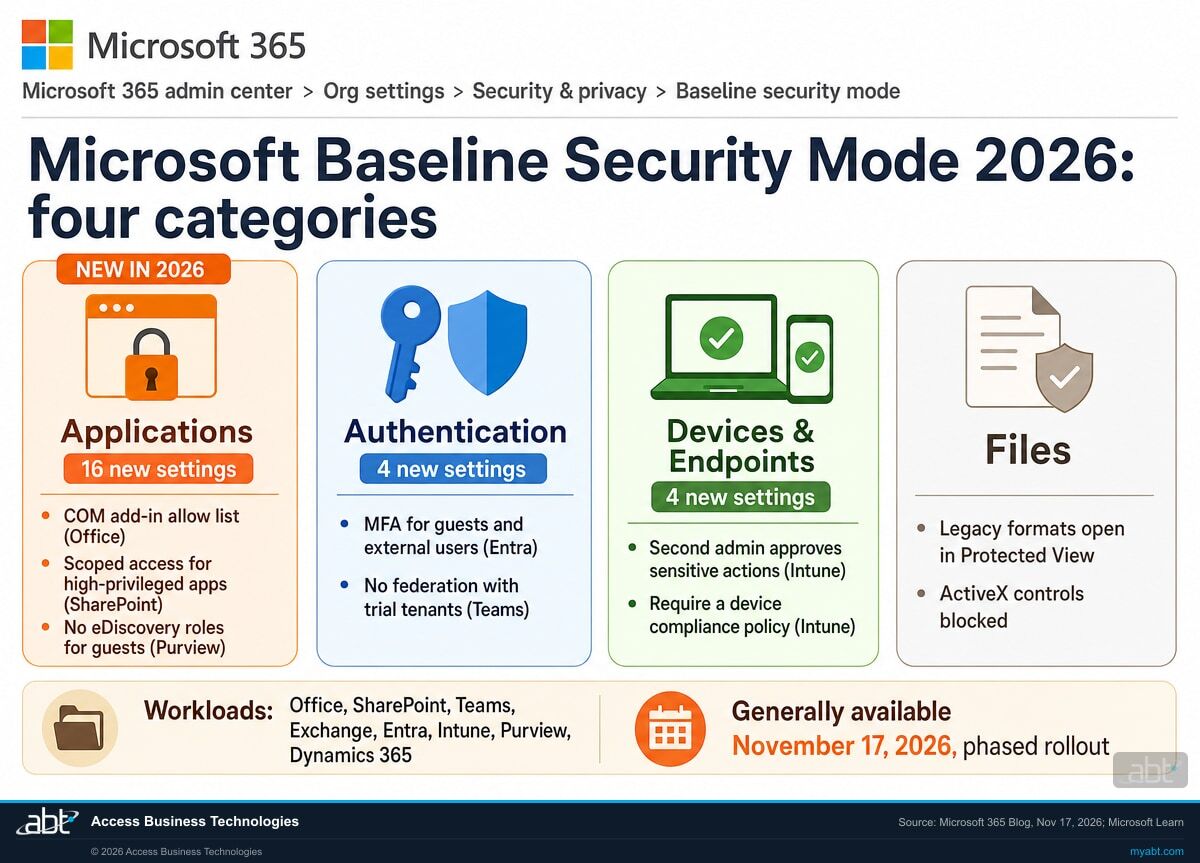
Microsoft put its recommended Microsoft 365 security settings on one page. Baseline Security Mode 2026 adds 24 more.
Baseline Security Mode lets an administrator check, test and turn on Microsoft's recommended security settings for Microsoft 365 from one page in the admin center, including settings that used to need PowerShell. Microsoft announced the 2026 release as generally available on November 17, 2026, at Ignite, with a phased rollout worldwide. This page covers what the 2026 release adds, what can stop working when a setting goes on, and six steps a credit union, bank, or mortgage company can take to turn the settings on in ABT's recommended sequence.
- 24 new settings across Applications, Authentication, and Devices and Endpoints, per Microsoft's announcement
- Each setting is applied on its own, after an impact report or a run in simulation mode
- Available on all Microsoft 365 subscriptions and plans, per Microsoft Learn
The change
What is Microsoft Baseline Security Mode 2026?
It is the second release of Baseline Security Mode, a page in the Microsoft 365 admin center that brings Microsoft's recommended security settings together. Microsoft announced it at Ignite on November 17, 2026, and documents each setting on its Baseline security mode settings page. Here is the release in one place.
The release in brief
- What
- 24 new recommended security settings, a new Applications category, and coverage extended to Intune, Purview and Dynamics 365.
- Status
- Generally available, announced November 17, 2026, with a phased rollout across all supported Microsoft 365 cloud environments worldwide.
- Control
- Each setting is managed on its own. Run the impact report, or run the setting in simulation mode, then turn it on when the report is clean.
- Where
- Microsoft 365 admin center, Settings, Org Settings, Security and Privacy tab, Baseline Security Mode.
- Next
- Microsoft's roadmap says the 2025 settings will become the default for all new Microsoft 365 tenants. Azure and Windows settings are in preview.
Baseline Security Mode 2025 arrives
The first release covers five workloads: Office, SharePoint, Teams, Exchange and Entra.
Office builds ready for the EWS setting ship
Microsoft 365 Apps 16.0.20430.20092 and Office 2024 LTSC 16.0.17932.20976 are the minimum builds before Exchange Web Services goes off.
Baseline Security Mode 2026 is generally available
24 new settings roll out in phases, with Intune, Purview and Dynamics 365 added.
The 2025 settings will become the default for new tenants
Microsoft says the 2025 baseline will become the default configuration for all new Microsoft 365 tenants, and urges existing tenants to opt in.
"Microsoft Baseline security mode is not a one-time feature; it is an evolving standard."
Microsoft 365 Blog, Ignite 2026 announcement, November 17, 2026Most Microsoft 365 tenants carry years of settings decisions. Some were chosen for a reason, some were defaults from an earlier era, and some exist only in PowerShell. Microsoft Learn says Baseline Security Mode brings certain security settings that were previously available only in PowerShell into the admin center, so an organization can evaluate each one before deployment. The 2026 release extends that list to device management in Intune, eDiscovery roles in Purview, and Dynamics 365, and adds a category for what applications can do, how they access data, and which permissions they hold.
The method is one setting at a time. For each setting, Microsoft recommends running the impact report first. If the report shows zero impacts, turn the setting on. If it shows critical dependencies, hold the setting and plan to address them first. Several of the 2026 settings finish work that Microsoft started elsewhere: our page on SMTP AUTH basic authentication and our page on Publisher end of support cover two of them.
Side by side
How does Baseline Security Mode 2026 compare with 2025?
Each row reflects Microsoft's announcement or its Learn documentation, except the last row, which is our recommendation.
| Question | Baseline Security Mode 2025 | Baseline Security Mode 2026 |
|---|---|---|
| Which workloads does it cover? | Office, SharePoint, Teams, Exchange and Entra | Those five, plus Intune, Purview and Dynamics 365; Azure and Windows in preview |
| Which categories does it use? | Authentication, Devices and Endpoints, and Files | Adds Applications: what apps can do, how they access data, and which permissions they hold |
| What do the new settings look like? | MFA for administrator accounts, which Microsoft names as the 2025 starting point | MFA for guests, no federation with trial tenants, a COM add-in allow list, no eDiscovery roles for guests, a second admin for sensitive Intune actions |
| How do you turn a setting on? | One setting at a time, after its impact report | One setting at a time, after its impact report or a run in simulation mode |
| What is coming next? | Will become the default configuration for all new Microsoft 365 tenants, per Microsoft's roadmap | Dashboard, downloadable reports, regulatory framework mapping and Multi-Geo views, all in private preview |
| Where to start (ABT recommendation) | Every 2025 setting with a clean impact report, first | Then the 2026 identity and Intune settings, with the help desk briefed |
Finish 2025, then take on 2026
Microsoft says the 2025 settings will become the default for new Microsoft 365 tenants, which makes them the floor Microsoft expects every tenant to reach. Start there: run the impact report on each 2025 setting, turn on the ones that come back clean, and write down why any setting is held. Then work through the 2026 settings, starting with the ones that protect identities, such as MFA for guests and external users, and the Intune setting that requires a second administrator for sensitive actions. For a credit union, bank, or mortgage company, that order puts administrator and outside-user access first, where an examiner is likely to look first.
Read where every Baseline Security Mode setting stands, and plan the order to turn them on
ABT works with your team to read each setting in your tenant, interpret the impact reports, list the dependencies to clear first, and plan the order, as part of a free security assessment.
Request the free assessmentThe work
How do you test and turn on Baseline Security Mode settings?
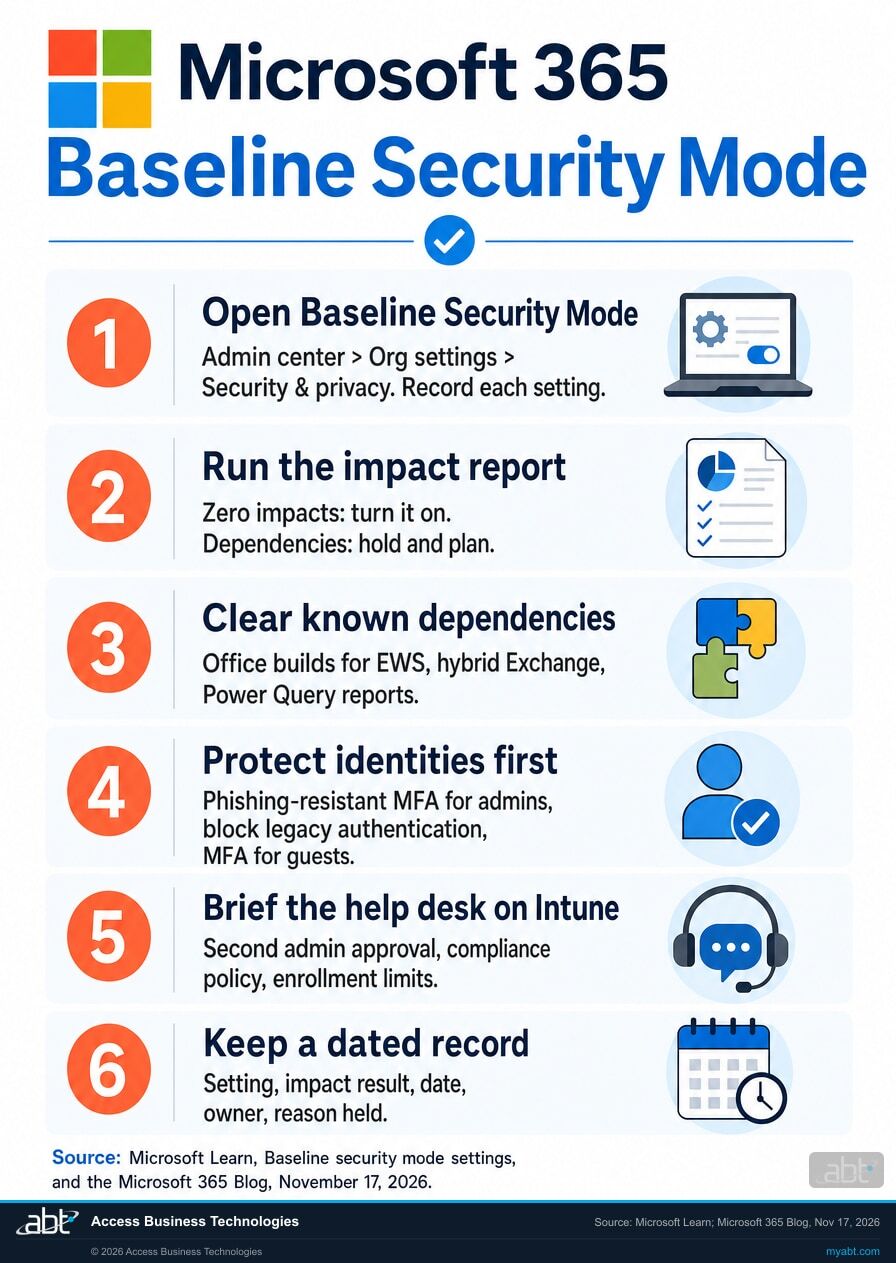
ABT's recommended sequence, built on Microsoft's recommended method on Microsoft Learn. Steps 1 to 3 find out where you stand. Steps 4 to 6 turn settings on and keep the record.
Open Baseline Security Mode and record where each setting stands
Microsoft's announcement says to start as a Global Administrator. List every setting, whether it is on, and which workload owns it. Microsoft Learn says workload administrators manage only their own settings, so note which role each change will need, for example the Security administrator role for Entra settings.
Run the impact report before every change
Microsoft recommends running the impact report for each setting. A setting with zero impacts can go on. A setting with critical dependencies waits until those dependencies are handled. Microsoft's announcement adds simulation mode as another way to see the effect first.
Clear the known dependencies first
Before disabling Exchange Web Services, confirm Win32 Office is at least Microsoft 365 Apps 16.0.20430.20092 or Office 2024 LTSC 16.0.17932.20976, and that a hybrid Exchange setup supports REST APIs. Find the workbooks, Power BI reports and dataflows that use the Exchange connector, and anyone relying on cross-tenant free/busy. Our page on the Exchange Web Services app inventory covers how to find the apps still using it.
Turn on the identity settings that protect administrators and outside users
Start with phishing-resistant MFA for admin portals, blocking legacy authentication flows, and the 2026 setting that requires MFA for guests and external users. Before enforcing phishing-resistant MFA, confirm every administrator has a phishing-resistant method registered, so nobody loses access to the admin portals.
Turn on the Intune settings with the help desk in the loop
Requiring a second administrator to approve sensitive actions, requiring a device compliance policy, limiting how many devices a user can enroll, and alerting users when a new device is enrolled all change what staff and administrators see. Tell the help desk what each one does before it goes on, and who approves the second-admin requests.
Keep a dated record of every setting
For each setting, write down the impact report result, the date it went on, who approved it, and the reason for any setting you held. Microsoft is previewing downloadable Executive, Admin and GRC reports; until they reach your tenant, your own record is the one you can hand to an examiner or auditor.
Check first
What can stop working when Baseline Security Mode settings go on?
Microsoft Learn currently lists these impacts. Each card names who to ask before the setting goes on.
Excel and Power BI reports that read mailboxes
The Exchange connector in Power Query hosts, including Excel for Windows and the web, Power BI and Fabric, and Power Platform dataflows, is listed. Ask finance and reporting staff which reports pull from Exchange.
Calendars shared with other organizations
Cross-tenant calendar sharing, free/busy and MailTips are listed. Ask executive assistants and anyone who schedules with partner institutions.
Phones using certificates for Exchange ActiveSync
Certificate-based authentication for Exchange ActiveSync, the legacy Exchange flow and separate from Microsoft Entra certificate-based authentication, is listed. Ask whoever manages mobile mail.
Hybrid Exchange
Microsoft says to turn off Exchange Web Services only after the hybrid Exchange setup supports REST APIs. Ask whoever maintains the on-premises Exchange servers.
Older Office builds and add-ins
Some Outlook features and Office add-ins depend on Exchange Web Services. Confirm Win32 Office meets the September 2026 minimum builds, and update Teams panels to the version Microsoft lists.
Dynamics on-premises
Server-side sync between Dynamics on-premises and Exchange Online is listed. Microsoft points to connecting Exchange Online to Dynamics 365 Customer Engagement (on-premises) instead.
For financial institutions
Why does Baseline Security Mode matter at a credit union, bank, or mortgage company?
Because it turns Microsoft's own security recommendations into a list your team can work through, test and show.
One page, fewer admin hours. Settings that used to take PowerShell across several admin centers now sit on one page with an impact report beside each one. A small IT team can work through Microsoft's recommendations in the order that suits the institution, with the impact report in hand before each change.
Legacy paths close. Microsoft Learn says that, based on its analysis, most credential stuffing attacks use legacy authentication, and the settings block legacy authentication flows, basic authentication, and new password credentials on applications. The 2026 release adds MFA for guests and external users and a second administrator for sensitive Intune actions such as wiping devices or changing roles, which narrows what one stolen administrator account can do.
A baseline you can show. Microsoft says Baseline Security Mode does not guarantee compliance with any law or regulatory framework, so the record matters. A mortgage company under the FTC Safeguards Rule must implement multi-factor authentication "for any individual accessing any information system" under 16 CFR 314.4(c)(5), unless its Qualified Individual approves in writing the use of reasonably equivalent or more secure access controls. A dated list of which settings are on, what each impact report showed, and why any setting is held gives examiners and auditors a clear answer to how the institution applies Microsoft's recommended baseline. Our page on the Windows 11 security baseline in Intune covers the device side of the same conversation.
A shared workbook is still a way in.
In our 22-second Short, we describe a poisoned Excel workbook shared through OneDrive or SharePoint, with hidden cells carrying instructions for an AI agent that reads it.
Baseline Security Mode includes a set of Excel and file settings aimed at older ways a workbook can reach outside the tenant or run code: blocking DDE server lookups and launches, disabling Excel 4.0 macros, blocking untrusted Microsoft Query files, blocking worksheet functions that use insecure protocols, and opening legacy formats in Protected View. Those settings govern what a workbook can run or connect to. Instructions hidden in cell text for an AI agent are a separate question, which our Copilot readiness page covers as part of preparing the tenant for Microsoft's AI tools.
How ABT helps
A free security assessment
ABT is a Tier 1 Microsoft Cloud Solution Provider serving more than 750 financial institutions. It manages Microsoft 365 tenants and hosts Azure environments for credit unions, banks, and mortgage companies. Baseline Security Mode is Microsoft's own checklist for a Microsoft 365 tenant, which makes it a natural place for a security review to start.
With your team, we read every Baseline Security Mode setting, interpret the impact reports, and plan the order
The assessment is free and ends with written findings you keep. We work through it with an administrator on your team, and your team decides which settings go on and when.
- The settings read. Every Baseline Security Mode setting in your tenant, whether it is on, and which role owns it.
- The impact reports. What each report shows, in plain terms, and which settings are ready today.
- The dependency list. Office builds, add-ins, hybrid Exchange, Power Query reports and cross-tenant calendars to clear first.
- The identity check. Which administrators, guests and external users each authentication setting affects.
- The order. A sequence for the 2025 and 2026 settings, with the help desk briefing for the Intune ones.
- The record. A dated summary of each setting and its reason for your information security program.
ABT also operates M365 Guardian, its managed security service for credit unions, banks, and mortgage companies. Learn about M365 Guardian
Related reading
If this opened a bigger question
Baseline Security Mode sits next to the larger questions of how administrators sign in, what replaces Exchange Web Services, and how a security program is measured.
Phishing-Resistant MFA for Financial Institutions
How FIDO2 keys, passkeys and certificate-based authentication fit a financial institution, and how to roll them out in Microsoft 365.
Read the article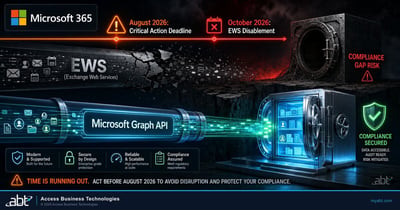
Exchange Web Services Retires
What the Exchange Web Services retirement means for the apps and integrations a financial institution still runs.
Read the article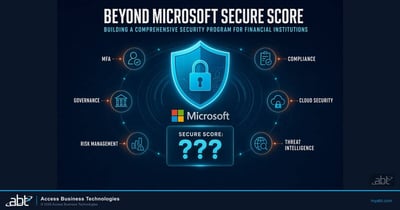
Beyond Secure Score: Building a Real Security Program
How banks and credit unions turn a security metric into a program an auditor can follow.
Read the articleAnswered
Microsoft Baseline Security Mode, answered
Verify it yourself
Where the facts on this page come from
Every Microsoft date, setting name, count, build number and quotation above comes from the sources listed here.
- Microsoft 365 Blog, "Ignite'26 Spotlight: Announcing Microsoft Baseline security mode 2026 General Availability," November 17, 2026. Source for general availability and the phased worldwide rollout, the Ignite 2025 introduction, the 2025 and 2026 workloads, the four categories, the 24 new settings and their split, simulation mode, the Global Administrator start, the private preview features, the statement that Baseline Security Mode does not guarantee compliance, the new-tenant default on the roadmap, and the quotation.
- Microsoft Learn, Baseline security mode settings, updated November 17, 2026. Source for the admin center path, the roles, availability on all Microsoft 365 subscriptions and plans, the impact report method, the setting names, the PowerShell note, the credential stuffing statement, the Exchange Web Services minimum builds, the list of features that currently stop working, the hybrid guidance, and the draft Conditional Access policies note.
- Electronic Code of Federal Regulations, 16 CFR 314.4, Standards for Safeguarding Customer Information (FTC Safeguards Rule). Source for the multi-factor authentication requirement in paragraph (c)(5).
- The callout, the six steps and their order, the last table row, and the people named in the cards are ABT's recommendations; everything else on this list is from Microsoft or the Code of Federal Regulations.
Microsoft wrote the baseline.
Find out where your tenant stands against it.
The work starts with the Baseline Security Mode page in your admin center and the impact report for each setting. The assessment ends with a written review you keep: where each setting stands, which ones are ready today, the dependencies to clear first, and the order to turn the rest on.
Tell us a little about your environment and we will come back with what we would check first.
What should we look at? Optional.
Encrypted. Private.
Thank you. That is with us.
An ABT specialist will be in touch shortly. If a particular setting, report or dependency is what you are thinking about, say so in your reply and we will start there.
