Skip to the main content.
Home Security EWS Allow List and App Inventory
Exchange Online · Microsoft 365

This month Microsoft writes you a list of the applications it has seen reaching into your mailboxes. It is worth more than the deadline that produced it.

The window to build your own Exchange Web Services allow list and sit out the October block closed at the end of August. For every tenant that did not act, Microsoft says it will build that list during September, from what it has observed your tenant actually using. Microsoft also says the result "might also include apps in there you weren't aware of." That sentence is the reason to read the list rather than just accept it.

  • Where the list lives, and the one command that reads it
  • The October reversal that catches anyone who acted halfway
  • What an entry nobody can account for actually means
Watch · 13 min
Entra ID Security Assessment: 7 Queries That Replace 2 Hours of PowerShell
The same discipline this page asks for, applied more broadly. Resolving an identifier to a thing, and a thing to an owner, is most of the work in any tenant review.
90
days is the longest look-back the EWS usage report will show you
Microsoft Learn, Exchange Web Services usage report
10
days it can take for activity to appear in that report at all
Microsoft Learn, Exchange Web Services usage report
24
hours is the stated maximum before an allow list change takes effect
Exchange Team Blog, Introducing EWSAllowedAppIDs
0
exceptions past April 2027, in Microsoft's own words
Exchange Team Blog, Exchange Online EWS, Your Time is Almost Up

What Microsoft is doing to your tenant this month

Exchange Web Services is the old programmatic way for an application to reach into a Microsoft 365 mailbox. It is being retired. The dates have been public for a long time, and most coverage has treated the whole thing as a migration deadline: move your applications to Microsoft Graph before the lights go out.

That framing is correct and it is also incomplete, because it misses what happens in September. For every tenant that has not built its own allow list, Microsoft is about to build one, using that tenant's own observed usage as the source. The Exchange Team says it plainly:

"To help you during this transition, we will pre-populate the Allow List for customers who have not created one before September 2026, based on each tenants own usage."

Exchange Team Blog, Exchange Online EWS, Your Time is Almost Up, updated 31 August 2026

Read that as an operations problem and it is mildly reassuring: Microsoft is doing some homework for you so that fewer things break in October. Read it as a security question and it is considerably more interesting, because a list generated from observed usage is not a list of the applications you authorised. It is a list of the applications that have actually been talking to your mailboxes. Those two sets are supposed to be identical. In most estates they are not, and nobody has had a cheap way to see the difference.

Microsoft says as much, in the same post, without softening it:

"If you only set EWSEnabled=True in August and we will populate your Allow List for you, we might also include apps in there you weren't aware of (if they show usage)."

Exchange Team Blog, Exchange Online EWS, Your Time is Almost Up, FAQ section

That is the whole wedge, and it comes from the vendor rather than from us. An organisation that does nothing at all in September still ends up holding an inventory it never had to commission, of a category of access that is genuinely difficult to enumerate any other way.

The rest of this page is about getting value out of that list: where it is, what its columns mean, what an unfamiliar entry does and does not tell you, and the one behavioural change in October that turns a half-finished job into an outage.

The date this page is written against

Microsoft offered an escape from the October 1 automatic block: configure your own allow list and set the tenant flag to true by the end of August 2026, and your tenant is excluded. That window closed on 31 August. If you are reading this in September, the option is gone, and the question is no longer whether to opt out but what to do with what arrives.

Why a list you did not write is worth more than one you did

An inventory you assemble reflects what you remember. An inventory the platform assembles reflects what is happening. The gap between them is the finding.

It is observed, not remembered

An application inventory built from memory, tickets, and vendor contracts captures what somebody wrote down. This list captures what actually made calls. An integration set up years ago by a person who has since left leaves no trace in the first kind of record, and shows up in the second once it has made a call inside the reporting window, allowing for the lag before that call appears.

It covers a hard category

Mailbox access by an application is one of the more awkward things to enumerate in Microsoft 365, because it can arrive through several routes and none of them appear on a single screen. This list is scoped narrowly and precisely: what used Exchange Web Services, and how much.

It arrives with a deadline attached

Inventories usually fail because nothing forces anyone to finish them. This one has a date behind it and a consequence: what is not on the list stops working. The reconciliation gets done because the alternative is an outage, which is a better forcing function than good intentions.

There is a reason Microsoft treats this access path as a security matter rather than a housekeeping one. The company attributes the acceleration of the whole retirement to a specific incident, and says so on its own documentation:

"The Midnight Blizzard security incident in January 2024 involved EWS and elevated the urgency of the EWS deprecation effort. The scope was also widened from third party applications to include all Microsoft applications."

Microsoft Learn, Deprecation of Exchange Web Services in Exchange Online

We are not going to characterise that incident beyond what Microsoft states, and neither should anybody presenting this internally. The useful part is the direction of travel: Microsoft looked at application access to mailboxes, decided the risk profile no longer justified the convenience, and set a date. Your list is a snapshot of your own version of the thing Microsoft decided was worth ending.

Where the list lives, and what its four columns mean

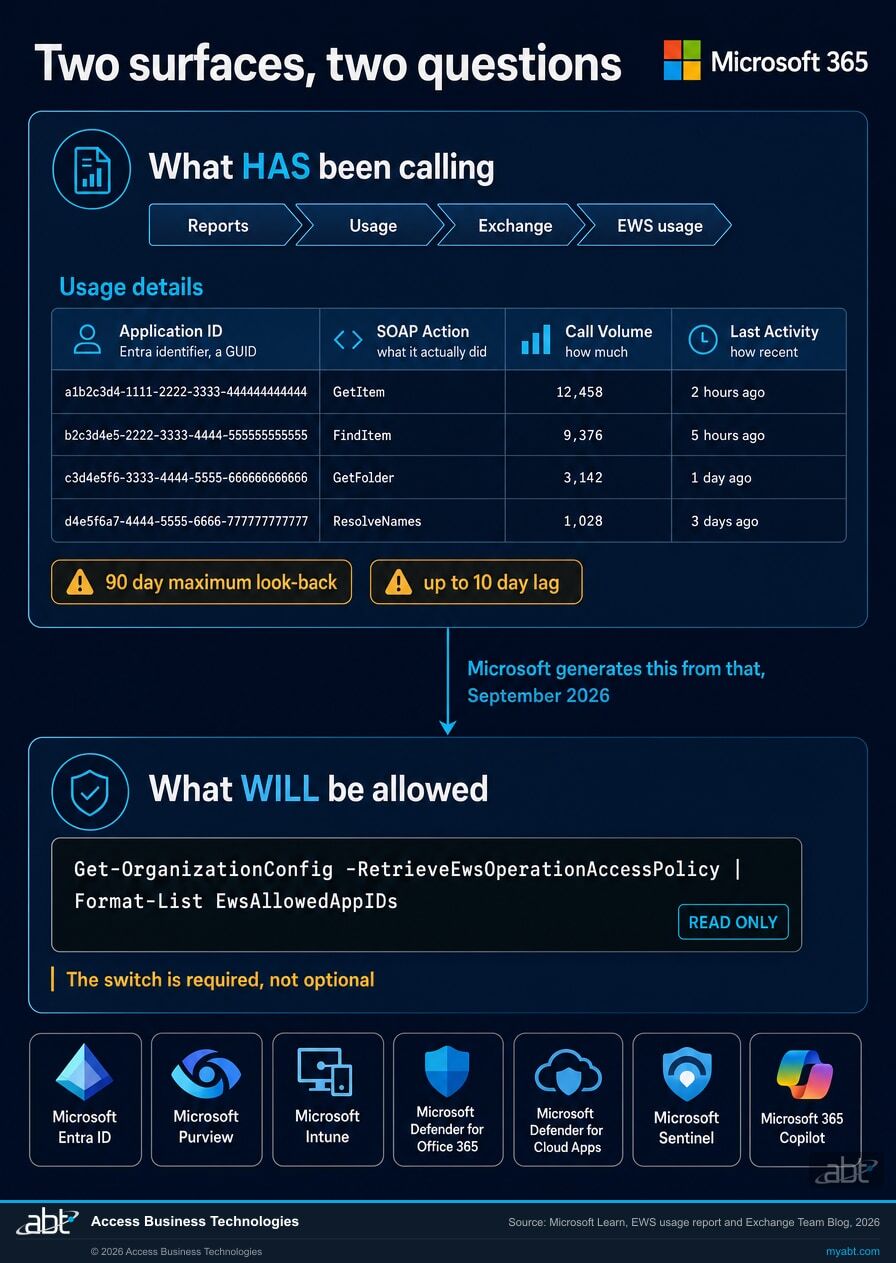
There are two surfaces, and they answer different questions. The usage report tells you what has been calling. The allow list property tells you what will still be permitted to call. In September the second is being generated from the first, so reading them together is the exercise.

The usage report sits in the Microsoft 365 admin center. Go to Reports, then Usage, then Exchange, then the EWS usage tab. Microsoft describes it as showing "the SOAP actions used by each application calling EWS in your organization" along with the successful call volume for each. Two summary figures sit at the top, of which the one that matters here is Active apps, the number of unique applications that sent at least one request during the period.

The detail table has four columns and cannot be customised:

ColumnWhat Microsoft says it isWhat it is useful for
Application ID The Microsoft Entra identifier for the registered application The only identity you get. It is a GUID, not a name, and turning it into a name is the first real task.
SOAP Action The specific Exchange Web Service SOAP action executed What the application actually did. Reading messages, moving them, syncing folders, and creating items are very different levels of reach.
Call Volume The number of SOAP action calls in the given period Scale, and a rough signal of whether something is a live production dependency or an occasional job.
Last Activity date (UTC) The last date of activity recorded for that app and SOAP action Whether this is current. An application last seen months ago is a different conversation from one that ran this morning.
Diagram showing the path through the Microsoft 365 admin center to the Exchange Web Services usage report, the four report columns, and the PowerShell command that reads the allow list
The two surfaces and the route to each. The usage report answers what has been calling; the allow list property answers what will still be permitted to.

The allow list itself is a tenant property read through Exchange Online PowerShell. The switch in the middle is not optional, and leaving it out is the most common reason the value comes back looking empty when it is not:

# Read both values at once. Read only, changes nothing. Get-OrganizationConfig -RetrieveEwsOperationAccessPolicy | Format-List EWSEnabled, EwsAllowedAppIDs

Microsoft explains the switch: "The use of RetrieveEwsOperationAccessPolicy is required for performance reasons, we only want to retrieve this list if the admin explicitly asks for it." Both properties sit on the same organization configuration object, so one call returns them together. Read them together too: neither value means much on its own, and the next section is entirely about why.

Three limits worth knowing before you treat this as complete

The report looks back 90 days at most. Microsoft offers 7, 30, or 90 day filters and nothing longer. Anything that runs quarterly, annually, or only at period end can be entirely real and entirely absent from the view.

It lags by up to 10 days. Microsoft states that usage data "is collected and aggregated weekly, not daily" and that "it can take up to 10 days for usage to show in the report." Something that ran last week may not be there yet.

The ability to set the list is still rolling out. Microsoft notes that all tenants should be able to view the parameter, "but they won't be able to set the list until the roll out reaches the tenant." If you can read the value and not write it, that is the rollout rather than a permissions problem.

Those limits are the reason to start now rather than at the end of the month. A 90 day window measured on 1 September reaches back into June. The same window measured on 30 September has already lost most of June, because each day of waiting drops another day off the far end.

The setting that means the opposite thing in October

This is the part that catches people, and it catches the conscientious ones hardest, because it punishes acting halfway rather than not acting at all.

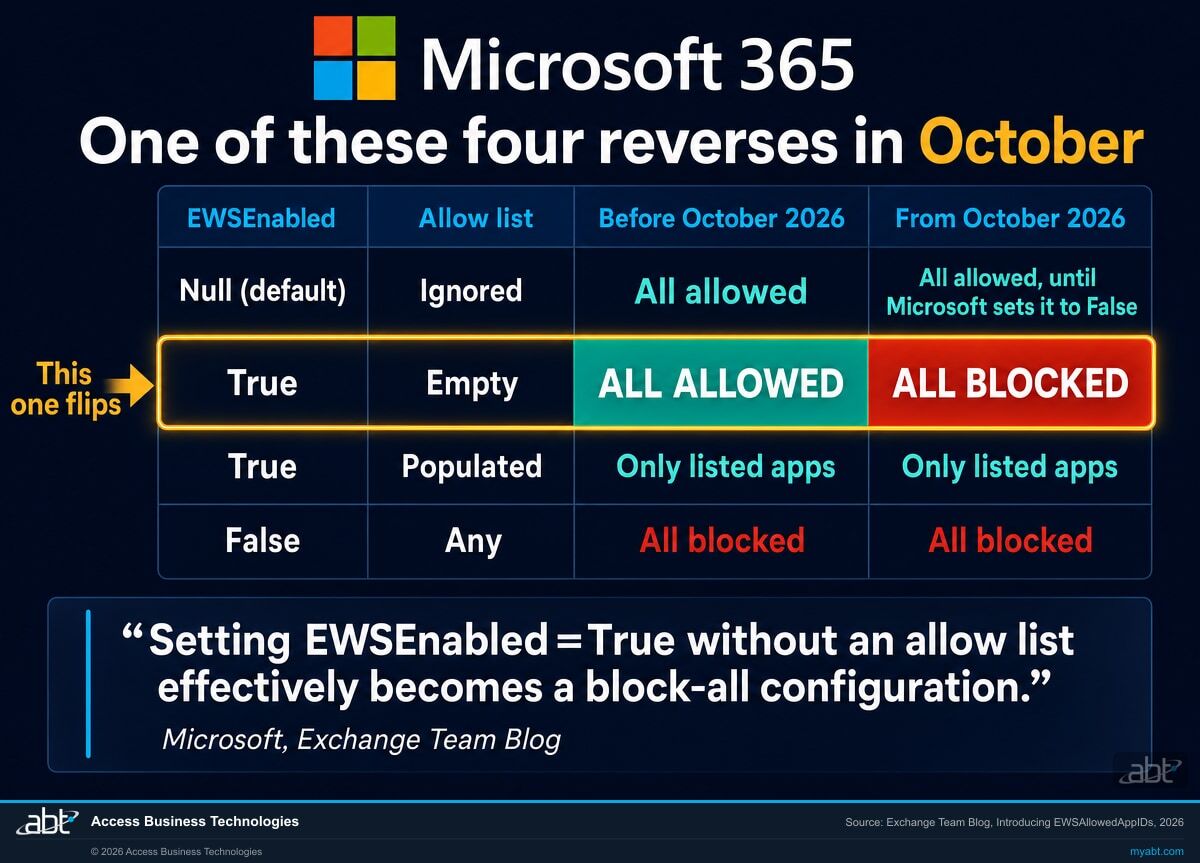
Two values govern EWS in a tenant. EWSEnabled, which can be true, false, or null, and null is the default that most tenants are still sitting on. And the allow list, EwsAllowedAppIDs, which can be populated or empty. One combination of those two values changes meaning completely on 1 October, from permitting everything to permitting nothing.

EWSEnabledAllow listBehaviour before October 2026Behaviour from October 2026
Null
the default
Ignored All EWS traffic allowed All EWS allowed, until the rollout reaches the tenant and sets the value to False
True Empty or null All EWS traffic allowed All EWS traffic blocked
True Populated Only listed applications allowed Only listed applications allowed
False Any All EWS traffic blocked All EWS traffic blocked

This table shows the effect of EWSEnabled and the AppID allow list on their own. A tenant that also has the older user agent based access policy configured has a second check to satisfy, covered further down.

Look at the second row. Before October, setting the flag to true with no list is the most permissive configuration available. From October it is the most restrictive one. Microsoft states the consequence directly:

"After enforcement begins, setting EWSEnabled=True without an allow list effectively becomes a block-all configuration."

Exchange Team Blog, Introducing EWSAllowedAppIDs, updated 21 August 2026

If somebody on your team set the flag in August, check what else they did

Setting EWSEnabled to true was widely and correctly recommended over the summer, both to secure the exclusion from the October block and to sit out any "scream tests" Microsoft might run. On its own, without a populated allow list, that same setting becomes a block-all configuration on 1 October.

Microsoft has said it will fill the list for tenants that have not filled it themselves, which should cover this case. Verify it rather than assume it. The command in the previous section takes a few seconds and the failure mode it rules out is every EWS application in the tenant stopping at once.

There is a related subtlety worth knowing if more than one person has touched this. Microsoft will not overwrite work an administrator has already done, and it draws the line at whether the property has been modified rather than at whether the result looks sensible:

"If the admin makes any changes to AppID Allow List by modifying the EWSAllowedAppIDs property, Microsoft will not make any modifications of that property for the tenant. Microsoft will modify EWSAllowedAppIDs only if the customer has not done so already."

Exchange Team Blog, Exchange Online EWS, Your Time is Almost Up, FAQ added 31 August 2026

So a partial edit opts you out of the automatic help entirely. Somebody who added one known application in July, meaning to come back and finish, has a list containing exactly that one application and no assistance coming. Everything else stops in October. This is not a hypothetical shape of mistake; it is the ordinary result of starting a task and being interrupted.

If the list was auto-generated, you keep full control of it afterwards. Microsoft confirms that an administrator can "change the content of Allow List" after the September population, so the generated list is a starting point to reconcile rather than a decision imposed on you.

Comparison chart of the four combinations of the EWSEnabled tenant setting and the allow list, showing which combination reverses from allowing all traffic to blocking all traffic in October 2026
Four configurations, one of which reverses. The second row is the one to check before October.

Find out what has been reaching into your mailboxes.

Our engineers read your Microsoft 365 tenant and come back with what is on your allow list, what the usage report shows, which application identifiers resolve to something you recognise, and which ones nobody can account for yet. No cost, no obligation.

Get a free security assessment

What an entry you cannot account for actually means

Start with what it does not mean. An application identifier you do not recognise is not evidence of an intrusion. The common explanations are dull: a vendor tool whose registered application name differs from the product you bought it as, a Microsoft first-party component, a utility somebody installed for a project in 2021, or a service that a departed colleague set up and documented nowhere.

It is also not nothing. The honest description is that it is an access path into mailboxes that your organisation cannot currently explain, which is a governance finding whatever the eventual answer turns out to be. The work is resolution, in a fixed order, and most entries fall out at the first or second step.

1

Resolve the identifier to an application

Check the identifier against Microsoft's published list of first-party application identifiers first, because a good proportion of entries are Microsoft's own components. Microsoft names Office and Power Query for Excel as examples, and notes that these need to be on your list too if you want them to keep working.

For anything that is not first-party, Microsoft's guidance is direct: "If you still can't find the Application ID, check your Enterprise Applications in Microsoft Entra ID." That is where a third-party application registered in your tenant will be, usually with a display name that makes the vendor obvious.

Microsoft Learn, Exchange Web Services usage report
2

Establish what it has been doing, not just that it exists

The SOAP action column is the difference between an application that reads a folder listing and one that reads message bodies, moves items, or creates them. Call volume and last activity date tell you whether this is a live production dependency or something that ran twice in June.

A high-volume entry with a recent date is active enough that somebody will notice when it stops, so it needs an owner before October. A single call near the far end of the window is a different conversation, and often the right answer there is to let it lapse. Volume tells you how much an application has been doing, not how much the business depends on it, so read it as a triage order rather than a verdict.

Usage details table, all four columns read together

3

Find the human who wanted it

This is the step that takes real time and the one that produces the actual finding. An application resolves to a vendor in minutes. Establishing who inside the institution asked for it, what business process depends on it, whether that process still exists, and whether anybody reviewed the access it was granted, is not mechanical.

It is also the question an examiner asks, and the reason to do this in September rather than in the week the October block arrives.

Your own records, and the people who hold them
4

Decide, and write the decision down

Each entry ends in one of three places: it stays, and goes on the allow list with an owner recorded against it; it goes, and the access is removed deliberately rather than left to expire; or it moves, because the vendor supports Microsoft Graph and this is the moment to switch.

The decision matters more than the direction. An application allowed to keep mailbox access because somebody weighed it is a defensible position. The same application on the list because the platform put it there and nobody looked is not.

The output worth keeping after the deadline passes

For a bank, a credit union, or a mortgage company

Application access to mailboxes is squarely inside what examiners ask about under access control and third-party risk. The specific question this exercise answers, which is usually the hard one, is whether the institution can enumerate what has access and say who approved it.

Producing that list, resolving it, and recording the decisions is a genuinely useful artefact well beyond this deadline. Whether any of it is required in your case depends on your regulator, your policies, and your own risk assessment, and nothing on this page settles that for you.

There are two allow lists, and an application has to satisfy both

Exchange has had a feature called EWSAllowList for many years. The new one is called EwsAllowedAppIDs. The names are close enough that they get conflated in conversation, and they are not the same thing. Microsoft draws the distinction explicitly:

"The EWSAllowList feature Exchange has had for many years is based on User Agent, not App ID (and it applies to REST/Graph not just EWS by the way). Both can work together, but they operate on different aspects of the calling application."

Exchange Team Blog, Introducing EWSAllowedAppIDs

The older mechanism matches on the user agent string an application presents. The new one matches on its registered application identifier in Microsoft Entra. An application can satisfy one and fail the other, and where an organisation has configured the older policy, both checks apply. On how the two interact, Microsoft is unambiguous: "The new AppID Allow List takes precedence. An app will have to pass both checks to gain access."

The practical consequence is small but sharp. If your tenant already has the older access policy configured, adding an application identifier to the new list is necessary and may not be sufficient. Check both before concluding an application is safe.

Writing to the list replaces it entirely

The command that sets the allow list writes the whole value. Microsoft: "Administrators should be aware that setting the property writes the full list value. If the property already contains App IDs, they will be replaced unless included in the new command." There is no incremental add or remove today.

So the safe pattern is read, combine, write. Read the current value, append or drop what you intend to change, write the complete list back, then read it again to confirm what actually landed. Allow at least a day before testing behaviour, because changes take up to 24 hours to take effect while servers refresh their cache.

What to do in September, in an order that does not create the outage early

Only one of these six steps changes anything. The order matters because the cheap, read-only work comes first, and the single step that writes to your tenant comes after you know what depends on it.
1

Read both values today

Get the current EWSEnabled state and the current allow list. This costs a minute, changes nothing, and tells you which of the four rows in the table above you are actually in. Everything else depends on the answer, and a surprising number of teams discover here that somebody already acted without telling anyone.

Exchange Online PowerShell, read only
2

Pull the usage report at 90 days and export it

Take the widest window available and export the CSV, because the window only ever gets shorter from here and the export is the record you will reconcile against. Do this early in the month rather than late: the 90 day view on 1 September reaches back to early June, and each day of delay drops a day off the far end.

Reports, Usage, Exchange, EWS usage tab, Export
3

Watch for the generated list, then read it against your export

Microsoft says the population happens during September for tenants that have not built their own list, without naming a specific day. When it appears, the comparison is the exercise: entries on the generated list that are not in your own understanding of the estate are the ones to work through, using the four steps in the previous section.

Microsoft has also committed to monthly Message Center posts with tenant specific usage summaries, so the admin center is worth checking alongside the report.

Microsoft 365 admin center, Health, Message center
4

Ask each vendor the Graph question directly

For every third-party application that resolves to a supported product, the question is whether the version you are running, as deployed, still needs Exchange Web Services or already supports Microsoft Graph. Vendors have had years of notice and many have shipped support; some have shipped it in a version you are not on yet.

This is the step with the longest lead time and the least control, which is why it starts now rather than in October.

Your vendors, in writing
5

Set the list deliberately, then verify it landed

Once you know what belongs, write the complete list. Remember that the write replaces the whole value, that there is no incremental edit, and that touching the property at all means Microsoft stops maintaining it for you. Read the value back afterwards. A command that returns without an error is not the same as a setting that changed.

Then wait a day before drawing conclusions from behaviour, because the cache refresh is up to 24 hours.

The only step that changes state
6

Treat April 2027 as the real date

October is a checkpoint with an escape hatch, and it has two documented settings rather than one. If something critical breaks, an administrator can either set EWSEnabled to true with a correct allow list, or set it back to null, which Microsoft says re-enables EWS without restrictions until the final deprecation. Setting the flag to true while the list is empty is not a recovery, because from October that combination permits nothing. Microsoft warns there will be a service interruption where it has already blocked EWS. April 2027 has no escape hatch: the ability to control the setting is removed from tenant administrators, and Microsoft says "there will be no exceptions past April 2027."

So the allow list is a way to buy time for a migration, not a substitute for one. Anything you allow in October still has to be off Exchange Web Services by the spring.

The date that actually ends this

If you run Exchange on premises, or a hybrid

None of this touches Exchange Server. Microsoft states that the retirement applies only to Microsoft 365 and Exchange Online, and that there are no changes to EWS in Exchange Server. On premises mailboxes may continue using it.

Hybrid deployments have one specific dependency worth planning for now: Microsoft says that "only Exchange SE will support Graph for calls to Exchange Online, so hybrid customers will have to use Exchange SE to host on-premises mailboxes." If your on premises servers are on an older version, that is a project with its own lead time. Our page on Exchange Server SE and Exchange Online covers that decision.

The wider picture around this one change

Exchange Web Services retirement and the August 2026 deadline for financial institutions
Exchange Online

Exchange Web Services Retires: The August 2026 Deadline

The migration side of this story, written while the August window was still open. Useful background on what EWS is, which applications typically depend on it, and what moving to Microsoft Graph involves.

Read the article
Microsoft Entra ID access reviews for banks, credit unions, and mortgage companies
Identity

Entra ID Access Reviews for Financial Institutions

The recurring version of the exercise this page describes once. If reconciling an application inventory in September is useful, the question worth asking afterwards is what makes it happen again without a deadline forcing it.

Read the article
OAuth consent phishing against financial institutions and how applications gain mailbox access
Security

The OAuth Consent Phishing Toolkit That Bypasses Multifactor Authentication

Why an application with mailbox access that nobody remembers approving is worth resolving rather than shrugging at. The mechanism by which unwanted applications acquire that access in the first place.

Read the article

Where ABT fits

Access Business Technologies is a Tier-1 Microsoft Cloud Solution Provider. We have worked with Microsoft technology since 1999, and today we manage Microsoft 365 tenants and host Azure environments for more than 750 financial institutions. Reading a tenant to find out what is quietly connected to it, and working out which of those things a Microsoft change is about to reach, is ordinary work here rather than a special engagement.

The free security assessment is a read of your tenant, not a sales call with a report attached. For this particular change, our engineers report what your EWSEnabled value is and what your allow list currently contains, what the usage report shows across the widest window still available, which application identifiers resolve to recognisable products and which do not, and which of them look like live production dependencies rather than dormant leftovers. You get what is switched on, what is not, and what each finding would mean on a bad morning.

What a tenant read cannot do on its own is tell you who inside your organisation asked for a given application and whether that reason still holds. That part needs your people, and it is usually where the useful conversation happens. There is no cost and no obligation.

ABT also operates M365 Guardian, its managed security service for credit unions, banks, and mortgage companies.

If something has already stopped working and you need it running today, say so when you get in touch and we will treat it that way rather than as a review.

Where the facts on this page come from

Every EWS date, quotation, command, and behaviour on this page was read from the four Microsoft sources below on 1 September 2026. ABT's own statements, such as how many institutions we work with, are ours rather than Microsoft's. Where a source has been revised, the revision date is given, because several of these have moved.
Exchange Team Blog, Exchange Online EWS, Your Time is Almost Up
Published 5 February 2026, updated 31 August 2026 (version 16). The source for the September population of allow lists, the warning about unrecognised applications, the closed August window, the October 1 behaviour, the scream tests, the April 2027 finality, and both FAQ entries added on 31 August about Microsoft not modifying a list an administrator has touched. techcommunity.microsoft.com
Exchange Team Blog, Introducing EWSAllowedAppIDs
Published 19 June 2026, updated 21 August 2026. The source for the before and after behaviour tables, the block-all reversal, the PowerShell syntax and the mandatory retrieval switch, the 24 hour cache, the absence of incremental edits, the distinction from the older user agent based list, and the note that the ability to set the list is still rolling out. techcommunity.microsoft.com
Microsoft Learn, Deprecation of Exchange Web Services in Exchange Online
Updated 21 August 2026. The source for the retirement timeline, the statement that the Midnight Blizzard incident elevated urgency and widened the scope to Microsoft's own applications, and the current state of the remaining gaps between Exchange Web Services and Microsoft Graph. learn.microsoft.com
Microsoft Learn, Exchange Web Services (EWS) Usage Report
Updated 7 August 2026. The source for the admin center path, the four report columns and their definitions, the summary figures, the 7, 30, and 90 day filters, the statement that data is aggregated weekly and can take up to 10 days to appear, and the guidance on resolving an application identifier through Enterprise Applications in Microsoft Entra ID. learn.microsoft.com

The changes sitting next to this one

Three Microsoft changes land on the same estate within roughly six months of each other, and they reach overlapping sets of applications. It is worth knowing which is which before an outage forces the question.

Answered from Microsoft's own documentation

Is Microsoft really going to create an EWS allow list for my tenant automatically?

Yes, if you have not created one yourself. The Exchange Team says it will "pre-populate the Allow List for customers who have not created one before September 2026, based on each tenants own usage." Microsoft names the month rather than a specific day, so there is no published date to plan around. The important qualifier is that this applies only to tenants that have left the property untouched. If an administrator has modified the allow list at any point, Microsoft states it "will modify EWSAllowedAppIDs only if the customer has not done so already," so a partially completed list receives no automatic help and stands as it is.

How do I see which applications have been using EWS in my tenant?

In the Microsoft 365 admin center, go to Reports, then Usage, then Exchange, then the EWS usage tab. Microsoft describes the report as showing the SOAP actions used by each application calling EWS in your organization along with the successful call volume for each. The detail table has four columns that cannot be customised: Application ID, SOAP Action, Call Volume, and Last Activity date in UTC. You can filter by the last 7, 30, or 90 days, and you can export to CSV. Two limits are worth knowing before you treat the output as complete. Ninety days is the longest window available, so anything running quarterly or annually can be genuinely absent. And Microsoft states that usage data is collected and aggregated weekly rather than daily, and that it can take up to 10 days for usage to show in the report.

What is the PowerShell command to read the EWS allow list?

Get-OrganizationConfig with the RetrieveEwsOperationAccessPolicy switch, piped to Format-List EwsAllowedAppIDs, in Exchange Online PowerShell. It is read only and changes nothing. The switch is required rather than optional: Microsoft explains that it exists for performance reasons, because the list is only retrieved when an administrator explicitly asks for it. Leaving it out is the most common reason the value appears empty when it is not. Read the EWSEnabled property at the same time, because neither value means much without the other. Writing to the list uses Set-OrganizationConfig with the EwsAllowedAppIDs parameter, and that command replaces the entire value rather than adding to it, so the safe pattern is to read the current list, compute the full updated list, write it back, and then read it again to confirm what landed.

We set EWSEnabled to true in August. Are we safe?

Only if the allow list is populated as well, and this is the single most important thing to check before October. Before October 2026, setting the flag to true with an empty or null list means all EWS traffic is allowed, which is the most permissive configuration available. From October 2026 the identical configuration means all EWS traffic is blocked. Microsoft states it directly: after enforcement begins, setting EWSEnabled to true without an allow list effectively becomes a block-all configuration. Microsoft has said it will populate the list for tenants that have not populated it themselves, which should cover most of this case, but verify rather than assume. The check is a single read-only command and the failure it rules out is every EWS application in the tenant stopping at once.

I do not recognise an application on the list. Have we been breached?

It is not evidence of one, and it should not be treated as an incident on that basis alone. The common explanations are dull: a Microsoft first-party component, a vendor tool whose registered application name differs from the product name you know it by, or something set up years ago by somebody who has since left. Microsoft explicitly notes that first-party applications such as Office and Power Query for Excel will appear and need to be on the list if you want them to keep working. What it does mean is that there is an access path into mailboxes your organisation cannot currently explain, which is worth resolving whatever the answer turns out to be. Work it in order: resolve the identifier against Microsoft's published first-party list, then against Enterprise Applications in Microsoft Entra ID, then look at the SOAP actions and call volume to understand what it has actually been doing, then find the person who asked for it. That last step is the one that takes real time and produces the real finding.

Can I change the list after Microsoft populates it?

Yes. Microsoft addressed this directly in a FAQ added on 31 August 2026, confirming that administrators will be able to change the content of the allow list after an automatic population. So the generated list is a starting point to reconcile rather than a decision imposed on you. Two mechanics matter when you do. The command writes the full value, so anything already there is replaced unless you include it, and there is no incremental add or remove operation today. And changes can take up to 24 hours to take effect, because servers refresh their in-memory cache once a day. Testing behaviour within an hour of a change will tell you nothing reliable.

Does any of this affect Exchange Server on premises?

No. Microsoft states that the retirement applies only to Microsoft 365 and Exchange Online across all environments, and that there are no changes to EWS in Exchange Server. On premises mailboxes may continue using it. Hybrid deployments have one dependency worth planning for now, which Microsoft names in its own FAQ: only Exchange SE will support Microsoft Graph for calls to Exchange Online, so hybrid customers will have to use Exchange SE to host on-premises mailboxes. If your on premises servers are running an older version, that upgrade has its own lead time and is worth starting well before the deadlines discussed here.

If something breaks in October, can we turn EWS back on?

In October, yes, and Microsoft documents two routes rather than one. Its words are that if you still need EWS "you will have two choices": set EWSEnabled to true and maintain an allow list, or set EWSEnabled back to null, which Microsoft says "re-enables EWS without restrictions until the final deprecation occurs" and has to be done in Exchange Online PowerShell. The distinction matters, because from October an allow list that is empty or absent means nothing is permitted, so setting the flag to true on its own is not a recovery. Microsoft also notes that where it has to re-enable EWS after blocking it, there will be a service interruption. So it is a recovery path rather than a plan. April 2027 is different and there is no equivalent escape: from 1 April 2027 EWS is fully and permanently disabled, the ability to control the setting is removed from tenant administrators, and Microsoft states there will be no exceptions past April 2027. The practical reading is that the allow list buys time for a migration rather than replacing one. Anything you allow through in October still has to be off Exchange Web Services by the spring.

What are the scream tests Microsoft mentions?

Microsoft says it may perform temporary scream tests, which it describes as shorter periods of time when EWS is turned off and then back on, to help expose hidden dependencies before the final cutoff. The purpose is to make silent dependencies announce themselves while there is still time to do something about them. There is a stated exclusion: an organisation that has set EWSEnabled to true will not be affected by any scream tests Microsoft conducts. Microsoft has said it will provide more information about these in due course, so treat the detail as subject to change and watch the Message Center, where the company has committed to monthly posts carrying tenant specific EWS usage summaries.

Find out what has been reaching into your mailboxes.

Tell us roughly how many mailboxes you run and whether anything has already stopped working. Our engineers will read the tenant and come back with your current allow list and tenant setting, what the usage report shows, which application identifiers resolve to something recognisable, and which ones need an owner before October.

SOC 1 Type 2 · Security Controls
SOC 2 Type 1
Tier-1 CSP

ABT manages Microsoft 365 tenants and hosts Azure environments for more than 750 financial institutions. The assessment is a technical review and is not legal or compliance advice.

Get a free security assessment

A read of your tenant, and a plain answer on what has mailbox access.

Encrypted. Private.