


Your scanners, statements and alerts keep sending through December. Then the default flips, and the report that names the senders it reaches takes under an hour to run.
Microsoft revised this timeline in January 2026. The March and April 2026 dates still circulating widely were replaced before they arrived. Here is the current schedule, the built-in report that shows which of your senders are still using basic authentication, and what each replacement path actually costs you in reach.
- The four current milestones, quoted from Microsoft
- The one report column that separates basic auth from OAuth
- Why a default off leaves you more room than a removal would
- Two traps sitting inside the obvious replacements
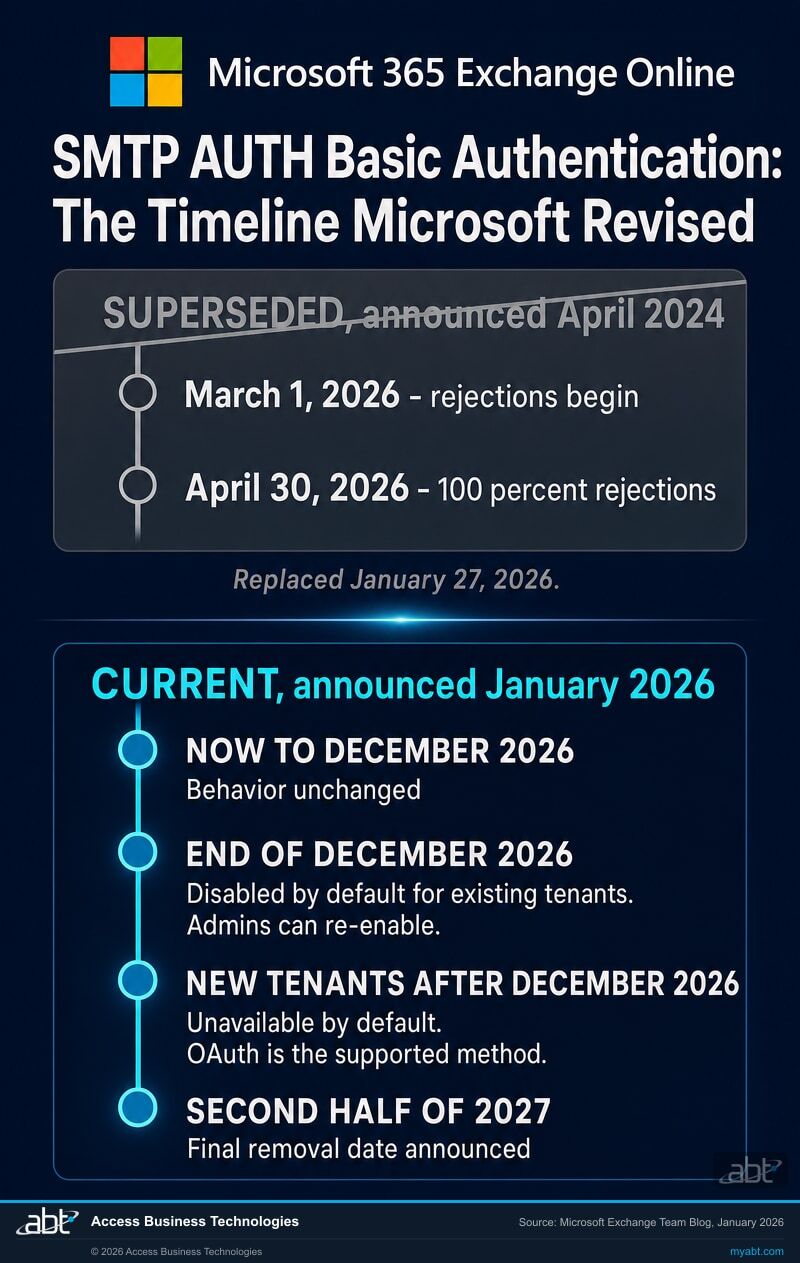
Two timelines are in circulation. One of them was replaced in January.
In April 2024 Microsoft published a schedule for removing basic authentication from client SMTP submission. That post said rejections would begin on 1 March 2026 and reach one hundred percent on 30 April 2026. It is a thorough post, it ranked well, and a great deal of the advice written since then rests on it.
On 27 January 2026 Microsoft revised the schedule. The 2024 post now carries an update banner at the top pointing readers to the replacement, and the replacement post sets out four milestones instead of two. The revision landed before either of the original dates arrived.
Now to December 2026: SMTP AUTH Basic Authentication behavior remains unchanged. End of December 2026: SMTP AUTH Basic Authentication will be disabled by default for existing tenants. Administrators will still be able to enable it if needed. New tenants created after December 2026: SMTP AUTH Basic Authentication will be unavailable by default. OAuth will be the supported authentication method. Second half of 2027: Microsoft will announce the final removal date for SMTP AUTH Basic Authentication.
Microsoft gives the reasoning in the same post: many customers "continue to face real challenges modernizing legacy email workflows and need sufficient time to adopt viable, secure alternatives," so the revision is described as providing "clearer milestones and additional runway." The change applies to tenants in all cloud environments.
Why the old dates are still the ones you find
Search for this deadline today and the superseded dates come back readily, because the 2024 post is four times longer, has had two years to accumulate links, and is the version every summary was written from. There is a sharper reason as well, and it recurs across Microsoft changes, so it is a pattern rather than a one-off.
Microsoft's own canonical page still points at the older post
The Learn article that most administrators land on, "How to set up a multifunction device or application to send email using Microsoft 365 or Office 365," carries the deprecation note and the words "see timeline information." As of 4 September 2026 the link behind those words resolves to the April 2024 post rather than the January 2026 one that replaced it.
Following the trail Microsoft lays down therefore lands you on the superseded schedule. The way to tell which is current: the newer post carries the later publication date, and the older one carries a supersession banner naming its replacement.
For a regulated institution the practical lesson is about change management rather than about this one protocol. A date taken from a blog post, a vendor summary or a chat assistant is a date that may have been revised somewhere you did not look. The durable habit is to check the tenant's own Message Center and the dated primary post before a project plan is built on a milestone. This is the same failure pattern we documented when the legacy TLS retirement for POP and IMAP moved and the public web kept repeating the earlier month.
A default that flips leaves you room. A removal would not.
The two posts differ on a point that matters more than the date. Read them side by side and the change is from a permanent removal to a default setting.
| Question | April 2024 post (superseded) | January 2026 post (current) |
|---|---|---|
| What happens on the date | "Exchange Online will permanently remove support for Basic authentication with Client Submission (SMTP AUTH)" | "disabled by default for existing tenants" |
| Can an administrator turn it back on | No. "You will not be able to do this because Basic auth will be permanently disabled." | Yes. "Administrators will still be able to enable it if needed." |
| Are exceptions available | "We cannot offer any exceptions" | Final removal date to be announced in the second half of 2027 |
| New tenants | Covered by the same removal | Tenants created after December 2026 get it unavailable by default, with OAuth as the supported method |
That difference is worth being precise about in both directions. It means an institution that reaches the end of December with one forgotten device still sending has a recovery path, which is a materially calmer position than the 2024 schedule described. It also means the pressure to finish comes from your own risk posture rather than from a hard wall, and deadlines without walls are the ones that slip.
The useful way to read it
Microsoft has committed to two things: one default change at the end of December 2026, and one announcement in the second half of 2027 that will name a final removal date. Everything past that depends on your tenant.
A default reaches wherever nobody intervened, so the senders most exposed in December are the ones you have not found. A sender you have found can be carried past it, by moving it to OAuth or by an administrator re-enabling the setting, and how long that second option remains open is not yet published. That is the argument for spending this quarter on discovery rather than on migration. The list is the part you control, and the deadline for the rest of the work has not been set.
Examiners tend to ask the discovery question rather than the migration one. "Which systems in this institution authenticate with a password over a legacy protocol, and how do you know" is answerable today from a report Microsoft already generates. Answering it before December converts a deadline into an inventory item, and an inventory item is the sort of thing that closes a finding.
A shorter version of the same shape
Run the count Microsoft already built for you
Exchange Online has reported on this since 2024, and most institutions have never opened the report. It sits in the new Exchange admin center under Reports then Mail Flow, and it is called SMTP AUTH Clients.
The report exists for a security reason Microsoft states plainly on the documentation page: the protocol "is susceptible to being used to send email from compromised accounts." That is the same reason to read it now for a deadline. A sender list that surprises you is a finding whether or not a date is attached to it.
Open the report and widen the window
It defaults to the last seven days, which will under-report anything that runs monthly. Month-end statement jobs, quarterly notices and the payroll run are exactly the senders a seven-day window walks past. The report accepts a range of up to ninety days, and ninety days is the number to use.
Read the Authentication Protocol column
This is the column that answers the question. Microsoft documents the two values it can hold: "Basic Auth is TlsAuthLogin and Modern Auth is XOAUTH2." Every row reading Basic Auth is a sender that depends on the credential the December default withdraws, so each one needs a decision. Whether a given row actually stops depends on what else is true in the tenant: an administrator can re-enable the setting, an existing authentication policy or security defaults may already close the protocol, and a mailbox switched off individually is out of the picture regardless. Every row reading Modern Auth already came through the change.
Note the TLS columns while you are there
The same report breaks each sender down by TLS 1.0, TLS 1.1 and TLS 1.2 percentages. A device still negotiating TLS 1.0 or 1.1 has a second problem arriving on its own schedule, and it is usually the same device. Capturing both in one pass saves running the exercise twice.
Turn each sender address into an owner
This is the step that takes real time and the one that decides whether the project finishes. A sender address is a mailbox; a mailbox is a device, an application or a job; and each of those has somebody who will notice when it stops. The report gives you the first column. Your asset register and your vendor list give you the rest.
We will run the count with you and hand back the sender list
A free security assessment includes reading the SMTP AUTH Clients report across the full ninety-day window, separating the basic authentication senders from the ones already on OAuth, and mapping each one to the mailbox and the override behind it. You get the list. The owner mapping needs your records, and we tell you exactly which ones.
Get a free security assessmentThe switch has three states, and the middle one is where the risk lives
Two settings govern whether a mailbox may use SMTP AUTH at all. There is an organization-wide switch, and there is a per-mailbox switch that overrides it. Microsoft is explicit about the precedence: "The mailbox setting takes precedence over the organization setting."
The per-mailbox setting holds three values, and reading them as a set is what makes the picture useful.
| Value | What it means | What it tells you |
|---|---|---|
| $true | SMTP AUTH is disabled for this mailbox, whatever the organization setting says | Somebody made a deliberate decision to switch this one off. Nothing to do. |
| $false | SMTP AUTH is enabled for this mailbox, whatever the organization setting says | The population that matters. Each of these is an override somebody created for a reason, usually to make one device work, often years ago, frequently in a ticket nobody has read since. |
| $null | This mailbox follows the organization-wide setting | The default state. Its behaviour changes if anybody ever changes the tenant switch. |
Microsoft publishes the enumeration commands on the same page. Reading all three states rather than one gives you the count, the exceptions, and the ratio between them in a single pass.
# The organization-wide setting
Get-TransportConfig | Format-List SmtpClientAuthenticationDisabled
# Every mailbox carrying an explicit override, the population that matters
$Users = Get-CASMailbox -ResultSize unlimited
$Users | where {$_.SmtpClientAuthenticationDisabled -eq $false}
# Every mailbox explicitly switched off
$Users | where {$_.SmtpClientAuthenticationDisabled -eq $true}
# Every mailbox simply following the organization setting
$Users | where {$_.SmtpClientAuthenticationDisabled -eq $null}
Commands as published by Microsoft Learn, "Enable or disable authenticated client SMTP submission (SMTP AUTH) in Exchange Online." The same values are visible one mailbox at a time in the Microsoft 365 admin center under Users, Active users, the user, Mail, then Manage email apps, where the setting appears as Authenticated SMTP with a checkbox.
Read the two lists together, because they answer different questions
The $false list tells you which mailboxes are permitted to use SMTP AUTH. The SMTP AUTH Clients report tells you which ones are actually sending, and on which credential.
A mailbox on the permitted list that appears nowhere in ninety days of report data is a question rather than an answer. It may be an override that outlived its device, which is a standing credential worth closing. It may equally be a quarterly or annual job that simply did not run inside the window, and closing it would break a workflow nobody is watching. Check it against the job scheduler before deciding, and see the coverage section below. A sender appearing in the report on Basic Auth is the one with a December date attached.
There are two conditions that quietly override all of this, and both should be checked before anyone concludes the tenant is exposed. If security defaults are enabled in Microsoft Entra ID, SMTP AUTH is already disabled across the organization. And if an authentication policy in the tenant already disables basic authentication for SMTP, then clients cannot use the protocol regardless of the settings above. That policy parameter is AllowBasicAuthSmtp, and setting it to $false is how an institution can make this change on its own schedule instead of Microsoft's.
Four ways mail leaves a device, and only one of them is affected
A copier, an alarm panel, a loan origination system and a monitoring tool all send mail, and they do it by four different mechanisms. Knowing which one a given device uses decides whether December is relevant to it at all.
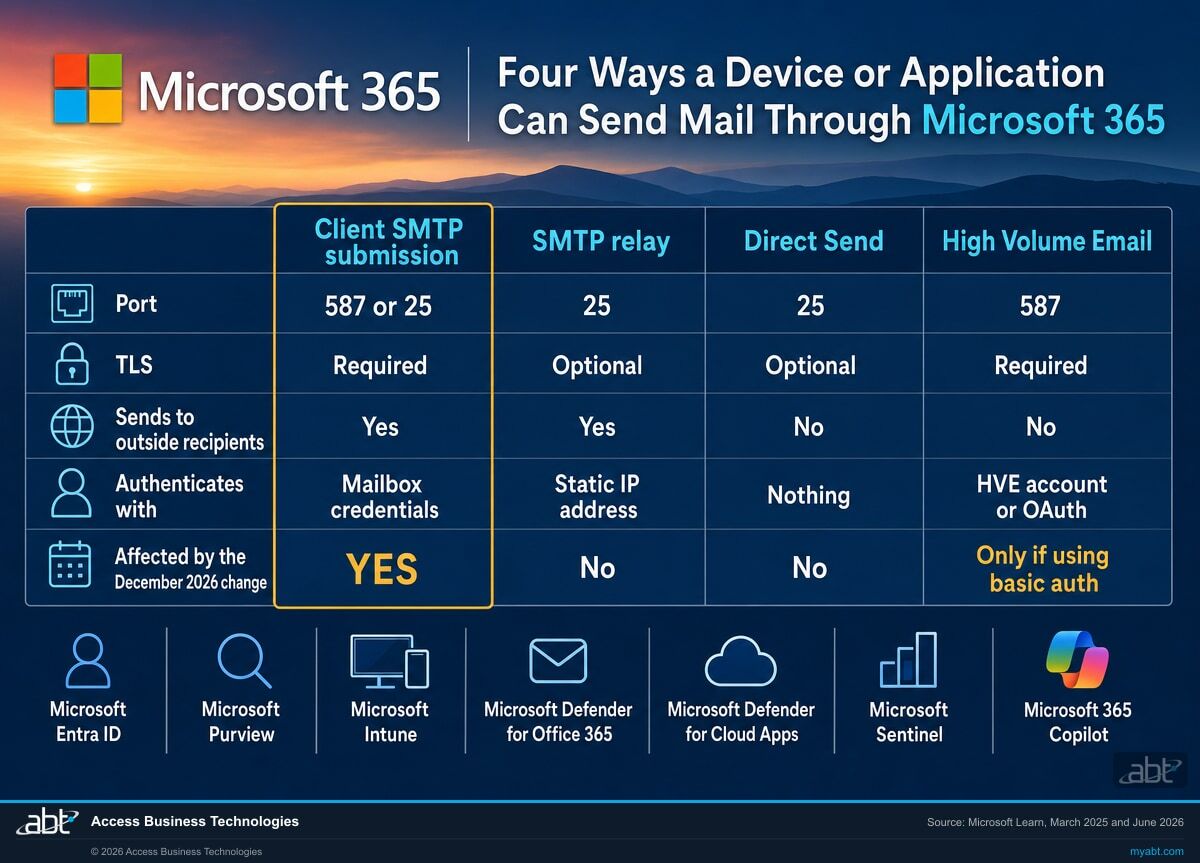
Client SMTP submission
The device signs in with a mailbox username and password on port 587 or 25, TLS required. It can send to the outside world and its messages land in the mailbox's Sent Items. Microsoft's published limits are ten thousand recipients per day and thirty messages per minute.
This is the one December affects, and only where the credential is a password rather than an OAuth token.
SMTP relay
The device is authenticated by its static IP address through an inbound connector on port 25, with no mailbox credential involved. It can relay to the internet, it does not bypass anti-spam, and it does not write to Sent Items.
Unaffected by the December change, because there is no basic authentication in the path.
Direct Send
The device sends unauthenticated to the tenant's own mail endpoint on port 25. It reaches recipients inside your domains only, and Microsoft describes it as suitable "only for advanced customers willing to take on the responsibilities of email server admins."
Unaffected by December, and carrying a caution of its own worth reading below.
The fourth path, High Volume Email, is Microsoft's own recommended replacement and gets its own section below, because what it does and does not cover is the part most summaries leave out.
The quickest scoping question
Ask whoever configured the device one question: does it hold a username and password for a mailbox? If yes, it is client SMTP submission and December applies. If it holds only an IP allowance or nothing at all, it is relay or Direct Send and December does not apply to it.
What changes is the credential, and the protocol stays
The most common misreading of this deadline is that SMTP AUTH itself is going away. It is staying. Microsoft states the position on the Learn page: "SMTP AUTH supports modern authentication (Modern Auth) through OAuth in addition to basic authentication."
So a device that speaks SMTP AUTH and can present an OAuth token keeps working, on the same port, against the same endpoint, past every date on this page. What retires is the password.
That distinction changes the shape of the remediation list. For a modern line-of-business application, the fix is often a configuration change: register an application in Microsoft Entra ID, grant it the mail-send permission, and point the existing SMTP integration at a token instead of a stored password. Microsoft publishes the procedure under "Authenticate an IMAP, POP or SMTP connection using OAuth." Nothing about the device's mail path changes.
The senders that will genuinely need replacing
Some devices cannot present a token, and no amount of configuration will change that. A copier whose firmware predates OAuth support, an alarm panel with a fixed SMTP form, an application whose vendor has stopped shipping updates. These are the ones that need a different path rather than a different credential, and they are the reason to run the count in September instead of November.
Firmware updates are the cheapest fix and the one most often available. Check the device's current firmware against the manufacturer's release notes for OAuth or modern authentication support before assuming a replacement is required.
There is a security argument sitting underneath the deadline, and it is the reason to do this whatever the date says. A stored mailbox password on a device is a credential that does not expire, does not present a second factor, and frequently belongs to a mailbox with more reach than the device needs. Microsoft's own framing on the report page is that the protocol is "susceptible to being used to send email from compromised accounts." We have written about the wider pattern in what happens when an authentication default changes underneath service accounts, and the anatomy is the same one every time.
The two replacements Microsoft names, and where each one stops
Microsoft's canonical Learn page carries a recommendation rather than leaving the reader to choose. It splits on one question: does this sender need to reach anybody outside your organization?
We strongly recommend using one of the following alternative methods instead. Send email to internal recipients only: Use High Volume Email for Microsoft 365. Send email to internal and external recipients: Use Azure Communication Services Email.
Sorting your sender list on that single question is the fastest way to turn a list of devices into a plan. In most institutions the split is uneven and helpful: monitoring alerts, scan to email, payroll notices and system messages are internal, while statements, disclosures and borrower correspondence go outside.
High Volume Email, for the internal traffic
High Volume Email uses dedicated accounts rather than user or shared mailboxes, which is the point of it: application traffic stops being indistinguishable from a person's mail. Microsoft names payroll and human resources notifications, monitoring and service alerts, line-of-business messaging, device-generated mail from printers and scanners, and security and compliance notifications as the intended scenarios.
Its constraints are the part to read before committing a device to it.
| Constraint | Value | What it rules out |
|---|---|---|
| Recipient scope | Internal recipients within the tenant only | Any statement, notice or disclosure that goes to a member, borrower or customer |
| Accounts per tenant | Up to 100 | Rarely a constraint, and useful to know if you plan one account per device |
| Recipients per message | Up to 50 | A single alert addressed to a large operations list |
| Maximum message size | 10 MB | Scan to email of a long document at high resolution |
| Distribution lists | HVE accounts cannot be added to distribution lists or mail-enabled security groups | Any workflow where the sending identity is expected to be a group member |
| Receiving | No mailbox, cannot receive mail; a Reply-To address is configured instead | Anything that expects a human to reply to the sender directly |
| Cloud environments | Microsoft 365 Worldwide, the standard multi-tenant service. Others are "under evaluation" | Institutions operating in a sovereign or government cloud |
| Endpoint and port | smtp.hve.mx.microsoft is recommended, port 587, TLS required | The older smtp-hve.office365.com endpoint is documented as one that "will be deprecated in the future" |
| Licensing | "Do not assign licenses to HVE accounts." They do not require Microsoft 365 licenses | Budgeting a licence per device |
The trap worth naming: High Volume Email accepts basic authentication too
Microsoft documents it directly: High Volume Email "supports both modern authentication (OAuth) and basic authentication for SMTP connections." A migration that moves a copier onto an HVE account while keeping a username and password has changed the endpoint and kept the credential.
Microsoft's guidance on the same page is unambiguous: "Use OAuth authentication when possible." If security defaults are enabled in Microsoft Entra ID, the decision is already made for you, because in that configuration HVE can authenticate only by using OAuth.
Set the acceptance test for this project accordingly. A device has been migrated when the SMTP AUTH Clients report shows it on Modern Auth, and not when it has been pointed at a new endpoint.
Azure Communication Services Email, for anything that goes outside
For senders that reach members, borrowers or customers, Microsoft points at Azure Communication Services Email. It is an Azure service, which means it runs on an Azure subscription with its own configuration and its own billing, separate from your Microsoft 365 licensing.
What it provides is documented: sending from an Azure-managed domain or from your own verified custom domain; SPF and DKIM support for both, with Authenticated Received Chain preserving authentication results in transit; message hygiene through Microsoft Defender components; and an Insights dashboard emitting request-level logs that carry a message ID and recipient information, which Microsoft describes as being for "diagnostic and auditing purposes." Bounce, blocked, open and click tracking are included.
That logging is the part that repays attention in a regulated institution. Application-generated mail sent from a mailbox is auditable only as far as the mailbox is, whereas a service built for the purpose produces per-message delivery records. A mailbox keeps a copy of what it sent in Sent Items, which is evidence the message was submitted. A per-message delivery log is a different artifact, and moving statement traffic onto a service that keeps one is useful independently of the deadline. What weight such a record carries for any particular obligation is a question for your compliance officer and counsel.
It also changes your sender authentication posture, so treat the DNS work as part of the project rather than as a follow-up. Our guide to SPF, DKIM and DMARC enforcement for financial institutions covers what to check before and after a new sending source is introduced.
Two further options exist for institutions that still run mail infrastructure of their own. An on-premises Exchange Server or other SMTP server can accept basic authentication from the device locally, or be configured with a receive connector for anonymous relay, which Microsoft is careful to distinguish from an open relay. Both keep the legacy device working while removing Exchange Online from the authentication path.
Six senders a straight count tends to walk past
The report is honest about what it saw. The gaps come from what it had no opportunity to see, and from systems whose sending nobody in the room thinks of as email.
Anything that runs less often than your reporting window
A quarterly board packet, an annual notice, a disaster recovery test that mails its results. A ninety-day window catches the quarterly job only if you happen to run it in the right quarter. Cross-check the report against your job scheduler rather than treating it as complete on its own.
The device somebody replaced without decommissioning the mailbox
The override stays behind on a mailbox with a working password, sending nothing. It is invisible in the report precisely because it is idle, and it is a standing credential with no owner. The $false enumeration finds these where the report cannot.
Vendor-hosted systems sending as your domain
A core processor, a loan origination platform or a marketing tool given a mailbox credential during implementation. The mail is yours, the configuration lives with the vendor, and the ticket that set it up is on their side. These take the longest to change, which is the argument for finding them first.
Building systems and anything with a maintenance contract
Alarm panels, elevator monitoring, HVAC controls, UPS units, branch camera systems and backup appliances all send email. They rarely appear on an IT asset register, they are frequently on a facilities contract, and the person who knows the SMTP settings works for the installer.
Scripts written by somebody who has left
A scheduled task on a server that mails a reconciliation each morning, with the credential in a configuration file. It works, so nobody has touched it, so it appears in no register. It shows up in the report as a sender address, which is exactly why the report is worth reading line by line rather than in summary.
Test and development systems pointed at production mail
A staging instance configured against the production tenant during a project and never repointed. Low volume, real credential, and usually the last thing anyone checks. Its failure in December is harmless and its existence today is not.
Give the count a stated coverage
An inventory is worth more when it says what it covered. "Ninety days of the SMTP AUTH Clients report, plus every mailbox carrying an explicit override, cross-checked against the job scheduler and the facilities contract list" is a defensible statement. A number on its own invites the question of how it was reached, and that question tends to arrive from an examiner rather than from a colleague.
Direct Send solves this deadline, and Microsoft has signalled its own plans for it
The fastest way to get a stubborn copier off basic authentication is to stop authenticating it. Point it at the tenant's own mail endpoint on port 25, with no credential at all, and it delivers to recipients inside your domains. That is Direct Send, it works, and it is unaffected by anything happening in December.
Before it becomes the default answer for the difficult devices on your list, two sentences from Microsoft's own page are worth reading.
Most customers don't need to use Direct Send. We're working on an option to disable Direct Send by default to protect customers.
Microsoft describes Direct Send as appropriate "only for advanced customers willing to take on the responsibilities of email server admins," and recommends it "only when your legacy device or application doesn't support any of the previously described methods." Its practical limits: it cannot relay to the internet through Microsoft 365, it does not bypass anti-spam so its messages can be filtered, and it writes nothing to Sent Items.
How to hold this
Microsoft has stated an intention rather than a date, and this page reports only that. There is no announced schedule for such a change, and nothing here should be read as one.
What follows from it is a planning preference. A device moved to High Volume Email or to an OAuth token is a device that is finished. A device moved to Direct Send is a device that works today and sits on a path its vendor has said it is reconsidering. For a handful of stubborn endpoints that is a reasonable trade. For the bulk of a migration it is worth the extra effort to land somewhere settled.
There is a security dimension as well, and it is the reason Microsoft gives for the change it is contemplating. An unauthenticated path that accepts mail claiming to be from your own domain is a path an outsider can also try, which is why SPF, DKIM and DMARC enforcement carries more weight for an institution using Direct Send than for one that is not. If you take this route, take the DNS work with it.
A workable order for the next ninety days
The work divides cleanly, and the early steps cost hours rather than weeks. Running them in September leaves the expensive discovery, the vendor-hosted senders, with enough runway to finish comfortably.
| Step | What it produces | Rough effort |
|---|---|---|
| 1. Read the report at ninety days | Each sender that submitted inside the window, split by Basic Auth and Modern Auth, with volumes and TLS levels | Under an hour |
| 2. Enumerate the three switch states | The permitted list, including the idle overrides the report cannot show | Minutes |
| 3. Reconcile the two lists | Active basic-auth senders, idle overrides to close, and senders already on OAuth | An afternoon |
| 4. Name an owner for each active sender | The list that turns into work, with the vendor-hosted ones flagged first | Days, spread across teams |
| 5. Sort by internal or external recipients | The High Volume Email pile and the Azure Communication Services pile | An hour once owners are known |
| 6. Check firmware before replacing anything | The devices that gain OAuth support with an update rather than a purchase | Varies by fleet |
| 7. Resolve the idle overrides | Each one either closed or explained by a job that runs less often than the window | Minutes per mailbox, plus the scheduler check |
| 8. Re-run the report to confirm | Evidence that each migrated sender now reads Modern Auth | Under an hour |
Step eight is the one that gets skipped and the one that matters. A device pointed at a new endpoint with a new configuration has been changed; a device appearing in the report on Modern Auth has been migrated. Those are different claims, and only the second one survives December.
Steps one, two, three and seven also stand on their own terms, deadline aside. They reduce the number of standing passwords in the tenant, and they produce a written answer to a question examiners have begun asking directly. Institutions running a broader review of legacy access will find the same reasoning in our page on building an application inventory from what Microsoft already reports.
We read the tenant and hand back the sender list
ABT is a Tier 1 Microsoft Cloud Solution Provider. We manage Microsoft 365 tenants and host Azure environments for more than 750 financial institutions, which means both halves of this particular problem sit inside work we already do: the Exchange Online side where the senders live, and the Azure side where the external-recipient replacement runs.
A free security assessment covers the measurable part of this page. We read the SMTP AUTH Clients report across the full ninety-day window, enumerate all three states of the per-mailbox switch, reconcile the two lists so the idle overrides surface alongside the active senders, check whether security defaults or an existing authentication policy already close the protocol in your tenant, and note which senders are still negotiating older TLS versions while we are in there. You get the sender list, the override list, and the reconciliation between them.
The owner mapping needs your records, so we tell you precisely which ones to pull: the job scheduler, the facilities contracts, and the implementation tickets for any vendor-hosted platform that mails as your domain. That is the step no tenant read can do for you, and naming it up front is usually what keeps the project moving.
ABT also operates M365 Guardian, its managed security service for credit unions, banks, and mortgage companies.
Where the facts on this page come from
The same shape, on other Microsoft deadlines
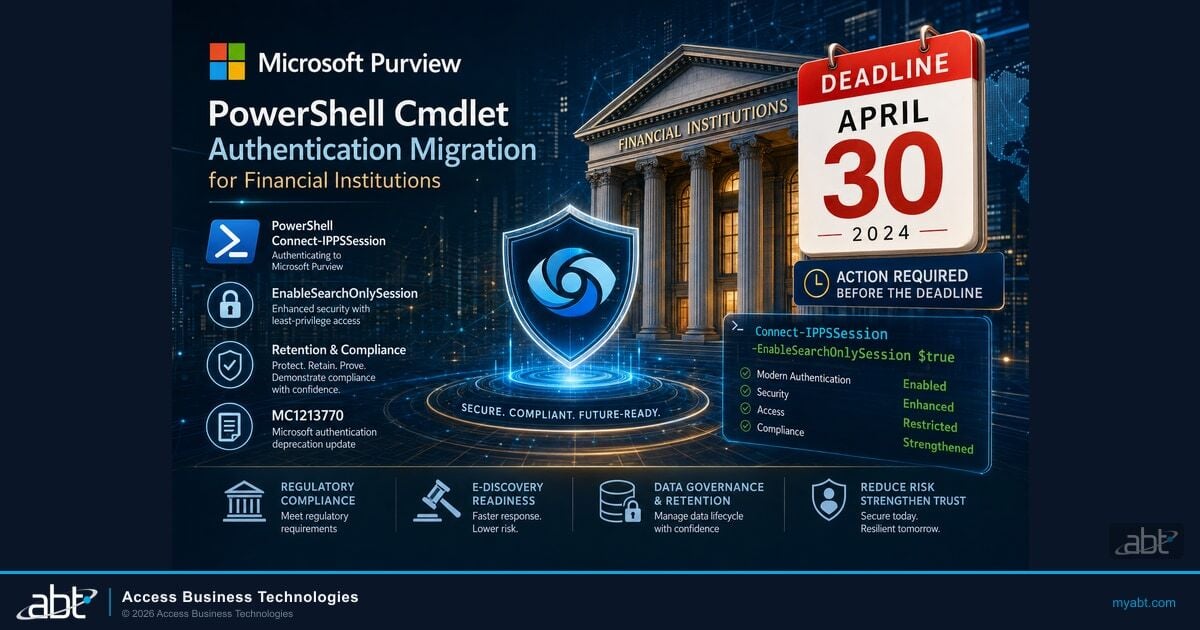
Microsoft Purview PowerShell Cmdlet Authentication Migration
A Message Center notification, a hard date, and a set of scripts that stop working. The companion article to the video above, and the closest match to this page's anatomy.
Read the article ›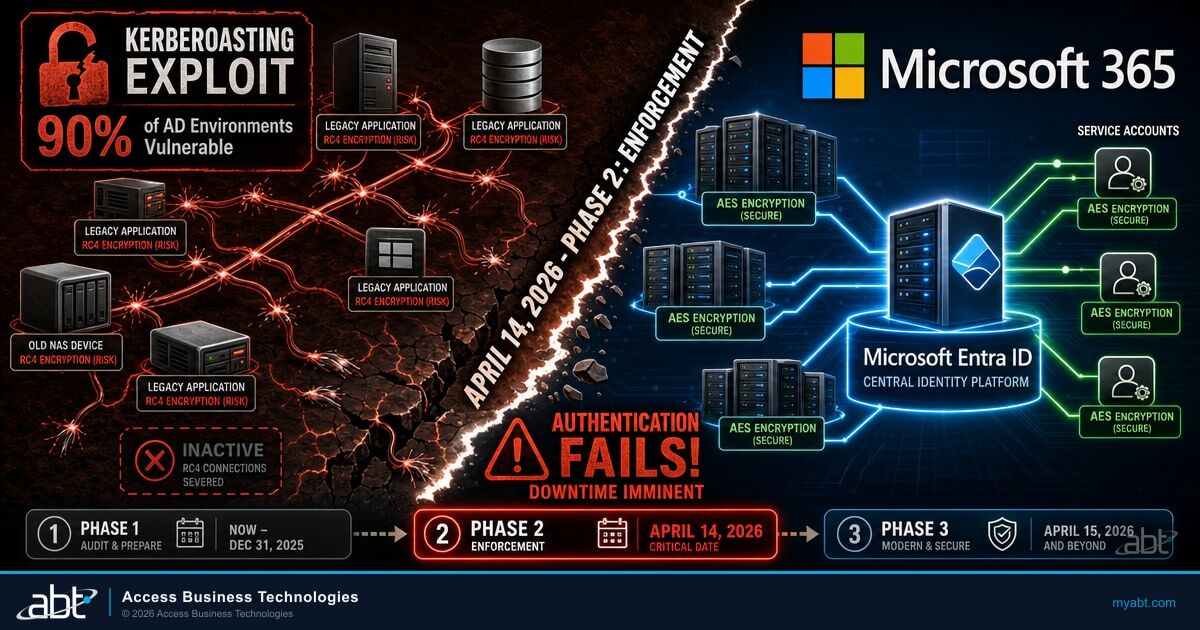
Kerberos RC4 to AES: The Patch That Will Break Your Service Accounts
An encryption default changes and the accounts that notice are the ones nobody logs in as. Includes the audit that finds them before the change lands.
Read the article ›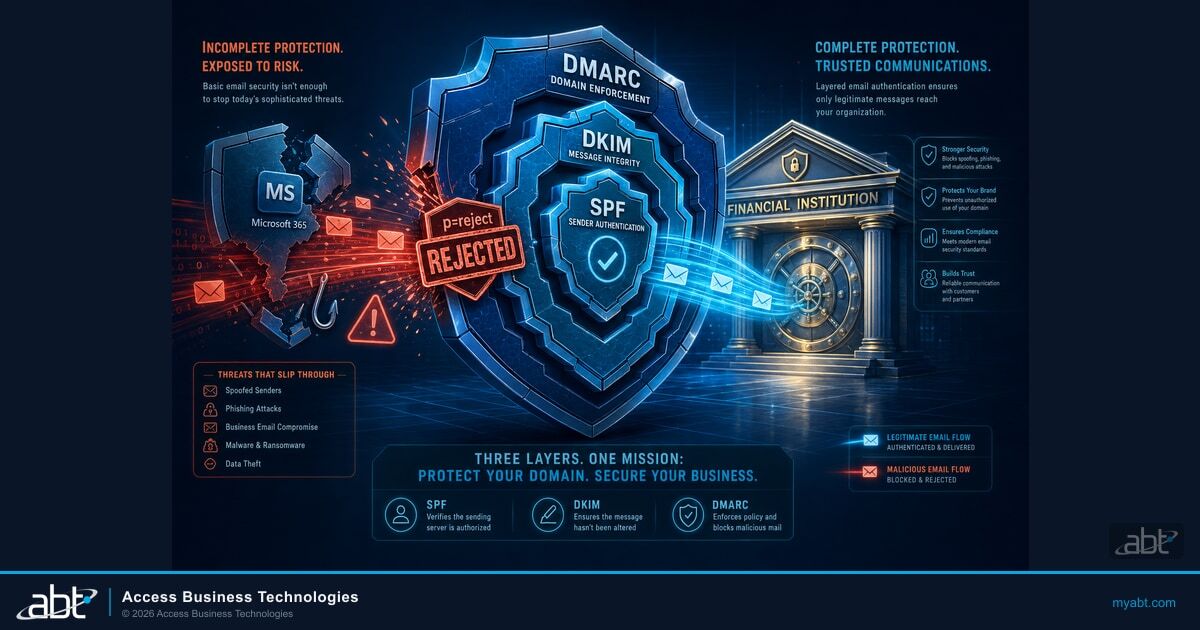
SPF, DKIM and DMARC Enforcement Done Right
Introducing a new sending source changes your authentication posture. What to check before and after any device moves to a different path.
Read the article ›Answered from Microsoft's own documentation
At the end of December 2026 it becomes disabled by default for existing tenants, and administrators will still be able to enable it if needed. Behaviour is unchanged between now and then. Tenants created after December 2026 will have it unavailable by default, with OAuth as the supported authentication method. Microsoft has said it will announce the final removal date in the second half of 2027. These four milestones come from the Exchange Team Blog post published on 27 January 2026 and stamped Version 3.0 on 29 January 2026.
The March and April 2026 dates come from an Exchange Team Blog post published in April 2024. Microsoft revised that schedule on 27 January 2026, before either date arrived, and the 2024 post now carries a banner pointing readers to the replacement. The current schedule is the December 2026 one. The older post is still widely cited, and as of 4 September 2026 it is also still the post that Microsoft's own multifunction-device Learn page links to under the words "timeline information."
No. What is being retired is basic authentication on SMTP AUTH, meaning the username and password. Microsoft states on its Learn page that SMTP AUTH supports modern authentication through OAuth in addition to basic authentication. A device or application that can present an OAuth token keeps using the same protocol, the same port and the same endpoint after every date on this page.
Open the SMTP AUTH Clients report in the new Exchange admin center under Reports then Mail Flow. Change the date range from the seven-day default to the ninety-day maximum, then read the Authentication Protocol column. Microsoft documents its two values: Basic Auth appears as TlsAuthLogin and Modern Auth appears as XOAUTH2. Every row showing Basic Auth is a sender affected by the December change.
The organization-wide setting is SmtpClientAuthenticationDisabled on the transport configuration. The per-mailbox setting of the same name overrides it, and Microsoft states that the mailbox setting takes precedence over the organization setting. The per-mailbox value has three states: true means disabled for that mailbox, false means enabled for that mailbox, and null means the mailbox follows the organization setting. The mailboxes set to false are the ones somebody deliberately switched on.
Microsoft splits the recommendation on recipient scope. For mail going only to recipients inside your tenant, it recommends High Volume Email for Microsoft 365. For mail going to recipients inside and outside your tenant, it recommends Azure Communication Services Email. Institutions that still run their own mail infrastructure can also authenticate the device against an on-premises email server or configure that server for anonymous relay, which Microsoft distinguishes from an open relay.
Only if you also move to OAuth. Microsoft documents that High Volume Email supports both modern authentication through OAuth and basic authentication for SMTP connections, and its own guidance on that page is to use OAuth authentication when possible. Moving a device to an HVE account while keeping a username and password changes the endpoint and keeps the credential. If security defaults are enabled in Microsoft Entra ID, HVE can authenticate only by using OAuth.
No. Microsoft documents its recipient scope as internal recipients within the tenant only, and lists external email delivery among the unsupported scenarios. Statements, disclosures and any other correspondence leaving the organization need a different path, which is why Microsoft points at Azure Communication Services Email for that traffic. Other HVE limits to check before committing a device: up to 100 accounts per tenant, up to 50 recipients per message, a 10 MB maximum message size, and support in the Microsoft 365 Worldwide multi-tenant service.
Direct Send is unaffected by the December change because it uses no authentication at all, so it does work. Microsoft describes it as suitable only for advanced customers willing to take on the responsibilities of email server admins, recommends it only when a legacy device supports none of the other methods, and states on the same page that it is working on an option to disable Direct Send by default to protect customers. No date has been announced for that. It is a reasonable choice for a small number of stubborn devices and a weaker foundation for a whole migration.
Yes, and doing it on your own schedule is easier to diagnose than a change that arrives during a holiday period. An authentication policy created with the AllowBasicAuthSmtp parameter set to false closes basic authentication for SMTP across the accounts it applies to. Microsoft also notes that if security defaults are enabled in Microsoft Entra ID, SMTP AUTH is already disabled in Exchange Online. Run the ninety-day report first so the change lands on a known list of senders rather than an unknown one.
Find out which senders in your tenant are still using a password.
Tell us roughly how many users you have and whether this is already on a project list. Our engineers read the tenant and come back with the senders that submitted in the last ninety days split by basic authentication and OAuth, every mailbox carrying an explicit override including the idle ones, whether security defaults or an existing authentication policy already close the protocol, and which senders are still negotiating older TLS versions. Mapping each sender to a device and an owner needs your records too, and we tell you exactly which ones to pull.
ABT manages Microsoft 365 tenants and hosts Azure environments for more than 750 financial institutions. The assessment is a technical review and is not legal or compliance advice.
Get a free security assessment
A read of your tenant, and the list of senders that need a decision before December.
