In This Article
There is a protocol running inside your Microsoft 365 tenant right now that almost nobody at your institution can name, and it is scheduled to stop working. Exchange Web Services has been quietly moving mail, calendar data, and archive exports between Microsoft 365 and your other systems for the better part of two decades. Microsoft is retiring it.
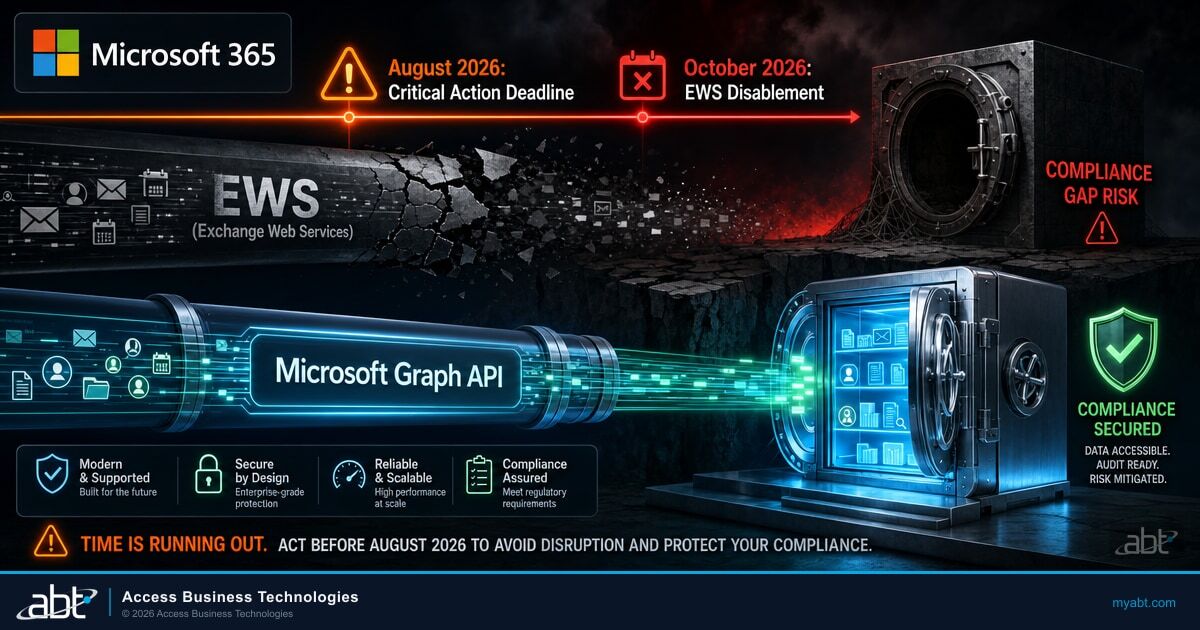
Most coverage of this change points at October 1, 2026 as the date to worry about. That is the date Microsoft begins blocking. It is not the date you need on your calendar.
If your tenant still depends on Exchange Web Services for anything, the date that actually matters is the end of August 2026. Miss it and you lose the ability to opt out of the automatic change, which means you find out what depended on the protocol by watching it fail.
What Microsoft Is Actually Changing
Exchange Web Services is an application programming interface. Software uses it to read mailboxes, write calendar entries, export archives, and pull availability data out of Exchange Online without a person clicking anything. It was built nearly twenty years ago, and Microsoft has been signaling its end for a long time.
The retirement is phased, not a single cutover, and that distinction is where institutions get caught. Microsoft has published two dates. In October 2026, in Microsoft's own words, EWS "starts to be disabled globally for all organizations." In April 2027, EWS "is fully disabled," and at that point the ability to control the setting is removed from tenant administrators entirely.
The mechanism is a single tenant level setting called EWSEnabled, and it accepts three values. Understanding what those values do before and after October is the whole game.
| EWSEnabled value | Before October 2026 | Starting October 2026 |
|---|---|---|
| Null (the default today) | All EWS traffic allowed. Any allow list is ignored. | Microsoft changes the value to False as the rollout reaches your tenant, blocking EWS for every application in it. |
| True | All EWS allowed if no allow list exists. If an allow list exists, only the applications on it. | Only applications on the allow list are permitted. With no allow list, this becomes a block-all configuration. |
| False | All EWS blocked. | All EWS blocked. No change. |
Read the first row again, because it describes the position most tenants are in. Null is the default. Microsoft has confirmed that many tenants still have the setting unset, which behaves as unrestricted access. Those tenants are not opting into anything. They are sitting on a factory default that Microsoft is about to change on their behalf.
The trap that will catch careful administrators
Setting EWSEnabled to True feels like the safe defensive move. Before October it is. After enforcement begins, Microsoft is explicit that setting the value to True without configuring an allow list "effectively becomes a block-all configuration." An administrator who flips the switch to True in September and stops there has not protected anything. They have armed the block.
Why Your Real Deadline Is the End of August
Buried in Microsoft's announcement is an escape hatch with its own, earlier deadline. If you proactively configure an allow list and set EWSEnabled to True by the end of August 2026, your tenant is excluded from the October 1 automatic change.
That is roughly three weeks from the date this article was published, not seven. Coverage that frames this purely as an October problem is describing the wrong date for any organization that still has a live dependency.
The date that matters
October 1, 2026 is when Microsoft starts switching Exchange Web Services off. The end of August 2026 is your last chance to keep that from happening to your tenant automatically. Neither date changes April 1, 2027, when the protocol is disabled permanently for everyone. Acting in August does not save the protocol. It buys you a migration you control instead of one that arrives on Microsoft's schedule.
Microsoft has committed to a backstop. For customers who have not created an allow list before September 2026, Microsoft will pre-populate one based on each tenant's own usage. That is a genuinely helpful move, and it is not a substitute for doing the work.
Why a usage-derived allow list is not the whole answer
A list built from observed traffic reflects what called the protocol during the observation window. Financial institutions run a great deal of software that does not call anything on a daily basis. A quarterly archive export, a year-end retention job, a disaster recovery restore that has not been exercised since the last tabletop, an examination response tool that runs when examiners ask and at no other time. None of that is guaranteed to appear in a list derived from recent activity.
Microsoft says as much in its own guidance: the administrator owns making sure the list is correct.

There is a recovery path if this goes wrong, and it is worth knowing before you need it. An administrator can re-enable the protocol after Microsoft blocks it. Microsoft is candid about the cost, stating plainly that there will be a service interruption in that case. That is a fine emergency valve and a poor plan.
What EWS Is Quietly Holding Up Inside Your Institution
This is where the change stops being an information technology curiosity and starts being a compliance question. The applications most likely to still depend on Exchange Web Services inside a bank, a credit union, or a mortgage company are the ones that touch mail as a record rather than mail as a conversation.
Think about what runs against your mailboxes without a human in the loop. Journaling and archiving connectors that capture every message for retention. Export tooling that produces mailbox extracts when someone requests them. Backup and migration products. Legal hold and discovery workflows. Line of business systems that create calendar entries or read availability, which in a lending shop often means the software that books closings and appraisals.
An archiving connector loses its access to Exchange Web Services in early October. Mail keeps flowing normally. Users notice nothing. Inboxes work, calendars work, and no ticket gets opened because nothing visible is broken.
The capture stops. Months later, a request arrives that requires producing messages from that window, and the archive has a hole in it exactly where the connector went quiet. The outage was invisible. The gap in the record is not.
That asymmetry is the real risk here. An outage in a mail client generates a help desk queue within minutes. An outage in a retention pipeline generates nothing at all until the moment you need the records, and by then the window to capture them has closed. Institutions that have already thought carefully about how Microsoft 365 handles data retention and email archiving will recognize the shape of the problem immediately.
The same logic applies to discovery. If your process for responding to a legal hold or an examination request depends on tooling that reaches mailboxes over this protocol, that process has a dependency nobody has written down. Teams that have moved this work onto Microsoft Purview eDiscovery are in a considerably better position, because that path does not ride on the protocol being retired.
The Gaps Microsoft Has Not Closed Yet
Microsoft's recommended replacement is Microsoft Graph, and for the large majority of scenarios Graph is ready. Microsoft describes it as having reached near complete feature parity. The honest and more useful detail is the list of places where it has not, because Microsoft publishes that list openly.
The published gaps include import and export of mailboxes, which remains in preview and excludes Microsoft 365 Groups and public folder mailboxes. Import and export of public folders. Import and export of Microsoft 365 Groups. In-place Archive. Event delta for recurring events. A handful of smaller items, including administration interfaces that are still in preview.
Look at the first four of those with a financial services eye. Mailbox import and export, public folder import and export, and In-place Archive are not obscure developer features. Where a product implements archiving, journaling, discovery export, or backup on top of Exchange Web Services, those are the primitives it is built on. Microsoft's own gap list lands squarely on the workloads that regulated institutions care most about.
Microsoft's guidance is not to wait for parity before acting. Its published call to action asks organizations to investigate the footprint of internal and third party applications, work with security and executive teams to prioritize internal applications, migrate what can be migrated now, and press vendors to prioritize their own migration. The message is that discovery and vendor pressure are the work available today, and both take longer than the configuration change does.
What this means practically is that the answer for a given application is rarely a simple migrate it. It is a conversation with a vendor about whether their product has shipped a Graph based path yet, and what happens to your institution if it has not by the spring of 2027. Some vendors have already moved. Others are still working. The only way to know which category yours is in is to ask, and the answer determines whether you are configuring an allow list or planning a replacement.
Which raises the harder question. When a vendor tells you they are ready, how would you know whether that is true?
One tenant sees one answer. A fleet sees the pattern.
An institution running its own tenant asks each vendor once and receives one answer from one account team. There is no way to tell a shipped and tested migration path from a roadmap commitment until the deadline arrives and the connector either keeps working or does not.
ABT manages Microsoft 365 tenants for more than 750 banks, credit unions, and mortgage companies, which means we are asking the same vendors the same question on behalf of many institutions at once, and then watching what actually happens in production across all of them. Which archiving connectors have genuinely moved. Which ones answered confidently and then went quiet. What broke somewhere else first. That kind of cross-institution pattern is hard to assemble from inside a single tenant, and it is often the difference between a vendor assurance and a verified one.
It is worth noting what is not affected, because hybrid institutions consistently over-scope this. The retirement applies only to Microsoft 365 and Exchange Online. Microsoft states there are no changes to Exchange Web Services in Exchange Server. If you run mailboxes on premises, that side of the house is not part of this deadline.
The Second Change That Gets Overlooked
On August 7, 2026, Microsoft published a second migration workstream under the same retirement. It affects a narrower group, and the group it affects tends not to realize it is in scope.
If your organization shares free and busy availability, calendars, or out of office notices with another Microsoft 365 organization, that sharing currently rides on Exchange Web Services. Microsoft is moving it to Microsoft 365 Cross-Tenant Access Policy, which becomes available starting in September 2026. This is an availability date rather than a migration mandate, but the underlying deadline is the same retirement.
Three Exchange Online configurations drive that sharing today. Organization Relationships, used to share availability and out of office notices with other Microsoft 365 tenants. Availability Address Spaces, specifically those set with the OrgWideFBToken access method. And Sharing Policies, used to share calendars externally.
Microsoft is equally specific about what is not affected: sharing inside your own organization, sharing between on premises and online users in a hybrid deployment, and sharing with an organization that runs Exchange on premises.
For financial institutions this is less obscure than it sounds. Organizations set these relationships up with subsidiaries, with recently acquired institutions still running a separate tenant, with title companies, with correspondent partners, with outside counsel. It is never configured by default, which means if it exists in your tenant, somebody set it up deliberately and may well have left the organization since. If you are auditing this, it is worth reviewing it alongside the rest of your guest access and external sharing configuration, since both answer the same governance question about who outside the institution can see what.
What to Do in the Next Three Weeks
The sequence matters more than the speed. Discovery first, decisions second, configuration last.

That is six real tasks in roughly three weeks, and it lands in a month when most institutions are already carrying an examination response, an audit, or a core conversion. If your administrators do not have that capacity spare, this is precisely the kind of work a managed Microsoft 365 partner should be doing on your behalf rather than handing you as a checklist.
One operational warning worth planning around. Microsoft has said it may run temporary tests, short periods when the protocol is switched off and then back on, specifically to expose hidden dependencies. Microsoft also sends monthly messages with tenant specific usage summaries. If something in your environment breaks briefly and recovers on its own between now and October, that is not a glitch to dismiss. That is your inventory telling you what it forgot to mention.
This is the third Microsoft deadline in the same window, and they are worth tracking together rather than one at a time. Legacy Entra ID risk policies retire on October 1, 2026, and AD FS key container hardening moves to enforcement in the same month. Institutions handling these as three separate fire drills will spend more effort than those treating them as one autumn readiness project, which is a large part of why they are worth handing to a partner who is already tracking all three across every tenant they manage.
It is also worth understanding why Microsoft is doing this at all, because the reason is not housekeeping. The protocol was implicated in a nation state intrusion, and retiring it removes a large piece of legacy, highly privileged surface area from every tenant. The same actor lineage has continued to target Microsoft 365 identity through other routes, including captive portal attacks on traveling executives. Turning this protocol off is genuinely good for your security posture. The work is making sure it happens on your schedule instead of by surprise.
Find out what is calling Exchange Web Services in your tenant
ABT manages Microsoft 365 tenants for more than 750 financial institutions. We can pull your usage report, reconcile it against the jobs a report cannot see, work your vendor list, and build and validate the allow list before the end of August.
Frequently Asked Questions
There are two dates. Microsoft begins phased blocking in October 2026, starting October 1, and full permanent disablement follows on April 1, 2027. In between, administrators retain some control. After April 1, 2027 that control is removed. For any tenant that still needs the protocol, the practical deadline is earlier still: the end of August 2026.
Most tenants have the EWSEnabled setting at its default value of Null, which allows all traffic. Microsoft changes that value to False as the October rollout reaches each tenant, which blocks Exchange Web Services for every application in it. If nothing in your environment uses the protocol, you will notice nothing. If something does, it stops working at that point.
Yes, until April 2027. An administrator can re-enable the protocol after Microsoft blocks it, and Microsoft states there will be a service interruption when that happens. It is a workable emergency measure and a poor substitute for knowing your dependencies in advance.
No. Microsoft has stated that the retirement applies only to Microsoft 365 and Exchange Online, and that there are no changes to Exchange Web Services in Exchange Server. Institutions running a hybrid deployment should scope the work to their Exchange Online side.
Microsoft will pre-populate the allow list before September 2026 for customers who have not created one, based on each tenant's own usage. That helps, but a list derived from observed traffic reflects what ran during the observation window. Infrequent jobs such as quarterly archive exports, annual retention runs, and recovery tooling may not appear. Microsoft's guidance is explicit that the administrator owns confirming the list is correct.
The protocol is nearly twenty years old and stopped receiving functionality updates in 2018. Microsoft has said the January 2024 Midnight Blizzard security incident involved Exchange Web Services, elevated the urgency of the retirement, and widened its scope from third party applications to include all Microsoft applications. Retiring it reduces legacy, highly privileged surface area across every tenant.