


Microsoft Publisher has reached end of support. Here is what to do with the .pub files that are left.
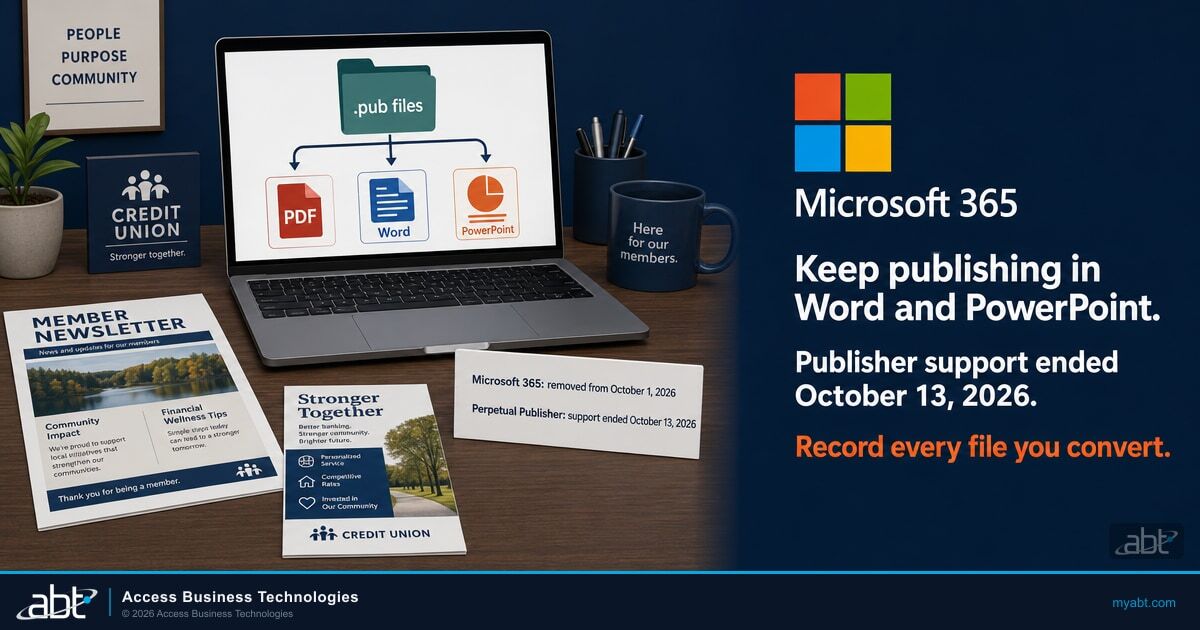
Your teams can keep producing the newsletters, flyers, and forms that lived in Publisher, in Word and PowerPoint. Microsoft 365 subscribers lost Publisher as Microsoft's removal update rolled out on or shortly after October 1, 2026, and Microsoft's support for perpetual Publisher, in Office LTSC 2021 and Office 2021, ended on October 13, 2026. A perpetual copy still runs and still opens .pub files, now without security fixes. For the marketing, branch, and operations teams at credit unions, banks, and mortgage companies, this page sorts what is left into four recommended routes and a five-step plan.
- Microsoft 365: Publisher's removal rolled out on or shortly after October 1, 2026
- Perpetual copies: support ended October 13, 2026, with Office LTSC 2021 and Office 2021, and the app still runs
- Office LTSC Professional Plus 2021 includes Publisher; Microsoft's newest perpetual suite, Office LTSC 2024, leaves it out
What happened to Microsoft Publisher in October 2026?
Both of Microsoft's dates have passed. Microsoft 365 subscribers lost the app as the removal update rolled out from October 1, and support for perpetual copies ended on October 13. A perpetual copy still runs, without security fixes.
Microsoft's September 9, 2026 reminder in the Microsoft 365 Message Center put the change in one sentence: "After October 1, 2026, Publisher will no longer be included with Microsoft 365 subscriptions, and Microsoft 365 subscribers will no longer be able to open or edit Publisher (.pub) files using Publisher."
Source: Microsoft 365 Message Center notice MC1469564, "Microsoft Publisher: Reminder that support ends in October 2026", published September 9, 2026, re-read October 18, 2026 in the Message Center, unchanged since September 9, 2026.The Microsoft Support article on the retirement now describes how the removal reached people: "Microsoft 365 subscribers will not be able to access Publisher on or shortly after October 1, 2026, as the removal update process rolls out." Its FAQ adds that for Microsoft 365 subscribers, Publisher "will no longer be available for installation or download after October 2026." Microsoft's notices describe the application: what ends for a subscriber is the ability to open and edit .pub files in Publisher.
Source: Microsoft Publisher will no longer be supported after October 2026, Microsoft Support, page dated October 6, 2026, re-read October 18, 2026.If Publisher came with Microsoft 365
Microsoft removed it from subscriptions through an update that rolled out on or shortly after October 1, 2026. On a computer the update has reached, opening and editing .pub files in Publisher has ended, and Microsoft's own export routes need a working copy of Publisher. For those files, a subscription on its own leaves four recommended routes, set out below.
If Publisher came with Office LTSC 2021 or Office 2021
Support ended on October 13, 2026. Microsoft's Office 2021 page says support "ended on October 13, 2026 and there will be no extension and no extended security updates." Microsoft says a perpetual copy still installs and runs and still opens and edits files. Copies of Publisher that came with Office 2019 or Office 2016 have been past end of support since October 14, 2025.
What October 13 changed for the files that are left
Every perpetual copy of Publisher is now unsupported software. Microsoft's October 15, 2026 Partner Center notice says of Office LTSC 2021: "Microsoft no longer provides updates, security fixes, or technical support for these products." A perpetual copy can still run Microsoft's own export for the files that are left. ABT's recommendation: run it on one computer kept for the job, record that computer as an exception with an owner and a removal date, and remove Publisher once the export is checked. Microsoft's original notice, MC716267, gave October 13 for Microsoft 365 customers too; the FAQ below explains the change.
How do Microsoft 365 Publisher and perpetual Publisher compare now?
Both groups are past their dates. Once the removal update reaches a subscriber's computer, the perpetual copy is the one that still opens .pub files in Publisher, now without support.
| What changes | Publisher through Microsoft 365 | Perpetual Publisher (Office LTSC 2021, Office 2021) |
|---|---|---|
| Key date | October 1, 2026: removal from Microsoft 365 subscriptions, rolling out on or shortly after that date | October 13, 2026: support ended, and the app keeps running |
| Opening and editing .pub files in Publisher | Ended for subscribers as the removal update reached them | Still possible, according to Microsoft, as unsupported software since October 13, 2026 |
| Installing or downloading Publisher after October 2026 | Microsoft's wording: "will no longer be available for installation or download after October 2026" | Still possible, according to Microsoft, as unsupported software |
| Microsoft's own export routes: Save as PDF and the sample script | Both need a working copy of Publisher, which the removal update takes away on each computer it reaches | Runnable on the perpetual copy, as unsupported software since October 13, 2026. Microsoft describes its script as instructional |
| Update channel | Microsoft 365 Apps channels, such as Current Channel, Monthly Enterprise Channel, or Semi-Annual Enterprise Channel | PerpetualVL2021 is the only update channel for volume licensed Office LTSC Professional Plus 2021 and Office LTSC Standard 2021 |
| Support and security updates | Publisher is removed from Microsoft 365 subscriptions | Ended October 13, 2026. For Office LTSC 2021, Microsoft says it no longer provides updates, security fixes, or technical support; for Office 2021, there will be no extension and no extended security updates |
Microsoft's newest perpetual suite leaves Publisher out. Microsoft Learn's overview of Office LTSC 2024 says: "Microsoft Publisher is not included with Office LTSC 2024. This change is due to the planned retirement of Publisher, which will no longer be supported after October 2026."
Find the .pub files that are left, and the licenses that can still open them.
A free licensing assessment reviews the perpetual Office and Publisher licensing in your records, identifies which of it includes Publisher, and walks your administrator through an eDiscovery search for .pub files in the SharePoint and OneDrive locations you include.
Request the free licensing assessmentWhat can you still do with .pub files that were never converted?
Four routes ABT recommends, built from Microsoft's guidance. Choose one for each file, based on what the file is for and what your institution already licenses; most institutions combine them across their files.
Export them on a perpetual copy you already license
Every copy now unsupportedMicrosoft's PDF steps and its bulk conversion script both run inside Publisher, and Microsoft says a perpetual copy still opens and edits files. If your records show a license that includes Publisher, such as Office LTSC Professional Plus 2021, that copy can export what is left. Every perpetual copy is now past end of support: the Publisher in Office LTSC 2021 and Office 2021 since October 13, 2026, and copies from Office 2019 or Office 2016 since October 14, 2025. ABT's recommendation: run it on one computer kept for the job, record that computer as an exception, and remove Publisher when the export is checked. Microsoft describes its script as instructional, so test it on copies first.
Start from a PDF you already have
Any timeMicrosoft's route to an editable Word file opens a PDF in Word, wherever that PDF came from. The print-ready file sent to your printer or the newsletter posted on your website can become the Word version of a piece whose .pub file was never converted. Microsoft's caution applies: the layout may vary from the original, particularly when the document includes many graphics.
Rebuild it in Word or PowerPoint
Recurring piecesFor the monthly newsletter, the quarterly rate sheet, or the annual meeting program, Microsoft's job-by-job table and the templates at Microsoft Create are the starting point. Rebuild the template once and every future issue starts from it.
Use a third-party converter
Vendor review firstMicrosoft mentions services that convert directly from Publisher to other formats, and says: "These services vary in quality and capabilities, and Microsoft does not provide support for them." A service that receives your files becomes a service provider with access to whatever those files contain.
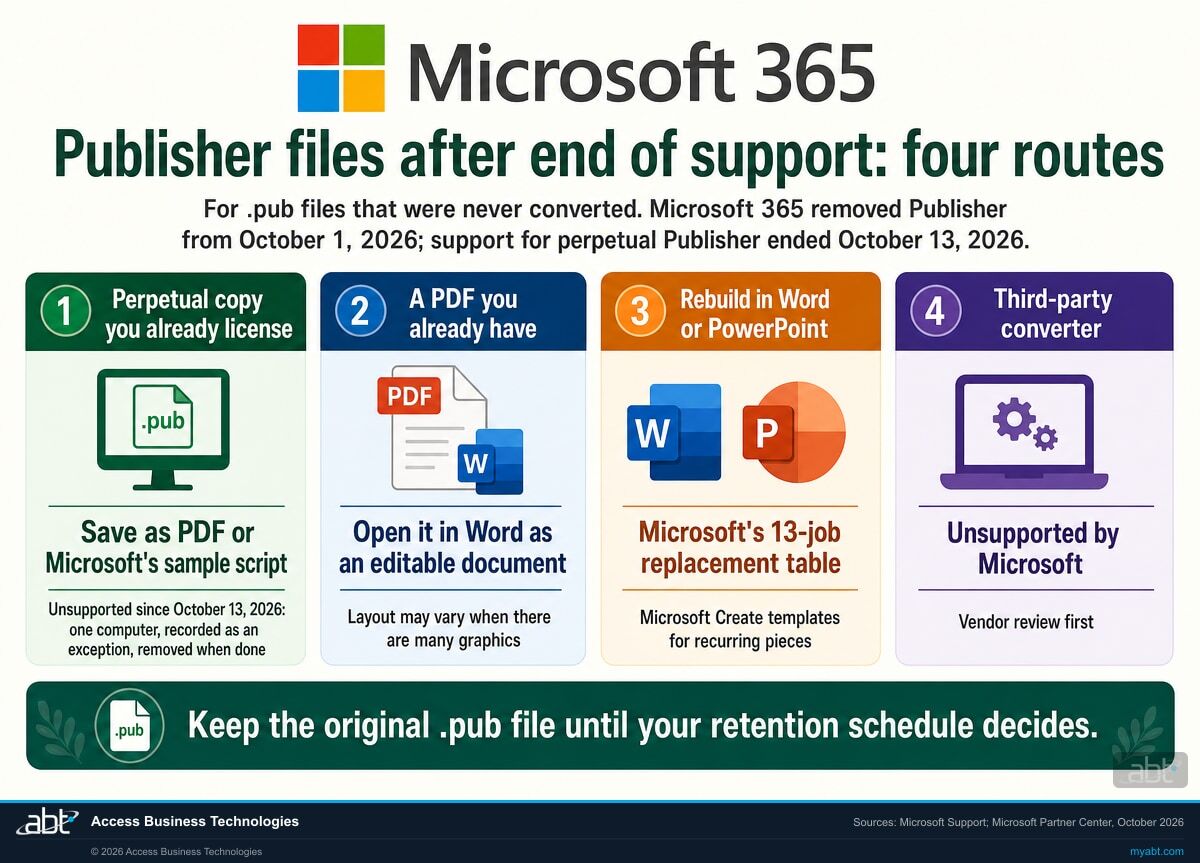
Keep the original .pub file while you decide
A .pub file is still a record if your retention schedule says so, whichever app can open it, and a perpetual copy can still read it. Keep each original next to whatever replaces it until your records owner decides its retention, and write that decision down. When a record has no perpetual copy and no PDF behind it, your records owner and compliance officer decide whether a readable copy is needed at all, and a converter that has passed your vendor review is the route for one.
How do you find the .pub files that are left?
Microsoft names three places to look: local storage, OneDrive, and SharePoint.
Search for the .pub file extension everywhere your people save files. Microsoft's reminder lists the places: "Search for existing Publisher (.pub) files across local storage, OneDrive, and SharePoint to identify content requiring migration."
For an individual user, the Microsoft Support article keeps it simple, recommending a file search for .Pub on a PC, in OneDrive, or in SharePoint to locate Publisher files. That works one person at a time. An institution needs the same answer for every site and every OneDrive account at once.
For administrators: one query for SharePoint and OneDrive locations
Microsoft Purview eDiscovery supports a FileExtension property for content in SharePoint and OneDrive, which Microsoft documents as "The extension of a file; for example, docx, one, pptx, or xlsx," with the example query fileextension:xlsx returning all Excel files. The same property with pub as the value, fileextension:pub, searches for Publisher files across the sites and OneDrive accounts included in the search. An administrator with eDiscovery permissions can run it from the Microsoft Purview portal without visiting a single desk. Before relying on the results, run it once against a few .pub files you know are there.
Where a tenant search stops
A tenant search covers the SharePoint and OneDrive locations included in it. Files saved to a PC's local drive, a USB drive, or an on-premises file share sit outside it. Those locations need a search on the machines themselves or on the file server, run by whoever manages them.
Record three things for every file you find
Who owns it, what it is for, and when it was last modified. The owner answers the route question, the purpose decides the format, and the last modified date is usually the fastest way to separate the rate sheet updated every month from the event flyer nobody has touched in years.
What should happen next, in order?
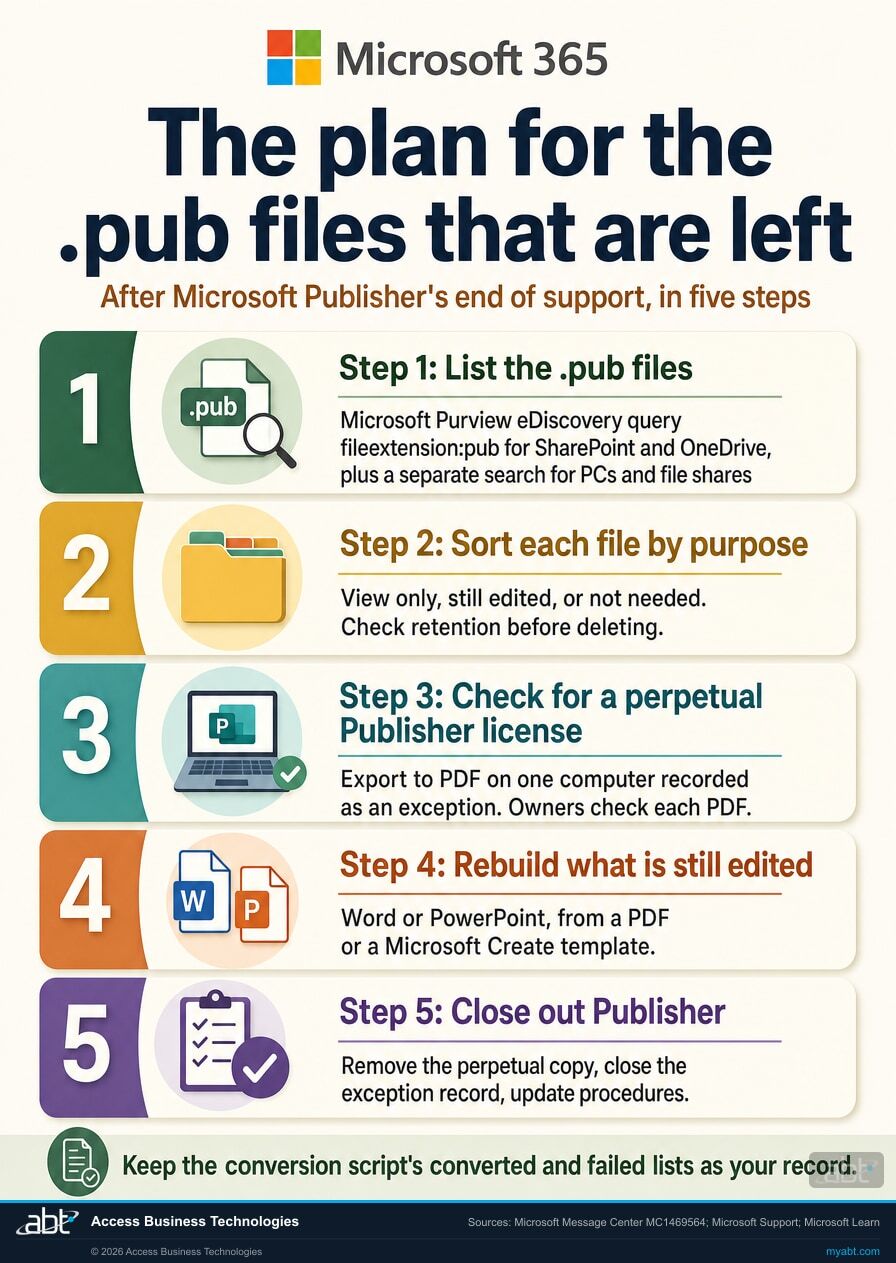
ABT's recommended plan, informed by Microsoft's reminder, its Support article, and Microsoft Learn: five steps, in the order that keeps the work in proportion.
List the .pub files that are left
Search local storage, OneDrive, and SharePoint, as Microsoft's reminder directs. Use the eDiscovery FileExtension query for the SharePoint and OneDrive locations you include, and a separate search for PCs, removable media, and file shares. Record which locations were searched, and give every file on the list an owner.
Sort each file by what it is for
Three piles: records you only need to view, files someone still edits, and files nobody needs. Check the third pile against your retention schedule before anything is deleted, and keep the originals until that check is done.
Check your records for a perpetual Publisher license
If a subscriber's copy of Publisher still opens, export its files to PDF now, while it does. For everything else, check for a perpetual license. If you hold one, whether from Office LTSC 2021, Office 2021, or an older suite such as Office 2019 or Office 2016, export the view-only files, and the files someone still edits, to PDF on one computer kept for the job, with Save as PDF or Microsoft's sample script. That copy is unsupported, since October 14, 2025 for Office 2019 or Office 2016 and since October 13, 2026 for Office 2021 or Office LTSC 2021, so record the computer as an exception, with the end of support date that applies, its owner, your information security officer's approval, and a removal date, before the export starts. Keep the script's lists of converted and failed files, and have each file's owner open the PDF and confirm its content, figures, disclosures, and layout: the log shows a file converted, and the owner's check shows it is right. If you hold none, use a PDF you already have for view-only records and go to step four for the files someone still edits. For an archival file with no perpetual copy and no PDF, keep the original .pub file under your retention schedule and take it to your records owner and compliance officer, who decide whether a readable copy is needed and, if so, approve a converter that has passed your vendor review.
Rebuild what is still edited
Open the PDF from step three, or one you already have, in Word as an editable document, follow Microsoft's job-by-job recommendations, or rebuild recurring pieces from Microsoft Create templates. Have the owner of each file check the result, because layout is the part Microsoft warns can change.
Close out Publisher
Update the procedures, templates, and training material that still assume Publisher, which is what Microsoft's reminder recommends for Publisher-based business processes. Remove Publisher from the computer kept for the export once the owners have checked the PDFs, close its exception record, and tell each team which app now handles which job.
How do you run Microsoft's export on an unsupported perpetual copy?
Confirm the license, use one computer kept for the job, record it as an exception, export to PDF, and keep the record of what moved.
Microsoft's FAQ is the basis for this route: "if you have the Perpetual version of Publisher, although support will end, you will still be able to install and use the app beyond this date." On files, it adds: "If you have the Perpetual version of Publisher, you will still be able to access and edit your files."
Source: Microsoft Support, FAQ, re-read October 18, 2026.Confirm which perpetual license you hold
Microsoft Learn's overview of Office LTSC 2021 lists Publisher among the apps included with Office LTSC Professional Plus 2021. The same page notes that Publisher is unavailable on Mac: "Access and Publisher aren't available for devices running macOS." Buying the current perpetual suite leaves Publisher out, because Microsoft says "Microsoft Publisher is not included with Office LTSC 2024." A copy that came with Office 2019 or Office 2016 has been past end of support since October 14, 2025, and the Office LTSC 2021 and Office 2021 copies since October 13, 2026. Your volume licensing records answer this before anyone installs anything.
Sources: Overview of Office LTSC 2021 and Overview of Office LTSC 2024, Microsoft Learn, re-read October 18, 2026.Use a computer that does not run Microsoft 365 Apps
Microsoft treats the Office update channel as a property of the whole computer: "Update channel is a device-wide setting, meaning all Office products, including Project and Visio, installed on a device must use the same update channel." For volume licensed Office LTSC 2021, Microsoft names one channel: PerpetualVL2021 "is the only update channel available for Office LTSC Professional Plus 2021 and Office LTSC Standard 2021." Microsoft 365 Apps runs on its own channels. Our reading of those two statements: a volume licensed perpetual copy belongs on a separate computer, physical or virtual, kept for the conversion and away from the Microsoft 365 Apps installations your people use every day. That is implementation advice, built on Microsoft's rules, and with every perpetual copy now unsupported, one computer also keeps that software in one place. For a retail copy, check Microsoft's side-by-side installation rules before installing it next to Microsoft 365 Apps.
Sources: Update Office LTSC 2021 and Supported scenarios for installing different versions of Office, Project, and Visio on the same computer, Microsoft Learn, re-read October 18, 2026.Export to PDF, one file at a time or in bulk
Microsoft's steps are short: open the Publisher file, go to File, then Save as, choose a location, select PDF as the file type, and save. For volume, Microsoft publishes a sample PowerShell script, Convert-PubFileToPDF.ps1, whose first instruction is "Ensure you have a working and licensed version of Publisher installed on your computer." It runs from a PowerShell window with the required execution policies. Microsoft describes it as instructional and recommends you "modify and test for your specific needs." The script keeps running when a file fails and reports which files converted and which hit an error, and "If the file name already exists, we will not export the file and will show an error." Run it against a copy of one folder first, and keep its converted and failed lists as the record of what moved.
Record the exception, then remove the copy
Microsoft's October 15, 2026 Partner Center notice confirms the date has passed: "Support for Office Long Term Servicing Channel (LTSC) 2021, Project LTSC 2021, and Visio LTSC 2021 ended on October 13, 2026. Microsoft no longer provides updates, security fixes, or technical support for these products." For Office 2021, Microsoft says there will be no extension and no extended security updates, and that "All of your Office 2021 apps may continue to function." The export still runs. ABT's recommendation is to treat the computer that runs it as unsupported software under your own policy: name the computer and its owner, get your information security officer's approval of the safeguards around it, record why it exists and the date it is removed, use it only for the export, and remove Publisher once each file's owner has checked the PDFs.
Sources: October 2026 announcements, Microsoft Partner Center; End of support for Office 2021, Microsoft Support; both re-read October 18, 2026.Where should each Publisher job live now?
Ask one question of every file: will anyone edit it again?
- PDF, for anything only viewed, shared, or printed. Microsoft's reminder: "Save Publisher files as PDF if they only need to be viewed, shared, or printed after Publisher is retired." Past newsletters, rate sheets and flyers kept for reference belong here, and your retention policy decides whether the PDF becomes the retained copy.
- Word, for text-heavy files someone still edits. Microsoft recommends Word for newsletters, letterhead, envelopes, labels, programs and folded paper projects, and business invoices, applications and forms.
- PowerPoint, for visual layouts. Microsoft recommends PowerPoint for banners, signs and posters, and either Word or PowerPoint for ads and flyers, brochures, certificates, business cards, calendars and cards. Lobby signage and event posters usually sit most comfortably in PowerPoint, where free placement of text and images is the default.
- A template, for recurring pieces. Microsoft's reminder recommends moving Publisher-based business processes to Word, PowerPoint, or Microsoft Create templates. The monthly newsletter and the quarterly rate sheet are processes, and one rebuilt template serves every future issue.
Microsoft's replacement app for each Publisher job
The Microsoft Support article maps thirteen common Publisher jobs to the Microsoft 365 app that should take them over, and points to customizable templates at Microsoft Create for a head start.
| I want to create | Microsoft recommends | Where it can show up at a credit union, bank, or mortgage company |
|---|---|---|
| Ads or flyers | Word or PowerPoint | Rate promotion flyers, community event flyers |
| Brochures | Word or PowerPoint | Account and loan product brochures |
| Banners, signs, posters | PowerPoint | Lobby posters, branch window signs |
| Certificates | Word or PowerPoint | Staff recognition and training certificates |
| Business cards | Word or PowerPoint | Branch staff and loan officer cards |
| Business invoices, applications and forms | Word | Internal request forms, event registration forms |
| Calendars | Word or PowerPoint | Branch holiday schedules, promotional calendars |
| Envelopes | Word | Envelopes for letters to members and customers |
| Labels | Word | Mailing labels and file folder labels |
| Letterhead | Word | Branch and department letterhead |
| Newsletter | Word | Member and customer newsletters, staff newsletters |
| Programs, folded paper projects | Word | Annual meeting programs |
| Cards (greeting, compliment, and similar) | Word or PowerPoint | Holiday and thank-you cards |
Before anything is deleted
Files you plan to discard go through your records retention schedule first. A flyer nobody will edit again can still be a record your policy says to keep, and your policy then decides the format it is kept in.
What does a credit union, bank, or mortgage company add to Microsoft's checklist?
Microsoft's reminder says: "No compliance considerations identified, review as appropriate for your organization." For a regulated institution, that review deserves an owner and a date.
- Decide which files are records before converting anything. A newsletter archive, a published rate sheet, or a printed insert can fall under your records retention schedule. Decide in writing whether the PDF becomes the retained copy or sits beside the original .pub file, and apply the retention period your schedule already assigns. Our guide to Microsoft 365 data retention for financial institutions covers how retention is configured in Microsoft Purview.
- Treat an upload-based converter like any other vendor. Microsoft offers no support for third-party converters, and a service that receives your files becomes a service provider with access to whatever those files contain. Some Publisher files, such as application forms, can carry customer information.
- Give any perpetual Publisher install an end date. Since October 13, 2026, every perpetual copy of Publisher is unsupported. Microsoft's Partner Center notice says continued use "might expose them to security vulnerabilities, compliance risks, and reduced reliability due to the absence of ongoing updates and security fixes," and Microsoft's Office LTSC 2021 announcement says the end of support "could impact compliance requirements." Keep the copy on the computer set aside for the conversion, and document it the way you document any other unsupported software: which machine, why, and when it goes.
- Keep the evidence. The file inventory with the locations it covered, the sorting decisions, the conversion script's output, and the date each team stopped using Publisher add up to a short record of how the retirement was handled, for your change-management file and your next audit or examination.
October 13 was a suite date as well as a Publisher date. Our page on Office LTSC 2021 end of support covers the rest of the suite, and our page on what to fix first after the October 2026 Microsoft deadlines covers the other Microsoft dates from the same week.
A free licensing assessment for the files that are left
ABT is a Tier 1 Microsoft Cloud Solution Provider working with more than 750 financial institutions. We manage Microsoft 365 tenants and host Azure environments for credit unions, banks, and mortgage companies, which is the licensing and tenant work this question depends on.
- Your licensing. Which Microsoft 365 subscriptions your users hold, which perpetual Office or Publisher licensing in your records includes Publisher, and the end of support date that applies to each of those copies.
- Your files. A walkthrough, with your administrator, of an eDiscovery search for .pub files in the SharePoint and OneDrive locations you include.
- Your routes. For each Publisher job your teams run, the route that fits: an export on a perpetual copy recorded as an exception, a PDF you already have, a rebuild in Word or PowerPoint, or a converter that passes your vendor review.
- Your plan. A short written summary your team can work from, including the exception record for any perpetual copy kept for the export.
Files on local drives, removable media, and on-premises file shares sit outside the tenant, so the assessment includes a short checklist for the teams that keep them. No license purchase is required to get the assessment.
ABT also operates M365 Guardian, its managed security service for credit unions, banks, and mortgage companies.
Where the facts on this page come from
The dates and quotations above come from the Microsoft sources listed here, re-read on October 18, 2026. The two Message Center notices are visible to Microsoft 365 administrators in the admin center.
- Microsoft Publisher will no longer be supported after October 2026, Microsoft Support. Source for the October 1, 2026 Microsoft 365 date and its rollout wording, the October 13, 2026 perpetual date, the PDF steps, the PDF to Word route and its layout caution, the sample script and its requirement for a working and licensed copy of Publisher, the note on third-party converters, the thirteen recommended alternatives and Microsoft Create, the installation and existing-file answers for subscribers and perpetual users, and the .pub search tip.
- Microsoft 365 Message Center notice MC1469564, "Microsoft Publisher: Reminder that support ends in October 2026", published September 9, 2026 and available to administrators in the Microsoft 365 admin center. Source for the key dates, the description of who is affected, Microsoft's recommended actions, and the compliance considerations line.
- Microsoft 365 Message Center notice MC716267, "Microsoft Publisher will no longer be supported after October 2026", first published February 15, 2024 and updated November 11, 2025. Source for the original October 13, 2026 date and its statement on Microsoft 365 customer access.
- Office LTSC 2021 reaching end of support on October 13, 2026, Microsoft Learn. Source for the October 13, 2026 end of support date for Office LTSC 2021, the statement that Microsoft will no longer provide technical support, bug fixes, or security updates after that date, and the note that this could impact compliance requirements.
- End of support for Office 2021, Microsoft Support. Source for the statement that support for Office 2021 ended on October 13, 2026 with no extension and no extended security updates, and that Office 2021 apps may continue to function.
- October 2026 announcements, Microsoft Partner Center. Source for the statement that support for Office LTSC 2021, Project LTSC 2021, and Visio LTSC 2021 ended on October 13, 2026, that Microsoft no longer provides updates, security fixes, or technical support for them, and the risks Microsoft names for continued use.
- Plan an upgrade from older versions of Office to Microsoft 365 Apps, Microsoft Learn. Source for the October 14, 2025 end of support dates for Office 2019 and Office 2016.
- Overview of Office LTSC 2021, Microsoft Learn. Source for Publisher being included in Office LTSC Professional Plus 2021 and unavailable on macOS.
- Overview of Office LTSC 2024, Microsoft Learn. Source for the statement that Microsoft Publisher is not included with Office LTSC 2024.
- Update Office LTSC 2021, Microsoft Learn. Source for the update channel being a device-wide setting, PerpetualVL2021 being the only update channel for Office LTSC Professional Plus 2021 and Office LTSC Standard 2021, and the channels Microsoft 365 Apps supports.
- Supported scenarios for installing different versions of Office, Project, and Visio on the same computer, Microsoft Learn. Source for the rule that products installed on the same computer must use the same update channel.
- Keyword queries and search conditions for eDiscovery, Microsoft Learn. Source for the FileExtension property and its example query.
Related reading

Microsoft 365 Data Retention for Financial Institutions
How retention is configured in Microsoft Purview, for the converted Publisher files your retention decision says to keep.
Microsoft Is Retiring Restricted SharePoint Search: The Copilot Oversharing Deadline for Financial Institutions
Another dated Microsoft retirement where the work starts with an inventory of what sits in SharePoint.
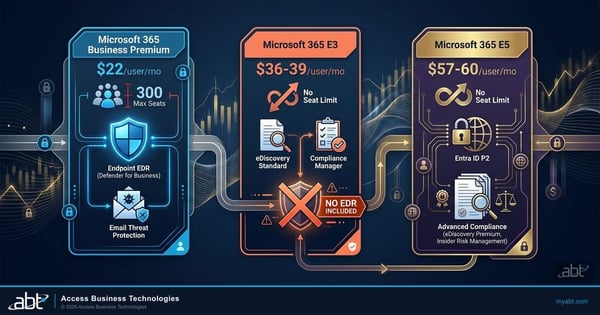
Microsoft 365 E3 vs. E5 vs. Business Premium: The Financial Institution's License Decision
The license decision behind the assessment, for institutions weighing which Microsoft 365 plan fits.
A related risk: data loss and recovery
Twenty-four seconds from our channel on data loss and recovery in Microsoft 365.
This Short is about backup and recovery, a different problem from the Publisher retirement, where the application goes away and the files need a format that still opens. The shared lesson is to keep a copy you can still open, and for a .pub file that means converting it while a perpetual copy can still run Microsoft's export.
Microsoft Publisher retirement questions, answered from Microsoft documentation
Not once the removal update reaches their computer. The Microsoft Support article says Microsoft 365 subscribers will not be able to access Publisher on or shortly after October 1, 2026, as the removal update process rolls out, and Microsoft's September 9, 2026 Message Center reminder, MC1469564, says that after October 1, 2026, Publisher will no longer be included with Microsoft 365 subscriptions. Microsoft also says Publisher will no longer be available for subscribers to install or download after October 2026. A perpetual copy, such as the Publisher in Office LTSC Professional Plus 2021, still runs, and Microsoft's support for it ended on October 13, 2026.
Microsoft describes the removal as an update that rolls out: subscribers lose access "on or shortly after October 1, 2026, as the removal update process rolls out." So the day a subscriber's copy stopped opening can differ from one computer to the next. Treat a copy that still opens as a short window: save its files as PDF now, and plan everything else on the four routes this page describes.
For Microsoft 365 subscribers, Microsoft says you will no longer be able to open or edit your Publisher files using Microsoft Publisher. Microsoft's notices are about the application: what ends is the ability to open and edit the files in Publisher. The files can still move to a format that opens: export them on a perpetual copy if your institution licenses one, recorded as an exception because it is now unsupported, rebuild them in Word from a PDF you already have, rebuild recurring pieces from a Microsoft Create template, or use a third-party converter that passes your vendor review. Keep each original .pub file until your records owner decides its retention; for an archival file with no perpetual copy and no PDF, your records owner and compliance officer decide whether a readable copy is needed.
Microsoft's own export routes, Save as PDF and its sample PowerShell script, both run inside Publisher, and Microsoft says the script requires a working and licensed version of Publisher. If a subscriber's computer still opens Publisher, export from it now, while it does. Once the update has reached a computer, those routes need a perpetual copy, such as the Publisher in Office LTSC Professional Plus 2021, which has been unsupported since October 13, 2026 and belongs on one computer recorded as an exception. Where your institution holds no perpetual copy, Word can open a PDF of the piece as an editable document, recurring pieces can be rebuilt in Word or PowerPoint, and third-party converters exist, which Microsoft says vary in quality and capabilities and which Microsoft does not support.
No. Microsoft Learn's overview of Office LTSC 2024 says Microsoft Publisher is not included with Office LTSC 2024, and that the change is due to the planned retirement of Publisher, which will no longer be supported after October 2026. Microsoft Learn lists Publisher in Office LTSC Professional Plus 2021, whose support ended on October 13, 2026.
Microsoft Learn says the update channel is a device-wide setting, so all Office products installed on a computer must use the same update channel, and that PerpetualVL2021 is the only update channel available for Office LTSC Professional Plus 2021 and Office LTSC Standard 2021. Microsoft 365 Apps uses its own channels, such as Current Channel and Monthly Enterprise Channel. ABT's reading of those two statements, offered as implementation advice: run a volume licensed Office LTSC 2021 copy on a separate computer, physical or virtual, kept for the conversion. For a retail copy, check Microsoft's side-by-side installation rules first.
Yes, as unsupported software. Support for the perpetual version of Publisher ended on October 13, 2026, with Office LTSC 2021 and Office 2021, and Microsoft says perpetual users can still install and use the app and access and edit their files. Microsoft also says it no longer provides updates, security fixes, or technical support for Office LTSC 2021, and that Office 2021 has no extension and no extended security updates. If you keep a perpetual install, keep it to one computer used for the export, and document which computer, why, and when it will be removed.
No. Microsoft's Office 2021 page says support ended on October 13, 2026 "and there will be no extension and no extended security updates," and Microsoft's October 15, 2026 Partner Center notice says support for Office LTSC 2021 ended on October 13, 2026 and that Microsoft no longer provides updates, security fixes, or technical support for it. Office LTSC 2024, Microsoft's current perpetual suite, leaves Publisher out.
Open the file in Publisher, go to File, then Save as, choose a location, select PDF as the file type, and save. For many files, Microsoft publishes a sample PowerShell script that exports Publisher files to PDF in bulk. Microsoft says it requires a working and licensed version of Publisher on the computer running it, describes it as instructional, and recommends you modify and test it for your needs. The script continues past errors, reports which files converted and which did not, and skips any file whose output name already exists. If your Publisher came with Microsoft 365 and the removal update has reached that computer, run the export on a perpetual copy, such as Office LTSC Professional Plus 2021, on one computer kept for the job and recorded as an exception, because every perpetual copy is now past end of support.
Microsoft's documented route goes through PDF. Open Word, go to File, then Open, and open the PDF, and Word presents it as an editable document. The PDF can be one saved from Publisher or one you already have, such as the file sent to your printer. Microsoft notes that the converted document is suited to text editing and that its layout may vary from the original, particularly when the document includes many graphics. Text-heavy files such as newsletters and letterhead suit this route. For visual layouts such as posters and signs, Microsoft recommends PowerPoint, and rebuilding from a Microsoft Create template can be faster than repairing a converted layout.
Word and PowerPoint, job by job. Microsoft's list sends newsletters, letterhead, envelopes, labels, programs and folded paper projects, and business invoices, applications and forms to Word; banners, signs and posters to PowerPoint; and ads or flyers, brochures, certificates, business cards, calendars and cards to either Word or PowerPoint. That is thirteen common Publisher jobs in all. Microsoft also points to customizable templates at Microsoft Create as a starting point.
Search for the .pub extension. Microsoft's reminder recommends searching local storage, OneDrive, and SharePoint, and its Support article suggests a file search for .Pub on a PC, in OneDrive, or in SharePoint. For SharePoint and OneDrive, an administrator with eDiscovery permissions can use the FileExtension property that Microsoft Purview eDiscovery documents, with a query such as fileextension:pub, which searches for .pub files in the locations included in the search. Files on local drives, removable media, and on-premises file shares sit outside SharePoint and OneDrive, so they need a separate search on those machines or servers.
Microsoft says these services vary in quality and capabilities and that Microsoft does not provide support for them. A credit union, bank, or mortgage company has a second test to apply: if a converter works by uploading your files to its own service, it becomes a service provider with access to whatever those files contain, and some Publisher files, such as application forms, can hold customer information. Review it the way you review any other vendor, and test the output on copies before converting originals.
Microsoft's original Message Center notice, MC716267, first posted February 15, 2024 and refreshed November 11, 2025, gave October 13, 2026 and said Microsoft 365 customers would not be able to access Publisher from that date forward. Microsoft's September 9, 2026 reminder, MC1469564, separated the dates: October 1, 2026 for Microsoft 365 subscribers and October 13, 2026 for the perpetual version, when Office LTSC 2021 reaches end of support. The reminder refers back to MC716267 for background, so both notices describe the same retirement.
It reviews the Microsoft 365 subscriptions your users hold and the perpetual Office and Publisher licensing in your records, identifies which of that licensing includes Publisher, and marks the end of support date that applies to each of those copies. It includes a walkthrough, with your administrator, of an eDiscovery search for .pub files in the SharePoint and OneDrive locations you include, matches each Publisher job your teams run to a route and to Microsoft's recommended Word or PowerPoint replacement, and ends with a short written summary your team can work from, including the exception record for any perpetual copy kept for the export. No license purchase is required.
Plan the .pub files
Publisher left behind.
Tell us roughly how many .pub files and teams are involved. Our engineers will check your records for perpetual licensing that includes Publisher, walk your administrator through an eDiscovery search for .pub files in SharePoint and OneDrive, and map each Publisher job to the Microsoft app that replaces it.
