


Same price. Different question.
On 24 August 2026, on an annual commitment, the published list prices for Google Workspace and Microsoft 365 matched at all three business tiers: seven dollars, fourteen dollars, and twenty two dollars per user per month. Both business plan families stop at 300 users, above which each vendor has a separate enterprise range. So the honest reason to move is not the list price, and anyone telling you otherwise has not checked the two pricing pages this week. The real question is what your team can do afterwards, and what actually survives the trip. This page is about the mail, calendar, and contact migration, which is the part Microsoft documents in detail, and it quotes that documentation throughout.
- Every migration limit here is quoted from Microsoft's own documentation, with each source linked at the foot of the page
- Free migration with a 12-month Microsoft 365 licensing commitment through ABT
- Run by a Tier 1 Microsoft Cloud Solution Provider that manages Microsoft 365 for 750+ financial institutions
Does a Google Workspace migration move calendars and contacts?
Yes. Microsoft's Google Workspace migration carries mail, mail rules, calendar, and contacts. That is the whole supported list, and Microsoft states it in the first line of its own procedure.
"You can migrate the following functionalities from Google Workspace to Microsoft 365 or Office 365: Mail and Rules, Calendar, Contacts."
Microsoft Learn, Perform a Google Workspace migration to Microsoft 365 or Office 365This is worth stating plainly because the answer is different depending on which migration you end up running, and the difference is the single most expensive misunderstanding in this whole subject. Microsoft publishes several migration methods. The IMAP method, which is the one the admin center setup wizard offers and the one most small hosting providers support, carries mail and nothing else. Microsoft says so plainly in its IMAP migration documentation: that path "doesn't migrate contacts, calendar items, or tasks." Teams land on it by accident, because it is the path of least resistance, and discover the gap on cutover Monday.
The Google Workspace path is the purpose-built one, and it is better. It talks to Google's APIs rather than pretending to be a mail client, so it can see the things a mail protocol cannot: the calendar, the contact list, the filters. If you are moving off Google Workspace, this is the path you want, and the main risk is being routed onto the other one by whoever is holding the wizard.
What it does not carry is a short list, and every item on it is documented rather than discovered. That is the useful part of this page. Not that a migration has limits, which is true of every migration ever run, but that these specific limits are published in advance, which means every one of them can be planned for instead of survived.
Scope, stated plainly. Everything on this page concerns the mail, calendar, and contact migration, which is the workload Microsoft documents in the detail quoted here. Google Drive and the documents inside it are a separate workload with a separate plan, and moving them into OneDrive and SharePoint is its own piece of work with its own decisions about permissions, external sharing links, and shared drives. It is not covered by the limits below, and nothing on this page should be read as describing it.
What this page covers, and what it does not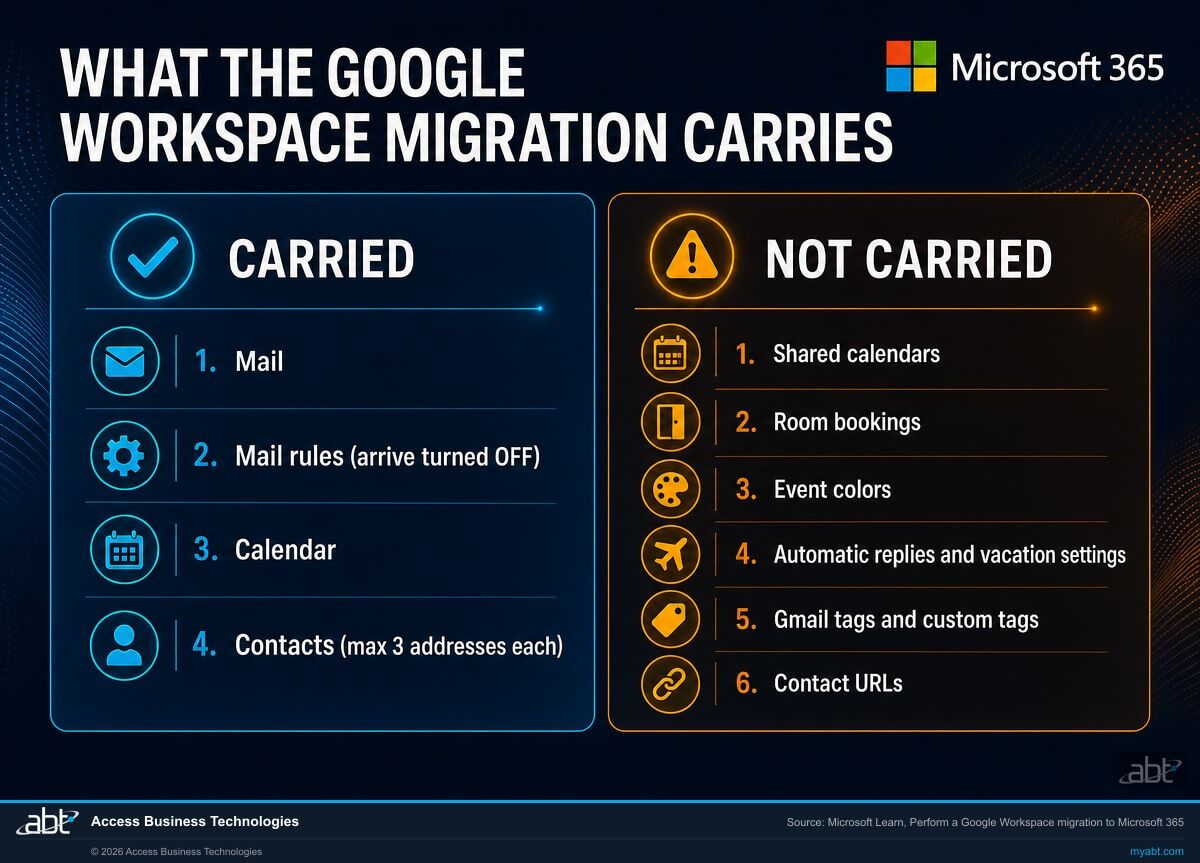
Seven limits that decide how your migration goes
All seven come from Microsoft's own migration documentation. The exact pages are linked at the foot of this one, so every quote below can be checked at source. None of them is a reason not to migrate. All of them are reasons to know the list before somebody touches a DNS record.
Your filing rules arrive switched off
Microsoft is explicit: "Rules will be migrated and remain turned off by default. We advise users to verify the rules on Outlook before enabling them." The rules make the trip. They just do not start working again on their own.
For one person that is a minor irritation. For a lending team where every processor has built a decade of filters that route appraisals, disclosures, and investor conditions into folders, it means that on Monday morning everything lands in one undifferentiated inbox until each person goes and switches their own rules back on. Nobody loses data. Plenty of people lose the morning. Microsoft's advice to check the rules before enabling them is genuinely good, because a rule written against Gmail labels does not always mean the same thing once the labels are gone.
Shared calendars and room bookings are not carried
Two separate rows in Microsoft's limitations table say it: "Shared calendars and event colors won't be migrated" and "Room bookings won't be migrated."
Personal calendars move. The departmental calendar that four people maintain does not, and neither does the booking history on your conference rooms. This is the limit that most often surprises an operations manager, because the shared calendar is usually the one the business actually runs on. It needs a named owner and a plan before cutover, not a support ticket afterwards.
Contacts keep three email addresses, and no more
"A maximum of three email addresses per contact are migrated over." Most contacts have one. Some have two. The ones with four or five are almost always the important ones: the borrower with a work address and a personal address and the one they actually read, the investor contact with a desk address and a shared team alias.
Gmail tags, contact URLs, and custom tags are not carried either. If your team has built structure into the contact list using labels, that structure is worth exporting before the move rather than reconstructing after it.
Retention policies make good migrations look broken
This is the one worth reading twice. Microsoft warns that its migration tool "is currently unaware of tools enforcing messaging records management (MRM) or archival policies", so anything those policies move or delete during the run gets flagged as missing. In Microsoft's own words, the result is "perceived data loss rather than actual data loss, which makes it much harder to identify actual data loss during any content verification checks."
The damage is not to the data. It is to your ability to tell whether anything really went wrong, because the report fills with false alarms and a genuine failure hides among them. Microsoft "strongly recommends disabling all MRM and archival policies before attempting any data migration to mailboxes."
One distinction that matters in a regulated business, and that no vendor page states for you: Microsoft is describing a technical recommendation, not granting anyone permission. Switching off retention, messaging records management, or archival controls is a records-management decision, and the authority to make it belongs to whoever owns records retention at your institution, typically compliance or legal rather than whoever is running the migration. A litigation hold is a further and separate obligation on top of that, with its own owner, and it does not pause because a migration is convenient. In practice that means three things before anything is switched off: named approval from the records owner, a check for any active hold, and a written record of what was disabled and when, so it can be put back exactly and evidenced later.
Google sets the pace, not Microsoft
"Throughput limitations for contacts and calendars completely depend on the quota restrictions for your tenant's service account on the Google Workspace side."
The speed of the calendar and contact portion is governed by quota on the system you are leaving. That has one practical consequence worth planning around: the schedule is not entirely yours to set, and a migration window built on an assumption about how fast this goes is built on the wrong vendor's numbers.
The message ceiling is a default, and defaults can be raised
The largest single message the migration will carry depends on your transport configuration, and Microsoft states "The default limit is 35 MB." Microsoft also publishes guidance for raising the ceiling to 150 MB.
So this is a limit with a remedy, and the remedy has to be applied before the run rather than after it. Anyone who has ever emailed a full appraisal package with photographs knows which messages this touches.
Automatic replies and vacation settings do not travel
The limitations table lists "Vacation settings, Automatic reply settings" under Mail. These are small, they are quick to rebuild, and they are exactly the sort of thing nobody remembers until a client emails someone who is on leave and gets silence back.
One more scope note, relevant to a narrow group: Microsoft states that "Google Workspace migration is not currently available for Office 365 US Government GCC High or DoD." If you are in one of those environments, this path is not open to you and the plan needs to be a different one.
Get the list before cutover, not after
Tell us how many Google Workspace accounts you have and what your team actually depends on. We will come back with what the documented migration carries, a named approach for each thing it does not, and the order the work has to happen in.
Is Microsoft 365 cheaper than Google Workspace?
No. On an annual commitment they are the same number at every business tier. We checked both vendors' own pricing pages on 24 August 2026 rather than repeating what an article said last year, and this is what they say. One qualification matters before you read the table: these are the annual-commitment rates on both sides. Google publishes them under a one-year commitment billed monthly. Microsoft publishes them as an annual subscription paid yearly and separately offers annual commitment with monthly payment. Comparing a committed price on one side to an uncommitted price on the other is the most common way this comparison gets rigged, so the table below is annual against annual. Both vendors also run promotional pricing from time to time, which is deliberately left out here because it changes.
| Tier | Google Workspace | Microsoft 365 | Annual-commitment list price |
|---|---|---|---|
| Entry | Business Starter | Business Basic | $7.00 per user per month |
| Mid | Business Standard | Business Standard | $14.00 per user per month |
| Upper | Business Plus | Business Premium | $22.00 per user per month |
| Seat ceiling | 1 to 300 users | Maximum of 300 users | Same on both sides |
| Above that | Enterprise, price not published | Enterprise plans, published | Only one side shows a number |
Three things follow from that table, and none of them is a sales argument.
First, nobody should switch suites to save money on the licence rate itself. On the figures above there is nothing in it. Your own bill may differ from list, because negotiated terms, promotions, non-profit and education pricing, currency, and tax all move the real number, which is another reason to compare your actual invoice rather than a vendor table. If someone is leading with cost, ask which two numbers they are comparing, because it is not these ones. Where money genuinely does get found is in seat count rather than seat price: almost every organization we look at is paying for accounts belonging to people who left, duplicate accounts, and expensive tiers assigned to people who need a cheap one. That is a real saving and it is available whether or not you ever change vendor.
Second, the tiers match on price but not on shape. Google's entry tier gives each user 30 GB and caps video meetings at 100 participants; the middle tier moves to 2 TB and 150 participants, and Business Plus to 5 TB and 500. Microsoft's tiers divide along a different line, with the jump from Business Standard to Business Premium being largely about security and device management rather than storage. Two suites at $22 are not two versions of the same product, and the right comparison is against what your organization actually needs rather than against a feature grid.
Third, both vendors now include some form of AI assistant in their paid business plans, and that is where the interesting difference sits. On Google's side, its pricing page presents Gemini assistance as part of the business plans, with the breadth of where it reaches growing as you move up the tiers. Google is the authority on exactly what lands in which plan, and that is worth reading on its own pricing page rather than taking from anyone else, including us. On Microsoft's side, Business Standard at $14.00 and Business Premium at $22.00 describe secure AI chat as an included feature, and the deeper, work-grounded Microsoft 365 Copilot is a paid step up rather than part of the base plan, sold either as Copilot-bundled versions of those plans or as an add-on. The published price for that step up moves, and some of what is advertised at any given moment is promotional, so the figure worth acting on is the one on Microsoft's own page on the day you buy. Ask us and we will price it against your actual seat count. So the comparison to make is not whether AI is included, since something is on both sides, but what each vendor means by it at the tier you would actually buy. The distinction Microsoft draws is between an assistant that chats and an assistant grounded in your own work, and whether that is worth the step up is a question about your business rather than about the licence rate.
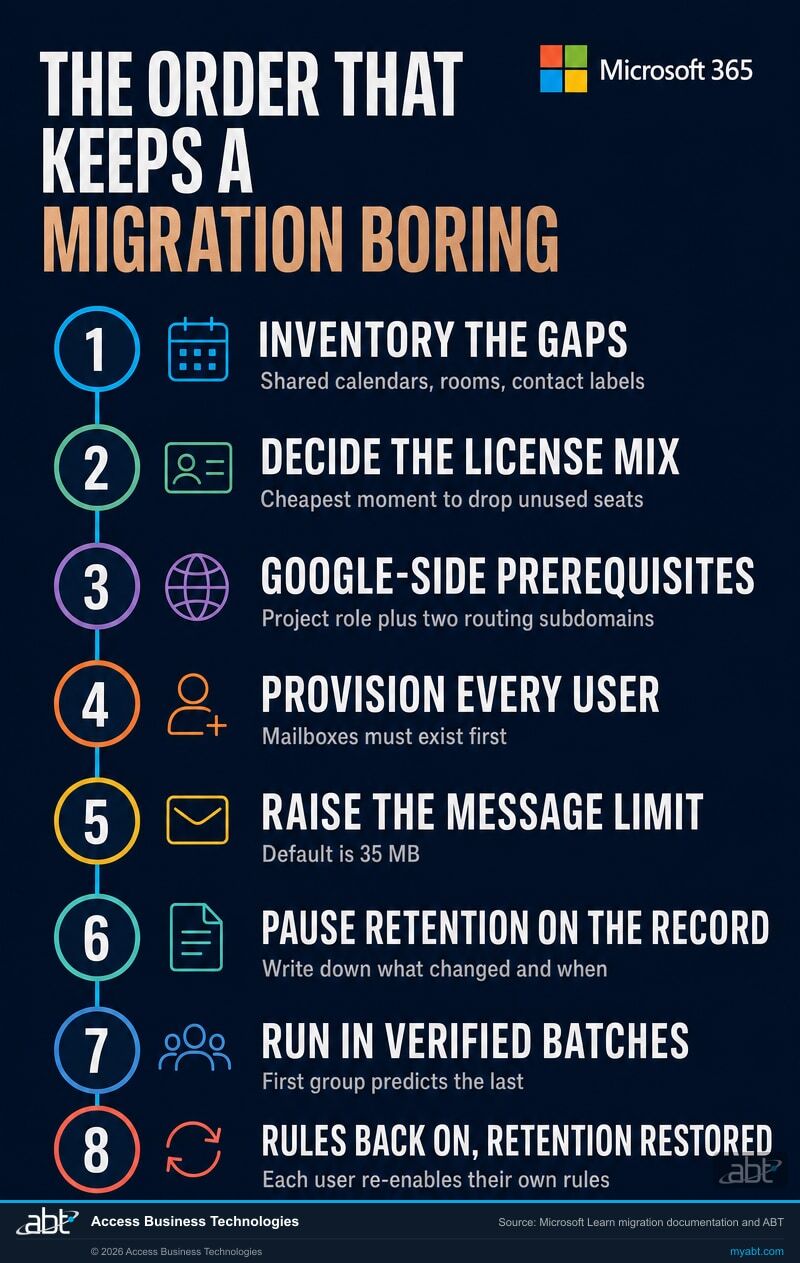
The order that keeps a migration boring
Every step below is either a documented Microsoft prerequisite or a direct consequence of one of the seven limits. Boring is the goal. A migration nobody notices is a migration that went well.
Inventory what only exists on the Google side
Shared calendars, room resources, contact labels, and any contact carrying more than three addresses. These are the documented gaps, so this list is knowable in advance rather than discovered later. Write it down while you can still read it in the source system.
Decide what the licence mix should be
A migration is the one moment when every seat is being looked at anyway, which makes it the cheapest possible time to stop paying for the ones nobody uses. Doing this first also means you provision the right thing once, rather than provisioning and then correcting.
Set up the Google side prerequisites
Microsoft requires a project creator role on the Google side, and two subdomains for mail routing, one pointing at Microsoft 365 and one at your Google Workspace domain. Neither is difficult. Both block everything downstream if they are missing.
Provision every user before the migration runs
Microsoft is direct about this: "This migration requires that you provision all of your users who will be migrated as mail-enabled users outside of the migration process." The mailboxes have to exist first. A user who is missing at this point is a user whose mail has nowhere to land.
Raise the message size ceiling, if you need it raised
The 35 MB default is a configuration value, and changing it after the run does not retroactively carry the messages that were too big during it. Decide before, not after.
Pause retention and archival policies, on the record
Microsoft strongly recommends this so the verification report means something. Get named approval from whoever owns records retention first, check separately for any active legal hold, and record what was paused and when. This step is the one an examiner is most likely to ask about later, which is exactly why the approval and the record are created at the time rather than reconstructed from memory.
Run in batches, and verify each one
Microsoft supports migrating in batches so the project can happen in stages, and offers three methods to do it: automated through the Exchange admin center, manual through the Exchange admin center, or PowerShell. Batching is not caution for its own sake. It means the first group tells you what the tenth group will do, while the tenth group can still be changed.
Turn the rules back on, and put retention back
Rules arrive disabled and each person has to enable their own, so this is a communication task as much as a technical one. Tell people it is coming before it happens. Then restore every retention and archival policy that was paused, and keep the record of it.
We run the migration, and you know what moves before it moves.
ABT is a Tier 1 Microsoft Cloud Solution Provider. We manage Microsoft 365 tenants for more than 750 financial institutions, and we host the Azure environments behind the applications those institutions run every day. Migrations are ordinary work here rather than a project we schedule around.
- The right path, chosen deliberately. The purpose-built Google Workspace migration rather than whichever one the wizard offered first, and we will tell you plainly if your situation calls for something else.
- The gaps get a plan, not a shrug. Shared calendars, room bookings, contact labels, automatic replies, and any contact carrying more than three addresses each get a named approach before cutover.
- Licensing right-sized on the way in. The saving is in seat count, not seat price, and a migration is the cheapest moment to find it.
- Tenant hardening included. Multifactor authentication, Microsoft Entra ID policies, and an Exchange Online Protection review, done while we are already in the tenant.
- Retention reinstated deliberately. Anything paused for the migration goes back on with a written record of what changed and when, so your next examination has an answer.
The migration is free with a 12-month Microsoft 365 licensing commitment through ABT, and covers the mail, calendar, and contact migration described on this page. Moving Google Drive content into OneDrive and SharePoint is a separate workload; we will scope it and tell you what it involves, and it is quoted separately rather than assumed into the free migration. Credit unions, banks, and mortgage companies are our core practice, and the same process runs for organizations outside financial services. To be plain about scope: several things are carried by no documented Microsoft-native path, shared calendars, room bookings, event colors, and automatic reply settings among them. Where that content genuinely matters to you, we will tell you what it would take to move it and what that would cost, rather than quietly leaving it out. What we commit to is that you have the list before cutover, with a named approach for each item on it. If your situation will not support a clean path, we will say so before you commit rather than after.
ABT also operates M365 Guardian, its managed security service for credit unions, banks, and mortgage companies.
Where the facts on this page come from
The load-bearing migration claims above come from Microsoft's own documentation, quoted where the wording matters. Every price comes from the vendor's own pricing page, read on 24 August 2026. ABT's own claims, our Tier 1 CSP status, the institutions we serve, and the terms of the offer, come from ABT and are marked as such.
- Perform a Google Workspace migration to Microsoft 365 or Office 365 is the source for the supported content list, the full limitations table, the rules-arrive-disabled behavior, the three-address contact limit, the Google-side throughput dependency, the 35 MB default message ceiling, the retention warning, the GCC High and DoD exclusion, and the requirement to provision users first.
- What you need to know about migrating your IMAP mailboxes to Microsoft 365 or Office 365 is the source for the contrast drawn above: that the IMAP path "doesn't migrate contacts, calendar items, or tasks."
- Google Workspace migration prerequisites is the source for the project creator role and the two mail-routing subdomains.
- Google Workspace pricing is the source for Business Starter at $7.00, Business Standard at $14.00, and Business Plus at $22.00 per user per month, for the storage and meeting participant figures, and for the fact that Enterprise pricing is not published.
- Compare Microsoft 365 business plans is the source for Business Basic at $7.00, Business Standard at $14.00, and Business Premium at $22.00 per user per month paid yearly, for the Copilot step-up prices, and for the 300-user ceiling.
Related reading
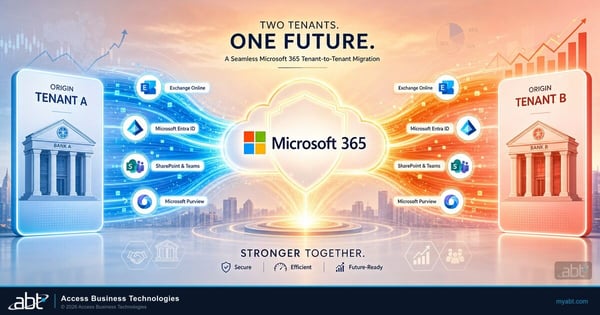
Tenant-to-Tenant Migration for Credit Union and Bank Mergers
When the move is Microsoft 365 to Microsoft 365 rather than Google Workspace to Microsoft 365, the rules change completely. What that path looks like.
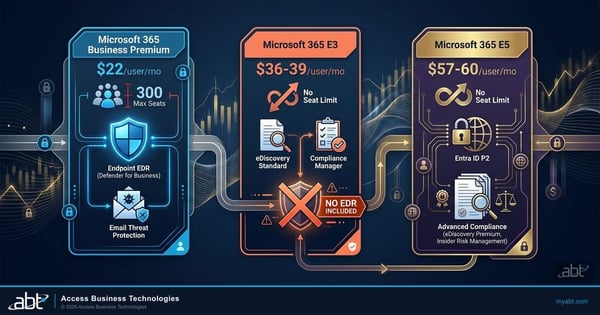
Business Premium, E3, or E5: The License Decision
Once you are past 300 users the business plans stop, and the question changes. How the enterprise tiers actually differ.

Microsoft 365 License Audit: Are You Overpaying?
The saving is in seat count rather than seat price. Where the waste usually hides, and how to find it.
Migration questions, answered from the documentation
Yes. Microsoft's purpose-built Google Workspace migration carries mail, mail rules, calendar, and contacts. That is different from an IMAP migration, which carries mail only and leaves calendars, contacts, and tasks behind. Which answer applies to you depends entirely on which migration path you run, so confirm the path before anyone starts.
Microsoft's limitations table names shared calendars, event colors, room bookings, vacation and automatic reply settings, Gmail tags, contact URLs, and custom tags. Contacts are also capped at three email addresses each, so a contact carrying more than three loses the rest. Every item on that list is documented in advance, which means each one can be planned for rather than discovered afterwards.
Not on an annual commitment. As of 24 August 2026 both vendors publish the same three business tier prices at that commitment level: $7.00, $14.00, and $22.00 per user per month, and both cap their business plans at 300 users. Google publishes those rates under a one-year commitment billed monthly; Microsoft publishes them as an annual subscription paid yearly. Comparing a committed price on one side to an uncommitted price on the other is how this comparison usually gets rigged. Real savings come from seat count rather than seat price, meaning accounts nobody uses and expensive tiers assigned to people who need a cheaper one, and that saving is available whether or not you change vendor.
The rules migrate, but Microsoft states they "remain turned off by default" and advises users to verify them in Outlook before enabling them. Each person has to switch their own rules back on, so plan for a short period after cutover when mail is not being filed automatically, and tell people it is coming before it happens rather than after.
Because the migration tool cannot see them. Microsoft explains that messages moved or deleted by messaging records management or archival policies during a run get flagged as missing, producing "perceived data loss rather than actual data loss, which makes it much harder to identify actual data loss during any content verification checks." Microsoft strongly recommends disabling those policies first. Pausing a retention policy is a technical step and is not authority to lift a litigation hold, which remains a separate obligation, and anything paused should be restored afterwards with a written record.
Microsoft does not publish a duration, and any figure quoted without seeing your environment is a guess. What Microsoft does document is the constraint that shapes the schedule: throughput for contacts and calendars "completely depend on the quota restrictions for your tenant's service account on the Google Workspace side." The pace of that portion is set by the system you are leaving. Microsoft supports migrating in batches so the work can run in stages, which is also what lets the first group tell you what the last group will do.
No. The migration described on this page covers mail, mail rules, calendar, and contacts. Google Drive content is a separate workload with its own plan, its own tooling, and its own decisions about folder permissions, external sharing links, and shared drives. Treat it as a second project running alongside the mailbox move rather than something the mailbox migration picks up on the way past, and scope it explicitly so nobody assumes it is included.
Bring the calendars
and the contacts.
Tell us how many Google Workspace accounts you have and what matters most in them. Our team will come back with what the documented migration carries, the named list of what it does not, and the order the work has to happen in.
