


Switch your Microsoft 365 partner. Your tenant never moves.
Eligible Microsoft 365 subscriptions can transfer from one Cloud Solution Provider to another in the middle of your term, and Microsoft's rule is that the new subscription is created at the original subscription's price. No mailbox migration. No new tenant. What genuinely changes is who bills you and who supports you, which is the part you wanted to change. Most teams never find this out, because the partner they want to leave has no reason to mention it.
"Subscription transfers create a new subscription under the target partner at the price of the original subscription."
Microsoft Learn, Partner Center transfer documentation- Your tenant, mailboxes, files, and domain stay exactly where they are
- Free licensing assessment with no obligation, and ABT runs the transfer at no charge with a 12-month licensing commitment
- Run by a Tier 1 Microsoft Cloud Solution Provider that manages Microsoft 365 for 750+ financial institutions
What happens when you switch Microsoft 365 partners?
Your subscriptions change hands in Microsoft's Partner Center. Your Microsoft 365 environment stays where it is. The partner you leave stops billing you at the transfer date, the partner you join picks up the remainder of your term, and every mailbox, file, user account, and domain stays in the tenant it was already in. The documented process acts on the subscription record inside Partner Center rather than on your tenant, so there is no cutover weekend and nothing to migrate.
The confusion is understandable, because the word people reach for is "migration," and switching partners is not one. A migration moves data between tenants. Changing partners moves a commercial relationship between two companies that both work with Microsoft. Your tenant was never the property of your partner. When a new partner comes aboard, Microsoft's own documentation describes the step as requesting a reseller relationship with the customer's existing tenant, which you accept from inside the Microsoft 365 admin center.
Two separate things get established, and it helps to know they are separate. The first is the reseller relationship, which is who sells you licenses and bills you. The second is the admin relationship, which is the delegated permission that lets a partner actually administer your services. Microsoft is explicit that one does not imply the other: a reseller relationship on its own lets a partner transact, and managing your Microsoft 365 tenant requires permission you grant separately. That distinction is where your control sits. You decide how much access a partner has, and you can grant a narrow scope while you get comfortable.
The mechanics are published, stable, and boring, which is exactly what you want from something touching your production email. Both halves are documented by Microsoft: the subscription transfer process between CSP partners and the reseller relationship request that starts it. Every claim on this page about how a transfer works comes from those two documents, and where a limit exists, we state it rather than hide it. ABT's own service and offer claims are ours rather than Microsoft's, and they are labeled that way.
One honest note about why this is not common knowledge. Microsoft does not pay a new-customer incentive on a transferred customer, because a transferred customer is not new. A partner chasing acquisition bonuses has very little reason to build a marketing page explaining how easy it is to leave the partner you have. That is the whole reason this page exists, and it is also a reasonable question to put to any partner you are evaluating: if the answer to "how do I leave if this does not work" is vague, you have learned something. Our view on what actually separates partners is on the Tier 1 Cloud Solution Provider page.
What actually changes, and what does not?
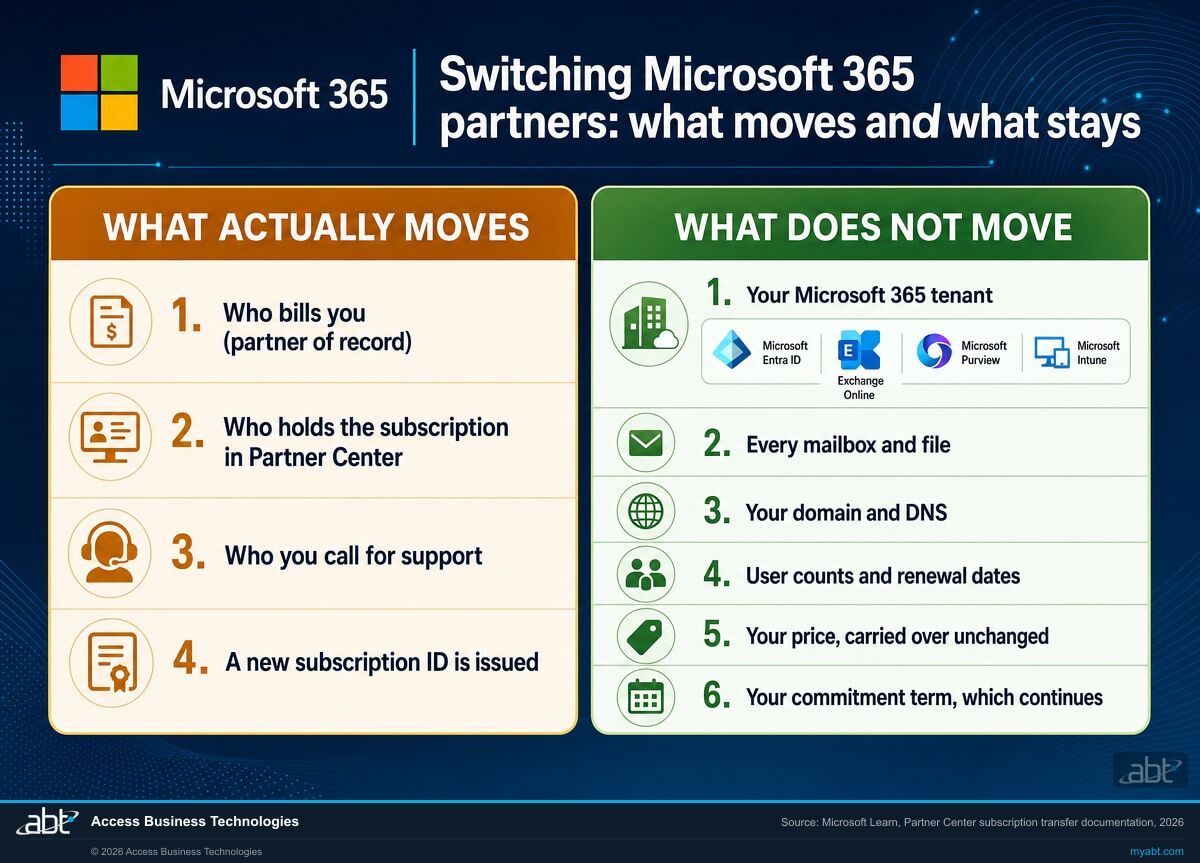
The left column is what people brace for when they hear the word "switch." The right column is what Microsoft's documented process actually does.
| What teams expect | What actually happens | |
|---|---|---|
| Your tenant | A new tenant has to be built and everyone gets moved into it | Nothing is built. Your new partner requests a relationship with the tenant you already have, and you accept it in the Microsoft 365 admin center |
| Mailboxes and files | A migration window, a mail freeze, and a week of missing attachments | Untouched. Exchange Online, SharePoint, OneDrive, and Teams data never move, because the tenant never moves |
| Your domain and sign-in | DNS changes, new passwords, users locked out on Monday | Neither is part of the transfer. The documented process changes the subscription record in Partner Center, and your domain and sign-in configuration are properties of the tenant it leaves alone |
| Your price | A new partner means new pricing, probably higher | The new subscription is created at the price of the original subscription. Any promotion already applied carries over |
| Your term | The clock resets and you are locked in for another full year | It does not reset. Your existing term continues, and the new partner is responsible for the remainder of it |
| Seats and renewal dates | Everything gets rebuilt and something gets missed | Subscription properties are preserved, including user counts, renewal properties, and scheduled renewal properties. Scheduled changes travel with the subscription |
| Billing and support | Two invoices, a gap in coverage, nobody owning the handoff | Your old partner is responsible up to the transfer date, your new partner from that point on. This is the part that genuinely changes, and it is the part you wanted to change |
| Admin access | The new partner gets the keys to everything by default | Reselling and administering are separate grants. Management access is permission you give deliberately, at the scope you choose |
| Your data during the change | Identical on both sides. A partner transfer moves a billing relationship, never your mailboxes, files, or domain. | |
Find out what you are actually paying for
Before anything transfers, ABT's licensing team reviews every subscription and seat you hold and gives you a written assessment: what you own, what is going unused, and what the right plan mix looks like. It is free, it is yours to keep, and you are under no obligation to switch anything.
How do you transfer Microsoft 365 subscriptions to a new partner?
You accept a reseller relationship with the new partner, the new partner sends a transfer request through Partner Center, and your current partner approves and submits it. Microsoft executes the rest. The whole sequence is a handful of clicks spread across three parties, and the only genuinely uncertain step is the one where your current partner has to press a button.
Licensing review first, decisions second
Before anything is requested, ABT inventories what you actually hold: every subscription, every seat, every renewal date, and every scheduled change already queued against your subscriptions. This is where most of the value shows up, because a partner switch is the rare moment when somebody looks carefully at a bill that has been renewing on autopilot. You get the assessment whether or not you go further.
Nothing has changed yetYou accept the reseller relationship
ABT sends a relationship request, and you accept it from inside your own Microsoft 365 admin center. This is the step people expect to be dangerous and it is not: accepting a reseller relationship lets a partner transact on your behalf. It does not hand over administrative control of your tenant, which is a separate permission you grant deliberately and scope yourself.
Microsoft 365 admin centerThe transfer request is built and sent
ABT creates the transfer request in Partner Center, naming your current partner and specifying which product types are in scope. Requests can be limited to license-based Microsoft 365 subscriptions or opened to everything including Azure. You are told exactly which subscriptions are on the request before it goes anywhere, because a transfer that includes something unexpected is a bad surprise for everyone.
Microsoft Partner CenterYour current partner approves and submits
They receive an email notification, open the request, select the subscriptions, and submit. This is the only step neither you nor your new partner controls, and it is worth knowing the deadline: a request nobody acts on expires after 30 days and has to be recreated. Most partners handle it professionally, because the revenue is leaving either way. For the ones who do not, see the fine print below, because that situation has a real answer and it is not the one most people assume.
Microsoft Partner CenterMicrosoft completes the transfer
Transfers take up to 72 hours. Each subscription is recreated under the new partner with a new subscription ID, at the original price, carrying its user counts and renewal dates. If a line item fails, Microsoft retries it for 72 hours before marking the transfer partially complete, and the remaining items go on a fresh request. Then ABT runs a security posture review of the tenant we now support, and you get a written summary of what we found.
Same price, same term, same tenant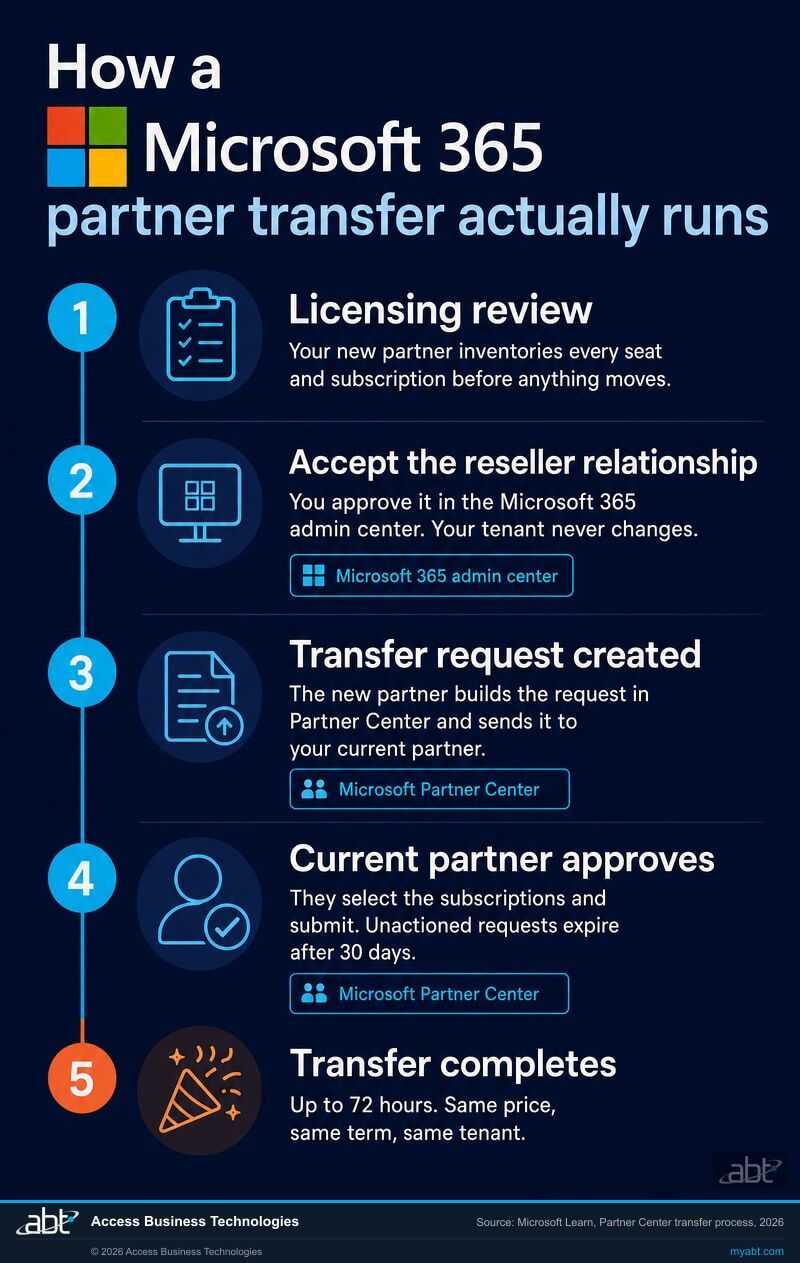
What a partner switch does not do
Three limits worth knowing before you start, all of them straight from Microsoft's documentation. Any partner who tells you otherwise is selling you something.
It does not end your term
A transfer is not an escape hatch from a commitment you regret. Microsoft is direct about it: there is no new cancellation window, because a transferred subscription is not treated as a new subscription term. Your existing term continues under the new partner. If somebody promises that switching will release you from an annual commitment, check that against Microsoft's own words before you believe it.
It needs your current partner to act
The transfer request has to be approved and submitted by the partner you are leaving. Most handle it professionally, because the subscription revenue is leaving either way and a clean exit protects their reputation. For a partner who simply drags their feet, the 30-day expiry is the backstop: the request lapses and a new one is sent. Be clear-eyed about the harder case, though. Microsoft's documented process gives a partner who flatly refuses to submit no button anyone can press for them, so a transfer is not something you can force. What you always keep is the term itself. You are free not to renew, and the subscriptions can be repurchased through the partner you want when the current term ends.
Large estates split across requests
A single transfer carries a maximum of 25 license-based line items per billing plan. The limit is per billing plan, so 20 monthly subscriptions alongside 12 annual ones needs no split at all, while 32 monthly subscriptions needs two requests. Azure items have no limit. This is a scheduling detail rather than an obstacle, but it belongs in the plan rather than in a surprise.
There is a fourth thing worth saying plainly, because it is the question behind the question. A new partner does not automatically improve your security posture. The transfer moves a commercial relationship, and it changes nothing about how your tenant is configured. If your tenant has unenforced multifactor authentication, stale administrative accounts, or Microsoft Entra ID policies nobody has reviewed since the day they were switched on, all of that survives the transfer untouched. The improvement comes from the work that happens after, which is why our first act on a newly supported tenant is a posture review rather than a welcome email.
One case genuinely is different. If your Microsoft 365 was purchased through GoDaddy, your tenant is federated with GoDaddy's system and a standard partner transfer is not the path. That situation has its own documented process, and we cover it on the GoDaddy defederation page. If you are unsure which situation you are in, the licensing assessment answers it in the first conversation. And if what you are really trying to solve is the renewal number rather than the partner, the Microsoft 365 price lock page is the more useful starting point.
The assessment is free. The switch is free with a 12-month commitment.
Two different offers, and the difference matters. The licensing assessment carries no obligation at all: you get it, you keep it, you owe us nothing. Running the transfer itself is the part we do at no charge in exchange for a 12-month Microsoft 365 licensing commitment through ABT, because once your tenant is properly licensed we want to be the partner managing it. That trade is the whole deal, stated plainly.
ABT reviews your licensing and handles the entire transfer. You commit to 12 months of Microsoft 365 licensing through ABT.
- A written licensing assessment, with no strings. Every subscription, seat, renewal date, and scheduled change, with a plain read on what is oversized, what is idle, and what is missing. You keep the assessment whether or not you switch anything.
- The transfer, run end to end at no charge. We build the request, scope it correctly, coordinate the timing with your current partner, chase the approval before the 30-day clock runs out, and confirm every line item completed rather than assuming it did.
- A security posture review once the tenant is ours to support. Multifactor authentication coverage, Microsoft Entra ID sign-in policies, administrative role sprawl, and Exchange Online Protection settings, with a written before-and-after summary of what changed.
- A named team afterward. ABT manages your Microsoft 365 tenant as a Tier 1 Cloud Solution Provider, which means the people who ran your transfer are the people who answer when you call.
The 12-month commitment applies to the transfer handling and the ongoing management, not to the assessment, which is yours with no obligation either way. There are no migration fees, setup fees, or per-mailbox charges, because there is no migration. Under Microsoft's transfer rules the transferred subscription is created at the original subscription's price and your term continues, so the transfer itself is not a repricing event. Be precise about what that rule covers: it governs the price of the transferred subscription, not the total of your invoice, and any managed services you choose to add are priced separately and quoted to you in writing before you agree to them. Where the assessment finds savings, they come from right-sizing what you own rather than from the switch, and we show you that math before you agree to anything. Final commercial terms are set out in the agreement you sign, not on this page.
ABT also operates M365 Guardian, its managed security service for credit unions, banks, and mortgage companies.
Regulated? This is our home field.
ABT manages Microsoft 365 tenants for 750+ financial institutions, so if you are a credit union, bank, or mortgage company changing partners, the switch arrives with the paperwork your examiners expect: documented controls, vendor due-diligence materials on request, and a posture review written for an audience that will read it closely. Changing a critical vendor is a governance event at a regulated institution, and it should produce a record. Plenty of the organizations we onboard are ordinary businesses with no examiner in sight, and the process is identical. The file is simply thicker when somebody official is going to open it.
Related reading

Why CIOs Are Choosing ABT for Microsoft 365 Licensing
What technology leaders look for when they decide the partner relationship is worth changing, and what they get after.

Stop Paying for Microsoft 365 Shelfware
Which licenses you can safely downgrade and which ones will break something, which is the first question any real assessment answers.

Why Generic MSPs Fail Financial Services Compliance
The gap between a competent generalist and a partner who has sat through your kind of examination, and why it shows up at the worst moment.
Switching Microsoft 365 partners, answered
Ready to
Change Partners?
Tell us what you are running and ABT's licensing team will build your free assessment: what you hold today, what it should cost, and exactly what the transfer would involve for your subscriptions.
