In This Article
- The Hidden Cost of Microsoft 365 Licensing at Financial Institutions
- Five Licensing Mistakes Costing You Money
- E3 vs. E5 vs. Business Premium: What Financial Services Actually Needs
- How to Run a Microsoft 365 License Audit
- Why Tier-1 Direct-Bill CSP Pricing Matters
- M365 Guardian: The Operating Model on Top of the Licenses
- Compliance Guardrails: Don't Break Security to Save Money
- Frequently Asked Questions
Microsoft dropped its biggest commercial price increase in years on December 4, 2025. Starting July 1, 2026, M365 E3 jumps 8.3% to $39 per user per month. E5 rises 5.3% to $60. Business Basic climbs 16.7%. Frontline F3 surges 25%. That lands on top of the volume-discount elimination from November 2025, which already added 6 to 12 percent for large enterprises. For a 500-person bank on E3, the combined hit is roughly $70,000 more per year before you change a single setting.
The timing stings for financial institutions weighing Microsoft 365 Copilot adoption. Most regulated institutions cannot just flip Copilot on. SEC Rule 17a-4, FINRA Rule 4511, and CFTC recordkeeping requirements all apply to AI-generated communications, and plenty of compliance teams haven't solved the configuration yet. You're staring at higher base costs and pressure to adopt a tool you may not be ready to deploy.
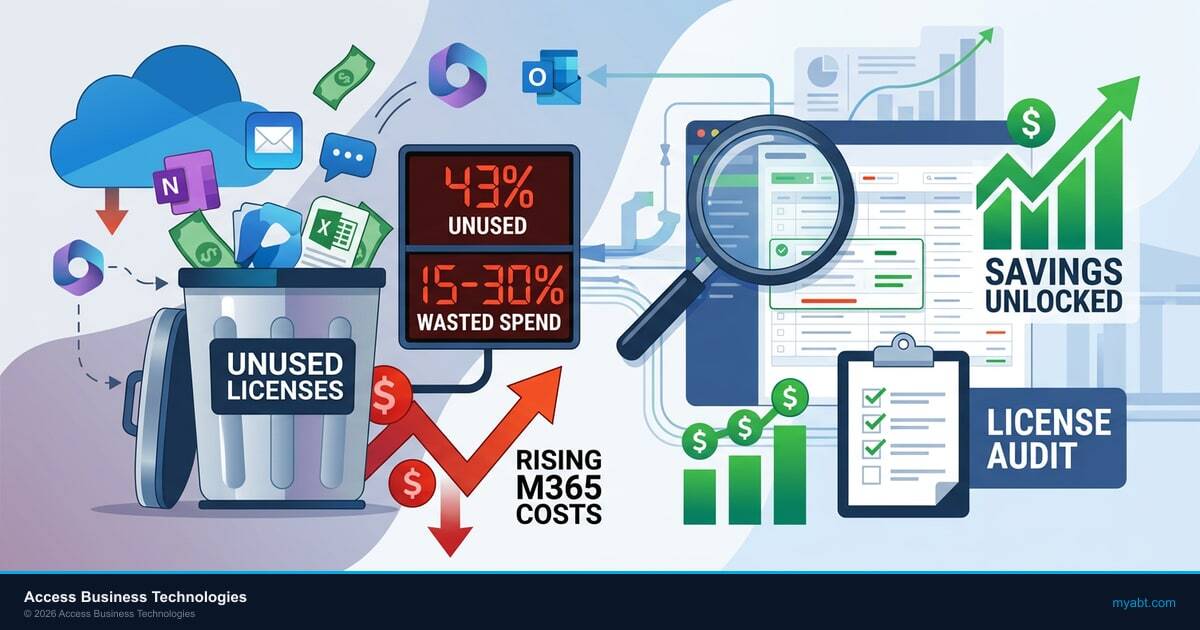
Meanwhile, Zylo's February 2026 SaaS Management Index found that 43 percent of enterprise software licenses sit completely unused, costing companies an average of $80.6 million per year. Gartner calls 30 percent of SaaS spend "toxic." With Microsoft tightening enforcement across its product line, the penalty for sloppy license management keeps climbing alongside the prices.
Why a License Audit Is a 2026 Priority
- Right-sizing produces immediate, recurring savings that compound every month a financial institution stays on inflated tiers. The compounding accelerates after the July 2026 price hike.
- Audits surface unconfigured features that examiners expect to be running. Paying for Microsoft Purview Information Protection and Defender for Office 365 Plan 2 without configuring them is overspending and underprotecting at the same time.
- Tier-1 Direct-Bill CSP pricing typically reduces gross M365 cost by 5 to 15 percent against direct-from-Microsoft list. Combined with right-sizing, total savings frequently land in the 20 to 40 percent range.
This guide walks through the most common licensing waste, how to tell which plan each role actually needs, and how to run an M365 license review without accidentally breaking your security posture. It also covers the two structural questions most institutions skip: where you should be buying the licenses from, and who should be operating them on top of the platform.
The Hidden Cost of Microsoft 365 Licensing at Financial Institutions
Microsoft 365 overspending at financial institutions follows a predictable pattern. Someone made a licensing decision three years ago. It was probably the right call at the time. Then the organization grew, Microsoft changed its plan structure, employees came and went, and nobody revisited the original decision.
The result is licensing sprawl. A typical 250-person mortgage company's license inventory, on audit, usually looks like this:
- 267 licenses assigned but only 243 active employees. Those 24 extras: departed employees, shared mailboxes that don't need full licenses, and test accounts from an integration project that ended 18 months ago.
- 250 E5 licenses when the original purchase was driven by the compliance team's need for Microsoft Purview and Microsoft Defender for Office 365 Plan 2. The other 210 users never touch those features.
- 35 add-on licenses for capabilities already bundled in E5. Power BI Pro purchased separately when it ships with E5. Microsoft Visio Plan 2 for people who use it once a quarter.
At current E5 per-user pricing, the gap between what this company pays and what it should pay is $8,000 to $12,000 per month. That is $96,000 to $144,000 per year in Microsoft 365 overspending on licensing alone.
Multiply that across an institution with 500 or 1,000 users, and you are looking at six figures in annual waste that nobody has flagged because the monthly invoice just auto-renews.
Five Licensing Mistakes Costing You Money
After auditing Microsoft 365 environments for hundreds of financial institutions, these are the five mistakes that show up in almost every engagement.
1. Everyone Gets the Same License Tier
This is the biggest single source of waste. The IT Director picks one plan for the whole company because it is easier to manage. Usually it is E3 or E5, and usually it is based on what the most demanding department needs.
Your loan officers do not need the same license as your chief information security officer. A teller processing transactions needs email, Microsoft Teams, and basic Office apps. Your compliance team needs Microsoft Purview eDiscovery, Audit Premium, and Information Barriers. Those are different license tiers at different price points.
2. Departed Employees Keep Their Licenses
This sounds like it should be easy to catch. It isn't. Offboarding at financial institutions often involves regulatory holds on mailbox content, which means accounts stay active longer than at other companies. The problem is when "active for compliance hold" turns into "still paying for a full E5 license 14 months after the employee left."
A shared mailbox or inactive mailbox with litigation hold does not require a paid license in most cases. Your offboarding process should convert these accounts rather than leaving them on full licenses.
3. Paying for Add-Ons Already Included in Your Plan
Microsoft's licensing matrix is genuinely confusing. We regularly find organizations paying separately for:
- Power BI Pro when they already have E5 (which includes it).
- Microsoft Entra ID P2 when they already have E5 (which includes it).
- Microsoft Defender for Endpoint Plan 2 when they have E5 Security (which includes it).
- Microsoft Teams Audio Conferencing when they already have E5 (which includes it).
Each of these duplicates adds $5 to $12 per user per month. Across 200 users, one duplicate add-on costs $12,000 to $28,800 per year.
4. Unused Licenses Sitting in Inventory
Bulk license purchases often leave unassigned licenses sitting idle. You bought 300 Business Premium licenses when you had 280 employees, expecting growth. The growth happened, but you bought E3 licenses for the new hires instead. Those 20 unassigned Business Premium licenses keep renewing.
5. Security Features Bought but Never Configured
This is the most expensive mistake because it combines overspending with a false sense of security. Many financial institutions upgraded to E5 specifically for the advanced security and compliance features. Then nobody configured them.
Buying E5 for Microsoft Defender for Office 365 Plan 2 does not protect you from phishing attacks if you have not set up Safe Attachments policies and anti-phishing rules. Paying for Microsoft Purview Information Barriers does not satisfy your examiner if the barriers are not actually in place. You are paying the premium and getting none of the protection.
"Gartner estimates that 30 percent of SaaS spending is wasted or underutilized. For regulated industries, the waste is compounded by compliance risk. You are paying for security features that exist in your license but were never turned on."
Gartner SaaS Management Market Guide, 2025
E3 vs. E5 vs. Business Premium: What Financial Services Actually Needs
The licensing decision in financial services comes down to one question: which users need advanced security and compliance features, and which users just need to do their jobs?
Business Premium: The Baseline for Most Staff
Microsoft 365 Business Premium includes the Office apps, email, Microsoft Teams, SharePoint Online, OneDrive, Microsoft Intune device management, and Microsoft Defender for Business. For tellers, loan processors, administrative staff, and most operational roles, this is more than enough.
Business Premium also includes Conditional Access through Microsoft Entra ID P1, which means you can enforce MFA, block legacy authentication, and require compliant devices. These are the security controls that satisfy most day-to-day compliance requirements.
The limitation: Business Premium caps at 300 users per tenant and does not include the advanced compliance tools (eDiscovery, Information Barriers, Audit Premium) that regulated institutions sometimes need. If you have more than 300 users or need those compliance features for specific roles, you will need E3 or E5 for at least part of your workforce.
E3: The Middle Ground
E3 adds unlimited user count, larger mailboxes (100 GB vs. 50 GB), and some compliance features. For organizations over 300 users, E3 is the practical baseline. But E3 does not include the advanced security stack that makes E5 worth the price for your security and compliance teams.
E5: Worth It for the Right Roles
E5 adds Microsoft Defender for Office 365 Plan 2, Microsoft Defender for Endpoint Plan 2, Microsoft Entra ID P2, Microsoft Purview (advanced compliance), Power BI Pro, and Audio Conferencing. These features matter for:
- Security team: Threat investigation, automated remediation, attack simulation.
- Compliance officers: eDiscovery, Information Barriers, Audit Premium, retention policies with adaptive scopes.
- IT administrators: Identity Protection risk policies, Privileged Identity Management, Access Reviews.
- Executives: Power BI for reporting and board-level dashboards.
The key insight for Microsoft 365 license optimization: E5 is worth the price for 15 to 25 percent of your workforce. The other 75 to 85 percent are on a more expensive plan than they need.
How to Run a Microsoft 365 License Audit
A proper license audit takes your current spend, maps it against actual usage, and produces a right-sizing plan. Here is how to do it.
Step 1: Pull Your Current License Inventory
In the Microsoft 365 Admin Center, go to Billing > Your products. Export the full list of purchased licenses, assigned licenses, and available licenses. This gives you the baseline: what you are paying for vs. what has been assigned.
Already you will probably find unassigned licenses generating monthly charges.
Step 2: Run Usage Reports
In the Admin Center under Reports > Usage, pull the last 180 days of activity data. You are looking for:
- Last activity date per user. Anyone who has not logged in for 90+ days needs investigation.
- App usage breakdown. Which users actually use the advanced features their license includes? If someone has E5 but only uses Outlook, Word, and Teams, they do not need E5.
- Defender activity. Are the advanced threat investigation and automated remediation features in E5 being used, or is the security team only using the basic Defender capabilities available in lower tiers?
Step 3: Map Users to Required Tiers
Build a spreadsheet with every user, their current license, their actual usage, and their role. Assign the minimum license tier that covers their requirements:
- Business Premium: Standard staff, operational roles, most of the workforce.
- E3: Users who need larger mailboxes, specific compliance tools, or are in tenants over 300 users.
- E5: Security team, compliance officers, IT admins, executives who need Power BI.
Step 4: Identify and Eliminate Duplicate Capabilities
Cross-reference your add-on subscriptions against what is included in each tier. Every add-on that duplicates a bundled feature is money thrown away.
Step 5: Build a Migration Plan
Do not change 200 licenses on a Friday afternoon. License changes can affect Conditional Access policies, DLP rules, retention policies, and security configurations. A financial institution should phase these changes with testing, roll them department by department, and verify that all compliance-critical features remain functional after each change.
This is where many institutions get stuck. The audit identifies savings, but nobody wants to risk breaking security configurations. That is a valid concern, and it is why many banks and credit unions bring in a specialist for the migration itself. ABT's licensing team handles this for hundreds of financial institutions. They know which configurations break when you change tiers and how to preserve them. For the broader operating-model picture, see our companion article on how M365 Guardian wraps the Microsoft tenant and the FFIEC cybersecurity expectations your audit needs to preserve.

Why Tier-1 Direct-Bill CSP Pricing Matters for Your Microsoft 365 License Optimization
Where you buy Microsoft 365 licenses affects what you pay. There are three purchasing channels, and they are not equal.
Direct from Microsoft
Buying directly from Microsoft.com is the most expensive option. There is no volume discount negotiation, no dedicated account team, and no license management support. You pay list price and manage everything yourself.
Through a Reseller (Indirect / Tier-2 CSP)
Many managed service providers resell Microsoft licenses as an indirect or Tier-2 CSP. They buy from a distributor, mark up the price, and pass it through. They have limited ability to negotiate pricing and no direct relationship with Microsoft for escalations.
Through a Tier-1 Direct-Bill CSP
Tier-1 Direct-Bill Cloud Solution Providers like Access Business Technologies have a direct billing and operational relationship with Microsoft. There is no middleman distributor between the customer tenant and Microsoft. That structural difference matters in three ways for a financial institution running a license audit.
- Better pricing. Tier-1 Direct-Bill CSPs negotiate directly with Microsoft on volume commitments. That pricing advantage gets passed to customers in the 5 to 15 percent range against direct-from-Microsoft list, depending on the seat count and the mix of SKUs.
- Direct escalation path. When a licensing issue or service incident occurs, a Tier-1 Direct-Bill CSP goes straight to Microsoft engineering. Indirect CSPs route through their distributor, which adds days to resolution time on the exact escalations a regulated institution cannot afford to defer.
- License management expertise at scale. Tier-1 Direct-Bill CSPs manage tens of thousands of seats across hundreds of tenants. ABT manages Microsoft 365 licensing for more than 750 financial institutions and has seen every license-change scenario the platform produces.
For a financial institution, the M365 Direct-Bill CSP relationship is not a procurement detail. It is a structural choice that decides who is operationally accountable to Microsoft for how the tenant is configured. ABT, as a Tier-1 Direct-Bill CSP, transacts directly with Microsoft and manages each customer's tenant under Granular Delegated Administrative Privileges (GDAP) with least-privilege role scoping. The same partner relationship that produces the pricing advantage also produces the operating model layered on top: Microsoft Entra ID identity baselines, Microsoft Intune device posture, Microsoft Defender threat detection, Microsoft Purview retention and audit, and Microsoft Sentinel as the SIEM. Right-sizing the licenses without standardizing the configurations on top of them leaves the savings on the table.
The pricing difference between buying through a Tier-1 Direct-Bill CSP and buying direct can be 5 to 15 percent on the same licenses. Combined with right-sizing from a license audit, the total savings are substantial. The trap is treating that as the end of the story.
M365 Guardian: The Operating Model on Top of the Licenses
Right-sizing the license inventory is the first half of the savings story. The second half is the operating model that runs on top of those licenses. A bank that drops 30 percent of its E5 seats to Business Premium and then leaves the remaining E5 tenants on Microsoft's defaults has saved money on the SKUs while still failing to use most of what is in the SKUs. The license audit produced the savings. The operating model produces the protection.
This is the layer that M365 Guardian addresses. Guardian is ABT's operating model on top of the Microsoft 365 stack for regulated financial services firms. Guardian is not a separate license. The Microsoft platform is the platform. ABT layers a financial-services-tuned configuration and a 24/7 security operations center on top of the licenses the institution already owns. The Guardian operating model includes:
- Microsoft Entra ID Conditional Access baselines tuned to community-bank and credit-union user behavior, with MFA enforcement in Grant mode (not Report-Only), legacy authentication blocked, and step-up policies for high-risk sign-ins.
- Microsoft Intune device compliance covering OS version, BitLocker encryption, Defender Antivirus status, and patch level, with app protection policies for personal devices that handle business communications.
- Microsoft Purview retention, DLP, and Audit Premium bound to mailboxes, SharePoint sites, OneDrive accounts, and Teams channels so the books-and-records trail satisfies SEA Rule 17a-4, FINRA Rule 4511, and the FTC Safeguards Rule out of the box.
- Microsoft Defender for Office 365 and Defender for Endpoint deployed with Safe Attachments, Safe Links, anti-phishing, and anti-impersonation policies tuned to the actual phishing patterns that hit FIs, not vendor SMB defaults.
- Microsoft Sentinel as the SIEM of record, aggregating signals from Entra ID, Defender, Purview, and Intune into a single incident timeline that produces the evidence regulators expect under Regulation S-P, NCUA cybersecurity requirements, and FFIEC examination questions.
- 24/7 security operations center monitoring the Sentinel and Defender signals every minute of the day, so the institution gets the productivity of a managed control plane without staffing a SOC internally.
The license audit tells you which SKUs to buy. The Guardian operating model tells you what to do with the capabilities those SKUs unlock. Most institutions need both passes. The audit alone produces savings on paper. The operating model produces savings that hold up to an examiner's questions about which features are actually configured and who is watching them.
Key Takeaway
A Microsoft 365 license audit is the first deliverable. The second deliverable is making sure the audit savings do not leave you cheaper and less protected. A Tier-1 Direct-Bill CSP gets you the pricing. The M365 Guardian operating model on top of Microsoft Entra ID, Microsoft Purview, Microsoft Defender, Microsoft Intune, and Microsoft Sentinel gets you the configuration that examiners actually grade.
Compliance Guardrails: Don't Break Security to Save Money
The worst-case outcome of a Microsoft 365 license audit is saving $80,000 on licensing and then failing a regulatory examination because a critical security feature stopped working when you changed tiers. For the broader regulatory context, see our guide on FFIEC cybersecurity requirements for community banks.
Microsoft 365 licensing for financial services requires extra caution during any license change. Here is what to watch.
Conditional Access Policies
Some Conditional Access features require Microsoft Entra ID P2 (included in E5, not in E3 or Business Premium). If your policies use Identity Protection risk-based conditions, sign-in risk policies, or Access Reviews, downgrading users from E5 to E3 will break those policies. The conditions stop evaluating. Users who should be blocked are not.
Before downgrading any license, inventory every Conditional Access policy and verify which Entra ID features it depends on.
Data Loss Prevention Rules
DLP policies in Microsoft Purview have different capabilities depending on the license tier. Advanced DLP features (Endpoint DLP, exact data matching) require E5 Compliance or E5. If you have configured these, downgrading the user's license silently disables the policy for them. No error message. No alert. The rule just stops applying.
Retention Policies and Legal Holds
Financial institutions use retention policies and legal holds for regulatory compliance. Some advanced retention features (adaptive scopes, auto-applying retention labels with trainable classifiers) require E5. Downgrading a user who is subject to these policies can cause data governance gaps your compliance team will not know about until an examiner asks for records that no longer exist.
The Safe Approach
Run your audit. Identify the savings. Then have someone who understands both Microsoft licensing and financial services compliance execute the changes. ABT runs a free security assessment that includes a license utilization review alongside your security configuration audit. It tells you where you are overspending and where changing licenses would create compliance risk.
Price Increase Alert: July 2026
Microsoft's December 2025 price increase takes effect July 1, 2026. E3 rises 8.3 percent to $39 per user per month, E5 rises 5.3 percent to $60, and Frontline F3 surges 25 percent. Combined with the November 2025 volume-discount elimination, financial institutions face 15 to 20 percent higher M365 costs year over year. Every month you delay a license audit is another month paying inflated rates on licenses you may not need.
Get a Microsoft 365 License and Operating-Model Review
ABT runs the Tier-1 Direct-Bill CSP relationship plus the M365 Guardian operating model described in this article for more than 750 banks, credit unions, and mortgage companies. A 30-minute conversation maps your current license footprint, surfaces the right-sizing opportunities, and shows you what the Guardian configuration on top of those licenses would cover. No commitment, no quote, no obligation.
Frequently Asked Questions
Financial institutions should conduct a Microsoft 365 license audit at least twice per year, aligned with budget planning cycles and Microsoft renewal dates. Organizations experiencing rapid hiring, mergers, or regulatory changes should audit quarterly. Each audit should include license inventory, usage analysis, add-on deduplication, and a compliance impact assessment before making any changes.
Financial institutions typically overspend on Microsoft 365 licensing by 15 to 30 percent. Common causes include departed employees retaining active licenses, uniform E5 assignments regardless of role, duplicate add-on subscriptions for features already bundled in existing plans, and unassigned licenses continuing to renew. A thorough audit identifies these issues and produces a right-sizing plan.
Downgrading a Microsoft 365 license does not delete user data, but it can disable features that depend on the higher-tier license. Conditional Access policies, Data Loss Prevention rules, and retention policies may stop functioning for affected users. Financial institutions should document all active security and compliance configurations before any tier change and verify each one remains operational afterward.
A Tier-1 Direct-Bill Cloud Solution Provider transacts directly with Microsoft, holds a direct billing and support relationship, and is operationally accountable to Microsoft for how customer tenants are configured. An indirect CSP buys licenses through a distributor, which adds an extra support layer between the customer and Microsoft. For financial institutions, working with a Tier-1 Direct-Bill CSP also provides access to direct Microsoft engineering escalation paths and the operating-model layer that wraps Microsoft Entra ID, Microsoft Purview, Microsoft Defender, Microsoft Intune, and Microsoft Sentinel into a single managed footprint.
M365 Guardian is ABT's operating model on top of the Microsoft 365 platform for regulated financial services firms. It is not a separate license or a separate product. The Microsoft 365 platform stays the platform. ABT layers a financial-services-tuned configuration of Microsoft Entra ID Conditional Access, Microsoft Intune device compliance, Microsoft Purview retention and Audit Premium, Microsoft Defender for Office 365 and Endpoint, and Microsoft Sentinel as SIEM on top of the licenses the institution already owns, then runs a 24/7 security operations center against those signals. Buying Microsoft 365 directly leaves the institution responsible for configuring all of that and watching it. The Guardian model makes those outcomes the partner's responsibility.
ABT conducts Microsoft 365 license audits for banks, credit unions, mortgage companies, and other regulated financial institutions. As a Tier-1 Microsoft Direct-Bill CSP with SOC 2 Type II attestation, ABT provides license utilization analysis, right-sizing recommendations, and compliance-safe migration execution. The process includes a free security assessment that covers both licensing and the security and compliance configuration layered on top under the M365 Guardian operating model.
Before changing license tiers, inventory all Conditional Access policies using Microsoft Entra ID P2 features and all DLP rules requiring E5 or E5 Compliance. Downgrading from E5 to E3 silently disables Identity Protection risk-based conditions, Endpoint DLP, and exact data matching. Document every active policy, verify its license dependency, and test changes in a pilot group before organization-wide rollout. A Tier-1 Direct-Bill CSP that operates the tenant under GDAP can run this verification across the entire footprint in one pass.