


Escape GoDaddy Microsoft 365. Keep every mailbox exactly where it is.
Your Microsoft 365 tenant already belongs to you. Defederation removes GoDaddy's sign-in layer and portal from in front of it, so your team gets the full admin center, the full license catalog, and a partner who works for you. Nothing migrates. Nobody loses email.
- Free defederation and tenant hardening with a 12-month licensing commitment
- Same tenant, same domain, same mailboxes. The move is paperwork, not a migration
- Run by a Tier 1 Microsoft Cloud Solution Provider that manages Microsoft 365 for 750+ financial institutions
What is GoDaddy defederation, and why do teams want it?
GoDaddy defederation is the process that moves your Microsoft 365 tenant out from behind GoDaddy's reseller layer and back under your direct control. Your mailboxes, files, and domain stay in the same tenant the whole time. What changes is who stands between you and Microsoft: after defederation, nobody does, except the partner you choose.
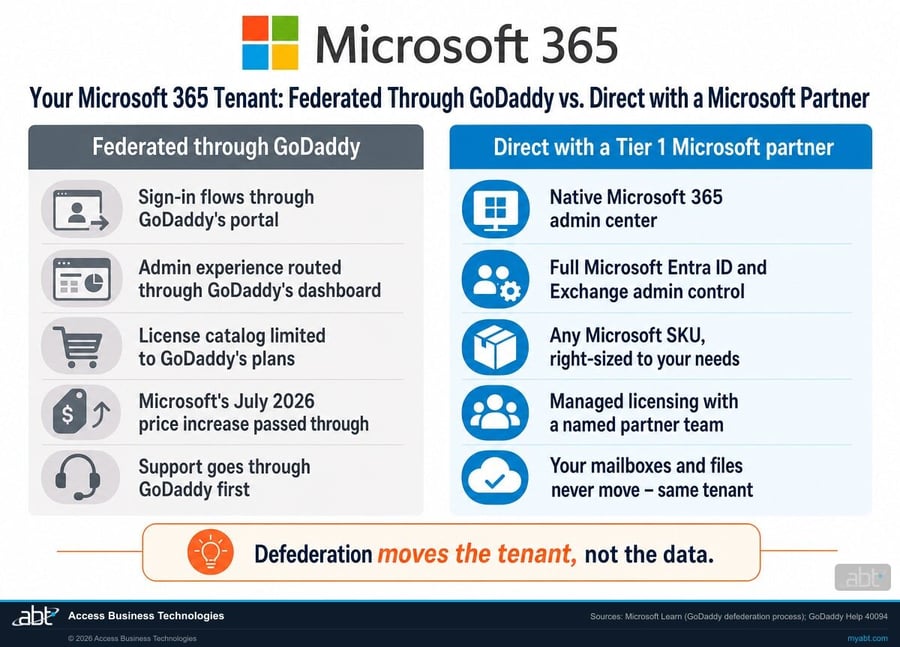
When Microsoft 365 is purchased through GoDaddy, the tenant is federated with GoDaddy's system. In practice that means your sign-in flows through GoDaddy's portal, your admin experience is routed through GoDaddy's dashboard, and your license options are limited to the plans GoDaddy sells. GoDaddy's own move-away guide spells out how deep that layer goes: when you leave, GoDaddy resets every admin password to a temporary one and its sign-in page stops working, because until that moment GoDaddy controlled the front door to your own tenant.
Most teams live with the arrangement until something forces the question. The common triggers we hear: an admin needs a setting the GoDaddy dashboard does not expose, a security project needs full Microsoft Entra ID control, an application needs a license GoDaddy does not sell, or the renewal invoice lands carrying Microsoft's July 2026 price increase, which raised Business Standard by 12 percent and Office 365 E3 by 13 percent at list. GoDaddy did not create that increase, but paying it for a constrained tenant is what sends people searching for the exit.
The exit is real, documented, and safer than most teams expect. Microsoft publishes its own GoDaddy defederation process page, which points to GoDaddy's official move-away guide as the supported path. In GoDaddy's own words, the process "moves your Microsoft tenant away from GoDaddy" while "the domain will remain associated with your tenant." Nothing about your data moves. One warning both companies agree on: unofficial third-party defederation shortcuts can break sign-in to SharePoint and your mailboxes, which is exactly why this is a job for a Microsoft partner following the supported process, not a weekend script.
What changes when GoDaddy is out of the picture?
Same tenant, same data, very different day-to-day. Here is the honest before-and-after, drawn from how federation actually works.
| Federated through GoDaddy | Direct tenant with ABT as your partner | |
|---|---|---|
| Sign-in | Flows through GoDaddy's sign-in page and identity layer | Native Microsoft sign-in with Microsoft Entra ID, ready for MFA and Conditional Access policies your team controls |
| Admin experience | Routed through GoDaddy's dashboard; the admin tile leads to a GoDaddy-branded portal | Full native Microsoft 365 admin center, Exchange admin center, and Microsoft Entra admin center |
| License catalog | Limited to the plans GoDaddy sells, with GoDaddy's own add-ons attached | Any Microsoft SKU, right-sized: Business Premium, E3, E5, Copilot, Defender, whatever the job actually needs |
| Pricing | GoDaddy's retail pricing, with Microsoft's July 2026 list increase passed through at renewal | Partner pricing reviewed yearly against what your people actually use, so you stop paying for idle seats |
| Security posture | Advanced configuration constrained by the reseller layer in front of your tenant | Tenant hardening included in the escape: MFA, Microsoft Entra ID policies, Exchange Online Protection review, admin role cleanup |
| Support | GoDaddy support first, Microsoft second | A named ABT team that manages your Microsoft 365 tenant, with Microsoft escalation behind it |
| Your data during the change | Identical on both sides. Defederation moves the tenant relationship, never the mailboxes, files, or domain. | |
Find out what your escape looks like
Twenty minutes with ABT's licensing team gets you a written escape plan: what defederation involves for your specific tenant, what your licensing should cost afterward, and what we harden on day one. No obligation, and the plan is yours either way.
How do you remove GoDaddy from Microsoft 365?
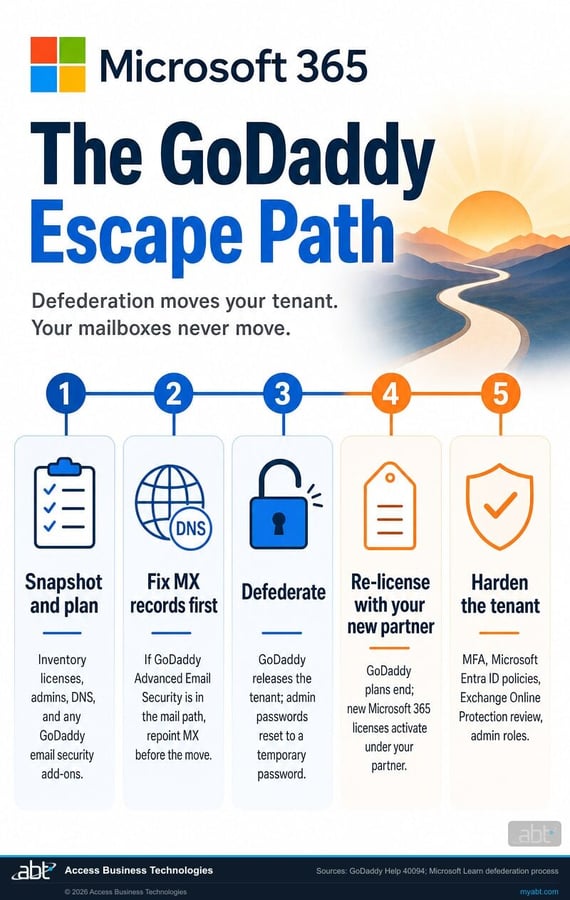
You remove GoDaddy from Microsoft 365 by following the defederation process both companies document: prepare the tenant, have GoDaddy release it, then re-license and secure it under your new partner. Done in the right order, users keep working through the change and the visible difference is a better sign-in page. Done in the wrong order, mail flow and sign-in can break, which is why the sequence below matters more than the speed.
Snapshot and plan
ABT inventories your licenses, admin accounts, DNS records, and any GoDaddy email add-ons in the mail path. This is where surprises get found during planning instead of during the move.
Fix MX records first, if needed
GoDaddy's own guide is explicit: if its Advanced Email Security product sits in your mail path, MX records must be repointed to Microsoft 365 before the move so mail flow never depends on a service that is about to end.
Defederate
GoDaddy releases the tenant. Per its documented process, every admin password resets to a temporary password and the GoDaddy sign-in page stops working. ABT coordinates the timing, catches the temporary credentials, and restores clean admin access immediately.
Re-license with ABT
GoDaddy's plans end at defederation, so new Microsoft 365 licenses activate under ABT as your Cloud Solution Provider, mapped seat by seat to what your team actually uses rather than what the old catalog happened to bundle.
Harden the tenant
With full control restored, ABT runs the hardening pass GoDaddy's layer made awkward: MFA enforcement, Microsoft Entra ID sign-in policies, Exchange Online Protection review, admin role cleanup, and a written summary of what changed.
The GoDaddy escape, free with a 12-month licensing commitment
Defederation is skilled work, and we do it well. We make it free because once your tenant is unlocked and properly licensed, we want to be the partner managing it. That trade is the whole deal, stated plainly.
ABT runs the entire escape. You commit to 12 months of Microsoft 365 licensing through ABT.
- The full defederation, following the process Microsoft and GoDaddy document: planning, MX record fixes where needed, the release itself, and credential recovery the moment GoDaddy resets admin passwords.
- Right-sized licensing from day one. We map every seat to the plan it actually needs before the switch, so the first invoice under ABT reflects your usage, not GoDaddy's bundle.
- Tenant hardening included: MFA enforcement, Microsoft Entra ID sign-in policies, Exchange Online Protection review, and admin role cleanup, with a written before-and-after summary.
- A named team afterward. ABT manages your Microsoft 365 tenant as a Tier 1 Cloud Solution Provider, which means the people who ran your escape are the people who answer when you call.
The commitment covers your Microsoft 365 licensing through ABT for 12 months at partner pricing. No migration fees, no setup fees, no per-mailbox charges, because there is no migration. If your organization runs GoDaddy email add-ons, the escape plan prices any replacement before you commit, so there are no surprises after.
ABT also operates M365 Guardian, its managed security service for credit unions, banks, and mortgage companies.
Regulated? This is our home field.
ABT manages Microsoft 365 tenants for 750+ financial institutions, so if you are a credit union, bank, or mortgage company that started on GoDaddy and outgrew it, the escape comes with the posture your examiners expect: documented controls, vendor due-diligence paperwork on request, and a hardening pass built for regulated environments. Plenty of our GoDaddy escapes are ordinary businesses too. The playbook is the same; the paperwork is just deeper when a regulator will read it.
Related reading

Microsoft 365 License Audit: Are You Overpaying?
How to find the idle seats and oversized plans hiding in your monthly bill, and what a right-sizing pass typically recovers.

What to Ask Your Microsoft Partner About Security
The questions that separate a reseller who bills you from a partner who protects you, useful the day you choose your post-GoDaddy home.
Why a Tier 1 CSP Beats a Generic MSP
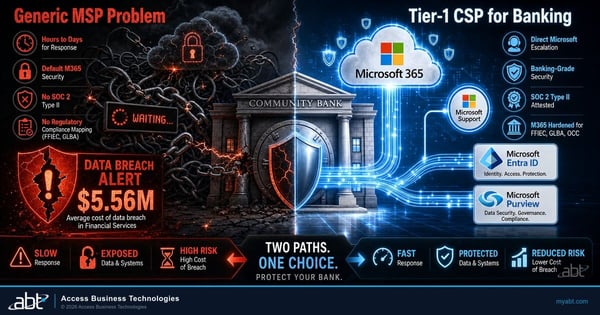
What Tier 1 Cloud Solution Provider status actually means, and why the direct Microsoft relationship changes support and pricing.
GoDaddy defederation, answered
Ready to
Escape GoDaddy?
Tell us about your tenant and ABT's licensing team will build your free escape plan: what defederation involves for you, what your licensing should cost afterward, and what we harden on day one.
