


Microsoft Entra Connect Sync keeps synchronizing past 7 April 2027 on version 2.6.84.0 or later. The server also needs application-based authentication, and on an existing server that is a separate step.
On 29 and 30 September 2026 Microsoft replaced its 30 September 2026 cutoff with a later date and a higher bar: version 2.6.84.0 or later, plus application-based authentication configured, by 7 April 2027. Servers that meet both keep synchronizing. Servers that miss either lose synchronization from that date until they are fixed. This page covers the two checks that tell you where each server stands, which build to install, the step an upgrade leaves for you, and what to do if a server stops.
- Two checks per server, a few minutes each: the version and the authentication type
- The build to install, and the wizard step that switches the server to application-based authentication
- What to do if synchronization stops: accounts, sessions and logs
What changed, and what happens on 7 April 2027?
Microsoft Entra Connect Sync servers need two things by 7 April 2027: version 2.6.84.0 or later, and application-based authentication configured. Servers that meet both keep synchronizing. Servers that miss either lose all synchronization services from that date until they are upgraded and switched. The cause is the retirement of legacy authentication: the username and password of the directory synchronization account give way to an application identity that signs in with a certificate.
Microsoft states the rule in an identical box on its version release history, its upgrade guidance and its prerequisites page:
Mandatory upgrade required: Upgrade Microsoft Entra Connect Sync to version 2.6.84.0 or later and configure application-based authentication by April 7, 2027. Legacy authentication is being retired, and synchronization services will stop working after this date if these requirements aren't met.
If synchronization stops, upgrade to the latest version and configure application-based authentication to restore service.
The date moved on 29 and 30 September 2026
Until 29 September 2026 the same box set 30 September 2026 as the stop date and 2.5.79.0 as the minimum, and earlier versions of this page carried that date. Microsoft's public documentation history shows the edits. On 29 September 2026 the box changed to the new date and the new minimum across the release history, upgrade, prerequisites and security update pages. On 30 September and 1 October the hardening article followed, under a commit titled "Extend deadline from 30/sept/2026 to 7/april/2027". The change appeared on Learn first, so the box on those pages is the place to watch for the next one.
One Microsoft page lags. The Connect Sync security update article names 2.6.84.0 as its minimum and still words its recommendation as "by September 30, 2026", directly above the same 7 April 2027 box. Read the box.
The change runs through a dedicated first-party application. Microsoft's hardening article names it the Microsoft Entra AD Synchronization Service, application ID 6bf85cfa-ac8a-4be5-b5de-425a0d0dc016, visible under Enterprise Applications in the Microsoft Entra admin center, and describes it as critical for the continued operation of synchronization through Entra Connect. Knowing the name makes it easy to recognize in that list.
A missed date is recoverable, and the outage lasts until someone fixes it
What restores a stopped server is a person upgrading it and switching its authentication. Microsoft is specific about the shape of the gap:
If you're unable to upgrade by the deadline, you can restore the impacted functionalities by upgrading to the latest version. However, all synchronization services will fail during the period between April 7, 2027, and when you upgrade.
So the length of an outage is set by how long it takes somebody to notice it and finish the work. A directory sync failure is quiet in a way a mail outage is loud. Nobody calls the help desk to say their manager attribute is stale. The people who would notice first are the ones onboarding a new hire, and they will read an outage as a provisioning delay.
Who is actually exposed
This time the work reaches every Connect Sync server, including the ones automatic upgrade kept current. Earlier builds could switch an existing server to application-based authentication during background sync, with automatic onboarding available from 2.5.76.0. From 2.6.84.0, Microsoft says, new installations configure it during setup, and an existing server gets it when an administrator runs the wizard and chooses Configure application-based authentication to Microsoft Entra ID.
So a tenant can hold one server that is already switched and another that still signs in with the legacy account, on the same build. The only reliable answer is to check each server, which takes one PowerShell command.
How do you tell whether a server is ready for 7 April 2027?
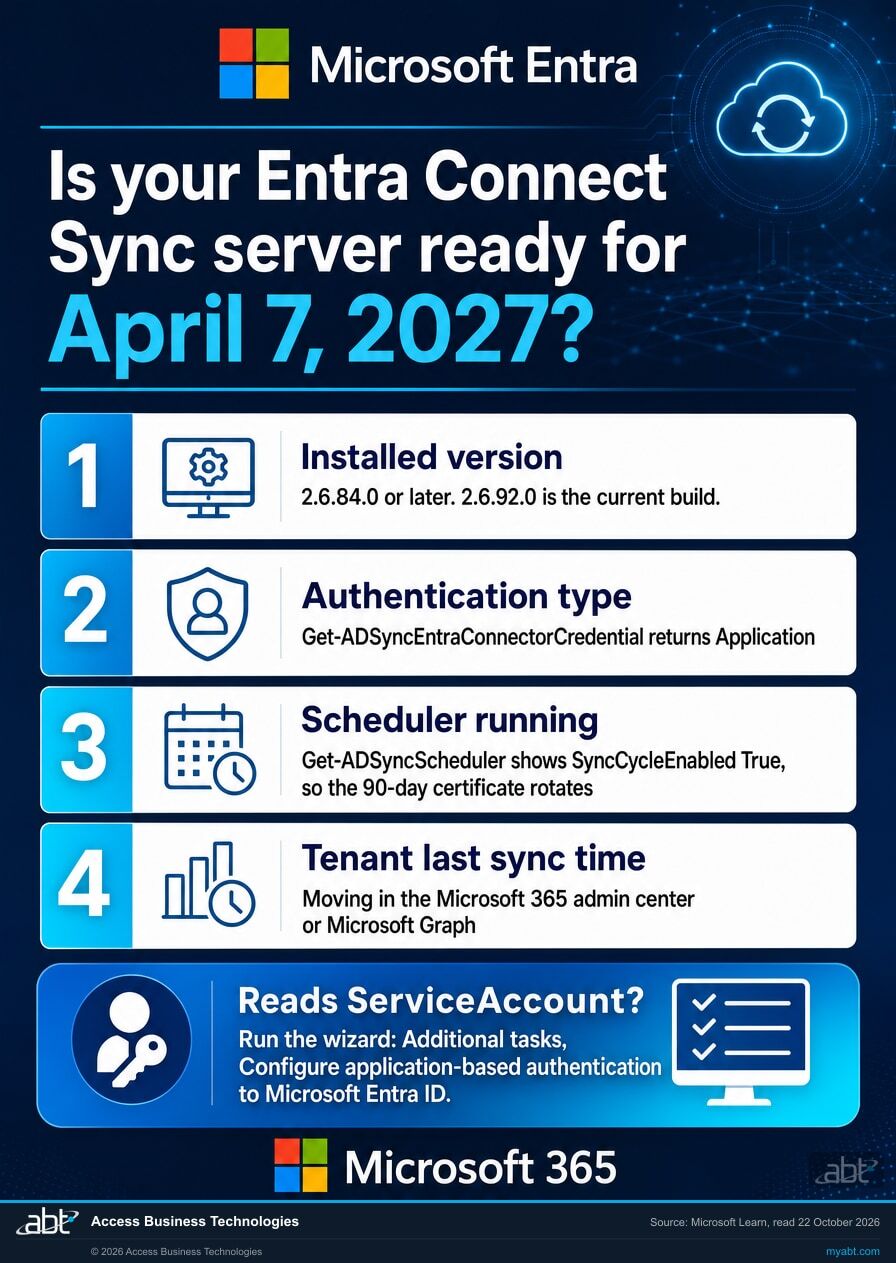
The installed version
Open Microsoft Entra Connect from the Start menu and read the version in the wizard, or find it under Programs and Features alongside every other installed application. The ADSync PowerShell module that ships with the product reports the installed build without opening the wizard, which is the faster route across several servers. 2.6.84.0 or later meets the version half of the requirement.
The authentication type
On the sync server, Get-ADSyncEntraConnectorCredential returns the ConnectorIdentityType in use: ServiceAccount for the legacy username and password, Application for application-based authentication. The wizard shows the same thing under Tasks, View or export current configuration, which lists the application (client) ID when the server uses application-based authentication.
The scheduler, which now rotates the certificate too
Get-ADSyncScheduler reports whether the scheduler is running its import, sync and export steps (SyncCycleEnabled), when the next cycle starts (NextSyncCycleStartTimeInUTC), and whether the server is in staging mode (StagingModeEnabled), which suppresses exports while imports carry on. Under application-based authentication the scheduler has a second job: Microsoft generates certificates with a 90-day lifetime by default and checks for rotation through the scheduler, and if the scheduler is suspended, automatic certificate rotation can't happen.
The tenant's last sync time, and the alerts
A healthy server runs a delta cycle every 30 minutes by default, so a last sync time that keeps moving is the confirmation, and one that has stopped is the first sign of trouble whatever the cause. The DirSync Status tile in the Microsoft 365 admin center is the quick look. Microsoft Graph carries the same fact as the organization property onPremisesLastSyncDateTime, which Microsoft defines as "The time and date at which the tenant was last synced with the on-premises directory." Microsoft's troubleshooting index for Microsoft 365 lists the symptoms of a stop: the DirSync Status tile indicating a problem, admin center alerts or automated emails saying there hasn't been a recent synchronization event, and a warning that sync hasn't registered in more than a day. Microsoft sends its directory synchronization error mail to the tenant's admin email and alternate email, so check those mailboxes too. In Microsoft Entra Connect Health, the overview for each sync service brings together server health, active and recently resolved alerts, synchronization errors and data freshness status.
If a server has stopped: contain first, then fix
An offboarding that falls inside an outage needs the cloud side too: disable the account in Microsoft Entra ID and revoke its sessions, as well as disabling it in Active Directory. The steps are further down this page. Then treat the upgrade and the authentication switch as an emergency change, choose the build, and switch the server.
Check every server, including the one you forgot
An organization that has done a swing migration may still have more than one Connect server, and a staging server can sit a version behind or still use the legacy account. It is harmless while it stays in staging mode. It stops being harmless the moment somebody promotes it during an incident and discovers that the server they just made active misses the requirement.
Microsoft is direct about the related hazard: a decommissioned sync server left on the network or powered up again by mistake tends to overwrite Microsoft Entra data with its old information, and can cause attribute values to revert on every sync cycle, which by default is every 30 minutes. If you find an old server during this check, finish the job and remove it.
If automatic upgrade was supposed to handle it
Automatic upgrade can carry a server to a newer build: Microsoft says it occasionally auto-upgrades customers where supported, from version 2.3.20.0 or higher. The authentication switch on an existing server is the wizard step either way. Get-ADSyncAutoUpgrade reports one of three states: Enabled, Suspended or Disabled. When it reads Suspended, adding -Detail shows the reason. The Application event log records upgrade results under the source Microsoft Entra Connect Upgrade, event IDs 300 to 399.
Microsoft lists the conditions that make a server ineligible, among them TLS below 1.2, an installation that was not an express settings or DirSync upgrade, a database other than SQL Server Express LocalDB, and a LocalDB of 8 GB or more. One detail is easy to trip over: if the Synchronization Service Manager window is open on the server, the upgrade is suspended until it is closed. On 2.5.79.0 and 2.5.190.0 Microsoft also warns against using the Synchronization Service Manager UI at all, because it may cause the Connect wizard and automatic certificate renewal to fail, and says the issue is fixed in 2.6.1.0.
What does your version number mean for 7 April 2027?
| Build | Support | By 7 April 2027 | Verdict |
|---|---|---|---|
| Retired or retiring below 2.5.79.0, and 2.5.79.0 |
Builds below 2.5.79.0 are out of support. 2.5.79.0 reaches end of support on 23 October 2026. Microsoft warns that a retired version might unexpectedly stop working. | Synchronization stops: below 2.6.84.0. Below 2.3.20.0, auto-upgrade cannot reach the server, so the upgrade is done by hand. | Upgrade now |
| Supported, below the minimum 2.5.190.0, 2.6.1.0, 2.6.3.0 |
Supported until 2 February 2027, 10 March 2027 and 7 July 2027 respectively. | Synchronization stops: all three are below 2.6.84.0. Upgrade by whichever comes first, the support end date or 7 April 2027. 2.6.3.0 is the trap, supported for three months past the date it stops. | Upgrade by the earlier date |
| The minimum 2.6.84.0 |
Supported until 16 September 2027. | Meets the version; needs application-based authentication. Installing or upgrading to it with an existing ADSync database might fail with error 0xE0474352. | Pass over as a target |
| Supported, above the minimum 2.6.91.0 |
Supported until 23 September 2027. | Meets the version; needs application-based authentication. Adds Microsoft Graph permissions, so review app-scoped Conditional Access. | Check the date |
| Recalled 2.6.79.0 |
Absent from Microsoft's supported list. | Microsoft recalled it after an issue was identified post-release, and its note tells anyone who installed it to uninstall it and install the latest available version. | Replace now |
| Current build 2.6.92.0 as of 22 October 2026 |
Released 23 September 2026 as a hotfix. Its end-of-support date is set when a newer build ships. | Meets the version; needs application-based authentication on an existing server. Microsoft's note: this release includes security fixes and it recommends upgrading as soon as possible. | Current |
Version numbers change, and Microsoft retires each 2.x build 12 months after a newer one is released. The point of the table is the shape of it: check the release history for the current version on the day you do the work, and treat the number in any article, including this one, as a snapshot of the day it was written.
The offboarding gap a stopped sync opens
What stops when directory synchronization stops?
"All synchronization services will fail" is an accurate sentence and a quiet one. It becomes concrete once you look at what Connect Sync actually carries. Microsoft publishes the full attribute list, and three entries on it decide how much this matters to a regulated institution.
accountEnabled: the one that should worry you
Microsoft's attribute reference lists accountEnabled with the comment "Defines if an account is enabled". It appears in the synchronized set for every workload on that page: Microsoft 365 Apps for enterprise, Exchange Online, SharePoint Online, Teams, Azure Rights Management, Intune, Dynamics, third-party applications, and Windows 10 devices.
That attribute is how disabling an account in on-premises Active Directory becomes disabling an account in Microsoft 365. When synchronization is down, the checkbox gets ticked on-premises, the runbook gets signed off, and the change waits on-premises until synchronization runs again.
Whether the person can still sign in depends on how your tenant authenticates, and Microsoft documents this directly. Its guidance on choosing a hybrid authentication method says:
Currently, password hash synchronization doesn't immediately enforce changes in on-premises account states. In this situation, a user has access to cloud apps until the user account state is synchronized to Microsoft Entra ID. Organizations might want to overcome this limitation by running a new synchronization cycle after administrators do bulk updates to on-premises user account states. An example is disabling accounts.
In normal operation that gap is short. Microsoft's own comparison table puts it at up to a 30-minute delay for disabled accounts under password hash synchronization. The point of this page is what happens to that delay when the synchronization cycle it depends on has stopped: the limitation stops being a delay and starts being a state.
| Your sign-in method | Where authentication happens, per Microsoft | Disabling the AD account while synchronization is stopped |
|---|---|---|
| Password hash synchronization | In the cloud: the password hash is synchronized and Microsoft Entra ID validates the credentials. | Sign-in continues until the cloud account is disabled or synchronization resumes. Microsoft supports the disabled-account state here with "up to 30-minute delay", and that delay is the synchronization cycle. With no cycle running, the disable stays on-premises. This is the case that should worry you. |
| Pass-through authentication | "In the cloud, after a secure password verification exchange with the on-premises authentication agent" | New sign-ins are denied. Microsoft: pass-through authentication "enforces the on-premises account policy at the time of sign-in", and "access is denied when an on-premises user's account state is disabled". |
| Federation, for example AD FS | "On-premises" | New sign-ins are denied. Microsoft lists the same account states as supported, including disabled accounts, locked out, expired, and sign-in hours. |
Two qualifications apply to all three rows. An established session carries on where a new sign-in would be refused: access tokens and refresh tokens keep working until they expire or are revoked, which is what session revocation and Continuous Access Evaluation exist to shorten. And unless someone removes them in the cloud, the license, the group memberships and the mailbox remain in place for all three, because removing them on-premises is a directory change and directory changes are what stopped.
If you do not know which of the three your tenant uses, that is the next thing to establish, and it takes about as long as reading the version number.
Say exactly how much of this is Microsoft's
Most of it. Microsoft documents that all synchronization fails from the stop date until the upgrade, that accountEnabled is one of the attributes synchronization carries, and, in its own words above, that password hash synchronization does not immediately enforce on-premises account state changes, naming disabling accounts as the example. The step we are adding is the short one: with synchronization stopped, the cycle that normally closes that gap within 30 minutes is not running.
Connecting the two is our step. Microsoft's pages on this change describe it as a synchronization outage, and the offboarding reading is ours.
The failure is quiet on the offboarding side. The sync engine logs its own failures on the server, and Connect Health raises alerts when its agents are current. What tends to produce no signal is the offboarding workflow itself: the help desk sees a completed task, and the record shows the account disabled, because on-premises it is. Unless someone checks the cloud side, the person doing the deprovisioning has no reason to suspect that half of it did not land.
Which is why the useful question is whether the person who ticked the box would ever hear about it.
member: access changes made by group stop landing
Group membership travels through the member attribute, and most institutions grant Microsoft 365 access by group precisely because it is the cleaner control. It is also the control that stops: moving somebody out of the group behind a shared mailbox, a SharePoint site or a licensed application changes nothing in the cloud until sync resumes.
The direction of that failure is worth stating plainly. Access you remove stays granted. Access you grant never arrives. The second tends to produce a support ticket quickly. The first tends to produce none.
pwdLastSet: what invalidates a token that is already issued
Microsoft describes pwdLastSet as a mechanical property "used to know when to invalidate already issued tokens", used by password hash synchronization, pass-through authentication and federation alike. So the timestamp that tells Microsoft Entra ID a password changed is itself something synchronization carries. That matters during an incident, when forcing an on-premises password reset is a standard first move against a suspected compromise.
What keeps working
Authentication itself is separate from synchronization. Users already present in Microsoft Entra ID go on working: mail keeps flowing, Teams keeps working, and files stay where they are. Conditional Access policies keep evaluating, and multifactor authentication keeps challenging. The users, mailboxes and files already in the tenant stay in place.
Sign-in is the one to qualify. Whether a given person can still authenticate depends on the method in the table above and on whether their session is already established, so treat "everyone keeps signing in" as true of the tenant as a whole and not of any account whose on-premises state changed during the outage.
What stops is change that starts on-premises. Accounts and groups synchronized from Active Directory stay in the state they were in when sync last ran, while changes made directly in the cloud, such as revoking a user's sessions, still apply. That is why this can run for weeks without anyone raising it, and why the checks above belong in the first days of any stop.
We will read the tenant with you and tell you where you stand
A free security assessment covers this change alongside the rest of your identity posture, starting with the four answers that decide what it costs you: whether synchronization is running, which version each Connect server runs, how each one authenticates, and which sign-in method your tenant uses.
Get a free security assessmentWould your monitoring have told you?
Microsoft Entra Connect Health is the component that watches the sync server and raises alerts when it stops working. It runs as a set of agents, and on its Connect Sync security update page Microsoft asks customers to move those agents to 4.5.2466.0 or higher across the Connect Sync agent, the AD DS agent and the AD FS agent, in a recommendation that page still dates 30 September 2026.
These are the alerts Microsoft lists as impacted for agents below that minimum:
| Component | Minimum version | What is affected below it |
|---|---|---|
| Connect Health, Connect Sync agent | 4.5.2466.0 | A named subset of alerts, including "Password Hash Synchronization has stopped working", "Password Hash Synchronization heartbeat was skipped in the last 120 minutes", "Connection to Microsoft Entra ID failed due to authentication failure", "Export to Microsoft Entra ID was Stopped. Accidental delete threshold was reached", and two service-start failures. |
| Connect Health, AD DS agent | 4.5.2466.0 | All alerts. |
| Connect Health, AD FS agent | 4.5.2466.0 | All alerts. |
Read the first row again. "Password Hash Synchronization has stopped working" is close to a description of the outage this page is about, and on a stale Health agent it is one of the alerts Microsoft lists as impacted. Microsoft adds a second limit on the same product: when Connect runs a non-default configuration, custom attribute filtering for example, the Health agent does not upload the error events related to Microsoft Entra Connect, which limits the evaluation of alerts. Microsoft documents a Settings option on the sync service in Connect Health to enable that monitoring.
What that correlation means
Microsoft has not said the two failures are designed to coincide, and the alert impact is a property of the agent version, separate from the synchronization stop. What makes it worth a section is practical: a Connect server that has drifted is a reason to check its Health agents too, and Microsoft publishes both requirements on the same page.
Which means the sensible order is to check both in the same sitting, and to treat a quiet monitoring dashboard as an unanswered question.
Which Entra Connect Sync version should you install now?
The current build: 2.6.92.0 as of 22 October 2026, a hotfix released 23 September 2026 that fixes an issue in 2.6.91.0 when enabling pass-through authentication through the wizard, and that Microsoft recommends installing as soon as possible because it includes security fixes. It clears the 2.6.84.0 minimum, and Microsoft's release history argues for going straight to it for three reasons.
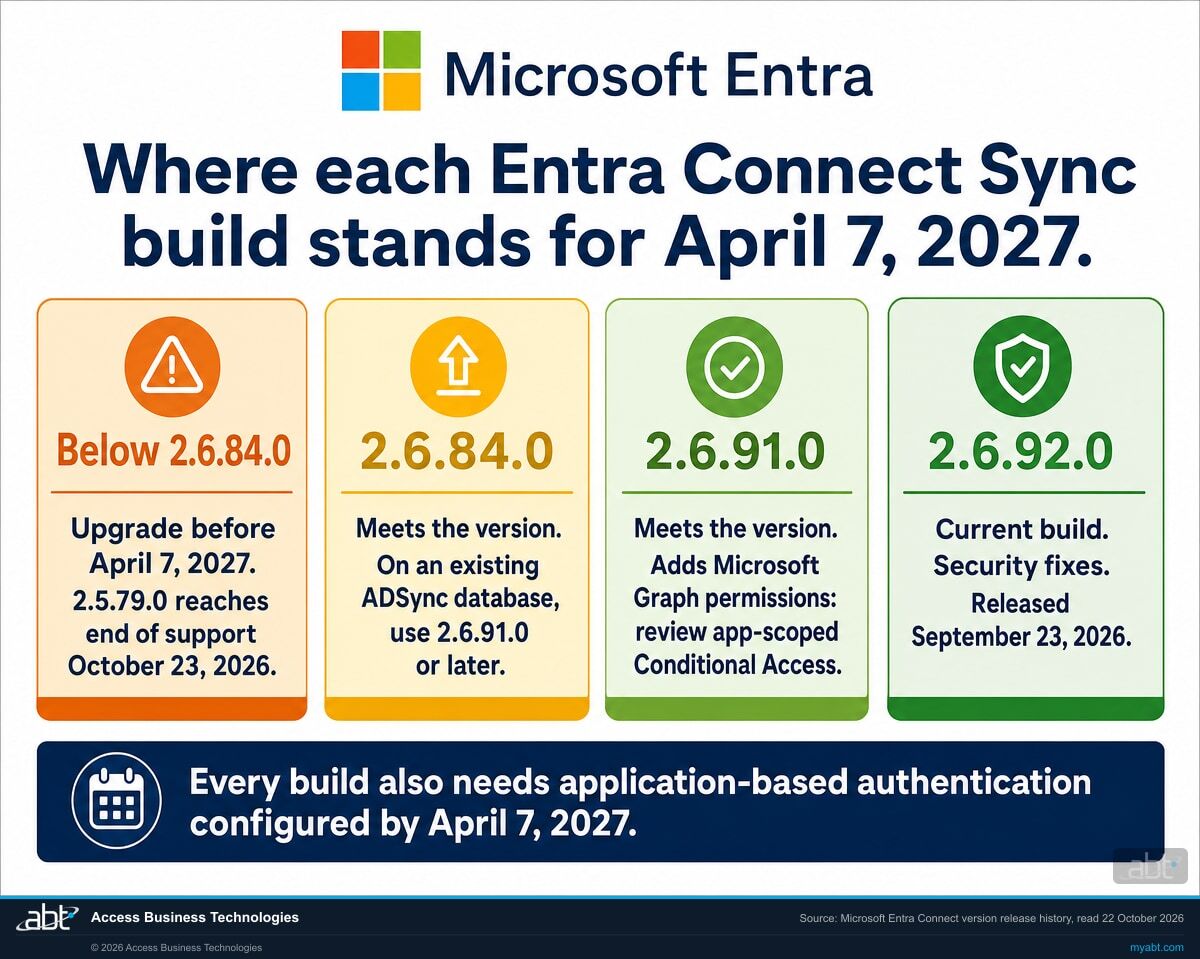
Below 2.6.84.0, the server stops on 7 April 2027 whatever its support date says
Microsoft retires Connect Sync 2.x versions 12 months after a newer version is released, a policy in effect since 15 March 2023, and the April requirement is a separate test. 2.5.79.0 reaches end of support on 23 October 2026, 2.5.190.0 on 2 February 2027 and 2.6.1.0 on 10 March 2027. 2.6.3.0 is the one to watch: Microsoft supports it until 7 July 2027, three months after it stops synchronizing. The notes for 2.5.79.0 and 2.5.190.0 also warn against using the Synchronization Service Manager UI on those builds, because doing so may cause the Connect wizard and automatic certificate renewal to fail. Microsoft says the issue is fixed in 2.6.1.0.
2.6.84.0 has a known issue with existing databases
Microsoft's known issues for 2.6.84.0 say that installing or upgrading to it with an existing ADSync database might fail with error 0xE0474352, and direct anyone installing or upgrading with an existing database to 2.6.91.0 or later. A server being upgraded where it stands already has its database, so we would pass over 2.6.84.0 as a target.
The later builds fix the new authentication itself
2.6.91.0 fixed an application-based authentication certificate rotation issue that could remove the last usable application key during directory replica delays. Version 2.6.79.0 was recalled after an issue was identified post-release, and Microsoft's note tells customers who installed it to uninstall it and install the latest available version, which the note names as 2.6.92.0. Reading the release history on the day you do the work beats searching for a download link.
Where the installer actually is
Microsoft states that the Connect Sync .msi is exclusively available in the Microsoft Entra admin center, under the Manage tab of the Microsoft Entra Connect Get started page. Two prerequisites are named on the same pages and are worth confirming before you run it: .NET Framework 4.7.2 and TLS 1.2.
Two checks before the new build goes on
A modified miiserver.exe.config. Microsoft's release history leads with a known issue for upgrades to 2.5.190.0 and 2.6.1.0: if miiserver.exe.config was previously modified, synchronization may fail after the upgrade with a System.IO.FileLoadException, because the upgrade leaves the modified file alone and a dependency binding goes missing. Microsoft has seen it where the file was edited under earlier guidance for password hash synchronization in FIPS-enabled environments, and documents a manual fix in the release history.
App-scoped Conditional Access. Version 2.6.91.0 adds Microsoft Graph permissions to Microsoft Entra Connect, and Microsoft asks anyone using app-scoped Conditional Access policies to review policies targeting Microsoft.Azure.SyncFabric or Microsoft 365 Reporting Service.
What is application-based authentication, and how do you switch a server to it?
Microsoft describes the new method as an application identity that uses the OAuth 2.0 client credential flow with certificate credentials, in place of a connector account that uses a username and password. Connect offers three ways to manage it. Managed by Microsoft Entra Connect is the default: Connect creates the certificate, keeps it in the CURRENT_USER store and rotates it. With Bring Your Own Certificate, an administrator creates, rotates and deletes the certificate. With Bring Your Own Application, an administrator also manages the application and its permissions. The two bring-your-own options are set up in PowerShell; for most institutions the default is the right answer.
Check which method the server uses
Run Get-ADSyncEntraConnectorCredential on the sync server. Microsoft documents that it returns the ConnectorIdentityType in use, and that the value can be ServiceAccount or Application. ServiceAccount means the server still signs in with the legacy account and needs the switch.
Switch it in the wizard
Open the Microsoft Entra Connect wizard, go to Additional tasks, choose Configure application-based authentication to Microsoft Entra ID and follow the prompts, signing in with a Microsoft Entra account that holds at least the Hybrid Identity Administrator role. Then run the PowerShell check again and confirm it reads Application. From 2.6.84.0 the wizard stops with an error if the setup fails, so a failed switch is visible at the time you make it.
Keep the certificate rotating
By default Connect generates certificates with a 90-day lifetime and rotates them through the sync scheduler, so a suspended scheduler means no automatic rotation. Connect warns once a certificate has consumed 70 percent of its lifetime, around day 63 for a 90-day certificate, with event ID 1011 in the Application event log, and logs event ID 1012 if it has expired. When a configuration is not eligible for automatic rotation, the wizard's Additional tasks entry Rotate application certificate rotates it by hand. Microsoft recommends a Trusted Platform Module on the server to protect the private key.
Retire the old account
Once the server reads Application and synchronization is working as expected, Microsoft strongly recommends removing the legacy Directory Synchronization Account from Microsoft Entra ID with PowerShell, and deprivileging a custom account that has to stay and removing its DSA role. That is the username and password the new method replaces. Before removing an account, confirm that every other Connect server, staging included, already reads Application or signs in with an account of its own.
Review who holds Application Administrator
Microsoft's application identity article points out that the Application Administrator role can add credentials to an application, naming Connect Sync, and use those credentials to impersonate the application's identity, which it describes as a possible elevation of privilege over what the role assignments allow. Once a server signs in as an application, treat that role as privileged for this reason, and review its holders in the same sitting as the switch.
Three ways to upgrade, and when each one is right
| Method | When it fits | What it costs you |
|---|---|---|
| Automatic upgrade | Express installations that are already on 2.3.20.0 or higher and eligible. If this has been working, the version may already be current, and on an existing server the authentication switch is still a wizard step. | No manual intervention for the version. Microsoft's release history marks each build as available for auto upgrade or for download only. |
| In-place upgrade | Microsoft's stated preference for a single server with fewer than roughly 100,000 objects, where the configuration has not drifted far from the defaults. | Microsoft notes that if there is an issue during the in-place upgrade, you can't roll back the new release or configuration. A full import and full synchronization may run afterwards, which can take hours, and the normal delta scheduler is suspended while it does. Microsoft suggests considering a weekend, and notes password synchronization continues during that run. On a server that has already stopped, nothing synchronizes until the upgrade and the authentication switch are both done. |
| Swing migration | Microsoft's recommendation when you are making substantial configuration changes, upgrading the server operating system, or coming from an old build. Its explicit guidance: anyone who has not upgraded in 12 to 18 months should consider this instead. | Needs a second server. In exchange, production sync is not interrupted, the new configuration can be verified before it goes live, and the old server stays available if the new one misbehaves. |
Two things to get right around the change
Custom sync rules. Microsoft warns that if you have modified the out-of-box synchronization rules, an upgrade sets them back to default. Institutions with attribute filtering, custom joins, or anything built for a core banking or loan origination integration should export the custom rules first and confirm them afterwards. This is how an upgrade can succeed technically and still break an integration.
The old server. Finish decommissioning it. Microsoft's warning about rogue sync servers is unusually blunt: one left on the network or powered back on later can overwrite Microsoft Entra data with stale information and revert attribute values on every cycle. Uninstall the product and its components, or delete the virtual machine.
Before 7 April 2027 this is planned work for a normal change window. On a server that has stopped, the upgrade ends a live outage, so it belongs in an emergency change. Once it completes, switch the authentication if the server still reads ServiceAccount, then watch the tenant's last sync time move. If you need a cycle sooner than the schedule, Microsoft's command is Start-ADSyncSyncCycle -PolicyType Delta. From 2.6.84.0, re-enabling the password hash synchronization cloud setting is an administrator's job, so confirm it shows as enabled after the upgrade.
What should you do if synchronization stops, and once it resumes?
While synchronization is down: offboard from both sides
Microsoft's emergency revocation guidance for a hybrid environment covers both directories. In Active Directory, disable the user and reset the password. In Microsoft Entra ID, clear Account enabled on the user's properties and select Revoke sessions on the overview page, or run Update-MgUser -AccountEnabled:$false and Revoke-MgUserSignInSession in PowerShell.
The Microsoft Entra steps are the ones that take effect while synchronization is stopped, and the Active Directory disable keeps the account disabled once it resumes.
Accounts disabled during the outage, and their sessions
Pull the offboarding tickets closed while synchronization was down and confirm each account shows as disabled in Microsoft Entra ID once the cycle completes. Revoke sessions for any account that was only disabled on-premises. Microsoft's emergency revocation guidance does this with Revoke sessions on the user's overview page in the admin center, or with Revoke-MgUserSignInSession in PowerShell, which revokes the user's Microsoft Entra ID refresh tokens. Access tokens already issued stay valid until they expire, by default a random 60 to 90 minutes according to Microsoft's token documentation.
Sign-ins by those accounts, before the logs age out
If any of those accounts signed in after it was disabled on-premises, the sign-in logs are where it shows. Microsoft keeps Microsoft Entra sign-in and audit logs for 30 days on Microsoft Entra ID P1 and P2 and seven days on the free tier, so read them before the first days of the outage age out, or route them to storage to keep them longer. The Microsoft 365 unified audit log is a separate record, with its own retention set in Microsoft Purview Audit.
Group changes and new accounts
Spot-check that group membership removed on-premises during the outage has taken effect in the cloud, starting with the groups behind shared mailboxes and sensitive SharePoint sites, and that accounts created for new hires in that window now exist in Microsoft Entra ID.
A record of the outage itself
After the upgrade to the current build, Synchronization Service Manager keeps seven days of run history by default. If you want a record of when synchronization stopped and when it resumed for your own incident file, keep a dated copy before it rolls off, alongside the version the server ran before and after the upgrade.
Should this be the moment you move to Cloud Sync instead?
Microsoft raises it on both its hardening and security update pages for Connect Sync, in the same words: if you are eligible, it recommends migrating from Microsoft Entra Connect Sync to Microsoft Entra Cloud Sync. Cloud Sync is a lightweight agent with its configuration held in the cloud, so the sync rules stop living on a Windows server you have to patch, upgrade and eventually decommission. Microsoft's stated reasoning is that it is introducing new sync features through Cloud Sync, and that choosing it can avoid future migrations.
From version 2.6.91.0, Connect Sync includes a guided migration workflow to Cloud Sync covering configuration assessment, provisioning agent setup, staged activation and validation. Microsoft lists it as available only in the Azure public cloud. Its Cloud Sync overview sets out the order: review the migration decision guide to see whether Cloud Sync supports your requirements, use the guided tool if your installation meets its requirements, use a documented manual procedure only where one exists, and otherwise continue using Connect Sync.
- Eligibility is conditional. Microsoft gates the recommendation on "if you're eligible" and publishes a supported sync scenarios comparison to answer the question. Some configurations are not supported on Cloud Sync today. Read that comparison against your own environment.
- It is a project of its own. With about five months to 7 April 2027, the Connect Sync upgrade and the authentication switch are the near-term work, and the build you install for them is the one that brings the guided workflow with it.
The practical order: upgrade and switch first, then let the upgrade prompt the Cloud Sync question. They are two decisions on two timelines, and merging them is how a dated requirement turns into a stalled project.
We read the environment and hand back the answer in writing
Where a server is already on a current build and signing in as an application, this ends quickly and in your favor, and that is a good outcome to have on paper. A free security assessment covers this change as part of a wider read of the tenant.
- Whether synchronization is running. The tenant's last successful sync, and when it stopped if it did.
- Every Connect server visible to us. Which is active, which is staging, and the installed version of each, checked against the server list in your own records.
- Each server's authentication type. Whether it signs in with the legacy account or an application identity, and whether its scheduler is running so the certificate rotates.
- Whether auto-upgrade is on, eligible, and actually succeeding. The three are different questions and only the third one matters.
- The Connect Health agents. Version state against the 4.5.2466.0 minimum, so you know where each agent stands before you rely on its alerts.
- Custom sync rules and attribute filtering. What has been changed from the defaults, so the upgrade plan accounts for each customization.
- Your sign-in method. Password hash synchronization, pass-through authentication or federation, which is what decides whether a stopped sync leaves disabled accounts able to sign in.
- A named set of identity checks alongside it. Conditional Access policy coverage, privileged role assignments including Application Administrator, registered authentication methods, and stale or unused accounts.
That list is the scope: a point-in-time technical review of the items named above, as they stand on the day we read them.
What it cannot do from the tenant alone: tell you which change window your board will approve, or which of your integrations depends on a custom rule somebody wrote in 2019. Those need your records, and we tell you exactly which ones to pull. The output is written, and you keep it whether or not you engage us for the work.
ABT manages Microsoft 365 tenants and hosts Azure environments for more than 750 financial institutions, so hybrid identity in a regulated setting is the environment we work in daily. ABT also operates M365 Guardian, its managed security service for credit unions, banks, and mortgage companies.
Where the facts on this page come from
Every Microsoft fact on this page traces to those sources. The offboarding reading, the order of the checks and the recommendations are ABT's. Microsoft's documentation also moves: the stop date itself changed on 29 and 30 September 2026, two builds shipped in September, and the recall note changed the build it names along with them. Check these pages against this one before you act on a date or a version number.
The identity controls a stopped sync touches
Microsoft 365 Employee Offboarding for Financial Institutions
The full runbook, including the steps that run in the cloud and therefore keep working when directory sync is down. Read it alongside this page.
Read the article ›
Conditional Access Exclusions: The List Nobody Reviews
The 2.6.91.0 notes ask you to review app-scoped Conditional Access. This is the wider problem: exclusions that outlive the reason they were added.
Read the article ›
Microsoft 365 Audit Log Retention for Financial Institutions
The Microsoft 365 unified audit log is the other half of reconstructing what changed during an outage, with retention set separately from the Microsoft Entra sign-in logs.
Read the article ›Answered from Microsoft's own documentation
From April 7, 2027, Microsoft says synchronization services stop working on any Connect Sync server that is below version 2.6.84.0 or has not been configured for application-based authentication, because legacy authentication is being retired. Microsoft states this in an identical box on its version release history, its upgrade guidance and its prerequisites page, and adds that if synchronization stops, upgrading to the latest version and configuring application-based authentication restores service. Servers that meet both requirements keep synchronizing, and the tenant's last sync time confirms it.
Yes. On September 29 and 30, 2026 Microsoft edited its Connect Sync pages to replace the September 30, 2026 cutoff and the 2.5.79.0 minimum with a later date and a higher bar: version 2.6.84.0 or later, plus application-based authentication configured, by April 7, 2027. The change shows in the public edit history of Microsoft's documentation. Build 2.5.79.0 still reaches end of support on October 23, 2026. Microsoft's Connect Sync security update page still words its recommendation as by September 30, 2026, directly above the April 7, 2027 box, so read the box.
Two checks on the sync server. The version: 2.6.84.0 or later, read in the Connect wizard, under Programs and Features, or with the ADSync PowerShell module. The authentication type: Get-ADSyncEntraConnectorCredential returns the ConnectorIdentityType in use, ServiceAccount for the legacy account or Application for application-based authentication. Then confirm the scheduler is running with Get-ADSyncScheduler, because the default 90-day certificate rotates through it, and watch the tenant's last sync time move in the Microsoft 365 admin center or in Microsoft Graph as onPremisesLastSyncDateTime. Check every server, staging servers included.
Start with the tenant. The DirSync Status tile in the Microsoft 365 admin center shows the state, Microsoft Graph carries the last sync time as the organization property onPremisesLastSyncDateTime, and Microsoft lists admin center alerts and automated emails about a missing recent synchronization event as symptoms, with its error mail going to the admin and alternate email addresses. The default schedule runs every 30 minutes, so a last sync time that has stopped moving is the first sign. On the server, Get-ADSyncScheduler shows whether the scheduler is enabled and whether the server is in staging mode, which suppresses exports, and Synchronization Service Manager keeps seven days of run history by default. Microsoft warns against using that interface on 2.5.79.0 and 2.5.190.0. From April 7, 2027, a server below 2.6.84.0 or still on the legacy account is the first suspect.
Yes. Microsoft says you can restore the impacted functionality by upgrading to the latest version, and that all synchronization services fail during the period between April 7, 2027 and when you upgrade; its release history adds configuring application-based authentication to restore service. The length of the outage is set by how long it takes somebody to notice it and finish the work. Restoring synchronization resumes the flow of on-premises changes; anything that happened while it was down still needs its own review, starting with the accounts disabled in that window.
It is the sign-in method that replaces the directory synchronization account. Microsoft describes it as an application identity that uses the OAuth 2.0 client credential flow with certificate credentials, in place of a connector account that uses a username and password. The default option, Managed by Microsoft Entra Connect, creates the certificate, stores it in the CURRENT_USER store and rotates it through the sync scheduler, with a 90-day lifetime by default. Bring Your Own Certificate hands the certificate to an administrator, and Bring Your Own Application hands over the application and its permissions as well. Microsoft recommends a Trusted Platform Module on the server to protect the private key, and recommends removing the Directory Synchronization Account from Microsoft Entra ID after switching.
On an existing server, the switch is a separate step. Microsoft's notes for 2.6.84.0 say new installations configure application-based authentication during setup, and an existing server moves from the legacy directory synchronization account when an administrator runs the wizard. To switch an existing server, open the wizard, go to Additional tasks and choose Configure application-based authentication to Microsoft Entra ID, signing in with an account that holds at least the Hybrid Identity Administrator role, then confirm Get-ADSyncEntraConnectorCredential returns Application. From 2.6.84.0 the wizard stops with an error if that setup fails, so a failed switch is visible when it happens.
Open Microsoft Entra Connect on the sync server and read the version in the wizard, or find it under Programs and Features on the same machine. The ADSync PowerShell module that ships with the product reports the installed build without opening the wizard, which is the faster route across several servers. Check every server, because an organization that has done a swing migration may still have a staging server that sits a version behind.
It can carry the version, and the authentication switch stays a wizard step. Microsoft says it occasionally auto-upgrades customers where supported, from version 2.3.20.0 or higher, and lists conditions that make a server ineligible, such as TLS below 1.2, a database other than SQL Server Express LocalDB, or a LocalDB of 8 GB or more; auto-upgrade also suspends itself while the Synchronization Service Manager window is open on the server. As of October 22, 2026 Microsoft lists 2.6.91.0 and 2.6.92.0 as released for download. From 2.6.84.0 an existing server moves to application-based authentication when an administrator runs that wizard step. Get-ADSyncAutoUpgrade reports whether auto-upgrade is enabled, suspended or disabled, the -Detail switch gives the suspension reason, and the Application event log records upgrade results under the source Microsoft Entra Connect Upgrade, event IDs 300 to 399.
The current build. As of October 22, 2026 that is 2.6.92.0, a hotfix released September 23, 2026 that includes security fixes and that Microsoft recommends installing as soon as possible. Every build below 2.6.84.0 stops synchronizing on April 7, 2027 whatever its support date, including 2.6.3.0, which Microsoft supports until July 7, 2027. Installing or upgrading to 2.6.84.0 with an existing ADSync database might fail with error 0xE0474352, and Microsoft directs those installs to 2.6.91.0 or later. 2.6.79.0 was recalled, and Microsoft tells anyone who installed it to uninstall it and install the latest available version, 2.6.92.0. Check the release history on the day you do the work, because the current build changes.
Microsoft states that the Connect Sync .msi is exclusively available in the Microsoft Entra admin center, under the Manage tab of the Microsoft Entra Connect Get started page. Confirm two prerequisites before you run it: .NET Framework 4.7.2 and TLS 1.2. If the server's miiserver.exe.config was ever modified, for example under earlier guidance for password hash synchronization in FIPS-enabled environments, read Microsoft's known issue on that file in the release history first, because synchronization can fail after the upgrade until the file is corrected.
The users, mailboxes and files already in the tenant stay in place. Mail keeps flowing, files stay where they are, Conditional Access keeps evaluating and multifactor authentication keeps challenging. What stops is change that starts on-premises: synchronized accounts and groups stay in the state they were in when synchronization last ran, so new accounts are not created in the cloud, group membership changes made in Active Directory do not take effect, and attribute updates do not arrive. Changes made directly in the cloud, such as revoking sessions, still apply. Sign-in is the one thing to qualify, because for any account whose on-premises state changed during the outage the answer depends on whether the tenant uses password hash synchronization, pass-through authentication or federation. The failure is quiet because the visible services keep working, which is why it can run for weeks without a support ticket.
It depends on how your tenant authenticates, and Microsoft documents this directly. Its hybrid authentication guidance states that password hash synchronization "doesn't immediately enforce changes in on-premises account states" and that "a user has access to cloud apps until the user account state is synchronized to Microsoft Entra ID", giving disabling accounts as its example. Its comparison table supports disabled accounts under password hash synchronization with an up to 30-minute delay, and that delay is the synchronization cycle. So on password hash synchronization, with synchronization stopped, sign-in continues and the disable waits on-premises. On pass-through authentication and on federation such as AD FS the answer differs: Microsoft states that pass-through authentication enforces the on-premises account policy at the time of sign-in and that access is denied when an on-premises account is disabled, and it lists the same account states for federation. In all three cases an established session keeps working until its tokens expire or are revoked, and unless someone acts in the cloud, the license, group memberships and mailbox stay in place, because removing them on-premises is itself a directory change. Connecting a synchronization stop to offboarding is our reading of those Microsoft statements.
Yes, from both sides. Microsoft's emergency revocation guidance for a hybrid environment disables the user and resets the password in Active Directory, then, in Microsoft Entra ID, clears Account enabled and revokes the user's sessions with Revoke sessions in the admin center, or with Update-MgUser and Revoke-MgUserSignInSession in PowerShell. The Microsoft Entra steps are the ones that take effect while synchronization is stopped, and the Active Directory disable keeps the account disabled once synchronization resumes.
Four things. Confirm that accounts disabled on-premises during the outage now show as disabled in Microsoft Entra ID, and revoke sessions for any that were only disabled on-premises, which Microsoft's emergency revocation guidance does with Revoke sessions in the admin center or Revoke-MgUserSignInSession in PowerShell. Read the sign-in logs for those accounts: Microsoft keeps Microsoft Entra sign-in and audit logs for 30 days on Microsoft Entra ID P1 and P2 and seven days on the free tier. Spot-check that group membership changes and new accounts from the outage window arrived. And keep a dated copy of the Synchronization Service Manager run history, which is kept for seven days by default, if you want a record of when synchronization stopped and resumed. On 2.6.84.0 and later, also confirm password hash synchronization shows as enabled, because re-enabling its cloud setting is an administrator's job from that build, and confirm Get-ADSyncEntraConnectorCredential returns Application.
Yes. On its Connect Sync security update page, Microsoft asks customers to move the Connect Sync agent, the AD DS agent and the AD FS agent to 4.5.2466.0 or higher, in a recommendation that page still dates September 30, 2026. Its impact table lists all alerts as impacted for the AD DS and AD FS agents below that version, and a specific subset for the Connect Sync agent that includes "Password Hash Synchronization has stopped working" and "Password Hash Synchronization heartbeat was skipped in the last 120 minutes". Be precise about what that is: the alert impact is a property of the agent version, separate from the synchronization stop, and Microsoft does not describe the two as causally linked. They are two requirements of one hardening program, published on the same page. The practical point is that a server that has drifted is a reason to check its agents too, so check both together and treat a quiet dashboard as an open question.
Microsoft recommends migrating to Cloud Sync if you are eligible, on its hardening and security update pages for Connect Sync, on the reasoning that it is introducing new sync features through Cloud Sync and that choosing it can avoid future migrations. Its Cloud Sync overview sets the order: review the migration decision guide, use the guided migration tool if your installation meets its requirements, use a documented manual procedure only where one exists, and otherwise continue using Connect Sync. From version 2.6.91.0, Connect Sync includes that guided workflow, covering configuration assessment, provisioning agent setup, staged activation and validation, which Microsoft lists as available only in the Azure public cloud. With April 7, 2027 about five months away, upgrade and switch the server first, then decide.
Microsoft documents three. Automatic upgrade suits express installations already on 2.3.20.0 or higher. An in-place upgrade is its stated preference for a single server with fewer than roughly 100,000 objects, with the caveat that Microsoft says you can't roll back the new release or configuration if there is an issue during the upgrade, and that a full import and full synchronization may run afterwards while the delta scheduler is suspended, though password synchronization continues. A swing migration uses a second server and is Microsoft's recommendation for substantial configuration changes or an operating system upgrade, and Microsoft suggests considering it for any server that has not been upgraded in twelve to eighteen months. Whichever you choose, export any custom synchronization rules first, because Microsoft warns that an upgrade resets modified out-of-box rules to default.
Finish the job. Microsoft warns that an old Connect server left on the network, or powered up again later by mistake, tends to overwrite Microsoft Entra data with its old information and can cause attribute values to revert on every sync cycle, which by default runs every thirty minutes. Its instruction is to completely uninstall the product and its components, or to permanently delete the server if it is a virtual machine. A powered-off virtual machine that somebody restores during an unrelated incident is exactly the scenario the warning describes.
Find out where your directory synchronization actually stands.
Tell us roughly how many users you have and whether this is already on a project list. Our engineers read the environment and come back in writing on the scope set out above: whether synchronization is running, the servers, the versions, how each one authenticates, the auto-upgrade state, the Health agents, your sign-in method and your customized sync rules. Deciding the change window and confirming which integrations depend on a custom rule needs your records too, and we name exactly which ones to pull.
ABT manages Microsoft 365 tenants and hosts Azure environments for more than 750 financial institutions. The assessment is a technical review and is not legal or compliance advice.
Get a free security assessment
A read of your environment, and a written answer on where your synchronization stands.
