Skip to the main content.
Home Security SMS MFA Retirement and Affected Users
Microsoft Entra ID · Microsoft 365

Microsoft switched passkeys on for your text-code users on September 1 and started asking them to register. The number that decides February is one nobody has counted.

Microsoft publishes a script that tells you how many of your users are enabled for SMS or voice. It publishes nothing that tells you how many of those users own a device that can hold a passkey. The second number is the one that decides how much February actually costs you, and it is the number a migration plan has to be built on.

  • The count, the three roles that can run it, and why Global Administrator is not one of them
  • The four groups your count splits into, and the one that actually becomes an outage
  • The people the count does not reach, including guests who are in scope before the fix exists
Two counts, not one
COUNT ONE
Microsoft answers this
How many of my users are enabled for SMS or voice?
A published PowerShell script returns it. Microsoft's guidance on reading the output is one sentence long: any non-zero result means you are in scope.
COUNT TWO
Nobody answers this for you
How many of those users can actually complete a passkey registration?
Shared devices, kiosks, guest accounts, and hardware that cannot hold a credential all sit inside count one and outside any plan built from it.
A tenant that measures only the first number arrives at February with a migration plan and no idea how much of it is achievable.
0
opt outs from the February 1, 2027 enforcement, in Microsoft's own words
Microsoft Learn, passkeys by default and retirement of Microsoft-provided SMS and voice
3
separate places that one document repeats there is no opt out from the February 2027 enforcement
Microsoft Learn, passkeys by default and retirement of Microsoft-provided SMS and voice
$0
additional Microsoft licence charge to move a user from SMS or voice onto a passkey
Microsoft Learn, SMS and voice retirement FAQ
Oct 30
the first day you can select a telecom provider to keep SMS, three months before the deadline
Microsoft Learn, passkeys by default and retirement of Microsoft-provided SMS and voice

One date already passed. The other is the one with teeth.

Microsoft Entra ID is making passkeys the default sign-in experience and retiring Microsoft-provided SMS and voice authentication. There are two dates, they do very different things, and confusing them is the most common way an organisation ends up unprepared.

September 1, 2026 has already happened. On that date, users enabled for SMS or voice in the Entra authentication methods policy, or in legacy multifactor authentication settings, were automatically enabled for passkeys. Registration campaign settings moved to a Microsoft managed state targeting passkeys, which brings those users into scope automatically. The next time each of them signs in and completes multifactor authentication, they are nudged to register a passkey.

February 1, 2027 is the enforcement. Microsoft-provided telecom delivery for SMS and voice is retired. After that date, a user whose only available multifactor method is SMS or voice is required to register a passkey during sign-in, and Microsoft describes that prompt as blocking.

DateWhat Microsoft doesWhat a user experiencesForces a migration?
September 1, 2026
already in effect
Auto-enables passkeys for SMS and voice users in the authentication methods policy, and sets the registration campaign to Microsoft managed. A prompt to register a passkey at the next successful multifactor sign-in. No. Microsoft states that by default users have unlimited snoozes of the nudge.
February 1, 2027 Retires Microsoft-provided SMS and voice delivery across Entra ID, self-service password reset included. A user with another method keeps signing in and loses SMS as an option. A user with no other method is stopped at a registration prompt. Yes, and only for the users who have nothing else.

The snooze is why September is quieter than it looks

Microsoft is explicit that "by default, users will have unlimited snoozes of the nudge prompt." So the September change produces help-desk questions and very little completed registration. An organisation that reads a month of nudging as progress can arrive at February with the same population it started with, having watched a campaign run the whole time.

Microsoft states the position on the second date three separate times in one document, twice in identical wording:

"There is no opt out from this February 1 behavior. It will be enforced for all tenants."

Microsoft Learn, passkeys by default and retirement of Microsoft-provided SMS and voice authentication, updated 10 August 2026

Repetition in vendor documentation is usually a response to a question the vendor keeps being asked. Read it as the answer to whether an exception is available, and the answer is no.

What this is not

It is not an account lockout, and describing it that way internally will cost you credibility with the people you need. Microsoft answers the question directly. Asked whether customers will be locked out of their accounts on February 1, 2027, the documented answer is "No." The users affected receive a registration prompt they cannot skip, and completing the registration lets them straight through. The failure is a stopped sign-in and a help-desk queue on a Monday morning, not a locked account. That distinction changes the remediation, so it is worth being right about.

Measure who can clear the bar before you raise it

The temptation with a dated vendor change is to write the plan first and discover the population later. On this particular change that order fails, because the population is the plan.

A vendor count is a denominator

Microsoft's script answers who is enabled for SMS or voice. That is a policy fact. It says nothing about whether those people can complete the replacement, and the replacement is the whole exercise.

Passkeys need somewhere to live

A passkey is stored either in a platform credential manager and synced, or bound to a device such as a security key or an authenticator app. A person whose only work device is a shared terminal cannot leave a credential on that machine, so the passkey has to live on something they carry. That is a purchasing decision with a lead time, rather than something a prompt can resolve.

Most of the gap is a read away

Registered methods per user come straight out of the tenant with read-only rights, and that alone separates the people who already hold a phishing-resistant credential from the people who hold nothing else. The last split, whether a given person has a device that can carry a passkey, needs your records as well as your tenant.

This is not a hypothetical failure mode. It is the ordinary result of planning an authentication change from a policy count. A recommendation to move an organisation off SMS, written before anyone measured registered methods, can turn out to be unachievable for most of the workforce on the day it is scheduled. The correction is cheap and it is always the same: get the capability number before you write the date into a plan.

The licensing position is unusually clean. Microsoft states that migrating users from Microsoft-provided SMS and voice to passkeys carries no additional cost. Read that as a licensing statement rather than a project estimate: security keys for the people who need them, help-desk time, and any device changes are still yours to budget. What it does mean is that the passkey route adds nothing to your Microsoft bill, and the other route does. The next sections separate the population that needs the other route from the population that does not.

The change in under two minutes

If you need to hand this to somebody who would rather watch than read, start here.
Watch · 2 min
Microsoft Is Retiring Texted MFA Codes. Banks Have Until February 2027.
The two dates and what happens to a user who has only a text code. Its closing instruction is the same as this page's: inventory those users now, then run the registration campaign with months to spare rather than weeks. The video also cites the figure behind Microsoft's reasoning, which is worth having the source for: Microsoft reports that when AI is embedded into phishing operations, click-through rates reach 54 percent, against roughly 12 percent for more traditional campaigns. A texted code is the credential most easily handed to whoever asked for it.

Run the count Microsoft gives you, with rights you probably already have

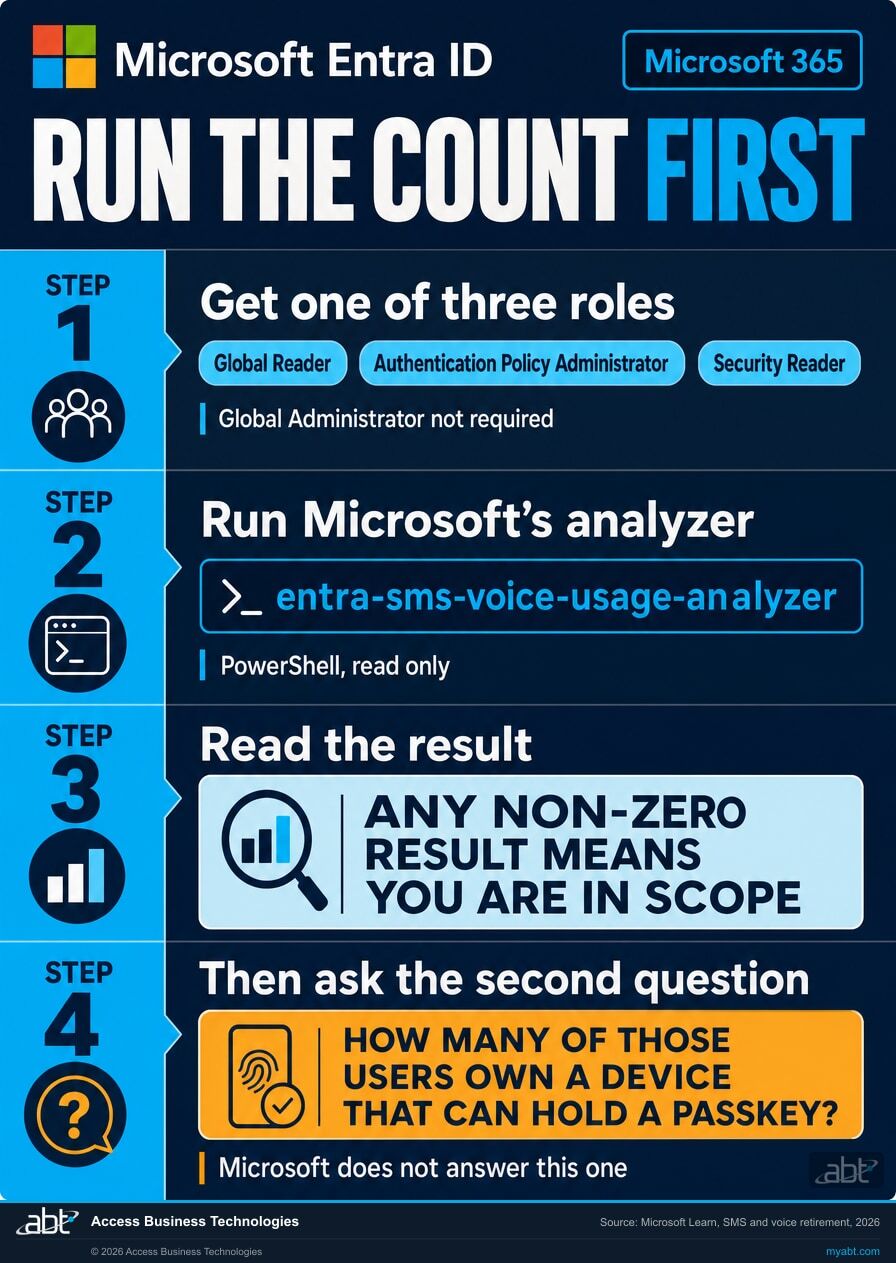
Microsoft publishes a PowerShell script for this and points at it from both the retirement article and the FAQ. It reads the authentication method policy usage for SMS and voice in your tenant. It is a read, and it changes nothing.

1

Get one of three roles, none of which is Global Administrator

Microsoft names them precisely: Global Reader, Authentication Policy Administrator, or Security Reader. Two of those, Global Reader and Security Reader, are read-only, so the measurement can be done without giving anyone the ability to change an authentication policy. Authentication Policy Administrator also works, but it carries write authority over the authentication methods policy, which is more than this task needs. Global Administrator is required for none of it.

Microsoft Learn, passkeys by default and retirement of Microsoft-provided SMS and voice authentication

2

Run Microsoft's analyzer

The script is published by Microsoft at github.com/microsoft/entra-sms-voice-usage-analyzer, described there as a PowerShell script to check Entra ID SMS and voice authentication method policy usage.

Linked from the retirement article and the FAQ
3

Read the output the way Microsoft reads it

The guidance is one sentence and it is unambiguous: "Any non-zero result means you're in scope." There is no threshold below which this is somebody else's problem.

Microsoft Learn, SMS and voice retirement FAQ
4

Then ask the question the script does not answer

Of the users it returned, how many have already registered a phishing-resistant method, how many have a second method of any kind, and how many have a device that can hold a passkey at all. That is count two, and the rest of this page is about it.

Not published by Microsoft. Read from the tenant.
Four step checklist for counting users affected by the Microsoft SMS and voice MFA retirement, showing the three Entra ID roles required, Microsoft's published analyzer script, the any non-zero result guidance, and the follow-up capability question Microsoft does not answer
The published count takes an afternoon and read-only rights. The fourth step is the one that changes what the plan says.

Where the second number actually comes from

The authentication methods activity report in Entra ID carries registration detail per user, which is what turns a policy count into a capability count. Read registered methods per user, and separate phishing-resistant registrations from the rest. Being enabled for a method and having registered one are different facts, and only the second one survives February.

Find out who in your tenant still has nothing but a text code.

Our engineers read your tenant and come back with who is enabled for SMS or voice, who has already registered something phishing-resistant, and who holds nothing but a text code. That last list is the one that needs a device decision, and we go through it with you.

Get a free security assessment

The four groups your count splits into, and the two that matter

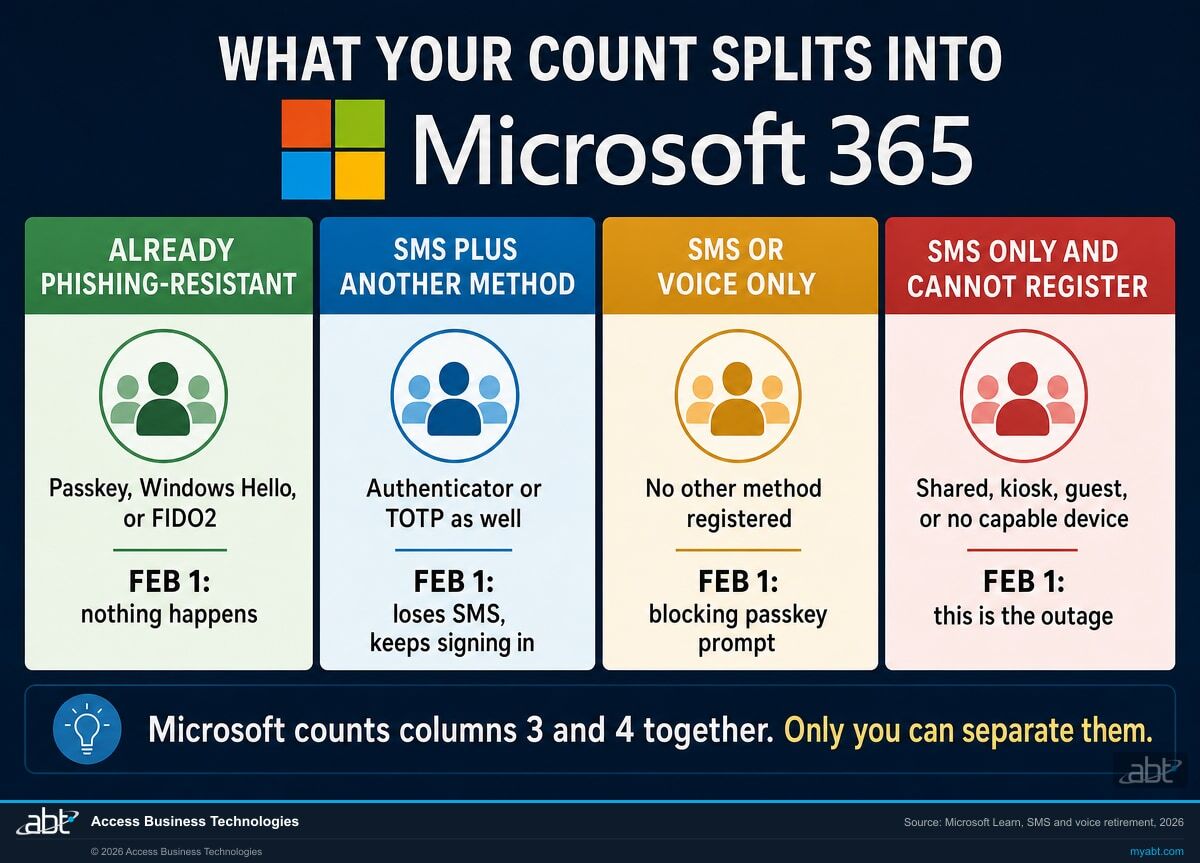
Microsoft's enforcement is narrower than most summaries of it. The blocking prompt fires on users whose only available multifactor method is SMS or voice. Everybody else keeps signing in.
GroupWhat they have registered todayWhat happens on February 1, 2027Work required
Already phishing-resistant A passkey, Windows Hello for Business, or a FIDO2 security key. Nothing. Microsoft states these users continue with the method they have. None. Confirm they are counted correctly and move on.
SMS or voice plus another method An authenticator app or another non-telecom method alongside the text code. They lose SMS and voice as an option. They are not stopped, because SMS is not their only method. Low. A communication, not a migration. Tell them the text option is going.
SMS or voice only, and able to register A text or call code and nothing else, on a device that can hold a passkey. A blocking registration prompt at sign-in. They register and continue. Moderate. Move them deliberately in the autumn rather than at a prompt in February.
SMS or voice only, and unable to register A text or call code, and no personal device or security key on which a passkey could live. The same blocking prompt, with nothing to hand that can satisfy it. High. Usually solved by issuing a security key or a managed phone, which is a purchase and a lead time rather than a campaign. This is the group that becomes an outage if nobody acts, and the one no published count separates out.
Four column comparison of the user groups affected by the Microsoft SMS and voice MFA retirement, from already phishing-resistant through to SMS only users who cannot register a passkey
Groups three and four look identical in a policy count and behave completely differently on the day. Separating them is the work.

Two practical consequences fall out of this table, and both of them save money.

Group two is larger than people expect and needs almost nothing. Any user who was pushed onto an authenticator app at some point in the last few years, and kept a phone number registered as a fallback, sits here. They are not a migration project. They are an email.

Group four is smaller than people fear and is the entire risk. It is usually a countable set of named situations rather than a percentage: the branch terminal, the shared operations mailbox, the contractor with no managed device, the account that exists so a nightly job can sign in. Each one needs a decision rather than a campaign, and there are months in which to make them.

Five populations a straight count tends to walk past

Three of these are documented by Microsoft, and they are easy to miss because they sit in the FAQ rather than the timeline. The other two are ours, drawn from what tends to be true inside a working estate, and each one says underneath it where it comes from.

1

Guest and business-to-business users are in scope before the fix is generally available

Microsoft confirms these users are included in the scope of the retirement. It also says passkey support for business-to-business users and internal guest users is planned to be available by the end of calendar year 2026. An external auditor, a vendor engineer, or a partner who signs in with a text code is therefore in scope of a February deadline whose remedy arrives, on plan, weeks before it. That sequence is worth watching rather than assuming.

Microsoft Learn, SMS and voice retirement FAQ
2

Self-service password reset is included

Microsoft states the retirement applies across Entra ID, self-service password reset included. A tenant that uses a text code as a reset factor is affected in a second place, and reset flows are rarely inventoried alongside sign-in methods. Microsoft also notes it is planning support for password change by users who sign in without a password, with details still to come.

Microsoft Learn, SMS and voice retirement FAQ
3

Emergency access accounts

The account you keep for the day everything else fails is the worst possible one to discover a February surprise on. Read its registered methods explicitly rather than assuming it sits outside the change, and confirm it holds something phishing-resistant. An emergency account that depends on a text code is a control that stops working on a schedule.

Verify from the tenant, not from the runbook
4

Accounts nobody thinks of as people

Shared mailboxes with sign-in enabled, kiosk logins, and accounts created so an overnight process can authenticate all appear in a user count and none of them can respond to a registration prompt. They belong in group four by default until somebody proves otherwise.

Local knowledge, which is why a tenant read alone is not enough
5

Anything not in the public cloud, and two identity products that are excluded

Microsoft scopes this timeline to public cloud environments only, with other environments following on a later schedule and advance communication promised. Azure Active Directory B2C is out of scope entirely. For Microsoft Entra External ID the change comes next year under a separate announcement. If you run a customer-facing identity estate, its date is not this date.

Microsoft Learn, SMS and voice retirement FAQ

One thing that is not affected

External multifactor methods are not in scope. Microsoft states that only SMS and voice authentication method policies and legacy multifactor policies are retired, and that users of external methods are unaffected unless they are also enabled for SMS or voice. If you already route multifactor through a third party, check whether the telecom fallback is still switched on and then stop worrying about the rest.

There is an opt out. It buys you September, not February.

A temporary opt out exists for the window between September 1, 2026 and February 1, 2027. Microsoft describes its purpose narrowly: it lets an organisation delay passkey enablement and the registration campaign while it completes transition activities, such as configuring a telecom provider or moving users to another method. It is a pause on the nudging, and it is not a pause on the deadline.

It is set through Microsoft Graph and requires the Policy.ReadWrite.AuthenticationMethod permission:

# Excludes the tenant from automatic passkey enablement and the # registration campaign, for the opt-out period only. PATCH https://graph.microsoft.com/beta/policies/authenticationmethodspolicy Content-Type: application/json { "optOutSettings": { "passkeyDynamicMigration": true } }

Note the endpoint is on the beta channel. Treat that as a reason to verify the value took effect by reading the policy back rather than trusting the response, which is good practice on any authentication policy write and particularly on a preview surface.

What it does not do

Microsoft is direct about the limit. "Beginning February 1, 2027, standard passkey migration and enforcement timelines apply regardless of this setting." A tenant that still has users on Microsoft-managed SMS or voice on that date, and has not configured a telecom provider, sees those users lose SMS and voice as a way to satisfy multifactor authentication.

Used well, the opt out is a scheduling tool: it stops a nudge campaign firing into a busy quarter while you do the real work on your own timetable. Used as a decision, it converts five months of runway into a February emergency, because the population it hides is exactly the population that gets stopped.

If you genuinely need a telecom channel after February

SMS and voice do not disappear from Entra ID. What ends is Microsoft providing the delivery. Organisations that need a telecom channel can contract with a provider through the Microsoft Security Store and keep using it. Microsoft frames this as being for a genuine business, regulatory, or technical need rather than as a general alternative, and asks you to document which regulation or scenario applies.

Three dates govern it, and none of them has arrived yet:

DateWhat becomes possible
September 18, 2026Microsoft publishes the telecom provider options and terms through the Security Store, so you can evaluate which meets your regional and compliance requirements.
October 30, 2026Selection and configuration open. This is the first day a tenant can actually stand one up.
February 1, 2027Microsoft-provided delivery ends. A configured provider carries on; an unconfigured tenant does not.

It costs money, and Microsoft says so plainly. Pricing varies by provider and region, is typically charged per message, and depends on volume and geographic distribution. Set against that, Microsoft charges nothing extra for the passkey route. So the honest way to size this is to work out how few users genuinely require a telecom channel, price that group, and move everybody else.

As of this writing the provider roster is not yet published, so nobody can tell you what it will cost. What you can do before September 18 is decide which users would qualify, and document the regulation or operational scenario behind each one. That list starts from group four in the table above without being the same list. Being unable to hold a passkey today is a device problem, and issuing a security key or a managed phone solves it once. The telecom route is for the narrower set where a rule or a workflow genuinely requires a message sent to a phone, and that is a smaller group again.

A caution on the regulatory argument

A claim that a regulator requires out-of-band SMS is worth checking against the actual text before it becomes the basis for a recurring cost. Confirm the requirement, in writing, against the primary guidance that applies to your institution, then price the exception. Requirements of this kind are often written in terms of out-of-band verification rather than SMS specifically, and where that turns out to be the case a passkey may satisfy the same requirement with no additional Microsoft charge. Your compliance function owns that reading, and this page is not a substitute for it.

The background this page assumes

Microsoft Entra passkeys default and the retirement of SMS and voice multifactor authentication for financial institutions
Identity

Microsoft Entra Passkeys Default and SMS and Voice MFA Retirement

The announcement itself, in full: what Microsoft said, why it is doing this, the milestone-by-milestone timeline, and what a migration plan looks like. Start there if you want the change explained rather than measured.

Read the article
Phishing-resistant multifactor authentication for banks, credit unions, and mortgage companies under FFIEC, NCUA, and OCC expectations
Compliance

Phishing-Resistant MFA and Why Examiners Now Ask About It

The supervisory side of the same move. Useful if you need to make the case internally that this is a direction of travel rather than one vendor's decision, or if somebody has told you a text code is a regulatory requirement.

Read the article
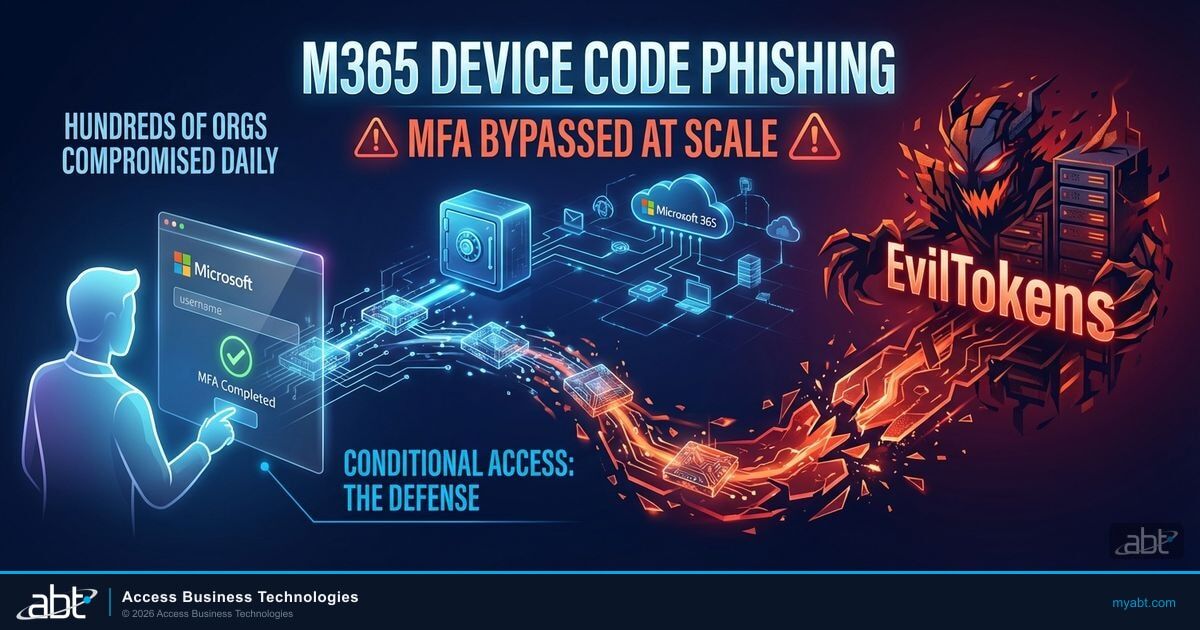
Microsoft 365 device code phishing and multifactor authentication bypass at scale
Security

Device Code Phishing: MFA Is Being Bypassed at Scale

Why a code that a person can read out, type in, or be talked into sharing is a weaker second factor than one that cannot leave the device. The mechanism behind Microsoft's stated reason for ending telecom delivery.

Read the article

Where ABT fits

Access Business Technologies is a Tier-1 Microsoft Cloud Solution Provider. We have worked with Microsoft technology since 1999, and today we manage Microsoft 365 tenants and host Azure environments for more than 750 financial institutions. Reading a tenant to work out who is exposed to a control before that control is enforced is ordinary work here rather than a special engagement.

The free security assessment is a read of your tenant, not a sales call with a report attached. For this change, our engineers report how many of your users are enabled for SMS or voice, how many have already registered a phishing-resistant method, how many hold a second method of any kind, and which accounts hold nothing but a telecom method. You also get the state of your emergency access accounts and whether self-service password reset depends on a telecom factor.

That last list is a shortlist, not a verdict. Entra ID records which methods an account has registered. It does not record whether the person behind the account has a phone or a workstation that can carry a passkey, which shared login belongs to which counter, or which contractor is leaving in November anyway. We hand you the shortlist and the questions to ask against it, and the answers come from your records and your people. Saying otherwise would be claiming a tenant read can see something it cannot. There is no cost and no obligation.

ABT also operates M365 Guardian, its managed security service for credit unions, banks, and mortgage companies.

If a February date is already inside a board reporting cycle and you need the numbers sooner than that, say so when you get in touch and we will treat it that way.

Where the facts on this page come from

Every date, quotation, role name, permission, and documented product behaviour on this page was read from the four Microsoft sources below on 2 September 2026, from the published document source rather than a summary of it. The way this page groups users into four populations, and its judgements about which of those groups tend to be larger or smaller in practice, are ABT's reading rather than Microsoft's. So are our statements about the company, such as how many institutions we work with.
Microsoft Learn, passkeys by default and retirement of Microsoft-provided SMS and voice authentication

Updated 10 August 2026. The source for both dates, the retirement timeline table, the September auto-enablement of passkeys and the Microsoft managed registration campaign, the unlimited snooze default, the blocking registration prompt, the three statements that there is no opt out, the three roles required to run the count, the link to Microsoft's analyzer script, the temporary opt-out request body and its stated limit, and the telecom provider dates of 18 September and 30 October 2026. learn.microsoft.com
Microsoft Learn, frequently asked questions about SMS and voice retirement
Updated 30 July 2026. The source for the explicit answer that users are not locked out, the any non-zero result guidance, the statement that telecom providers carry a cost while passkey migration carries none, the inclusion of self-service password reset, the public cloud scoping, the exclusion of Azure Active Directory B2C and the separate timeline for Microsoft Entra External ID, the position of external multifactor methods, and the planned end of calendar year 2026 availability of passkey support for business-to-business and internal guest users. learn.microsoft.com
Microsoft Security Blog, threat actor abuse of AI accelerates from tool to cyberattack surface
Published 2 April 2026, read 2 September 2026. The source for the click-through figures quoted in the video section: AI-embedded phishing operations reaching 54 percent against roughly 12 percent for more traditional campaigns. microsoft.com
Microsoft, Entra SMS and voice usage analyzer
Confirmed present on 2 September 2026. Microsoft's published PowerShell script for checking Entra ID SMS and voice authentication method policy usage, referenced from both documents above. github.com/microsoft

Other Microsoft dates landing on the same estate

Three changes reaching the same tenants inside roughly six months. Each one breaks something quietly if nobody measures first, which is the only thing they have in common and the reason they are worth reading together.

Answered from Microsoft's own documentation

What actually changed on September 1, 2026?

Passkeys became the default authentication experience in Microsoft Entra ID, and users enabled for SMS or voice were automatically enabled for passkeys. Microsoft states that users enabled for SMS or voice in the Entra authentication methods policy, or in legacy multifactor settings, are auto-enabled for passkeys in that policy and placed into a passkey profile allowing all types of passkeys. Registration campaign settings move to a Microsoft managed state targeting passkeys, which brings those users into scope automatically. The practical effect for a user is a prompt to register a passkey the next time they sign in and complete multifactor authentication. Nothing stops working on this date. Microsoft also notes that by default users have unlimited snoozes of that prompt, so the change generates prompts rather than completed registrations.

Will our users be locked out of their accounts on February 1, 2027?

No, and Microsoft answers this question in those terms. What happens is that users who still rely on SMS or voice receive a blocking registration prompt to register a passkey, which they can no longer skip, and they must complete the registration before they can continue signing in. That is a stopped sign-in rather than a locked account, and the distinction matters because the remediation is different. A user who can register a passkey on the device in front of them is delayed by a minute. A user on a shared terminal or a device that cannot hold a credential is stopped until somebody solves that, which is why the useful question is not how many users are affected but how many of them can complete the registration where they are.

How do we find out which of our users are affected?

Microsoft publishes a PowerShell script for exactly this, at github.com/microsoft/entra-sms-voice-usage-analyzer, and points at it from both the retirement article and the FAQ. It checks Entra ID SMS and voice authentication method policy usage. Microsoft's guidance on interpreting the result is a single sentence: any non-zero result means you are in scope. That gives you the first of two numbers. The second, which Microsoft does not publish a tool for, is how many of those users have already registered a phishing-resistant method, how many hold any second method, and how many have a device capable of holding a passkey at all. The authentication methods activity report in Entra ID carries per-user registration detail, which is where that second number comes from.

Do we need Global Administrator rights to run the count?

No. Microsoft names three roles and Global Administrator is not among them: Global Reader, Authentication Policy Administrator, or Security Reader. Two of those three are read-only. Global Reader and Security Reader can run the measurement without being able to change anything, which is the combination you want for this task, and it means the work can be delegated to whoever has time this week rather than to whoever holds the most powerful role in the tenant. Authentication Policy Administrator also satisfies the requirement, but it is not a read-only role: it carries write authority over the authentication methods policy. Setting the temporary opt out is a separate matter again and requires a write permission, specifically Policy.ReadWrite.AuthenticationMethod through Microsoft Graph.

Can we opt out of the February 1, 2027 enforcement?

No. Microsoft states this three separate times in the retirement document, twice in identical wording: there is no opt out from the February 1 behaviour, and it will be enforced for all tenants. Microsoft scopes this timeline to public cloud environments, with other cloud environments following on a later schedule, so read "all tenants" within that scope. A temporary opt out does exist, but it applies only to the window between September 1, 2026 and February 1, 2027, and it suspends the automatic passkey enablement and the registration campaign rather than the retirement. Microsoft is explicit that beginning February 1, 2027, standard passkey migration and enforcement timelines apply regardless of that setting. The only route to continuing with SMS or voice past that date is to configure a customer-managed telecom provider through the Microsoft Security Store.

What does the temporary opt out actually do?

It excludes your tenant from the automatic passkey enablement and the registration campaign rollout during the opt-out period, so users stop being nudged. It is set through Microsoft Graph by patching the authentication methods policy and setting passkeyDynamicMigration to true inside optOutSettings, which requires the Policy.ReadWrite.AuthenticationMethod permission. Microsoft describes its intended use narrowly, as a way to delay the nudging while you complete transition activities such as configuring a telecom provider or moving users onto another method. The endpoint published for it is on the beta channel, so read the policy back after setting it rather than trusting the response. Used as a scheduling tool it is sensible. Used as a decision, it removes the visible pressure without changing the deadline.

A user has the Authenticator app and a phone number. Do they get the blocking prompt?

No. Microsoft scopes the blocking prompt to users whose only available multifactor method is SMS or voice. A user who also has an authenticator app keeps signing in normally and simply loses the text or call option. This is the single most useful distinction in the whole change, because it usually moves a large share of the affected list from a migration project into a communication. It also means the raw count of users enabled for SMS or voice overstates the problem, sometimes substantially, and that a plan built on that raw count will be sized wrong. Separate the users who have a second method from the users who do not before you decide how much work this is.

What happens to guest and external users?

Microsoft confirms that business-to-business users and internal guest users are included in the scope of the retirement. It also states that passkey support for those users is planned to be available by the end of calendar year 2026. So this population is in scope of a February deadline while the remedy for it is, on plan, arriving shortly beforehand. If external auditors, vendor engineers, or partner staff sign in to your tenant with a text code, that is worth tracking rather than assuming. Note that Microsoft Entra External ID and Azure Active Directory B2C are different products and are handled separately: B2C is out of scope entirely, and External ID follows next year under its own announcement.

Does this affect self-service password reset?

Yes. Microsoft states that the retirement of native SMS and voice applies across Entra ID, and names self-service password reset specifically. If your reset flow accepts a text message or a phone call as a verification factor, that is a second place this change reaches, and it tends to be inventoried separately from sign-in methods or not at all. Organisations that keep a telecom channel through a provider in the Security Store can continue to use it for reset as well. Microsoft has also said it is planning to introduce support for password change by users who authenticate without a password, with further detail still to come, which is worth watching if your users sign in with passkeys but still need to change a password occasionally.

Can we keep using SMS after February 1, 2027, and what does it cost?

Yes, by contracting with a telecom provider through the Microsoft Security Store rather than relying on Microsoft to deliver the messages. Microsoft frames this as an option for organisations with a genuine business, regulatory, or technical need, and asks you to document which regulation or scenario applies. Options and terms publish on September 18, 2026, and selection and configuration open on October 30, 2026, so nothing can be stood up before then. On cost, Microsoft says pricing varies by provider and region, is typically charged per message, and depends on volume and geographic distribution, while migrating a user to a passkey carries no additional cost. The sensible sequence is to identify the smallest group that genuinely requires a telecom channel, document why, and move everyone else.

Find out who in your tenant still has nothing but a text code.

Tell us roughly how many users you have and whether anything about February is already on a board agenda. Our engineers read the tenant and come back with who is enabled for SMS or voice, who already holds a phishing-resistant method, the shortlist of accounts holding nothing but a text code, the state of your emergency access accounts, and whether self-service password reset depends on a telecom factor. Turning that shortlist into a device plan needs your records too, and we tell you exactly what to check.

SOC 1 Type 2 · Security Controls
SOC 2 Type 1
Tier-1 CSP

ABT manages Microsoft 365 tenants and hosts Azure environments for more than 750 financial institutions. The assessment is a technical review and is not legal or compliance advice.

Get a free security assessment

A read of your tenant, and the shortlist of accounts that need a decision before February.

Encrypted. Private.