


Microsoft scheduled its freeze on Conditional Access custom controls for September 2026. Keep every working custom control in place until its replacement is working.
If your institution runs Duo, RSA or another third-party MFA through custom controls, this applies to you. Microsoft set September 2026 as the start of the freeze: no new custom controls and no edits to existing ones. The controls you already have keep working until full retirement in 2027. Microsoft documents one way to change a custom control, delete it and create it again, and the freeze closes the second half of that procedure. None of Microsoft's published sources says when the block reaches each tenant, so plan as though it is in place.
- What the freeze closes, and what keeps working until 2027
- Why a working custom control should stay in place
- The inventory, the migration, and the date Microsoft asks you to finish by
What does the custom controls freeze change, and what still works?
Custom controls are how a Microsoft 365 tenant sends a user out to a non-Microsoft multifactor provider in the middle of a Conditional Access evaluation. The browser redirects to the provider, the provider does its check, and the user comes back. If your institution bought Duo, RSA or a comparable product and asked for it to be enforced through Conditional Access, this is very likely the mechanism that was used, because until External MFA it was the route Microsoft provided for third-party MFA inside Conditional Access.
Microsoft is retiring it. The notice appears in an identical box on two Microsoft Learn pages and reads in full:
Custom controls are deprecated. Adding new custom controls and editing existing custom controls will not be allowed starting September 2026. Full retirement is scheduled for early 2027. Start planning your migration now.
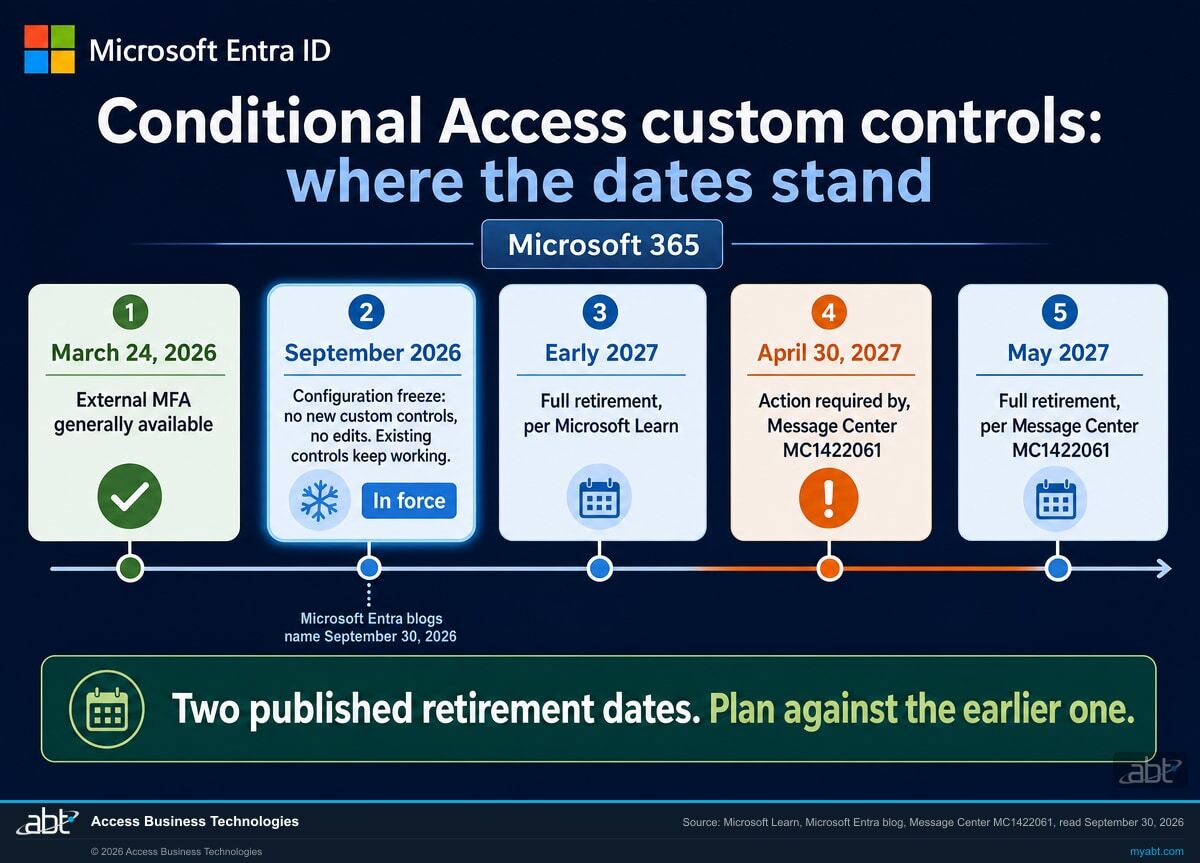
The second and third sentences describe two different events. September 2026 is when the configuration freezes, and Microsoft's schedule puts that freeze in force now. Full retirement, which Microsoft describes as the end of support for custom controls, follows in 2027. Between the two, this is where a tenant with custom controls stands:
- Closed from September 2026: adding a new custom control, and editing an existing one.
- Still working until retirement: every custom control already in place. Message Center MC1422061 says existing custom controls "will continue to function until retirement in May 2027", and Microsoft Learn dates full retirement to early 2027.
- The same before and after the freeze: Microsoft's statement that custom controls do not satisfy its MFA requirement, covered further down this page.
How the freeze shows up
Users see no change, because existing custom controls keep working. The freeze surfaces when an administrator tries to add or change a custom control.
If your tenant still offers to add or edit a custom control, plan as though the block is in place. Learn and Message Center give September 2026, two Microsoft Entra blog posts name September 30, 2026, and none of the Microsoft sources on this page says when the block reached each tenant. Microsoft's documentation says adding and editing are not allowed from September 2026, both retirement dates stand, and any control added or changed now would need migrating before retirement in any case.
The short version
- Run the inventory in the next section. An empty result, confirmed a second way and recorded with its date, closes the matter.
- Keep every working custom control in place. The only documented way to edit one is to delete it and create it again, and creating is closed. The policies that use it are a separate object, covered below.
- Set the finish date by the earliest Microsoft date. Learn's early 2027 can mean January, so ABT's planning target is December 31, 2026. Microsoft's own action-required date is April 30, 2027.
- Start the External MFA pilot with a test group, following Microsoft's migration guide.
- Check how your MFA policies are written. External MFA satisfies the plain Require multifactor authentication grant, and Microsoft says authentication strength grants are not satisfied by it.
Does any of this apply to you? Start with the inventory.
Microsoft publishes the check itself. A custom control shows up on a Conditional Access policy as a value in the CustomAuthenticationFactors grant control, and one Microsoft Graph PowerShell command lists every policy that has one, along with the custom control each policy references:
Connect-MgGraph -Scopes "Policy.Read.All"

Get-MgIdentityConditionalAccessPolicy -All | Where-Object {
    $_.GrantControls -and (
        @($_.GrantControls.CustomAuthenticationFactors) |
        Where-Object { $_ -is [string] -and $_.Trim().Length -gt 0 }
    ).Count -gt 0
} | Select-Object Id, DisplayName, State, @{
    N = "CustomAuthFactors"
    E = { ($_.GrantControls.CustomAuthenticationFactors | Where-Object { $_ -is [string] -and $_.Trim().Length -gt 0 }) -join "," }
}
That command is read-only. It changes nothing, and the scope it asks for is Policy.Read.All. An empty result is a welcome answer, and one worth confirming.
Treat an empty result as a starting inventory and confirm it, for three reasons. The command only sees what your permissions let it see, so a run without the right role can return nothing for a reason that has nothing to do with your configuration. A Graph error can look like an empty result if nobody checks the exit. And it reports custom controls attached to policies, so a control defined in the tenant but not referenced by any policy will not appear. Before recording that you have none, open the Custom controls list in the Manage section of the Conditional Access page in the Microsoft Entra admin center.
The policy side of the answer is available without PowerShell too. In the Microsoft Entra admin center, go to Protection, then Conditional Access, then Policies, and look at the Grant controls on each policy. Microsoft's migration guide adds a tip worth repeating: large tenants might have dozens or hundreds of policies, so export the results and track migration status per policy.
What to record for each policy you find
Microsoft's guide asks for five things per policy, and they are the five that decide how much work the migration is: the policy name and ID, the users and groups it targets, the cloud apps it targets, which custom control provider it references, and any conditions such as locations or device platforms. Collecting that first is the difference between a migration you can schedule and one you discover halfway through.
Why is deleting a working custom control the step to avoid now?
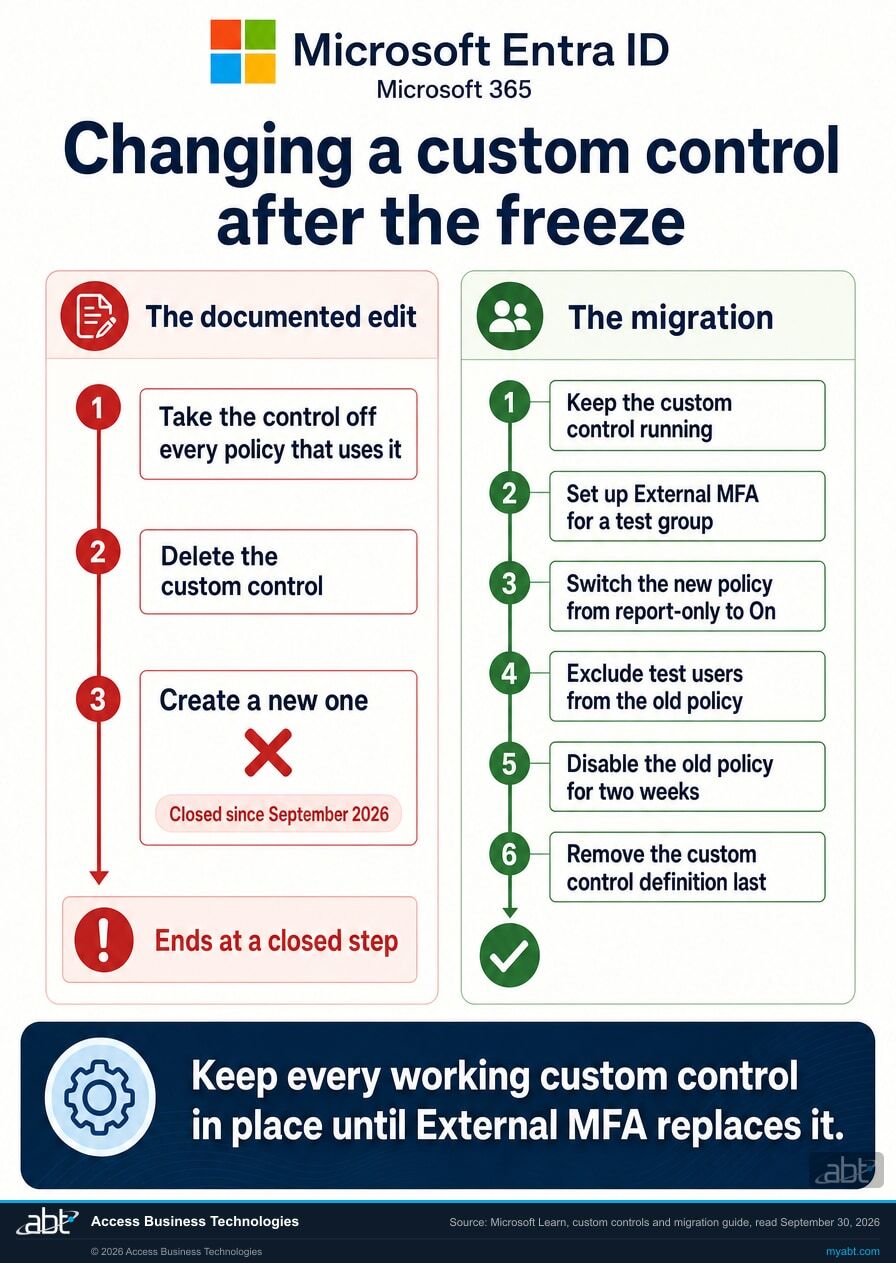
Microsoft's custom controls page has a short section headed "Editing custom controls". It reads, in its entirety:
To edit a custom control, delete the current control and create a new one with the updated information.
Microsoft documents no edit operation. Changing a custom control means deleting it and creating its replacement. The same page puts a condition on the delete itself: "To delete a custom control, ensure that it isn't being used in any Conditional Access policy." So an edit is three steps. Take the control off every policy that uses it, delete it, then create the new one. The freeze closes the third step.
ABT's reading, not a Microsoft statement
Microsoft does not spell out what these sentences mean together, so this paragraph is our reasoning. With creation blocked, deleting a working custom control in order to change it leaves every policy it was taken off without that control, and there is no documented way to put it back. Keep every working custom control in place until its replacement is working. If the provider's configuration needs to change, if a certificate rotates, or if you switch MFA vendors, plan that change as the migration to External MFA.
Microsoft adds a second warning on the same page that applies to anyone tempted to adjust a control in place: "Changing the JSON might break the connection between the provider and Microsoft, potentially locking you and your users out of your accounts."
The policy and the control are two different objects
The freeze is written about custom controls themselves. Microsoft's migration guide, the document the whole migration runs on, still tells you to open the existing custom control policy, add your test group under its exclusions, and later disable that policy. Both are edits to a Conditional Access policy that references a custom control, so the published migration path treats those policy-level changes as available. Microsoft has not stated that distinction in a single sentence, so treat it as our reading and confirm it on one policy before you book a change window.
One precaution follows. Microsoft's custom controls and migration pages do not say whether a new policy can reference an existing custom control once adding and editing are blocked, so a deleted custom control policy may not come back in its old form. Disable a custom control policy and leave it in the tenant, which is also what Microsoft's guidance asks for during the rollback period.
This is what turns a quiet freeze into a real constraint. The exposure sits with institutions that need an ordinary configuration change before retirement and meet the closed step partway through the only procedure Microsoft documents.
When do custom controls stop being supported?
| Microsoft source | Date on the source | What it says |
|---|---|---|
| Learn: Custom controls in Microsoft Entra Conditional Access | Last updated May 19, 2026 | Adding and editing blocked starting September 2026. "Full retirement is scheduled for early 2027." |
| Learn: Migrate from custom controls to external MFA | Last updated May 19, 2026 | The identical box, word for word. |
| Microsoft Entra blog: External MFA is now generally available | March 24, 2026 | "External MFA replaces Custom Controls, which will be deprecated on September 30, 2026. Existing configurations will continue to work during the transition period." |
| Microsoft Entra blog: Microsoft Entra ID security updates: What organizations need to do now | June 8, 2026, updated August 4, 2026 | "Custom controls will be retired on September 30, 2026, and the service will reach end of life in May 2027." |
| Message Center MC1422061 | Published July 9, 2026 | "September 2026: Administrators will no longer be able to create new Custom Controls or modify existing Custom Controls." And: "May 2027: Custom Controls will be fully retired and no longer supported." Action-required date: April 30, 2027. |
The April 30, 2027 date comes from the notice as it appears in ABT's own tenant, read through Microsoft Graph on September 30, 2026, where Microsoft records it as the action-required date. It is the date Microsoft asks you to be finished by, and it falls before the May retirement month begins. Administrators can read the same notice in their own Message Center in the Microsoft 365 admin center.
One point of precision about what retirement means. Microsoft describes it as the end of support for custom controls. Its Message Center notice adds that existing custom controls continue to function until retirement, that organizations using them must migrate affected policies to External MFA before it, and it answers yes to whether the change will modify, interrupt, or disable Conditional Access policies. Plan as though retirement ends the control, and finish before it.
Two published retirement dates
Learn says full retirement is early 2027. Message Center MC1422061 and a June 2026 Microsoft Entra blog post say May 2027, and the notice carries an action-required date of April 30, 2027. If Learn is right and the plan was built for May, an unsupported identity control runs through a quarter nobody budgeted for. ABT's recommendation, labeled as ours: finish the migration by December 31, 2026, ahead of the earliest reading of early 2027. If your institution freezes changes at year end, that means finishing before the freeze begins.
Do custom controls satisfy Microsoft's MFA requirement?
On the page where Microsoft explains its mandatory multifactor authentication enforcement, there is one sentence about custom controls:
The legacy Conditional Access custom controls preview doesn't satisfy the MFA requirement. You should migrate to external MFA to use an external solution with Microsoft Entra ID.
That requirement is Microsoft's mandatory MFA for Azure and its admin portals. Microsoft's enforcement schedule lists the Azure portal, the Microsoft Entra admin center and the Microsoft Intune admin center starting in October 2024, the Microsoft 365 admin center starting in February 2025, and Azure CLI, Azure PowerShell, the Azure mobile app, infrastructure-as-code tools and REST API endpoints for create, update and delete operations starting October 1, 2025. Those are the sign-ins your administrators make every day.
Read plainly: a user can complete a Duo push, an RSA token, or whatever second factor your institution licensed, and Microsoft does not count that toward its own MFA requirement. The user did MFA. Microsoft did not record it as MFA.
Microsoft's migration guide sets out the full picture as a comparison table, and every row is a capability the custom control never had:
| Capability | Custom controls | External MFA |
|---|---|---|
| Satisfies the Conditional Access Require MFA grant | No | Yes, native MFA claim |
| Sign-in log accuracy | MFA not reflected | Full MFA reporting |
| Privileged Identity Management | Not supported | Supported |
| Risk-based Conditional Access | Not supported | Supported |
| Intune device registration | Not supported | Supported |
The custom controls documentation carries a longer list of the same shape. Microsoft states that custom controls cannot be used with Microsoft Entra ID Protection automation requiring multifactor authentication, self-service password reset, satisfying multifactor authentication claim requirements, sign-in frequency controls, elevating a role in Privileged Identity Management, Intune device enrollment, cross-tenant trusts, or joining devices to Microsoft Entra ID.
Custom controls were always a preview, and Microsoft said so early
Microsoft opens the custom controls page with the words "Custom controls are a preview capability of Microsoft Entra ID", and the mandatory MFA page calls it "the legacy Conditional Access custom controls preview". In a post dated March 20, 2020, now carried on the Microsoft Entra blog, Alex Simons, Corporate Vice President of Microsoft's Identity Division, wrote that the custom controls approach was "too limited", that Microsoft would replace the preview, and that once the replacement reached general availability, "we will provide time for customers to migrate to the new implementation."
That replacement, External MFA, reached general availability on March 24, 2026. Read together, the freeze and the 2027 retirement are the migration time the 2020 post described. Institutions that integrated a commercial second factor through custom controls used the route Microsoft supported at the time.
A control that runs, and a record that does not show it ran
Take the second row of that table on its own. "Sign-in log accuracy: MFA not reflected." Microsoft Entra sign-in logs are where an institution goes to answer the question of whether multifactor authentication actually happened on a given sign-in. It is the record an incident responder reconstructs a timeline from, and the record you reach for when somebody asks for evidence that a control is operating as well as configured.
On a tenant using custom controls, that record does not show the second factor as MFA. The redirect happened, the provider did its job, the user completed the challenge, and the log does not carry it in the field a reader would look at. The control is real, and the Microsoft Entra record of it is thin. The MFA provider keeps its own logs, which are a separate record from the tenant's.
The scope of that point is Microsoft Entra ID: what it records, and what Microsoft's own grant controls accept. How any regulator views a custom control is a question for your compliance team. Three practical consequences follow inside Microsoft, and all three hold today, whatever the date:
- A Require MFA policy is not being satisfied by your second factor. Microsoft states this directly. If you built a Conditional Access policy on the Require MFA grant expecting the custom control to meet it, check that assumption before relying on it.
- Risk-based Conditional Access does not work with it. Policies that respond to a risky sign-in or a risky user cannot use a custom control, so a tenant that bought third-party MFA and also bought Microsoft Entra ID P2 for risk-based policies has two products that do not meet in the middle.
- Privileged Identity Management does not work with it. Role elevation is the single moment where a strong second factor matters most, and it is on Microsoft's unsupported list.
Why we keep writing about this shape of problem
A security control can be present, switched on, correctly targeted, and still fall short of what its name implies. Custom controls are that pattern, documented by the vendor. The right test is what the control does when it fires, and whether the record afterwards proves it fired.
We will read your Conditional Access policies and tell you what each one actually enforces
A free security assessment answers the question this page raises, in writing: which of your policies use a custom control, which grant each policy actually applies, what your sign-in logs record when it fires, and what the move to External MFA needs before retirement.
Get a free security assessmentWhere does phishing-resistant MFA fit in this decision?
What does the migration to External MFA take?
External MFA reached general availability on March 24, 2026, and was previously called external authentication methods, so older documentation and older internal notes may use that name. It is built on OpenID Connect, which is the substantive difference: the provider publishes standard endpoints and Microsoft Entra ID validates real tokens against them, where a custom control relied on a block of provider JSON pasted into a text box.
What you need before you start
Microsoft's prerequisites list is short and every item on it has an owner in most institutions:
- A Microsoft Entra ID P1 or P2 license.
- The Authentication Policy Administrator role, or Global Administrator.
- The Privileged Role Administrator role, to grant admin consent for the provider's application. This is frequently a different person, and it is the step that stalls migrations.
- Three pieces of metadata from your MFA vendor: an Application ID for their app registration, a Client ID, and an OIDC discovery URL.
- A test user group, and the policy inventory from earlier on this page.
The discovery URL has a strict shape. Microsoft requires it to use HTTPS and to end with /.well-known/openid-configuration, with no additional path segments, query string, or fragment after that. The issuer value must match character for character across the configuration, the discovery document, and the tokens the provider issues. Get those values from your vendor.
The sequence, following Microsoft's migration guide
- Audit the existing custom control policies and record the five fields per policy listed earlier.
- Configure the external MFA authentication method policy with the provider metadata, and grant admin consent. Until consent is granted the method stays disabled.
- Target a test group only, not all users, and set up exclusions for break-glass accounts at the same time.
- Register the test users for the external method and confirm registration before assuming it happened.
- Create a parallel Conditional Access policy using the standard Require multifactor authentication grant, in report-only mode first.
- Review the report-only results in the sign-in logs. Report-only evaluates the new policy on each sign-in without enforcing it or prompting anyone, so this step shows which sign-ins the policy would cover. The proof that External MFA works comes after the policy is on.
- Switch the new policy from report-only to On, before anyone is taken out of the old policy.
- Exclude the test users from the old custom control policy so they are not subject to both, and confirm with the What If tool that only the new policy applies to them.
- Test sign-ins, and confirm in the sign-in logs that the new policy granted access and that the MFA requirement was satisfied by the external method.
- Expand in phases, and only then switch the old policy off.
Microsoft's guide sets out four rollout phases: a test group of five to ten users, then fifty to one hundred IT staff and early adopters, then department by department, and then all users. Microsoft also notes that because of caching and replication it can take up to a few hours for a new Conditional Access policy to take effect at authentication time, so a policy tested five minutes after saving can look broken when it is still propagating.
Keep the old policy disabled for two weeks after you finish
Microsoft's guidance is explicit: keep the old custom control policy disabled, not deleted, for at least two weeks as a rollback option, and monitor sign-in logs for one to two weeks to confirm there are no regressions.
Microsoft's last two rollout steps are to delete the old custom control policy and then to remove the custom control definition from the tenant. With the freeze in force, the definition cannot be created again, and Microsoft's migration guide does not say whether a policy that references a custom control can be. Take both steps last, once the replacement has run clean for two weeks.
Which two mistakes does Microsoft warn about by name?
An authentication strength grant is not satisfied by External MFA, including the built-in multifactor authentication strength. Microsoft says this in two places, and instructs that policies be configured with the plain Require multifactor authentication grant instead. It is an easy one to get wrong precisely because authentication strengths are the more modern control and the natural thing to reach for. If your institution has standardized on authentication strengths, this is a design constraint to know before you write the policy.
External MFA and custom controls can operate in parallel during a migration, which is what makes a phased rollout possible. The trap is a user who ends up in both policies. Microsoft describes the result plainly: that user has to satisfy MFA during sign-in and also satisfy the custom control, which redirects them to the external provider a second time. Two prompts, same provider, same person. The fix is the exclusion step in the sequence above, and skipping it is how a pilot generates help desk tickets that look like a product fault.
We read the policies and hand back the answer in writing
The free security assessment starts with the inventory on this page, run against your tenant. For each Conditional Access policy we report which grant control it actually applies, whether a custom control is in the chain, which provider it references, and what the sign-in logs record when the policy fires. Where a custom control is present, we set out what the migration to External MFA needs from you, from your MFA vendor, and from us, which of the two traps above your configuration is exposed to, and how to sequence the work so every working custom control stays in place until its replacement has run clean.
Two things about that engagement. It is a technical review, and the written output is yours whether or not you engage us for the work that follows. Deciding a change window and confirming which applications depend on which policy needs your records as well as your tenant, and we name exactly which ones to pull.
ABT manages Microsoft 365 tenants and hosts Azure environments for more than 750 financial institutions, so Conditional Access in a regulated setting is the environment we work in daily. ABT also operates M365 Guardian, its managed security service for credit unions, banks, and mortgage companies.
Where the facts on this page come from
The Conditional Access questions behind this one
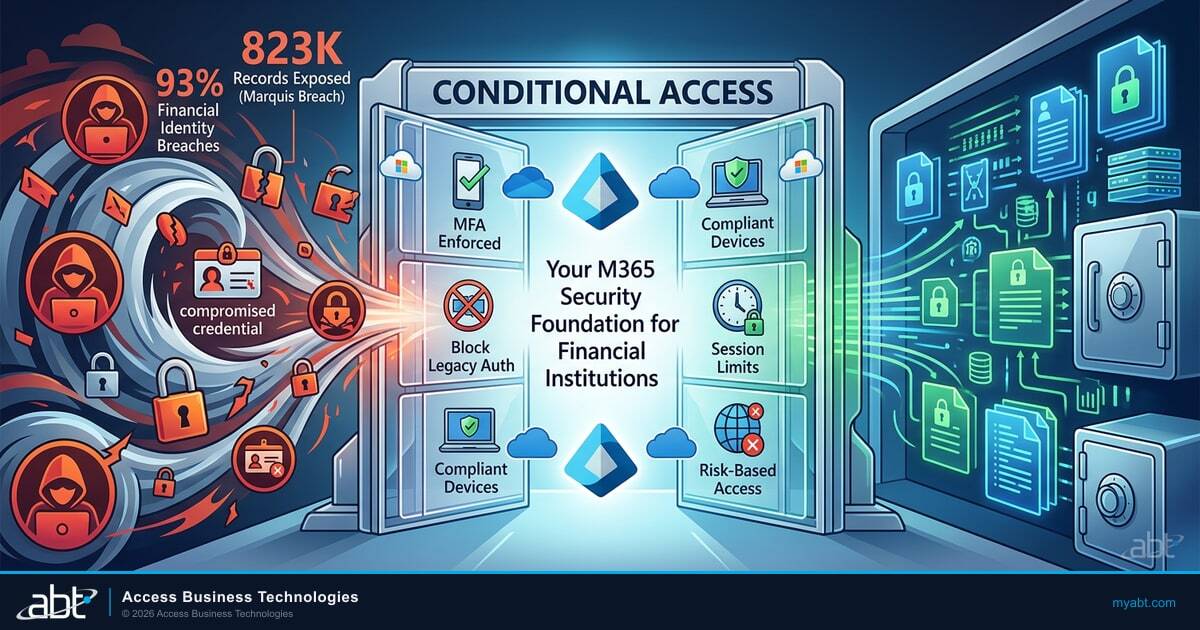
Conditional Access Policies for Financial Institutions: 2026 Best Practices
The policy set an institution should have in place, and what each one is actually for. Start here if the inventory on this page turned up more than you expected.
Read the article ›
Phishing-Resistant MFA for Financial Institutions
If you are rebuilding the MFA policy anyway, this is the argument for what to rebuild it around, beyond reproducing what you had.
Read the article ›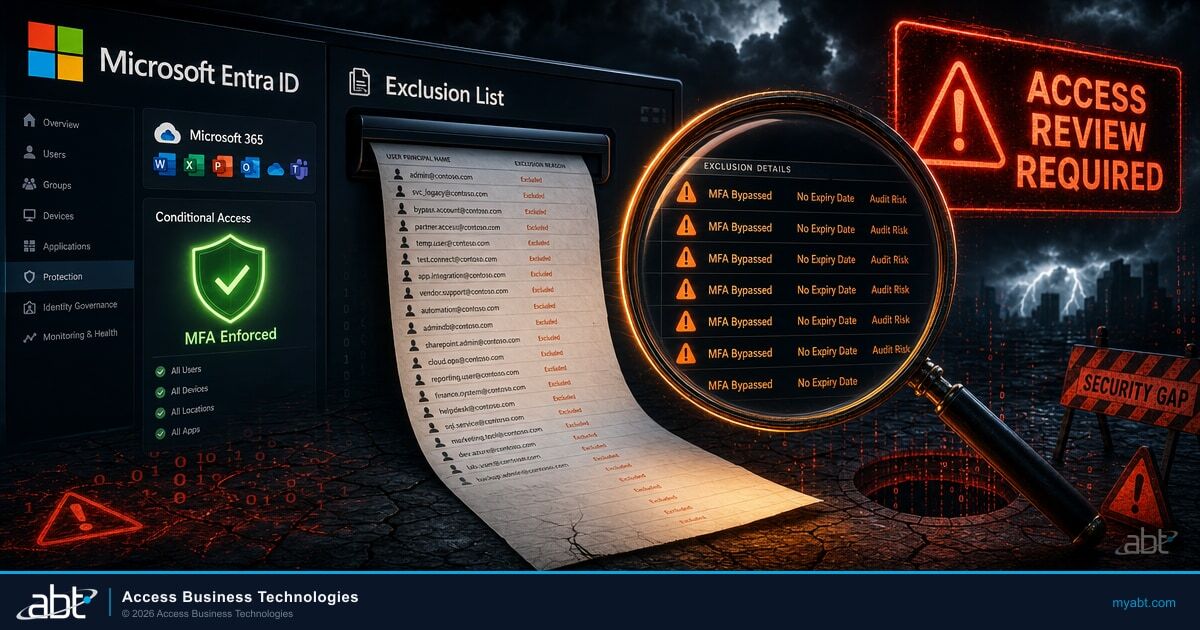
Conditional Access Exclusions: The List Nobody Reviews
The migration on this page asks you to add exclusions deliberately, and then to take them back out. This is what happens to the ones that stay.
Read the article ›Answered from Microsoft's own documentation
The configuration froze. Microsoft states that adding new custom controls and editing existing custom controls will not be allowed starting September 2026, and its schedule puts that freeze in force now. Learn and Message Center give the month, and two Microsoft Entra blog posts name September 30, 2026, one as the deprecation date and the other as the retirement date. Existing custom controls keep working: Message Center MC1422061 says they continue to function until retirement in May 2027, and Microsoft Learn dates full retirement to early 2027. Users see no change from the freeze itself.
2027. September 2026 closed the ability to change the configuration. Full retirement, the end of Microsoft's support for custom controls, comes in 2027: Microsoft Learn says early 2027, Message Center MC1422061 says May 2027, and the same notice carries an action-required date of April 30, 2027. ABT's planning target is December 31, 2026, ahead of the earliest of those. September still shapes the work, because any change a custom control needs between now and retirement has to be made as part of the migration to External MFA.
Both are Microsoft statements and they differ. The two Microsoft Learn pages say full retirement is scheduled for early 2027. Message Center notice MC1422061, published July 9, 2026, says May 2027, as does a Microsoft Entra blog post from June 2026, and in ABT's own tenant the notice carries an action-required date of April 30, 2027, which is the date Microsoft asks you to be finished by. Plan against the earlier retirement date, because finishing late means running an unsupported identity control through a quarter you did not budget for; ABT's planning target is December 31, 2026. Check the notice as it appears in your own Message Center.
One read-only Microsoft Graph PowerShell command lists every Conditional Access policy that uses one, along with the custom control it references. Connect with the Policy.Read.All scope and filter Get-MgIdentityConditionalAccessPolicy on the CustomAuthenticationFactors grant control. The same answer is visible in the Microsoft Entra admin center under Protection, then Conditional Access, then Policies, by reading the Grant controls on each policy. An empty result is a welcome answer. Treat it as a starting inventory and confirm it: the command only sees what your permissions allow, a Graph error can resemble an empty result, and it reports controls attached to policies, so also check the Custom controls list in the Manage section of the Conditional Access page before recording that you have none.
No. Microsoft states on its mandatory multifactor authentication planning page that the legacy Conditional Access custom controls preview does not satisfy the MFA requirement, and instructs customers to migrate to external MFA to use an external solution. That requirement covers sign-ins to Azure and to the Microsoft admin portals. Microsoft's migration guide adds that custom controls do not satisfy the Conditional Access Require MFA grant either. Both statements concern Microsoft's own requirement and grant control and apply whatever the retirement dates; the strength of your third-party provider is a separate question.
Not through a custom control. Microsoft's own capability comparison lists sign-in log accuracy for custom controls as MFA not reflected, against full MFA reporting for external MFA. The redirect to the provider happens and the user completes the provider challenge, but the sign-in record does not carry it as MFA. That matters for anyone who uses sign-in logs as the evidence that a control is operating as well as configured.
Microsoft lists them as unsupported with Privileged Identity Management, risk-based Conditional Access, and Intune device registration. The custom controls documentation adds Microsoft Entra ID Protection automation requiring multifactor authentication, self-service password reset, satisfying multifactor authentication claim requirements, sign-in frequency controls, Intune device enrollment, cross-tenant trusts, and joining devices to Microsoft Entra ID.
There is no edit operation to fall back on. Microsoft documents the edit procedure as deleting the current control and creating a new one with the updated information, it requires a custom control to be off every Conditional Access policy before it can be deleted, and creation is blocked from September 2026. ABT's reading of those statements together, which Microsoft does not spell out, is that deleting a working custom control now removes it with no documented way to recreate it. Keep every working custom control in place, and make any needed change as part of the migration to External MFA.
Microsoft's freeze statement is about custom controls themselves, and its migration guide still instructs you to add your test group to the exclusions of the existing custom control policy and later to disable that policy. ABT reads that as Microsoft treating policy-level changes as available during the migration. Microsoft has not said so in a single sentence, so confirm it on one policy before a change window. Disable a custom control policy and leave it in the tenant, because Microsoft's custom controls and migration pages do not say whether a new policy can reference an existing custom control after the freeze.
Plan as though the block is in place. Microsoft's documentation sets September 2026, two Microsoft Entra blog posts name September 30, 2026, and none of those sources says when the block reached each tenant. Its documentation says adding and editing custom controls are not allowed starting September 2026, both retirement dates stand, and any custom control added or changed now would need migrating to External MFA before retirement in any case.
In March 2020. A post dated March 20, 2020, now carried on the Microsoft Entra blog, said the custom controls approach was too limited, that Microsoft would replace the preview, and that once the replacement reached general availability Microsoft would provide time for customers to migrate. The replacement, External MFA, reached general availability on March 24, 2026. The September 2026 freeze came next, and full retirement follows in 2027.
External MFA lets users satisfy a multifactor requirement with a third-party provider while Microsoft Entra ID remains the identity control plane. It reached general availability on March 24, 2026 and was previously called external authentication methods. The substantive difference is that it is built on OpenID Connect, so the provider publishes standard endpoints and Microsoft Entra ID validates real tokens against them, where custom controls relied on a block of provider JSON pasted into a configuration box.
Microsoft's prerequisites are a Microsoft Entra ID P1 or P2 license, the Authentication Policy Administrator role or Global Administrator, and the Privileged Role Administrator role to grant admin consent for the provider's application. From your MFA vendor you need an Application ID, a Client ID, and an OIDC discovery URL that uses HTTPS and ends with the well-known openid-configuration path with no query string or fragment. You also need a test group and an inventory of every policy that uses a custom control.
Yes, and Microsoft recommends a parallel set of policies for exactly that reason. The trap is a user who ends up inside both policies. Microsoft describes the result plainly: that user must satisfy MFA during sign-in and also satisfy the custom control, which redirects them to the external provider a second time. The fix is to exclude your test group from the old custom control policy as you add them to the new one.
No. Microsoft states that grant controls based on authentication strengths, including the built-in multifactor authentication strength, are not satisfied by the external MFA method, and instructs that policies be configured with the plain Require multifactor authentication grant. This catches institutions that have standardized on authentication strengths, because that is the more modern control and the natural one to reach for. It is a design constraint to know before writing the policy.
Find out what your Conditional Access policies actually enforce.
Tell us roughly how many users you have and whether third-party multifactor authentication is in the picture. Our engineers read the tenant and come back in writing on the scope set out above: which policies use a custom control, which grant each policy applies, what the sign-in logs record when it fires, and what the migration to External MFA needs from you and from your MFA vendor before retirement. Confirming which applications depend on which policy needs your records too, and we name exactly which ones to pull.
ABT manages Microsoft 365 tenants and hosts Azure environments for more than 750 financial institutions. The assessment is a technical review and is not legal or compliance advice.
Get a free security assessment
A read of your Conditional Access policies, and a written answer on where you stand now that custom controls are frozen.
