


Microsoft Defender · Permissions and roles · MC1537494
Microsoft is turning on Defender RBAC for you. Review imported roles before your tenant's activation date.
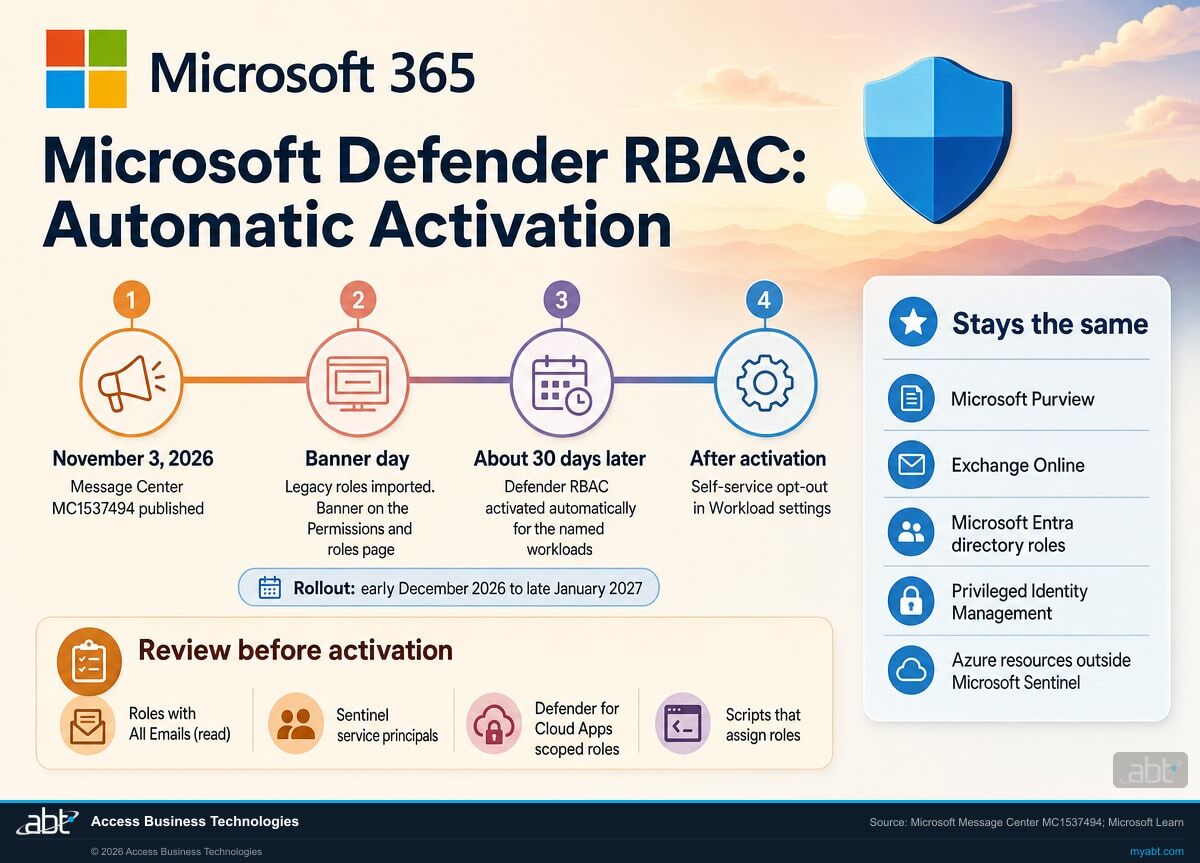
Microsoft Defender role-based access control is becoming the single access model for every Defender and Sentinel experience in the Microsoft Defender portal. Starting in early December 2026, Microsoft imports each tenant's existing roles, posts a banner, and about 30 days later activates the new model for the workloads it named. Most people keep the access they had. A few assignments need a person to look: Purview role groups that can carry permission to read all email, Sentinel automation running under a service principal, four Defender for Cloud Apps scoped roles, and scripts that assign roles through an API. This page covers what changes for a credit union, bank, or mortgage company, and how to finish the review inside the notice window.
- Rollout begins early December 2026 and is expected to complete by late January 2027, per Microsoft Message Center
- Activation follows the in-portal notice by about 30 days, and imported roles change nothing until then
- Purview, Exchange Online, Entra directory roles, PIM and non-Sentinel Azure permissions stay as they are
The change
What is Microsoft changing with Defender RBAC automatic activation?
Microsoft published Message Center notice MC1537494 on November 3, 2026, under the title "Attention needed: Your tenant will be auto enabled for the new Microsoft Defender RBAC model." Message Center is in the Microsoft 365 admin center. Here is the change in one place.
The change in brief
- What
- Defender RBAC, the unified permissions model for the Microsoft Defender portal, becomes the single access model for all Defender and Sentinel portal experiences, in a phased rollout.
- How
- Existing roles are imported first and a banner appears on the Permissions and roles page. About 30 days after that notice, Defender RBAC is activated automatically for the workloads the portal names.
- When
- Rollout begins early December 2026 and is expected to complete by late January 2027. Each tenant's banner carries its own workloads and dates.
- Unchanged
- Microsoft Purview, Exchange Online, Microsoft Entra directory roles, Privileged Identity Management, and Azure resources unrelated to Microsoft Sentinel. PowerShell with Defender for Office 365 keeps working.
- Undo
- A self-service opt-out is available after activation from the workload settings control, which reverts that workload to the legacy model.
Microsoft announces the change
Message Center notice MC1537494 tells administrators that tenants will be auto enabled for the new Defender RBAC model.
Banners and role imports begin
A banner names the workloads that will move, and legacy roles are imported automatically. The import has no operational effect yet.
Activation for the named workloads
Authorization for those Defender and Sentinel portal experiences defaults to the new roles.
Rollout expected to complete
By then most tenants run the Defender portal on Defender RBAC, and the imported roles are the access record.
"Following this period, the new Defender RBAC will be activated automatically for the in-scope workload(s), approximately 30 days after the in-portal notification date."
Microsoft Message Center, MC1537494, November 3, 2026Until now, each Defender product kept its own permissions. Defender for Endpoint had its roles and device groups, Defender for Office 365 used Email and collaboration role groups and Exchange Online roles, Defender for Cloud Apps had its own admin roles, and Microsoft Sentinel used Azure roles on the workspace. Defender RBAC puts them in one list in the Defender portal, with one set of permissions and scopes that reach across device groups, cloud, identity and Sentinel. Microsoft has made it the default for new Defender for Endpoint and Defender for Identity tenants since 2025, and for new Defender for Office 365 Plan 2 organizations since July 2026. MC1537494 brings everyone else across.
The import is designed to keep people working: Microsoft maps every legacy permission to a Defender RBAC permission, and the Entra roles Global Administrator, Security Administrator, Security Operator and Security Reader keep granting portal access. Portal access and individual capabilities are separate questions. In a related notice, MC1486293, Microsoft removes the Security settings permission from the Security Operator role's default mapping for Defender for Office 365, so by default a Security Operator loses the ability to view and manage email threat policies and the Tenant Allow/Block List once Defender RBAC is active for that workload. Our page on the Security Operator role in Defender for Office 365 covers that change and the permissions Microsoft names as the fix. This page covers the whole tenant, where the review matters for a second reason: the imported list becomes the place your access is decided after activation, and a few of the mappings give a role group more reach in the Defender portal than its name suggests.
Role by role
Which imported roles need a person to check them?
We put Microsoft's mapping next to the check each kind of access deserves. The "what activation does" column comes from Microsoft; the "what to check" column is our recommendation for a financial institution's security and IT teams.
| Where the access lives today | What activation does | What to check |
|---|---|---|
| Entra roles: Global Administrator, Security Administrator, Security Operator, Security Reader | Keep granting Defender portal access, mapped to Defender RBAC permissions | Who holds each role, whether it is eligible through PIM or permanently assigned, and which Security Operators manage email threat policies (MC1486293 removes that from the role by default) |
| Defender for Endpoint roles and device groups | Imported with their permissions; device groups keep working as scopes | That each imported role still points at the right device groups, including live response rights |
| Email and collaboration role groups in the Defender portal | Imported when assigned to at least one user | Members of each imported group, and empty built-in groups you expected to see |
| Purview role groups holding the Preview role (eDiscovery Manager, Data Investigator, Privacy Management groups) | Can appear in the imported view with Email and collaboration content: All Emails (read) | Which people should read message content in the Defender portal, and the scope they need |
| Microsoft Sentinel Reader, Responder and Contributor | Enabled in Defender RBAC automatically | Sentinel scopes, and users whose broader Azure roles still show them more Sentinel data |
| Sentinel Playbook Operator, Automation Contributor, Workbook Contributor | Stay in Azure; Azure RBAC keeps governing Logic Apps and Workbooks | That these stay on your Azure access review, since the Defender list leaves them out |
| Sentinel permissions held by a service principal | Service principal assignments are not supported in unified RBAC | Every automation account with Sentinel access, and how it will keep working |
| Defender for Cloud Apps scoped roles: App/instance admin, User group admin, Cloud Discovery global admin, Cloud Discovery report admin | Retired from support once Cloud Apps is active in Defender RBAC | Who holds them today and which Defender RBAC role replaces each one |
| Roles that still list a deleted user or group | Listed as not eligible for import | Remove the stale member from the original role, then re-run the import |
| Scripts or tools that assign Defender roles through an API | Microsoft asks API users to move to the Defender RBAC API | Any onboarding or offboarding automation that grants Defender access |
Start with the permission to read every email
Microsoft's role mapping says the Preview role becomes the Defender RBAC permission "Email and collaboration content: All Emails (read)," and that Preview sits by default in Purview role groups including eDiscovery Manager, Data Investigator and the Privacy Management groups. Those groups can show up in your imported list with that permission, and Data Investigator also brings Search and Purge, which maps to Email advanced actions. For a credit union, bank, or mortgage company, message content means member and borrower information, so this is the assignment to read first: open each imported role that lists All Emails (read), confirm every member has a current business reason, and narrow the role or its membership before the activation date on your banner.
List every imported Defender role, check who can read email content, and finish the review before your activation date
ABT works with your team to read your Defender RBAC banner, list each imported role with its members and scopes, flag the Purview, Sentinel and Cloud Apps assignments that need a decision, and write down what you changed, as part of a free security assessment.
Request the free assessmentThe work
How do you review imported roles before Defender RBAC activates?
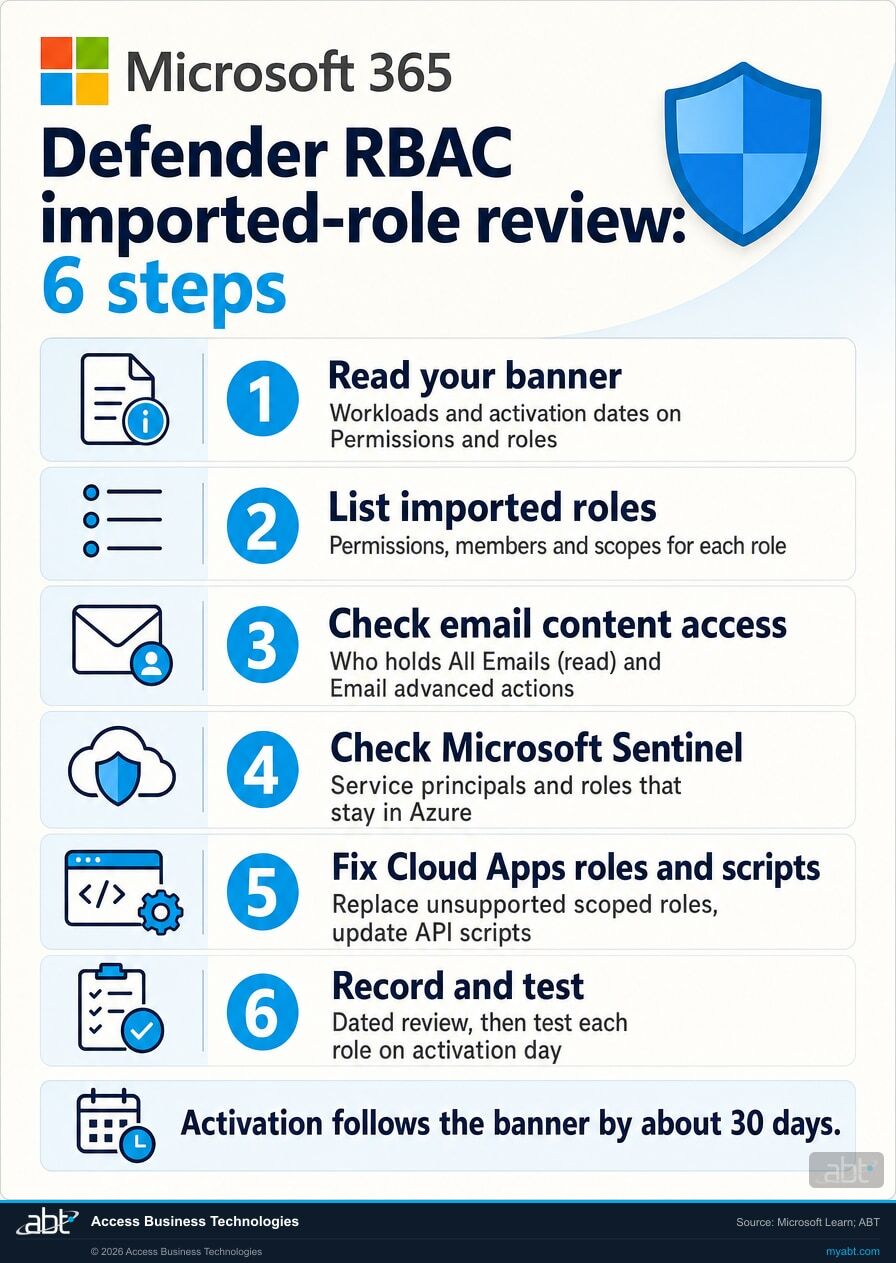
Six steps, built on Microsoft's recommended actions in MC1537494 and its Defender RBAC documentation. Steps 1 and 2 find your dates and list what was imported. Steps 3 to 5 handle the assignments that need a decision. Step 6 is the record and the plan for activation day.
Read your banner and write down the workloads and dates
The banner on the Permissions and roles page names the workloads that will move to Defender RBAC and their activation dates. Write them down with the date the banner appeared, since activation follows about 30 days later. You need at least the Microsoft Entra Security Administrator role to open this page. Workload settings, at the top of the same page, shows which workloads are already active; Microsoft notes that Defender for Cloud is active by default and Exposure Management access already runs on Defender RBAC.
List every imported role with its permissions, members and scope
Imported roles carry the word Imported in their description until someone edits them. For each one, record the permissions, the users and groups assigned, and the scope: device groups for Defender for Endpoint, and Cloud, Sentinel or Identity scopes where you use them. Check the list of roles not eligible for import; Microsoft puts a role there when it still holds a user or group that has been deleted from Entra ID. Remove that member from the original role and re-run the import, and avoid importing the same role twice, which creates a duplicate.
Confirm who can read email content and email actions
Filter your list for "Email and collaboration content: All Emails (read)" and "Email advanced actions." Match each to its source: the Preview role inside eDiscovery Manager, Data Investigator, the Privacy Management groups and Subject Rights Request groups, or Search and Purge. Confirm each member still needs that access in the Defender portal, and narrow the imported role where they do not. Microsoft lets you adjust imported assignments before the workload is activated, so the change is ready on day one.
Check Sentinel automation, Azure-only roles and broader Azure access
List every service principal with a Sentinel role on the workspace: Microsoft says service principal assignments are not supported in unified RBAC, so plan to keep that access on Azure RBAC. Keep Playbook Operator, Automation Contributor and Workbook Contributor on your Azure access review. Note users whose Azure roles are broader than their Defender role, because Sentinel pages still honor Azure roles. After Sentinel is active, make Sentinel permission changes in the Defender portal; Microsoft warns that changes in the Azure portal can cause sync errors.
Replace unsupported Cloud Apps roles and update scripts
Find anyone holding the App/instance admin, User group admin, Cloud Discovery global admin or Cloud Discovery report admin roles, and decide which Defender RBAC role gives them the access they need. Then find any onboarding, offboarding or provisioning script that grants Defender access through an API. Microsoft points API users to the Defender RBAC API; the Microsoft Graph beta roleManagement documentation lists "Defender (Microsoft Defender XDR)" among its RBAC providers.
Record the review and test each role on activation day
Save the imported role list, the changes you made and the date. Update runbooks that tell staff where to grant Defender access, as Microsoft recommends. On activation day, sign in as a security analyst, a help desk user and an auditor, confirm each sees what they should, and keep the opt-out path in the runbook: Workload settings reverts a workload to the legacy model, and roles created or edited in Defender RBAC stop applying while it is off.
Who notices
Who in the institution will notice Defender RBAC activation?
Each card is a group whose access runs through the Defender portal, and what to confirm with them before your activation date.
The security team
Analysts who triage alerts, run live response or hunt across email and devices. Confirm their imported roles carry the same response rights and device group scopes they use today.
The help desk
Staff who release quarantined mail or check a user's sign-in alerts. Their access often comes from an Email and collaboration role group, so confirm the group was imported with members.
Compliance and audit
eDiscovery managers, privacy staff and internal auditors. Their Purview role groups can bring permission to read message content in the Defender portal; agree which of them need it.
Your IT provider
Microsoft says GDAP and multi-tenant management stay as they are, and GDAP assignments are included in the import. Ask your provider to confirm their roles in your list.
Automation owners
Whoever runs Sentinel playbooks or role-assignment scripts. Service principals and API-based assignments are the pieces that need a plan before activation.
Leadership
The information security officer who signs the access review. A dated record of the imported roles and your changes is the evidence that the review happened.
For financial institutions
Why does Defender RBAC activation matter at a credit union, bank, or mortgage company?
Because the Defender portal holds alerts, device control and message content, and the imported role list decides who reaches each one.
Your team keeps working through the change. A review during the notice window means the analyst who isolates a laptop, the help desk technician who releases a held message and the auditor who reads reports all keep their access on activation day, and anyone who needs a different role gets it before the switch.
Access to member and borrower data stays deliberate. The permission to read all email in the Defender portal reaches message content, which at a financial institution includes account and loan details. Confirming who holds it, and narrowing it where the business reason has lapsed, keeps that access matched to a job. Our page on app governance roles in Defender for Cloud Apps covers a related Entra role change, and our page on the Defender for Identity alert retirement covers another Defender change on a similar clock.
A record you can show. Examiners, auditors and cyber insurers ask how you grant, review and remove access to security tools and sensitive data. A dated list of imported Defender roles, the changes you made and the reasons gives your access review its evidence, written as part of the change.
Governance is the part an access review proves.
Our Short covers the retirement of the FFIEC Cybersecurity Assessment Tool and the Govern function in NIST CSF 2.0, the voluntary NIST framework many institutions now use in its place.
Govern covers roles, responsibilities and oversight. A reviewed, dated list of who holds which security permission is one of the plainest ways to show that function at work, and Defender RBAC activation hands every Microsoft Defender customer a reason to produce one this winter.
How ABT helps
A free security assessment
ABT is a Tier 1 Microsoft Cloud Solution Provider serving more than 750 financial institutions. It manages Microsoft 365 tenants and hosts Azure environments for credit unions, banks, and mortgage companies. Access to security tools is a common place for those reviews to start, and this assessment covers the Defender roles your banner will activate.
With your team, we list every imported Defender role, flag the assignments that need a decision, and plan activation day
The assessment is free and ends with written findings you keep. We work through it with an administrator on your team, and your team decides what changes and who makes each change.
- The dates. The workloads and activation dates on your Permissions and roles banner.
- The role list. Each imported role with its permissions, members and scopes, plus roles not eligible for import.
- The email-content check. Every role carrying All Emails (read) or Email advanced actions, and who holds it.
- The Sentinel check. Service principals, Azure-only roles and users with broader Azure access.
- The Cloud Apps and script check. Unsupported scoped roles and any automation that assigns Defender roles.
- The record. A dated summary for your access review and information security program, with the activation-day test plan.
ABT also operates M365 Guardian, its managed security service for credit unions, banks, and mortgage companies. Learn about M365 Guardian
Related reading
If this opened a bigger question
A permissions change tends to raise the questions around it: what each Defender workload protects, and how it is configured.
Microsoft Defender for Identity: Protect the Domain Controllers Behind Every Login
What Defender for Identity detects on the domain controllers behind every staff login, how to license it, and how to deploy it.
Read the article
Defender Vulnerability Management for Financial Institutions: Fix What Matters First
How banks, credit unions, and mortgage companies rank device vulnerabilities by exposure and hand each fix to Intune as a tracked task.
Read the article
Microsoft Defender for Office 365 for Financial Institutions: The Anti-Phishing Configuration Examiners Expect
The six anti-phishing controls financial institution examiners verify in Defender for Office 365, and a 30-day rollout plan.
Read the articleAnswered
Defender RBAC automatic activation, answered
Verify it yourself
Where the facts on this page come from
Every Microsoft date, role name, permission name and quotation above comes from the sources listed here.
- Microsoft Message Center, MC1537494, "Attention needed: Your tenant will be auto enabled for the new Microsoft Defender RBAC model," published November 3, 2026, read in the Microsoft 365 admin center Message Center. Source for the single access model, the role import and banner, activation about 30 days after notification, the rollout window, the unchanged permissions, the opt-out, the API move, GDAP, the Entra roles that keep granting access, Sentinel and Azure RBAC, Defender for Office 365 Plan 2 applicability, and the recommended actions and scopes.
- Microsoft Learn, Map Microsoft Defender XDR unified RBAC permissions. Source for the role mappings, the Preview role and All Emails (read), the Purview role groups that hold Preview, the Email and collaboration import rule, the Defender for Cloud Apps scoped roles, the Sentinel role mappings, and the roles that stay in Azure.
- Microsoft Learn, Activate Microsoft Defender unified RBAC. Source for the activation and deactivation steps, Workload settings, Defender for Cloud and Exposure Management defaults, service principals in Sentinel, and Azure portal sync errors.
- Microsoft Learn, Microsoft Defender unified role-based access control. Source for the supported workloads, the defaults for new tenants since 2025 and July 2026, the Security Administrator prerequisite, Sentinel and Azure roles, Global Administrator and workspaces, and Purview DLP and Insider Risk Management.
- Microsoft Learn, Import roles to Microsoft Defender unified RBAC. Source for roles not eligible for import, the Imported label, re-running the import and duplicate roles.
- Microsoft Learn, roleManagement resource type (Microsoft Graph beta). Source for "Defender (Microsoft Defender XDR)" in the list of supported RBAC providers and the defender relationship to Defender Unified RBAC role definitions and role assignments.
- The "what to check" column, the six steps and their order, and the list of groups who notice are ABT's recommendations; everything else on this list is Microsoft's own.
Microsoft activates Defender RBAC about 30 days after your banner.
Review the imported roles before activation.
The work starts with the banner on your Permissions and roles page and the list of imported roles. The assessment ends with a written review you keep: who holds each Defender role, who can read email content, what happens to Sentinel automation and Cloud Apps scoped roles, and how you will test on activation day.
Tell us a little about your environment and we will come back with what we would check first.
What should we look at? Optional.
Encrypted. Private.
Thank you. That is with us.
An ABT specialist will be in touch shortly. If a particular role, workload or activation date is what you are thinking about, say so in your reply and we will start there.
