


Microsoft Defender for Office 365 · Unified RBAC · Message Center MC1486293
In November, the Security Operator role stops managing your email threat policies. Where Unified RBAC is on, decide who gets the permissions back before the rollout.
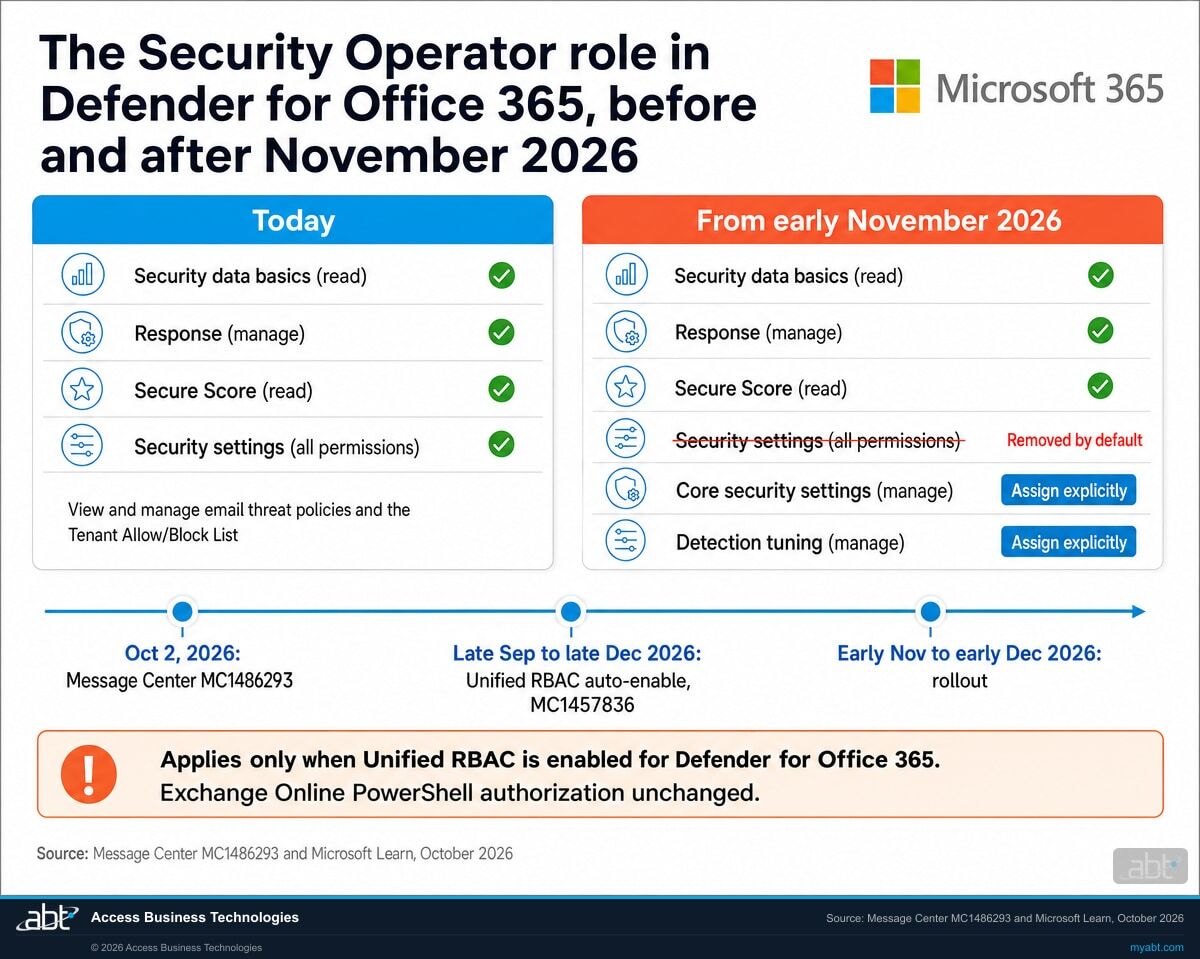
Today, a person holding the Microsoft Entra Security Operator role can open the anti-phishing, Safe Links and preset security policies in the Microsoft Defender portal and change them, and can add or remove Tenant Allow/Block List entries, because Microsoft's default Unified RBAC mapping hands that role the whole "Security settings" permission for Defender for Office 365. Microsoft announced on October 2, 2026 that it is taking that permission out of the default mapping, with a rollout from early November to early December 2026. Where Unified RBAC is on for Defender for Office 365, and the person holds no other role or assignment that carries the permission, the role keeps its alert, incident and response work and its reads of email metadata, quarantine, exposure management and Secure Score, and loses viewing as well as editing of the six policy types and the allow/block list by default. Microsoft is also switching Unified RBAC on for tenants between late September and late December 2026, so the "only if Unified RBAC is enabled" condition reaches more institutions every week. For a credit union, bank, or mortgage company, that is a list of names: who holds the role, what each person does with the policies, and which two permissions give the work back.
- Early November to early December 2026: the default mapping of the Microsoft Entra Security Operator role for Defender for Office 365 stops including Security settings (all permissions)
- By default the role then loses the ability to view, create, edit or delete anti-spam, anti-phishing, anti-malware, Safe Links, Safe Attachments and preset security policies, and to touch Tenant Allow/Block List entries
- The fix Microsoft names: assign Core security settings and Detection tuning in Unified RBAC, or a role that already carries them, such as Security Administrator
The change
What does the Security Operator role lose in November, and why is Microsoft doing it?
Microsoft is changing one line in a mapping table: the line that says what the Microsoft Entra Security Operator role may do inside Microsoft Defender for Office 365 when Unified RBAC is the permission model. Today that line carries Security settings (all permissions). From November it carries less, and the reason Microsoft gives is least privilege.
The decision in brief
- What
- Microsoft is updating the default Unified RBAC mapping for the Microsoft Entra Security Operator role in the Defender for Office 365 workload so that the default mapping drops Authorization and settings \ Security settings (all permissions). By default the role then loses access to view, create, edit or delete email threat policies and to view, add, edit or remove Tenant Allow/Block List entries.
- When
- General availability rollout begins in early November 2026 and is expected to complete by early December 2026, across Worldwide, GCC, GCC High and DoD. Microsoft published the post on October 2, 2026 as a major change with no action-required date.
- Who
- Organizations where both of Microsoft's conditions apply: Unified RBAC is enabled, or will be enabled, for Defender for Office 365 (Email & Collaboration), and users are assigned the Microsoft Entra Security Operator role. The people who feel it are those who hold no other role or Unified RBAC assignment carrying the permission. Tenants that have not enabled Unified RBAC are unaffected, and Microsoft is enabling it for tenants between late September and late December 2026.
- Owner
- Whoever administers Microsoft Entra roles and the Defender portal permissions in your institution, with your information security officer, because the review is an access review.
- Action
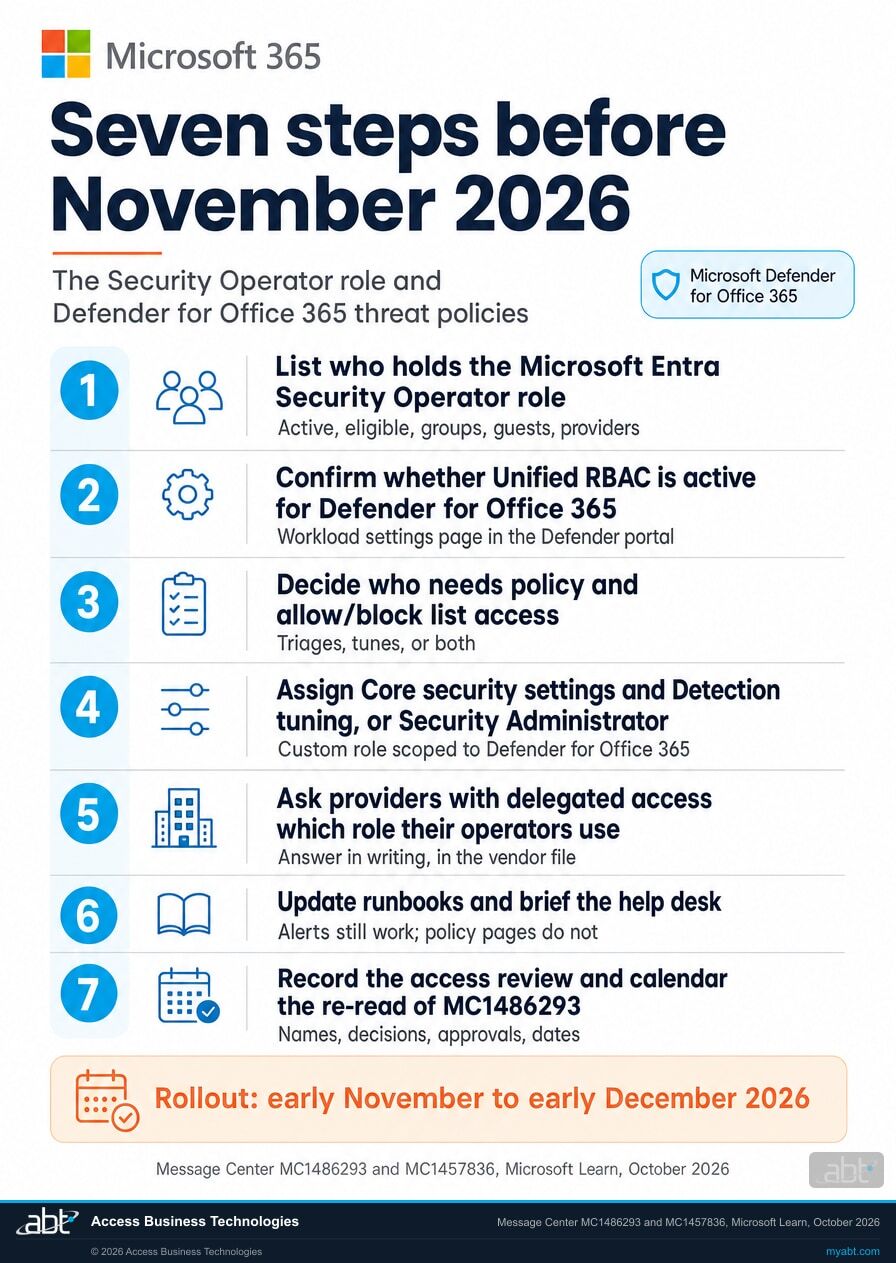
- List who holds the role, confirm whether Unified RBAC is on for Defender for Office 365, decide who needs policy and allow/block list access, assign Core security settings and Detection tuning (or Security Administrator) to those people, update runbooks and help desk notes, and record the review.
New Plan 2 tenants start on Unified RBAC
Microsoft Learn: Unified RBAC is the default permission model for new Defender for Office 365 Plan 2 organizations from July 2026. Existing organizations can activate it at any time.
Microsoft switches Unified RBAC on for tenants
MC1457836 (August 19, 2026): tenants are auto-enabled for the named workloads about 30 days after an in-portal notification, with legacy roles imported and a self-service opt-out after activation.
MC1486293 reaches tenants
A major change post for Microsoft Defender XDR: the Security Operator mapping for Defender for Office 365 loses Security settings (all permissions) by default, with the two replacement permissions named.
The mapping changes
Where Unified RBAC is on for Defender for Office 365, operators who rely on the Entra role alone lose the policy pages and the Tenant Allow/Block List until somebody assigns the permissions or a role that carries them.
"After this change, organizations that have Unified RBAC enabled and rely only on the Microsoft Entra Security Operator role for this access will need to manually assign the appropriate permissions or assign a role that includes those permissions."
Microsoft 365 Message Center post MC1486293, Microsoft Defender for Office 365: Changes to Unified RBAC permission mapping for Microsoft Entra Security Operator role, October 2, 2026Microsoft's own description of the starting point is the clearest one. Its guide to configuring Unified RBAC for Defender for Office 365 lists what each Microsoft Entra role gets in that workload: Security Administrator, "Full access (policies, response, metadata, quarantine)"; Security Operator, "Policy management, response actions, metadata read"; Security Reader and Global Reader, "Read access, metadata read, response actions." The Learn mapping table, as it read on October 11, 2026, spells out the Security operator row: Security data basics (read), Exposure Management (read), Response (manage), Secure Score (read), and Authorization and settings \ Security settings (All permissions), plus, for Defender for Office 365 only, email and collaboration metadata (read), quarantine emails (read) and System settings (read and manage). The "Security settings (All permissions)" entry is the one that lets an operator open a Safe Links policy and change it.
MC1486293 removes that entry from the default mapping, for the Defender for Office 365 workload, "to align access with documented Microsoft Defender for Office 365 role expectations and least-privilege principles." Microsoft's role description for the Entra Security Operator in the Defender portal reads "View, investigate, and respond to active threats to your Microsoft 365 users, devices, and content," while Security Administrator reads "Control your organization's overall security by managing threat policies." The November change moves the mapping toward those descriptions: an operator responds, an administrator sets policy. What stays with the role is everything else in its mapping: incident, alert and hunting reads, response actions, email metadata and quarantine reads, exposure management and Secure Score reads, and, per Microsoft, "Other role mappings and existing Exchange Online PowerShell authorization are unchanged." Viewing the policies goes with editing them: Microsoft's wording covers view as well as create, edit and delete.
Two facts decide whether this touches your institution at all. First, the change applies only when Unified RBAC is enabled for Defender for Office 365; Microsoft says tenants that have not enabled it are unaffected. Second, Microsoft is enabling it: MC1457836 says each tenant will be auto-enabled for the in-scope workloads about 30 days after an in-portal notification, in a rollout from late September to late December 2026, and that the Entra roles "will now map to Unified RBAC permissions as per the mapping." Put the two posts together and the change arrives when both conditions hold: Unified RBAC is active for Defender for Office 365 in your tenant, whether somebody chose it or Microsoft activated it, and the new default mapping has reached your tenant in the November to December rollout. An institution activated in October meets the change in November; an institution activated after the rollout completes meets it at activation, which is what Microsoft's "is enabled, or will be enabled" covers. The first week of November as a preparation date is our recommendation, since Microsoft gives only the window. Our page on which Microsoft Entra roles hold app governance after the September 26 change covers the same mechanism in a different Defender workload.
The roles
Who can still manage email threat policies and the Tenant Allow/Block List after the change?
Six rows, read once per person who tunes your email protection. The first row is the role Microsoft is changing. The fourth is the path Microsoft names for operators who should keep the access. The last is the tenant the change has not reached yet.
| Role or path | Threat policies and the allow/block list after the change | What it keeps | What it takes | What to weigh |
|---|---|---|---|---|
| Microsoft Entra Security Operator (the role MC1486293 changes) | By default, no access to view, create, edit or delete anti-spam, anti-phishing, anti-malware, Safe Links, Safe Attachments or preset security policies, and no access to view, add, edit or remove Tenant Allow/Block List entries | In the Learn mapping: Security data basics (read) for incidents, alerts and hunting; Response (manage); Exposure Management (read); Secure Score (read); email and collaboration metadata (read) and quarantine emails (read); System settings (read and manage). Viewing the six policy types and the allow/block list leaves with the removed permission | Nothing. The new default arrives with the rollout, early November to early December 2026 | The people who tune your policies lose the pages they work in, on a date Microsoft gives only as a window, unless another role or assignment carries the permission for them |
| Microsoft Entra Security Administrator | Full access: Microsoft's guide lists "policies, response, metadata, quarantine"; MC1486293 names it as a role that already includes the permissions | Everything it holds today; Microsoft says other role mappings are unchanged | A directory role assignment, active or eligible through Privileged Identity Management where you use it | A privileged role that also manages security features in Microsoft Entra ID Protection, Entra Authentication, Azure Information Protection and the Purview portal, which is more than policy tuning |
| Microsoft Entra Security Reader or Global Reader | Read access, as today | Read access, metadata read, response actions, per Microsoft's guide | A directory role assignment | The right fit for auditors and examiners who need to see a policy and never change it |
| A custom Unified RBAC role with Core security settings (manage) and Detection tuning (manage) | The path Microsoft names: the two permissions it says to assign, scoped to the Microsoft Defender for Office 365 data source | Whatever else you put in the role. Microsoft's quick reference maps the tasks: view threat policies, Core security settings (read); edit threat policies, Core security settings (manage); add, modify or delete Tenant Allow/Block List entries, Detection tuning (manage) | Permissions > Microsoft Defender XDR > Roles > Create custom role; at least Security Administrator in Entra ID, or all Authorization permissions in Unified RBAC, to create it | Least privilege done the way Microsoft describes it: the grant stays inside the data source you scope the role to, and Microsoft's documentation says a role assigned for one data source leaves the other services out of reach |
| Exchange Online role groups and PowerShell | Unchanged. Microsoft: "existing Exchange Online PowerShell authorization are unchanged"; PowerShell and the Exchange admin center stay governed by Exchange Online role groups | On the Learn mapping, the Exchange Online Security Operator role group and the Tenant AllowBlockList Manager role map to Detection tuning (manage) | Membership in the Exchange Online role group, managed where it is managed today | A scripted operator keeps working; a portal operator with the same job title may not, because the two "Security Operator" names are different things |
| A tenant where Unified RBAC is not enabled for Defender for Office 365 | Unaffected, in Microsoft's words, for as long as that stays true | Legacy Email & collaboration roles and Exchange Online roles keep controlling Defender portal access | Nothing today. Watch for the MC1457836 in-portal notification and the Workload settings page | New Plan 2 tenants have been on Unified RBAC by default since July 2026, and Microsoft is switching the rest on through December 2026 with about 30 days of notice |
What an operator sees, and why the name of the role misleads
Microsoft's wording is that access to view, create, edit or delete the policies, and access to view, add, edit or remove allow/block entries, leaves the role by default. An operator who relied on the Entra role alone opens the Defender portal in November and finds the threat policy pages and the Tenant Allow/Block List out of reach, with alerts and response still working. Expect the first report from an analyst chasing a false positive, because the allow entry they add every week is one of the controls that moved.
Three different things carry the name Security Operator. The Microsoft Entra directory role (template ID 5f2222b1-57c3-48ba-8ad5-d4759f1fde6f) is the one MC1486293 changes. The Email & collaboration role group of the same name, in the legacy Defender for Office 365 permissions, maps on Learn to read-level security settings. The Exchange Online role group of the same name maps to Detection tuning (manage) and stays governed by Exchange Online. When you inventory who is affected, inventory the directory role by its template ID, and expect the list to differ from the role-group memberships that share its name.
Know who holds Security Operator, and what each of them does with your policies, before November
ABT inventories the Microsoft Entra role assignments and Unified RBAC roles in your tenant, reads back whether Unified RBAC is active for Defender for Office 365, and leaves you a written permission plan per person, as part of a free security assessment.
Request the free assessmentThe work
How do you keep your operators working through the November change?
Seven steps, in the order the decisions depend on each other. Steps 1 and 2 establish whether the change reaches you and whom it touches. Steps 3 and 4 are Microsoft's recommendation, done as an access review. Step 5 covers the operators who are not your employees. Steps 6 and 7 are the runbook and the record.
List everyone who holds the Microsoft Entra Security Operator role
Microsoft's first recommendation is to review the users assigned the role and determine whether they rely on it to view or manage email threat policies or the Tenant Allow/Block List. Open the role by its template ID, 5f2222b1-57c3-48ba-8ad5-d4759f1fde6f, so you are reading the directory role, as distinct from the Exchange Online or Email & collaboration role group that shares its name. Include eligible assignments through Privileged Identity Management, group-based assignments, guest accounts, and the accounts your managed service providers use in your tenant.
Record each person's name, how the role was assigned, and the last date anyone reviewed it. Microsoft's own documentation calls this a privileged role; the list is short at most institutions, and that is the point of reading it.
Confirm whether Unified RBAC is active for Defender for Office 365
The Workload settings control at the top of the Roles page shows each workload with a toggle; Microsoft's documentation says the Activate workloads banner appears only while at least one workload is still inactive. If Defender for Office 365 (Email & collaboration) is active, MC1486293 applies to you in November. If it is inactive, you are in Microsoft's unaffected group today, and the next thing to look for is the MC1457836 notification in the same portal, which starts the roughly 30-day clock before Microsoft activates the named workloads for you.
Microsoft's guide lists Defender for Office 365 Plan 2 under what you need to configure Unified RBAC for this workload, and new Plan 2 organizations have started on it by default since July 2026. If your institution holds Plan 1 only, read the Workload settings page and note what you found, with the date.
Decide who needs policy and allow/block list access, and who only needs to respond
Microsoft's reason for the change is least privilege, and its role descriptions draw the line: an operator views, investigates and responds; an administrator manages threat policies. Go down the list from step 1 and write what each person does with the six policy types and the Tenant Allow/Block List. The analyst who adds allow entries after a false positive needs the access. The on-call responder who releases quarantined mail and closes alerts may not.
For a credit union, bank, or mortgage company this is the kind of access review your examiner asks about anyway, so write the decision in the form you would show them: name, role, what they need, what you assigned, who approved it, and the date.
Assign the two permissions Microsoft names, or a role that already carries them
Microsoft's instruction is to "manually assign the appropriate Unified RBAC permissions, including Core security settings and Detection tuning, or assign a role that already includes those permissions, such as Security Administrator." The custom-role route keeps the grant inside one workload: in the Defender portal, open Permissions, then Microsoft Defender XDR, then Roles, select Create custom role, choose the two permissions under Authorization and settings, then assign the users and select Microsoft Defender for Office 365 as the data source. Microsoft documents the prerequisite as at least Security Administrator in Microsoft Entra ID, or all Authorization permissions in Unified RBAC.
Microsoft's quick reference for Unified RBAC permissions in Defender for Office 365 maps the tasks: View threat policies, Core security settings (read); Edit threat policies, Core security settings (manage); Manage Tenant Allow/Block List entries, Detection tuning (manage). It says all threat policy features use Core security settings, read to view and manage to configure, and lists anti-phishing, anti-spam, anti-malware, Safe Links, Safe Attachments and preset security policies among them; for the allow/block list, viewing entries takes Core security settings (read) and adding, modifying or deleting them takes Detection tuning (manage). So an operator who tunes both needs both permissions at the manage level, and an operator who only reads policies needs Core security settings (read). Security Administrator is the shorter route and a wider one; it also manages security features in Microsoft Entra ID Protection and the Purview portal, so reserve it for the people whose job is actually that wide.
Then test, in two stages, under a test plan your change process approves with the rollback written down. Before the rollout reaches your tenant, confirm the positive side only: an operator who received the grant opens a Safe Links policy and the Tenant Allow/Block List and completes the scoped test action, because the old default still supplies that access to everyone with the role until the mapping changes, so a negative test proves nothing yet. After the rollout reaches your tenant, run both sides: the operator with the grant repeats the test, and an operator who did not receive it confirms the policy pages and the allow/block list are out of reach. Record both. An assignment is proof that you made it; the post-rollout test is proof that it did the work.
Ask the operators who work in your tenant from outside which role they use
Many institutions run email security through a provider whose analysts sign in with delegated access. MC1457836 says delegated access through B2B and GDAP "remains unchanged" and that roles with assignments to B2B or GDAP users and groups are included in the automatic import into Unified RBAC. If those analysts rely on the Entra Security Operator role to maintain your allow/block list, they are on the same November clock as your own staff. Ask the provider, in writing, which role its operators hold in your tenant and whether it depends on the Security Operator mapping for policy or allow/block work; keep the answer in the vendor file.
Update the runbooks and tell the people who take the first call
Microsoft asks organizations to update internal operational procedures, runbooks and access-control documentation, and to communicate the change to security operations teams and help desk staff. Give the help desk the shape of the report they will get: an operator who could edit a policy or add an allow entry last week finds the page out of reach this week, while alerts and response still work. Give them the list from step 3 and the date the permissions were assigned, so the call ends in a confirmation and never in a ticket to the wrong team.
Record it as the access review it is, and calendar the re-read
Put the step 1 list, the step 3 decisions and the step 4 assignments in your access review file, and the November change itself in your change record. For institutions under the FTC Safeguards Rule, 16 CFR 314.4(c)(1) asks for access controls that are periodically reviewed and that limit authorized users to what they need; this review supports that, with a date on it. Then calendar a re-read of MC1486293 in late November, because Microsoft revises its own windows after it posts them, and our page on how Message Center dates move after publication covers how to track a moving date without re-reading every post by hand.
Before you decide
What else should you know before you assign anything?
Six facts from Microsoft's own posts and documentation that decide what the change means in a given tenant, including one place where two Microsoft texts say different things.
Unaffected tenants are becoming affected tenants
MC1486293: "Tenants that have not enabled Unified RBAC are not affected." MC1457836, seven weeks earlier: "Your tenant will be auto enabled to URBAC," for the in-scope workloads, about 30 days after an in-portal notification, in a rollout from late September to late December 2026. Read the first sentence with the second beside it.
Entra roles always grant access; the mapping decides what
Microsoft's configuration guide: "Microsoft Entra roles (for example, Security Administrator, Security Reader) always grant access regardless of Unified RBAC activation." MC1457836 says the same of Security Operator and adds that the roles "will now map to Unified RBAC permissions as per the mapping." The role survives November; one line of its mapping changes.
PowerShell and the Exchange admin center sit outside the change
Microsoft's scope table gives Defender portal access to Unified RBAC and keeps PowerShell access and the Exchange admin center with Exchange Online role groups; MC1486293 says existing Exchange Online PowerShell authorization is unchanged. An operator who manages the allow/block list with New-TenantAllowBlockListItems keeps doing so under the Exchange Online role that permits it.
The legacy permissions page disappears when you activate
Microsoft: once Unified RBAC is active for Email & collaboration, the Defender portal removes the legacy permissions page at security.microsoft.com/emailandcollabpermissions, so roles must be configured or imported before activation. For an auto-enabled tenant, that import happens for you; review what it produced on the Roles page.
Plan 2 is what Microsoft's guide lists
The guide to configuring Unified RBAC for Defender for Office 365 lists Defender for Office 365 Plan 2 under what you need, and the activation page's applies-to line names Plan 2. The documentation is silent on a Plan 1 only tenant, so a Business Premium institution reads its own Workload settings page before drawing a conclusion.
Two Microsoft texts on switching it back off
MC1457836: "Self-service opt-out is available after activation," through the workload settings control. The configuration guide, updated July 14, 2026: "The ability to deactivate Unified RBAC will be removed in a future update." Plan on the permission assignment in step 4, and treat the opt-out as a window Microsoft has said it intends to close.
For financial institutions
Why does this matter at a credit union, bank, or mortgage company?
Because the people who keep phishing out of your institution's mailboxes do it by tuning policies and allow/block entries every week, and a change to who may touch those controls is a change to a control your examiner will ask about.
Keep the operators working. The anti-phishing, Safe Links and Safe Attachments policies your institution runs are the controls that filter phishing and impersonation out of the mail your staff act on, and the Tenant Allow/Block List is where an analyst clears a false positive on a vendor's invoice the same morning it lands in quarantine. If the people doing that work hold the Entra Security Operator role and nothing else, the November mapping change takes those pages away by default; steps 1 through 4 give the work back to the people who need it, before the rollout reaches your tenant. Our article on the Defender for Office 365 anti-phishing configuration examiners expect covers the policies themselves.
Protect the control. Microsoft's stated reason is least privilege, and the regulators use the same words. The FFIEC Information Security booklet says "Users should be granted access to systems, applications, and databases based on their job responsibilities," and that "Authorized users with elevated or administrator privileges can pose a potential threat to systems and data." Microsoft's own documentation calls Security Operator a privileged role. A review that separates the operators who tune policies from the operators who respond to alerts, and assigns the two named permissions only to the first group, is least privilege applied to the control that protects your mail. Our article on the Conditional Access exclusions nobody reviews describes the same discipline on the identity side.
Keep the record. For mortgage companies and other non-bank lenders under the FTC Safeguards Rule, 16 CFR 314.4(c)(1) requires "Implementing and periodically reviewing access controls" that "Limit authorized users' access only to customer information that they need to perform their duties and functions"; 314.4(c)(7) requires procedures for change management; and 314.4(c)(8) requires controls "designed to monitor and log the activity of authorized users." The FFIEC booklet asks management to establish and administer "a user access program for physical and logical access" and to employ segregation of duties. The review Microsoft is asking for supports the access-control part of that record, the (c)(1) part: who held the role, what they needed, what you assigned, who approved it, and when. The change record covers (c)(7). Monitoring and logging under (c)(8) is a separate control that a role review leaves untouched; the audit log that records what each operator did with the policies is where that evidence lives. Our page on the Microsoft 365 finding-to-fix map for IT exams shows where an access-rights finding lands and what closes it.
Those texts speak in general terms, and how they apply to a given role assignment is your institution's call. The November change is a natural point to write that call down for the Security Operator role, and for the provider accounts that share it.
Why is a role review the same evidence an examiner asks for?
Because least privilege is the standard on both sides of the table. The Short from our channel makes the point about Microsoft 365 Copilot: it argues that the access cleanup that makes Copilot safe to deploy produces the kind of least-privilege access-control evidence the Gramm-Leach-Bliley Act Safeguards Rule, the FFIEC and the NCUA expect, in 28 seconds.
The Security Operator review is the same shape. Microsoft asks you to list who holds the role and decide who still needs policy and allow/block access; your examiner asks for a periodic review of access rights that limits each person to what the job requires. Do the first in the form of the second, with names, decisions, approvals and dates, and the review supports the access-rights part of what the examiner asks for.
How ABT helps
A free security assessment
ABT is a Tier 1 Microsoft Cloud Solution Provider serving more than 750 financial institutions, and it manages Microsoft 365 tenants for credit unions, banks, and mortgage companies. Who holds which security role in your tenant is part of your access-control picture, so the assessment starts there.
We inventory the security roles in your tenant and leave you a written permission plan for November
The assessment is free and ends with written findings you keep. We work through it with an administrator on your team, and your team decides what changes and who makes each change.
- The role inventory. Every active and eligible assignment of the Microsoft Entra Security Operator and Security Administrator roles, including groups, guests and provider accounts, read from the directory by template ID.
- The Unified RBAC readback. Which Defender workloads are active in Unified RBAC, what the automatic import produced, and whether the MC1457836 notification has started your clock.
- The permission map. One line per person: what they do today with threat policies and the Tenant Allow/Block List, and what they need after November.
- The role design. A custom Unified RBAC role carrying Core security settings and Detection tuning, scoped to Defender for Office 365, for the people who tune, and the case for Security Administrator where a job is actually that wide.
- The delegated-access check. Which provider accounts and GDAP groups hold security roles in your tenant, and the question to put to each provider in writing.
- The record. A dated summary for your access review file, your change record and your runbooks.
ABT also operates M365 Guardian, its managed security service for credit unions, banks, and mortgage companies. Learn about M365 Guardian
Related reading
If this opened a bigger question
A role review tends to surface the questions behind it: whether the policies are configured the way examiners expect, which other access lists nobody reviews, and what else Defender for Office 365 now does with your mail.

Microsoft Defender for Office 365 for Financial Institutions: The Anti-Phishing Configuration Examiners Expect
Impersonation protection ships off by default. The six anti-phishing controls examiners verify, and a 30-day rollout plan.
Read the article
Conditional Access Exclusions: The List Nobody Reviews
An exclusion persists until someone removes it. Microsoft names access reviews as the fix, and which licence includes them.
Read the article
Microsoft Defender for Office 365 Now Detects Email Prompt Injection
Defender for Office 365 now catches prompt injection hidden in inbound email before Copilot reads it. What banks, credit unions and lenders should do.
Read the articleAnswered
The Security Operator change in Defender for Office 365, answered
Verify it yourself
Where the facts on this page come from
Every Microsoft, FTC and FFIEC date, permission name, role description and quotation above was read from the sources listed here on October 11, 2026.
- Microsoft 365 Message Center post MC1486293, Microsoft Defender for Office 365: Changes to Unified RBAC permission mapping for Microsoft Entra Security Operator role, published October 2, 2026, tagged Feature update, User impact and Admin impact, major change, service Microsoft Defender XDR. Source for the change, the early November to early December 2026 rollout, the two conditions, the six policy types and the Tenant Allow/Block List, the Core security settings and Detection tuning remedy, the unchanged mappings and PowerShell authorization, and the recommendations. Visible to administrators in your own Microsoft 365 admin center Message Center (sign-in required); as of October 11, 2026 the post had not yet appeared on the unofficial public archive.
- Microsoft 365 Message Center post MC1457836, Tenant will be auto-enabled into Microsoft Defender Unified RBAC, published August 19, 2026, major change. Source for the automatic activation, the late September to late December 2026 rollout, the notification period of about 30 days, the role import, the opt-out after activation, the statement that Entra directory roles are unchanged and map per the mapping, and the delegated-access statement. Microsoft 365 admin center Message Center (sign-in required).
- Microsoft Learn, Map Microsoft Defender unified role-based access control (RBAC) permissions, page updated September 8, 2026. Source for the Security operator row under Microsoft Entra Global roles access, the Email & collaboration role-group mapping, and the Exchange Online mapping of the Security Operator role group and the Tenant AllowBlockList Manager role to Detection tuning (manage).
- Microsoft Learn, Permissions in Microsoft Defender unified role-based access control (RBAC), page updated September 10, 2026. Source for the definitions of Core security settings and Detection tuning.
- Microsoft Learn, Unified RBAC permissions for Microsoft Defender for Office 365, page updated July 14, 2026. Source for the task-to-permission mapping: view threat policies (Core security settings, read), edit threat policies (Core security settings, manage), manage Tenant Allow/Block List entries (Detection tuning, manage), and the list of threat policy features that use Core security settings.
- Microsoft Learn, Configure Unified RBAC for Microsoft Defender for Office 365, page updated July 14, 2026. Source for the per-role access levels, the scope table, the statement that Entra roles always grant access, the Plan 2 requirement, and the note that the ability to deactivate will be removed in a future update.
- Microsoft Learn, Activate Microsoft Defender unified role-based access control (URBAC), page updated August 11, 2026, and Microsoft Defender unified role-based access control (RBAC), page updated September 10, 2026. Source for the Workload settings steps, the Activate workloads banner, the Defender-portal-only scope, and the July 2026 default for new Defender for Office 365 Plan 2 organizations.
- Microsoft Learn, Create custom roles with Microsoft Defender unified role-based access control (RBAC), page updated September 10, 2026. Source for the prerequisites and the Create custom role steps, including the data source assignment.
- Microsoft Learn, Microsoft Entra built-in roles, page updated September 10, 2026. Source for the Security Operator and Security Administrator descriptions, the privileged-role designation, and the Security Operator template ID.
- Microsoft Learn, Microsoft Defender for Office 365 permissions in the Microsoft Defender portal, page updated July 17, 2026. Source for the Security Operator and Security Administrator role descriptions in the Defender portal and the note that the Defender portal removes the legacy permissions page once Unified RBAC is active.
- Microsoft Learn, Preset security policies, page updated August 19, 2026. Source for Core security settings as the Unified RBAC permission the portal checks for policy work and for Microsoft's least-privilege statement.
- Microsoft Learn, What's new in Microsoft Defender for Office 365, page updated October 5, 2026. Source for the July 2026 entry on Unified RBAC becoming the default for new Plan 2 organizations.
- FTC Safeguards Rule, 16 CFR 314.4, paragraphs (c)(1), (c)(7) and (c)(8), on the eCFR. Source for the quoted access-control, change-management and monitoring requirements.
- FFIEC IT Examination Handbook, Information Security booklet, II.C.7 User Security Controls. Source for the quoted language on access by job responsibility, elevated privileges, the user access program and segregation of duties.
The Security Operator role changes in early November.
Know who holds it, and what each person needs, before then.
The work starts with the directory role assignments in your tenant and the Workload settings page in the Microsoft Defender portal. When it is done, you know who holds Security Operator, whether Unified RBAC is on for Defender for Office 365, which operators need policy and allow/block list access, what you assigned them, and who approved it.
Tell us a little about your environment and we will come back with what we would check first.
What should we look at? Optional.
Encrypted. Private.
Thank you. That is with us.
An ABT specialist will be in touch shortly. If a particular operator, provider or policy is the one you are worried about, say so in your reply and we will start there.
