


Microsoft Defender for Identity · Classic alerts · MC1552387
Defender for Identity retires two classic alerts at the end of November 2026. Build the remote code execution detection and confirm your pass-the-hash coverage before they go.
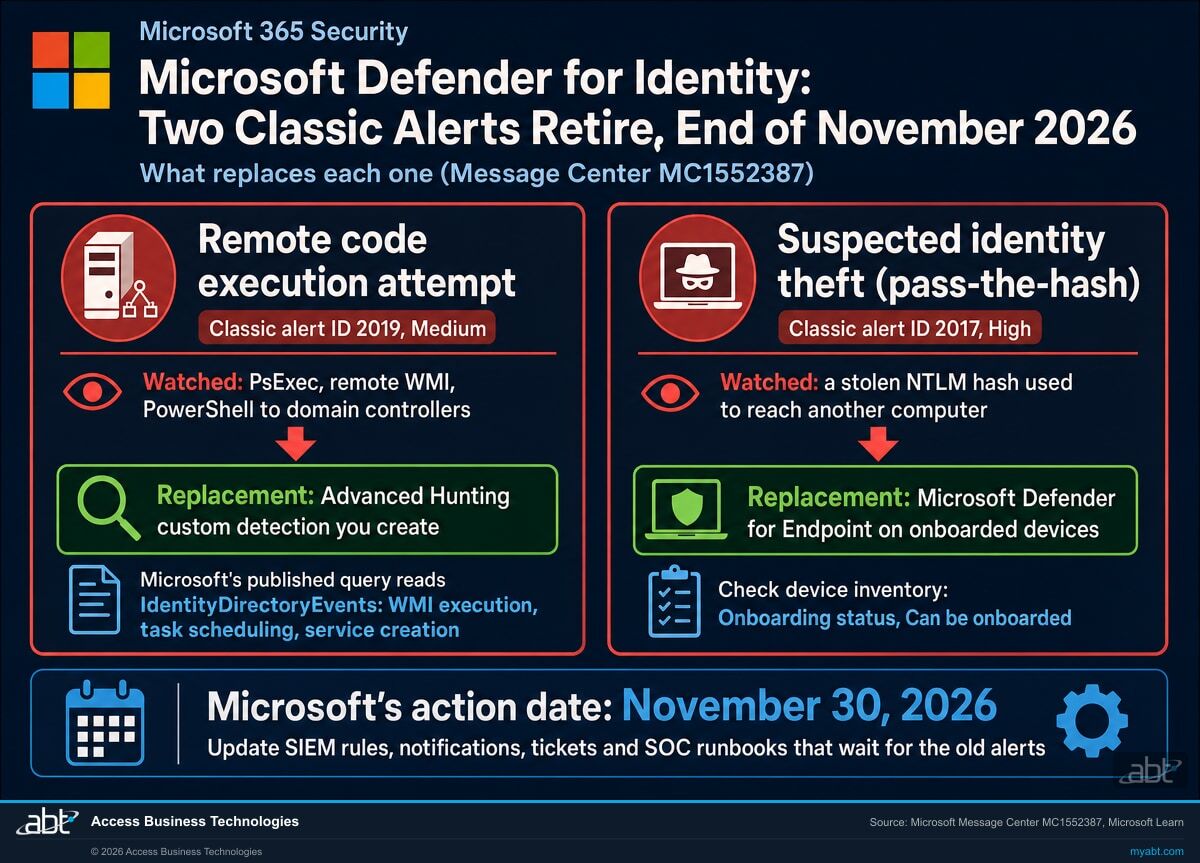
Microsoft Defender for Identity is retiring two of its classic alerts: Remote code execution attempt, which watched for remote commands such as PsExec, remote WMI and PowerShell connections against domain controllers and AD FS or AD CS servers, and Suspected identity theft (pass-the-hash). Microsoft announced the change on November 13, 2026, in Message Center post MC1552387, with rollout in late November. Each alert has a different replacement, and both are work your team does. Remote code execution coverage comes back as an Advanced Hunting custom detection that you create from a query Microsoft published. Pass-the-hash coverage moves to Microsoft Defender for Endpoint, on the devices where it is onboarded. For a credit union, bank, or mortgage company with on-premises Active Directory, that leaves about two weeks to build one rule, check one device inventory, and update everything that was listening for the old alerts.
- Microsoft's replacement query for remote code execution is published on GitHub and reads the IdentityDirectoryEvents table your sensors already fill
- Pass-the-hash detection follows Defender for Endpoint, so the device inventory's onboarding status becomes your coverage map
- SIEM rules, ticket routing and an outside SOC's runbook that key on the two alert names or IDs need the new sources added
The change
Which Defender for Identity alerts retire in November 2026?
Microsoft announced the retirement in Message Center post MC1552387 on November 13, 2026, and documents both alerts on its Defender for Identity classic alerts page. Here is what the notice says, and what replaces each alert.
The change in brief
- What
- Two classic Defender for Identity alerts retire: Remote code execution attempt, severity Medium, external ID 2019, and Suspected identity theft (pass-the-hash), severity High, external ID 2017.
- When
- Rollout begins in late November 2026 and is expected to complete by late November, in the Worldwide, GCC, GCC High and DoD clouds. The notice carries an action date of November 30, 2026, a Monday.
- Who
- Microsoft names security teams that use the classic alert workflows for remote code execution and pass-the-hash scenarios, across Defender for Identity and Defender XDR.
- RCE
- Monitor it with an Advanced Hunting custom detection rule built from the query Microsoft published.
- Pass-the-hash
- Monitor it through Microsoft Defender for Endpoint on onboarded devices, and confirm that coverage.
The replacement query is published
Microsoft adds a remote code execution hunting query to its Defender for Identity repository on GitHub, for you to test, adapt and save as a custom detection.
Microsoft announces the retirement
Message Center post MC1552387 names both alerts, the end of November timing, and the two replacement paths.
The alerts leave the product
When rollout completes, the two classic alerts leave Defender for Identity, as the notice describes.
The action date
Microsoft asks for the custom detection and the Defender for Endpoint coverage check before the end of November.
"RCE activity can continue to be monitored with a custom detection rule in Advanced Hunting. Pass-the-hash monitoring should continue through Microsoft Defender for Endpoint on onboarded devices."
Microsoft 365 Message Center, MC1552387, November 13, 2026These two alerts sit at the point in an attack where an intruder stops being one compromised account and starts moving. Microsoft's classic alert reference describes Remote code execution attempt as the alert that fires when someone with stolen administrative credentials, or a working exploit, runs remote commands on a domain controller or an AD FS or AD CS server, and it lists PsExec, remote WMI and PowerShell connections as what Defender for Identity detected. Suspected identity theft (pass-the-hash) fires when an attacker takes a user's NTLM hash from one computer and uses it to reach another. Both belong to the lateral movement stage that comes before most ransomware detonations and large data thefts, which is why they rank among the alerts a SOC least wants to lose.
Microsoft gives its reason in one line: the change "aligns detection workflows with current Microsoft Defender XDR and endpoint monitoring capabilities." In practice, the remote code execution logic moves into a query your team owns and can tune, and pass-the-hash detection moves to the endpoint sensor. The detection keeps working after November when the custom detection is saved and tested, and when the computers that matter carry the Defender for Endpoint sensor. The rest of this page is how to get both done before November 30.
Side by side
What replaces the remote code execution and pass-the-hash alerts?
The two alerts take different roads. We put Microsoft's notice, its classic alert reference and its published query side by side so each row shows what changes and who does the work.
| Item | Remote code execution attempt | Suspected identity theft (pass-the-hash) |
|---|---|---|
| External ID and severity | 2019, Medium | 2017, High |
| What it watched for | Remote commands on a domain controller or an AD FS or AD CS server; Microsoft lists PsExec, remote WMI and PowerShell connections | An NTLM hash stolen from one computer and used to reach another (MITRE ATT&CK T1550.002) |
| After rollout | Both classic alerts retire from Defender for Identity when rollout completes | |
| Replacement | An Advanced Hunting custom detection rule built from Microsoft's published query | Microsoft Defender for Endpoint on onboarded devices |
| Data it reads | IdentityDirectoryEvents: WMI execution, task scheduling and service creation, compared against a seven-day baseline | The Defender for Endpoint sensor on each onboarded device |
| Who sets it up | Your team: create, test and own the rule | Your team: confirm which devices are onboarded and onboard the rest |
| What to check | That the rule runs, returns results in your tenant, and reaches the people the old alert reached | That every server and workstation an administrator signs in to is onboarded |
Read the query against the old alert before you rely on it
The classic alert reference names three things Defender for Identity detected for remote code execution: PsExec, remote WMI and PowerShell connections. Microsoft's published query watches three activity types in IdentityDirectoryEvents: WMI execution, task scheduling and service creation. Tools in the PsExec family usually work by creating a service, so service creation is where that activity shows up. PowerShell remoting is the one the query leaves unnamed. If remote PowerShell sessions to your domain controllers matter to you, decide where that coverage now comes from, such as Defender for Endpoint on the domain controllers, and write the decision down. This is our reading of Microsoft's two sources, and step 5 below covers it.
See what was listening for these two alerts, build the replacement detection, and find the devices outside Defender for Endpoint before November 30
ABT works with your team to list every rule, report and provider that keys on the two retiring alerts, test Microsoft's replacement query in your tenant, and check Defender for Endpoint onboarding on the servers and workstations administrators use, as part of a free security assessment.
Request the free assessmentThe work
How do you replace the two Defender for Identity alerts before November 30, 2026?
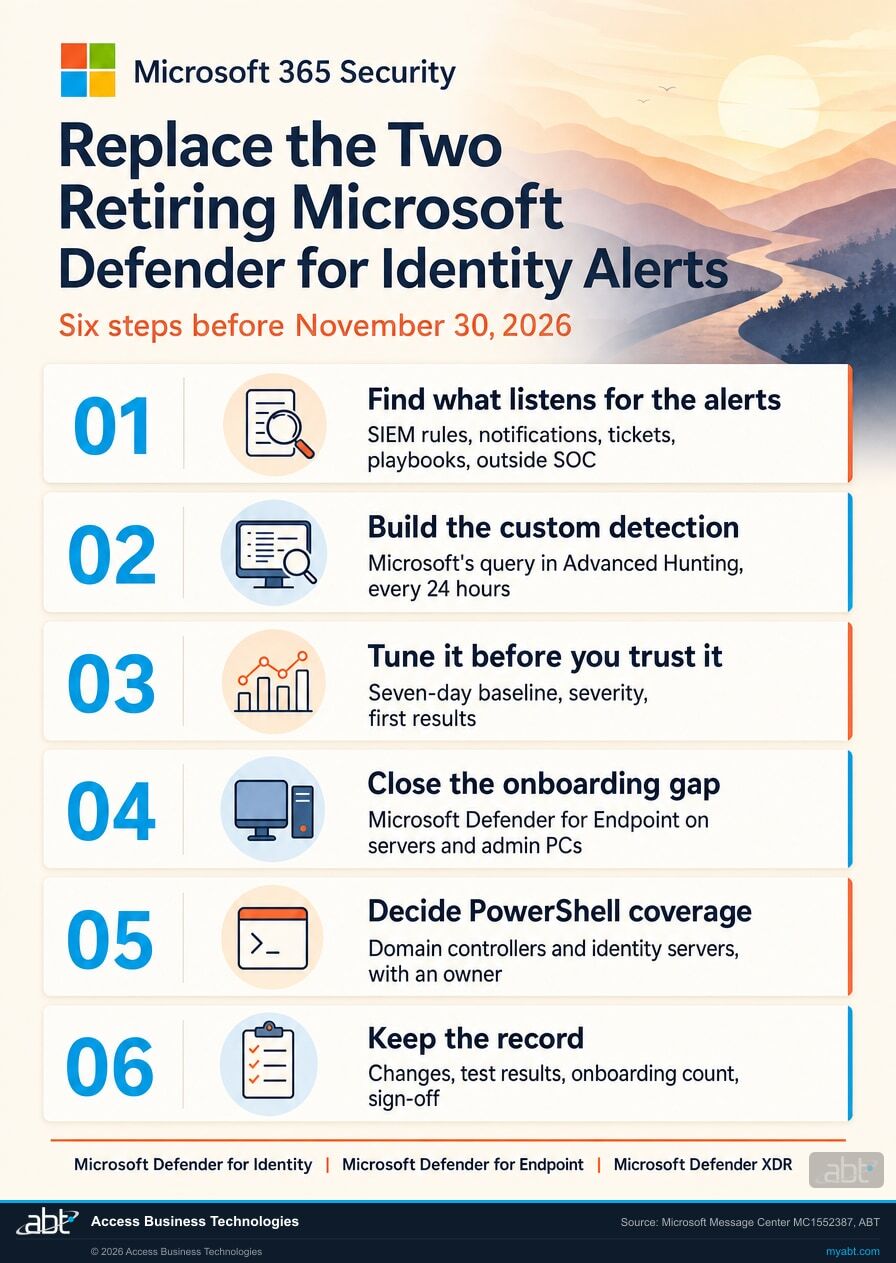
Six steps, built on Microsoft's recommended actions. Step 1 finds who depends on the old alerts. Steps 2 and 3 build and tune the remote code execution rule. Step 4 is pass-the-hash coverage, step 5 is the gap between the old alert and the new query, and step 6 is the record.
Find everything that listens for the two alerts
Start with your own history. This query shows whether either alert has fired in your tenant over the past 30 days, and which product raised it:
AlertInfo
| where Timestamp > ago(30d)
| where Title has "Remote code execution attempt" or Title has "pass-the-hash"
| summarize Alerts = count(), LastSeen = max(Timestamp) by Title, ServiceSource
Then list every place that acts on those alerts by name or by external ID 2019 or 2017: SIEM correlation rules, ticket routing, alert email notification rules, automation playbooks, monthly security reports, and the runbook of any outside SOC or managed security provider. Ask each provider in writing how their process changes after November, and put each answer on one sheet.
Build the remote code execution custom detection from Microsoft's query
Microsoft published the replacement as RemoteCodeExecution.md in its Defender for Identity repository on GitHub. Before you paste it in, confirm your sensors are recording the three activity types it reads:
IdentityDirectoryEvents
| where Timestamp > ago(7d)
| where ActionType in ("Task scheduling", "Service creation", "WMI execution")
| summarize Events = count() by ActionType
Then run Microsoft's query in Advanced hunting, review the results, and select Create detection rule. The query looks at the last day of activity, so the every 24 hours frequency matches it; Microsoft's guidance is to match a query's time filters to the rule's lookback. The query uses joins, which rules out the Continuous (NRT) frequency. The person who creates the rule needs manage permissions for the Defender for Identity data it reads.
Tune it before you trust it
The query compares each event with the previous seven days and holds back activity that the same account or the same source computer performed on three or more of those days. That keeps routine administration quiet, and it can also quiet activity an attacker repeats from the same account or computer across several days, so read the results and adjust the threshold to fit how your administrators work. Give the rule a clear name, a severity your team will act on, and the MITRE techniques Microsoft lists. Microsoft recommends that a custom detection return Timestamp and ReportId columns; the published query returns ReportId with FirstSeen and LastSeen, so add a Timestamp column before you save the rule, for example one set from LastSeen, and check that the alert times look right on the first matches. The query's own filters cover the last day against the seven days before it, so test it in Advanced hunting on several recent days, including one with known administrative work, before you save it as a rule.
Close the pass-the-hash gap with Defender for Endpoint onboarding
Microsoft's word is that pass-the-hash monitoring "should continue through Microsoft Defender for Endpoint on onboarded devices." That makes onboarding status your coverage map. In the device inventory, filter Onboarding status to Can be onboarded to see the devices Defender for Endpoint has discovered on your network that do not yet carry its sensor. Start with the computers where an administrator's hash would do the most damage: domain controllers, file and application servers, jump hosts and the workstations IT staff use. Onboard them, or record why one cannot be, before the end of November.
Decide how you cover what the new query leaves unnamed
The old alert listed PowerShell connections among the remote activity it detected. The published query watches WMI execution, task scheduling and service creation. For most institutions the clean answer is Defender for Endpoint on every domain controller and identity server, so remote PowerShell activity on those machines lands in the endpoint data your team already watches. Whatever you choose, write it into the sheet from step 1 with an owner and a date, so the decision is visible to the next person who reads your detection list.
Keep the record
Record what changed: the rules and reports you updated, the custom detection's name and its first test results, the onboarding count before and after, the decision from step 5, each provider's written answer, the date and who signed off. Then confirm licensing in the same note. Microsoft's prerequisites page lists the eligible plans, among them Microsoft 365 E5, Enterprise Mobility + Security E5, the Microsoft Defender Suite add-on, the Microsoft 365 F5 security plans and a standalone Defender for Identity license; check your plan against that page, and confirm that each server you onboard is licensed for Defender for Endpoint. A rule that never fires reads the same as a quiet month, so the first test result belongs in the record too.
Where to look
What usually depends on these two alerts?
An alert reaches people through more than the Defender portal. Each card is a place a rule or a habit can wait for an alert that will stop arriving.
SIEM correlation rules
Rules that raise a case when a pass-the-hash alert follows a risky sign-in. They need the custom detection's alert title and the Defender for Endpoint alerts added.
Alert email notifications
Notification rules that send identity alerts to an on-call address or a shared mailbox. Check that the new custom detection's alerts reach the same people.
Ticket routing
Help desk or ITSM rules that open a ticket by alert name or external ID. Map 2019 and 2017 to their replacements.
An outside SOC or provider
A managed security provider's runbook may name the classic alerts. Ask for their updated plan in writing and keep it with your record.
Automation playbooks
Playbooks that disable an account or isolate a device when a pass-the-hash alert fires. Point the trigger at the alerts that replace it.
Reports and dashboards
A monthly board or committee report that counts identity alerts by name. Add the new sources and note the change in the report, so readers know where the counts come from after November.
For financial institutions
Why does this matter at a credit union, bank, or mortgage company?
Because these alerts watch the step between one stolen password and a network-wide incident, and a detection that stops arriving looks exactly like a calm month.
Your team keeps its early warning. When an attacker who has taken over a loan processor's account starts running commands on a domain controller, or reuses a captured hash to reach the server that holds member or borrower files, these are the alerts that tell your team while there is still time to contain it. Building the replacement detection and onboarding the right servers keeps that warning in place after November, and the custom detection gives your team a rule it can read, tune and extend.
The change happens on Microsoft's side, and the response happens on yours. A rule in your SIEM or a playbook that waits for the old alert name keeps waiting after rollout. Step 1's inventory is how you know every consumer has been moved to the new sources. Hashes are also why NTLM hardening matters; our page on Windows NTLM signing enforcement covers the related change on the Windows side.
A record you can show. Examiners and cyber insurers ask how you detect lateral movement and how you manage changes to your security tools. A dated sheet of the consumers you updated, the custom detection and its test results, the onboarding count and the coverage decision is strong supporting evidence for both answers, written before anyone asked. Our page on the AADSignInEventsBeta retirement covers a similar Defender XDR change on the sign-in hunting side.
Some Microsoft changes ask nothing of you. This one asks two things.
Our Short explains what a remote code execution flaw is, and why the Copilot flaw it covers needed no action from customers: Microsoft fixed it inside its own service.
The Defender for Identity change is the other kind. Microsoft retires the alerts in its service, and the replacement detection, the onboarding check and the updated runbooks all happen in your tenant. Sorting Message Center posts into those two kinds each week is how a change like this reaches your calendar with time to act.
How ABT helps
A free security assessment
ABT is a Tier 1 Microsoft Cloud Solution Provider serving more than 750 financial institutions. It manages Microsoft 365 tenants and hosts Azure environments for credit unions, banks, and mortgage companies. Identity detection is where many of those reviews begin, and this assessment covers the alerts and devices your team relies on to see lateral movement.
With your team, we plan the replacement for the two retiring alerts, test the new detection in your tenant, and map Defender for Endpoint coverage before November 30
The assessment is free and ends with written findings you keep. We work through it with an administrator on your team, and your team decides what changes and who makes each change.
- The alert history. Whether either alert has fired in your tenant, and what happened next.
- The consumer list. SIEM rules, notifications, ticket routing, playbooks, reports and providers that key on the old alerts.
- The custom detection. Microsoft's query run in your tenant, with tuning notes for the baseline and the alert details.
- The coverage map. Defender for Endpoint onboarding on domain controllers, servers and administrator workstations.
- The PowerShell decision. Where remote PowerShell activity on identity servers is now watched, with an owner.
- The record. A dated summary for your change log and information security program, including license coverage.
ABT also operates M365 Guardian, its managed security service for credit unions, banks, and mortgage companies. Learn about M365 Guardian
Related reading
If this opened a bigger question
A change to identity alerts tends to raise the questions around it: what Defender for Identity protects, how lateral movement turns into ransomware, and what your incident response plan says happens after an alert.
Microsoft Defender for Identity: Protect the Domain Controllers Behind Every Login
What Defender for Identity watches on your domain controllers, and how it fits a financial institution's security program.
Read the article
Ransomware Protection for Financial Institutions
How banks, credit unions, and mortgage companies stop ransomware with layered Microsoft 365 controls, immutable Azure backups, and round-the-clock detection.
Read the article
Microsoft 365 Incident Response Plan for Financial Institutions
The seven elements of a written incident response plan, and how Microsoft 365 runs it from the first alert.
Read the articleAnswered
The Defender for Identity alert retirement, answered
Verify it yourself
Where the facts on this page come from
Every Microsoft date, alert name, ID, query detail, license and quotation above comes from the sources listed here.
- Microsoft 365 Message Center, MC1552387, "Retired: Microsoft Defender for Identity classic alerts (Remote code execution attempt and pass-the-hash)," published November 13, 2026, read from the tenant over Microsoft Graph; admins can open it in the Microsoft 365 admin center. Source for the two alerts, the late November rollout in the Worldwide, GCC, GCC High and DoD clouds, the November 30, 2026 action date, the replacement paths, Microsoft's stated reason, and the recommended actions.
- Microsoft Learn, Microsoft Defender for Identity classic security alerts. Source for each alert's description, severity and external ID (2019 and 2017), the PsExec, remote WMI and PowerShell detail, and the MITRE technique.
- Microsoft, RemoteCodeExecution.md in the Microsoft Defender for Identity repository on GitHub, added November 5, 2026. Source for the query's table, its three activity types, its one-day window, seven-day baseline and three-day threshold, its use of joins, and its output columns.
- Microsoft Learn, Create and manage custom detection rules. Source for the rule frequencies, matching time filters to the lookback, the Continuous (NRT) requirements, the recommended Timestamp and ReportId columns, and the permissions for Identity tables.
- Microsoft Learn, IdentityDirectoryEvents and AlertInfo table references. Source for the tables and columns in the two queries on this page.
- Microsoft Learn, Device inventory. Source for the Onboarding status filter and the Can be onboarded value.
- Microsoft Learn, Defender for Identity sensor prerequisites. Source for the licenses that include Defender for Identity.
- The comparison of the classic alert with the published query, the list of places alert consumers live, and the order of the steps are ABT's reading and recommendations; everything else on this list is Microsoft's own.
Two Defender for Identity alerts retire at the end of November 2026.
Build the replacement detection and confirm your Defender for Endpoint coverage first.
The work starts with what was listening for the old alerts. When it is done, you know which rules and providers moved to the new sources, how Microsoft's replacement query ran in your tenant, which servers carry Defender for Endpoint, and who owns the PowerShell decision.
Tell us a little about your environment and we will come back with what we would check first.
What should we look at? Optional.
Encrypted. Private.
Thank you. That is with us.
An ABT specialist will be in touch shortly. If a particular rule, server or provider is what you are thinking about, say so in your reply and we will start there.
