


Microsoft Defender for Cloud Apps · App Governance roles
Microsoft expects your staff's connected apps to work the same. The admin who reviews them may have lost access on September 26. Put App Governance in the right hands.
Staff connect apps to Microsoft 365 to get work done: e-signature tools, scheduling assistants, CRM add-ins, AI connectors. App Governance in Microsoft Defender for Cloud Apps is where your security team sees what each of those apps can reach. On September 26, 2026, Microsoft stopped letting administrators who hold only the Cloud Application Administrator role open App Governance, wherever Unified RBAC is on for Defender for Cloud Apps. Three more roles change in October.
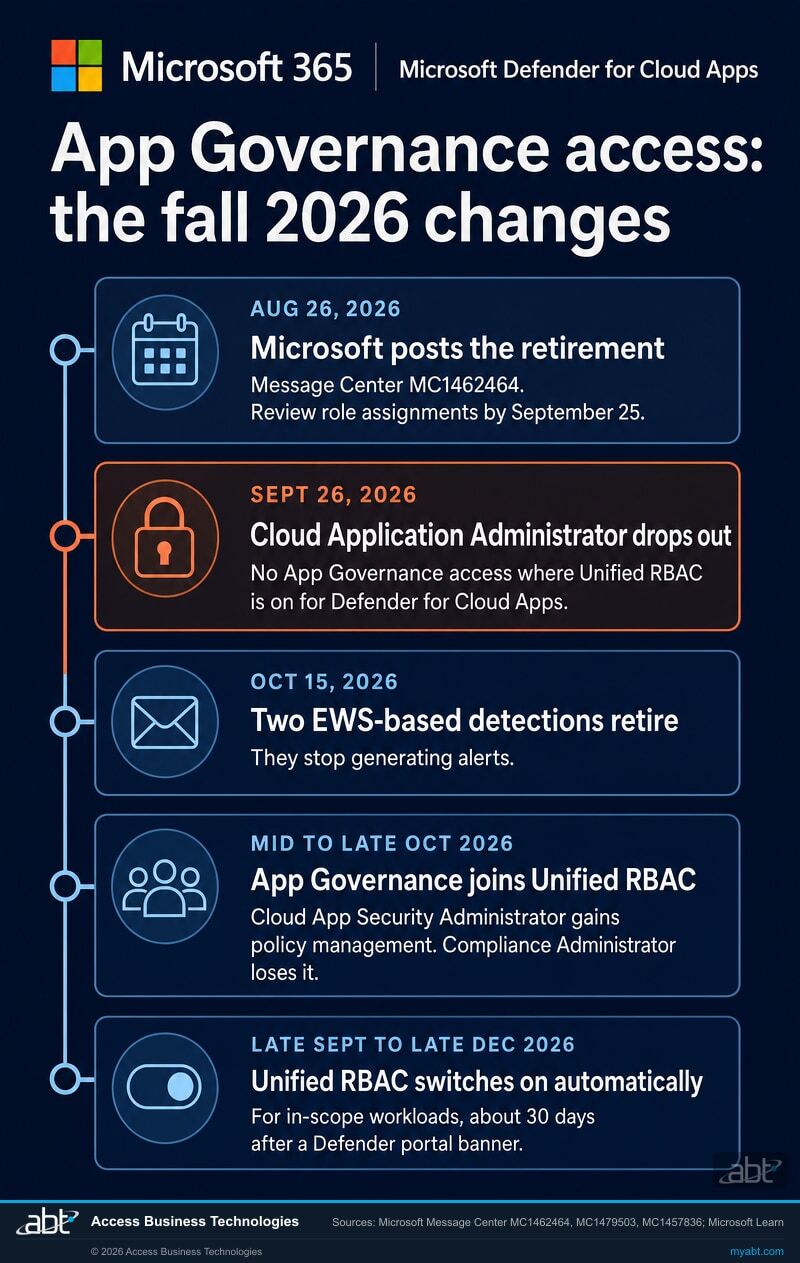
- September 26, 2026: Cloud Application Administrator on its own stopped opening App Governance where Unified RBAC is enabled for Defender for Cloud Apps, per Microsoft 365 Message Center post MC1462464
- Mid to late October 2026: Cloud App Security Administrator gains App Governance policy management, and Compliance Administrator gives it up, per MC1479503
- Late September to late December 2026: Microsoft switches in-scope Defender workloads to Unified RBAC automatically, about 30 days after a banner in the Defender portal, per MC1457836
The change
What did Microsoft change about App Governance access on September 26?
Administrators who held only the Cloud Application Administrator role lost App Governance access on September 26, 2026, wherever Unified RBAC is enabled for Defender for Cloud Apps. Administrators with a supported role kept their access, and Microsoft expects the people using connected apps to see the same experience.
Microsoft posts the retirement
Message Center post MC1462464 announces it as a major change and asks administrators to review role assignments by September 25, 2026.
The enforcement date
Administrators assigned only the Cloud Application Administrator role lose App Governance access when Unified RBAC is enabled for Defender for Cloud Apps.
Two EWS-based detections retire
Microsoft Learn says Defender for Cloud Apps retires the Exchange Web Services-based App Governance detections marked Retiring soon, and they stop generating alerts after that date.
App Governance joins Unified RBAC
MC1479503 changes what three Microsoft Entra roles can do in App Governance and gives custom Unified RBAC roles access.
"Administrators assigned only the Cloud Application Administrator role will no longer be able to access App Governance when URBAC is enabled for Defender for Cloud Apps."
Microsoft 365 Message Center post MC1462464, Microsoft Defender for Cloud Apps: App Governance support for the Cloud Application Administrator role is being retired, published August 26, 2026Microsoft's stated reason is alignment: the change brings App Governance access in line with the standard supported role set used across Microsoft Defender services. The post names seven supported roles: Security Administrator, Compliance Administrator, Compliance Data Administrator, Security Operator, Security Reader, Application Administrator, and Global Reader. It adds a recommendation worth keeping in front of whoever assigns roles: "We recommend assigning the role with the minimum permissions required for each administrator's responsibilities."
The condition in that sentence carries the weight. The change applies when Unified role-based access control, which Microsoft abbreviates URBAC, is enabled for Defender for Cloud Apps. Microsoft Learn describes the model App Governance uses today plainly: "Virtually all app governance experiences are controlled by Microsoft Entra ID roles only," and the one exception is the OAuthAppInfo table in advanced hunting.
App Governance itself is the part of Defender for Cloud Apps built for OAuth apps. Microsoft describes it as security and policy management for OAuth-enabled apps registered on Microsoft Entra ID, Google, and Salesforce, showing which user-installed apps have access to data in Microsoft 365, what permissions they hold, and which users granted them. Whoever loses access to App Governance loses that view.
Your tenant
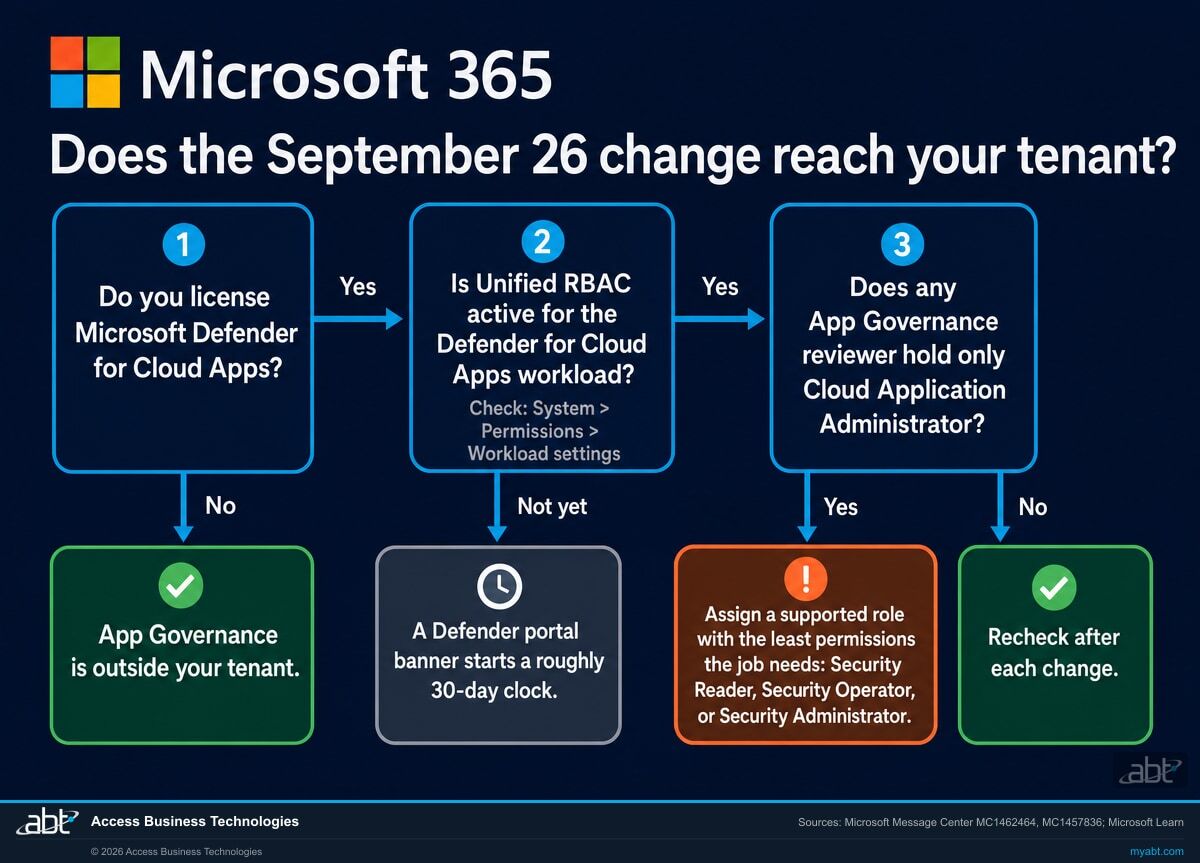
Does the September 26 change reach your tenant?
It reaches you where two things are true: your institution licenses Defender for Cloud Apps, and Unified RBAC is on for the Defender for Cloud Apps workload. The second one can change on Microsoft's schedule.
You license Defender for Cloud Apps
Microsoft Learn says App Governance is available to organizations with a valid Defender for Cloud Apps license. That license is the starting point for everything on this page.
Unified RBAC is on for Defender for Cloud Apps
In the Microsoft Defender portal, select System, then Permissions, then Workload settings. Microsoft Learn says a workload that isn't active shows Not Active.
New customers start with it on
Microsoft Learn says that starting in August 2026, Unified RBAC is enabled automatically for new Defender for Cloud Apps customers, with no manual workload activation required.
Everyone else, on Microsoft's schedule
MC1457836 says Microsoft auto-enables Defender Unified RBAC for in-scope workloads from late September to late December 2026, about 30 days after a banner appears in the Defender portal. The banner names the workloads.
"Unified RBAC will be activated automatically for the in-scope workload(s) on your tenant following a notification period that begins when you receive the in-portal notification, and your roles are imported into Unified RBAC."
Microsoft 365 Message Center post MC1457836, Tenant will be auto-enabled into Microsoft Defender Unified RBAC, published August 19, 2026Microsoft lays out the sequence in MC1457836. A notification banner appears in the Microsoft Defender portal naming the workloads. Your existing roles are imported into Unified RBAC, with no operational effect until activation. Activation follows approximately 30 days after the notification date, and Microsoft says you can review and adjust the imported roles in the meantime. After activation, a self-service opt-out in the workload settings reverts to your previous permissions model.
Microsoft Entra directory roles stay as they are. MC1457836 says Global Administrator, Security Administrator, Security Operator, and Security Reader continue to grant access to the Microsoft Defender portal as they do today. What changes for App Governance is narrower: from the day the Defender for Cloud Apps workload is active in Unified RBAC, the September 26 rule applies to your tenant, so any reviewer who holds only Cloud Application Administrator needs a supported role by then. The roughly 30 days between the banner and activation is the time to make that change.
One more detail for institutions that use scoped Defender for Cloud Apps roles. Microsoft Learn says that once Defender for Cloud Apps is activated in Unified RBAC, four built-in scoped roles stop being supported: App/instance admin, User group admin, Cloud Discovery global admin, and Cloud Discovery report admin. Microsoft Entra ID roles continue to function as normal.
The roles, side by side
Which Microsoft Entra roles can open App Governance now?
Start with the role each reviewer holds. Microsoft Learn documents what each role can do in App Governance, and two Message Center posts change parts of that this fall.
| Role | In App Governance today (Microsoft Learn) | This fall's change | Entra privileged label |
|---|---|---|---|
| Cloud Application Administrator | Absent from Learn's capability table | From September 26, 2026: no App Governance access when Unified RBAC is enabled for Defender for Cloud Apps (MC1462464) | Yes |
| Security Reader | Read the dashboard, apps, policies, alerts, settings, and remediation | None announced | Yes |
| Global Reader | Read the dashboard, apps, policies, alerts, and settings | None announced | Yes |
| Security Operator | Every capability except updating remediation, including creating, updating, and deleting policies | None announced | Yes |
| Security Administrator | Every capability except updating remediation | None announced | Yes |
| Compliance Administrator | Every capability except updating remediation | Mid to late October 2026: loses App Governance policy management and the setting that enables and disables App Governance (MC1479503) | No |
| Compliance Data Administrator | Every capability except updating remediation | Mid to late October 2026: loses the setting that enables and disables App Governance (MC1479503) | No |
| Cloud App Security Administrator | Can turn App Governance on; Learn says the role doesn't grant access to view or manage it | Mid to late October 2026: gains permission to view and manage App Governance policies (MC1479503) | No |
| Application Administrator | Absent from Learn's capability table | Named as a supported role in MC1462464 | Yes |
| Global Administrator | Every capability in the table, including updating remediation | None announced | Yes |
| Custom Defender XDR Unified RBAC roles for Defender for Cloud Apps | App Governance data in the OAuthAppInfo advanced hunting table only | Mid to late October 2026: access to App Governance features (MC1479503) | Not applicable |
Application Administrator appears in one Microsoft source and is absent from the other.
MC1462464 names Application Administrator as a supported role. Microsoft Learn's App Governance capability table, in its August 11, 2026 revision, lists seven roles and Application Administrator is absent from it. If you choose it, sign in as that reviewer and confirm App Governance opens before you rely on it.
Weigh what else it grants, too. Microsoft Entra describes Application Administrator as able to "create and manage all aspects of app registrations and enterprise apps," and labels it privileged. For someone whose job is reading app risk and alerts, Security Reader fits the job more closely.
Cloud App Security Administrator can switch App Governance on today, and can see its policies from October.
Microsoft Learn says the Cloud App Security Admin role "grants permissions turn on app governance" and "doesn't grant access to view or manage app governance capabilities." MC1479503 changes that in mid to late October: the role gains permission to view and manage App Governance policies. Its Microsoft Entra description is scoped to one product, "Manage all aspects of the Defender for Cloud Apps product," and Entra leaves it unlabeled as privileged.
Find out who can open App Governance in your tenant today
ABT lists the roles that reach App Governance, the Unified RBAC status of your Defender workloads, and the OAuth apps your staff have connected, as part of a free security assessment.
Request the free assessmentLeast privilege
Which role should each App Governance reviewer hold?
Match the role to the job, as Microsoft recommends. The roles named first on each card reach App Governance today, and they differ in how much else each one can change. Cloud App Security Administrator becomes an option with the mid to late October change.
Reads app risk and alerts
A compliance officer, auditor, or reviewer who signs off on connected apps.
- Security Reader. Read-only in App Governance: it reads the dashboard, apps, policies, alerts, settings, and remediation.
- Global Reader also reads App Governance, and Microsoft describes it as able to read everything a Global Administrator can. Keep it for people who already need that breadth.
Triages alerts and maintains policies
A security analyst who works App Governance alerts and tunes its policies.
- Security Operator. Every App Governance capability except updating remediation, including creating, updating, and deleting policies.
- After the mid to late October change reaches your tenant, Cloud App Security Administrator gains permission to view and manage App Governance policies, which suits an administrator dedicated to Defender for Cloud Apps.
Owns the App Governance settings
The administrator who turns App Governance on and keeps its configuration.
- Security Administrator. Every App Governance capability except updating remediation, plus the ability to activate Defender workloads in Unified RBAC.
- Compliance Administrator handles this today and gives up policy management and the enable and disable setting in mid to late October. Plan another role for that work before then.
Keeps the broad roles for emergencies
Global Administrator and the roles that manage every app in the directory.
- Global Administrator. Microsoft Learn calls it a highly privileged role that should be limited to emergency scenarios when you can't use an existing role.
- Make privileged roles eligible, then activated. Microsoft recommends Privileged Identity Management for just-in-time access; it requires a Microsoft Entra ID P2 or Microsoft Entra ID Governance license. Separately, Microsoft recommends keeping privileged role assignments in the organization to fewer than 10.
The short list
What should an administrator do now?
Seven steps. The first four settle the September 26 change, the next two prepare for October, and the last one keeps the record straight.
List everyone who holds Cloud Application Administrator
In the Microsoft Entra admin center, go to Entra ID, then Roles & admins, open Cloud Application Administrator, and select Assignments. Download assignments gives you a CSV. With a Microsoft Entra ID P2 license you see the Privileged Identity Management view, which shows eligible, active, and expired assignments, so include the eligible ones.
Find the App Governance reviewers on that list
Compare the list with the people your procedures name as reviewers of OAuth apps and consent requests. A reviewer who holds Cloud Application Administrator and nothing from the supported list is the person the September 26 change reaches, once Unified RBAC is on for Defender for Cloud Apps.
Check the Unified RBAC status of Defender for Cloud Apps
In the Microsoft Defender portal, select System, then Permissions, then Workload settings, and note the status of each workload. If Defender for Cloud Apps is active, the September 26 rule applies to you now. If it isn't, watch the Permissions page for the banner that starts Microsoft's roughly 30-day activation clock, and record the date it appears.
Assign each reviewer the least-privileged supported role, then test it
Use the role cards above: Security Reader for people who read app risk and alerts, Security Operator for analysts who maintain policies, Security Administrator for the owner of the settings. Then have each reviewer sign in with their own account, open App Governance in the Microsoft Defender portal, and do the task their job needs: read an app's permissions, update a policy, or change a setting. Record the result and the date. Where you have Privileged Identity Management, make the role eligible and have the reviewer activate it for each review.
Prepare for October's role remap
MC1479503 asks administrators to review users who reach App Governance through Compliance Administrator, Compliance Data Administrator, or Cloud App Security Administrator, and to review custom Defender XDR Unified RBAC roles for Defender for Cloud Apps. For anyone who needs App Governance before the change reaches your tenant, use a supported Microsoft Entra role from the table above. Custom Unified RBAC roles for Defender for Cloud Apps gain App Governance access with the mid to late October rollout, so assign one for App Governance work only after that rollout reaches you. Follow least-privilege principles either way, and update your internal role guidance to match.
Know which detections stop on October 15
Microsoft Learn names two Exchange Web Services-based App Governance detections marked Retiring soon: Suspicious OAuth app email activity through EWS API, and App with EWS application permissions accessing numerous emails. After October 15, 2026 they stop generating alerts. The same article lists Microsoft Graph-based detections, such as Suspicious OAuth app email activity through Graph API. If your alert runbooks name the EWS detections, update them. Our page on Microsoft's EWS allow list covers the wider Exchange Web Services retirement.
Record who holds what, and recheck after each change
Write down each App Governance reviewer, the role they hold and why, the Unified RBAC status of each Defender workload, and the date you checked. Recheck after October 15, after the October remap reaches your tenant, and on the day Unified RBAC activates for Defender for Cloud Apps. Microsoft recommends recurring access reviews for privileged roles; our page on the September Conditional Access custom controls change is a second identity setting worth recording the same way.
Read the sources in two minutes
Open Message Center posts MC1462464, MC1479503, and MC1457836 in your Microsoft 365 admin center. Then read Microsoft Learn's Turn on app governance in Microsoft Defender for Cloud Apps for the role table, and Activate Microsoft Defender unified RBAC for the workload settings.
For credit unions, banks, and mortgage companies
Why does App Governance matter at a financial institution?
Connected apps are how staff get more done in Microsoft 365, and each connection is a grant of access someone should be able to see.
Start with the upside. A loan officer sends documents for e-signature from Outlook, a scheduling assistant books a branch manager's meetings, a CRM add-in reads a shared mailbox. Each of those runs on an OAuth app with permissions to institution data. App Governance is what lets a security team say yes to the useful ones with evidence: which apps hold which permissions, which users granted them, and which ones behave oddly.
Attackers use the same mechanism. On July 13, 2026, Microsoft Threat Intelligence described campaigns in which actors impersonating IT support persuaded employees to authorize attacker-controlled connected apps in their Salesforce tenants, then ran bulk data queries "without generating traditional sign-in anomalies." Microsoft observed the activity in many tenants across industries such as retail, education, and manufacturing, and said the findings reinforce the importance of monitoring OAuth-connected applications. App Governance covers Salesforce OAuth apps as well as Microsoft Entra ID ones. Our write-up of OAuth consent phishing against financial institutions walks through the Microsoft 365 version of the same idea.
Third parties are a large share of the risk picture in general. Verizon's 2026 Data Breach Investigations Report found that breaches involving a third party now account for 48% of all breaches, with third-party involvement up 60%. Verizon counts breaches of every kind, so read the figure as context for third-party risk overall. A third-party connected app holds a standing permission, and the reviewer seat in App Governance is where someone watches it.
Governance closes the loop. A named reviewer, a least-privileged role, and a dated record that the reviewer could still open App Governance after each of this fall's changes belong in the evidence your information security program keeps. For standing admin access, our guide to Microsoft 365 E3 security add-ons covers Microsoft Entra ID P2 and the Privileged Identity Management it unlocks.
Approvals and reviews are two halves of one control
App Governance shows the apps already connected. Your Microsoft Entra consent settings decide who can approve new ones in the first place. The attack Microsoft describes starts with a persuaded employee approving an app, which is why the reviewer's view matters on the days an approval should have been questioned. Write down who can approve new apps and who reviews the ones already connected, keep both lists short, and name an owner for each, with the separation your control matrix calls for.
Why does a role's name undersell what it can do?
Because Microsoft names roles by the job and grants them by permission. The Short from our channel shows it with a different Microsoft role: Microsoft Intune's Help Desk Operator, which Microsoft's own role reference lists with permission to wipe and retire devices. A role given to tier-one support for everyday device tasks can also erase a phone.
The same reading applies here. Cloud Application Administrator sounds like an app reviewer's role, and Microsoft describes it as able to create and manage all aspects of app registrations and enterprise apps. Pick roles from the permission list, and the September 26 change becomes a chance to hand each reviewer exactly the access their review needs.
How ABT helps
A free security assessment
ABT is a Tier 1 Microsoft Cloud Solution Provider serving more than 750 financial institutions, and the App Governance role check is part of this assessment.
We show you who can open App Governance today, and what changes for them in October
The assessment is free and ends with written findings you keep. We work through your roles and settings with an administrator on your team, and your team decides what changes in the tenant and who makes each change.
- The role list, recorded. Everyone holding Cloud Application Administrator, Application Administrator, Cloud App Security Administrator, and the security and compliance roles, active and eligible.
- The Unified RBAC picture. The status of each Defender workload, and whether a portal banner has started Microsoft's roughly 30-day activation clock.
- A least-privilege plan. A proposed role for each App Governance reviewer, matched to the job they do.
- The October check. The people and custom roles the mid to late October remap reaches, with what each one needs before it arrives.
- The connected apps. The OAuth apps your staff have authorized, with the permissions each one holds.
ABT also operates M365 Guardian, its managed security service for credit unions, banks, and mortgage companies. Learn about M365 Guardian
Related reading
If this opened a bigger question
App Governance watches the apps; these three cover how apps and people get talked into access in the first place.
ConsentFix v3: OAuth Consent Phishing for Financial Institutions
How OAuth consent phishing works against Microsoft 365, and what financial institutions can check in their own tenant.
Read the guide
Should You Connect Claude or ChatGPT to Your Microsoft 365 Tenant?
A decision framework for letting outside AI tools connect to Microsoft 365 data, written for a CISO at a financial institution.
Read the guide
Microsoft Teams Helpdesk Impersonation, Stage by Stage
How attackers posing as IT support work through Microsoft Teams, from the first chat to data leaving the institution.
Read the guideAnswered
App Governance roles, answered
Verify it yourself
Where the facts on this page come from
Every Microsoft date, role, setting, and quotation above was read from the sources listed here on September 27, 2026.
- Microsoft 365 Message Center post MC1462464, Microsoft Defender for Cloud Apps: App Governance support for the Cloud Application Administrator role is being retired, plan for change, major change, published August 26, 2026. Source for the September 26, 2026 enforcement date, the Unified RBAC condition, the seven supported roles, the least-permissions recommendation, the September 25 review date, and the expectation of no user experience changes. Visible to administrators in your own Microsoft 365 admin center; a public archive copy is at mc.merill.net/message/MC1462464.
- Microsoft 365 Message Center post MC1479503, Microsoft Defender for Cloud Apps: Permission changes for select App Governance Entra roles, plan for change, published September 25, 2026. Source for Unified RBAC support for App Governance, the mid to late October 2026 rollout, the changes for Cloud App Security Administrator, Compliance Administrator, Compliance Data Administrator, and custom roles, and the recommended actions. Public archive copy: mc.merill.net/message/MC1479503.
- Microsoft 365 Message Center post MC1457836, Tenant will be auto-enabled into Microsoft Defender Unified RBAC, plan for change, major change, published August 19, 2026. Source for automatic activation from late September to late December 2026, the in-portal notification, the roughly 30-day period, role import, self-service opt-out, and Microsoft Entra directory roles continuing to grant Defender portal access. Public archive copy: mc.merill.net/message/MC1457836.
- Microsoft Learn, Turn on app governance in Microsoft Defender for Cloud Apps, updated August 11, 2026. Source for the role capability table, the Cloud App Security Admin note, the licensing requirement, and the Global Administrator guidance.
- Microsoft Learn, Map Microsoft Defender unified RBAC permissions, updated September 8, 2026, and Configure admin access in Defender for Cloud Apps. Source for App Governance being controlled by Microsoft Entra ID roles today, the OAuthAppInfo exception, and the four scoped roles that stop being supported.
- Microsoft Learn, Activate Microsoft Defender unified RBAC, updated August 11, 2026, and What's new in Microsoft Defender for Cloud Apps. Source for the System, Permissions, and Workload settings path, the Not Active status, and automatic Unified RBAC for new customers from August 2026.
- Microsoft Learn, Investigate OAuth app threat detection alerts with app governance, updated September 24, 2026. Source for the October 15, 2026 retirement of the EWS-based detections and the Graph-based detections that remain.
- Microsoft Learn, App governance in Microsoft Defender for Cloud Apps and Microsoft Defender XDR. Source for what App Governance covers.
- Microsoft Learn, Microsoft Entra built-in roles, Privileged roles and permissions in Microsoft Entra ID, Best practices for Microsoft Entra roles, and List Microsoft Entra role assignments. Source for role descriptions, the privileged label, least privilege, Privileged Identity Management licensing, the fewer-than-10 guidance, and the assignment listing steps.
- Microsoft Learn, Microsoft Intune built-in roles reference. Source for the Help Desk Operator wipe and retire permissions discussed beside the Short.
- Microsoft Security Blog, Defending SaaS-based applications against ShinyHunters OAuth abuse, July 13, 2026. Source for the connected-app consent campaigns, the industries observed, and the monitoring recommendation.
- Verizon, 2026 Data Breach Investigations Report news release, May 19, 2026. Source for breaches involving a third party accounting for 48% of all breaches and third-party involvement up 60%.
Your app reviewer's access may have changed on September 26.
Put the right role on every reviewer.
Listing the role holders and matching each reviewer to the least-privileged supported role is a short piece of work. Once it is done, you know who can open App Governance today, which role each reviewer should hold, and your role decisions are written down.
Tell us a little about your environment and we will come back with what we would check first.
What should we look at? Optional.
Encrypted. Private.
Thank you. That is with us.
An ABT specialist will be in touch shortly. If a reviewer lost App Governance access on September 26, say so in your reply and we will move it to the front.
