In This Article
- What the campaign actually does
- The part that should worry you: it trips almost nothing
- Ten months, three front doors, one objective
- Why this reaches banks, credit unions, and mortgage companies
- What actually stops it
- What to hunt for this week
- What we do about this across 750 tenants
- Frequently Asked Questions
Somebody in your institution can change where a paycheck lands. Maybe it is one person in human resources. Maybe it is a shared finance mailbox that three people read. Whoever it is, an attacker who reaches that mailbox does not need malware, does not need a vulnerability, and does not need to break your multi-factor authentication in the way you were taught to expect.
On August 6, 2026, Arctic Wolf Labs published research on a Microsoft 365 phishing campaign that does exactly this. The campaign steals a live session, reads the mail of the people who handle payroll and payments, and then quietly waits. What makes it worth your attention is not the theft itself. It is the design decision behind it.
This actor deliberately skipped nearly every behavior your business email compromise alerting was built to catch. No new multi-factor method. No new registered device. No password reset. No burst of internal phishing from the compromised account. The intruder holds a valid session and behaves, in the logs, like an employee having an ordinary week.
What the campaign actually does
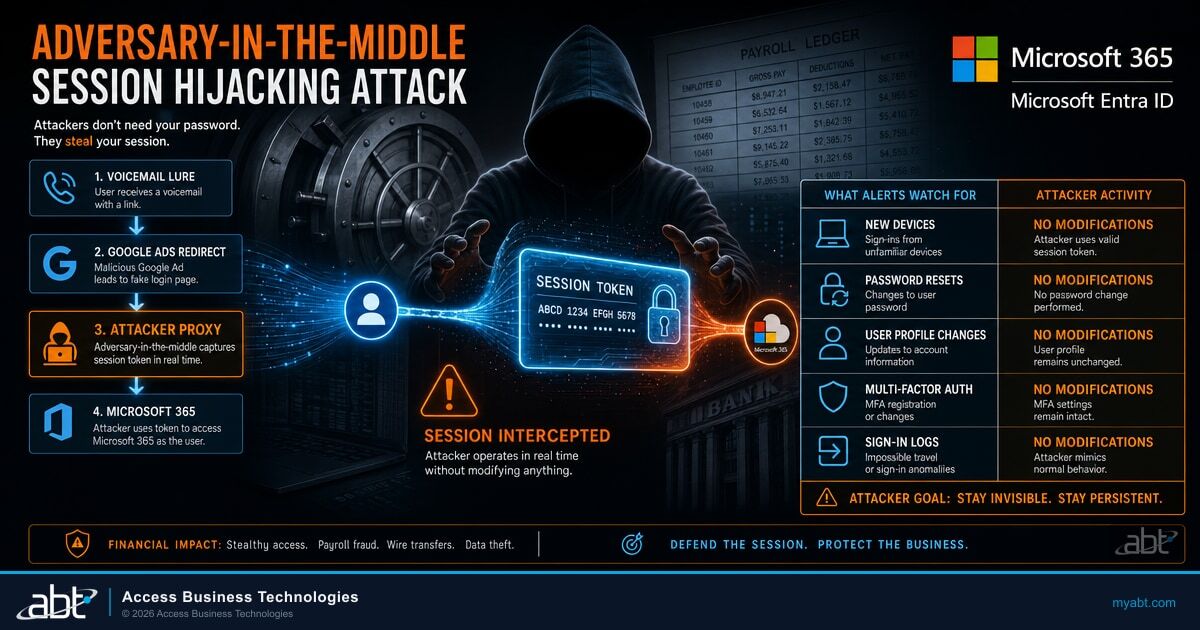
The lure is a voicemail notification carrying Microsoft branding, complete with a fabricated caller identifier, date, call duration, and reference number. It is built to look like a system message you have seen a hundred times, and to create just enough urgency that you tap it from a phone without inspecting anything.
What follows is the interesting part. The victim does not go straight to a malicious domain. They travel through a chain of legitimate, high-reputation services first.
Microsoft-branded notification with fabricated call metadata
A link redirect through a service your staff use daily
A Campaign Manager dynamic click tracker forwards the visitor onward
An intermediate page served from ordinary cloud storage
The adversary-in-the-middle page that relays the real sign-in
Every hop before the last one belongs to Google or Amazon. Reputation filtering, domain-age heuristics, and blocklists all look at that chain and see infrastructure they cannot afford to block. By the time the traffic reaches anything an analyst would call suspicious, the user is already typing.
The final page is an adversary-in-the-middle proxy. It sits between your employee and the genuine Microsoft sign-in, passes the credentials through, passes the multi-factor prompt through, and captures the session token that Microsoft issues at the end. The employee gets signed in. Everything works. Nothing looks wrong, because from their side nothing was wrong. We have written before about how adversary-in-the-middle phishing defeats standard multi-factor authentication, and the mechanism here is the same. The tradecraft after the theft is what changed.
With a stolen session in hand, the actor called Microsoft Graph, queried the tenant user directory with filters on payroll, human resources, and finance terms, and built a target list out of your own org chart. Then it read mail: payroll, invoices, payments, banking, benefits. It was not looking for secrets. It was looking for the process, the names, the approval habits, and the timing.
The part that should worry you: it trips almost nothing
Most detection for business email compromise is built around account modification. The logic is reasonable: an attacker who takes an account usually wants to keep it, so they register a device, add a multi-factor method, reset a password, or start phishing colleagues from the inside. Those actions are loud, and alerting on them works.
This actor did none of that.
| What most alerting watches for | What this campaign did |
|---|---|
| New multi-factor method registered | None |
| New device registered to the tenant | None |
| Password or credential change | None |
| Internal phishing sent from the account | None |
| Sweeping inbox rules hiding whole conversations | Selective rules only, in some cases |
| Sign-in from an implausible country | Residential proxy inside the victim country |
| Impossible travel between sign-ins | Proxy geolocation matched to victim country (our read: nothing left to fire on) |
The residential proxy detail deserves a moment. Impossible-travel and atypical-location detections work by noticing that a sign-in came from somewhere the user could not plausibly be. This actor routed sessions through residential proxy addresses selected to match the victim's own country, so the sign-ins resemble ordinary consumer broadband traffic from a normal place. The heuristic has nothing to fire on.
By avoiding these common business email compromise behaviors, the threat actors limited opportunities for early detection based on account modification or outbound email abuse.
Access was kept alive with automated token-refresh sign-ins at roughly eight-hour intervals. Read that as an observed pattern rather than a fixed schedule, because it is a research observation and not a published attacker timetable. But the shape of it is the useful part: a quiet, regular, machine-driven heartbeat that keeps a session valid without a human ever appearing to log in again.
Your alerting is built to notice an attacker changing things. This one changed almost nothing, and that was the point.
Researchers did note that the tradecraft is not invisible. Sign-in telemetry carried anomalous properties, including browser and operating system combinations that do not occur naturally on a real device. Those artifacts are detectable. They are simply not what most institutions are currently looking at.

Ten months, three front doors, one objective
This is not a new idea, and that is precisely why it deserves a place on your roadmap rather than a place on your reading list. Microsoft has documented payroll-diversion activity twice in the past ten months under two separate actor designations, and the pattern across all three data points is consistent in a way that should inform how you plan.
Microsoft publishes research on Storm-2657, a financially motivated actor it describes as conducting payroll pirate attacks against United States universities. Since March 2025 Microsoft observed 11 successfully compromised accounts at three universities, used to send phishing emails to nearly 6,000 email accounts across 25 universities. The route ran from adversary-in-the-middle phishing into Exchange Online, then into human resources software, where salary payment settings were changed. Inbox rules deleted the warning notifications that would have tipped off the employee.
Microsoft publishes research on Storm-2755, a different actor running the same play against Canadian employees. The front door changed entirely: instead of phishing email, the actor used search engine poisoning and malicious advertising to place a fake Microsoft 365 sign-in page at the top of results for ordinary sign-in searches. Microsoft notes the actor relied exclusively on geographic targeting rather than picking an industry. Inbox rules were keyed to the phrases direct deposit and bank, and banking details were changed in human resources software to redirect a payroll payment.
Arctic Wolf Labs reports a campaign that shares significant technical and behavioral overlap with the Payroll Pirates cluster Microsoft tracks as Storm-2755. The front door changed again, this time to a voicemail lure routed through Google and Amazon infrastructure. Scale changed too: hundreds of organizations targeted in a single month across the United States, Canada, and Europe. And this time the post-compromise behavior was tuned to avoid detection.
Two things are worth separating carefully here, because they are easy to blur. Storm-2657 and Storm-2755 are two distinct actor designations tracked by Microsoft, not two names for the same group, and the numbers from one do not describe the other. And Arctic Wolf was careful to say its campaign overlaps with the Storm-2755 cluster rather than claiming it is that cluster. We are repeating that care deliberately, because attribution that outruns the evidence is how good research turns into bad advice.
What does carry across all three is the objective. Reach the mailbox of somebody who can move money, learn how the process works, then change the destination. The delivery mechanism has been rebuilt three times in ten months. The goal has not moved once.

Why this reaches banks, credit unions, and mortgage companies
Here is where we want to be explicit about what the research says and what we are inferring, because the distinction changes how much weight you should give this.
The report names healthcare, education, manufacturing, government, and professional services, and then refers to other sectors without listing them. Financial services is not the headline of this research and we are not going to dress it up as one. It is also not ruled out by it.
Our reading, stated as a reading
This campaign selects victims by role, not by industry. It hunted for payroll, human resources, finance, and administrative staff by querying the directory for those job functions. Every credit union, bank, and mortgage company we work with employs those exact roles, usually in small teams, frequently with a shared mailbox, and almost always with the authority to update banking details on request.
So the relevant question is not whether your sector appeared in the report. It is whether your institution contains the target profile. It does. That is an inference from how the attacker chose targets, and we would rather label it than imply the research named you.
There is a second reason this lands harder in financial services than in the sectors named. Your finance and operations staff receive banking-detail change requests as a normal, expected, high-volume part of the job. A wire instruction that changes, a vendor updating an account number, a borrower correcting a routing number at closing. In a manufacturing company an emailed banking change is unusual enough to prompt a phone call. In a mortgage operation it is Tuesday.
That familiarity is the attack surface. An intruder reading a month of your payments mail learns exactly which phrasing, which sender, and which moment in the process will not prompt anyone to pick up the phone.
And payroll is the smaller number. The same mailbox that approves a direct deposit change is often the mailbox that carries closing wires, vendor account updates, and investor remittance instructions. An intruder reading a month of that mail is not learning how to redirect one salary. They are learning which wire, on which day, from which sender, will clear without anyone reaching for the phone.
What actually stops it
Because this is social engineering followed by session theft rather than the exploitation of a software flaw, patching is not the remedy. There is nothing to install. The controls that matter are identity controls, and Microsoft has published its own guidance for this exact activity.
In its own research on this activity, Microsoft recommends phishing-resistant multi-factor authentication, noting that traditional methods such as text message codes, email one-time passwords, and push notifications are becoming less effective. It also recommends Conditional Access adaptive session lifetime policies that prompt for reauthentication, Continuous Access Evaluation so access tokens are re-evaluated in near real time when risk conditions change, alerting on suspicious inbox rule creation, and device compliance enforcement through Conditional Access using Microsoft Intune.
Take those in order of how much they actually bite on this specific attack.
Phishing-resistant authentication is the control that closes the front door. A proxy can relay a text message code or a push approval because those are just secrets travelling between two parties. It cannot relay a FIDO2 or passkey assertion, because that assertion is cryptographically bound to the real sign-in address and simply will not validate for the attacker's proxy domain. This is the single highest-value change available, and it is the one we push hardest with clients. We have covered what phishing-resistant multi-factor authentication means for financial institutions and how Microsoft Entra is shifting the default toward passkeys in more depth.
One caveat decides whether it actually works. A passkey rollout only closes the door once the weaker methods are turned off for the accounts that matter. If a text message code or a push approval is still available as a fallback, the proxy steers the user to the fallback and the strong method you paid for never comes into play. Issuing the keys is the easy half. Removing the fallback for your payroll, finance, and administrative accounts without locking someone out on a Monday morning is the half that takes planning, and it is the half most rollouts stop short of.
Device compliance in Conditional Access breaks the stolen session's usefulness. If access to mail requires a managed, compliant device, a session replayed from an attacker's machine fails the policy regardless of how valid the token is.
Continuous Access Evaluation and shorter session lifetimes shrink the window. Neither prevents the initial theft. Both reduce how long a stolen session stays useful and force reauthentication when risk conditions change.
One clarification worth making plainly, because it is easy to get wrong. Microsoft offers a Conditional Access session control called token protection, which accepts only sign-in session tokens that are cryptographically bound to a registered device. It is a genuinely strong control against token replay and it is worth deploying. But according to Microsoft's current documentation, it is generally available for native applications on Windows, in preview for native applications on Apple platforms, and its browser support is a preview limited to selected web apps that access Azure Resource Manager. This campaign steals a browser session. Token protection hardens your native Outlook, Teams, and SharePoint clients today; it is not the control that answers this particular path, and any vendor telling you otherwise has not read the scope table.
None of that means Microsoft 365 leaves you exposed here. It means the answer is the combination above rather than one switch, and that getting the combination right is configuration work rather than a purchase.
Not sure which of these are actually enforced in your tenant?
This is the gap Guardian MxDR is built to close. Most institutions have some of these controls configured, some in report-only mode, and some assumed. The distance between those three states is where this campaign lives. We manage Microsoft 365 tenants for more than 750 financial institutions and we can tell you exactly where yours stands.
What to hunt for this week
Prevention is the long game. If you want to know whether this has already happened, the signals are different from the ones your alerting probably watches, and most of them are available in telemetry you already collect.
Start with a simpler question than any of the hunts below. If someone asked you next quarter to show who read your payments mailbox over the past ninety days, from what device, and on what schedule, could you produce it? Most institutions can, from data they are already paying to store. Almost none have ever been asked, so almost none have ever looked.
Arctic Wolf specifically recommends hunting for the roughly eight-hour sign-in cadence and for anomalies in mailbox access audit records. Building on that, here is where we would start:
- Directory enumeration through Microsoft Graph. Look for user-listing queries filtered on payroll, human resources, finance, and administrative terms. A normal employee account has no reason to enumerate the directory by job function.
- Regular, machine-timed sign-ins. A session that refreshes on a near-constant interval around the clock is not how humans work. The rhythm is the signal, not the location.
- Mailbox access records that do not match human behavior. Look for volume and timing of item access that no person would produce, particularly across payroll and payments conversations.
- Impossible client fingerprints. Browser and operating system combinations that cannot coexist on a real device, such as a mobile browser reporting a desktop operating system.
- Narrow inbox rules on finance mailboxes. Not sweeping rules. Small, surgical ones keyed to terms like direct deposit, bank, invoice, or payment, that mark messages read or move them out of sight.
- Any banking-detail change in the last 60 days that was approved on the strength of an email thread alone. This one is not a log query. It is a conversation with your operations lead, and it is the one most likely to find something.
That last item points at the control that works even when everything technical has already failed. Verify every change to payment destinations out of band, by calling a number you already had on file rather than one supplied in the request. It is unglamorous, it is not a product, and it is the reason most attempted payroll diversions end with an awkward phone call instead of a loss.
If you do one thing
Stop assuming that a quiet account is a safe account. This campaign was built specifically so that the compromised mailbox would look normal in every place you were trained to check. Move the question from what changed in this account to who is reading the payments mail, how often, and from where.
What we do about this across 750 tenants
Five of the six hunting signals above depend on telemetry that most institutions already collect and nobody reviews. That gap is the practical problem, and it is not a knowledge problem. Small security teams at credit unions, banks, and mortgage companies are not short of alerts. They are short of the hours to tune detections for an attack pattern that changed shape last month.
ABT manages Microsoft 365 tenants for more than 750 banks, credit unions, and mortgage companies. That footprint is the point, not the credential. A single institution sees one tenant, so an unusual sign-in pattern looks like an oddity and gets closed as one. Across 750 tenants in the same vertical, running a common policy baseline, the same oddity shows up as a pattern.
M365 Guardian is the operating model we run on those tenants: it configures the Microsoft Entra ID, Microsoft Defender, and Microsoft Purview controls to a standing baseline and watches for drift away from it. Guardian MxDR is where people review what that produces. For a campaign like this one the work is specific: confirm phishing-resistant authentication is actually enforced rather than merely available, verify device compliance policies are in grant mode rather than report-only, and point detection at session and mailbox access behavior instead of account modification. We do not promise that any service catches everything. We do think the difference between telemetry you hold and telemetry somebody reviews is the difference that matters here.
If you want the broader picture of how these identity attacks have evolved, our analysis of Microsoft 365 device code phishing and of the Microsoft Defender for Office 365 anti-phishing configuration examiners expect both cover ground adjacent to this campaign.
Have Guardian MxDR look at what your tenant is already telling you
The telemetry that catches this campaign is telemetry you already pay Microsoft to collect. The open question is whether anyone reads it. We can walk you through what your sign-in and mailbox access records actually show right now, and whether anything in them looks like the pattern above.
Frequently Asked Questions
Traditional multi-factor authentication does not. The attacker operates a proxy that sits between your employee and the genuine Microsoft sign-in page, so a text message code or a push approval is simply relayed through to Microsoft in real time and the resulting session token is captured. Phishing-resistant methods such as FIDO2 security keys and passkeys do stop it, because the cryptographic assertion is bound to the real sign-in address and will not validate for the attacker's proxy domain. That holds only where the weaker methods have been removed for those accounts. If a text message or push fallback is still enabled, an attacker can steer the user to it and the strong method never gets used.
No. This is social engineering followed by the theft of a valid session token, not the exploitation of a software vulnerability, so there is nothing to install. The effective responses are identity configuration changes: phishing-resistant authentication, device compliance requirements in Conditional Access, Continuous Access Evaluation, shorter session lifetimes, and detection tuned to session and mailbox access behavior.
The research names healthcare, education, manufacturing, government, and professional services, and refers to other sectors it does not enumerate. Financial services was not the focus of the reporting. Our view that financial institutions are exposed is an inference from how the attacker selected targets: it queried the directory for payroll, human resources, finance, and administrative staff, which is a role profile that every bank, credit union, and mortgage company contains.
They are two distinct financially motivated actors tracked separately by Microsoft, both associated with payroll diversion. Microsoft documented Storm-2657 in October 2025 targeting United States universities, and Storm-2755 in April 2026 targeting Canadian employees through search engine poisoning and malicious advertising. The August 2026 campaign reported by Arctic Wolf Labs was described as sharing significant technical and behavioral overlap with the Storm-2755 cluster rather than being definitively attributed to it.
Not on this path today. Token protection binds a sign-in session token to a registered device and is a strong control against token replay, but Microsoft's documentation currently describes it as generally available for native applications on Windows, in preview for native applications on Apple platforms, and limited in browsers to a preview covering selected web apps that access Azure Resource Manager. This campaign steals a browser session. Token protection is still worth deploying to harden native Outlook, Teams, and SharePoint clients.
Review every change to a payment or direct deposit destination made in the last 60 days and confirm each one was verified by a phone call to a number already on file, rather than approved on the strength of an email thread. That single check finds the outcome this campaign is built to produce, and it does not depend on any log query or security product.