In This Article
Your incident response playbook has a first page, and it is almost certainly right. Reset the password. Revoke the sessions. Re-enroll the user's multifactor authentication. For most Microsoft 365 account compromises that sequence ends the incident, and the speed of it is the whole point.
On September 2, 2026, the security firm Huntress published an analysis of a Microsoft 365 phishing kit it calls Knight Office. Most of what the kit does will be familiar to anyone who has read a threat report in the last two years. It sits between your employee and the real Microsoft sign in page, it lets them complete multifactor authentication for real, and it keeps the session token Microsoft issues at the end.
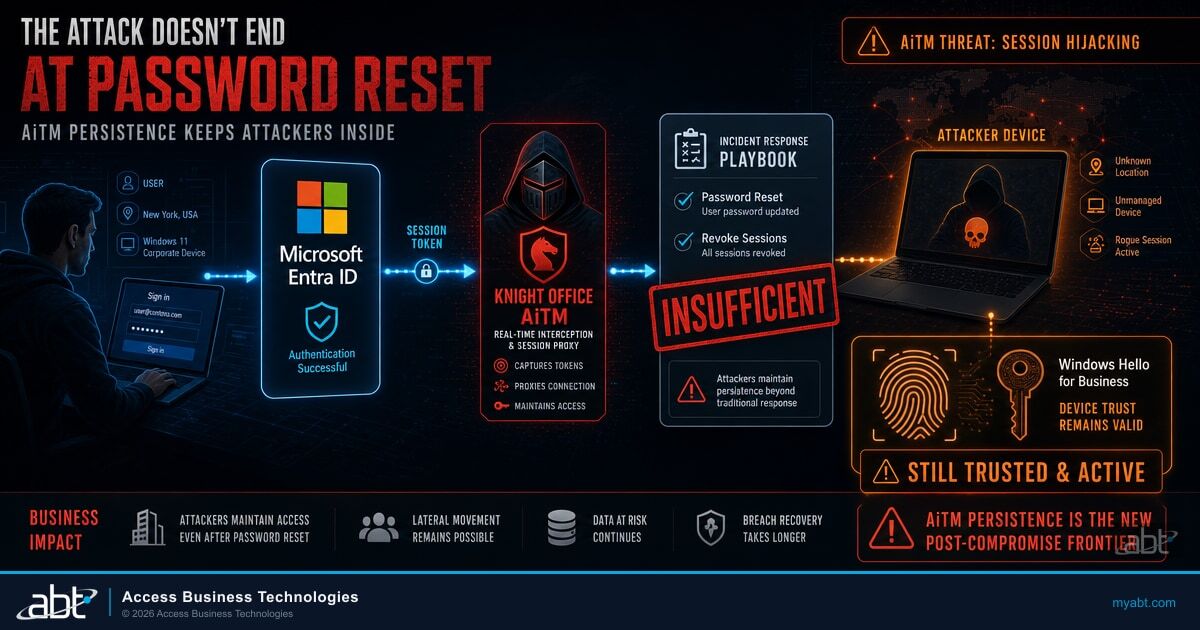
One detail in the report is not familiar, and it is the reason this article exists. In at least one incident Huntress observed, the operators did not stop at the stolen session. They used it to register a device of their own in Microsoft Entra ID, and then enrolled a Windows Hello for Business credential on that device. At that point the first page of your playbook stops being sufficient, because none of those three steps removes a registered device or an enrolled credential.
What Huntress found
Knight Office is an adversary in the middle kit. Huntress describes an attack chain that begins with a phishing email themed around a DocuSign document request, routes the victim through legitimate services including Monday.com and compromised Joomla sites so the initial link looks unremarkable, and lands them on a convincing imitation of a Microsoft SharePoint or Teams sign in page. The kit intercepts the device code authentication flow and captures the session token issued once the victim has authenticated. Huntress reports at least nine token replay logins on identities linked to the kit over a two week period.
Huntress is explicit about what that token buys. It lets the operator access the account, in their words, as if they were logged in, without needing an actual password or a way to bypass multifactor authentication. The authentication was genuine. Your employee really did approve it. The kit simply stood in the middle and kept the receipt.
What separates Knight Office from a hobbyist effort is the tooling around it. Huntress documented an operator console with a login page titled Login, KNIGHT OFFICE, advertising capture and management from a single place, webmail access with automatic refresh, deployment of custom links, and real time visitor statistics. This is a product with a dashboard, not a script someone pasted together.
The sender address Huntress names sits inside a network range ABT identified and blocked across three customer tenants roughly two weeks before the report was published. Shared hosting space is a lead worth following rather than an identification, and this one is being reported as a lead.
None of that, on its own, would justify another article. ABT has covered stolen session tokens before, including a campaign that read payroll and finance mail while triggering almost no alerts and token theft staged from compromised hotel and conference Wi-Fi. The pattern is well established. The persistence step is the new part.
How this differs from the August Windows Hello research
In August we published an article on Windows Hello for Business key abuse, and the two findings are easy to confuse. They are close to opposites, and the difference decides what you go and look at.
That August research started from a laptop that was already compromised. Code running inside a signed in user's session borrowed that user's existing Hello key to authenticate to Entra ID. The precondition was malware on the endpoint, and the credential in question already belonged to the employee.
Knight Office runs the other way around. There is no endpoint compromise in the chain Huntress describes. The operator is remote, working from a stolen browser session, and the credential at the end is not the employee's. It is a new Windows Hello for Business credential, enrolled on a new device, both belonging to the attacker and both issued legitimately by your tenant because the request arrived inside an authenticated session.
Steps one and two are the kit standard behavior as Huntress describes it. Steps three through five are the persistence path observed in at least one incident, not a guaranteed outcome of every run.
A DocuSign themed email routes through legitimate services to an imitation Microsoft sign in page.
The employee completes multifactor authentication for real. The kit relays it and keeps the issued session token.
The stolen session is used to register a device belonging to the operator in Microsoft Entra ID.
A Windows Hello for Business credential is bound to that device, issued legitimately by the tenant.
The operator now holds their own credential on a device object your tenant recognizes, independent of the stolen token.
The step that survives your incident response
Work through the standard response against that chain and the gap appears quickly.
Resetting the password invalidates the password. The attacker was not using it. Revoking sessions kills the stolen token, which by that point has already served its purpose. Re-registering the employee's multifactor authentication fixes the employee's authentication, and the attacker is not using the employee's authentication either. They are using a credential of their own. Every one of those three steps is still correct and still urgent, and automated session revocation on a risk detection is part of how ABT runs a Microsoft 365 tenant. The point is narrower. Those steps close the entry path, and the entry path is not where this operator now lives.
You respond to a confirmed token theft by resetting the password, revoking active sessions and re-enrolling the user's multifactor authentication, and you close the ticket when sign in logs look clean.
A device the operator registered during the incident, and any Windows Hello for Business credential bound to it, are still present as a tenant recognized device object and a valid credential, which may support continued access depending on your Conditional Access policies and other controls. Subsequent sign ins from that device may not register as anomalous, because they are a known device using a valid credential, which is what your controls were built to permit. Other signals can still fire, and Microsoft Entra ID Protection may still flag a sign in on location or other risk factors. The point is narrower: the device and the credential are not themselves the anomaly.
This is why Huntress leads its own defensive guidance where it does. The firm advises defenders to detect unexpected post authentication activity from callback proxies and sign ins associated with unfamiliar devices, to review newly registered Microsoft Entra devices and Windows Hello for Business credentials, to remove unauthorized authentication methods, and to disable synchronized accounts in on premises identity systems. Three of those four are about what was left behind rather than how the operator got in.
That is a monitoring problem before it is an investigation problem, because all three are changes to your directory rather than events in your mail flow. Newly registered devices, added authentication methods and drift in the settings that permit them are three of the signals Guardian MxDR watches inside the Microsoft Defender and Entra ID telemetry a Microsoft 365 tenant already produces. Whether a question like who registered a device last Tuesday can be answered depends on that telemetry and on how long it is retained, which is a matter of configuration rather than of scale. What scale gives ABT is pattern. Managing Microsoft 365 for more than 750 banks, credit unions and mortgage companies is how we know which answers are worth going and getting.
The durable damage is not the token that was stolen. It is what the token was used to enroll before anyone noticed it was missing.

That gap also explains why this reads differently from most security news. There is no version number to check and no update to schedule, which removes the usual first question and replaces it with a harder one about what your tenant currently allows.
There is nothing to patch here
As of publication there is no CVE associated with Knight Office, and the Huntress report describes no vulnerability being exploited. The activity as reported works through the Microsoft 365 authentication flow rather than against any disclosed flaw in it. On the reported behavior there is therefore nothing to patch, and the response lives in configuration, monitoring and incident handling rather than in an update.
Whether this works in your tenant is a configuration question
An important qualification, because the alternative reading is more alarming than the evidence supports. Huntress reports the device registration and credential enrollment for at least one observed incident. It is not established as universal behavior of the kit, and it is not something a stolen session can accomplish in every tenant.
Whether a stolen session can register a device depends on how your tenant is configured. Who is permitted to join or register devices, whether that action is itself gated, and what a device must satisfy before it is treated as trusted are all settings with defaults, and the defaults are permissive in the direction that favors the operator. A tenant that allows any user to register a device, and then treats that device object as sufficient without further evaluation, is a tenant where this chain has the least standing in its way. A tenant that restricts registration to a defined group, and gates the registration action itself, raises the bar substantially, though policy scope, exclusions and enrollment state all still bear on the outcome.
The uncomfortable part is that this is not visible from the place most people look. Registering a device, joining it, and having it marked compliant are three different states, and a Conditional Access policy can require any one of them. That distinction is the whole question here, because a device requirement is only as strong as the process behind the particular state it demands. Registration alone does not automatically satisfy a compliant device control. Where the state a policy asks for can be reached from an ordinary session, though, the requirement is still enforced and still satisfied. The policy is not broken. It is being met.
Why this matters for banks, credit unions and mortgage companies
Identity is where examinable controls concentrate, and device trust and authentication method inventory are exactly the kind of thing an examiner asks you to evidence rather than assert. A device registered by an intruder and a credential enrolled by an intruder are both, on paper, legitimate objects in your directory. They may not appear on a list of anomalies, because nothing about the objects themselves is anomalous once they exist.
In an institution that runs on Microsoft 365, that can mean continued access in the affected user context, which may reach the mailbox where closing documents and payment instructions arrive and the loan files that user can open in SharePoint, for as long as the device object and the credential remain and your policies continue to admit them. What Huntress documented is persistence in that user context rather than tenant wide control. The exposure is not the sign in. It is what the intruder still holds afterward.
The institutions that handle this well are not the ones with the longest policy list. They are the ones who can answer a narrower question: who added a device or an authentication method within the audit retention window available to you, and was each one expected.
See where your Microsoft 365 tenant stands today
A graded assessment shows you what your tenant currently permits, including who can register a device and what happens when one appears.

Three things this does not change
The natural reaction to a report like this is to over correct, so three points are worth stating plainly.
Windows Hello for Business is not the problem, and moving away from it would be the wrong lesson. It is phishing resistant, it is where Microsoft is taking authentication, and it remains the right destination. The finding here concerns the enrollment path, which is a configuration and monitoring question rather than a property of the credential. Our earlier guidance on phishing resistant multifactor authentication for financial institutions stands unchanged.
Multifactor authentication is still doing its job. An adversary in the middle kit relays a genuine check and keeps the result. The answer to that sits at the token and session layer, through continuous evaluation of a session rather than a single decision at sign in, and it is a different conversation from whether to require a second factor at all.
The governance point is the one that outlasts this particular kit. Device trust and authentication method inventory are examinable controls, and the evidence an examiner will ask for is not your policy list. It is a record of what changed, when, and whether each change was expected. An institution that can produce that record on request has a governance answer. An institution that has to go and reconstruct it has a project.
What to verify in your tenant this week
The initial review can begin with five checks. They are questions with definite answers, and the answers are worth having whether or not this particular kit ever reaches you. Run them yourself, or have Guardian MxDR run them and keep running them, which is the difference between knowing where your tenant stood in September and knowing where it stands.
Five checks worth running now
- Who is allowed to register a device. If the answer is every user, decide deliberately whether that is what you want, rather than inheriting it.
- What devices were registered in Microsoft Entra ID recently, and by whom. Look for registrations that do not correspond to a known hardware purchase or a known employee.
- What Windows Hello for Business credentials were enrolled, and on which devices. Treat an enrollment you cannot account for as an unresolved incident, not an oddity.
- What authentication methods have changed per user. An added method is one way persistence can appear from the identity side.
- Whether device registration is itself gated. A device trust requirement is only as strong as the process that decides which devices earn trust.
If a token theft has already happened at your institution, add one step to the response you already ran. Go back and check whether a device or an authentication method was added during the window between the phish and the containment. That window is where this lands, and it is a period response teams can overlook once the sign in logs look clean.
Have Guardian MxDR answer this for your tenant
ABT manages Microsoft 365 for more than 750 banks, credit unions and mortgage companies. Guardian MxDR watches the Microsoft Entra ID and Microsoft Defender signals your licenses already produce, including newly registered devices, added authentication methods, and the configuration changes that decide whether a stolen session can register anything at all. We will tell you what your tenant permits today, and what the retained telemetry shows was registered or enrolled while nobody was watching.
Frequently Asked Questions
No. A password reset invalidates the password, and revoking sessions invalidates issued tokens, but neither removes a device object registered in Microsoft Entra ID or an authentication method enrolled on it. Those are separate objects and must be deleted separately. This is why Huntress advises reviewing newly registered devices and Windows Hello for Business credentials as part of the response rather than treating credential rotation as the end of it.
As of publication there is no CVE associated with Knight Office, and the Huntress report describes no vulnerability being exploited. The activity as reported works through the Microsoft 365 authentication flow rather than against any disclosed flaw in it, so on the reported behavior there is nothing to patch. The response is configuration, monitoring and incident handling.
No. Windows Hello for Business is phishing resistant and remains the right destination for financial institutions. The finding concerns the enrollment path rather than the credential itself. An operator working from a stolen session enrolled a new credential of their own, which is a configuration and monitoring question about who may register devices and enroll methods, not a property of the authentication technology.
They are close to opposites. The August research required an already compromised endpoint, where code running in a signed in user's session abused that user's existing Windows Hello key. The Knight Office chain involves no endpoint malware. The operator is remote, working from a stolen browser session, and enrolls a new credential on a new device that belongs to them rather than to the employee.
No. It depends on tenant configuration. Whether every user may register a device, whether the registration action is itself gated, and what a device must satisfy before it is treated as trusted are all settings that vary by tenant. Huntress reported this behavior for at least one observed incident, not as universal behavior of the kit. Confirming your own configuration is the practical first step.
After the standard containment, check the window between the phish and the containment for two things: devices registered in Microsoft Entra ID during that period, and authentication methods added to any affected account. Both survive a password reset and a session revocation, and neither is inherently anomalous afterwards, because both are legitimate directory objects once created. ABT runs this review for the financial institutions whose Microsoft 365 tenants it manages, and Guardian MxDR watches the same signals continuously rather than only after an incident.