In This Article
- What the research actually shows
- Why this is not a patch problem
- The step that breaks the usual assumption
- What an attacker can do next, and what limits it
- What your current monitoring will and will not show
- What to verify in your tenant this week
- What this does not change
- Frequently Asked Questions
Windows Hello for Business was one of the easiest security wins most institutions have had in years. Staff stop typing passwords, stop calling the help desk about lockouts, and sign in with a fingerprint or a PIN instead. Sign-in gets faster and password-reset tickets drop at the same time, which is a rarer combination than it sounds.
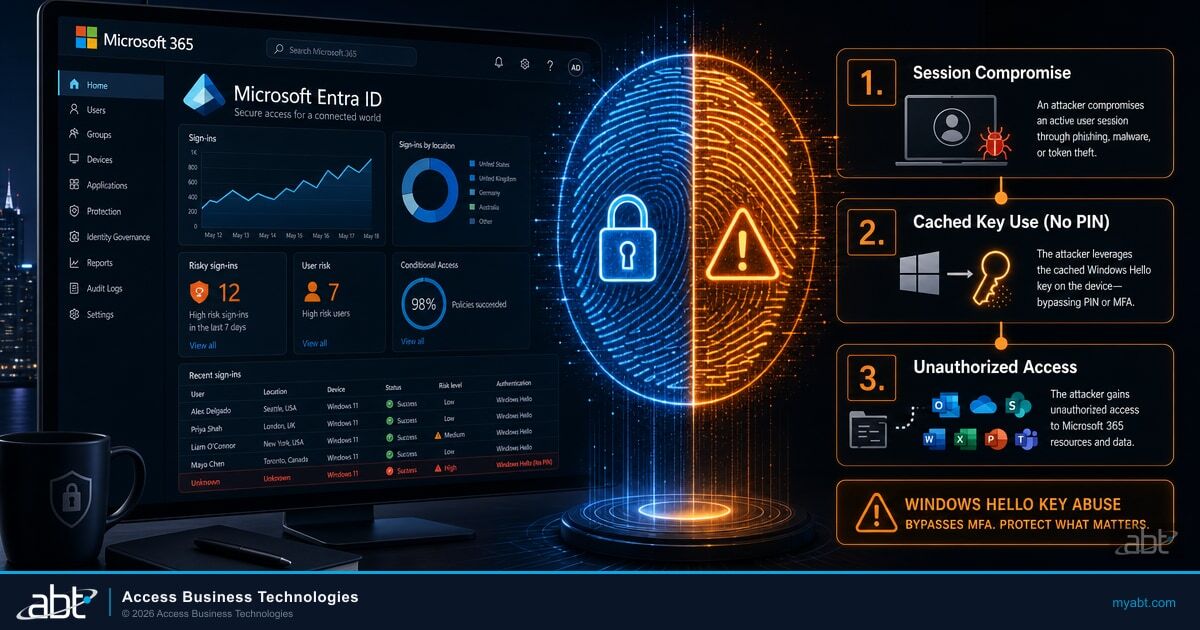
New research published on August 5, 2026 does not take that win away. What it does is describe something more specific and more useful to know: once an attacker is already running code inside a signed-in Windows session, that user's Windows Hello for Business key can be used to authenticate to Microsoft Entra ID without any PIN prompt, without any biometric prompt, and without the attacker ever extracting the private key.
The distinction matters enormously, and it is the reason this article exists. This is not a remote flaw that lets someone break into your tenant from the internet. It is a post-compromise technique that changes what an endpoint infection is worth. If you have deployed passkeys or Windows Hello across your institution, the practical question is not whether to keep them. It is what an attacker gets after a laptop is infected, and whether your current monitoring would show you.
Those figures describe how common endpoint compromise has become in general, and that is the only thing they are doing in this article. They are not evidence that information-stealing malware is using the Windows Hello technique described below, and no such connection has been reported anywhere. They are here because every step that follows depends on one prerequisite, code running inside a user session, and that prerequisite is not rare.
What the research actually shows
Security researcher Dirk-jan Mollema published the work, titled "Borrowing Windows Hello keys for authentication and persistence," on August 5, 2026. The mechanism is worth understanding precisely, because the precision is what separates a useful response from an overreaction.
While a user is interactively signed in, Windows keeps private-key operations available to that user's session. Code running as the user can call the Cryptography Next Generation interface, the same set of native functions Windows itself uses, and ask for signing operations backed by the Windows Hello key. Those calls are served from cached state.
"Calling these native functions from for example PowerShell does not prompt the user for a PIN or biometric authentication at all, but works based on cached data."
The key is then exercised as a FIDO2 passkey through WebAuthn. Three things are explicitly not happening. The private key is never extracted from the machine. The user's PIN is never recovered. And administrator rights are not required, because the Windows Hello key belongs to the user, not to the system. Mollema is direct about that last point: "We do not need Administrator rights to access it."
One more thing sets the timeline. Working proof-of-concept tooling for this is already public, published as part of the researcher's ROADtools project, with device registration and passkey authentication supported directly in its roadtx utility. That matters for how you prioritize: this is not a technique where an attacker has to develop anything first. They have to land on one machine. We are not publishing usage details here, and none are needed to make the operational point.
There is one more detail that turns this from a local curiosity into a remote-usable capability. In the flows Mollema tested, the Entra ID authentication challenge was valid for five minutes and, in his words, "is not bound to a session, a user or even a tenant, so we can request it on our attacker host." In those flows, an attacker requests the challenge from their own machine, has it signed on the compromised machine, and completes the authentication somewhere else entirely. That behavior is scoped to what the research demonstrated and should not be assumed to hold for every authentication flow or every tenant configuration.
Why this is not a patch problem
The most important operational fact about this research is what is absent from it. As of publication on August 17, 2026, no CVE identifier had been assigned to this technique and Microsoft had not released an advisory or patch specific to this behavior. The Hacker News reported on August 7, 2026 that it "found no CVE or Microsoft advisory tied to the technique."
Mollema characterizes the behavior as a consequence of the design rather than a defect, noting it "was left as-is since it is more or less a consequence of how WHFB works." Keeping a signed-in user's key usable without re-prompting is what makes single sign-on feel seamless. That same property is what code running as the user can borrow.
Use this context when briefing leadership
This is not a zero-day and not remotely exploitable on its own, and as of publication we found no public report of victims or of in-the-wild use of this technique. It is not an emergency patching event, and framing it as one will cost you credibility with the people who have to act on it. The accurate framing is that it raises the value of an endpoint compromise, so it belongs in detection and response planning rather than in an out-of-band patch cycle.
Practically, that means you cannot wait for an update to resolve this, and you also do not need to panic about it. What you can do is decide how much an infected laptop is allowed to be worth in your environment. That is a configuration and monitoring question, and it is answerable this week.
The step that breaks the usual assumption
Here is the part that changes how defenders should think about it. Mollema notes that the actions taken with a borrowed Windows Hello key count as performing fresh multi-factor authentication.
Be careful about what that sentence means, because it is easy to over-read. It means only how Microsoft Entra ID classifies the authentication when it evaluates policy. It does not mean the attacker supplied a new PIN or a new fingerprint, and it is not a statement about whether any authentication method is sufficient for a regulatory obligation. It is a policy-evaluation classification, nothing more.
That narrow fact still has a real consequence. A control that says "require multi-factor authentication before allowing this action" is looking for a classification, and the borrowed-key assertion carries it.
A sensitive action, for example registering a new device, is gated behind a requirement for fresh multi-factor authentication. The intent is that a human proves possession of a second factor at that moment.
An assertion signed by a genuine Windows Hello key on a genuine enrolled machine, classified as multi-factor for policy evaluation. The requirement is satisfied without the user being present or prompted.
This is why the usual reflex, tightening the multi-factor requirement, does not resolve this particular step. The requirement was met. Understanding that saves you from spending a change window on a control that would not have changed the outcome.
What an attacker can do next, and what limits it
Depending on tenant policy, an attacker holding a signed assertion may be able to sign in as the user through WebAuthn, register a device they control in Entra ID, obtain a Primary Refresh Token for that device, and add further authentication methods. Those are policy-dependent outcomes, not automatic ones. What your tenant permits determines how far the chain actually runs.
Code runs as the signed-in user. No administrator rights needed.
Native cryptographic calls produce a signature from cached state, with no PIN or biometric prompt.
In the tested flows, the challenge is requested on the attacker host and signed on the victim machine.
Where policy allows, a device the attacker controls is registered and issued a Primary Refresh Token.
Additional authentication methods may be added, surviving cleanup of the original infection.
Step five is the one that should hold your attention. Reimaging the infected laptop does not necessarily end the intrusion. If a device was registered and authentication methods were added, the attacker's foothold now lives in your directory rather than on the machine you just wiped. That is the difference between an endpoint incident and an identity incident, and it is the difference that decides whether an incident is actually closed. The same pattern shows up in the pre-authentication half of this problem, which we covered in our breakdown of the Microsoft 365 phishing campaign that reads payroll and finance mail while triggering almost no alerts.
We manage Microsoft 365 tenants for more than 750 financial institutions, and the configuration gap we walk into most often is not a missing Conditional Access policy. It is that device registration is still open to every user, because that is the default, and nobody has reviewed the registered-device list since the tenant was built. Two things of ours do separate jobs here, and the line between them is worth stating once. M365 Guardian owns configuration: it sets the Conditional Access baseline, applies the device-registration restrictions, and watches the tenant for drift away from that baseline. Guardian MxDR owns operations: it correlates endpoint signal against identity activity, investigates what that surfaces, and escalates to a named contact. Institutions generally run both, and on this problem they do different halves of the job. What neither does is stop a legitimate session from using its own key. We have not found a configuration that prevents it in the tenants we operate, and we are not going to claim one. That is why the order of the three layers further down matters more than any single control inside them.

Microsoft's own guidance has flagged the underlying risk for some time, independent of this specific research.
Microsoft states plainly that registered and joined devices are issued a Primary Refresh Token "which can be used as a primary authentication artifact, and in some cases as a multifactor authentication artifact." Its device security operations guidance goes further, warning that attackers "may try to register their own devices, use PRTs on legitimate devices to access business data, steal PRT-based tokens from legitimate user devices, or find misconfigurations in device-based controls in Microsoft Entra ID." The recommended control is direct: require multi-factor authentication to register or join devices, then monitor for any device registered or joined without it.
What we would add from managing these tenants day to day: that guidance gets read as an identity task and filed with the identity team, while the device-registration setting itself is usually left wherever onboarding left it. When we review a tenant we have just taken over, unrestricted device registration and a registered-device list nobody has read are among the most common findings, and both are free to fix. Neither needs a new licence, and neither is what institutions are usually looking at when they ask us about going passwordless.
That control is still correct and you should have it on. Note the interaction with the previous section, though. Because a borrowed-key assertion is classified as multi-factor, a registration performed with one would not appear as a registration completed without multi-factor authentication. The control narrows the opening; it does not close this specific path.
What your current monitoring will and will not show
Two separate things get confused here, so it is worth separating them carefully.
The first is Microsoft's published sample query for sign-ins by unknown devices. It looks for sign-ins where the device identifier is empty and the authentication requirement was single-factor. That query is a general unknown-device hunt. It was never written as a detection for this technique and should not be described as one.
The second is the detection Mollema actually recommends for this technique: hunt Entra ID sign-in logs for Windows Hello for Business sign-ins where the device identifier is empty. That is the signal, because an assertion produced on a machine other than a registered device shows up without one.
Reading those two together produces an observation worth stating explicitly as our own analysis rather than Microsoft's: because the assertion in question is classified as multi-factor for policy evaluation, a sign-in produced this way falls outside the single-factor filter in that stock query. A team that has adopted the sample query as written, and assumes it covers unknown-device activity generally, would not surface this. That is a specific limitation of one published sample query. It is not a claim that Microsoft, Microsoft Defender, or Microsoft Sentinel cannot detect this activity.
The honest caveat has to travel with the recommendation. Empty device identifiers are not inherently malicious. A user signing in through an incognito window, or through a browser that does not support single sign-on, produces exactly the same pattern. This is a triage lead that needs correlation and a baseline, not an alert you can switch on and trust. Institutions that skip the baselining step tend to turn the rule off because of the noise, which leaves them worse off than before. In our experience the hunts that stay alive are the ones where maintaining the baseline was somebody's standing job rather than a one-week project.
Why This Matters for Financial Institutions
Financial institutions had unusually strong reasons to go passwordless early. Password resets are a measurable help-desk cost, shared and reused credentials are a standing audit finding, and branch staff sign in and out all day. Wherever those reasons landed, the practical result is the same: if Windows Hello is widely deployed in your institution, it is deployed on the machines that reach customer financial data.
It also means the staff most likely to be targeted, the people in wire operations, loan processing, and accounting, are the same people whose sign-in was deliberately made frictionless. The productivity gain was real and worth having. The follow-up work is making sure an infection on one of those laptops cannot quietly become a permanent presence in your directory.
What to verify in your tenant this week
There is no patch to deploy, so the work is configuration and visibility. Three layers matter, in this order.
| Layer | Why it comes in this order | What good looks like |
|---|---|---|
| Endpoint detection and response | The technique requires code executing as the user. Every later step depends on that first step succeeding, so this is the only layer that addresses the cause rather than the consequence. | Full coverage across every managed device, with behavioral detection and a response path, not just signature scanning. |
| Device registration governance | Registering an attacker-controlled device is the persistence step. Restricting who may register, and from where, limits how far a single infection travels. | Registration restricted to the users and conditions that genuinely need it, reviewed as a standing list rather than left at the default. |
| Identity log hunting | This is how you find out it happened. It is a detection layer, not a preventive one, and it needs a baseline before it produces signal. | Windows Hello sign-ins with empty device identifiers reviewed and baselined, correlated against device registrations and authentication-method changes. |
Working down those layers, six checks will tell you where you actually stand. Most are reviews you can run with the access you already have, and the caveats below about your log window and about who does the work still apply.
That last item is the cheapest and most valuable thing on the list. A runbook that ends at the endpoint will keep producing incidents that appear closed and are not. If you are revisiting that document anyway, our Microsoft 365 incident response plan for financial institutions covers the directory-side steps that belong beside the endpoint ones.
Licensing shapes what you can actually do here, and it is worth being blunt about it. Microsoft 365 Business Premium includes Defender for Business, which covers a lot of ground. The deeper behavioral endpoint detection and the identity-risk signals that make the first and third layers stronger arrive with the Microsoft Defender Suite for Microsoft 365 Business Premium add-on, listed at ten dollars per user per month as of August 2026 on annual terms, which also brings Microsoft Entra ID P2. Confirm current pricing and terms for your agreement before you budget against that number. To be clear about the split, because it matters for budgeting: restricting who may register devices and reviewing what is already registered are configuration changes inside the tenant you already pay for, not purchases. Two caveats so this is not read as a promise that the whole list is free. Looking back further than your retained log window needs archiving you may not have set up, and somebody still has to do the work. What the add-on buys is depth of signal, not permission to act. If you are on Business Premium and this article has you checking your endpoint coverage, that add-on is the conversation to have. One caution worth knowing before you buy a subset of seats. Microsoft states that Defender for Business does not support mixed licensing: a tenant holding both Defender for Business and Defender for Endpoint Plan 2 defaults to the Defender for Business experience. So licensing only some of your users can leave the whole tenant on the experience you were trying to move off, and switching it over is a separate step rather than something that happens when the licences land. Confirm the plan for your tenant before you buy a partial block of seats.

Guardian MxDR: find out what an infected laptop is currently worth in your tenant
On this specific problem the scope is concrete, and it splits the way described above. M365 Guardian assesses your device-registration settings, configures the Conditional Access baseline and the registration restrictions, and watches the tenant for drift away from that baseline in nightly-refreshed reports reviewed on a set cadence. Guardian MxDR assesses your endpoint detection coverage, correlates endpoint signal against Entra ID sign-in and device-registration activity, and escalates to a named contact when something needs a decision. What we will not claim is that any of that prevents this technique or reliably detects it. We have not achieved that in the configurations we operate and tested, so we are not going to sell it. Ask hard questions of anyone who tells you otherwise.
What this does not change
Nothing in this research is an argument for backing away from phishing-resistant authentication. That needs saying plainly, because the temptation after a headline like this one is to conclude that passkeys were oversold.
They were not. Windows Hello and passkeys remain the strongest widely deployable answer to credential phishing, which remains one of the most common ways intrusions begin. This technique starts after an attacker already has code running on the machine, which is a materially harder position to reach than sending a convincing email. Retreating to text-message or voice one-time passcodes would trade a post-compromise concern for a pre-compromise one that is far easier to exploit, and Microsoft is retiring its own delivery of those methods anyway. We covered that timeline in our look at the Entra passkey default and the retirement of text-message and voice authentication, and the underlying case for the technology in our guide to phishing-resistant multi-factor authentication for financial institutions.
What changes is narrower and more actionable. The value of an endpoint compromise is higher than many institutions have modeled, and the artifacts that matter after one are increasingly in the directory rather than on the disk. Governance follows from that rather than leading it: if your access reviews cover accounts and groups but never registered devices or authentication methods, there is a gap in the review, and it is the gap this technique walks through.
The takeaway
Keep Windows Hello. There is nothing here that makes passwordless the wrong choice. Treat the research as a statement about what an infected laptop is worth, then close the two gaps it exposes: make sure endpoint detection genuinely covers every device, and make sure device registrations and authentication-method changes are reviewed the way accounts already are. Both of those start with the access you already have, and how far you can take the second one depends on your log retention and your licensing. The faster sign-in and the quieter help desk are yours to keep. This is about making sure that convenience stops at your front door.
Frequently Asked Questions
No. As of publication on August 17, 2026, no CVE identifier had been assigned and Microsoft had not released an advisory or patch specific to this behavior. The researcher describes it as a consequence of how Windows Hello for Business works rather than a defect, noting the behavior was left as is. Because there is no update to apply, the response is configuration and monitoring rather than patching.
No. The private key is not extracted and the PIN is not recovered. The technique asks Windows to perform signing operations with the key while the user is signed in, which is served from cached state and produces no prompt. The key stays where it is, which is also why hardware protection such as a TPM does not prevent this particular use.
Not on its own, though you should still require it. The researcher notes that actions taken with a borrowed key count as performing fresh multi-factor authentication, meaning that is how Entra ID classifies the authentication when evaluating policy. A registration performed with such an assertion therefore would not appear as a registration completed without multi-factor authentication. The requirement still reduces your overall exposure to other techniques, so keep it enabled and pair it with restrictions on who may register devices at all.
The signal to hunt is Windows Hello for Business sign-ins where the device identifier is empty, correlated with unexpected device registrations and newly added authentication methods. Treat it as a triage lead rather than an alert, because legitimate incognito browser sessions and browsers without single sign-on support produce the same pattern. Baseline what normal looks like in your tenant before you alert on it, or the noise will make the rule unusable.
No. This is a post-compromise technique that requires an attacker to already be running code in a signed-in session, which is a much harder position to reach than phishing a password or a one-time passcode. Phishing-resistant authentication remains the strongest widely deployable defense against one of the most common ways intrusions actually start, and Microsoft is retiring its own text-message and voice delivery regardless. The right response is to strengthen endpoint detection and directory-side review, not to weaken authentication.
Not necessarily, and this is the most important operational point in the research. Depending on tenant policy, an attacker may have registered a device they control and added authentication methods before you responded. Those artifacts live in your directory, not on the machine, so they survive a reimage. Any confirmed endpoint compromise should trigger a review of device registrations and authentication-method changes for the affected user.