In This Article
Most banks, credit unions, and mortgage lenders believe they solved the password problem years ago. They turned on multi-factor authentication, wrote a Conditional Access policy in Microsoft Entra ID, and moved on. A June 2026 password-spray campaign against Microsoft 365 tenants proved that belief can be dangerously incomplete. Where a Conditional Access policy did not cover the sign-in path the attackers used, accounts at organizations that had multi-factor authentication switched on were still taken over, and those sign-ins never triggered a challenge.
The security firm Huntress disclosed the campaign, which it tracked under the "LSHIY" label, on June 30, 2026. It was not a clever phishing kit or a stolen session token. It was an automated password spray that authenticated through an older, password-based Microsoft sign-in flow that Microsoft recommends against, one that hands the username and password straight to the token endpoint with no interactive sign-in and no chance to present a multi-factor prompt. For a financial institution that has to answer to examiners about identity controls, this is the exact failure mode that keeps a chief information security officer awake: the policy exists, the box is checked, and it still did not stop the sign-in.
This article breaks down what the campaign actually exploited, why a Conditional Access policy can be present and still fail to challenge a sign-in, and the specific checks every institution on Microsoft 365 should run this quarter. The campaign was a moment in time. The gap it exploited is durable, and other attackers reuse it.
What Happened in June 2026
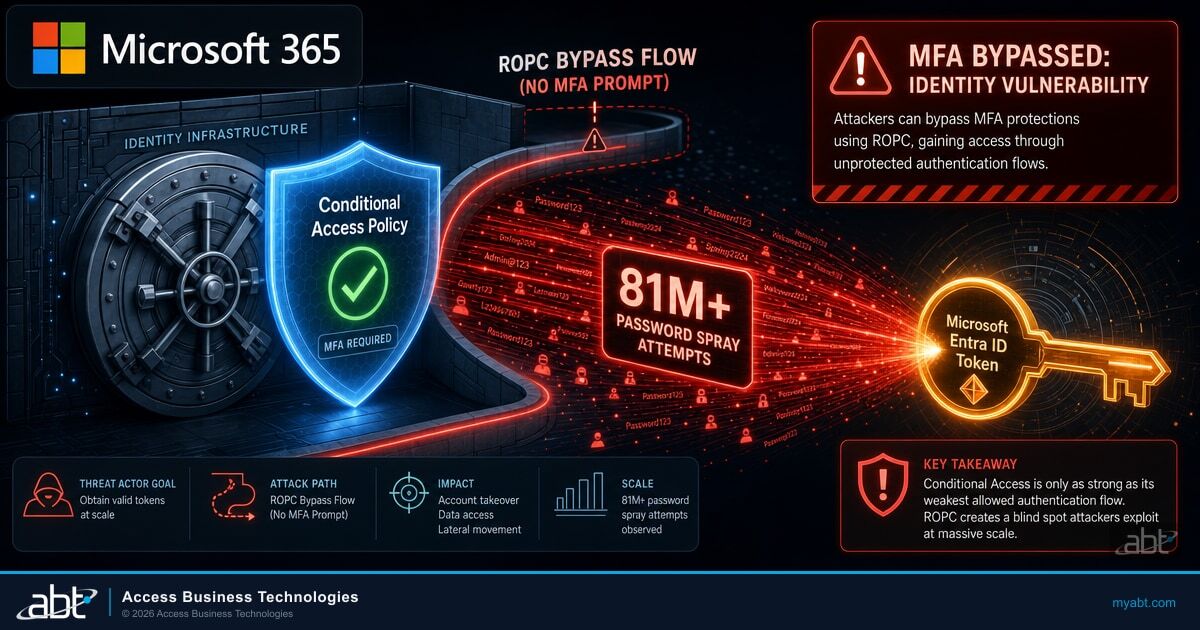
Between June 12 and June 26, 2026, an automated actor made more than 81 million login attempts against Microsoft 365 accounts that Huntress monitors. Over that two-week window, the campaign compromised 78 user accounts across 64 organizations. The traffic originated from an IPv6 range, 2a0a:d683::/32, controlled by an internet-infrastructure provider Huntress identifies as LSHIY LLC, operating autonomous system AS32167.
Password spraying is an old technique with a simple logic. Instead of hammering one account with thousands of passwords, which trips lockout policies fast, the attacker takes a small set of common passwords and tries each one against a large list of accounts. Spread thin across enough targets, the attempts stay under per-account thresholds while still landing on the handful of users who chose a weak or reused password. At the scale seen here, even a low success rate produces dozens of compromised accounts.
What made this campaign notable was not the volume. It was that even organizations with multi-factor authentication enforced through Conditional Access were affected. That should not happen if a policy is doing its job. The reason it happened points at a specific, password-based authentication path.
Automated login attempts start against Microsoft 365 accounts from the LSHIY infrastructure range.
The password spray ramps up, with account compromises accumulating across dozens of organizations.
Huntress counts more than 81 million login attempts, and 78 accounts compromised across 64 organizations, over the 14-day period.
Huntress publishes its research on the campaign and the Conditional Access weakness it exploited.
Secondary coverage followed on July 1, 2026, when The Hacker News reported on the campaign, citing the Huntress research. The numbers and the mechanism are the same across both accounts, because both trace back to the same source telemetry.
Why This Matters for Financial Institutions
A bank or credit union that suffers a single compromised account is not looking at a minor cleanup. A foothold in one mailbox opens the door to business email compromise, wire fraud attempts, and access to member or borrower data protected under the GLBA Safeguards Rule. Examiners increasingly expect institutions to demonstrate that identity controls actually work, not just that a policy is written. A campaign that slips through a Conditional Access gap while multi-factor authentication appears to be enforced is precisely the scenario that turns into an examination finding and an incident report.

Why MFA Did Not Fire
The root cause is a password-based sign-in flow called Resource Owner Password Credentials, or ROPC, which Microsoft recommends against using. In a normal, modern sign-in, a user is redirected to a Microsoft sign-in page, enters a password, and then gets prompted for a second factor before a token is issued. That interactive flow is where Conditional Access inserts the multi-factor challenge. ROPC skips all of it. The client posts the username and password directly to the Entra ID token endpoint and asks for a token in one step. There is no interactive sign-in page, so there is no natural place for a multi-factor prompt to appear.
In this campaign, the spray authenticated as a first-party Microsoft client, the Azure command-line interface, using that ROPC flow. Because ROPC is a password-only exchange, a Conditional Access policy that does not cover that client app type, and does not block legacy authentication, may not challenge the sign-in at all. The account holder never sees a push notification. The attacker either gets a token or gets rejected, based purely on whether the password was correct.
The policy was present. The box was checked. The sign-in still completed, because the flow the attacker used never asked for a second factor in the first place.
Huntress observed that even organizations that had multi-factor authentication enforced through Conditional Access were affected, because their policies were scoped in ways that left this path open. Some enforced multi-factor authentication for specific applications rather than all cloud apps. Some applied it only to certain user groups. Some required it only from untrusted locations. And some policies were still running in report-only mode, which logs what a policy would do without actually enforcing it. Any one of those gaps can leave a password-only ROPC sign-in unchallenged. It is the same class of weakness that makes techniques like device code phishing bypass MFA at scale: the attacker finds an authentication path the policy does not fully cover.
Report-Only Mode Is Not Enforcement
A Conditional Access policy left in report-only mode records what it would have done and grants access anyway. It is a valuable testing tool, but a policy that never leaves report-only mode provides zero protection. This is one of the most common gaps found during identity assessments, and it is invisible unless someone checks the policy state directly.
The Conditional Access Scoping Gap
Here is the uncomfortable truth for most institutions: you almost certainly have a Conditional Access policy, and it may not cover every client app type or block legacy authentication. Conditional Access is powerful, but it only enforces what its scope tells it to enforce. A policy that requires multi-factor authentication for browser and modern-app sign-ins, but does not extend that requirement to all client app types, leaves a lane open for a flow like ROPC that rides in on a legacy client.
The difference between a policy that stops this campaign and one that does not comes down to a few configuration choices. The comparison below shows the shape of a porous policy against a policy scoped to close the gap. If your policy looks like the left column, a password-only sign-in through a legacy flow may complete. If it looks like the right column, that same sign-in cannot complete the required multi-factor authentication and is denied.
Policy That Left the Lane Open
- Requires multi-factor authentication for specific apps only, not all cloud apps
- Applies to some user groups, not all users
- Challenges sign-ins only from untrusted locations
- Does not cover all client app types
- Legacy authentication still permitted
- Left running in report-only mode
Policy Scoped to Close the Gap
- Requires multi-factor authentication for all cloud apps
- Applies to all users, with documented break-glass exceptions
- Challenges sign-ins regardless of location
- Covers all client app types, including legacy clients
- Legacy authentication blocked by a separate policy
- Enforced, not report-only
Huntress recommends a Conditional Access policy that requires multi-factor authentication, or blocks access, for all users, all cloud apps, and all client app types, together with a separate policy that blocks legacy authentication. When such a policy applies, the all-client-app-types scope is the control that matters most: it extends the multi-factor requirement to the client the spray rode in on, so a password-only ROPC sign-in cannot satisfy the challenge and is denied. Blocking legacy authentication is a complementary hardening step that shuts down other older password-only protocols. That is the fix, described in behavior rather than in a single toggle, because it takes the all-client-types scope and the legacy-auth block working together.
A community bank enabled multi-factor authentication two years ago and scoped its Conditional Access policy to require it for Outlook and browser sign-ins. The IT director reports to the board that multi-factor authentication is fully deployed. Legacy authentication was never explicitly blocked because nothing seemed to be using it.
An automated spray tries common passwords against staff accounts through a legacy flow that the policy does not cover. One loan officer reused a password from a breached personal account. The sign-in completes with no multi-factor prompt, the attacker reads the mailbox, and the bank learns about it only when a fraudulent wire request goes out under the loan officer's name.
The compromise itself is not hypothetical for the 64 organizations caught in June, even if the downstream consequences varied by institution. It is a precise map of how a policy that looks complete on a slide can still leave a door open in production. The scoping details are where identity security lives or dies, and they are exactly the details that a busy internal IT team rarely has time to audit line by line.
What Every Financial Institution Should Check
You do not need to wait for a formal assessment to start closing this gap. Five checks separate an institution that is exposed to this class of attack from one that is not. Each maps directly to a specific configuration in Microsoft Entra ID, and each is something an examiner may reasonably ask you to evidence.
- Confirm your Conditional Access policy covers all client app types. A policy scoped to browser and modern-app clients only leaves legacy flows unchallenged. The scope must include all client app types to reach the path ROPC uses.
- Block legacy authentication explicitly. Do not assume nothing uses it. A dedicated policy that blocks legacy authentication shuts down the older password-only protocols that credential sprays also abuse, complementing the all-client-app-types multi-factor scope. Enable it in report-only first, review what breaks, then enforce.
- Move report-only policies to enforced. Audit every Conditional Access policy for its actual state. A policy stuck in report-only mode is documentation, not protection.
- Require multi-factor authentication for all users and all cloud apps. Per-app and per-group scoping creates seams. The baseline should be all users, all cloud apps, with documented break-glass accounts as the only exception.
- Hunt for successful sign-ins from the campaign infrastructure. Review Entra ID sign-in logs for successful authentications from the LSHIY range, 2a0a:d683::/32, and for token-endpoint activity consistent with ROPC. A compromise that already happened will not announce itself.

Two of those checks deserve emphasis for regulated institutions. First, blocking legacy authentication is one of the highest-value identity controls available in Microsoft 365, and it is free with the licensing most institutions already hold. Moving toward phishing-resistant multi-factor authentication raises the bar further, so that even a challenged sign-in cannot be satisfied by a stolen or sprayed credential. Second, hunting for a compromise that may have already occurred matters as much as hardening against the next one. If a password leaked during the June window, the account may already be under someone else's control.
Key Takeaway
Having a Conditional Access policy is not the same as being protected by it. The June 2026 campaign compromised accounts at organizations that had multi-factor authentication enforced, because their policies did not cover all client app types and did not block legacy authentication. The gap is in the scope, not in whether the policy exists.
The broader lesson is that identity is now the primary battleground for financial institutions on Microsoft 365, and identity controls fail quietly. There is no alarm when a policy is scoped one notch too narrow. The failure only becomes visible when an attacker finds the seam, which is why continuous review of the identity configuration, not a one-time setup, is what actually protects a tenant. Our analysis of why identity is the new perimeter in Microsoft 365 walks through why the moat around the network no longer matters when the front door is a sign-in flow.
Most of the controls that close this gap are available within the Microsoft 365 and Entra ID licensing many financial institutions already hold, though some risk-based features depend on the specific plan. Microsoft Entra ID Conditional Access is where the all-client-types scope and the legacy-authentication block get set. Microsoft Entra ID Protection adds sign-in risk detection that, when licensed and configured, can block or require step-up authentication for a risky sign-in even after a password leaks. Microsoft Defender surfaces the suspicious sign-in activity, and Microsoft Purview provides the audit trail an examiner will ask for. The capability is present in the platform. The work is configuring it correctly for a regulated institution and watching it stay that way.
How Guardian MxDR Closes the Gap
This campaign is the exact failure mode ABT's Guardian MxDR exists to close. ABT is a Tier 1 Microsoft Cloud Solution Provider that manages the Microsoft 365 and Entra ID tenants of more than 750 financial institutions. Where a customer runs workloads in Azure, ABT hosts and runs those Azure environments. The distinction matters here: the Conditional Access configuration that stops or lets through a spray like this lives inside the Microsoft 365 tenant ABT manages on the customer's behalf.
A small internal IT team at a bank or credit union rarely has the time to audit every Conditional Access policy for client-app-type coverage, legacy-auth blocking, and report-only drift, then keep watching as configurations change. That is the work Guardian MxDR takes off their plate. It means the institution's technology staff can focus on serving members and closing loans, while the identity perimeter is configured correctly and monitored continuously.
Guardian MxDR closes the gap on four fronts, all inside the Microsoft 365 and Entra ID tenant ABT manages:
- Conditional Access scoped to all client app types, legacy auth blocked. ABT configures Entra ID Conditional Access to require phishing-resistant multi-factor authentication, or block, for all users, all cloud apps, and all client app types, and blocks legacy authentication, rather than the browser-only scoping that let the June campaign through.
- Sign-in risk and strong authentication on the management plane. ABT manages Entra ID Protection sign-in-risk policies and enforces strong authentication on Azure management surfaces, so that a leaked password is far more likely to be blocked or challenged when it is used from the campaign's infrastructure.
- Monitoring and blocking of known-bad infrastructure. Guardian MxDR watches for and can block sign-ins from ranges like the LSHIY space, 2a0a:d683::/32, turning threat intelligence into an enforced control inside the tenant.
- Hunting for successful sign-ins. Guardian MxDR hunts Entra ID sign-in logs for successful authentications from the campaign range and for token-endpoint activity, so a compromise that already happened is found and contained rather than sitting silent.
What separates ABT from a national reseller is vertical depth. The large Tier-1 CSPs sell Microsoft licenses at scale but carry no financial-services specialization, and the regional IT shops that know banking rarely hold Tier-1 CSP status or run identity controls at this depth. ABT does both, for financial institutions specifically, which is why the patterns that catch a credit union off guard are ones ABT has already seen across its 750-plus institution footprint.
The takeaway for a bank, credit union, or mortgage CISO is direct. You almost certainly have a Conditional Access policy, and it may not block legacy authentication on every client app type. Guardian MxDR is the operating model that makes the policy actually fire, and watches the tenant for the case where it does not. For institutions weighing whether their identity posture would survive this class of attack, the fastest way to know is an assessment of the current Conditional Access configuration. ABT's guidance on Conditional Access best practices for financial institutions and its walkthrough of the Conditional Access rules every institution needs are good starting points, and an ABT identity review turns that guidance into a verified posture.
Would your Conditional Access policy have stopped the June spray?
ABT's team reviews your Microsoft 365 and Entra ID identity configuration, confirms Conditional Access covers all client app types, blocks legacy authentication, and hunts for any sign-in that already slipped through. Book a Conditional Access and identity security assessment through M365 Guardian and Guardian MxDR.
Frequently Asked Questions
The campaign used a password-based sign-in flow called Resource Owner Password Credentials, or ROPC, which posts a username and password directly to the Microsoft Entra ID token endpoint with no interactive sign-in. Because there is no interactive sign-in page, there is no natural point for a multi-factor prompt. Where a Conditional Access policy did not cover that client app type, the sign-in was not challenged. The multi-factor policy existed, but the flow the attacker used never invoked it.
LSHIY is the label Huntress used for a June 2026 password-spray campaign against Microsoft 365 accounts. Between June 12 and June 26, 2026, the campaign made more than 81 million login attempts and compromised 78 accounts across 64 organizations. The traffic came from an IPv6 range, 2a0a:d683::/32, tied to an infrastructure provider Huntress identifies as LSHIY LLC on autonomous system AS32167. The campaign was a specific event, but the Conditional Access weakness it exploited is durable and gets reused by other actors.
Configure a Conditional Access policy that requires multi-factor authentication, or blocks access, for all users, all cloud apps, and all client app types, and add a separate policy that blocks legacy authentication. When that combination applies, a password-only ROPC sign-in cannot complete the required multi-factor authentication and is denied. The all-client-app-types scope is what covers the client ROPC uses, while blocking legacy authentication shuts down other older password-only protocols. Also audit every existing policy to confirm it is enforced rather than left in report-only mode, and review sign-in logs for any successful authentication that already came through.
They dominate the identity threat landscape. Microsoft reports that more than 97% of identity-based attacks are large-scale password attacks, meaning password spray and brute force, per its 2025 Digital Defense Report. That same report found identity-based attacks surged 32% in the first half of 2025. Compromised credentials remain the leading initial-access vector, appearing in 22% of breaches in the Verizon 2025 Data Breach Investigations Report. This is not a niche technique. It is the most common way accounts get taken over.
ABT manages your Microsoft 365 and Entra ID tenant as a Tier 1 Microsoft Cloud Solution Provider. Microsoft hosts the underlying infrastructure; ABT manages the tenant, including the Conditional Access configuration that determines whether a sign-in like the June spray is challenged. Where a customer runs workloads in Azure, ABT hosts and runs those Azure environments. Through Guardian MxDR, ABT configures the identity controls correctly for a regulated institution and monitors the tenant continuously so the protection stays in place.