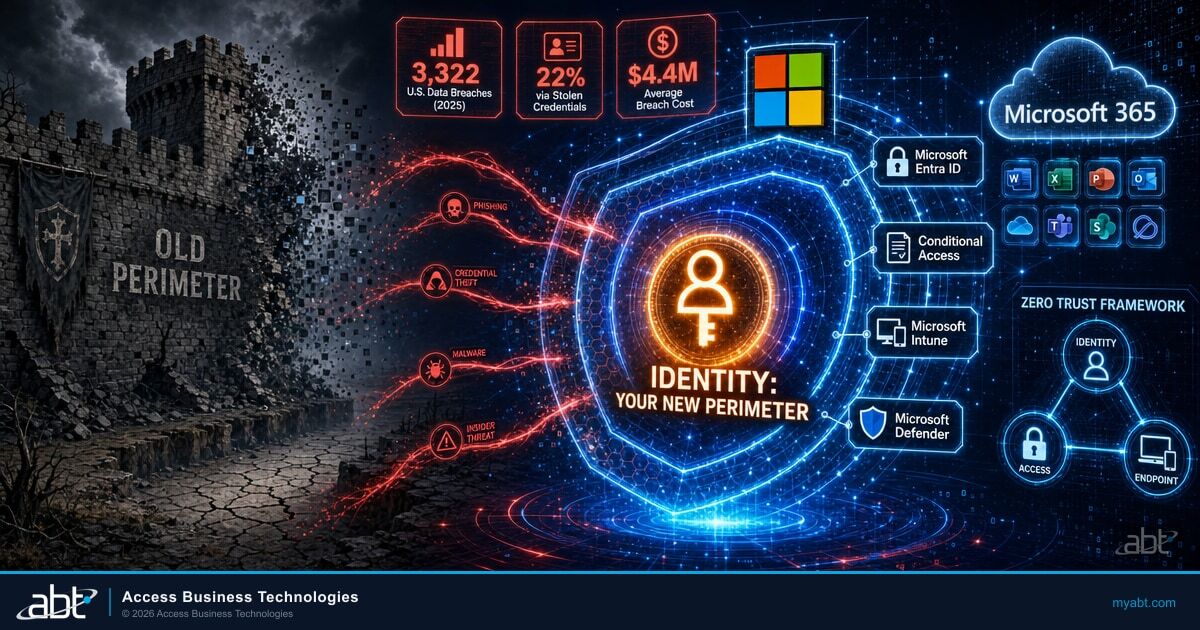
The castle-and-moat model of cybersecurity worked when your data lived on a server in the closet, your employees sat at desks in the building, and the firewall was the only gate. That architecture is gone. Your data now lives in Microsoft's cloud. Your employees work from branch offices, home offices, airport lounges, and coffee shops. Your applications run through a browser.
When the network perimeter dissolves, what remains? Identity.
Your credentials, including username, password, and authentication tokens, are the keys to every file, every email, every transaction in your organization. If an attacker possesses your identity, they possess your access. They do not breach a firewall. They log in.
Credential abuse powered 22% of all breaches in 2025, making stolen credentials the single most common initial access vector according to the Verizon Data Breach Investigations Report. For financial institutions governed by GLBA, FFIEC, and NCUA requirements, Microsoft 365 identity security is no longer an IT project. It is an organizational survival question.
The Identity-Access-Endpoint Triad: Three Layers, One Security Posture
Securing a Microsoft 365 environment requires three layers working together. Remove any one of them and the other two collapse.
Identity: Who Is Requesting Access?
Microsoft Entra ID (formerly Azure Active Directory) is the control plane. It verifies that the person requesting access is who they claim to be. But verification alone is not enough. A properly configured identity layer also evaluates context: Is this user logging in from a known location? Is their behavior consistent with past activity? Has their risk level changed since last authentication? See also our breakdown of Microsoft 365 E5 Security Features Banks Pay For But Don't Use.
For a credit union or bank, that context is the difference between a legitimate teller and an attacker using stolen credentials. For a mortgage company, it determines whether the person downloading borrower records is actually your loan officer. We cover Why Credit Unions Can't Afford Cheap Microsoft 365 Licenses in a companion piece.
Access: What Should This Identity Be Allowed to Do?
Authentication does not equal authorization. Conditional Access policies function as the decision engine between identity verification and resource access. If a user authenticates successfully but logs in from an unfamiliar device, the policy can require additional proof. If a user requests access to sensitive data from a blocked region, the policy denies it. Our guide to Microsoft 365 Security Checklist for Credit Unions goes deeper on this.
We break down five specific Conditional Access rules every financial institution needs in our companion article: 5 Conditional Access Rules Every Financial Institution Needs.
How Strong Is Your Identity Perimeter?
ABT's free Security Grade Assessment maps your Entra ID configuration, Conditional Access policies, and MFA enforcement against Zero Trust baselines. Takes 5 minutes. No sales call required.
Endpoint: Can We Trust the Device?
A verified user with valid permissions connecting from a malware-infected, unpatched personal laptop is still a breach in progress. Microsoft Intune and Defender for Endpoint verify that the device is healthy, encrypted, and compliant before it touches corporate data. For a detailed look at building risk-based device policies, see our guide on risk-based device compliance with Microsoft Intune.
These three layers form one security posture. Organizations that invest in identity verification but ignore device compliance are building a door with no frame. Organizations that manage devices but skip Conditional Access have locks with no policy for who gets a key.
Why Identity Attacks Are Accelerating in Financial Services
Attackers have shifted from perimeter attacks to credential theft because it works. The data across multiple industry reports tells a consistent story:
- 22% of all breaches began with stolen or compromised credentials in 2025, the highest of any initial access vector (Verizon DBIR).
- $4.4 million average global cost per breach in 2025, with credential-based incidents averaging even higher at $4.8 million because of extended dwell time (IBM Cost of a Data Breach Report).
- 292 days average time to identify and contain a credential-based breach, compared to 200 days for other attack types. Longer dwell time means more data exfiltrated and higher costs (IBM).
- AI-powered phishing increased 300% over 2024 levels, with real-time deepfake impersonation now operating at scale against financial services targets.
- 88% of basic web application attacks involved stolen credentials, making credential reuse the dominant attack path (Verizon DBIR).
Financial services reported 739 data breaches in 2025, more than any other sector. The combination of high-value data (Social Security numbers, account details, loan documents) and complex access environments (branch networks, remote staff, third-party integrations) makes the industry the highest-value target for credential theft campaigns.
Attackers have stopped trying to break through firewalls. They target the path of least resistance: a phishing email that captures credentials, a password reuse habit that hands over an account, an MFA fatigue attack that wears down a user until they approve a fraudulent prompt. MFA fatigue alone appeared in 14% of security incidents in the 2025 Verizon DBIR.
For financial institutions, the consequences are amplified. A compromised identity does not just access email. It accesses loan origination documents, wire transfer approvals, member account records, and board communications. Every one of those resources sits behind the same Microsoft 365 identity.
The Regulatory Mandate: Compliance Frameworks Expect Identity Controls
Regulators now treat identity and access management as a baseline expectation, not an advanced capability. Recent regulatory shifts have made this even more explicit:
- GLBA Safeguards Rule requires controls over who can access customer financial information, including risk assessments of identity management practices.
- FFIEC Cybersecurity Assessment Tool (CAT) was officially sunset on August 31, 2025. Financial institutions are now directed to use NIST Cybersecurity Framework 2.0 and CISA's Cybersecurity Performance Goals as their primary self-assessment tools.
- NCUA Part 748 requires credit unions to implement safeguards for member information, with identity verification and access controls at the foundation.
- NYDFS Cybersecurity Regulation (Part 500), effective November 2025, mandates universal MFA for all users accessing any information system, not just remote access or privileged accounts.
- FTC Safeguards Rule (updated) requires risk-based access controls for non-banking financial institutions including mortgage companies.
As of 2026, financial institutions subject to NYDFS Part 500 must implement universal MFA for ALL individuals accessing ANY information system. The era of selective MFA enforcement is over.
Cyber insurance providers are following the same path. Carriers now ask specific questions about MFA enforcement, device management, and Conditional Access configuration. If you cannot demonstrate these controls, expect higher premiums or denied claims when you need coverage most. Identity cyber scores are emerging as the new metric shaping cyber insurance underwriting in 2026.
Zero Trust: The Framework Behind Microsoft 365 Identity Security
Zero Trust is not a product you purchase. It is an operational philosophy built on three pillars that Microsoft has woven into the Entra ID and Conditional Access engine:
- Verify explicitly. Authenticate and authorize based on every available signal: user identity, location, device health, data classification, and behavioral anomalies.
- Use least privilege access. Grant the minimum permissions needed for the task. Implement just-in-time access for admin roles. Remove standing permissions that are not actively needed.
- Assume breach. Design as if attackers are already inside. Segment access, encrypt end-to-end, and use analytics to detect lateral movement.
For financial institutions running Microsoft 365, implementing Zero Trust means configuring the tools already included in your license:
- Disable legacy authentication. Legacy protocols bypass MFA. Blocking them is the absolute baseline. Microsoft's March 2026 Conditional Access enforcement changes are tightening this further by enforcing policies on all OIDC scope requests.
- Enforce MFA universally. Not via SMS (which is interceptable) but via authenticator apps, hardware keys, or passkeys. Microsoft now supports synced passkeys in Entra ID, reducing sign-in time by over 80% while eliminating phishing risk entirely. One multinational financial services firm saw helpdesk password resets drop 75% after transitioning to FIDO2.
- Deploy Conditional Access. Block logins from unauthorized geographies. Require managed devices for sensitive data access. Default policies are rarely sufficient for regulated institutions. Microsoft's 2026 update brings Conditional Access for Agent ID, treating AI agents as first-class identities with the same evaluation as human users.
- Manage every endpoint. Enroll corporate devices via Intune to enforce encryption and OS baselines. For personal devices, use MAM to sandbox corporate data. Read about closing the BYOD gap in Zero Trust for a deeper look at unmanaged endpoint risk.
- Monitor continuously. Watch sign-in logs for anomalies. Flag impossible travel events. Alert on bulk data downloads outside business hours.
Verify Your Identity Security Configuration
ABT's M365 security audit covers the controls examiners and insurers ask about:
- Entra ID Conditional Access policy review against FFIEC/NCUA baselines
- MFA enforcement audit across all user accounts and admin roles
- Legacy authentication detection and remediation plan
- Device compliance posture report for managed and personal endpoints
Microsoft 365 Is a Platform, Not Just Apps
Many financial institutions view Microsoft 365 as Word, Excel, and Outlook hosted in the cloud. That underestimation creates security gaps that attackers exploit.
Microsoft 365 is a platform where identity is the foundation. When you centralize identity through Entra ID, a user authenticates once (Single Sign-On) and gains governed access to Teams, OneDrive, SharePoint, and thousands of third-party SaaS applications. That single identity creates a single audit trail, which is exactly what FFIEC examiners and NCUA auditors expect. For a complete settings walkthrough, see our M365 security audit checklist for community banks.
The AI-Ready Connection
Microsoft 365 Copilot amplifies whatever security posture you have. If your identity and access governance is strong, Copilot respects those boundaries. If your permissions are sloppy, Copilot will surface sensitive borrower data for anyone who asks the right question. Copilot does not break your security. It reveals it.
Hardening your identity perimeter now prepares your institution for AI-driven workflows without creating new vulnerabilities. Before deploying Copilot, take the steps outlined in our financial services Copilot readiness assessment.
The Friction You Will Face (And How to Manage It)
Tightening Microsoft 365 identity security creates friction. Expect it and plan for it.
User resistance. Employees dislike added steps. When you enforce MFA or restrict access to managed devices, complaints will surface. The counter: Windows Hello biometrics and passkeys often make logging in faster than remembering multiple passwords. Login success rates increase by up to 4x with passkeys, according to FIDO Alliance deployment data. The secure path becomes the easiest path.
Executive exemptions. Leaders often demand to bypass MFA because it feels inconvenient. An executive account with weakened controls is exactly the target an attacker wants. Find alternatives (like phishing-resistant authentication that requires a fingerprint instead of a code) rather than removing protection.
Token persistence. Disabling an account in Active Directory does not kill active sessions. Tokens can persist, allowing access even after an account is locked. Proper incident response requires revoking tokens, killing active sessions, and investigating lateral movement.
Training gaps. The best Conditional Access policy will not stop a user who hands their MFA code to a convincing phishing site. Security training needs to move beyond "do not click links" to specific behavioral guidance for financial services staff handling sensitive data. MFA fatigue attacks, where users are bombarded with push notifications until they press Accept, now appear in 14% of security incidents.
The Business Case: What You Get from Identity Security Done Right
Identity security investment produces measurable returns across risk reduction, regulatory compliance, and operational efficiency:
- Reduced attack surface. Eliminating legacy authentication and enforcing MFA blocks 99.9% of automated credential attacks. Combined with phishing-resistant passkeys, the remaining 0.1% becomes significantly harder to execute.
- Examination confidence. Documented Conditional Access policies, sign-in logs, and compliance reports give examiners exactly what they need. With the FFIEC CAT sunset, institutions using NIST CSF 2.0 mapping demonstrate a stronger security posture to regulators.
- Secure hybrid operations. Employees work from anywhere on managed, compliant devices with consistent governance. No separate VPN headaches, no shadow IT workarounds.
- Lower breach costs. Organizations with Zero Trust controls pay an average of $1 million less per breach compared to those without, according to IBM. That is a measurable ROI on security investment.
- AI readiness. A hardened identity perimeter is the prerequisite for deploying Copilot and other AI tools safely. Without it, shadow AI becomes a compliance risk your team cannot see.
Why a Specialized MSP Closes the Gap
Microsoft provides the tools. They do not configure them for your regulatory environment. The gap between "licensed" and "secured" is where risk lives for financial institutions.
At Access Business Technologies (ABT), we built Guardian for this reality. As the largest Tier-1 Microsoft Cloud Solution Provider serving 750+ financial institutions, ABT bridges the gap between Microsoft's capabilities and the demands of regulated industries. Generic MSPs fail at financial services compliance because they lack the regulatory context that identity security in banking, lending, and credit union environments demands.
Guardian is a lifecycle: Hardening your tenant against Zero Trust baselines. Continuous Monitoring to catch sign-in anomalies and compliance drift. Deep Insights into your Microsoft 365 security posture. Rapid Response to neutralize threats before they become breaches.
You pay the same price for Microsoft licenses as you would buying directly. With ABT, you get Guardian's secure foundation included.
Your Identity Perimeter Has a Score. Do You Know It?
ABT has hardened identity security for 750+ financial institutions. Our free Security Grade Assessment benchmarks your Entra ID, Conditional Access, and endpoint compliance against the controls that FFIEC examiners, NCUA auditors, and cyber insurers expect. Five minutes. No obligation.
Frequently Asked Questions
Business Premium provides the capabilities but not the configuration. It includes Defender, Intune, and Entra ID P1, but these tools must be configured to meet GLBA, FFIEC, and NCUA requirements. Out-of-box defaults favor convenience over security. ABT Guardian closes that configuration gap for financial institutions.
Antivirus protects the device but cannot stop someone from logging into your systems with stolen credentials from a different computer. Identity security protects access to borrower and member data by verifying who requests access, from where, and under what conditions, before granting entry to any resource.
Zero Trust means every login attempt is treated as potentially hostile until verified through multiple signals. For banks and credit unions, this translates to enforcing MFA on every account, restricting access by device compliance and geographic location, and monitoring sign-in behavior continuously. FFIEC examiners increasingly expect this posture.
There is a short adjustment period, but modern identity security reduces friction over time. Single Sign-On eliminates multiple password entries. Windows Hello biometrics and passkeys make authentication faster than typing passwords. Microsoft reports passkey sign-in takes 3 seconds versus 24 seconds for password-based login on average.
Active Directory manages on-premises identities inside your network. Entra ID manages cloud identities for Microsoft 365 and SaaS applications. Most financial institutions need both synchronized together. Entra ID adds Conditional Access, risk-based sign-in detection, and phishing-resistant MFA that on-premises Active Directory alone cannot provide.