In This Article
You run IT for a community bank, a credit union, or a mortgage company. This week, three loan officers stopped you in the hallway to ask whether they can paste borrower data into ChatGPT. The website chatbot answered borrower questions overnight. Nobody has reviewed the responses. Microsoft 365 Copilot drafted condition letters in two loan files. The processors love it. An auto-tagging agent has been running on the post-close audit queue for a month, and you are not entirely sure who turned it on.
Next month, the examiner is back. Top of her list: "Show me how your institution governs the AI you use." None of it is in a single document. None of it has an owner. None of it has been tested for fairness. That silence is the gap that just got expensive.
Here is the part most coverage misses. Most of what your examiner will ask for is already sitting in your Microsoft 365 tenant. The five surfaces that govern AI are usually licensed in the Microsoft 365 Business Premium, Microsoft 365 Copilot Business, or Microsoft 365 E5 plan you already pay for. The gap is not a missing license. The gap is that nobody has owned them yet.
The Examiner Question Most IT Directors Cannot Answer
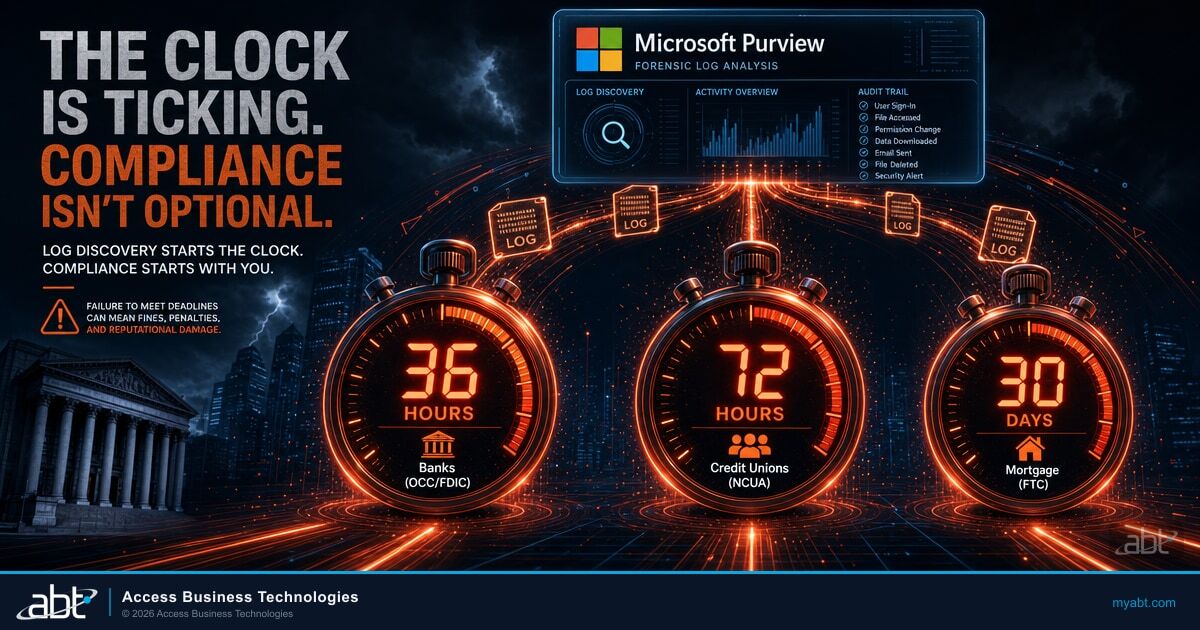
Examiners visit community banks, credit unions, and mortgage companies on a recurring schedule, often roughly every 12 to 18 months, though the exact cadence varies by regulator, charter, size, and risk profile. Their pre-visit request lists used to ask about MFA enforcement, Conditional Access policies, audit log retention, and vendor SOC 2 reports. Their 2026 lists ask the same questions, plus one new one: "Show me how your institution governs the AI you use." The IT director is the person who has to answer it, because the IT director is the only person who sees the full picture day to day.
The picture is rarely clean. Microsoft 365 Copilot is in production on the lending side because the COO read about it and wanted to pilot it. The website chatbot was a marketing project that quietly stayed live. The fraud-scoring vendor pushed an AI model update three quarters ago and never resent the SOC 2. A processor tagged her own auto-tagging agent for the post-close queue using Copilot Studio because she could. Nothing about any of that was wrong. Nothing about any of that was governed, either.
What Examiners Actually Want to See
A documented list of every AI system the institution uses or builds. A named owner for each. A written policy for what data may flow to AI. Evidence that high-risk AI was tested before production. Audit logs for AI interactions. A process for catching shadow AI when an employee bypasses the sanctioned tools. None of this is exotic. All of it is governable through controls you already pay for. Most community banks, credit unions, and mortgage companies just have not assembled the answer yet.
The other thing examiners no longer accept is "we use a third-party model and the vendor has SOC 2." Vendor diligence is necessary, not sufficient. The institution itself owns the governance, the testing, the monitoring, and the consumer-facing accountability. That is the through-line running across recent regulator statements on AI and third-party risk.
What Actually Changed in 2026
Two things shifted in the first half of 2026 that redefined the examiner conversation. A third, the Colorado AI Act, was rewritten and pushed to 2027. Take them in order.
SR 26-2 replaced SR 11-7 on April 17, 2026
On April 17, 2026, the Federal Reserve, FDIC, and OCC jointly rescinded SR 11-7, the 2011 model risk management guidance that ran banking models for fifteen years. The replacement, SR 26-2 from the Federal Reserve plus OCC Bulletin 2026-13, keeps the SR 11-7 three pillars (development, validation, governance) but reframes them through what the agencies call exposure and purpose proportionality. Bigger and more consequential models get more rigorous treatment. Lower-stakes models get scaled-down expectations. The new guidance applies primarily to banks above $30 billion in assets, with smaller banks pulled in only when model use is significant.
The catch is in how the new guidance handles newer technology. According to ABT's reading of the SR 26-2 materials, generative AI and agentic AI sit outside the scope of the guidance, on the rationale that these models are novel and rapidly evolving. Translation: the chatbot on your site, the Microsoft 365 Copilot pilot in your lending team, and the agent that auto-tags post-close items are likely NOT covered by SR 26-2 itself. Examiners will lean on the spirit of SR 26-2 plus NIST AI RMF when they look at those workloads, because that is the closest analog they have. Confirm the current scope language against the primary guidance before you rely on it.
The Colorado AI Act was rewritten, and the effective date moved to 2027
Colorado SB24-205, the original Colorado AI Act, was signed in May 2024 and was first scheduled to take effect in early 2026, after an interim postponement to mid-2026. Then the law itself changed. On May 14, 2026, Governor Jared Polis signed SB 26-189, which amends and narrows the Colorado AI Act and resets the effective date to January 1, 2027. The earlier broad duty-of-care framework built around high-risk AI systems and algorithmic discrimination was rewritten into a narrower model focused on disclosure and transparency for consequential automated decisions. The original 2026 deadline never arrived as a live obligation.
Enforcement is also on hold. The Colorado Attorney General has indicated the office will not enforce the Act until the rulemaking process concludes. The penalty mechanism that carries into the amended law is the Colorado Consumer Protection Act, which provides for a civil penalty of up to $20,000 per violation. How violations are counted (per affected consumer or otherwise) is a question for counsel and the pending rulemaking. There is no private right of action, and the Colorado Attorney General is the enforcing authority. Confirm the current Colorado position with counsel before you rely on it.
What the Colorado reset actually means
The Colorado AI Act is still law, now in its SB 26-189 form, and it takes effect January 1, 2027 rather than the old June 30, 2026 date. Rulemaking has not concluded, and the Attorney General has said enforcement waits for it. For an institution serving any Colorado consumers, the right posture is the one most regulators recommend anyway: build the program now against the most likely framework outline, document the applicability call, and watch the rulemaking calendar into 2027. The California, New York, Texas, and Illinois drafting tracks are moving on similar logic. The states that wait for Colorado to finalize will have less time to react when their own laws ship.
State AI laws are still moving
California, New York, Texas, and Illinois all have AI legislation in active drafting. ABT expects federal banking agencies to follow with their own AI governance request for information, given the attention the agencies have already paid to AI risk. That posture is exactly the same posture community banks, credit unions, and mortgage companies have been in for fifteen years on data privacy: the state floor moves first, the federal ceiling follows. Building governance against NIST AI RMF now means the next five state laws to ship will be a recheck, not a rebuild.
Five Microsoft 365 Surfaces That Already Govern AI
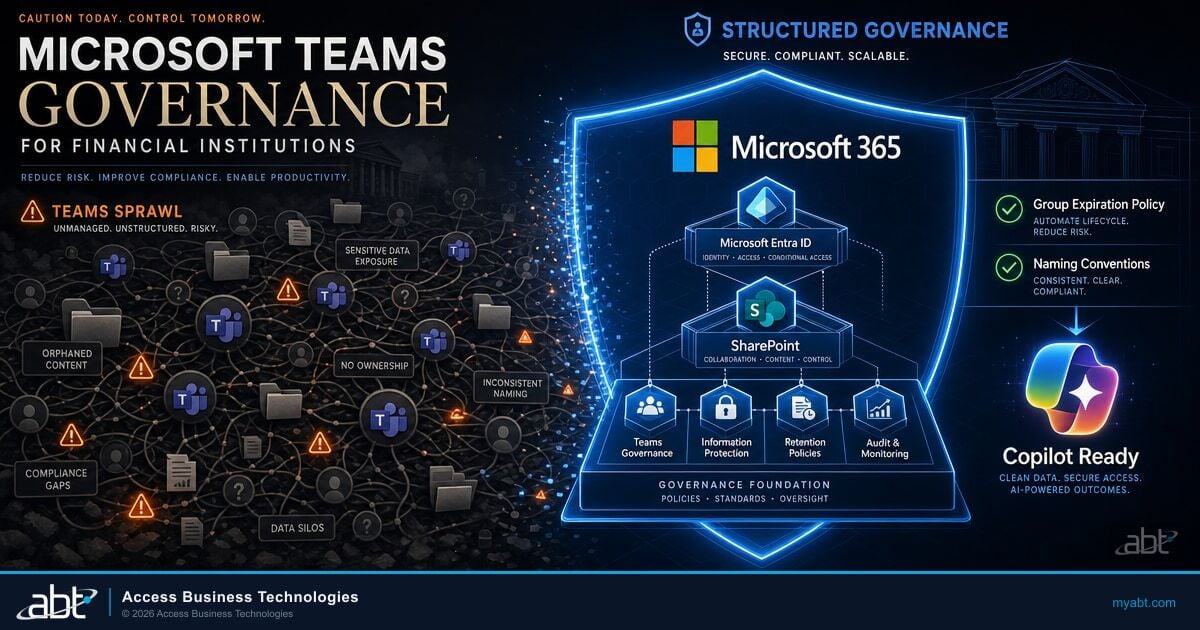
Here is the practical part. The five Microsoft 365 surfaces below are usually already licensed in the Microsoft 365 Business Premium, Microsoft 365 Copilot Business, or Microsoft 365 E5 plan you already pay for. The work is configuration, not procurement. If you are reading this before a Copilot rollout rather than after one, our companion guide to the five Microsoft 365 controls examiners ask about before you roll out Copilot frames the same surfaces from the pre-deployment side.
Data classification, sensitivity labels, and data loss prevention. If a loan officer pastes borrower data into a Copilot prompt, Purview is the surface that catches it.
Microsoft Purview Data Loss Prevention rules built specifically for AI prompts and responses. Same rule engine as the rest of Purview, scoped to the Copilot location.
Microsoft Entra ID Conditional Access decides which logins reach AI tools. Phishing-resistant authentication, device compliance, risk-based session controls.
Microsoft 365 admin center, Microsoft Entra admin center, Power Platform admin center, and Copilot Studio together expose every connected app, connector, and Copilot agent in your tenant.
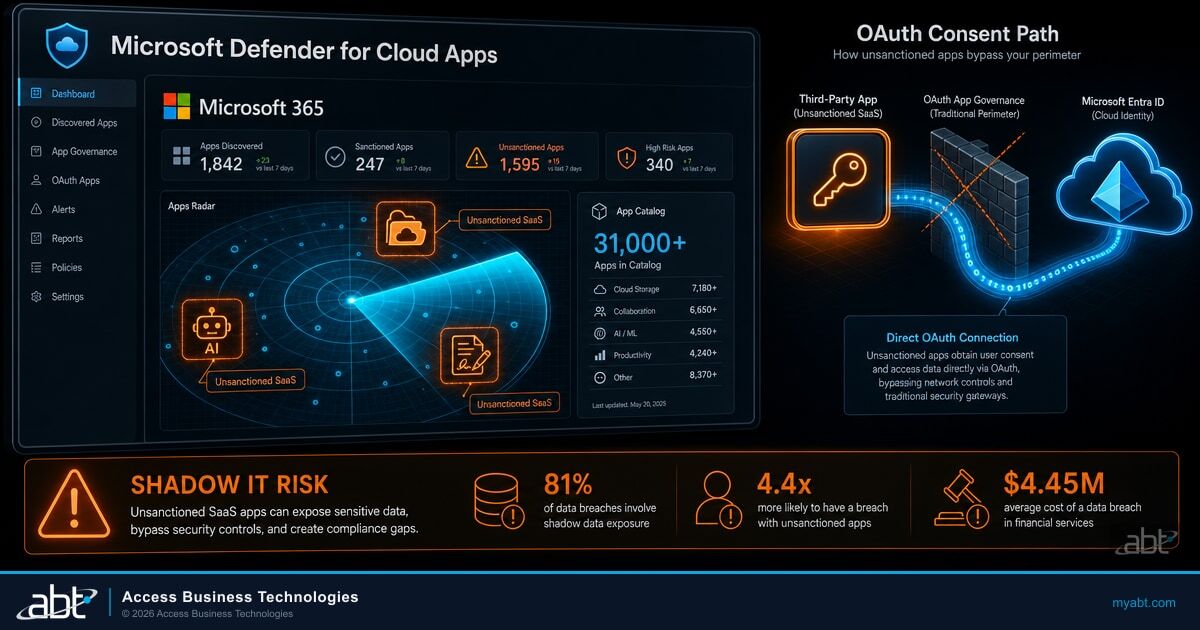
Microsoft Defender for Cloud Apps surfaces which AI tools your users actually visit. ChatGPT, Claude, Gemini, Perplexity, any of them.
Surface 1: Microsoft Purview
Microsoft Purview is the data security and compliance plane for Microsoft 365. Its DSPM (Data Security Posture Management) for AI capability is the central management view that helps secure data for AI apps and proactively monitor AI use across Microsoft 365 Copilot, ABT-built or customer-built agents, and connected third-party large language models. Microsoft Purview Information Protection applies sensitivity labels (Public, Internal, Confidential, Highly Confidential) across SharePoint, OneDrive, and Exchange before AI can access content. Manual labels are available in Microsoft 365 Business Premium. Automatic labeling and container labels (SharePoint or Teams sites) require Microsoft 365 E5 or the Purview Suite add-on.
Surface 2: Microsoft Purview Data Loss Prevention for Copilot
Microsoft Purview Data Loss Prevention has a Copilot location. The scoped policy scans typed Copilot prompt text in real-time for sensitive information types, including built-in detectors (credit card numbers, US Social Security numbers, IBAN, banking routing numbers) and custom detectors that match your loan-file or member-record patterns. When a sensitive prompt matches an enforced policy, Microsoft documents that Copilot restricts its processing of that prompt, so the sensitive content is not used to ground a response. Confirm the exact behavior against current Microsoft Learn documentation for your configuration. The policy is available in Microsoft 365 Business Premium and Microsoft 365 E5. The policy scans typed prompt text. File uploads route through the Information Protection sensitivity-label path on Surface 1.
Surface 3: Microsoft Entra ID Conditional Access
Microsoft Entra ID Conditional Access is the policy engine that decides which sign-ins reach Microsoft 365 Copilot, agents, and any other AI tool that authenticates against your Entra ID tenant. The same policy engine that enforces MFA, blocks legacy authentication, and gates SharePoint by device compliance gates AI access too. Phishing-resistant MFA, FIDO2 keys, device compliance signal, and Entra ID Protection risk score (sign-in risk and user risk) are all available without separate AI-specific policies. The work is mapping the Conditional Access policy template you already use for SharePoint to the Copilot, Microsoft Teams, and Power Platform service principals.
Surface 4: Agent visibility across the tenant
The canonical surfaces for agent inventory in 2026 are not a single dashboard. The Microsoft 365 admin center has an Agents section (Agents > All agents) that shows tenant-wide deployed and ownerless agents, including host product, availability, security/compliance posture, knowledge sources, and actions. The Microsoft Entra admin center holds the Microsoft Entra agent identities (the GUID identity each Copilot Studio agent authenticates as), with sign-in logs and Conditional Access reach. The Power Platform admin center exposes a Copilot Studio agent inventory at the environment level. Copilot Studio itself shows per-agent metadata, including the linked Entra agent identity. Together, these views answer the examiner question: "How do you know what agents are running in your tenant?"
Surface 5: Microsoft Defender for Cloud Apps shadow AI discovery
Shadow AI discovery surfaces which AI tools your employees actually visit, by app category. ChatGPT, Anthropic Claude, Google Gemini, Perplexity, Copilot.cloud, and a few hundred others appear with a risk read and a usage picture you can act on. Block via policy at the network or proxy edge. The licensing nuance matters here. A basic shadow-IT discovery capability, Cloud App Discovery, comes with Microsoft Entra ID P1, which is itself included in Microsoft 365 Business Premium, so most institutions already have a starting view. The richer Microsoft Defender for Cloud Apps experience (the fuller Cloud Discovery, the Generative AI category filter, sanctioned and unsanctioned tagging, and tighter controls) is the Microsoft cloud app security service, available with Microsoft 365 E5 or as an add-on rather than in base Business Premium. Most ABT-managed financial institutions start with the Entra ID discovery they already have and add Microsoft Defender for Cloud Apps where they want the deeper view. For the deeper version of this problem, our breakdown of shadow AI in banking and the compliance risk your team cannot see covers how unsanctioned AI use turns into an examiner finding.
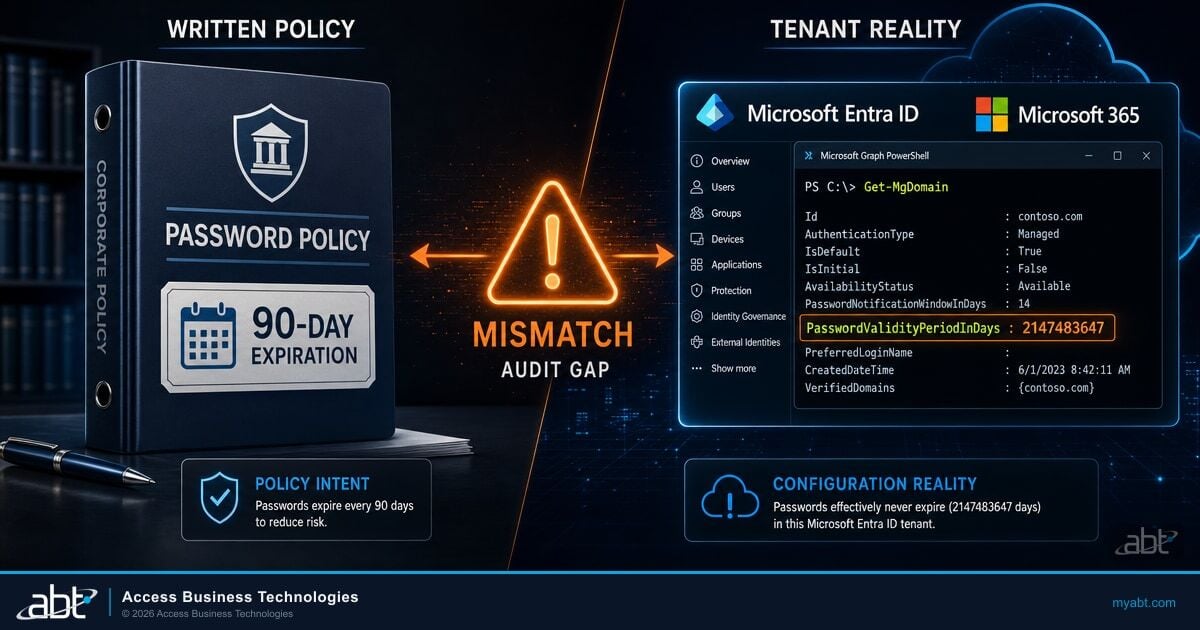
Across the 750-plus financial institutions ABT manages on Microsoft 365, the most common Day-One AI governance gap is not policy. It is configuration. The five surfaces are licensed. Microsoft Purview Audit retention is set to the default standard 180 days, not the 12-month window most examiners want. Copilot DLP is in audit-only mode, not enforce. Sensitivity labels are not auto-applied to Exchange or OneDrive. Conditional Access has Microsoft 365 Copilot in the same broad policy as SharePoint, with no specific phishing-resistant MFA carve-out for Copilot Studio agent owners. The fixes are hours of work in the right console, not a procurement cycle.
The NIST AI RMF Foundation
NIST released the AI Risk Management Framework (AI RMF) version 1.0 on January 26, 2023. It has become the de facto US AI governance taxonomy. The SR 26-2 model risk framework aligns with it, and federal banking agencies lean on it when reviewing AI workloads outside SR 26-2's scope. Treasury's public-private AI guidance series adapts it for financial services. State AI laws including the Colorado AI Act expect program documentation in this shape. For an institution that already runs a NIST CSF 2.0 cybersecurity program, the AI RMF reads as a familiar overlay using the same vocabulary.
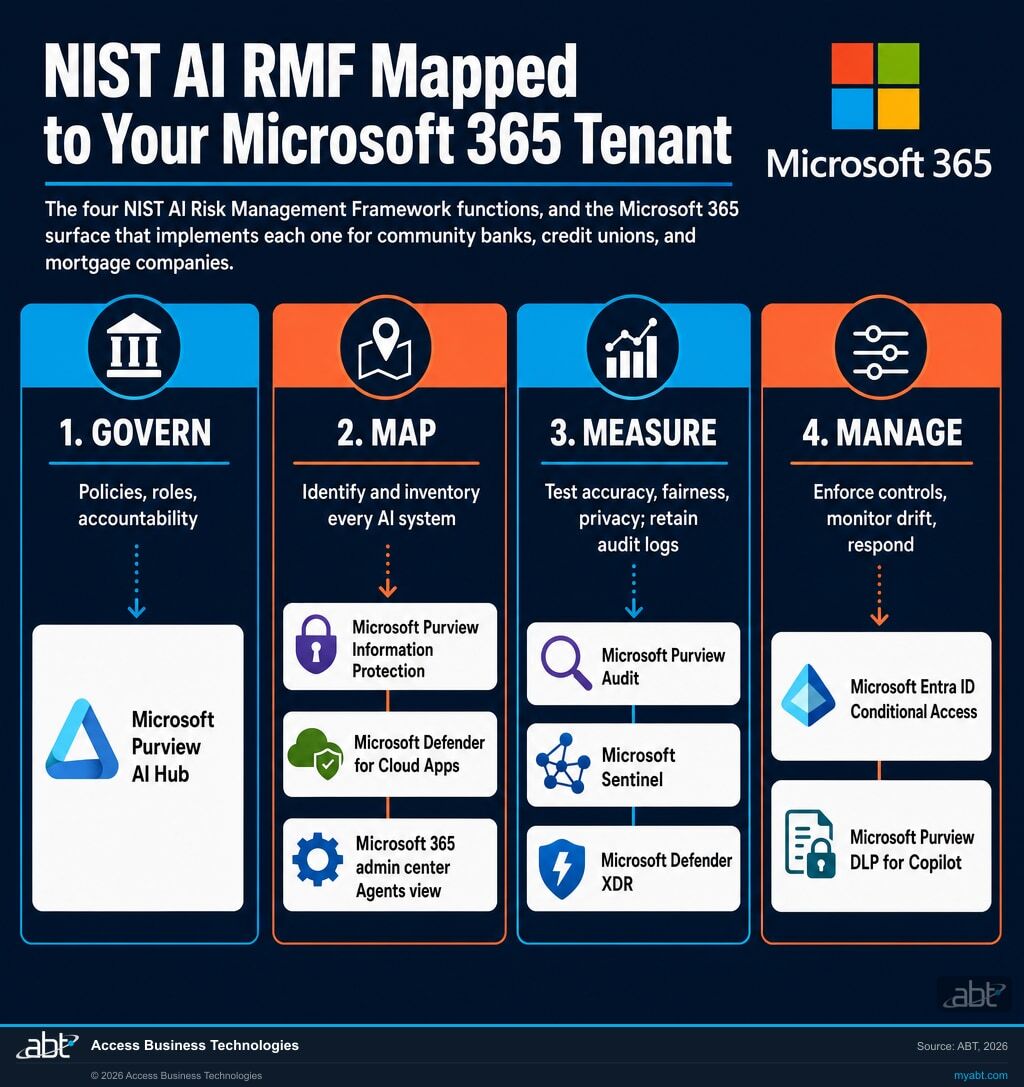
The NIST AI RMF Core has four functions: Govern, Map, Measure, and Manage. They are not linear steps. They are outcomes applied iteratively across the AI lifecycle. The four functions are also where each Microsoft 365 surface lands.
The non-obvious move for community banks, credit unions, and mortgage companies is to build the AI governance program against the four NIST functions before the next regulator arrives, not separately for each one. The Treasury financial services guidance, when it ships in full, is expected to adapt NIST AI RMF. The SR 26-2 framework aligns with NIST AI RMF, and examiners reach for it on AI workloads outside SR 26-2's scope. State laws cite or align with it. The framework that maps cleanly to all of those is NIST AI RMF, organized by Govern, Map, Measure, Manage.
Configuration, Not Procurement
The five surfaces above are mostly already licensed in the plans most institutions run. The work is largely configuration, and the cost is mostly hours of engineering time, with a few targeted exceptions (automatic labeling, 12-month Audit retention, and Microsoft Defender for Cloud Apps Cloud Discovery) that may need an E5 plan or a specific add-on rather than a brand-new platform.
Default tenant configuration most institutions ship with
- Microsoft Purview Audit retention at default 180 days
- Microsoft Purview DLP for Copilot in audit-only mode
- Manual sensitivity labels available, not applied to Exchange or OneDrive
- Conditional Access policy treats Copilot the same as SharePoint with no phishing-resistant carve-out for Copilot Studio agent owners
- Microsoft 365 admin center Agents view never reviewed
- No documented Microsoft Defender for Cloud Apps shadow AI dashboard
Configured tenant the examiner expects
- Microsoft Purview Audit retention extended to 12 months for AI events (E5 or Audit Premium add-on)
- Microsoft Purview DLP for Copilot in enforce mode for sensitive information types
- Auto-labeling on Exchange and OneDrive for Confidential and Highly Confidential content
- Phishing-resistant MFA on Copilot Studio agent owners and any privileged AI role via Conditional Access
- Quarterly review cadence on the Microsoft 365 admin center Agents inventory
- Microsoft Defender for Cloud Apps Cloud Discovery dashboard with sanctioned and unsanctioned tags applied
Most community banks, credit unions, and mortgage companies are running close to the left column today. The fix to the right column is between 20 and 60 hours of Microsoft 365 engineering work, depending on tenant size and complexity. The work is sequenced. The work is documented. The work is delivered through the same management plane your IT team already uses for SharePoint and Microsoft Teams.
TL;DR
Five Microsoft 365 surfaces. Already licensed in most tenants. The gap is not a missing license. The gap is that nobody has owned them yet, set the policies to enforce, and turned the audit retention up.
Want to see where your tenant actually stands today?
Run a Security Grade scan. Five minutes. One tenant. One report. The result is a prioritized list of the Microsoft 365 controls your tenant has and what is still off.
How ABT and the Guardian Operating Model Help
ABT manages Microsoft 365 tenants for more than 750 community banks, credit unions, and mortgage companies. When an institution asks ABT to look at AI governance, the work has two phases. The first is an audit of the existing Microsoft 365 controls against the AI governance questions the examiner will ask. The second is the Guardian operating model, the 24/7 service that keeps those controls running after the audit closes.
The audit phase maps cleanly inside ABT's NIST CSF 2.0 Assessment, the structured engagement that scores a financial institution end to end against the NIST Cybersecurity Framework 2.0. AI governance is one domain inside that assessment. ABT engineers walk through the five Microsoft 365 surfaces, score the configuration against what the examiner is likely to ask, and produce a written remediation plan with a Microsoft 365 admin center walk-through and a Microsoft Purview screenshot for each finding.
The Guardian operating model is the 24/7 layer. ABT engineers configure Microsoft Purview, monitor Conditional Access drift, surface the Microsoft 365 admin center Agents inventory, and report on Microsoft Defender for Cloud Apps shadow AI activity. Guardian MxDR is the detection and post-incident response side: alerts on anomalous AI behavior, including the Copilot agent that suddenly pulls files it never touched, the auto-tagging agent nobody knows who installed, the shadow ChatGPT prompt that tries to paste borrower data. Together, the Guardian operating model turns the configuration audit into a sustained, examiner-defensible program. Once the program is live, the work shifts from a one-time assessment to a repeating rhythm. Our guide to the quarterly AI governance auditing cycle examiners expect on Microsoft Purview and Microsoft Sentinel walks through the logging surface and the audit artifacts that keep the program defensible quarter after quarter.
A processor at a credit union spins up a Copilot Studio agent that auto-tags items in the post-close audit queue. The agent quietly grows, picks up access to a new SharePoint site, and starts pulling borrower-document content the processor was never supposed to expose to that audience.
The Microsoft 365 admin center Agents view shows the new agent. Microsoft Entra ID logs show the agent's identity reaching the new SharePoint site. Microsoft Purview surfaces the sensitivity label drift. Guardian MxDR alerts ABT's SOC. ABT engineers contact the IT director and document the agent ownership. To put the agent back inside its lane, the data-level fix is to correct the SharePoint site permissions and the agent's knowledge-source configuration in Copilot Studio so it can only reach the post-close audit content, with Microsoft Purview sensitivity labels and Microsoft Entra ID Conditional Access governing who and what can sign in to it. If the agent should not exist, it is blocked outright. The processor keeps her productivity. The institution keeps the audit log. The examiner sees a clean trail.
The fixes are usually configuration, not procurement. The licenses are in the tenant. The rules just need to be set to enforce, not watch.
A 90-Day Path to Examiner-Ready
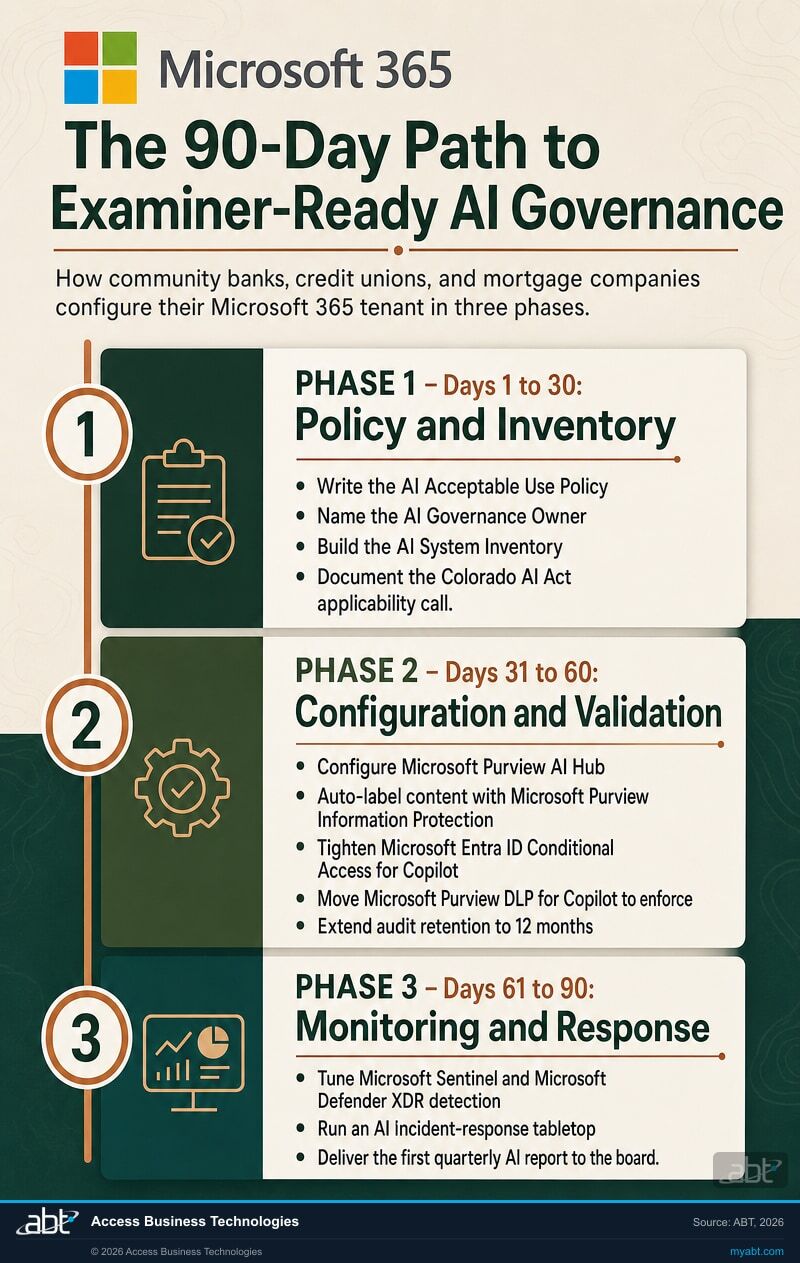
If your institution looked at the comparison grid above and recognized more left-column items than right-column ones, that is the typical starting position. The 90-day path below is the same sequence ABT runs with community banks, credit unions, and mortgage companies. It is not a SKU. It is a sequence that fits inside the NIST CSF 2.0 Assessment for institutions that engage ABT for the full program, and it is one IT director can run alone with the right Microsoft 365 admin center walk-through.
Days 1 through 30: Policy and inventory
Write the AI Acceptable Use Policy. Name the AI Governance Owner (typically the CIO, CISO, or Chief Risk Officer at the institution). Build the AI System Inventory: vendor models embedded in the loan origination system, the fraud platform, the CRM, the chatbot, plus internal Microsoft 365 Copilot use, Copilot Studio agents, and any shadow AI surfaced in the Microsoft Defender for Cloud Apps Cloud Discovery dashboard. Stand up the risk-tier classification scheme. Document the Colorado AI Act applicability determination against the amended SB 26-189 framework that takes effect January 1, 2027 (does the institution serve any Colorado consumers in lending, credit, or insurance, and does any AI factor into a consequential decision?). Brief the board on the draft policy at the next quarterly meeting.
Days 31 through 60: Configuration and validation
Configure Microsoft Purview AI Hub for governance oversight. Auto-label content across SharePoint, OneDrive, and Exchange via Microsoft Purview Information Protection. Tighten Microsoft Entra ID Conditional Access for Microsoft 365 Copilot, Copilot Studio agent owners, and any third-party AI portal that authenticates against Entra ID. Move Microsoft Purview DLP for Copilot from audit-only to enforce. Extend Microsoft Purview Audit retention to 12 months for AI events (E5 or Audit Premium add-on). Inventory agents in the Microsoft 365 admin center Agents view, the Microsoft Entra agent identity log, and the Power Platform admin center.
Days 61 through 90: Monitoring and response
Tune Microsoft Sentinel and Microsoft Defender XDR detection rules for AI workloads. Test the AI incident response addendum with a tabletop exercise covering prompt injection, data leak via AI, and an agent acting outside its boundary. Run the first model-drift baseline measurement on the highest-risk AI system in the inventory. Deliver the first quarterly AI report to the board. Set the cadence for the continuous improvement loop. At day 90, every Microsoft 365 control is at "configured" or has a documented exception with a remediation date.
In ABT's recent Microsoft 365 tenant configuration work for community banks, credit unions, and mortgage companies, one of the most common configuration gaps blocking AI governance is Microsoft Purview Audit retention left at the default standard 180 days instead of the 12-month window most examiners want. The fix is one tenant-level setting and (if not already on E5) a Microsoft Purview Audit Premium add-on at the user level for the AI-using staff.
Audit Your Microsoft 365 Controls Against the AI Governance Questions Your Examiner Will Ask
For community banks, credit unions, and mortgage companies on Microsoft 365, ABT runs the NIST CSF 2.0 Assessment and the Guardian operating model. We map what you already have to what you actually need to show. The licenses are usually already in the tenant. The work is configuration, not procurement.
Frequently Asked Questions
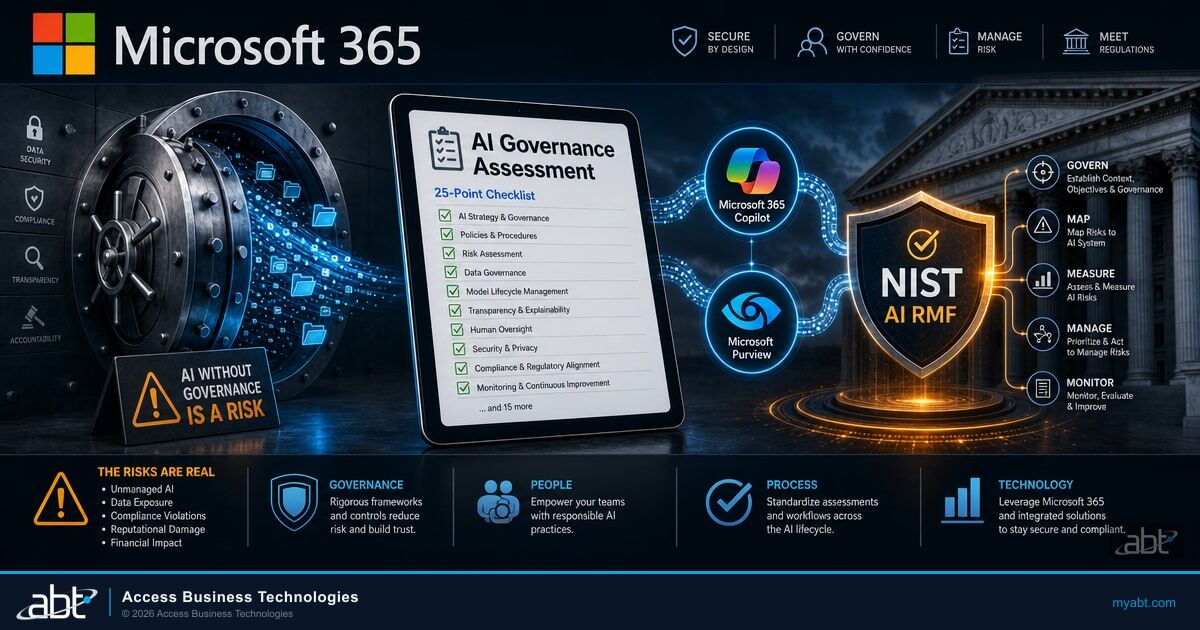
An AI governance assessment is a structured review of how a community bank, credit union, or mortgage company controls the AI systems it uses or builds. It scores the institution against a recognized framework (most commonly the NIST AI Risk Management Framework version 1.0, published January 26, 2023) and identifies gaps in policy, inventory, validation, and operational controls. For institutions on Microsoft 365, the assessment maps each control to the Microsoft 365 surface that implements it: Microsoft Purview, Microsoft Purview DLP for Copilot, Microsoft Entra ID Conditional Access, the Microsoft 365 admin center Agents view, and Microsoft Defender for Cloud Apps. Output is typically a control-by-control scorecard, a gap analysis, and a remediation plan sized for board reporting and examiner review.
Yes. On April 17, 2026, the Federal Reserve, FDIC, and OCC jointly rescinded SR 11-7. The replacement is SR 26-2 from the Federal Reserve, paired with OCC Bulletin 2026-13. The new guidance keeps SR 11-7's three pillars (development, validation, governance) but reframes them through an exposure and purpose proportionality framework. SR 26-2 applies primarily to banks above $30 billion in assets, with smaller banks pulled in only when model use is significant. Based on ABT's reading of the SR 26-2 materials, generative AI and agentic AI sit outside the scope of the guidance, on the rationale that these models are novel and rapidly evolving. For those workloads, examiners apply NIST AI RMF principles plus the institution's broader risk management discipline. Confirm the current scope language against the primary guidance before relying on it.
Possibly, depending on whether the institution serves any Colorado consumers and uses AI to make consequential decisions about lending, credit, deposit accounts, fraud holds, or insurance. The original Colorado AI Act (SB24-205) was scheduled to take effect in early 2026, then amended by SB 26-189, which Governor Jared Polis signed on May 14, 2026. SB 26-189 narrows the law to a disclosure and transparency model for consequential automated decisions and resets the effective date to January 1, 2027. Enforcement is on hold: the Colorado Attorney General has indicated the office will not enforce the law until rulemaking concludes. The Colorado Consumer Protection Act provides for a civil penalty of up to $20,000 per violation, with how violations are counted left to counsel and the pending rulemaking. There is no private right of action, and the Colorado AG is the enforcing authority. The first compliance step is a documented applicability determination (Govern function in NIST AI RMF), confirmed with counsel.
Five surfaces, all inside the tenant your team already manages. Microsoft Purview handles data classification, sensitivity labels, and DLP across SharePoint, OneDrive, and Exchange. Microsoft Purview Data Loss Prevention has a Copilot location that scans typed prompt text in real-time and blocks Copilot processing when sensitive data is detected. Microsoft Entra ID Conditional Access enforces phishing-resistant MFA, device compliance, and risk-based session controls for Copilot, Copilot Studio agents, and other AI tools that authenticate against Entra ID. Agent visibility is split across the Microsoft 365 admin center Agents view (tenant-wide), the Microsoft Entra admin center (agent identities and sign-in logs), the Power Platform admin center (Copilot Studio agents per environment), and Copilot Studio (per-agent metadata). Microsoft Defender for Cloud Apps Cloud Discovery surfaces shadow AI tools (ChatGPT, Anthropic Claude, Google Gemini, Perplexity) by filtering the Cloud app catalog by the Generative AI category.
Mostly yes. Microsoft 365 Business Premium includes manual sensitivity labels via Microsoft Purview Information Protection, Microsoft Purview DLP for Copilot prompt scanning, Microsoft Entra ID Conditional Access, the Microsoft 365 admin center Agents view, and Microsoft Purview Audit Standard (180-day retention). A few capabilities require an upgrade. Automatic sensitivity labeling and Microsoft Purview Audit Premium (12-month retention) require Microsoft 365 E5 or the relevant add-on at the user level for AI-using staff. A basic shadow-IT discovery capability, Cloud App Discovery, comes with Microsoft Entra ID P1, which is included in Business Premium, so most tenants already have a starting view of unsanctioned AI. The fuller Microsoft Defender for Cloud Apps experience comes with Microsoft 365 E5 or as an add-on rather than in base Business Premium. ABT's typical recommendation for a sub-300-seat financial institution is Business Premium plus targeted compliance and identity add-ons rather than a tenant-wide E5 upgrade.
Two things. First, ABT runs the NIST CSF 2.0 Assessment, a structured 6 to 8 week engagement scored across the NIST Cybersecurity Framework 2.0. AI governance is one domain inside that assessment. ABT engineers walk through the five Microsoft 365 surfaces, score the configuration against what the examiner is likely to ask, and produce a written remediation plan with screenshots and a Microsoft 365 admin center walk-through for each finding. Second, the Guardian operating model is the 24/7 layer that keeps the controls running after the audit closes. ABT engineers configure Microsoft Purview, monitor Microsoft Entra ID Conditional Access drift, surface the Microsoft 365 admin center Agents inventory, and report on Microsoft Defender for Cloud Apps shadow AI activity. Guardian MxDR is the detection and post-incident response side that alerts on anomalous AI behavior in flight.
Shadow AI is any AI use that happens outside the institution's sanctioned tools and outside its governance program. It includes employees using consumer ChatGPT or Anthropic Claude with corporate data, departments deploying third-party agents without IT review, and AI features inside vendor tools (the loan origination system, the CRM, the fraud platform) that nobody has formally inventoried. Microsoft Defender for Cloud Apps Cloud Discovery surfaces the discoverable layer by filtering the Cloud app catalog by the Generative AI category. The risk is twofold: data leakage (sensitive content sent to AI services with weaker controls) and compliance gaps (AI making consequential decisions without the institution's knowledge). The Manage function of NIST AI RMF makes shadow AI detection an ongoing operational requirement, not a one-time inventory step.
Sources and References
The regulatory and Microsoft product claims in this article trace to the following primary sources. Confirm the current status of any regulatory item against the primary source and with counsel before relying on it, since AI legislation and supervisory guidance continue to change.
- Colorado AI Act (original). Colorado General Assembly, Senate Bill 24-205, "Consumer Protections for Artificial Intelligence" (2024 regular session). leg.colorado.gov/bills/sb24-205
- Colorado AI Act (2026 amendment). Colorado General Assembly, Senate Bill 26-189, amending the Colorado Artificial Intelligence Act, signed by Governor Jared Polis on May 14, 2026, with an effective date of January 1, 2027. leg.colorado.gov
- Colorado Consumer Protection Act. Colorado Revised Statutes, Title 6, Article 1 (the civil-penalty and enforcement mechanism carried into the amended AI Act). leg.colorado.gov
- Federal model risk management guidance. Federal Reserve Supervision and Regulation Letter SR 26-2, paired with OCC Bulletin 2026-13, which together replaced the rescinded SR 11-7 on April 17, 2026. Federal Reserve: federalreserve.gov/supervisionreg/srletters. OCC: occ.gov/news-issuances/bulletins
- NIST AI Risk Management Framework. NIST AI 100-1, "Artificial Intelligence Risk Management Framework (AI RMF 1.0)," published January 26, 2023 (Govern, Map, Measure, Manage). nist.gov/itl/ai-risk-management-framework
- NIST Cybersecurity Framework 2.0. NIST CSF 2.0, the cybersecurity framework the AI RMF overlays for institutions already running a CSF program. nist.gov/cyberframework
- AI adoption data. McKinsey and Company, "The State of AI in 2025: Agents, innovation, and transformation," November 2025 (the 88 percent AI-adoption figure). mckinsey.com/capabilities/quantumblack/our-insights/the-state-of-ai
- Microsoft Purview (data security and compliance, including Data Security Posture Management for AI and DLP for Copilot). Microsoft Learn. learn.microsoft.com/purview
- Microsoft Entra ID Conditional Access. Microsoft Learn. learn.microsoft.com/entra/identity/conditional-access
- Microsoft Defender for Cloud Apps (Cloud Discovery and shadow AI visibility). Microsoft Learn. learn.microsoft.com/defender-cloud-apps
- Microsoft 365 admin center agents management and Microsoft Copilot governance. Microsoft Learn. learn.microsoft.com/microsoft-365-copilot
- Microsoft Sentinel and Microsoft Defender XDR. Microsoft Learn. learn.microsoft.com/azure/sentinel