


Windows 11 · Windows 10 · Windows Server
Windows Update certificates expire in May and June 2027. Find the PCs and servers that will stop getting updates.
Microsoft says a set of certificates that Windows devices use to connect to Windows Update expires on May 17, 2027 and June 19, 2027. Devices on a supported version of Windows that have the right security update keep updating. Devices that fall behind, or run an out-of-support version, lose access to Windows Update. This page covers which versions need what, the dates, and six steps a credit union, bank, or mortgage company can take now.
- Most in-support devices current on monthly updates need no extra action, per Microsoft
- Windows Server 2016, Windows Server 2019 and Windows 10 Enterprise 2019 LTSC have the earlier date: May 17, 2027
- Devices that get updates from WSUS are outside this change
The change
What happens to Windows Update in May and June 2027?
Certificates that Windows devices use to trust Windows Update reach their expiration dates. Microsoft has already shipped the replacements in security updates. Here is what that means for each kind of device.
The certificate rotation in brief
- What
- A set of certificates that help devices establish trusted connections to Windows Update expires on May 17, 2027 and June 19, 2027 (MC1491763).
- Already done
- Devices on a supported version of Windows that are current with monthly updates already have the replacement certificates and keep updating.
- Needs action
- Supported devices that are behind on updates, and devices on out-of-support Windows versions.
- Out of scope
- Devices that receive updates from Windows Server Update Services (WSUS).
- If missed
- A supported device can get the update from the Microsoft Update Catalog or your management tools. An unsupported device receives no updates.
The replacement certificates ship
Microsoft delivers the new certificates in Windows security updates, so current devices already have them.
Windows Server 2016 leaves extended support
Four months before its certificate date, per Microsoft Lifecycle. Microsoft lists Extended Security Update years after it.
First set of certificates expires
Windows Server 2016, Windows Server 2019 and Windows 10 Enterprise 2019 LTSC need the July 2026 update or later by now.
Second set of certificates expires
Windows 11, Windows Server 2022 and 2025, and in-support Windows 10 need their named update or later by now.
"If unaddressed, affected devices will stop connecting and receiving all types of updates from Windows Update."
Windows IT Pro Blog, Microsoft, October 8, 2026Windows Update checks a certificate to confirm a device is talking to Microsoft's real update servers before it trusts what it downloads. Certificates carry expiration dates, so Microsoft rotates them on a schedule. For most of an institution's fleet, the rotation already happened quietly: the replacement certificates arrived inside the September 2025 and July 2026 security updates, and devices that installed those updates are ready.
The devices at risk are the ones nobody has looked at in a while. A branch PC that has been switched off since spring, a server that only gets patched when someone remembers, a Windows 10 machine that never enrolled in Extended Security Updates. Each keeps working after the date, and each quietly stops receiving updates. For the Windows 10 side of that question, our Windows 10 ESU Year 2 page covers what the second year of coverage includes.
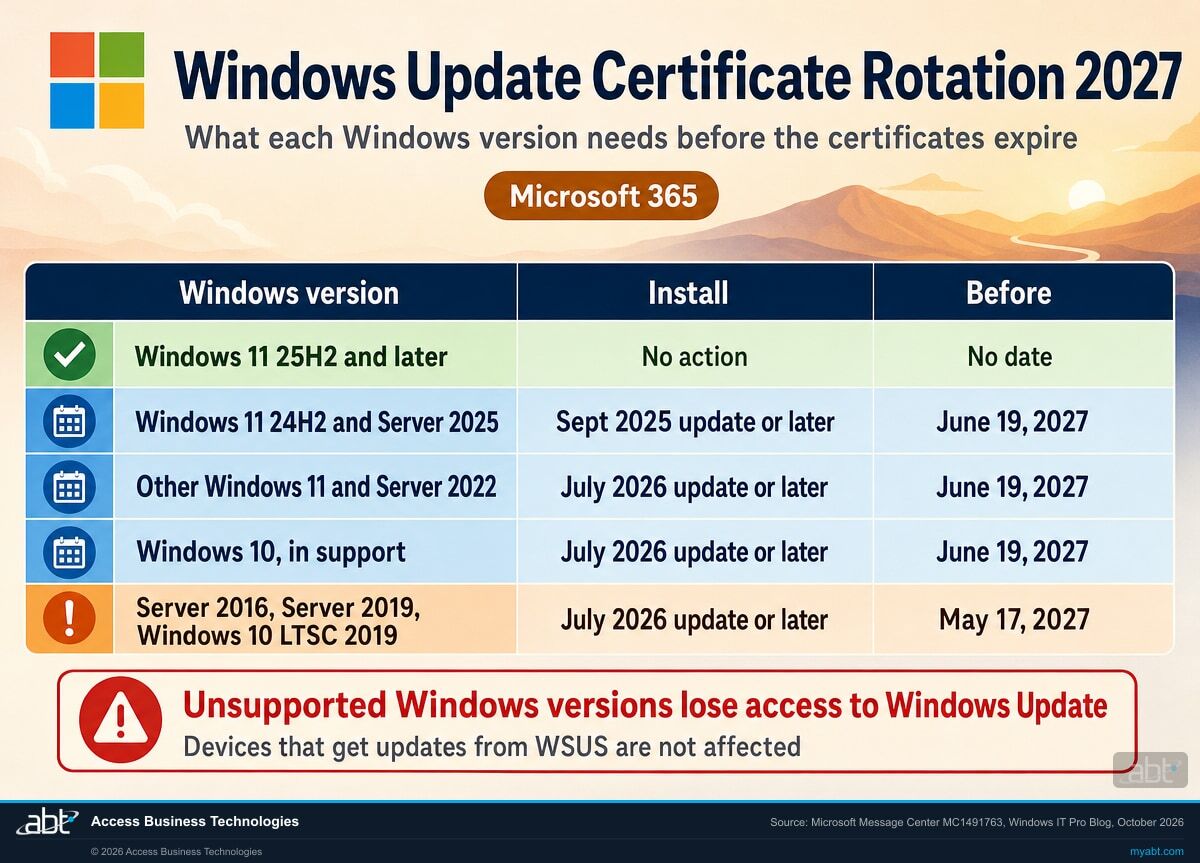
Side by side
Which Windows versions need action before the certificate dates?
The first three columns are Microsoft's certificate table. The last column adds each version's support dates from Microsoft Lifecycle, because a device has to pass both checks.
| Windows version | Install | Before | Support dates (Microsoft Lifecycle) |
|---|---|---|---|
| Windows 11, version 25H2 and later | No action | Not applicable | Version 25H2: Home and Pro to October 12, 2027; Enterprise and Education to October 10, 2028 |
| Windows 11, version 24H2 and Windows Server 2025 | September 2025 security update or later | June 19, 2027 | Version 24H2: Home and Pro servicing ended October 13, 2026; Enterprise and Education to October 12, 2027. Windows Server 2025 extended support to November 14, 2034 |
| Other in-support Windows 11 and Windows Server 2022 | July 2026 security update or later | June 19, 2027 | Windows 11 Enterprise and Education 23H2 servicing ended November 10, 2026. Windows Server 2022 extended support to October 14, 2031 |
| In-support Windows 10 | July 2026 security update or later | June 19, 2027 | Windows 10 support ended October 14, 2025. Extended Security Updates require version 22H2 |
| Windows 10 Enterprise 2019 LTSC, Windows Server 2019, Windows Server 2016 | July 2026 security update or later | May 17, 2027 | LTSC 2019 and Server 2019 extended support to January 9, 2029. Windows Server 2016 extended support ends January 12, 2027 |
| Other Windows versions | Upgrade to a supported version | Before the dates | Out of support: these devices lose access to Windows Update services |
Two tables, two checks
Microsoft's certificate table names Windows versions. The lifecycle pages say whether each edition of that version is still serviced. A Windows 11 Pro PC still on version 24H2 appears in the certificate table, and its servicing ended on October 13, 2026. Moving it to version 25H2 puts it on a version Microsoft lists as needing no certificate action, serviced for Home and Pro until October 12, 2027. Run every device through both tables, and fix the version question first.
Find the devices that will stop getting updates while the fix is still a monthly update
ABT works with your team to inventory every Windows PC and server, check each one against Microsoft's certificate table and lifecycle dates, and plan the updates and upgrades, as part of a free security assessment.
Request the free assessmentThe work
How do you get every Windows device ready for the certificate rotation?
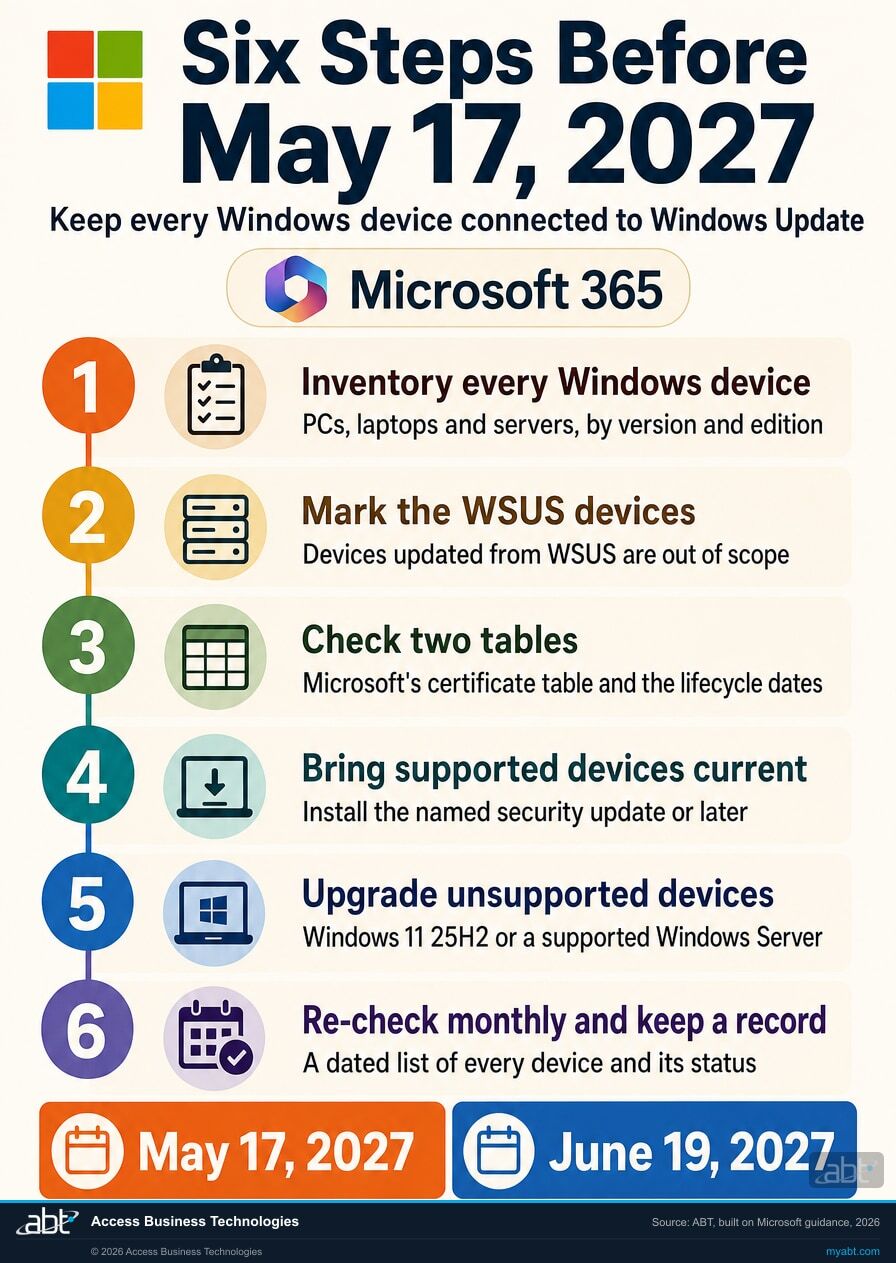
ABT's recommended sequence, built on Microsoft's three-step plan. Steps 1 to 3 find out where you stand. Steps 4 to 6 fix it and keep it fixed.
Inventory every Windows device by version and edition
List every PC, laptop and server with its Windows version, edition and last update date. Include the devices that rarely connect: spare laptops, branch machines that sit switched off, and servers that run one application. Microsoft's first step is to identify devices running older or unsupported versions of Windows.
Mark the devices that update from WSUS
Microsoft says the certificate change does not apply to devices that receive updates from Windows Server Update Services. Mark those devices so the rest of the list is the set that depends on Windows Update directly.
Check each device against both tables
Match each device to its row in the certificate table and note the update it needs and its date. Then check its edition and version against Microsoft Lifecycle. A device on a version past its servicing end date goes on the upgrade list, whatever the certificate table says.
Bring supported devices current
Install the security update Microsoft names in each device's row, or a later one: September 2025 for Windows 11 version 24H2 and Windows Server 2025, July 2026 for the other versions in the table. Windows 11 version 25H2 and later need nothing extra. For a device that is stuck, Microsoft points to the Microsoft Update Catalog or your regular management tools.
Upgrade the unsupported devices before May 2027
Plan Windows 11 upgrades for out-of-support PCs and a path for old servers. Windows Server 2016 leaves extended support on January 12, 2027, so it needs a decision first; our Windows Server 2016 end of support page lays out the options. Single-purpose devices on Windows 10 LTSC have their own dates, covered on our Windows 10 LTSC end of support page.
Re-check monthly and keep a dated record
Run the inventory again each month until every device is current or retired, and keep a dated list of each device, its version, its update status and its plan. That list answers the question "which machines are still getting updates" with a document, well before May 17, 2027.
Check first
Where are the devices most likely to miss the date?
ABT's list of the places to look first, each tied to a row in Microsoft's table.
Servers nobody patches on a schedule
Windows Server 2016 and 2019 have the earlier May 17, 2027 date. Application servers that are updated only during a vendor upgrade are the ones to check first.
PCs that sit switched off
Spare laptops, training-room PCs and machines at a seasonal branch miss monthly updates while they are off. A device that comes back after the date needs the update from the Microsoft Update Catalog.
Windows 10 PCs outside ESU
Windows 10 support ended on October 14, 2025. A Windows 10 Home, Pro, Enterprise or Education PC outside Extended Security Updates is on an unsupported version and goes on the upgrade list. LTSC editions follow their own lifecycle dates.
Windows 11 Pro PCs still on 24H2
Servicing for Home and Pro version 24H2 ended on October 13, 2026. Moving those PCs to version 25H2 settles both the servicing question and the certificate question.
Single-purpose devices on LTSC
Windows 10 Enterprise 2019 LTSC shares the May 17, 2027 date with the older servers. Kiosks and dedicated workstations often run LTSC and are easy to leave out of a PC inventory.
Old images and templates
A PC or virtual machine built from an image older than July 2026 can start without the update its version needs. Refresh images before May 2027, or check every new build against Microsoft's table.
For financial institutions
Why does the Windows Update certificate rotation matter at a credit union, bank, or mortgage company?
Because a device that stops updating keeps working, so nobody notices until someone checks.
Devices that keep up with the work. Staff on current, serviced versions of Windows get Microsoft's fixes and features every month without a project. Getting every device onto a supported version before May 2027 keeps the whole fleet on that monthly rhythm.
Updates that keep arriving. After the dates, an affected device stops receiving all types of updates from Windows Update, including security updates. The device still boots, logs in and opens the core banking or loan origination client, so the gap is invisible from the desk. Microsoft's own advice is to start with the device inventory, and our article on patch management for financial institutions covers why a missed month matters.
A record you can show. A dated inventory of every Windows device, its version, its update status and its upgrade plan is the evidence auditors and examiners look for when they review patch management. The certificate rotation gives that inventory a firm date: May 17, 2027.
Some fixes need nothing from you. These do.
In our 30-second Short, we describe a flaw in Microsoft's AI assistant that Microsoft fixed on its own side, published on June 4, 2026 in a batch of early security updates ahead of June Patch Tuesday. Nothing for customers to patch.
Fixes for the Windows PCs and servers your institution runs arrive a different way: through Windows Update, on each device. That path depends on the certificates expiring in May and June 2027, which is why the device inventory comes first.
How ABT helps
A free security assessment
ABT is a Tier 1 Microsoft Cloud Solution Provider serving more than 750 financial institutions. It manages Microsoft 365 tenants and hosts Azure environments for credit unions, banks, and mortgage companies. Which devices will keep getting updates after May 2027 is a question with a short answer, once someone has checked every one.
With your team, we check every Windows device against the certificate dates, and plan the fixes
The assessment is free and ends with written findings you keep. We work through it with an administrator on your team, and your team decides what changes and when.
- The device inventory. Every Windows PC, laptop and server, by version, edition and last update.
- The certificate check. Each device matched to Microsoft's table, with the update it needs and its date.
- The lifecycle check. The devices on versions past their servicing end date.
- The update source map. Which devices update from WSUS and which depend on Windows Update directly.
- The plan. Updates for supported devices and an upgrade path for the rest, in date order.
- The record. A dated summary for your information security program.
ABT also operates M365 Guardian, its managed security service for credit unions, banks, and mortgage companies. Learn about M365 Guardian
Related reading
If this opened a bigger question
The certificate rotation sits inside the larger work of patching, vulnerability management and knowing what runs on every device.

6 Zero-Days in One Month
Why financial institutions struggle to patch on their own, and what a dependable monthly patch cycle looks like.
Read the article
Defender Vulnerability Management for Financial Institutions
How to find and fix the vulnerabilities that matter first across PCs and servers.
Read the article
June 2026 Patch Tuesday
What financial institutions should patch first from Microsoft's June 2026 release.
Read the articleAnswered
Windows Update certificate rotation, answered
Verify it yourself
Where the facts on this page come from
The Microsoft dates, version rules, update names and quotation above come from these sources, each listed with the claims it supports.
- Microsoft 365 Message Center, MC1491763, "Prepare for Windows Update certificate rotation in 2027," October 8, 2026, in the Microsoft 365 admin center Message Center. Source for the two expiration dates, the replacement certificates in security updates, the version table, the loss of access for unsupported versions, the WSUS exclusion and the Microsoft Update Catalog path.
- Windows IT Pro Blog, Prepare for Windows Update certificate rotation in 2027, October 8, 2026. Source for how Windows Update uses certificates, the version table, what happens after the dates, the quotation, the WSUS note and Microsoft's three-step action plan.
- Microsoft Lifecycle, Windows Server 2016, Windows Server 2019, Windows Server 2022 and Windows Server 2025. Source for each server's extended support date and the Windows Server 2016 Extended Security Update years.
- Microsoft Lifecycle, Windows 11 Home and Pro, Windows 11 Enterprise and Education, Windows 10 Enterprise and Education and Windows 10 Enterprise LTSC 2019. Source for the Windows 11 version servicing dates, the Windows 10 end of support, and the LTSC 2019 date.
- Microsoft Learn, Extended Security Updates (ESU) program for Windows 10, updated November 2026. Source for the version 22H2 requirement and the three-year limit for organizations.
- The callout's final sentence, the six steps and their order, the places to look first, and the line about auditors and examiners are ABT's recommendations; everything else on this list is from Microsoft.
Which of your Windows devices stop getting updates in May 2027?
Find them now, while the fix is a monthly update.
The work starts with a list of every Windows PC and server and the version each one runs. The assessment ends with a written review you keep: which devices are ready, which need an update, which need an upgrade, and the order to do them in.
Tell us a little about your environment and we will come back with what we would check first.
What should we look at? Optional.
Encrypted. Private.
Thank you. That is with us.
An ABT specialist will be in touch shortly. If a particular server, branch or group of PCs is what you are thinking about, say so in your reply and we will start there.
