


Windows 10 ESU Year 2 reaches the PCs you own only where someone set it up. Verify it on every covered device.
Windows 10 Extended Security Updates are sold by the coverage year. Year 1 covers through October 13, 2026. Year 2 covers October 14, 2026 to October 12, 2027, as a separate purchase at double the Year 1 price, with a new activation key on every device it covers. Microsoft classifies the licence as perpetual, so nothing renews on its own. The PC keeps booting. Microsoft 365 Apps, Word and Outlook included, keep taking security updates into 2028. From October 14, a PC you own keeps getting Windows security updates through one of two routes: Year 2 bought and its key activated on that PC, or Microsoft's Windows 365 entitlement for the PC a Cloud PC user signs in to, switched on by its own policy setting. Windows 10 virtual machines in Windows 365 and Azure get ESU at no additional cost.
- Year 2 is double the Year 1 figure per device by Microsoft's published rule, bought separately, with its own key and its own activation pass.
- A device that skipped Year 1 pays for Year 1 and Year 2 together. Microsoft calls the program cumulative.
- Home PCs are on a different program. Microsoft extended it to October 12, 2027, an enrolled PC's coverage continues on its own, and it refuses domain-joined, Entra-joined and MDM-enrolled devices.
In this short, our team walks through a Windows kernel vulnerability from a 2026 Microsoft security update. Kernel flaws are the class of problem an operating system patch closes, and the class a Windows 10 machine without a current ESU year stops receiving fixes for.
What changes for Windows 10 on October 14, 2026?
From October 14, 2026, a Windows 10 PC you own keeps receiving Windows operating system security updates through one of two routes: Year 2 of Extended Security Updates bought for it, with the Year 2 key activated on it, or Microsoft's Windows 365 entitlement for a local device that a user with an assigned Cloud PC signs in to, with the ESU policy enabled on that device. Windows 10 virtual machines in Windows 365 and Azure are covered without a purchase, because Microsoft includes ESU there at no additional cost. Everything else about a device looks the same as it did the day before.
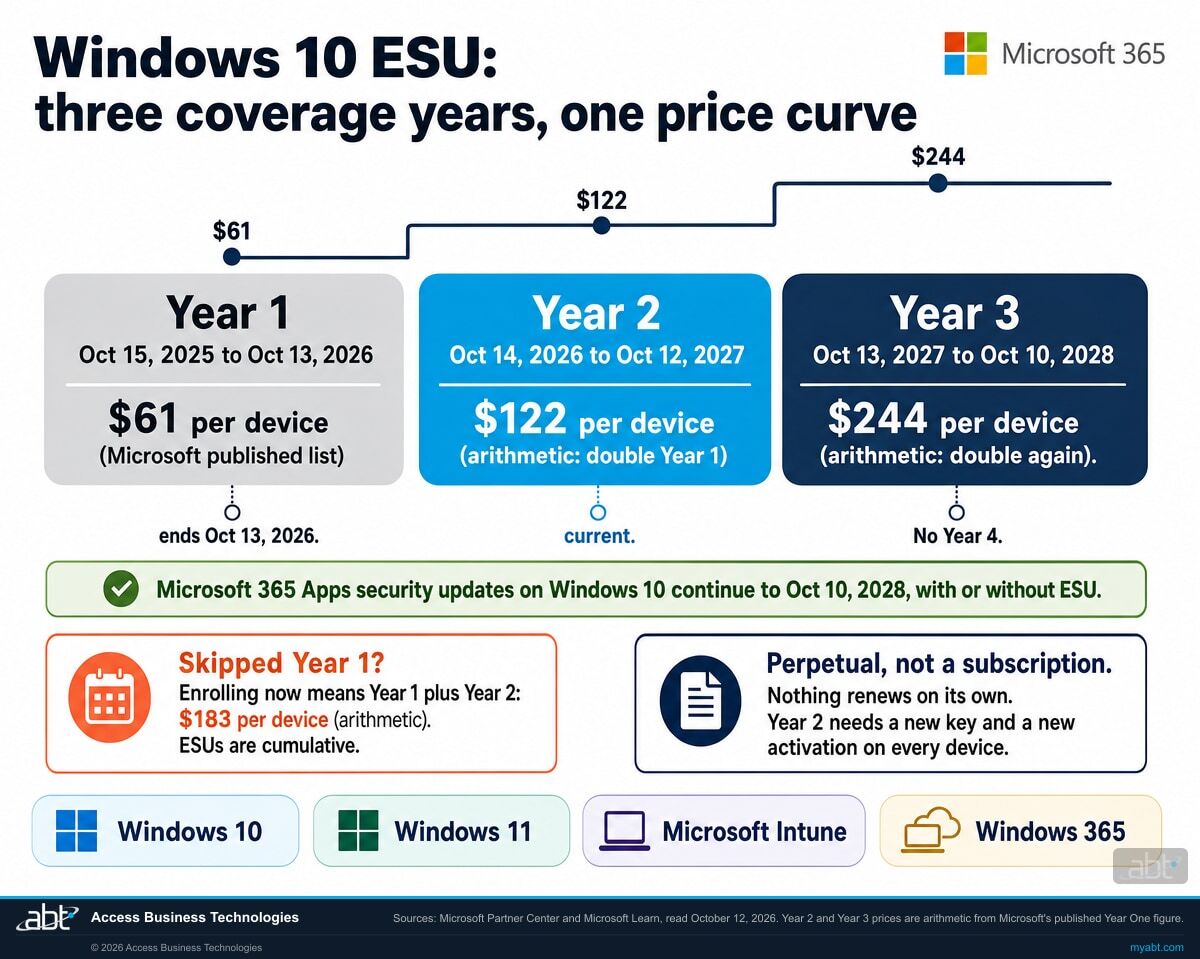
Windows 10 reached end of support on October 14, 2025. Microsoft's Extended Security Updates program is the bridge across that date, and it is sold in one year blocks. Microsoft's Partner Center documentation publishes the coverage dates plainly: Year 1 covers October 15, 2025 through October 13, 2026. Year 2 picks up the next day and runs to October 12, 2027. Year 3 runs to October 10, 2028, and there is no Year 4.
So the program itself runs for two more years. What ends on October 13, 2026 is the coverage that a Year 1 purchase paid for. Year 2 is a fresh purchase order, a fresh key, and a fresh activation pass across every machine. Microsoft's own instruction to its partners is explicit: once Year 2 coverage dates are current, purchase both Year 1 and Year 2 for a device that has neither. It is a purchase, because there is nothing to renew.
One scoping note before going further, because the two programs are routinely confused, and the confusion got worse this summer. Everything on this page describes the commercial program, the one organizations buy for managed devices, which Microsoft's lifecycle documentation scopes to Enterprise, Education, and Pro editions in commercial use. Microsoft runs a separate Extended Security Updates program for individuals and personal devices, and that program differs in three ways that matter if you are reading this for a home PC. Microsoft extended it: its consumer page now says you can enroll any time until the program ends on October 12, 2027, and that an enrolled device's coverage continues automatically through that date. It is free with Windows settings backup, or 1,000 Microsoft Rewards points, or $30 once. And it refuses commercial use: Microsoft states that enrollment is offered neither to devices joined to an Active Directory domain or Microsoft Entra nor to devices enrolled in a mobile device management solution. A managed fleet gets nothing from the consumer extension. That is the whole contrast in one line: the consumer program carries itself forward, and a purchased commercial licence moves only when someone buys the next year.
That distinction is the reason this page exists. Almost everything else an institution buys from Microsoft is a subscription. A subscription lapses loudly. It sends a renewal notice, it charges a card, it puts a banner in the admin center, and somebody in accounting sees the line item. Extended Security Updates for Windows 10 do none of that.
Does Windows 10 ESU Year 2 start automatically?
No. Microsoft classifies Windows 10 Extended Security Updates as perpetual software, and perpetual purchases do not renew. Microsoft's Year 2 coverage window is fixed, October 14, 2026 to October 12, 2027, and whether a given device receives the updates inside that window depends on four separate things: the purchase, the device meeting the prerequisites, the Year 2 key being activated on it, and the updates installing. Two sentences from the same Microsoft page settle the first half.
"Windows 10 ESUs are only perpetual, different than other ESUs that are either software or perpetual. Windows 10 ESUs are all simply perpetual by year."
"Perpetual software purchases have no end dates, they don't renew, they're perpetually available."
Microsoft Learn, Purchasing Extended Security Update Licenses as a Cloud Solution Provider, read October 12, 2026Read those together and the shape of the risk becomes clear. A Year 1 purchase is a perpetual licence for one named coverage year, and a perpetual licence carries no expiry warning. When that year's coverage end date passes, the licence has done everything it was ever going to do. It keeps its place in the admin center. It simply has nothing left to cover. That reading is ours, and the two quoted sentences are Microsoft's.
What those two sentences establish is the licensing fact: a Year 1 purchase carries no renewal event, so there is no auto renewal charge to appear on a statement and no subscription expiry to trigger the notices that normally accompany one. What they say nothing about is who tells you. Microsoft's ESU documentation describes no renewal notice and no on-device prompt for a coverage year that is ending, so in our experience the reminder comes from a person who put the date on a calendar, a reseller or managed provider, or a patch-compliance report that notices the updates stopped. Your reseller or managed provider may well raise it, and a good one will.
That makes verification the safeguard: confirm the Year 2 licence status on each device, and confirm in your update reporting that the next monthly Windows security update installed. A missing patch is easy to overlook, which is why the check belongs on a schedule. A lapse shows up in patch compliance reporting, vulnerability scanning and endpoint management tooling, all of which register an operating system that has stopped taking updates, so an institution running those well has a good chance of catching it. The gap is between organizations that watch that data deliberately and organizations that assume a device is fine because nobody has complained about it.
There is a second trap sitting behind the first one, and it catches the organizations that decided to wait and see. Extended Security Updates are cumulative. Microsoft states it directly: "If you decide to purchase the program in Year Two, you have to pay for Year One too, as ESUs are cumulative." Sitting out a year defers the same cost and adds the next one on top. Microsoft's guidance to partners says the same thing from the other side, instructing them that once Year 2 coverage dates are current, they should purchase both Year 1 and Year 2. By arithmetic from Microsoft's published Year One figure, a device enrolling for the first time now pays $61 plus $122, which is $183 per device, for coverage that runs to October 12, 2027.
Coverage is sold in whole years only. Microsoft is explicit that the program must be purchased by year and that customers cannot buy partial periods, and its minimum purchase is a single licence, so there is no volume floor forcing an institution to buy coverage for machines it plans to retire. Microsoft's Partner Center page adds that all three coverage years can be purchased ahead of their coverage dates, so a Year 2 purchase made in September was already the right move, and one made now still goes through.
How many Windows 10 machines are still in the building? That number decides every line of the Year 2 budget.
It is usually smaller than people fear or larger than the asset register says. Our engineers read it from your tenant, show you which devices carry the Year 2 program today, and tell you what each option would actually cost.
Request a free licensing assessmentWindows 10 ESU coverage years, and what each one costs
These coverage dates are published by Microsoft for the commercial program. The price column reflects Microsoft's published Volume Licensing figure for Year One and Microsoft's published statement that the price doubles every consecutive year.
| ESU year | Coverage starts | Coverage ends | Per device price |
|---|---|---|---|
| Year 1 Coverage ends October 13, 2026 |
October 15, 2025 | October 13, 2026 | $61 Microsoft published list, Volume Licensing Program |
| Year 2 Current from October 14, 2026 |
October 14, 2026 | October 12, 2027 | $122 Arithmetic: double the published Year 1 figure |
| Year 3 Final year |
October 13, 2027 | October 10, 2028 | $244 Arithmetic: double again. There is no Year 4. |
A note on those prices, because precision matters when a number is going into a budget. The $61 figure is what Microsoft publishes for Year One through the Volume Licensing Program. The $122 and $244 figures are arithmetic from that number and Microsoft's published doubling statement, and so are the $183 a device entering the program for the first time now pays for Year 1 and Year 2 together and the three year total of $427 per device. What a specific institution pays depends on its purchasing channel and its agreement, so treat these as the shape of the curve. The shape is the point: the cheapest year of this program is the one that is ending, and every year from here costs more than the last.
Why the applications keep working when Windows coverage lapses
Microsoft made a separate commitment about Microsoft 365 Apps, and it runs on a different clock from the operating system. That mismatch is what makes the Year 2 gap so easy to miss.
Microsoft committed to keep shipping security updates for Microsoft 365 Apps on Windows 10 for three years past the operating system's end of support, ending on October 10, 2028. Devices receive feature updates and Copilot support where eligible until Version 2608 is released, then stay on Version 2608 with security updates only until 2028. Version 2608 reached Current Channel in August 2026 and Monthly Enterprise Channel on September 8, 2026, per Microsoft's update history. The OneDrive desktop app on Windows 10 22H2 keeps updating on the same schedule.
None of that depends on Extended Security Updates. It is a Microsoft 365 commitment, separate from the Windows one. So on October 14, 2026, a purchased-ESU Windows 10 machine with no Year 2 key keeps running its applications as it did on October 13: Outlook opens, Excel opens, files sync. The evidence that Windows coverage lapsed lives in two places, the device's licence status and its update record, and those are the two places to check.
Underneath, the thing that stopped is the layer that matters most. Operating system patches are what close kernel flaws, driver flaws, and remote code execution paths. Those are the vulnerabilities a supported Windows install receives a fix for on the second Tuesday of each month, and the ones a machine without a current ESU year now simply keeps.
Keeps working normally
- Microsoft 365 Apps security updates, through October 10, 2028
- Word, Excel, Outlook and PowerPoint, opening and running as usual
- OneDrive desktop sync on Windows 10 22H2, through October 10, 2028
- Microsoft 365 Copilot where eligible, on the frozen app version
- The machine itself. It boots, signs in, and behaves.
Stops on a purchased-ESU device without a Year 2 key
- Windows 10 operating system security updates after October 13, 2026
- Kernel and driver patches, including remote code execution fixes
- Year 1's coverage, which ends with its named year, because a perpetual licence carries no renewal
- Your ability to say the device is still receiving Windows operating system security updates
Paying for ESU does not buy back Microsoft 365 support on Windows 10
This surprises people, so it is worth stating precisely. Microsoft's support limitations for Microsoft 365 Apps on Windows 10 apply, in Microsoft's own wording, "with or without Windows 10 Extended Security Updates." If an issue happens only on Windows 10 and not on Windows 11, support will ask you to move to Windows 11. If you cannot, support provides troubleshooting assistance only, and technical workarounds may be limited or unavailable.
Microsoft is equally direct that support incidents for Microsoft 365 Apps on Windows 10, again with or without Extended Security Updates, do not include the option to log a bug or request a product fix. Extended Security Updates buy security patches for the operating system. They buy nothing else, and they were never meant to.
Which other Microsoft dates land on October 13, 2026?
Five, with a sixth date close behind on November 10, and most estates are tracking one of them. Each is a separate product with its own documentation, and every one of them is discovered by the same inventory pass.
Windows 11, version 24H2, Home and Pro editions
Microsoft's release information lists version 24H2 as reaching end of updates on October 13, 2026 for Home, Pro, Pro Education and Pro for Workstations, and on October 12, 2027 for Enterprise, Education, IoT Enterprise and Enterprise multi-session. Windows 11 Business, the edition that comes with Microsoft 365 Business Premium, is the Pro edition, so a fleet that is part Windows 10 on ESU and part Windows 11 Pro on 24H2 has both halves stop on one October Tuesday. Microsoft's September 14 reminder recommends moving those devices to version 25H2, supported for Home and Pro to October 12, 2027. Version 26H2, generally available since September 29, 2026, is the second landing spot: Microsoft delivers it to eligible 24H2 and 25H2 devices as an enablement package, the same small download and quick restart as a monthly update, with availability expanding over the coming weeks and safeguard holds possible, and Home and Pro on 26H2 are supported to October 10, 2028. Version 26H1 is offered to new devices only; Microsoft states it is not an in-place update from 24H2 or 25H2. Our Windows 11 24H2 page covers the edition audit.
Two cliffs, one dayWindows Server 2012 and 2012 R2 Extended Security Updates, Year 3
The same Microsoft Partner Center table that publishes the Windows 10 dates publishes the Windows Server 2012 and 2012 R2 ones: ESU Year 3 covers October 14, 2025 to October 13, 2026, and Microsoft's lifecycle documentation lists October 13, 2026 as that program's Year 3 end date. Microsoft's ESU program for Windows Server runs for up to three years after end of support, so this is the final year, with no fourth year to buy. A 2012 R2 server still in the rack on October 14 has reached the end of its security updates. The next server date after this one is Windows Server 2016, which our Windows Server 2016 page covers.
Final ESU year endsWindows 10 Enterprise LTSB 2016
Microsoft's September 14 reminder puts Windows 10 Enterprise LTSB 2016 at end of updates on the same date as Windows 11 24H2 Home and Pro. Microsoft recommends updating those devices to Windows 11 Enterprise LTSC 2024 and notes that Extended Security Updates are available for organizations that need more time. Long-Term Servicing Channel builds sit outside the Windows 10 ESU program this page describes and run on their own dates, which our Windows 10 LTSC page lays out build by build.
Own program, own datesOffice LTSC 2021, Visio LTSC 2021 and Project LTSC 2021
Microsoft's Message Center reminder of September 15, 2026 states that support for Office LTSC 2021 ends on October 13, 2026, with no further updates, security fixes, or technical support after that date, and that support for Visio LTSC 2021, Project LTSC 2021 and several other products ends the same day. A Windows 10 machine kept alive on ESU Year 2 with a perpetual Office 2021 on it is covered on one layer and unsupported on the other. Our Office LTSC 2021 page covers the routes.
Support endsWindows Server 2022 mainstream support
Microsoft's message center carried a 30-day reminder on September 11, 2026 that Windows Server 2022 reaches end of mainstream support on October 13, 2026. The server keeps receiving security updates in extended support, so this one is a planning date, and it is the one most likely to be sitting unnoticed in the same rack as the 2012 R2 box above. Our Windows Server 2022 page covers what actually changes.
Planning date, updates continueFour weeks later: Windows 11, version 23H2, Enterprise and Education
Microsoft's October 9 reminder states that Windows 11, version 23H2 Enterprise and Education editions reach end of updates on November 10, 2026, and that the November 2026 Windows security update is the last one available for those editions. An institution standardized on Enterprise editions that skipped 24H2 meets its own cliff four weeks after everyone else. The same inventory pass that finds the Windows 10 machines finds these.
November 10, 2026There is a small mercy in the pile-up. Every one of these is found by the same inventory question, and for many institutions the same hardware refresh answers most of them at once. The machines still running Windows 10 in late 2026 are usually the oldest machines in the building, and the ones running Windows 11 Pro on an aging feature update are usually managed by the same team with the same tooling. One project, with a longer list.
What Extended Security Updates cover, and where the limits are
Four limits that change the shape of the decision, and one of them concerns an entire category of device that financial institutions tend to own.
Long-Term Servicing Channel devices run on their own dates and their own program
Microsoft states that Windows 10 Long Term Servicing releases have their own lifecycles and are not covered via the Windows 10 ESU program. This matters more in financial services than in most industries. Teller terminals, ATM controllers, kiosks, and other specialized endpoints are frequently built on Long-Term Servicing Channel images precisely because they are meant to sit still for years. A Windows 10 ESU Year 2 purchase covers none of them. Each build has its own date and, where Microsoft offers one, its own Extended Security Updates: Windows 10 Enterprise LTSB 2016 reaches end of updates on October 13, 2026, and Windows 10 Enterprise LTSC 2021 reaches end of support on January 12, 2027 with its own ESU purchasable since September 1, 2026. Those devices need their own line in the inventory and their own purchase decision, which our Windows 10 LTSC page walks through.
Only limited ESU-specific support is included
Microsoft answers the question directly with a single word: no. The program covers license activation, installation, and possible regressions caused by the Extended Security Updates themselves, and nothing else. General support is unavailable for a Windows version past its end of support date. New features, customer requested nonsecurity updates, and design change requests are all explicitly out of scope. An institution treating ESU as a way to keep a supported estate is misreading what it buys.
Bought for your own hardware, Year 2 needs a new key on every device, and the device has to be prepared first
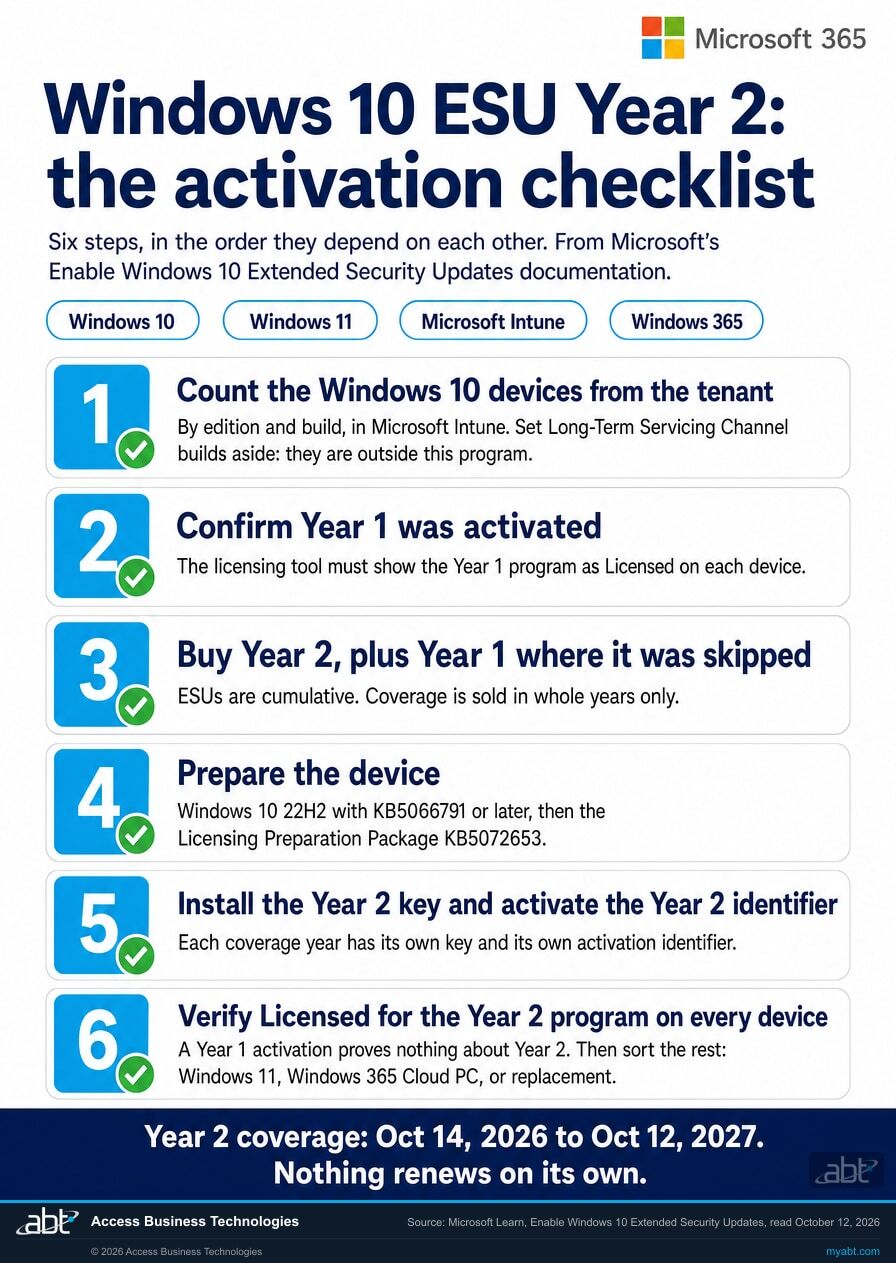
Enrollment is more than a purchase. Devices must be running Windows 10 version 22H2 with update KB5066791 or later installed, and then the Extended Security Updates Licensing Preparation Package, KB5072653, installed after it. Order matters there. Each coverage year then has its own Multiple Activation Key and its own activation identifier, so moving a fleet from Year 1 to Year 2 means installing the Year 2 key with Microsoft's licensing tool, activating the Year 2 identifier, and confirming on each machine that the licence status reads Licensed for the Year 2 program. A Year 1 activation proves nothing about Year 2. It is a deployment task with a verified finish, and it has to reach every device. Windows 10 virtual machines in Windows 365 and Azure sit outside this step, because Microsoft includes ESU for them at no additional cost. A local PC covered through Microsoft's Windows 365 entitlement sits outside it too; that route uses an ESU policy set through Intune or the registry in place of a purchased key.
Only whole years, and only three of them
Coverage cannot be bought for part of a year. Enrolled devices in a commercial or educational organization can receive security updates for a maximum of three years past end of support, which puts the hard floor under all of this at October 10, 2028. Whatever an institution decides about Year 2, the calendar ends in the same place. Every path that involves keeping Windows 10 is a path to the same date, and the only variable is how much gets spent getting there.
Four ways through Year 2, and what each one really costs
Most institutions end up using more than one of these at the same time, sorted by which machines are in which situation.
Buy Year 2 and keep the machines
The straightforward path, and the right one when the hardware has to stay in service for now. Budget double the Year 1 figure per device, plan the key deployment as real work with a verified finish, and plan for Year 3 to double again. This buys time to October 12, 2027. It buys no solution, and the meter runs faster every year. For a small number of devices it can still be the cheapest option overall, which is why the count in step one decides this.
Cost rises every yearUpgrade eligible machines to Windows 11
Free for hardware that meets the requirements, and it ends that machine's Windows 10 ESU cost. The work is real: compatibility checking, driver validation, line of business application testing, and a rollout with a rollback plan. Every machine that moves leaves the ESU bill and the 2027 Year 3 decision.
Ends the recurring costMove the workload to a Cloud PC
Microsoft includes Extended Security Updates at no additional cost for Windows 10 virtual machines in Windows 365, Azure Virtual Desktop and Azure virtual machines. Windows 10 endpoints connecting to a Windows 365 Cloud PC are also entitled to Extended Security Updates for up to three years while the Windows 365 subscription is active. Microsoft's Windows 365 documentation sets the conditions: the user holds a Windows 365 Enterprise or Flex licence with a Cloud PC, signs in to the local Windows 10 device with the same Microsoft Entra ID account, and the device has the ESU policy enabled through Intune or the registry, for up to 10 devices per user. Flex users sign in to that device at least once every 22 days to keep it eligible. For an institution held on Windows 10 by one application, this is often the cleanest answer nobody considered.
ESU included, no separate purchaseReplace the hardware
The machines still running Windows 10 in late 2026 are usually the oldest machines you own. Put three years of escalating ESU fees next to the price of a device that is faster, under warranty, and Windows 11 capable on day one, and the arithmetic frequently favors replacement. Run that comparison with real numbers; the option that avoids capital spend is often the expensive one.
Often cheaper than three ESU yearsWhat to do as Year 2 begins
In this order, because each step changes the answer to the next one.
Count the machines from the tenant
Every decision here scales with a number almost nobody has to hand. Pull the real count of Windows 10 devices from device management, split it by edition, and separate out anything on a Long-Term Servicing Channel build because that category is outside the program and needs its own lookup. Institutions are regularly surprised in both directions.
Audit current entitlement and activation
Purchasing a licence and successfully activating it on a device are two different events, and the gap between them is where quiet failures live. Check each device's licence status for the Year 2 program specifically. A device showing only the Year 1 program as Licensed has coverage through October 13, 2026 and none after it, and a device that was bought Year 1 coverage but never had the key applied has had none since October 14, 2025. Devices on the Windows 365 entitlement carry no Year 2 key, so check those against the user's Cloud PC assignment and the ESU policy instead, and keep your own record of them: Microsoft's documentation states that no administrator or end-user tool lists which endpoints claimed that entitlement.
Sort the count into the four paths
Windows 11 capable machines go to the upgrade pile. Machines held back by one stubborn application go to the Cloud PC pile. Machines old enough that ESU exceeds their residual value go to the replacement pile. Only what is left needs Year 2, and that pile is usually far smaller than the opening estimate.
Handle the Windows 11 24H2 half in the same pass
While the inventory is open, check which Windows 11 devices are on version 24H2 and which edition they run. Pro edition devices need to reach version 25H2 or version 26H2; Enterprise edition devices have until October 12, 2027. Version 26H2 arrives on 24H2 and 25H2 devices as an enablement package, so a device that has been waiting on a safeguard hold is a device to check. Plan around 25H2 or 26H2, because Microsoft states that 26H1 is offered to new devices only.
Put the purchase and the Year 2 key deployment on the calendar separately
These are different tasks with different owners and different failure modes. The purchase has to clear procurement. The key deployment has to reach every device and be verified device by device, twice: the Year 2 licence status reads Licensed, and your update reporting shows the next monthly Windows security update installed. A key that failed to apply looks identical to a key that did until the patch that was missed is the one that mattered. Give the deployment its own deadline, and every day a device waits after October 13 is a day it runs without the patches Microsoft is still shipping.
Write down what you decided and why
In our experience across credit unions, banks, and mortgage companies, the difficulty at examination is rarely the mere presence of an older operating system. It is being unable to show the count, the reasoning, and the plan when someone asks. A short documented decision covering the device count, the four piles, the spend, and the target dates turns an awkward question into a two minute answer with the open exceptions named, and it is worth writing while the work is fresh.
We read the tenant and tell you what Year 2 actually costs you, per path.
ABT is a Tier 1 Microsoft Cloud Solution Provider. We manage Microsoft 365 tenants for more than 750 credit unions, banks, and mortgage companies, and we host the Azure environments behind the applications many of them run every day. Windows lifecycle transitions are ordinary work here, and the licensing arithmetic behind them is a conversation we have several times a week.
- The device count as your tenant actually sees it. Windows 10 machines by edition and build, which ones show the Year 2 program activated today, which ones are Windows 11 capable, and which are on a Long-Term Servicing Channel build and therefore outside the program. This is read from device management, and the limit of that view is worth stating before you rely on it: anything unmanaged or off the tenant will be missing from it. We name that gap in the report.
- The four paths costed against your actual numbers. What Year 2 would cost your fleet, what the upgrade eligible portion removes from that bill, where a Cloud PC costs less than a hardware refresh, and where it costs more. Including the cases where the right answer is that buying Year 2 is the right call.
- The other October 13 dates in the same pass. Which Windows 11 devices are on 24H2 and which edition they carry, whether a 2012 R2 server or an Office 2021 install is still in the estate, and which of those share the October 13, 2026 date and which have until 2027.
- A dated plan you can hand to a board or an examiner. The count, the decision, the spend, and the target dates, written for the person who has to approve it.
- Yours to keep. The assessment is yours whether or not you ever engage us, and whether or not you buy a single licence through us.
To be plain about what this is. The assessment is a free technical review of your Microsoft 365 tenant and device estate against the Windows lifecycle dates on this page. The figures above are Microsoft's published Volume Licensing list and arithmetic from it, and what any institution pays depends on its channel and agreement. Where the right answer is to buy Year 2 for part of the fleet and move the rest, we will say so. Where you are already in good shape, we will say that too and the conversation can be short. Credit unions, banks, and mortgage companies are our core practice, and the same review runs for organizations outside financial services.
ABT also operates M365 Guardian, its managed security service for credit unions, banks, and mortgage companies.
Where the facts on this page come from
Every Microsoft date, published price and quotation above is taken from Microsoft's own documentation, and each source is linked below so you can read each sentence in its original context. The Year 2, Year 3 and skipped Year 1 figures are arithmetic from Microsoft's published Year One price, and what an organization pays depends on its purchasing channel. All were read on October 12 or 13, 2026. Where the page moves from quoting to interpreting, on what perpetual licensing means in practice and on how the four paths compare, that is our reading and is written as such. ABT's own claims, our Tier 1 CSP status and the terms of the assessment, come from ABT and are marked as such.
- Purchasing Extended Security Update Licenses as a Cloud Solution Provider is the source for the Windows 10 coverage date table, for the statement that Windows 10 ESUs are only perpetual and can be purchased ahead of their coverage dates, for the statement that perpetual purchases do not renew, for the guidance that once Year 2 coverage dates are current a partner should purchase both Year 1 and Year 2, and for the Windows Server 2012 and 2012 R2 ESU Year 3 coverage dates.
- Extended Security Updates (ESU) program for Windows 10 is the source for the $61 per device Year One figure through the Volume Licensing Program, for the statement that the price doubles every consecutive year for a maximum of three years, for the cumulative purchase rule, for the one licence minimum and the ban on partial periods, for the absence of technical support, and for the list of cloud and virtualization services where Extended Security Updates are included at no additional cost.
- Enable Windows 10 Extended Security Updates is the source for the October 14, 2025 end of support date, for the device prerequisites including the required update and the Licensing Preparation Package and the order they install in, for the separate activation identifier per coverage year and the licence status check, and for the exclusion of Long Term Servicing releases from the program.
- Understanding Extended Security Updates for Windows 10: Windows 365 deployment scenarios is the source for the Windows 365 entitlement for local Windows 10 devices: the Windows 365 Enterprise or Flex licence with a Cloud PC, the sign-in with the same Microsoft Entra ID account, the ESU policy set through Intune or the registry, the 22 day sign-in rule for Flex, the limit of 10 devices per user, and the statement that no administrator or end-user tool lists which endpoints claimed the entitlement. Read October 13, 2026.
- Enable Windows 10 Extended Security Updates for clients accessing cloud and virtual machines is the source for the statement that local Windows 10 devices accessing Windows 365 Cloud PCs need additional configuration to receive ESU. Read October 13, 2026.
- Windows 10 end of support and Microsoft 365 Apps is the source for the October 10, 2028 end of Microsoft 365 Apps security updates on Windows 10, for the Version 2608 freeze, for OneDrive desktop app updates continuing on Windows 10 22H2, and for the support limitations that apply with or without Extended Security Updates.
- Update history for Microsoft 365 Apps (listed by date) is the source for Version 2608 reaching Current Channel in August 2026 and Monthly Enterprise Channel on September 8, 2026. Read October 13, 2026.
- Windows 11 release information is the source for the end of updates dates by edition for versions 23H2, 24H2, 25H2 and 26H2, for the September 29, 2026 availability date of version 26H2, and for the statement that version 26H1 is scoped to new devices and is not offered as an in-place update from 24H2 or 25H2.
- Windows message center is the source for the September 14, 2026 reminder on Windows 11 24H2 Home and Pro and Windows 10 Enterprise LTSB 2016 with its recommendation of version 25H2, for the September 29, 2026 notice on how version 26H2 reaches existing devices, for the September 11, 2026 reminder on Windows Server 2022 mainstream support, and for the October 9, 2026 reminder on Windows 11 23H2 Enterprise and Education.
- Product Lifecycle FAQ, Extended Security Updates is the source for the ESU end dates by year for Windows 10 and for Windows Server 2012 and 2012 R2, for the editions that qualify for the Windows 10 ESU, and for Microsoft's description of the program as a last resort bridge.
- Windows Lifecycle FAQ corroborates that Windows 10 version 22H2 was serviced with monthly updates through October 14, 2025, after which it is no longer supported, and publishes the 24 month and 36 month servicing timelines for Windows 11 editions.
- Windows 10 Consumer Extended Security Updates (ESU) is the source for the consumer program's October 12, 2027 end date, for automatic continuation of an enrolled device's coverage through that date, for the three enrollment options, and for the exclusion of domain-joined, Entra-joined and MDM-enrolled devices.
- Windows Experience Blog, June 24, 2025 carries Microsoft's editor's note of June 25, 2026 stating that the consumer program is being provided for an additional year, with coverage available through October 12, 2027.
- Microsoft 365 Message Center notices MC1482225 (Windows 11, version 26H2 availability by enablement package), MC1471964 (the September 14 reminder), MC1448328 (Windows 10 Enterprise LTSC 2021 and its ESU), MC1472429 (Office LTSC 2021) and MC1492825 (Windows 11 23H2), read in ABT's own Microsoft 365 tenant on October 12, 2026. The Windows notices carry the same text on the public Windows message center linked above.
Related reading
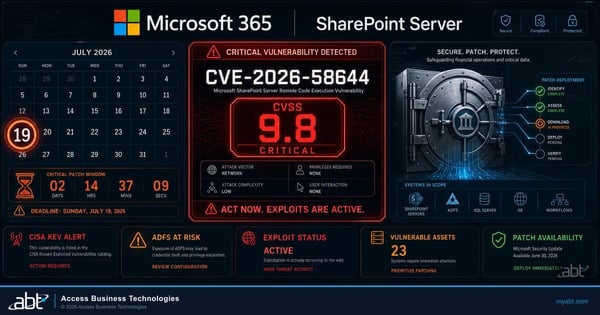
July 2026 Patch Tuesday: Three Exploited Flaws and What Financial Institutions Patch First
A month of exactly the updates a Windows 10 machine without a current ESU year would have missed. Useful for picturing what the gap actually contains.
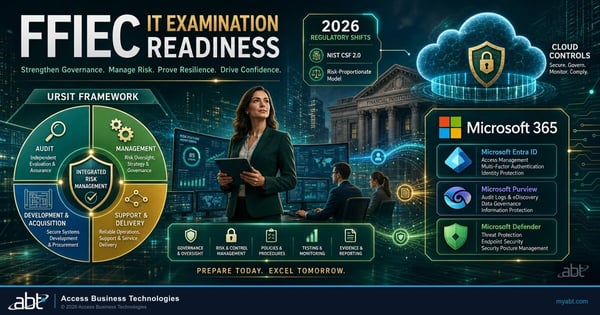
FFIEC IT Examination Readiness for Financial Institutions
How institutions prepare for an IT examination, and why a documented decision about aging endpoints is worth having ready.
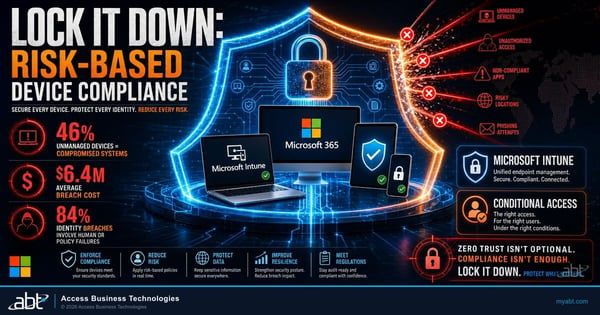
Lock It Down: Risk-Based Device Compliance with Microsoft Intune
How the device count on this page gets produced, and how compliance policy can keep an unpatched endpoint away from your data.
Windows 10 ESU Year 2 questions, answered from Microsoft documentation
Windows 10 Extended Security Updates Year 2 coverage for organizations runs from October 14, 2026 to October 12, 2027. Microsoft publishes the full table in its Partner Center documentation: Year 1 runs October 15, 2025 to October 13, 2026, Year 2 runs October 14, 2026 to October 12, 2027, and Year 3 runs October 13, 2027 to October 10, 2028. There is no Year 4, so October 10, 2028 is the end of the program regardless of what an organization buys. Microsoft's coverage window is fixed; whether a given device receives the Year 2 updates inside it depends on the purchase, the prerequisites, the Year 2 key being activated on that device, and the updates installing. On purchased ESU, a device without an activated Year 2 key has no coverage past October 13, 2026, whatever its Year 1 status, and a device that never activated Year 1 has had none since October 14, 2025. Windows 10 virtual machines in Windows 365 and Azure, and local PCs covered through Microsoft's Windows 365 entitlement for Cloud PC users, are covered without a key.
No. Microsoft states that "Windows 10 ESUs are only perpetual" and that "Perpetual software purchases have no end dates, they don't renew, they're perpetually available." A Year 1 purchase is a perpetual licence covering one named coverage year, so there is no automatic renewal and no subscription expiry to trigger the notices that normally accompany one. For devices on your own hardware, buying Year 2 is a separate purchase with its own Multiple Activation Key and its own activation identifier, installed and activated on every device, and Microsoft's licensing tool then reports the Year 2 program as Licensed on that device. Windows 10 virtual machines in Windows 365 and Azure are the exception, because Microsoft includes ESU there at no additional cost, and so is a local PC covered through Microsoft's Windows 365 entitlement for Cloud PC users. When Year 1 coverage ends on October 13, 2026, any other device without an activated Year 2 key stops receiving Windows operating system security updates. Microsoft's ESU documentation describes no renewal notice for an ending coverage year, so the reminder comes from a person or a patch-compliance report, and a reseller or managed provider may well raise it with you.
Microsoft publishes $61 USD per device for Year One through the Volume Licensing Program and states that "The price doubles every consecutive year, for a maximum of three years." That puts Year 2 at $122 per device and Year 3 at $244 per device by arithmetic, for a three year total of $427 per device, and it puts a device that skipped Year 1 and enrolls now at $183 per device for Year 1 and Year 2 together. Those figures are arithmetic from Microsoft's published Year One price, which is the one figure Microsoft publishes, and what a specific organization pays depends on its purchasing channel and agreement.
You can buy now, and you pay for Year 1 and Year 2 together. Microsoft states that "If you decide to purchase the program in Year Two, you have to pay for Year One too, as ESUs are cumulative." Microsoft's guidance to partners says the same from the other direction: once Year 2 coverage dates are current, partners should purchase both Year 1 and Year 2. Coverage is also sold in whole years only, because Microsoft requires the program to be purchased by year and states that customers cannot buy partial periods. The one piece of good news in the rule is that Microsoft's Partner Center documentation says all three coverage years can be purchased ahead of their coverage dates, so a late purchase still goes through.
The extension applies to the consumer program for personal devices, and Microsoft excludes managed business devices from it. Microsoft's editor's note of June 25, 2026 states that the Extended Security Updates program for personal use devices is being provided for an additional year, with coverage available through October 12, 2027, and Microsoft's consumer page states that an enrolled device's coverage continues automatically through that date. The same page states that the consumer program cannot be used in commercial scenarios and that enrollment is offered neither to devices joined to an Active Directory domain or Microsoft Entra nor to devices enrolled in a mobile device management solution. A managed fleet stays on the commercial program, where a purchased Year 1 licence ends with its year and Year 2 is bought separately.
No, and this is why the date is so easy to miss. Microsoft committed to providing security updates for Microsoft 365 Apps on Windows 10 for three years after Windows 10 end of support, "ending on October 10, 2028." Devices receive feature updates and Copilot support where eligible until Version 2608 is released, then remain on that version receiving security updates until 2028. The OneDrive desktop app on Windows 10 22H2 also continues updating through October 10, 2028. That commitment is independent of Extended Security Updates, so Word, Excel and Outlook keep taking security updates on a machine whose operating system has stopped being patched.
No. Microsoft applies its Microsoft 365 Apps support limitations on Windows 10 "with or without Windows 10 Extended Security Updates." If an issue occurs only on Windows 10 and not on Windows 11, support will ask the customer to move to Windows 11, and if that is not possible, support provides troubleshooting assistance only with workarounds that may be limited or unavailable. Microsoft also states that these support incidents do not include the option to log a bug or request other product updates. Extended Security Updates buy operating system security patches and nothing beyond that; the program itself includes no technical support other than for the activation and installation of the updates.
No. Microsoft states that Windows 10 Long Term Servicing releases have their own lifecycles and are not covered by the Windows 10 Extended Security Updates program. This matters in financial services in particular, because teller terminals, ATM controllers and similar specialized endpoints are frequently built on Long-Term Servicing Channel images. Those devices sit on separate lifecycle dates with their own programs: Microsoft lists Windows 10 Enterprise LTSB 2016 at end of updates on October 13, 2026, and Windows 10 Enterprise LTSC 2021 at end of support on January 12, 2027 with its own Extended Security Updates purchasable since September 1, 2026. A Windows 10 ESU Year 2 purchase covers none of them, so each needs its own line in the inventory and its own decision.
Yes, for virtual machines, and for local PCs that qualify through Windows 365. Microsoft states that Extended Security Updates are available at no additional cost for Windows 10 virtual machines in Windows 365, Azure Virtual Desktop, Azure virtual machines, Azure Dedicated Host, Azure VMware Solution, Nutanix Cloud Clusters on Azure, Azure Local, Azure Stack Hub and Azure Stack Edge. Microsoft also states that Windows 10 endpoints connecting to Windows 365 Cloud PCs are entitled to Extended Security Updates for up to three years while the Windows 365 subscription licence is active. Microsoft's Windows 365 documentation adds the conditions: a Windows 365 Enterprise or Flex licence with a Cloud PC for the user, a sign-in to the local device with the same Microsoft Entra ID account, and the ESU policy enabled on that device through Intune or the registry. For an organization held back by a single application that will not run on Windows 11, moving that workload to a Cloud PC is often a cleaner answer than paying escalating per device fees for two more years.
For some editions, yes. Microsoft's release information lists Windows 11 version 24H2 as reaching end of updates on October 13, 2026 for Home, Pro, Pro Education and Pro for Workstations, and on October 12, 2027 for Enterprise, Education, IoT Enterprise and Enterprise multi-session. Windows 11 Business, the edition included with Microsoft 365 Business Premium, is a Pro edition, so organizations licensed that way share the same October 13, 2026 date on both halves of the fleet. Either later version is a supported landing spot. Microsoft's September 14, 2026 reminder recommends version 25H2, which carries Home and Pro editions to October 12, 2027. Version 26H2 became generally available on September 29, 2026 and reaches eligible 24H2 and 25H2 devices as an enablement package, the same small download and quick restart as a monthly update, with availability expanding over the following weeks and safeguard holds possible; Home and Pro editions on 26H2 are supported to October 10, 2028. Version 26H1 is scoped to new devices and Microsoft states it is not offered as an in place update from 24H2 or 25H2.
Microsoft's own documentation puts five dates on October 13, 2026 besides the end of Windows 10 ESU Year 1 coverage. Windows 11 version 24H2 Home and Pro editions reach end of updates. Windows Server 2012 and 2012 R2 Extended Security Updates Year 3, the final year of that program, ends. Windows 10 Enterprise LTSB 2016 reaches end of updates. Support for Office LTSC 2021, Visio LTSC 2021 and Project LTSC 2021 ends. Windows Server 2022 reaches end of mainstream support, while continuing to receive security updates in extended support. Four weeks later, on November 10, 2026, Windows 11 version 23H2 Enterprise and Education editions reach end of updates. One inventory pass finds every one of them the tenant can see.
Find out what Year 2
actually costs you.
Tell us roughly how many people are in the institution. Our engineers will read the tenant and come back with the Windows 10 count as your tenant sees it, which devices carry the Year 2 program today, and what each of the four paths would cost against your own numbers.
