


Your branch devices keep working. Their security updates stop on four different dates.
Microsoft built the Long-Term Servicing Channel for machines that do one job for years: teller stations, kiosks, and the controllers behind an ATM. Every LTSC release runs on its own clock, and none of those clocks is the Windows 10 date everyone has already read about. Here is every date, with the Microsoft page each one comes from.
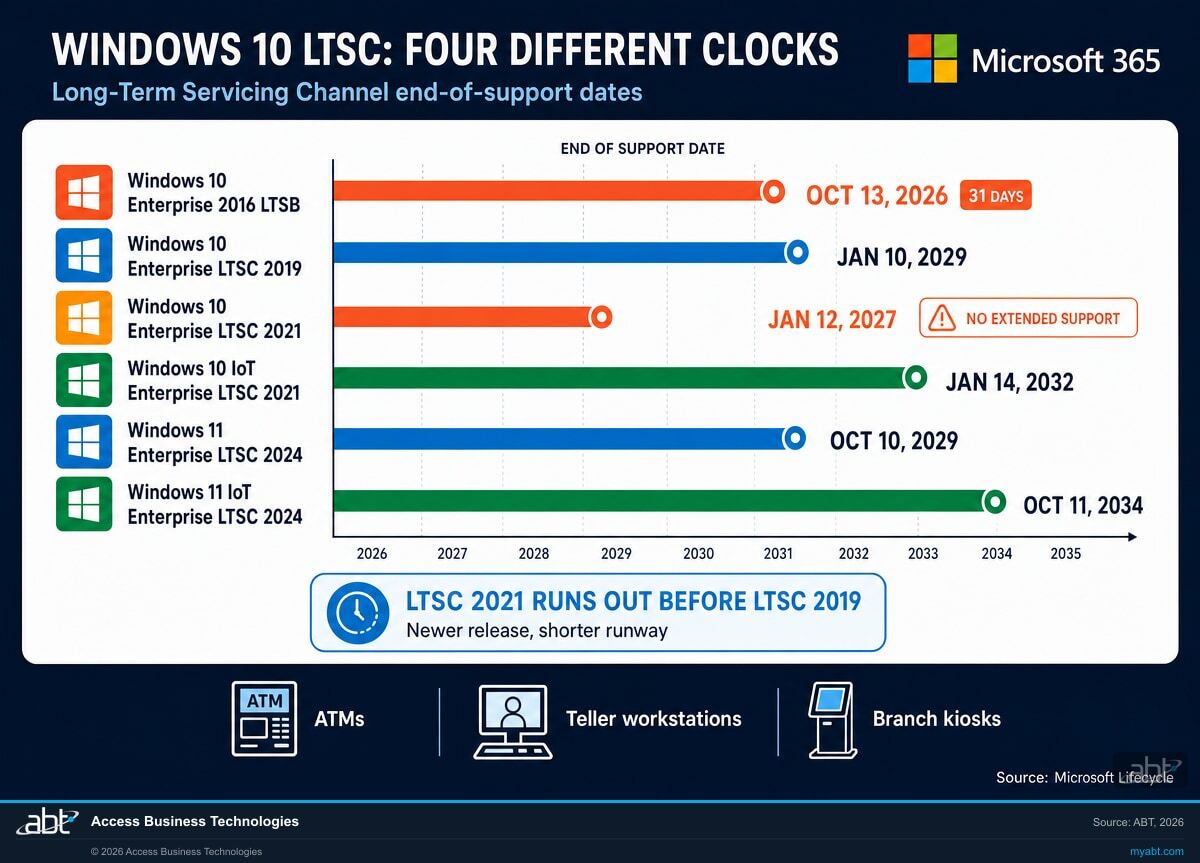
- Windows 10 Enterprise 2016 LTSB support ends October 13, 2026, and that is the closest date on this page
- Windows 10 Enterprise LTSC 2021 ends before the older LTSC 2019 does, which is not a typo
- Enterprise LTSC and IoT Enterprise LTSC look alike in an inventory report and need different purchases
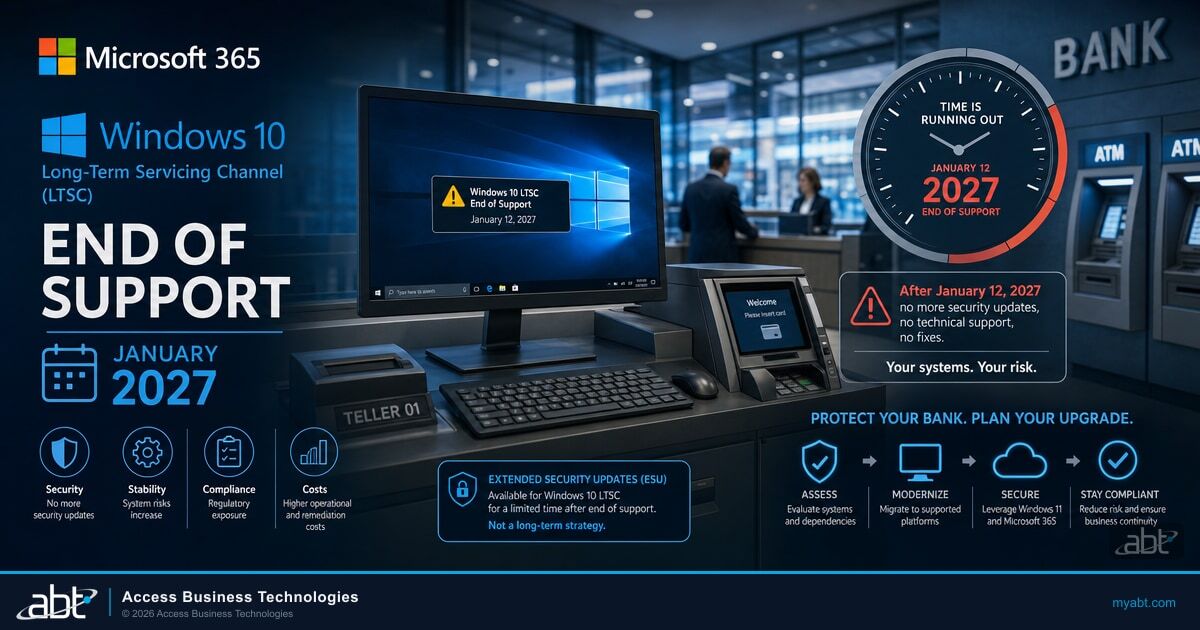
What is Windows 10 LTSC, and is it on your devices?
Short answer: if your institution has ATMs, interactive teller machines, branch kiosks, signature pads, or scanner stations, some of them are almost certainly running a Long-Term Servicing Channel build, and the people who ordered them may not have been in IT.
The Long-Term Servicing Channel is a separate edition of Windows that receives monthly quality updates but no feature updates. New features arrive only in a new LTSC release every few years, if you choose to install one.
Microsoft is direct about who it is for. The Windows lifecycle FAQ states that the Long-Term Servicing Channel "is designed to be used only for specialized devices, for example, those that control medical equipment or automated teller machines (ATMs)." Microsoft names the ATM itself. That single sentence is why this page is written for credit unions, banks, and mortgage companies rather than for a general IT audience.
Source: Microsoft Lifecycle FAQ for Windows, read September 12, 2026.The overview article is equally direct about who it is not for. Microsoft writes that "the long-term servicing channel isn't intended for deployment on most or all the PCs in an organization" and that the LTSC edition "provides a deployment option for special-purpose devices and environments."
Source: Windows Enterprise LTSC overview, Microsoft Learn, page dated July 14, 2026, read September 12, 2026.How LTSC gets into a financial institution without a decision
In our experience with regulated institutions, LTSC rarely arrives through an IT standard. It arrives inside a purchase. The ATM vendor ships a controller with an LTSC image because the machine has to boot the same way for a decade. The ITM arrives preconfigured. The check scanner comes with a locked-down workstation build from the vendor that supports it. A branch remodel adds two kiosks, and the kiosks come with an operating system nobody selected.
The result is a small population of devices on a different servicing clock from everything else in the building, frequently owned in the budget by operations or facilities rather than by IT, and usually excluded from the same reporting that covers staff laptops. That is a manageable situation as long as somebody knows the dates. The dates are the part that goes missing.
The practical tell. Run winver on the device. An LTSC build reports an edition name containing "LTSC" or "LTSB", for example Windows 10 Enterprise LTSC. If Microsoft Edge and the Microsoft Store are absent from a Windows 10 machine that is otherwise working normally, that is another strong signal: Microsoft states that features which could be updated with new functionality, "including Microsoft Edge and in-box Windows apps, are also not included" in LTSC.
When does Windows 10 LTSC support end?
There is no single date. There are six, across two Windows generations, and two of them arrive inside the next four months.
| Release | Start date | Mainstream end date | Extended end date |
|---|---|---|---|
| Windows 10 2016 LTSB (Enterprise) Next up | 8/2/2016 8:00:00 AM | 10/13/2021 6:59:59 AM | 10/14/2026 6:59:59 AM |
| Windows 10 Enterprise LTSC 2019 | 11/13/2018 8:00:00 AM | 1/10/2024 6:59:59 AM | 1/10/2029 6:59:59 AM |
| Windows 10 Enterprise LTSC 2021 | 11/16/2021 8:00:00 AM | 1/13/2027 6:59:59 AM | None listed |
| Windows 10 IoT Enterprise LTSC 2021 | 11/16/2021 8:00:00 AM | 1/13/2027 6:59:59 AM | 1/14/2032 6:59:59 AM |
| Windows 11 Enterprise LTSC 2024 | 10/1/2024 8:00:00 AM | 10/10/2029 6:59:59 AM | None listed |
| Windows 11 IoT Enterprise LTSC 2024 | 10/1/2024 8:00:00 AM | 10/10/2029 6:59:59 AM | 10/11/2034 6:59:59 AM |
Why the table says one day and Microsoft's prose says another
The lifecycle listings carry an end-of-day timestamp, so they read one calendar day later than the date Microsoft writes out in sentences. Where Microsoft states a date in prose, that is the date to put in a project plan:
- October 13, 2026 for Windows 10 Enterprise 2016 LTSB and Windows 10 IoT Enterprise 2016 LTSB. Microsoft: "ESU extends the use of Windows 10 Enterprise 2016 LTSB and Windows 10 IoT Enterprise 2016 LTSB devices past the end of support date on October 13, 2026."
- January 12, 2027 for Windows 10 Enterprise LTSC 2021. Microsoft: "ESU extends the use of Windows 10 Enterprise LTSC 2021 devices past their applicable end of support date of January 12, 2027."
For the releases where Microsoft publishes no prose sentence, this page quotes the lifecycle listing exactly as Microsoft lists it and does not shift the date by a day on its own authority. If you are building a board timeline off the 2019 or the IoT rows, take those from the lifecycle page directly and note the timestamp convention beside them.
We will tell you which LTSC builds you are running.
Most institutions can name their laptop fleet to the machine and cannot name the operating system inside the ATM lobby. A free licensing assessment produces the list: every Windows build in the tenant, which of them are Long-Term Servicing Channel, which release, and which date each one is sitting on.
Request the free licensing assessmentWhy does Windows 10 LTSC 2021 end before LTSC 2019?
Because the shape of the lifecycle changed with the 2021 release, and the newer build inherited the shorter one.
Windows 10 Enterprise LTSC 2019 carries an extended end date of 1/10/2029. Windows 10 Enterprise LTSC 2021 carries a mainstream end date of 1/13/2027 and no extended end date at all. The newer release runs out roughly two years sooner.
Put the two listings side by side and the reason is visible. LTSB 2016 and LTSC 2019 each have two phases: mainstream support, then a second block of extended support roughly five years long. Enterprise LTSC 2021 has one phase. The second block is not shortened on that listing, it is absent.
Windows 10 Enterprise LTSC 2019
Mainstream support ended 1/10/2024. Extended support listed to 1/10/2029. Two phases, roughly ten years of runway from release.
Windows 10 Enterprise LTSC 2021
Mainstream support listed to 1/13/2027. No extended end date listed. One phase, roughly five years of runway from release.
This is the part worth reading twice if you run a branch network. An institution that refreshed its teller workstation image from LTSC 2019 to LTSC 2021, doing the thing that looks like good hygiene, moved its own deadline forward by two years. Nothing on the device announced that. The build number went up.
"Always check your individual LTSC release to verify its servicing lifecycle."
Microsoft Learn, Windows Enterprise LTSC overview, page dated July 14, 2026Microsoft puts that sentence in the overview for a reason. There is no general rule you can apply to LTSC. Each release is looked up on its own.
The second thing the tables show
Windows 10 IoT Enterprise LTSC 2021 was released on the same day as Enterprise LTSC 2021, 11/16/2021, and carries the same mainstream end date of 1/13/2027. It also carries an extended end date of 1/14/2032, five years the Enterprise listing does not have.
The Windows 11 generation repeats the pattern. Windows 11 Enterprise LTSC 2024 is listed to 10/10/2029 with no extended end date. Windows 11 IoT Enterprise LTSC 2024 is listed to 10/10/2029 with an extended end date of 10/11/2034. So the edition chosen for a piece of replacement hardware in 2026 sets whether its next runway is about five years or about ten, and the two editions are one word apart on a purchase order.
Is Enterprise LTSC the same as IoT Enterprise LTSC?
No. They share a release date, a build, and most of a name. They do not share a support runway, and they do not share an Extended Security Updates offer.
Microsoft states this plainly in the Extended Security Updates guidance, in a one-line note that is easy to read past:
"The Enterprise LTSC 2021 ESU offer doesn't apply to Windows 10 IoT Enterprise LTSC 2021."
Microsoft Learn, Enable Extended Security Updates (ESU) for Windows 10 LTSB 2016 and Windows 10 Enterprise LTSC 2021, page dated August 28, 2026Read against the lifecycle tables, that note makes sense rather than being an inconsistency: IoT Enterprise LTSC 2021 does not need an Extended Security Updates purchase in January 2027, because its listing runs to 1/14/2032 on its own. The problem is operational. Both editions report as Windows 10 in most inventory tools, both sit in the same branch, and a bulk purchase made on the assumption that they are interchangeable buys coverage for devices that did not need it while leaving devices that did.
Where the difference actually bites
- Purchasing. One SKU does not cover both. The edition has to be read off each device before the order is placed, not inferred from the model number.
- Key distribution. For Windows 10 IoT Enterprise LTSB 2016, Microsoft says the activation key comes from somewhere else entirely: "For MAK keys for Windows 10 IoT Enterprise LTSB 2016, please contact your OEM partner." For an ATM fleet that means the hardware vendor, on the hardware vendor's timeline.
- Replacement planning. If a device is being replaced anyway, the edition on the replacement decides whether the institution is back in this conversation in 2029 or in 2034.
Can you buy Extended Security Updates for Windows 10 LTSC?
For two of these releases, yes, and one of them only became orderable through the Cloud Solution Provider price list this month.
Microsoft publishes an Extended Security Updates program for Windows 10 Enterprise 2016 LTSB, Windows 10 IoT Enterprise 2016 LTSB, and Windows 10 Enterprise LTSC 2021, with three coverage years available for each.
This is worth saying clearly because the wider Windows 10 coverage says the opposite, and it was right when it was written. The mainstream Windows 10 Extended Security Updates program, the one attached to Windows 10 version 22H2, does not cover Long-Term Servicing Channel releases. Those releases have their own lifecycles and, now, their own Extended Security Updates track.
On September 8, 2026, Microsoft told partners that the Windows 10 Enterprise LTSC 2021 Extended Security Updates offers had reached the Cloud Solution Provider price list:
"The Windows 10 Enterprise LTSC 2021 Extended Security Updates (ESU) Year 1-3 offers are now available. Due to a publishing delay, these offers weren't included in the September 2026 Cloud Solution Provider (CSP) price list at its regular monthly publication."
Microsoft Learn, Partner Center announcements, September 2026, item dated September 8, 2026The announcement names the product as Windows 10 Enterprise LTSC 2021 ESU under product ID DG7GMGDZQ4KS. If your provider told you in August that there was nothing to buy for LTSC 2021, they were describing the price list accurately at the time. Ask again.
Source: Microsoft Partner Center announcements, September 2026, read September 12, 2026.On price. Microsoft published no per-device price for the Windows 10 Enterprise LTSC 2021 Extended Security Updates offers in either of the documents above, so this page does not quote one. The figures you may have seen for Windows 10 Extended Security Updates belong to the mainstream Windows 10 program, which is a different product. Ask your Cloud Solution Provider for the current LTSC price against your own device count rather than working from a number written for a different program.
What does it take to actually enrol an LTSC device?
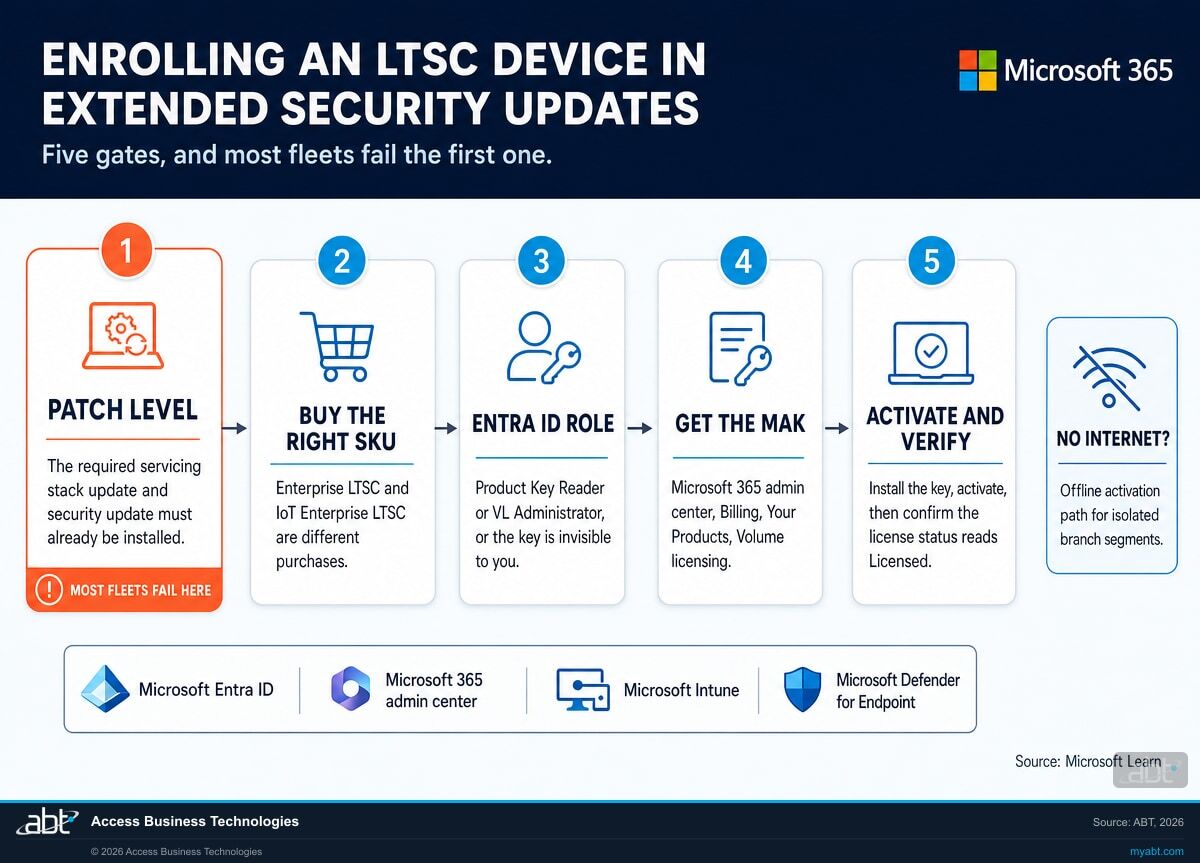
Five gates, each one a Microsoft requirement. In our own work the first gate is where fleets stall, and it is the one a purchase order cannot fix.
The device has to be current on updates first
Microsoft lists a patch-level prerequisite for enrolment. For Windows 10 2016 LTSB, the device needs the "September 2026 servicing stack update (SSU) (KB5122874) and September 2026 Windows security update (KB5123099), or later updates." For Windows 10 Enterprise LTSC 2021, it needs the "January 2027 servicing stack update (SSU) and January 2027 Windows security update."
Read that second one against the date support ends. The prerequisite update for LTSC 2021 lands in January 2027, the same month the release goes out of support. A device that has been quietly skipping monthly updates for two years, which describes a great many kiosks and controllers, has to be brought current before it is eligible for the coverage that was supposed to protect it. On a fleet that is a maintenance window, a vendor conversation, and in some cases a site visit.
Buy against the edition, not the device count
Enterprise LTSC and IoT Enterprise LTSC take different purchases, and the IoT 2021 edition needs none until 2032. A device-by-device edition read comes before the order.
Somebody needs the right Microsoft Entra ID role
Microsoft states: "You must have the Product Key Reader or VL Administrator role assigned to your Microsoft Entra ID account to view the MAK." This catches institutions regularly. The person who signed the purchase is often not the person holding either role, so the key is bought and then invisible to everyone trying to use it. Assign the role before the order lands, not after.
Collect the Multiple Activation Key
The key lives in the Microsoft 365 admin center. Microsoft's path: Billing, then Your Products, then the Volume licensing tab, then View contracts, then find the License ID holding the Extended Security Updates licences, then More actions, then View product keys.
Install, activate, then verify on the device
Microsoft's published sequence uses the built-in licensing script: install the key, activate against the matching program identifier, then run the display-licence command and confirm the output shows the Extended Security Updates program with a License Status of "Licensed." That last command is the verification step, and it is the only thing that proves a device is actually covered rather than merely paid for.
The branch network problem, and the path Microsoft publishes for it
Activation normally needs the device to reach Microsoft activation servers. Microsoft publishes the exact endpoints a client needs to reach, seven of them, spanning go.microsoft.com, login.live.com, and the activation and validation services. On an ATM or teller-device segment with tight egress filtering, that list is the conversation to have with whoever owns the firewall rules, and it is better had in advance than during a change window.
Where a device genuinely cannot reach those endpoints, Microsoft documents an offline path: generate an installation identifier on the device, take it to the Microsoft Product Activation portal from a machine that does have internet access, and apply the confirmation identifier that comes back. For larger numbers of disconnected devices, Microsoft points at the proxy activation scenario in the Volume Activation Management Tool. Neither path is exotic. Both need planning time that a January deadline does not leave much of.
What actually stops when LTSC support ends?
The machine keeps running. That is the whole problem.
Nothing on a teller station or an ATM controller changes visibly on the morning after its end-of-support date. The card reader still reads cards. The receipt printer still prints. No banner appears, no service degrades, and no ticket gets opened. What stops is the monthly quality update, which means that from that date forward every newly disclosed Windows vulnerability that would have been fixed simply stays open on that device for the rest of its working life.
The gap compounds in a way people underestimate. On a device that has not been enrolled in Extended Security Updates, a vulnerability disclosed eighteen months after end of support stays open for the rest of that machine’s working life, in a branch lobby, with a network path to the systems that matter. Enrolment changes that, for the releases where an offer exists and for as long as the purchased coverage years run. Security controls around the device reduce the exposure either way. They do not close it.
What ends on the date
Monthly quality updates, including security fixes. Microsoft technical support for the release. Any expectation that a newly published Windows vulnerability will be fixed on that device.
What does not end
The device boots, runs, and does its job exactly as before. Vendor application support may continue on the vendor's own terms. Your monitoring keeps reporting the device as healthy, because by every measure it has, it is.
The slower problem: the frozen feature set
There is a second effect that arrives before the end-of-support date and gets blamed on other things. Microsoft describes it directly:
"Since the feature set for LTSC doesn't change for the lifetime of the release, over time there might be some external tools that don't continue to provide legacy support."
Microsoft Learn, Windows Enterprise LTSC overview, page dated July 14, 2026In practice that shows up as an agent that will not install, a management tool that drops the platform, or a security product whose newest version requires something the frozen build does not have. Two separate facts sit behind that. Microsoft’s equivalence table puts Windows 10 Enterprise LTSC 2021 at the same feature update as Windows 10 version 21H2, released 11/16/2021, so the feature set on that device is the one Windows had in late 2021 and will stay that way for the life of the release. Separately, the Windows lifecycle FAQ records that "Windows 10, version 22H2 is the last feature update released for Windows 10 and will be serviced with monthly updates through October 14, 2025 after which it is no longer supported." Those two statements are about different things, and neither one shortens the LTSC device’s own servicing runway: it keeps receiving monthly quality updates until its own end-of-support date. What it does not receive is any Windows feature added after 2021, and that is the thing a third-party installer checks for.
If your endpoint agent coverage report has a handful of stubbornly non-compliant machines that nobody can explain, check whether they are LTSC before you check anything else.
Four ways through, and what each one really costs
Every institution with LTSC devices takes one of these four, including the one where nothing is decided.
Buy Extended Security Updates and keep the hardware
Buys time, changes nothing elseAvailable for Windows 10 Enterprise 2016 LTSB, Windows 10 IoT Enterprise 2016 LTSB, and Windows 10 Enterprise LTSC 2021, with three coverage years published for each. The right choice when the hardware is healthy, the vendor application is certified against that build, and a replacement project cannot land before the date. Budget the enrolment work alongside the licence: the patch-level prerequisite, the role assignment, the key distribution, and a verification pass across the fleet.
Move the device to a current LTSC release
Longest runway, needs vendor sign-offWindows 11 Enterprise LTSC 2024 is listed to 10/10/2029 and Windows 11 IoT Enterprise LTSC 2024 to 10/11/2034. Extended Security Updates buy up to three years on the build you already have. Moving the device to a current release buys the rest of a listed lifecycle, which on the IoT edition runs years beyond that, and it is the only one of the four paths that also puts the device back on a build the tools around it still support. The gate is rarely Microsoft. It is whether the ATM, ITM, or scanner vendor certifies their software on it, and whether the existing hardware meets the requirements of the newer Windows generation. Ask the vendor before you plan the project, because the answer decides between this path and path 3.
Replace the hardware on the vendor's refresh cycle
Highest cost, cleanest outcomeOften the honest answer for a 2016-era device that is already near the end of its mechanical life. The thing to get right is the edition on the replacement. Specify IoT Enterprise LTSC where the vendor supports it, because on the current generation that is the difference between a 2029 listing and a 2034 one. Write the edition into the purchase requirement rather than accepting whatever image ships.
Move the workload off LTSC entirely
Right for the devices that never needed itSome of the machines running LTSC in a branch are not specialized devices at all. They are ordinary workstations that inherited an LTSC image from a vendor bundle or an old standard. Microsoft is explicit that LTSC is not intended for most PCs in an organization. Those devices belong on the general availability channel with the rest of the fleet, where they get feature updates, current tooling support, and a servicing clock the IT team already tracks. In the fleets we have looked at, this path shrinks the LTSC population enough to make the other three affordable.
The fifth path, which is not a path. Doing nothing is a decision, and after the date it is a decision to run permanently unpatched endpoints inside the branch network. If that is genuinely the least-bad option for a small number of devices, document it: which devices, why, what compensating controls are in place, and when it gets revisited. An examiner is far more comfortable with a documented, bounded, monitored exception than with a device nobody had a position on.
How does an unsupported branch device turn into an exam finding?
Through the inventory, almost always. The finding is usually not that a device was unsupported. It is that the institution did not know.
In the examinations we help institutions prepare for, the technology questioning tends to follow one sequence: show us the asset inventory, show us that it is complete, show us how you know when something on it goes out of support, and show us what you decided to do about the things that have. Unsupported software comes up because it is easy for an examiner to verify and hard for an institution to argue with.
LTSC devices fail that sequence in a specific way. They are frequently missing from the inventory the IT team hands over, because they were bought by another department and managed by a vendor. When they are present, they are often listed as "Windows 10" with no edition and no release, which cannot be mapped to a support date. And the end-of-support dates themselves are not the widely known Windows 10 dates, so a spreadsheet built from general Windows 10 guidance has the wrong deadline against them even when the devices are listed correctly.
What to have ready before the question is asked
- A device list that includes the specialized endpoints. ATMs, ITMs, kiosks, scanner stations, signature pads, and anything else with a Windows build behind it, whichever budget bought it. Device-management reporting will not produce this on its own, because the devices that matter most here are often the ones never enrolled in it.
- Edition and release for every Windows device, rather than the product family alone. "Windows 10" is not an answer. "Windows 10 IoT Enterprise LTSC 2021" is, because it maps to a date.
- The date each one is on, sourced to Microsoft. Not to a blog, not to a vendor summary, and not to a general Windows 10 article.
- A dated decision per device group. Extended Security Updates, upgrade, replace, or a documented exception with compensating controls. A decision with a date on it is what turns a finding into a plan.
Credit unions, banks, and mortgage companies that can produce those four things tend to have a short conversation about branch hardware. The ones that cannot tend to have a long one.
We read the tenant and hand you the list
ABT is a Tier 1 Microsoft Cloud Solution Provider working with more than 750 financial institutions. We manage Microsoft 365 tenants and host Azure environments for credit unions, banks, and mortgage companies, which means the device data needed to answer this question is usually already sitting in a tenant we can read.
- Every Windows device the tenant can see, with edition and release, never the product family alone
- Which of them are Long-Term Servicing Channel builds, separated into Enterprise LTSC and IoT Enterprise LTSC
- The Microsoft end-of-support date each one is sitting on, cited to the Microsoft page it came from
- Which releases have an Extended Security Updates offer available today and which do not
- The devices that are on LTSC without needing to be, which is where most of the savings are
- A per-group recommendation you can take to a board or an examiner with a date beside it
One limit worth stating up front, because it decides how much of the job this finishes. A tenant read finds the devices the tenant knows about. A vendor-managed ATM controller on its own segment, never enrolled in your device management, will not appear in it, and no tenant read can conjure one. So the assessment comes in two halves: the list we produce from the tenant, and a short worksheet for the devices only your operations, facilities and vendor contacts can account for. The second half takes about half an hour of somebody’s time inside the institution. We will tell you which devices we could not see, rather than hand you a gap that reads like a clean result.
No licence purchase is required to get the assessment, and the output is yours whether or not you buy anything through us. If the answer turns out to be that your fleet is fine until 2032, we would rather tell you that than sell you something.
ABT also operates M365 Guardian, its managed security service for credit unions, banks, and mortgage companies.
If you have already read our page on Windows 10 Extended Security Updates, this is the part it told you to look up separately. The neighbouring deadlines worth checking at the same time are Windows Server 2016 end of support, because the branch server room usually ages alongside the branch hardware, and Windows 11 version 24H2 end of servicing, which is the same class of mistake in a newer edition.
What an unpatched endpoint inherits
Under a minute on what happens to flaws that are already being exploited in the wild.
Microsoft flaws that reach the CISA Known Exploited Vulnerabilities catalogue are the ones attackers are already using. On a supported device those get closed on the next patch cycle. On a device past its end-of-support date they stay open, and every month adds another one.
Where the facts on this page come from
Every date, quotation and product identifier above was read from a Microsoft page on September 12, 2026. Nothing here is sourced to a vendor summary or a news article.
- Enable Extended Security Updates (ESU) for Windows 10 LTSB 2016 and Windows 10 Enterprise LTSC 2021, Microsoft Learn, page dated August 28, 2026. Source for the October 13, 2026 and January 12, 2027 end-of-support dates, the note that the Enterprise LTSC 2021 offer does not apply to IoT Enterprise LTSC 2021, the patch-level prerequisites, the Microsoft Entra ID role requirement, the Multiple Activation Key path, the OEM key note for IoT Enterprise LTSB 2016, the activation endpoint list, and the offline activation path.
- Microsoft Partner Center announcements, September 2026, item dated September 8, 2026. Source for the Windows 10 Enterprise LTSC 2021 Extended Security Updates Year 1 to 3 availability, the September 8 price list republish, and product ID DG7GMGDZQ4KS.
- Microsoft Lifecycle: Windows 10 Enterprise LTSC 2021. Source for the 11/16/2021 start date and the 1/13/2027 mainstream end date, with no extended end date listed.
- Microsoft Lifecycle: Windows 10 IoT Enterprise LTSC 2021. Source for the matching 11/16/2021 start date, the 1/13/2027 mainstream end date, and the 1/14/2032 extended end date.
- Microsoft Lifecycle: Windows 10 Enterprise LTSC 2019. Source for the 11/13/2018 start date, the 1/10/2024 mainstream end date, and the 1/10/2029 extended end date.
- Microsoft Lifecycle: Windows 10 2016 LTSB, editions: Enterprise. Source for the 8/2/2016 start date, the 10/13/2021 mainstream end date, and the 10/14/2026 extended end date.
- Microsoft Lifecycle: Windows 11 Enterprise LTSC 2024 and Windows 11 IoT Enterprise LTSC 2024. Source for the 10/10/2029 mainstream end dates and the 10/11/2034 extended end date on the IoT listing.
- Windows Enterprise LTSC overview, Microsoft Learn, page dated July 14, 2026. Source for the statement that LTSC is not intended for most PCs in an organization, the note on external tools dropping legacy support, the instruction to check each release individually, the exclusion of Microsoft Edge and in-box apps, and the release equivalence table.
- Microsoft Lifecycle FAQ for Windows. Source for the statement that LTSC is designed only for specialized devices such as those controlling medical equipment or ATMs, and for the Windows 10 version 22H2 servicing statement.
Two things deliberately absent from this page: a per-device price for Windows 10 Enterprise LTSC 2021 Extended Security Updates, because Microsoft published none in the documents above, and any coverage end date for Year 2 or Year 3 of that program, because Microsoft publishes the three programs without stating those dates. Arithmetic from January 12, 2027 would look authoritative and would not be Microsoft's.
Related reading
How to Pass Your NCUA IT Exam: What Examiners Actually Look For
The asset inventory question, and why a device nobody listed is a harder conversation than a device nobody patched.
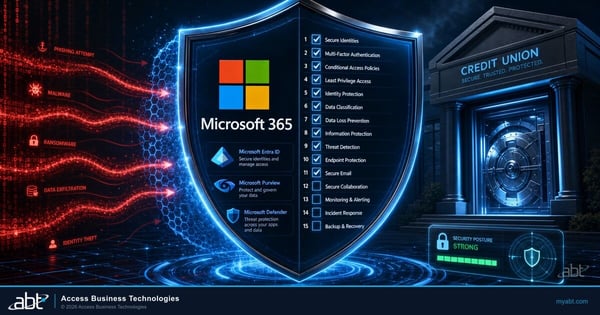
Microsoft 365 Security Checklist for Credit Unions: 15 Settings Your IT Team Should Verify Today
The tenant-side controls that reduce what an aging endpoint can reach while a replacement plan is still in progress.
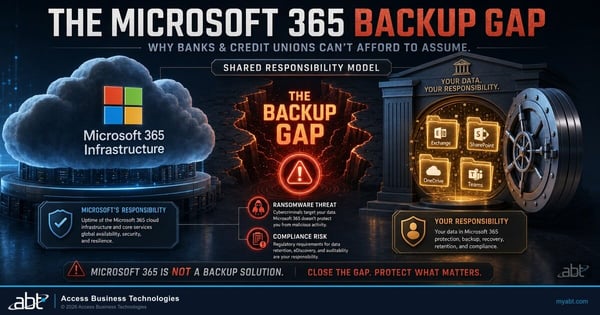
The Microsoft 365 Backup Gap: What Banks and Credit Unions Do Not Get by Default
Another case where the default assumption and the documented reality are further apart than anybody expects.
Windows 10 LTSC questions, answered from Microsoft documentation
There is no single date, because each Long-Term Servicing Channel release has its own. Microsoft states that Windows 10 Enterprise 2016 LTSB and Windows 10 IoT Enterprise 2016 LTSB reach end of support on October 13, 2026, and that Windows 10 Enterprise LTSC 2021 reaches its applicable end of support on January 12, 2027. The Microsoft Lifecycle listings give Windows 10 Enterprise LTSC 2019 an extended end date of 1/10/2029, Windows 10 IoT Enterprise LTSC 2021 an extended end date of 1/14/2032, Windows 11 Enterprise LTSC 2024 a mainstream end date of 10/10/2029, and Windows 11 IoT Enterprise LTSC 2024 an extended end date of 10/11/2034. Check the specific release on the device rather than applying a general Windows 10 date to it.
Not by the mainstream Windows 10 Extended Security Updates program, which is attached to Windows 10 version 22H2. Long-Term Servicing Channel releases have their own lifecycles and their own Extended Security Updates track. Microsoft publishes Extended Security Updates guidance covering Windows 10 Enterprise 2016 LTSB, Windows 10 IoT Enterprise 2016 LTSB, and Windows 10 Enterprise LTSC 2021, with three coverage years available for each. So the answer is that an LTSC device is not covered by the program most Windows 10 coverage describes, and separately may be eligible for a different program of its own.
Because the two releases have differently shaped lifecycles. The Microsoft Lifecycle listing for Windows 10 Enterprise LTSC 2019 shows a mainstream end date of 1/10/2024 followed by an extended end date of 1/10/2029. The listing for Windows 10 Enterprise LTSC 2021 shows a mainstream end date of 1/13/2027 and no extended end date at all. The older release therefore has roughly two more years of listed support than the newer one. An institution that moved a device image from LTSC 2019 to LTSC 2021 shortened its own runway without anything on the device indicating it.
No. Microsoft states directly: "The Enterprise LTSC 2021 ESU offer doesn't apply to Windows 10 IoT Enterprise LTSC 2021." Read alongside the lifecycle listings this is consistent rather than contradictory, because Windows 10 IoT Enterprise LTSC 2021 carries an extended end date of 1/14/2032 and does not need Extended Security Updates in January 2027. The operational risk is that the two editions look alike in most inventory reports, so a purchase made on the assumption that they are interchangeable covers devices that did not need it and misses devices that did.
Run winver on the device and read the edition name. A Long-Term Servicing Channel build reports an edition containing LTSC or LTSB, for example Windows 10 Enterprise LTSC 2021 or Windows 10 IoT Enterprise LTSC 2021. A second signal is what is missing: Microsoft states that features which could be updated with new functionality, "including Microsoft Edge and in-box Windows apps, are also not included" in LTSC, so a Windows 10 machine running normally with no Microsoft Edge and no Microsoft Store is very likely an LTSC build. Across a fleet, the edition and release fields in your device management reporting answer this without touching each machine, provided the report shows edition rather than only the product family.
A current patch level, before anything else. Microsoft lists the prerequisite for Windows 10 2016 LTSB as the "September 2026 servicing stack update (SSU) (KB5122874) and September 2026 Windows security update (KB5123099), or later updates", and for Windows 10 Enterprise LTSC 2021 as the "January 2027 servicing stack update (SSU) and January 2027 Windows security update". The device also needs administrative privileges available for the enrolment commands. The practical consequence is that a kiosk or controller which has been skipping monthly updates has to be brought current first, which for a branch fleet means a maintenance window and often a vendor conversation. Start that before the licence arrives, not after.
Only an account holding one of two roles. Microsoft states: "You must have the Product Key Reader or VL Administrator role assigned to your Microsoft Entra ID account to view the MAK." The key is collected in the Microsoft 365 admin center under Billing, then Your Products, then the Volume licensing tab, then View contracts, then the License ID holding the licences, then View product keys. Assign the role before the purchase lands, because the person who approves the spend is frequently not the person who needs to read the key. One exception worth noting: for Windows 10 IoT Enterprise LTSB 2016, Microsoft says to contact your OEM partner for the key rather than collecting it from the admin center.
Yes. Microsoft publishes two routes. Where a device can reach the internet, it needs access to a specific set of activation endpoints, seven of them, spanning go.microsoft.com, login.live.com and the Microsoft activation and validation services. On a tightly filtered branch segment that list is a firewall conversation worth having in advance. Where a device genuinely cannot reach them, Microsoft documents an offline path: generate an installation identifier on the device, take it to the Microsoft Product Activation portal from a machine with internet access, and apply the confirmation identifier that comes back. For large numbers of disconnected devices Microsoft points at the proxy activation scenario in the Volume Activation Management Tool.
It depends on whether the device is genuinely a specialized endpoint. If it is, the current generation is Windows 11 Enterprise LTSC 2024, listed to 10/10/2029, or Windows 11 IoT Enterprise LTSC 2024, listed to 10/11/2034. Where the hardware vendor supports the IoT edition, specifying it in the purchase requirement is worth roughly five additional years. If the device is an ordinary workstation that inherited an LTSC image from a vendor bundle or an old standard, it belongs on the general availability channel instead. Microsoft states that the long-term servicing channel "isn't intended for deployment on most or all the PCs in an organization", and in the fleets we have looked at, moving those machines back shrinks the LTSC population enough to make the remaining decisions affordable.
Find out which LTSC builds
are actually in your branches.
Tell us roughly how many people are in the institution. Our engineers will read the tenant and come back with every Windows build you are running, which of them are Long-Term Servicing Channel, the release and edition of each, and the Microsoft end-of-support date sitting against every one.
