


Microsoft Entra Agent ID · MC1506733 and MC1506728 · Rollout from November 4, 2026
In a rollout that begins November 4, Microsoft Entra lets users without a role create agent blueprints. Decide who builds your agents, and give them the role to do it.
Agents are how staff move repetitive work off their desks, and Microsoft Entra Agent ID is where each agent gets its identity. Starting November 4, 2026, Microsoft changes who can create the blueprint behind them: default users, meaning anyone without a built-in or custom Microsoft Entra role, can create new agent blueprints unless an administrator sets Users can create agent blueprints to No. The rollout begins in early November and is expected to complete by late November, and you can choose the setting today. A companion change ends the automatic AgentIdentity.CreateAsManager grant, so an agent that creates its own identities without a signed-in user needs an administrator's explicit consent. For a credit union, bank, or mortgage company, the decision is who builds agents, the role that lets them, and a record of both.
- Users can create agent blueprints (Entra ID > Users > User settings): from the rollout, users without a Microsoft Entra role can create new agent blueprints unless the setting is No
- AgentIdentity.CreateAsManager: Microsoft Entra stops granting it automatically to agent blueprint principals, and app-only identity creation that relies on the automatic grant fails with a 403 error
- Existing agent blueprints and agent identities stay in place; Copilot Studio, Security Copilot and Microsoft Foundry keep their own admin controls
The change
What changes in Microsoft Entra on November 4, 2026, and who does it reach?
Two Message Center posts published October 13, 2026 change how agents arrive in your tenant. One changes who can create the blueprint an agent is built from. The other changes how an agent creates its own identities when no one is signed in.
The change in brief
- What
- Default users, meaning users without a built-in or custom Microsoft Entra role, can create new agent blueprints unless an administrator sets Users can create agent blueprints to No. Separately, Microsoft Entra stops granting the AgentIdentity.CreateAsManager Microsoft Graph application permission automatically to agent blueprint principals; an administrator grants it where an agent needs it.
- When
- Both rollouts begin in early November 2026, starting November 4, and are expected to complete by late November 2026. A setting you choose now takes effect when the rollout begins in your tenant.
- Who
- Every organization using Microsoft Entra. The blueprint setting reaches users without an Entra role. The permission change reaches agents, existing and future, that create their own agent identities with app-only authentication.
- Owner
- Whoever administers Microsoft Entra (Microsoft's steps start from at least a Cloud Application Administrator), whoever owns your AI and Copilot program, and your information security officer for the approval path.
- Action
- Decide who builds agents, set the toggle, assign the Agent ID Developer role to the people you name, review Users can register applications and user consent alongside it, and find any agent that depends on the automatic grant before enforcement reaches you.
Microsoft announces both changes
MC1506733, "Review who can create agents in Microsoft Entra," and MC1506728, the AgentIdentity.CreateAsManager change, reach Microsoft 365 admin centers with the same rollout window.
Explicit grants open
From this date an administrator can grant AgentIdentity.CreateAsManager through tenant-wide admin consent or manual app-role creation. A successful grant shows An administrator in the Granted By column.
Rollout begins
Users without a Microsoft Entra role can create new agent blueprints unless the setting is No, and Microsoft Entra ends the automatic AgentIdentity.CreateAsManager grant to agent blueprint principals.
Rollout expected to complete
Microsoft expects both changes to reach tenants worldwide by late November. Once enforcement reaches a tenant, an app-only request that relies only on the automatic grant fails with a 403 error.
"Starting November 4, default users will be able to create new agent blueprints unless an administrator turns off Users can create agent blueprints. This means that users without built-in or custom Entra roles will be able to create new agent blueprints in their organization."
Microsoft 365 Message Center post MC1506733, Action may be required: Review who can create agents in Microsoft Entra, October 13, 2026An agent identity blueprint is the template every agent identity in a tenant is created from, and in Microsoft's words a blueprint "can perform exactly one operation in the tenant: provision or deprovision agent identities." Two properties make the blueprint the right place to decide. Microsoft's blueprint article says OAuth permissions granted to a blueprint are granted to every agent identity created from it, and "Disabling an agent identity blueprint prevents all its agent identities from authenticating." Whoever creates a blueprint shapes every agent made from it.
Before the rollout, a user creating a blueprint in the Microsoft Entra admin center or a command-line tool needs the Agent ID Developer or Agent ID Administrator role, per Microsoft's article on how agent identities are created. MC1506733 opens that to default users. Microsoft's Learn article on delegating app registration permissions already describes the new default and the switch: "By default, users in your organization can create agent identity blueprints. To restrict creation to administrators and users assigned the Agent ID Developer role, turn off Users can create agent blueprints." You can choose now. MC1506733: "If you change this toggle now, your tenant won't change right away. Your setting takes effect when the rollout begins in early November."
MC1506728 changes the other half. "Currently, all agents are granted AgentIdentity.CreateAsManager upon creation without administrator approval." That Microsoft Graph application permission lets a blueprint principal create agent identities and fully manage them without a signed-in user, and Microsoft's creation-channels article describes the automatic grant as permanent, in its words "This permission can't be revoked," with a cap of 250 agent identity creations per principal. From November 4, Microsoft Entra stops granting it automatically, and the change, per MC1506728, "Makes app-only agent identity creation authority visible, auditable, and revocable." An agent that creates its own identities with app-only authentication then needs an administrator to grant the permission, or it fails with a 403 error once enforcement reaches the tenant. Agents that use a directory role to authorize creation sit outside the change.
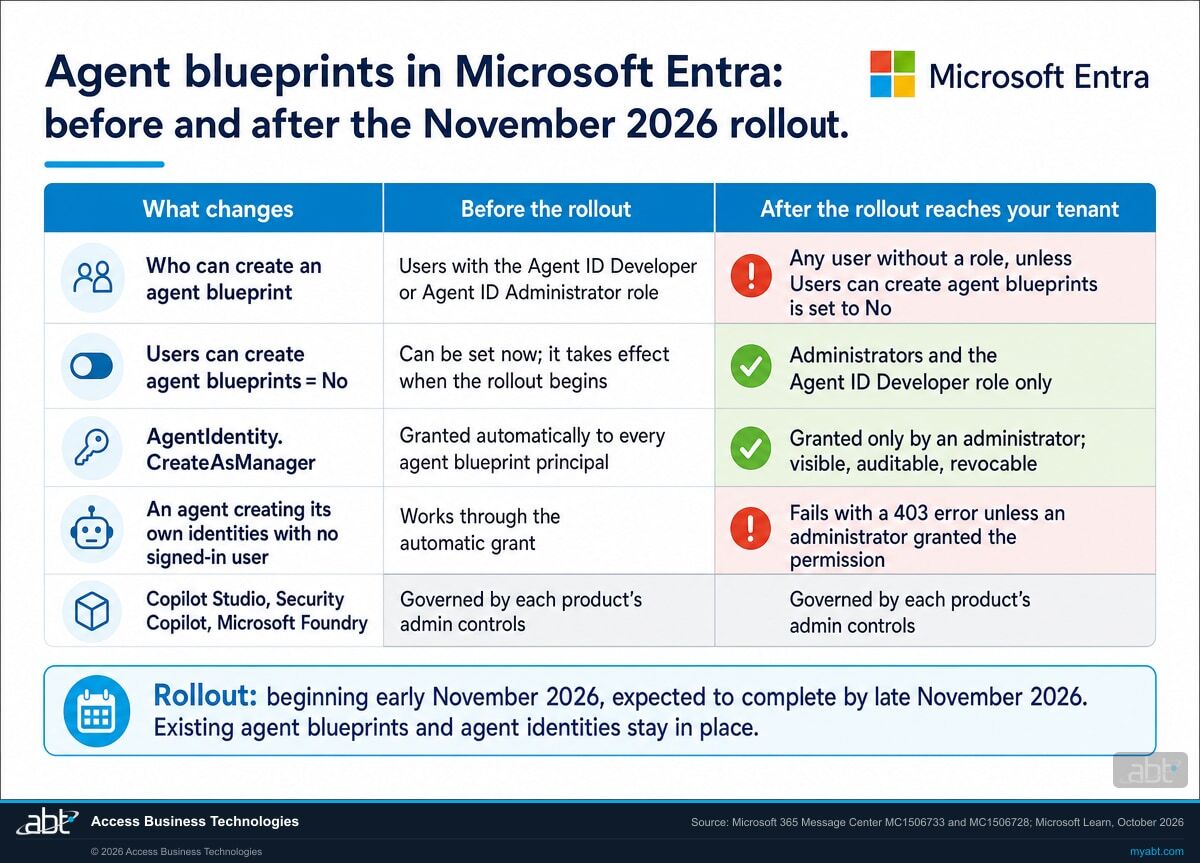
Before and after
What does each setting and permission do before and after the November rollout?
Read the first three rows as the decision about people: who creates agent blueprints. The next two rows are the decision about agents that create identities without a signed-in user. The last row is the boundary of the setting.
| Control | Before the rollout | After the rollout reaches your tenant | Where you see it | What to weigh |
|---|---|---|---|---|
| Users can create agent blueprints = Yes (the new default) | Blueprint creation in the admin center or command-line tools needs the Agent ID Developer or Agent ID Administrator role | Users without a Microsoft Entra role can create new agent blueprints | Entra ID > Users > User settings > Default user role permissions | Default users without an Entra role can start a new agent blueprint, and each blueprint can create agent identities |
| Users can create agent blueprints = No | Can be set now; takes effect when the rollout begins | Supported administrators and users assigned the Agent ID Developer role keep creating blueprints | Entra ID > Users > User settings > Default user role permissions | Pairs with a named list of builders and the role assignment |
| Agent ID Developer role | Creates an agent identity blueprint and its principal; the creator is added as owner of both | The same, and the path for named builders once the setting is No | Microsoft Entra built-in role, template ID adb2368d-a9be-41b5-8667-d96778e081b0 | Ownership follows the builder, which keeps each agent tied to a person |
| AgentIdentity.CreateAsManager, automatic | Granted to every agent blueprint principal on creation, without administrator approval | Ends; an app-only request relying on it fails with a 403 error | Entra ID > Agent blueprints > Granted permissions | Affects existing and future agents that create their own identities |
| AgentIdentity.CreateAsManager, granted by an administrator | Possible from October 16, 2026; Microsoft says an earlier grant causes an error | Visible, auditable and revocable; Granted By shows An administrator | Tenant-wide admin consent or manual app-role creation | The path for an agent that must create identities without a signed-in user |
| Copilot Studio, Security Copilot, Microsoft Foundry | Creation governed by each product's admin controls | Creation still governed by each product's admin controls | Each product's admin settings | Review those controls next to the Entra setting |
Three settings to decide together
MC1506733 scopes the new setting to new agent blueprint creation by default users. Existing blueprints, agent identities created from existing blueprints, and the requirements inside Microsoft Foundry or Security Copilot, such as licenses and Azure subscriptions, stay where they are. Microsoft also writes: "The new setting is independent of Users can register applications. Review both settings separately."
The third switch is user consent. Microsoft's Learn article says that by default "Everyone also has the ability to consent to apps and agents accessing company data on their behalf," and its article on creation channels says a consent to a third-party agent "results in the creation of an agent identity blueprint principal." Deciding blueprint creation, app registration and user consent together puts all three settings in one decision record.
See who can create agents in your tenant today, and which agents the audit log shows relying on the automatic grant
ABT reads your Microsoft Entra user settings, the agent blueprints and agent identities already in your tenant, and the audit log entries that show agents creating their own identities, and leaves you a written decision record, as part of a free Copilot readiness assessment.
Request the free assessmentThe work
How do you decide who creates agents before the rollout reaches your tenant?
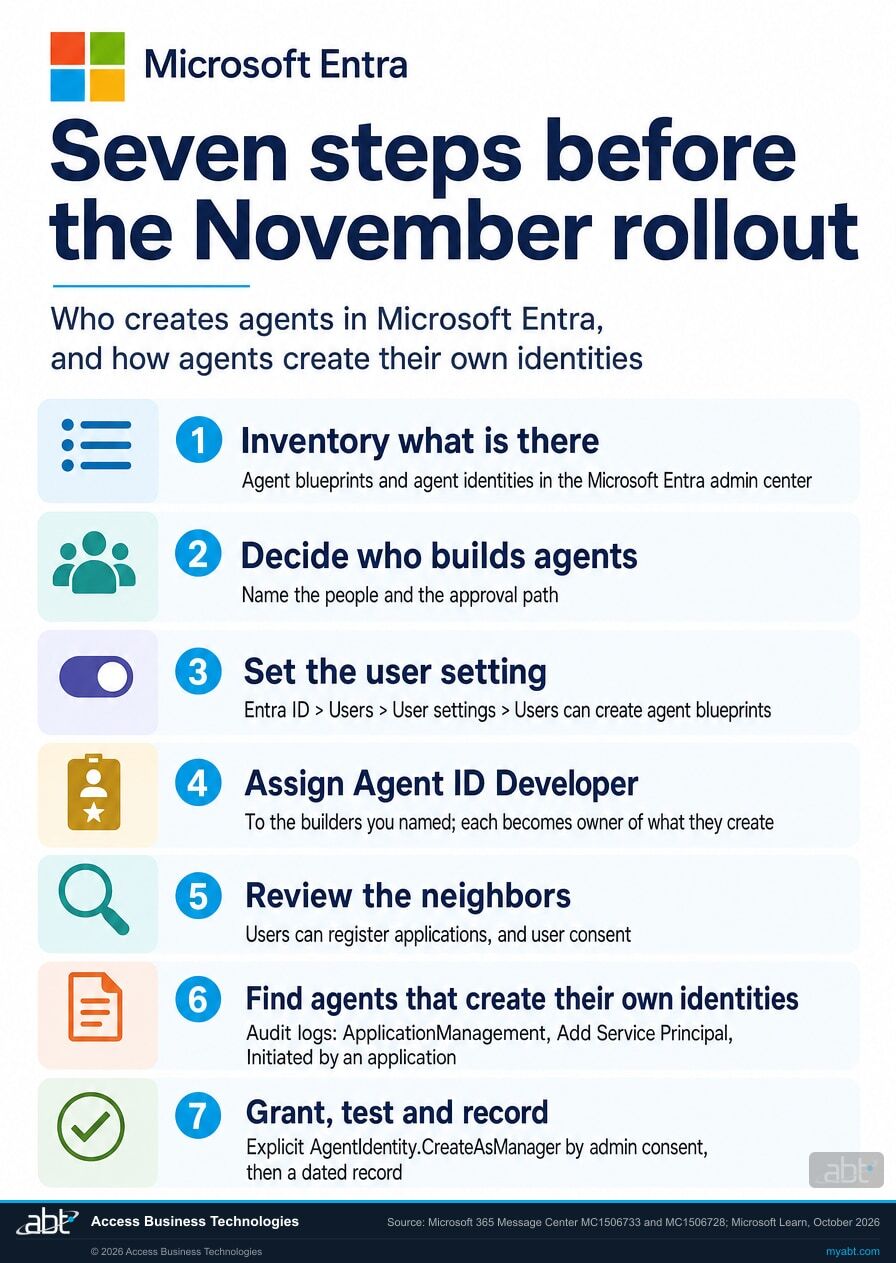
Seven steps, in the order the decisions depend on each other. Steps 1 and 2 establish what exists and who should build. Steps 3 to 5 set the switches. Steps 6 and 7 handle agents that create their own identities.
Inventory the agent blueprints and agent identities already in the tenant
Microsoft's guidance on monitoring agent creation names two sources: Microsoft Entra audit events for new agent identity creations, and Microsoft Graph, used "to query all agent identity objects by object type." In the admin center, an agent built in Copilot Studio appears with its own agent identity, and Microsoft notes, "The user who created the agent is recorded as its sponsor." Start the list with each blueprint, its owners or sponsor, the permissions it holds, and the agent identities created from it.
Decide who should create agent blueprints, and how a new one gets approved
The setting gives two answers: everyone without a role, or administrators plus the people you assign. ABT's recommended baseline for a regulated institution is No, with the Agent ID Developer role assigned to named builders, set by your own documented risk decision. Write down who they are, who approves a new agent, and where that approval is recorded.
Set Users can create agent blueprints
Microsoft's steps: sign in to the Microsoft Entra admin center "as at least a Cloud Application Administrator," browse to Entra ID, Users, User settings, set Users can create agent blueprints to No, and save. MC1506733: "Your setting takes effect when the rollout begins in early November." If your answer is Yes, Microsoft says no action is required, and a written record of the choice still belongs in step 7.
Assign the Agent ID Developer role to the people you named
Microsoft's role definition: "Create an agent identity blueprint and its agent identity blueprint principal in a tenant. User will be added as an owner of the created agent identity blueprint and its agent identity blueprint principal." Ownership carries weight later: Microsoft's creation-channels article lets an owner of a blueprint or its principal create agent identities from it through Microsoft Graph with delegated permissions, with no Agent ID role required. Keep Agent ID Administrator, which Microsoft describes as managing all aspects of agents in a tenant, for the people who run the program.
Review the two neighboring settings
MC1506733 asks for it directly: "Review both settings separately." Microsoft's Learn article adds that by default "all users can register applications," and that users can consent to apps and agents accessing company data on their behalf. A third-party agent can also arrive through that consent, which creates an agent identity blueprint principal in your tenant. Decide all three settings together and record the result.
Find agents that create their own identities without a signed-in user
MC1506728's steps: filter the audit log to the ApplicationManagement category and the Add Service Principal activity, and find events where the Initiated By (actor) type is Application and the target is an agent identity. For each agent found, open Entra ID, Agent blueprints, search for the blueprint, and read Granted permissions. Microsoft: if no other granted permission allows creation, "this agent relies on AgentIdentity.CreateAsManager." The search reaches only as far back as your logs: Microsoft Entra keeps audit logs for seven days on Microsoft Entra ID Free and 30 days on P1 or P2, and Microsoft notes you can keep them longer by routing them to an Azure storage account with Azure Monitor.
Grant explicitly, test, and record the decision
Since October 16, 2026, an administrator can grant the permission "through tenant-wide admin consent or manual app-role creation"; a successful grant shows "An administrator" in the Granted By column. Microsoft's permission reference: it "Allows the app to create agent identities as the parent agent identity blueprint and fully manage them, including reading, updating, and deleting, without a signed-in user," and admin consent is required. Microsoft asks you to test app-only agent identity creation before enforcement and update operational guidance for a failed request. Record each agent, the reason it needs the grant, who approved it, and the date. Our page on Microsoft 365 Copilot readiness for financial institutions shows where this decision sits in a wider rollout.
Before you decide
What else should you know before you change the setting?
Six facts from Microsoft's own documentation that decide what the change means in your tenant.
Existing blueprints and identities stay in place
MC1506733 applies the setting to new agent blueprint creation by default users, and MC1506728 keeps existing agent identities and agent blueprints in place. The inventory from step 1 is the starting list your decision applies to.
Agent platforms keep their own controls
Microsoft lists Copilot Studio, Security Copilot and Azure AI Foundry as products that "can create agent identity blueprints, agent identities, and agents' user accounts in tenants," and says administrators control them "by using the administrative tools for each respective product." Copilot Studio's blueprint is "Automatically added when Copilot Studio is enabled." Our page on who can upload Copilot agents into your tenant covers one of those controls.
The automatic grant was permanent until now
Microsoft's creation-channels article, as published on October 23, 2026, describes AgentIdentity.CreateAsManager as "automatically granted to any agent identity blueprint principal in the tenant," says "This permission can't be revoked," and caps a principal at 250 agent identity creations. MC1506728 makes the permission "revocable if consented."
A directory role is a separate path
MC1506728 places agents that use a directory role to authorize creation of agent identities outside the change. An agent that creates identities with app-only authentication and holds no such role needs the explicit grant, or a move to another supported authorization model, before enforcement reaches the tenant.
Disabling a blueprint stops every agent built from it
Microsoft: "Disabling an agent identity blueprint prevents all its agent identities from authenticating," and "Customers can remove a blueprint from their tenant by deleting the agent identity blueprint principal." One blueprint can stand behind many agent identities, so check which agents depend on a blueprint before you disable or delete it.
Agent ID is available to all Entra customers
Microsoft: "Agent ID is available for all Microsoft Entra customers." Microsoft adds, "Extending Microsoft Entra security features to agents requires Microsoft Agent 365." Our article on Agent 365 governance for financial institutions covers that layer.
For financial institutions
Why does this matter at a credit union, bank, or mortgage company?
Because agents are already part of the work, and each one is a new identity that can reach member, customer and loan data.
Keep the builders building. Microsoft's Cyber Pulse report of February 2026 counted how many large companies run low-code agents: "More than 80% of Fortune 500 companies today use AI active agents built with low-code/no-code tools." Naming your builders, whether they sit in lending, member services, operations or IT, and giving them the Agent ID Developer role lets that work continue on the day the setting changes, with each builder recorded as owner of what they create. Our article on Copilot Studio agent authentication covers how those agents sign in to the systems they use.
Protect the data. Each blueprint can create agent identities, and OAuth permissions granted to a blueprint are granted to every agent identity created from it. Microsoft's Cyber Pulse report of February 2026 found "numerous organizations are deploying AI capabilities and agents prior to establishing appropriate controls for access management, data protection, compliance, and accountability," and added: "In regulated sectors such as financial services, healthcare, and the public sector, this gap can have particularly significant consequences." Deciding who creates blueprints, and granting AgentIdentity.CreateAsManager only where an agent needs it, gives each new blueprint and each app-only grant a named owner and an approval on record. Our page on the Microsoft Copilot plugin registry and its admin controls covers the matching question for plugins.
Keep the record. A setting chosen before the rollout, a role assignment for each named builder, an audit log search for agents creating their own identities, and a dated approval for each explicit grant make a short record your information security officer can hand to anyone who asks how AI agents enter the institution. Microsoft writes, "All agent identity creations are recorded in Microsoft Entra audit logs," so each new agent identity shows up in the same audit log the step 6 search reads.
Who builds the first agent at your institution?
The Short from our channel puts the question in 25 seconds: "People are building agents whether IT approves it or not." It ends on the choice every institution now faces: "whether you build the first one correctly or someone else does it without guardrails."
The setting, the Agent ID Developer role and the explicit permission grant are the controls Microsoft Entra gives you for that choice. MC1506733: with the toggle set to No, "default users will not be able to create new agents," and "Supported administrators and users assigned the Agent ID Developer role can continue to create them."
How ABT helps
A free Copilot readiness assessment
ABT is a Tier 1 Microsoft Cloud Solution Provider serving more than 750 financial institutions, and it manages Microsoft 365 tenants for credit unions, banks, and mortgage companies. Who can create agents is part of being ready for Copilot, so the assessment starts there.
We show who can create agents in your tenant, which agents already exist, and which the audit log shows relying on the automatic grant
The assessment is free and ends with written findings you keep. We work through it with an administrator on your team, and your team decides what changes and who makes each change.
- The settings readback. Users can create agent blueprints, Users can register applications, and your user consent setting, with what each allows today.
- The agent inventory. The agent blueprints and agent identities in your tenant, with their owners or sponsors and the permissions they hold.
- The audit log search. Agents that created agent identities without a signed-in user within the period your audit logs retain, and whether each relies on the automatic AgentIdentity.CreateAsManager grant.
- The builder list. The people who should hold the Agent ID Developer role, and the approval path for a new agent.
- The product controls. The admin settings in Copilot Studio and the other agent platforms you use, read next to the Entra setting.
- The record. A dated summary of each decision for your change record and your AI governance file.
ABT also operates M365 Guardian, its managed security service for credit unions, banks, and mortgage companies. Learn about M365 Guardian
Related reading
If this opened a bigger question
An agent setting tends to surface the questions around it: who can upload agents into the tenant, how Agent 365 governs them, and how agents sign in to the systems they use.
Who Can Upload Copilot Agents Into Your Tenant?
The Microsoft 365 admin center control for uploading agents that carry actions or an MCP server, and how to set it.
Read the page
Agent 365 Goes Live May 1: What Financial Institutions Must Know
The governance controls to configure before autonomous agents enter your tenant.
Read the article
Copilot Studio Agent Authentication: The August 25 Question
How Copilot Studio agent tools authenticate, as the user or as their builder, and what that means for unattended agents.
Read the articleAnswered
Agent blueprints and the November 2026 Microsoft Entra change, answered
Verify it yourself
Where the facts on this page come from
Every Microsoft date, setting, role, permission and quotation above was read from the sources listed here on October 23, 2026.
- Microsoft 365 Message Center post MC1506733, Action may be required: Review who can create agents in Microsoft Entra, published October 13, 2026. Source for the November 4 default, the rollout window, the setting path, the scope of the setting, its independence from Users can register applications, and the timing of a setting chosen early. Visible to administrators in your own Microsoft 365 admin center Message Center (sign-in required).
- Microsoft 365 Message Center post MC1506728, Microsoft Entra: Changes to AgentIdentity.CreateAsManager permission for agent identities, published October 13, 2026. Source for the end of the automatic grant, the October 16 grant date, the audit log search, the Granted permissions check, the 403 error and the scope of the change. Visible to administrators in your own Microsoft 365 admin center Message Center (sign-in required).
- Microsoft Learn, Delegate app registration permissions in Microsoft Entra ID, retrieved October 23, 2026. Source for the setting steps, the minimum role, the default for agent blueprints, app registration and user consent.
- Microsoft Learn, Agent identity blueprints in Microsoft Entra Agent ID, retrieved October 23, 2026. Source for what a blueprint is, inherited permissions, disabling and removing a blueprint, and the blueprint principal.
- Microsoft Learn, How are agent identities created?, retrieved October 23, 2026. Source for the creation channels, the roles required before the change, the product integrations and their controls, the consent channel, the pre-change description of AgentIdentity.CreateAsManager and the audit log statement.
- Microsoft Learn, What are agent identities, retrieved October 23, 2026. Source for Copilot Studio agent identities and sponsors, Agent ID availability, and Agent 365.
- Microsoft Learn, Microsoft Entra built-in roles, retrieved October 23, 2026. Source for the Agent ID Developer and Agent ID Administrator definitions and the Agent ID Developer template ID.
- Microsoft Learn, Microsoft Graph permissions reference, retrieved October 23, 2026. Source for the AgentIdentity.CreateAsManager identifier, description and admin consent requirement.
- Microsoft Learn, Microsoft Entra data retention, retrieved October 23, 2026. Source for audit log retention by license and for routing logs to an Azure storage account.
- Microsoft Security Blog, 80% of Fortune 500 use active AI Agents: Observability, governance, and security shape the new frontier, February 10, 2026. Source for the Fortune 500 telemetry figure and the regulated-sectors quotation.
The November rollout changes who can create agents.
Decide who builds them, and record it, before it reaches your tenant.
The work starts with the agent blueprints and agent identities already in your tenant and the three Microsoft Entra settings that decide who adds more. When it is done, you know who can create agents, who holds the Agent ID Developer role, which agents create their own identities, which of them hold an explicit grant, and where each decision is recorded.
Tell us a little about your environment and we will come back with what we would check first.
What should we look at? Optional.
Encrypted. Private.
Thank you. That is with us.
An ABT specialist will be in touch shortly. If a particular agent, team or platform is the one you are thinking about, say so in your reply and we will start there.
