


Microsoft Copilot · Microsoft 365 admin center
Copilot's Agents button becomes Plugins: one place for the tools your staff use with Copilot. Decide what your staff can install and use before the new button arrives.
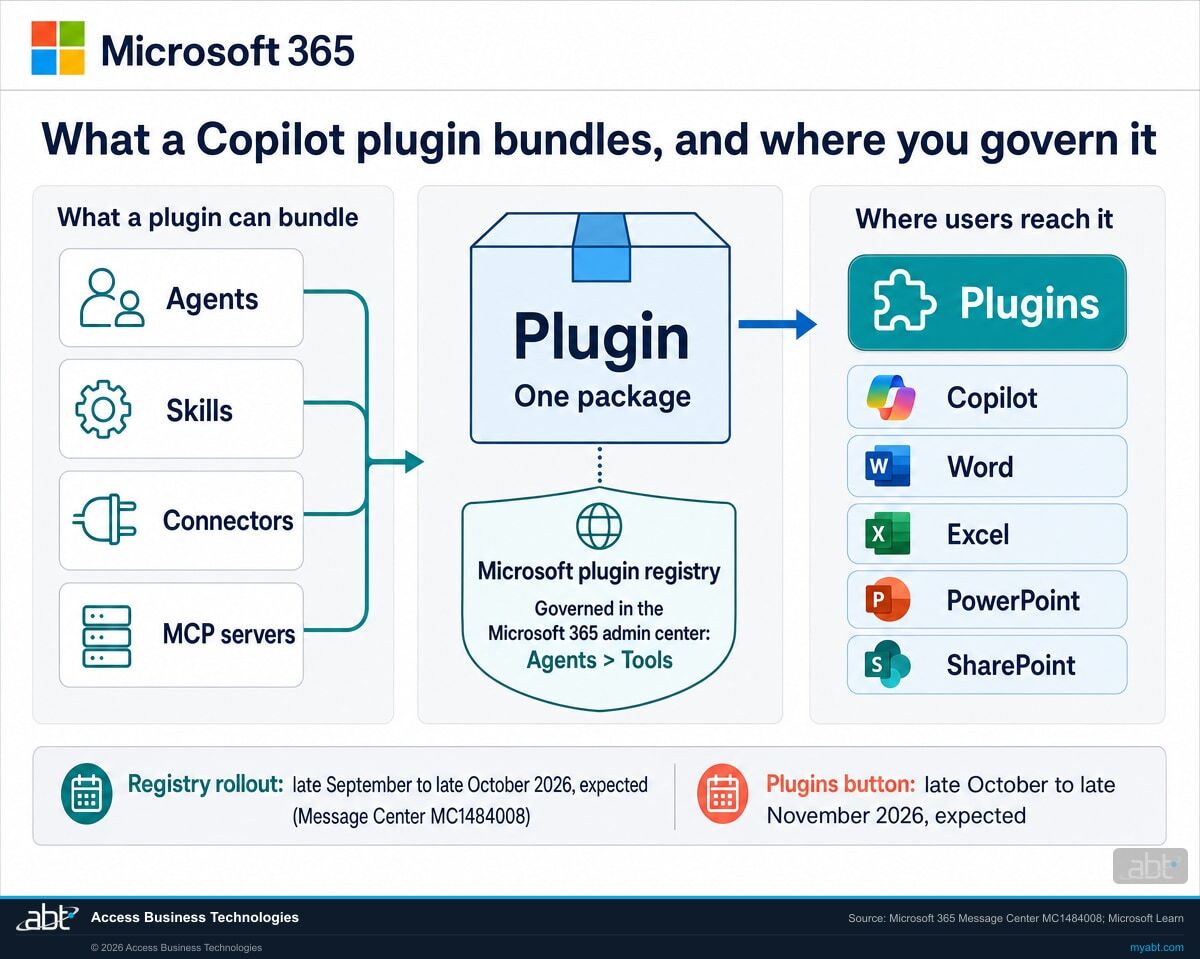
Microsoft's new plugin registry packages agents, skills, connectors, and Model Context Protocol (MCP) servers into plugins that staff reach through one Plugins menu in Copilot and supported Microsoft 365 apps. The registry is rolling out now, and Microsoft expects the Plugins button to replace Agents, Agents & Skills, and Customize between late October and late November 2026. Microsoft asks for no setup to turn it on. Settings in the Microsoft 365 admin center decide what your users can install, and Microsoft Learn lists all users as the default for who can use agents and plugins, subject to existing app policies and user assignments.
- Late September to late October 2026: Microsoft expects the plugin registry rollout to complete by late October (Message Center MC1484008)
- Late October to late November 2026: Microsoft expects one Plugins button to replace Agents, Agents & Skills, and Customize, with Frontier users seeing it in October (MC1484008, MC1479277)
- The controls live under Agents in the Microsoft 365 admin center: publisher categories, user access, plugin scope, access requests, and MCP server approval
The change
What is the Microsoft plugin registry, and what changes for your users?
The plugin registry is Microsoft's catalog for discovering, publishing, and governing plugins across Copilot and the Microsoft 365 apps. A plugin can bundle agents, skills, connectors, and MCP servers into one package. Your users find the plugins you allow through one Plugins button, and your administrators decide what is allowed under Agents in the Microsoft 365 admin center.
The decision in brief
- What
- Microsoft's plugin registry gathers agents, skills, connectors, and MCP servers into plugins, and one Plugins button replaces Agents, Agents & Skills, and Customize.
- When
- The registry began rolling out in late September 2026, and Microsoft expects it to complete by late October. The Plugins button is expected to follow from late October to late November 2026, and users in Microsoft's Frontier program see it in October.
- Users
- Staff find approved plugins through one Plugins menu in Copilot Home (Chat and Cowork), Code, Autopilot, and supported Microsoft 365 apps. A plugin your settings restrict shows as blocked by your organization's policy, and eligible users can request access.
- Owner
- Your Microsoft 365 administrator, an AI Administrator or Global Administrator (the two roles Microsoft Learn names) for MCP server approvals, and whoever owns vendor and AI decisions at your institution.
- Action
- Choose which publishers users can install from, who can use agents and plugins, who answers access requests, and who approves MCP servers, then tell staff about the new button.
The new Microsoft Copilot
Microsoft introduces the new Copilot app: Chat and Cowork together in Home, plus Code and Autopilot (Message Center MC1479277).
The plugin registry announced
MC1484008 and the Microsoft Copilot Blog announce the registry, rolling out now, with more than 100 plugins already available.
The registry rolls out
Administrators gain the plugin catalog under Tools in the Microsoft 365 admin center and in Microsoft Agent 365.
Plugins replaces three buttons
MC1484008: Microsoft expects that by late November 2026 Plugins is where users find agents, replacing Agents, Agents & Skills, and Customize. Frontier users see it in October.
"Plugins can bundle agents, skills, connectors, and Model Context Protocol (MCP) servers into a single package that can be published, discovered, governed, and acquired through the Microsoft 365 admin center and Microsoft Agent 365."
Microsoft 365 Message Center post MC1484008, Microsoft Copilot: Introducing the Microsoft plugin registry for Microsoft Copilot experiences, plan for change, published September 30, 2026Microsoft's definitions are short. Skills "provide reusable instructions for specialized work," connectors "give Copilot approved access to services and data," and agents "customize Copilot for specific uses." An MCP server exposes tools that agents can call, and Microsoft Learn's description of the block control shows the scale of one approval: blocking a server "disables all the tools it exposes."
In the Copilot app, MC1479277 describes the swap in detail: Plugins replaces the standalone Agents entry point in Chat, which some preview users saw as Agents & Skills, and the Customize entry point in Cowork.
Microsoft says the catalog already holds more than 100 plugins, for areas such as finance, sales, project management, IT service management, and market research, and that the registry will support Copilot Studio, GitHub Copilot, and Microsoft Foundry in the future. Staff can already pull available agents and skills into a prompt by typing / or @, a change Microsoft describes in MC1479519.
Microsoft asks for no setup: "No action or setup is required to enable this change, and no technical migration is required." Its recommendations are the work: update documentation and training that mention Agents, Agents & Skills, or Customize, prepare users for the new button, and "Review which plugin capabilities should be available to users based on your organization's governance requirements." Agents keep their own settings: "Admins will continue to manage agents in the Agents settings within the Microsoft 365 admin center and Microsoft Agent 365."
The settings
Which admin center settings decide what your users can install?
Six settings and two approval queues, all under Agents in the Microsoft 365 admin center. Microsoft Learn documents each one. The table lists where each lives, the choices it offers, and what it decides.
| Control | Where it lives | Choices | What it decides |
|---|---|---|---|
| Agent and plugin access | Agents > Settings > Agent and plugin access | Microsoft; your organization; certified external publishers | Which publisher categories users can install from. Plugins built by Microsoft stay visible to users when that category is off, and users can't install them. |
| User access | Agents > Settings > User access | All users (the default); No users; Specific users or groups | Who in the organization can use agents and plugins at all. |
| Plugin availability | Agents > Tools > Plugins, then Users | All users; No users; Specific users and groups | Who can use one plugin. Installing it for a group makes it ready without each person adding it. |
| Access requests | Agents > Tools > Requests | Approve; Reject | What happens when a user asks for a plugin your settings restrict. |
| Upload | Agents > Tools > Registry, then Upload | All users or specific users or groups, chosen at install | Your own plugins and skills, which a developer packages in a manifest file. |
| Block, uninstall, delete | Agents > Tools > Plugins | Block; Uninstall; Delete (uploaded packages only) | Block stops users and agents from using a plugin across the organization. Delete removes an uploaded package from the registry. |
| MCP server requests | Agents > Tools, Requests (preview) tab | Approve, then grant Microsoft Entra consent; or Reject | Which MCP servers join your registry. Microsoft Learn names AI Administrator and Global Administrator as the two roles that meet both approval requirements. |
| Tool-level control | Agents > Tools > Registry, the server, Tools tab | Enabled or Disabled for each tool | Individual tools inside supported MCP servers registered on Agent 365. Rolling out to tenants. |
All users is the starting point
Microsoft Learn lists All users as the default for user access: "all users in the organization can access agents and plugins, subject to the existing app policies and user assignments." The other layers in the table still apply on top of it: the publisher categories users can install from, who can use each plugin, which MCP servers have consent, and, where supported, which tools run.
With no setup required on Microsoft's side, a tenant that changes nothing meets the Plugins button with the settings it has today. Reviewing them before the button reaches your users turns each default into a decision your institution made, with a name and a date beside it.
Know what your users can install before the Plugins button arrives
ABT reviews your agent and plugin settings with your administrators, lists the plugins, agents, and MCP servers in your tenant and who can use each, and marks the ones from external publishers, as part of a free Copilot readiness assessment.
Request the free assessmentThe work
How do you set Copilot plugin governance before the Plugins button arrives?
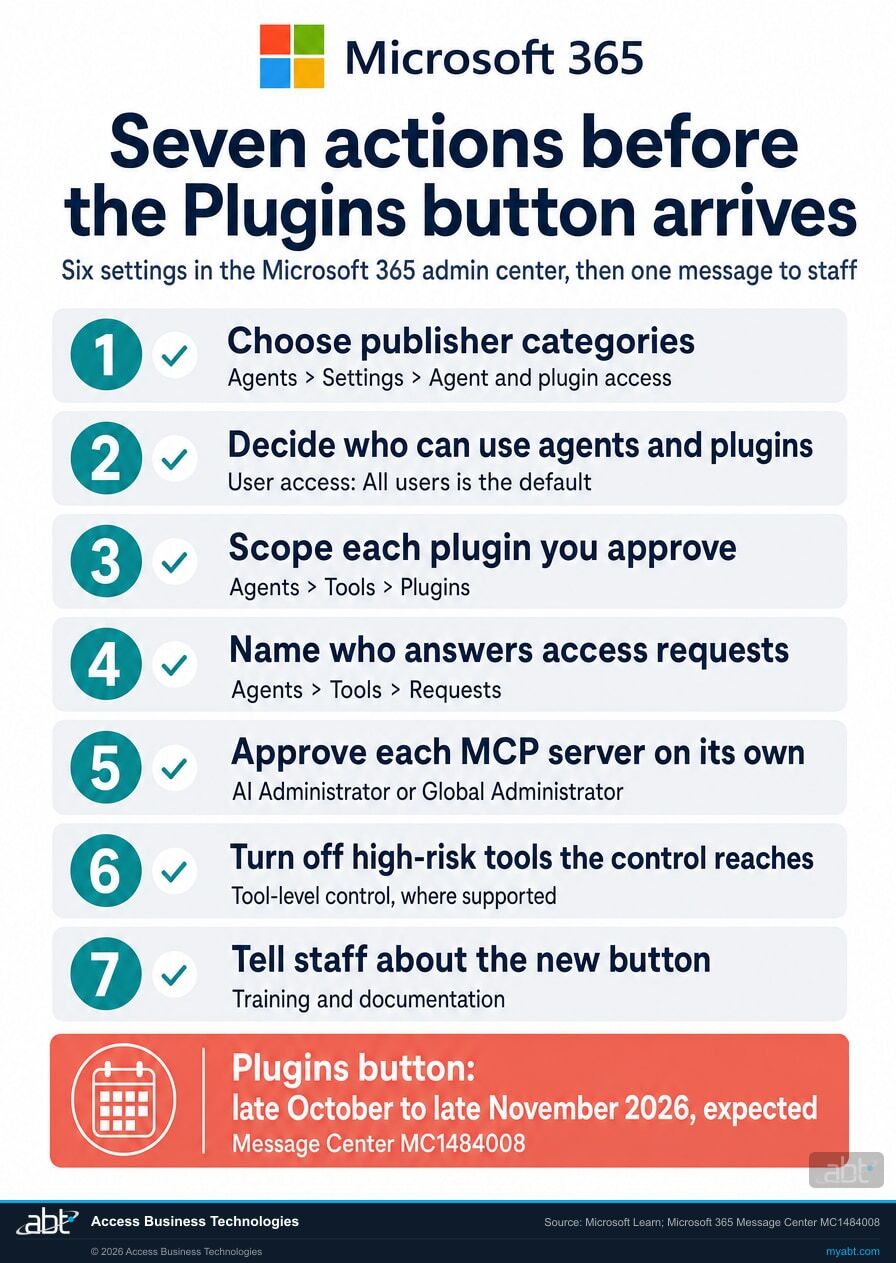
Seven recommended governance actions, in the order the decisions depend on each other. Six are settings Microsoft Learn documents in the Microsoft 365 admin center, and the seventh is telling staff what changes. Together they take the Plugins button from a default to a decision.
Choose the publishers your users can install from
Microsoft offers three categories: Microsoft, your organization, and certified external publishers. Microsoft Learn's answer to the question of blocking third-party plugins is to clear the category for certified external publishers, which stops users from installing plugins from that category. Plugins from Microsoft and from your organization are governed separately, and MCP servers, uploaded packages, and existing connections have their own controls. Plugins built by Microsoft stay visible to users when you turn their category off, and users can't install them.
Decide who can use agents and plugins at all
The choices are All users, No users, or Specific users or groups, and All users is the default. A named pilot group is a sound first position for an institution that wants a few teams to start while policy, training, and vendor review catch up.
Scope each plugin you approve to the people who need it
Select a plugin, open Users, and choose All users, No users, or Specific users and groups. You can also install a plugin for a group so it is ready to use without each person adding it, which keeps a plugin with the team whose work it supports.
Name who answers access requests
A user who finds a restricted plugin sees it marked as blocked by your organization's policy, and eligible users can select Request access. Each request arrives in the Microsoft 365 admin center with the user and the plugin, for an administrator to approve or reject. Decide who reviews requests and how quickly, so every request has an owner from the first day.
Treat every MCP server as its own approval
When a developer registers a remote MCP server, it appears there for review with its name, publisher, requester, and declared tools. Approval needs access to the Tools page and the right to grant tenant-wide consent, and Microsoft Learn names two roles that have both: AI Administrator and Global Administrator. Its roles page describes these two as having "tenant-wide visibility and governance authority," while product-specific admin roles govern only within their own products.
The server becomes available to agent-building surfaces only after consent is granted, so the consent step is where the review of its permissions belongs. Microsoft notes an approved server can take up to 30 minutes to appear in all Copilot Studio environments in the tenant.
Turn off the high-risk tools the control reaches
Tool-level control switches individual tools inside a supported MCP server on or off. Microsoft's own example is to keep tools "that write, delete, or process payments" turned off by default while allowing lower-risk tools on the same server. It is rolling out to tenants, it covers specific types of MCP servers registered on Agent 365, and the Agent 365 Tooling Gateway enforces it at runtime.
For a server that doesn't support tool discovery, the decision is the whole server: allow it or block it.
Tell staff about the new button
Microsoft recommends updating internal documentation, training, and adoption materials that reference Agents, Agents & Skills, or Customize, and preparing users for the Plugins button. Tell staff where approved plugins appear, how to request one, and who decides.
The review
What should you check before you approve a plugin?
Start with the publishing record and read every component in the package. Microsoft's administrator guide for Copilot plugins lists what to confirm, and it warns that a control applied to one object can stop short of the components that object references.
What to confirm, from Microsoft's list
- Identity and version. The exact package and version, and the publisher or creator behind it.
- Audience and reach. The intended users or groups, the publishing route, and the Microsoft experiences it supports.
- What is inside. The agents, skills, connectors, and MCP servers it includes, with their descriptions and dependencies.
- What it reaches. Permissions and consent, connections and external services, and the licenses it requires.
- Who looks after it. Known limitations, and the support and update owner.
How far one decision reaches
- Blocking a plugin stops users and the agents that depend on it, while its MCP servers and connectors stay available to other plugins.
- Blocking an MCP server also blocks the plugins that depend on it and the connectors linked to it.
- Connections are separate. Microsoft Learn: "A per-user connection isn't the same as organization-level deployment."
- Check each surface. Microsoft Learn: "Don't assume that one approval, assignment, or block propagates to every Microsoft experience or dependency unless the linked product procedure confirms it."
Who owns an agent after the person who built it leaves?
Microsoft Learn: "Agents become ownerless when their original creator leaves the organization." Agent management rules in the Microsoft 365 admin center can reassign ownerless agents built with Agent Builder to the previous owner's manager, based on the Microsoft Entra ID hierarchy, and can block ownerless agents that have no usage. At a financial institution, that check belongs in the offboarding steps beside the mailbox and the license.
Microsoft's guide also asks for the program around the settings before the first approval: "Establish review, approval, and exception processes," and "Assign support and lifecycle owners." A short written standard covering who approves which publisher category, who answers requests, and how often installed plugins are reviewed is enough to start.
For financial institutions
Why does a plugin decision matter at a credit union, bank, or mortgage company?
Because a plugin from an external publisher can hand your staff's work to a service outside Microsoft, and that turns a productivity decision into a vendor decision your institution has to stand behind.
Get the work done. Microsoft's case for plugins is productivity: plugins "can connect Copilot to approved business data and actions, helping users complete more workflows without leaving the experience where they're working." Microsoft says the single Plugins menu cuts "repeated discovery and setup" as staff move between apps. For a lending team or a member services team, the right plugin in the right hands is time back in the day.
Protect the data. Microsoft Learn is direct about plugins from other publishers: "Data processed by non-Microsoft services isn't subject to Microsoft agreements." It asks administrators to review the terms provided by non-Microsoft agent and plugin publishers and to consult internal policies before allowing access. Plugins can also act as well as read, and Microsoft suggests using its tool-level control to keep high-risk tools, such as tools that write, delete, or process payments, turned off by default. Our page on Copilot connector write actions covers the connectors that gain write tools in October.
Keep the record. In a proposal published in the Federal Register on September 15, 2026, the OCC, the Federal Reserve Board, the FDIC, and the NCUA set out new interagency guidance on third-party risk management, with comments due November 16, 2026. It defines a third-party relationship as "a business arrangement between a banking organization and an entity or individual for the provision of one or more products, services, and other activities that support the banking organization," and for this guidance, banking organizations include insured credit unions. It also observes that "Risks presented by third-party relationships are varied and may change over time or may not be immediately apparent."
The proposal speaks to third-party relationships in general terms, and whether a given plugin publisher is one is your program's call. Record that determination with its reasoning: the publisher and its terms, the permissions and data flows the plugin uses, who approved it, and when it is next reviewed. Who can upload custom agent packages that carry actions or an MCP server is a separate Copilot setting, covered in our page on the advanced agent upload control.
Should you block every third-party AI tool?
The registry gives an institution a governed middle path: allow publisher categories, scope plugins to groups, answer requests, and approve MCP servers one at a time. The Short from our channel makes the same case in under a minute, and its advice reads like a map of the new settings: "Approve specific connectors, scope their permissions, monitor their activity."
Approving and scoping now happen in the Microsoft 365 admin center. Microsoft's administrator guide treats monitoring as its own lifecycle stage: monitor use, review updates, adjust access, and retire the solution and its dependencies safely.
How ABT helps
A free Copilot readiness assessment
ABT is a Tier 1 Microsoft Cloud Solution Provider serving more than 750 financial institutions, and the plugin settings review is part of this assessment.
We review your agent and plugin settings with your administrators and leave you a written record of the decisions
The assessment is free and ends with written findings you keep. We work through the settings with an administrator on your team, and your team decides what changes in the tenant and who makes each change.
- The settings map. Each control in the table above, as your tenant has it set today.
- The inventory. The plugins, agents, and MCP servers available, installed, or requested in your tenant, and who can use each.
- The external list. Which of them come from external publishers, with the terms your vendor review should read.
- The recommendation. Publisher categories, user access, and who answers requests and approves MCP servers, with the reasoning.
- The wider Copilot picture. Licensing, agent sharing settings, and readiness for the rest of the Copilot rollout.
- The record. A dated summary of the decisions your team makes, ready for your change-management and vendor files.
ABT also operates M365 Guardian, its managed security service for credit unions, banks, and mortgage companies. Learn about M365 Guardian
Related reading
If this opened a bigger question
A plugin decision tends to surface the program behind it: which outside AI services may touch the tenant, how AI use is governed, and how data stays protected once agents are working.

Should You Connect Claude or ChatGPT to Your M365 Tenant? A CISO Decision Framework
A five-question framework for CISOs deciding whether a third-party AI tool such as Claude or ChatGPT should connect to the Microsoft 365 tenant.
Read the article
AI Governance Assessment for Financial Institutions: The 25-Point Checklist for Banks, Credit Unions, and Mortgage Companies
A 25-point checklist for credit unions, banks, and mortgage companies, built on the NIST AI Risk Management Framework and mapped to Microsoft 365 Copilot and Microsoft Agent 365.
Read the article
Microsoft Purview for AI Reaches GA: What Banks, Credit Unions, and Mortgage Companies Must Configure Before AI Agents Touch Member Data
What Microsoft Purview's AI data security and compliance protections cover, and what an institution configures before AI agents touch member data.
Read the articleAnswered
The Microsoft Copilot plugin registry, answered
Verify it yourself
Where the facts on this page come from
Every Microsoft date, setting, path, and quotation above was read from the sources listed here on October 6, 2026, and each source was confirmed unchanged on October 7, 2026.
- Microsoft 365 Message Center post MC1484008, Microsoft Copilot: Introducing the Microsoft plugin registry for Microsoft Copilot experiences, plan for change, published September 30, 2026. Source for what the registry is, what a plugin can bundle, the two rollout windows, the Plugins button, the no-setup statement, and Microsoft's recommendations. Visible to administrators in your own Microsoft 365 admin center; a public archive copy is at mc.merill.net/message/MC1484008.
- Microsoft 365 Message Center post MC1479277, Microsoft Copilot: New ways to work across Microsoft Copilot and Microsoft 365, published September 25, 2026 and updated October 5, 2026. Source for the new Copilot app, the Plugins entry point in Chat and Cowork, and the Frontier timing. Public archive copy: mc.merill.net/message/MC1479277.
- Microsoft 365 Message Center post MC1479519, Agents and Skills in CIQ, updated October 5, 2026. Source for inserting agents and skills into a prompt with / or @. Public archive copy: mc.merill.net/message/MC1479519.
- Microsoft Copilot Blog, Introducing the plugin registry, September 30, 2026. Source for the more than 100 plugins, Microsoft's definitions of skills, connectors, and agents, the productivity case, the future Copilot Studio, GitHub Copilot, and Microsoft Foundry support, and the note on what qualifying subscriptions include.
- Microsoft Learn, Manage plugins, skills, and MCP servers in Microsoft 365 admin center, dated September 28, 2026. Source for the publisher categories, plugin availability, access requests, uploads, block and delete, MCP server approval and its two roles, consent, the 30-minute note, and tool-level control.
- Microsoft Learn, Agent settings in Microsoft 365 admin center, updated September 30, 2026. Source for the User access options and default, the Microsoft-built exception, the statement on non-Microsoft services, and the agent management rules for ownerless agents.
- Microsoft Learn, Administer Microsoft 365 Copilot plugins and agents, dated September 30, 2026. Source for the review list, the readiness steps, and the limits of a single approval, assignment, or block.
- Microsoft Learn, Agent management roles and permissions in Microsoft 365 admin center. Source for the tenant-wide governance authority of the AI Administrator and Global Administrator roles.
- Federal Register, Proposed Third-Party Risk Management Guidance, 91 FR 58536, published September 15, 2026 by the OCC, the Federal Reserve Board, the FDIC, and the NCUA. Source for the comment deadline, the definition of a third-party relationship, the inclusion of insured credit unions, and the quoted line on risk.
Copilot's Plugins button is on its way to your users.
Decide what they can install first.
The work starts with your agent and plugin settings and the plugins, agents, and MCP servers already in your tenant. When it is done, you know who can install what, which publishers sit outside Microsoft, and who approves the next request.
Tell us a little about your environment and we will come back with what we would check first.
What should we look at? Optional.
Encrypted. Private.
Thank you. That is with us.
An ABT specialist will be in touch shortly. If plugins are already reaching users ahead of your review, say so in your reply and we will start there.
