


Microsoft 365 Copilot · Admin Control
Your people can keep building Copilot agents. From October 25, the question is what your upload setting says, and who decided it.
Microsoft added a setting to the Microsoft 365 admin center, under Copilot Settings, that decides who may upload an advanced agent or plugin: a package carrying a Declarative Agent with actions, or an MCP server. Microsoft set October 25, 2026 as the date the default applies, and the default is all users unless an administrator selected no users or specific users or groups. From that date the default applies, so three jobs remain: read the value your tenant shows, change it if it is the wrong one for your institution, and review what was uploaded before anyone chose.
- From October 25, 2026, the default applies. With no choice on record, advanced-package uploads stay enabled for all users
- Four options: all users, selected users, Microsoft Entra ID groups, or no users
- Advanced means a Declarative Agent with actions, or an MCP server. Those are Microsoft's words
- Read the value: all users, selected users, Entra ID groups, or no users
- No choice on record means all users
- Basic packages stay outside the setting
The sequence
What changed on October 25, and what stayed the same
Read this one carefully. Microsoft handed administrators a new switch, and the position it defaults to is the position the tenant was already in.
Uploads were already allowed
Users who built a Copilot agent could upload it, subject to whatever app-upload and Copilot access settings the tenant applied. Microsoft introduced the upload setting as a new admin control aimed at packages carrying actions or an MCP server. The upload already existed. The line between basic and advanced is what arrived.
The control appeared
Rollout began, with the control in the Microsoft 365 admin center under Copilot Settings. Microsoft described a General Availability rollout expected to complete by the end of October, so tenants saw it on different days. Administrators can view user-uploaded packages in the admin center, and the details page shows the components of each one.
The default applies
Microsoft's wording is precise: advanced-package uploads will be enabled by default unless the admin has selected no users or specific users or groups. Silence reads as all users. A chosen setting and an unchosen one can show the same value, and only the chosen one comes with a reason you can write down.
Three limits worth knowing
The setting reaches user-uploaded packages only, so first-party and third-party built agents sit outside it. It applies only to packages uploaded after the control became available. And basic packages stay allowed whatever option is chosen.
What October 25 means for your users
Microsoft states both of these plainly in the notice: "No action is required to maintain current behavior" and "If no action is taken, advanced-package uploads remain allowed by default."
Your users keep the ability they already had. What October 25 changes is the record: from that date, the value in the setting is either a decision somebody made or a default nobody chose, and the first one is the version an examiner can read.
The definition
What makes a package advanced?
This is the part worth reading twice. Microsoft's definition is one sentence long, it draws a capability boundary, and it tells you exactly what the control is protecting.
"An advanced agent is a package that has either a Declarative Agent with actions or with an MCP server. All other packages are considered basic."
Microsoft 365 Message Center, post MC1472007, Manage who can upload advanced agents and plugins, updated September 15, 2026Two triggers, and both of them describe a package that can take an action. Everything else is basic, and basic uploads sit outside this control. Worth being precise about what the definition covers: it sorts packages by the capability they carry. Where the data goes is a separate question, and a basic package can still draw on outside data, because Microsoft's own guidance describes agent knowledge as able to connect external data through Microsoft 365 Copilot connectors.
Actions are the first trigger. Microsoft's own extensibility documentation describes a declarative agent as one you configure by adding "custom instructions, additional knowledge, and actions to automate business processes", and it is specific about what actions do: "Custom actions to integrate with APIs to interact with external systems in real-time." The overview page puts the consequence in plain language, saying agents can retrieve information, summarize data, "or even take actions like sending emails or updating records."
An agent without actions answers. An agent with actions can write, send, and call. That capability is the line the control is drawn on.
| Basic package | Advanced package | |
|---|---|---|
| What it contains | Instructions and knowledge, without actions and without an MCP server | A Declarative Agent with actions, or an MCP server |
| What the package itself can do | Answer from its instructions and its knowledge sources. The package carries no actions and no MCP server | Act. Microsoft describes custom actions as integrating with APIs to interact with external systems in real time, and an MCP server exposes tools the agent can call |
| Covered by the new control | No. Basic uploads remain allowed and are not impacted | Yes, for user-uploaded packages uploaded after the control becomes available |
| Who can upload it from October 25 | Unchanged | All users, unless an administrator picked specific users, Entra ID groups, or no users |
| Visible to administrators | Listed among user-uploaded packages | Listed too, and the details page shows the components of the package |
The second trigger is the one most people have not thought about yet
An MCP server is the other half of Microsoft's definition, and it is newer than most governance documents in a bank or credit union. Microsoft's extensibility guidance describes the relationship this way: plugins let declarative agents in Microsoft 365 Copilot interact with Model Context Protocol servers, or with REST APIs that carry an OpenAPI description. Connecting to one gives the agent access to that server's tools, which are functions a language model can call.
Microsoft's own worked example is a remote third-party server, reached over OAuth, with a token obtained on behalf of the signed-in user every time the agent calls it. In its words, Copilot uses the registration to "obtain an access token on behalf of the signed-in user each time the agent calls the MCP server." So the agent acts with the permissions of whoever is using it, against a service outside your tenant.
"Agents Toolkit configures the generated plugin manifest (ai-plugin.json) for dynamic tool discovery, so the agent resolves the MCP server's tools ... at runtime, and you don't add tools manually."
Microsoft Learn, Build a plugin for a declarative agent from an MCP server, retrieved October 25, 2026Read that sentence with a governance hat on and it says something sharp. With dynamic tool discovery, the approved package does not carry a fixed list of what it can do. The agent asks the server what tools it has, and it asks at runtime. An approval recorded on the day of upload describes the package. It does not necessarily describe everything that package will be able to do next quarter, because the answer lives on a server somebody else operates.
Microsoft documents the alternative in the same breath, and it deserves equal billing: a builder can pin a fixed, curated set of tools, which settles the list at build time. So this is a choice somebody makes, and it is a property of how the plugin was built. The governance question is simply whether anyone at your institution is in a position to know which choice was made.
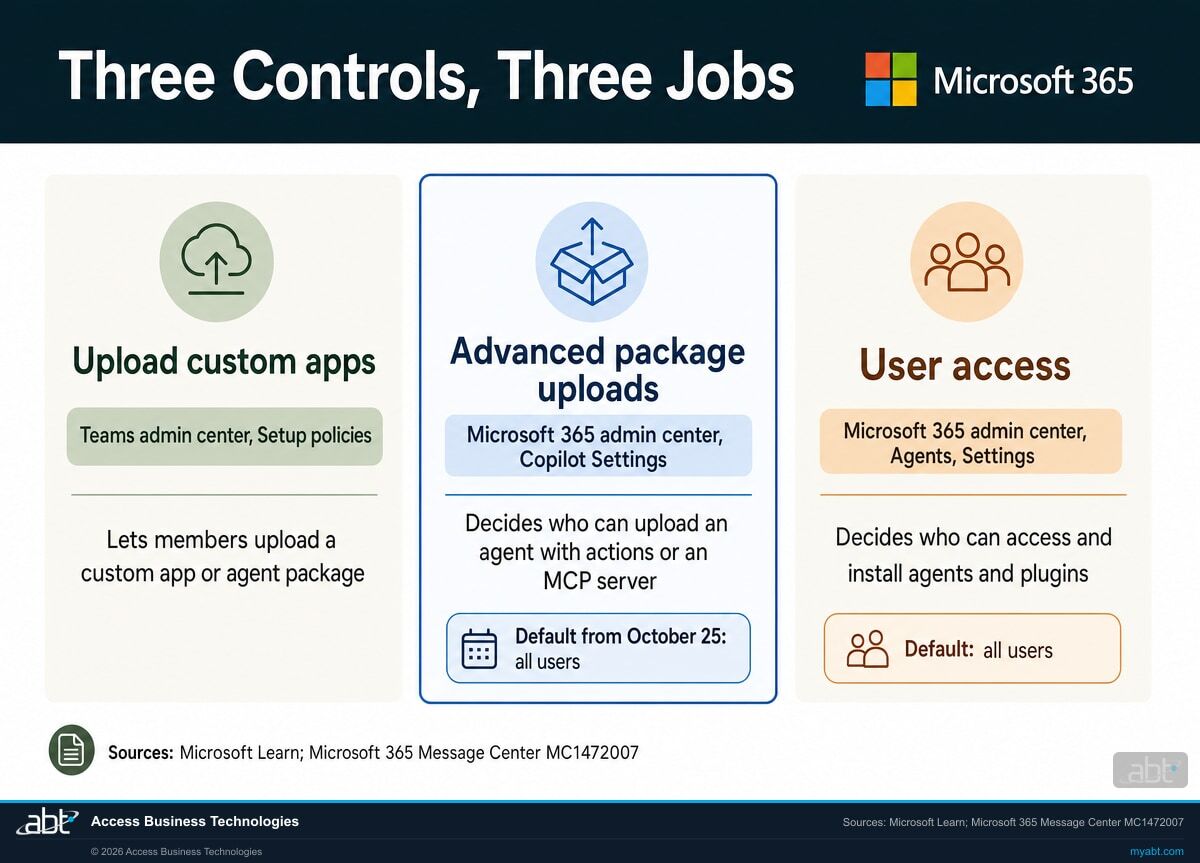
Three controls touch agent packages, and each does a different job
The Microsoft Teams admin center has its own gate. Microsoft's agents admin guide describes the Upload custom apps setting in Teams app setup policies as the way to determine whether members can upload an agent, or custom app package, in Teams.
In the Microsoft 365 admin center, User access (Agents, then Settings) controls how members of your organization access and install agents and plugins, with all users as the default, no users, or specific users or groups. Microsoft's Agent settings page counts MCP servers among the plugins it covers.
The advanced package upload setting decides who can upload a package that can act. Access governs what people can use. Upload governs what people can introduce. A tenant can have one narrowed and another wide open, so read all three on the same day.
Find out what was uploaded before anyone chose
ABT reviews which agents and plugins exist in your tenant, which of them carry actions or an MCP server, what your upload setting reads today, and which of the four options fits how your institution works.
Get the free Copilot readiness assessmentFor credit unions, banks, and mortgage companies
Why ten minutes on this is worth more than it looks
The setting takes one click. What makes it worth a meeting is that it forces an institution to answer a question about its own AI program that most have not written down yet.
Picture how an advanced agent actually arrives. A loan officer who is good with technology builds something useful, because that is what Copilot invites people to do and it is genuinely how work gets faster. It connects to a system the team uses every day. It saves an hour a week per person and it spreads by word of mouth, which is a good outcome and the reason to have Copilot at all.
Now the questions an examiner asks about third-party connections start applying to it. What data does it reach. Which service is on the other end. Who reviewed it. Who approved it. Those questions were always reasonable. What has been missing is a tenant-level place to stand when answering them, and that is what the setting provides.
The useful part is the record the decision creates. An institution that picks a named Entra ID group has a documented control with a named population behind it, which is a sentence you can put in a policy and an answer you can give without going and finding out first.
"To help organizations manage the deployment of advanced Copilot extensibility scenarios, we are introducing a new admin control that determines who can upload advanced agents and plugins. This enhancement strengthens enterprise governance and manageability by allowing administrators to limit advanced-package uploads to specific users or Microsoft Entra ID groups while maintaining flexibility for organizations that want broader access."
Microsoft 365 Message Center, post MC1472007, Manage who can upload advanced agents and pluginsWorth keeping in proportion: declarative agents run inside a managed framework. Microsoft's extensibility documentation states that because they use Copilot's own infrastructure, model, and orchestrator, declarative agents "adhere to the security, compliance, and Responsible AI (RAI) requirements for Microsoft 365." They inherit that framework.
What that framework covers is worth reading carefully, and it is the reason actions and MCP servers are singled out. When an agent calls an MCP server, Microsoft's walkthrough has the user sign in to that service separately and has Copilot obtain an access token on behalf of the signed-in user for each call. The permissions on the far side of that connection belong to the other service, and they are configured there. So the useful question about an advanced package covers two things: what it can see in Microsoft 365, and what it has been authorized to do everywhere else.
So the risk being managed here is narrower than "AI in the tenant" and more specific than it sounds. It is about packages that can act, uploaded by individuals, into an environment where somebody will eventually be asked to produce a list of them. For an institution that has approved builders and some way of reviewing what they connect to, a named group tends to fit. For one that has neither yet, no users buys time to put them in place.
Nobody sends you a checklist called "AI audit"
The questions an institution gets asked about AI tend to arrive inside the reviews that already exist: third-party risk, change management, access control, vendor oversight. An agent that calls an outside service is a third-party connection, and it reads like one on paper.
ABT manages Microsoft 365 tenants for credit unions, banks, and mortgage companies, which means the Copilot questions and the examination questions land on the same desk. They are easier to answer together than separately.
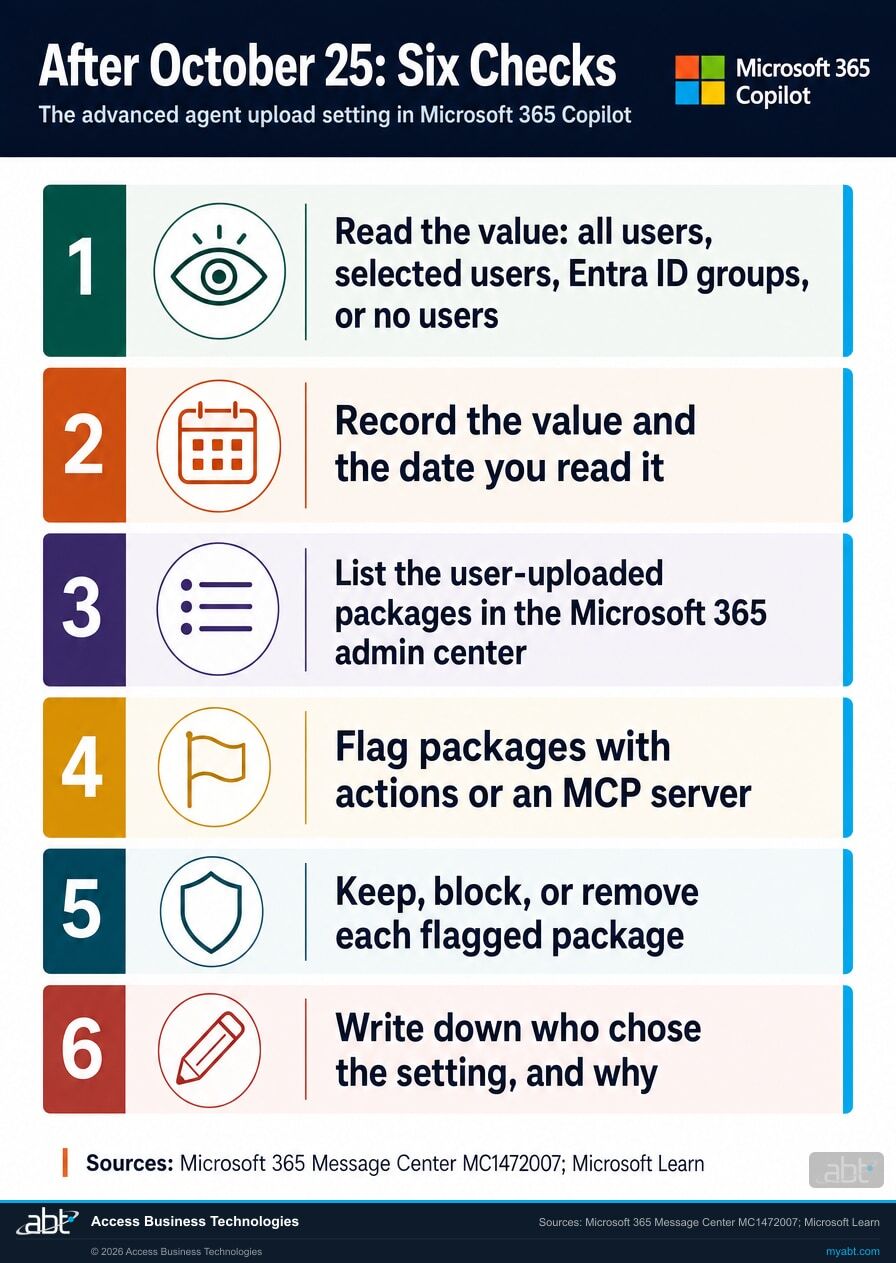
The short list
What to do from October 25
Microsoft's own recommendations run to four lines. Here is the version that leaves an institution something to file.
Read the value
Microsoft's notice places the control in the Microsoft 365 admin center under Copilot Settings. It holds one of four values: all users, selected users, Entra ID groups, or no users. If nobody chose before October 25, expect all users. If the control is missing, Microsoft's rollout is expected to complete by the end of October 2026, so check again then.
Record the value and the date you read it
A screenshot with the date on it is enough to start. If the value is the default nobody picked, say so in the record. That is the line an examiner or auditor will ask about, and it is easier to write now than to reconstruct later.
List the user-uploaded packages
Administrators can view user-uploaded packages in the Microsoft 365 admin center, and the details page shows the components of each one. Microsoft's Agent Registry lists agents that individual users or developers created and shared as Shared by creator entries. Pull this list before anything else: the setting governs who uploads from here on, and the inventory covers what is already there.
Flag packages with actions or an MCP server
Packages carrying actions or an MCP server are the ones the control governs and the ones worth attention, because those are the packages that can do something. Two piles, and the small one is the one to look at.
For each agent connected to an MCP server, ask the builder one question: are its tools resolved at runtime or pinned to a fixed set? Both are supported and both are defensible. Knowing which one you have is what turns an approval into an accurate one.
Keep, block, or remove each flagged package
Microsoft notes that the available admin actions differ by agent type and publisher state: some entries offer Delete, others offer Remove, and some offer only Block. Blocking an agent prevents any users in the tenant from accessing it.
While you are in the Agent Registry, look at agents whose owner has left. Microsoft notes that shared agents can become ownerless when you delete the user who created them, and the admin center shows a count of them with a filter to isolate them. Give each ownerless agent that can act a new owner or retire it, and add the check to your offboarding steps.
Write down who chose the setting, and why
If the value you found is the default nobody chose, this is the moment to choose. Microsoft's notice lists what administrators can configure: all users, selected users, Entra ID groups, or no users. For most institutions that want the productivity, a named Microsoft Entra ID group fits: the people who build these things, changed through the same process that changes any other group membership. All users is a legitimate choice when somebody made it. No users suits an institution still writing its agent policy.
Then write three sentences naming the option selected, who selected it, and why. Microsoft suggests updating administrator and help desk documentation and telling support teams about the control, which is the same idea. Who owns the setting, who is allowed to change it, and how the group gets reviewed are the rest of it.
Read the notice in your own tenant
Microsoft Learn's admin pages, read again on October 25, 2026, describe the neighboring controls in Agent settings, the Agent Registry and the agents admin guide, and leave the advanced package upload control to the Message Center. The Message Center post in your own Microsoft 365 admin center is the authoritative version, and it takes two minutes to read. Search your Message Center for MC1472007.
Two more agent decisions sit close to this one
Microsoft Entra is changing who can create agent blueprints by default: starting November 4, default users will be able to create new agent blueprints unless an administrator turns off Users can create agent blueprints, according to Message Center post MC1506733. We cover that one in Users Can Create Agent Blueprints: the November 4 change.
The catalog side of the same admin surface is in the Copilot plugin registry and its admin controls, and the connector side is in Copilot connectors and their new write actions. One record covering all three decisions is easier to defend than three separate ones.
How ABT helps
A free Copilot readiness assessment
ABT is a Tier 1 Microsoft Cloud Solution Provider. We manage Microsoft 365 tenants for more than 750 financial institutions, and questions like this one arrive on our desk every month.
We tell you what is in your tenant, and which of the four options fits it
- The inventory, in writing. Which agents and plugins have been uploaded into your tenant, by whom, and what each package contains.
- The advanced list, separated out. Which of them carry actions or an MCP server, and what sits on the other end of each connection.
- The recommendation, with the reasoning. Which of the four options fits your institution, and who belongs in the group if a group is the answer.
- The wider Copilot picture. Licensing, the settings around agent access and sharing, and where your current configuration sits against what examiners are asking financial institutions about AI.
- The note for the file. A short written record of the value the setting holds, who chose it, and the date, which is the part that answers the question later.
ABT also operates M365 Guardian, its managed security service for credit unions, banks, and mortgage companies. Learn about M365 Guardian
Related reading
If this opened a bigger question
One setting tends to surface the program behind it: what people are building, how it authenticates, and what an examiner will want to see.

Custom Agents vs. Custom Skills: Two Ways to Extend Microsoft 365 Copilot
Both extend Copilot, and they are governed differently. How banks and credit unions choose the right approach before any build work starts.
Read the guide
AI Governance Assessment: The 25-Point Checklist
Built on the NIST AI Risk Management Framework and mapped to Microsoft 365 Copilot, for credit unions, banks, and mortgage companies.
Read the checklist
Copilot Studio Agent Authentication: The August 25 Question
A Microsoft control that switches agent tools to authenticate as the signed-in user. It is off by default, and it breaks unattended agents.
Read the guideAnswered
The advanced agent upload control, answered
Verify it yourself
Where the facts on this page come from
The page was first written from Microsoft sources read on September 21, 2026. Every date, quotation and definition was read again from those sources on October 25, 2026, the day of this update.
- Microsoft 365 Message Center post MC1472007, Manage who can upload advanced agents and plugins, categorized as plan for change, flagged as a major change, last updated September 15, 2026 and unchanged when read on October 25, 2026. Source for the September 25 rollout start and the end of October completion, the October 25 default, the four options, the definition of an advanced agent, the statement that basic package uploads remain allowed and are not impacted, the limits to user-uploaded packages and to packages uploaded after the control becomes available, the administrator view of user-uploaded packages, and both statements that no action is required to maintain current behavior. Visible to administrators in your own Microsoft 365 admin center.
- Microsoft 365 Message Center post MC1506733, Action may be required: Review who can create agents in Microsoft Entra, read October 25, 2026. Source for the November 4 change to the Users can create agent blueprints setting.
- Microsoft Learn, Compare declarative and custom engine agents, retrieved October 25, 2026. Source for the definition of a declarative agent as adding custom instructions, knowledge and actions, for custom actions integrating with APIs to interact with external systems in real time, for agents taking actions such as sending emails or updating records, and for the statement that declarative agents adhere to the security, compliance and Responsible AI requirements for Microsoft 365.
- Microsoft Learn, Build a plugin for a declarative agent from an MCP server, retrieved October 25, 2026. Source for dynamic tool discovery resolving the server's tools at runtime, for the pinned tools alternative, for Copilot obtaining an access token on behalf of the signed-in user on each call, and for the Custom App Upload Enabled and Copilot Access Enabled prerequisites.
- Microsoft Learn, MCP and API plugins for declarative agents, retrieved October 25, 2026. Source for plugins enabling declarative agents to interact with MCP servers or REST APIs with an OpenAPI description.
- Microsoft Learn, Agent settings in Microsoft 365 admin center, retrieved October 25, 2026. Source for User access (all users as the default, no users, or specific users or groups), for Agent and plugin access, and for plugins including tools, MCP servers, connectors, skills, and other AI artifacts.
- Microsoft Learn, Agent Registry in Microsoft 365 admin center, retrieved October 25, 2026. Source for Shared by creator entries, for admin actions that differ by agent type and publisher state, and for ownerless shared agents.
- Microsoft Learn, Agents admin guide for Microsoft 365, retrieved October 25, 2026. Source for the Upload custom apps setting in Teams app setup policies and for blocking an agent preventing any users in the tenant from accessing it.
One setting.
One decision worth recording.
Pulling the inventory, looking at what carries actions or an MCP server, and settling on an option is an afternoon of work. Reconstructing who uploaded what, and when, at examination time is a much longer one.
Tell us a little about your environment and we will come back with what we would check first.
What should we look at? Optional.
Encrypted. Private.
Thank you. That is with us.
An ABT specialist will be in touch shortly. If your deadline is this week, say so in your reply and we will move it to the front.
