


Microsoft Defender for Office 365 · Teams user reporting
Teams user reporting is on by default from October 25 in tenants that left it unconfigured. Check where your reports go and who reads them.
A report option in Teams turns every employee into an early warning. Someone flags the strange chat, the help desk call that felt wrong, or the meeting guest nobody expected, and the report raises an alert in the Microsoft Defender portal for your security team to triage. Microsoft says Teams user reporting is enabled by default beginning October 25, 2026 in tenants that have left Teams user-reported settings unconfigured, unless they opt out. Microsoft's default destination sends each report to Microsoft and to a reporting mailbox, and Microsoft Learn says the default reporting mailbox is the global admin's.
- From October 25, 2026: on by default for licensed tenants that left the settings unconfigured, per Microsoft 365 Message Center post MC1478463
- The settings live on their own Teams user reported settings page in the Microsoft Defender portal, and Microsoft Learn now lists meetings and meeting participants alongside messages and calls
- In scope for commercial Microsoft 365 tenants licensed for Defender for Office 365 Plan 1 or Plan 2, and Microsoft includes Plan 1 in Microsoft 365 Business Premium and, since July 1, 2026, Office 365 E3 and Microsoft 365 E3
The change
What is different about Teams user reporting from October 2026?
Reporting in Teams still runs on two settings, one in the Teams admin center and one in the Microsoft Defender portal. In October Microsoft gave the Defender side its own page, and from October 25 it switches reporting on by default in tenants that left it unconfigured.
A dedicated settings page
Teams user-reported settings moved to their own Teams user reported settings page in the Microsoft Defender portal. Microsoft said settings already configured carry over.
Late changes catch up
Microsoft said changes made after the migration may not be reflected until the week of October 15, 2026. Read the page today to see what is in force.
On by default
Where Teams user-reported settings were left unconfigured, Microsoft switches Teams user reporting on from this date, unless the tenant opted out.
Meetings and participants
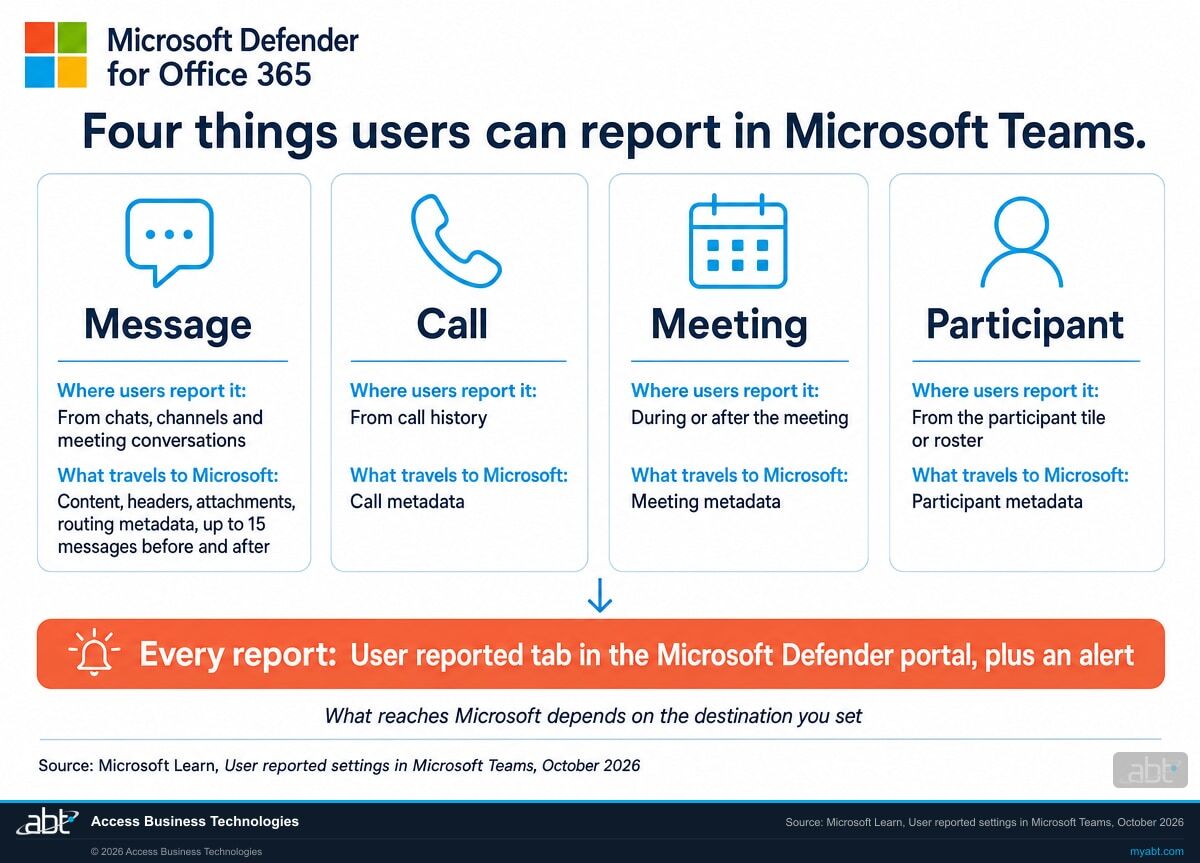
Microsoft Learn lists four reportable items: messages, calls, meetings, and meeting participants. Meeting reporting has its own Teams admin center policy, Allow users to report meetings.
"If you have not already configured Teams user-reported settings, Teams user reporting will be enabled by default beginning October 25, 2026, unless you opt out."
Microsoft 365 Message Center post MC1478463, Microsoft Defender for Office 365: Teams user reporting enabled by default, published September 24, 2026Microsoft lists the rollout for organizations licensed for Microsoft Defender for Office 365 Plan 1 or Plan 2, Microsoft 365 E5, or Office 365 E5, beginning in late October 2026 and expected to complete by late October 2026. Microsoft's service description adds that Plan 1 is included in Microsoft 365 Business Premium and, effective July 1, 2026, in Office 365 E3 and Microsoft 365 E3. Institutions on those plans are in scope in commercial Microsoft 365, and Microsoft Learn lists Teams reporting as unavailable in Microsoft 365 GCC, GCC High, and DoD.
What users see is simple. In the Teams desktop client and the Teams web app, a message's More options menu carries Report this message, and call history carries Report call. In a meeting, users report the meeting from its More options menu during or after the meeting, and report a single participant from that person's tile or from the roster. The Teams apps for iPhone, iPad, and Android report messages.
Reporting is the easy part. The decisions are where a report goes, who reads it, and what travels with it to Microsoft. Where nobody set them, Microsoft's defaults apply, and the seven-point check below reads what is in force in your tenant.
The decision
Where does a reported Teams item go, and who sees it?
Microsoft offers three destinations for reported items. The choice sets who sees a report first and what Microsoft receives.
The destination lives in the Reported item destinations section of the Teams user reported settings page in the Microsoft Defender portal, under Settings, then Email & collaboration. Microsoft's own default is Microsoft and my reporting mailbox. Microsoft explains the choice: reporting items to Microsoft is an important part of training the service to improve the accuracy of filtering, cutting both false positives and false negatives.
| Microsoft and my reporting mailbox (Microsoft's default) | My reporting mailbox only | Microsoft only | |
|---|---|---|---|
| Who receives the report | Microsoft, for analysis, and your reporting mailbox | Your reporting mailbox | Microsoft, for analysis |
| Microsoft's analysis | Automatic, on every report | When an admin submits an item from the User reported tab; Microsoft says submission of Teams messages to Microsoft is in Preview | Automatic, on every report |
| What goes to Microsoft | For a message: its content, headers, attachments, and routing metadata, plus up to fifteen messages before and after. For a call, meeting, or participant: its metadata. | Only the items an admin submits | For a message: its content, headers, attachments, and routing metadata, plus up to fifteen messages before and after. For a call, meeting, or participant: its metadata. |
| Your security team's copy | In the reporting mailbox | In the reporting mailbox | Reports skip the mailbox |
| User reported tab and alerts in the Defender portal | Included | Included | Included |
| Good fit when | You want Microsoft's analysis and your own copy of every report | Your compliance review wants a person to decide each submission, and your portal offers submission of Teams messages to Microsoft | Your security team works from the Defender portal and its alerts |
Microsoft's default reporting mailbox belongs to your global admin.
Microsoft Learn puts it in one line: the default user reporting mailbox is the Exchange Online mailbox of the global admin, and the value for older Microsoft 365 organizations is unchanged. Read the page to see which mailbox your tenant names, then ask who reads it and how often.
A mailbox your security team works from every day is the better home for reports. Microsoft lists the requirements: one Exchange Online mailbox, since distribution groups and routing to an external or on-premises mailbox aren't allowed; identified as a SecOps mailbox in the advanced delivery policy, so reported messages arrive unfiltered; and, if you use data loss prevention, excluded from those policies. If you run Attack simulation training or another phishing simulation product, the SecOps setting matters twice: Microsoft notes that a user reported message might otherwise trigger a training assignment. Teams reporting itself works only for users with an online Teams mailbox.
What a report carries
What does a Teams report send to Microsoft?
Microsoft documents exactly what travels with a report. It belongs in the written destination decision in step 4 below.
The item itself
For a message, its content, headers, attachments, and routing metadata. For a call, the call metadata, and for a meeting or a participant, the meeting or participant metadata.
Up to fifteen messages before and after
Microsoft says up to fifteen messages before and after the reported message might also be shared for analysis, as context for the report.
Microsoft staff may read it
Microsoft personnel might read submitted messages and files and review submitted call, meeting, and participant metadata. Microsoft notes this is typically not permitted for Teams items in Microsoft 365.
Stored in the USA, deleted when done
Submitted content is stored in secured, compliance-audited data centers located in the USA and is deleted as soon as it's no longer required, Microsoft says.
"Microsoft treats this feedback as your organization's authorization to analyze the submitted information to improve hygiene algorithms."
Microsoft Learn, User reported settings in Microsoft Teams, last updated October 5, 2026The same Microsoft page says the submission remains confidential between your organization and Microsoft during the review process, that Microsoft might also use AI to evaluate and generate responses tailored to a submission, and how Microsoft limits the use of customer data to train generative AI foundation models. Read those lines with your privacy officer. They are part of the decision.
For a credit union, bank, or mortgage company, a Teams chat can hold member or borrower details, so the fifteen-message context is the line to weigh. My reporting mailbox only sends reports to your mailbox and leaves submission to Microsoft to an admin. Microsoft Learn says they go to Microsoft only if an admin submits them from the User reported tab, and Microsoft says submission of Teams messages to Microsoft "is currently in Preview, isn't available in all organizations, and is subject to change." The other two destinations send each report automatically, which is how Microsoft's filtering learns from your users.
Find out where your tenant's Teams reports go
ABT reads both reporting settings, the destination, the reporting mailbox, and who receives the alerts in your Microsoft 365 tenant, as part of a free security assessment.
Request the free assessmentThe seven-point check
How do you check what Teams user reporting does in your tenant?
Seven checks, with the right admin roles in hand. Run them whether or not anyone configured reporting before October 25. The dated record they leave is the point.
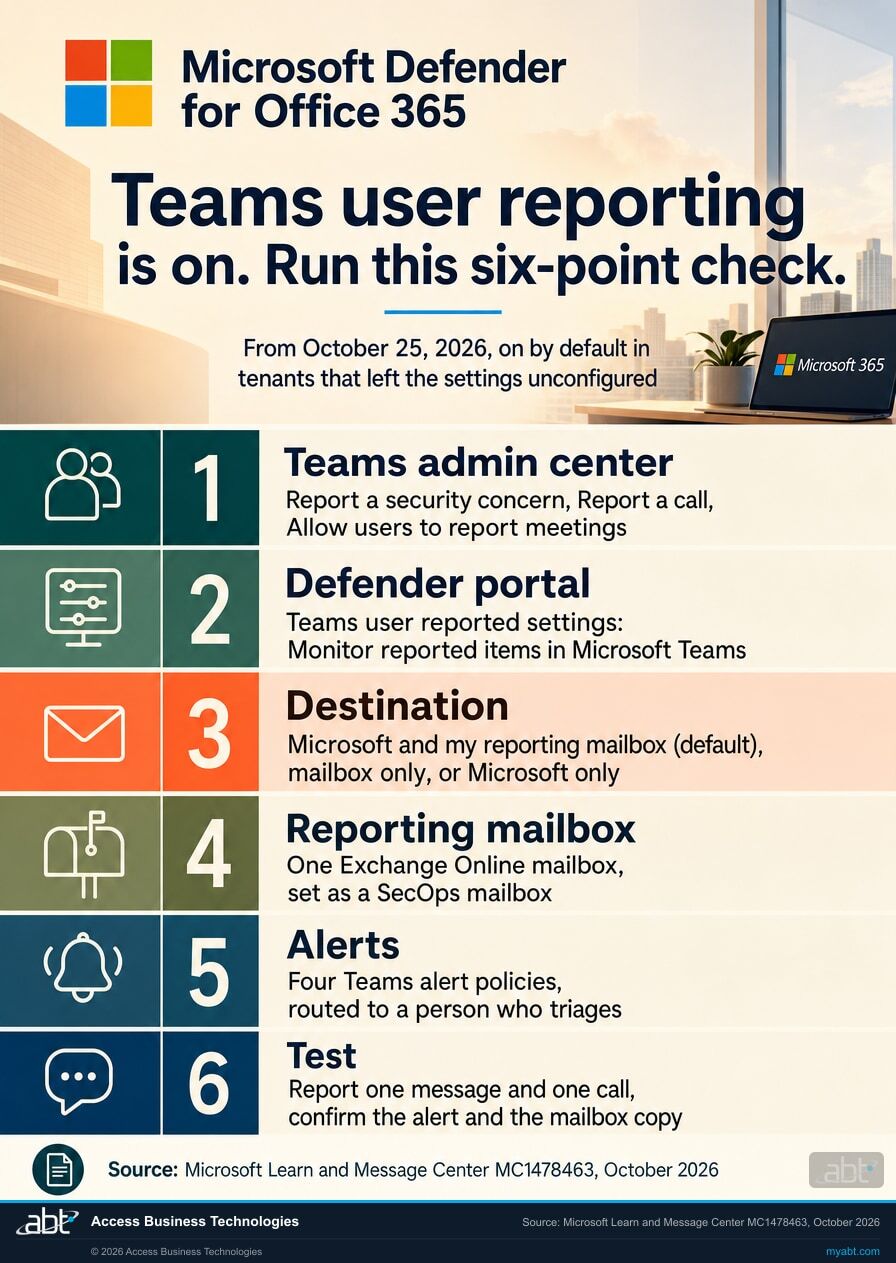
Read the Teams admin center toggles
In the Teams admin center, open Settings & policies. On the Global (Org-wide) default settings tab and on each custom policy, open Messaging and find Report a security concern. On the Messaging settings page, under Messaging safety, find Report incorrect security detections. On the Calling settings page, under General, find Report a call. Then find the Allow users to report meetings policy. Microsoft Learn says that when one of these is off, users can't report those items in Teams, and the Defender setting for them has no effect. Viewing or changing the reporting toggles takes the Teams Administrator or Global Administrator role.
Read the Defender settings page
In the Microsoft Defender portal, go to Settings, then Email & collaboration, then the Teams user reported settings tab. In the Microsoft Teams section, read Monitor reported items in Microsoft Teams. Microsoft Learn says it is on by default for new tenants, that existing tenants need to enable it, and that where Teams reporting is on it needs to be on too for reports to show correctly on the User reported tab. Microsoft's Message Center post describes the October 25 change as turning Teams user reporting on for tenants that never configured these settings, so record the value your tenant shows today. Changing it takes membership in the Organization Management or Security Administrator role groups.
Read the destination and the mailbox in one command
In Exchange Online PowerShell, run Get-ReportSubmissionPolicy -Identity DefaultReportSubmissionPolicy | Format-List ReportChatMessageEnabled,ReportChatMessageToCustomizedAddressEnabled,ReportChatMessageAddresses. In Microsoft's examples, both values True sends reports to Microsoft and the reporting mailbox, ReportChatMessageEnabled True with the customized address False sends them to Microsoft only, and ReportChatMessageEnabled False with the customized address True sends them to the reporting mailbox only. ReportChatMessageAddresses names the mailbox. Save the output with the date.
Make the destination a written decision
Put the three destinations in front of your privacy or compliance officer and your security lead together. The trade is Microsoft's analysis, which Microsoft says improves its filtering, against what a report carries to Microsoft: the item, up to fifteen messages before and after it, and the possibility that Microsoft personnel read it. Any of the three can be the right choice. Before you pick mailbox-only, check that your portal lets an admin submit Teams items to Microsoft, because Microsoft says submission of Teams messages to Microsoft is in Preview and isn't available in all organizations. Record the choice and the reason. A written decision is far easier to explain later than an inherited default.
Give reports a mailbox your security team reads
If your destination includes a reporting mailbox, replace the global admin default with one Exchange Online mailbox that belongs to security operations. Identify it as a SecOps mailbox in the advanced delivery policy, exclude it from data loss prevention if you use it, and give one person the job of reading it every business day.
Route the four alerts
Microsoft ships four alert policies that fire by default when users report Teams items: Teams message reported by user as a security risk, Teams message reported by user as a not security risk, Teams call reported by user as a security risk, and Teams call reported by user as a not security risk. Microsoft Learn says meeting and participant reports raise the same alerts as reported calls. Check who receives them and how quickly someone looks. A reported help desk impersonation call deserves an answer the same day, and our guide to the first 24 hours after an impersonation email shows what that response looks like on the email side.
Test it once and keep the record
Have a volunteer report a test message and a test call. Check four outcomes separately: the item appears on the User reported tab of the Submissions page, the alert fires, the alert notification reaches the person who triages, and, if your destination includes a mailbox, the mailbox receives its copy. File the dated results with the PowerShell output from step 3 and the decision from step 4.
Then show your staff the report options
Teach Report this message from a message's More options menu, Report call from call history, and the report option in a meeting's More options menu and on a participant's tile. Microsoft Learn says senders and callers aren't told they were reported, the item stays visible to the user, and the same item can be reported more than once. Pair the lesson with the pattern Microsoft sees most in Teams attacks, someone posing as the IT help desk and warning that an account is about to be locked, which our breakdown of the Teams help desk impersonation attack chain walks through stage by stage.
For credit unions, banks, and mortgage companies
Why does Teams reporting matter at a financial institution?
Teams is where your staff get work done, and Microsoft's own data shows attackers calling them there.
Start with the productive version. The loan team clears a condition in a chat, a branch pings operations about a member's card, and a vendor joins a meeting from outside the tenant. A report option puts the people doing that work on your security team's side of the table, one click from the message that looked wrong.
Microsoft's Q2 2026 email threat report puts numbers on the risk. In Microsoft's words, vishing through Teams showed the steepest growth of any threat category tracked in the report during Q2. Average weekly malicious call attempts rose 31% from April to May and another 27% into June, and since the beginning of 2026 weekly vishing attempts have increased roughly 80% and now run at nearly ten times the mid-2025 baseline. Those figures count calls. Microsoft reports Teams-based phishing messages separately: up 19% from March to April, 1% into May, and 10% into June. The dominant lure remained technical support impersonation: attackers posing as an employee's IT help desk, warning of an impending account lockout.
Two more findings explain why a person's report matters. Microsoft notes that Teams traffic typically bypasses secure email gateways, and that for the second consecutive month more than half, 52%, of Teams-based phishing attacks in June used generic display names in place of obvious IT support names. The lures can look ordinary, and the employee who says "that call felt wrong" can be the first signal your security team gets. Our analysis of Microsoft's Q2 2026 Teams vishing data covers the rest of the report.
What protects Teams at each license level
User reporting is one of several Teams protections that arrive with Defender for Office 365. Microsoft Learn's feature table, last updated October 5, 2026, splits them this way.
Every Teams license
Built into Microsoft 365
- Built-in virus protection in SharePoint, OneDrive, and Teams
- The Teams external domain anomalies report
- Near real-time warnings on malicious URLs in Teams messages, up to 48 hours after delivery
Defender for Office 365 Plan 1
In Business Premium, Office 365 E3, and Microsoft 365 E3
- User-reported Teams items: messages, calls, meetings, and meeting participants
- Safe Links (time-of-click URL protection) and Safe Attachments (time-of-click file protection)
- Zero-hour auto purge (ZAP) for Teams, with admin-managed quarantine
- Tenant Allow/Block List for domains, URLs, and files
- Teams message and call entity panels for investigation
Defender for Office 365 Plan 2
In Microsoft 365 E5 and Office 365 E5
- Everything in Plan 1
- Removing users from Teams chats as an admin remediation
- Advanced hunting on Teams messages
If your institution runs Microsoft 365 E3 and wants the Plan 2 tools without a full E5 move, our page on Microsoft 365 E3 security add-ons lays out the step up. Teams settings beyond reporting, from guest access to retention, are covered in our guide to Teams governance for financial institutions.
Why does a person's report matter when the sign-in page is real?
A real Microsoft sign-in page can sit at the end of a fake invitation. Microsoft Threat Intelligence described one such attack in February 2025: Storm-2372 generated a legitimate device code request and tricked targets into entering it into a legitimate sign-in page. Its lures resembled messaging apps including WhatsApp, Signal, and Microsoft Teams, and its phishing emails were dressed as Teams meeting invitations.
The Short from our channel walks through that pattern: the victim signs in on the real portal and completes the real multifactor prompt. Microsoft's guidance for device code phishing is to block device code flow wherever possible, and that control belongs in place first. Where a lure still reaches someone, the person who says "that meeting invite was strange" is part of your detection, and the report option is how that observation reaches your security team.
How ABT helps
A free security assessment
ABT is a Tier 1 Microsoft Cloud Solution Provider. We manage Microsoft 365 tenants for more than 750 financial institutions, and the Teams reporting check is part of this assessment.
We show you where your Teams reports go today, and who reads them
The assessment is free and ends with written findings you keep. We work through your reporting settings with an administrator on your team, and your team decides what changes in the tenant and who makes each change.
- The reporting settings, both portals. The Teams admin center policies, meeting reporting included, and the Teams user reported settings page in the Defender portal, recorded as they stand today.
- The destination brief. The three destinations laid out for your compliance officer, with what each one sends and to whom.
- The reporting mailbox. One mailbox for security operations, with its advanced delivery and data loss prevention settings.
- The alert path. Who receives the four Teams report alerts, meeting reports included, and how quickly someone looks.
- The wider Teams picture. External access, Safe Links, and ZAP for Teams, measured by what each setting does in your tenant.
ABT also operates M365 Guardian, its managed security service for credit unions, banks, and mortgage companies. Learn about M365 Guardian
Related reading
If this opened a bigger question
Teams reporting sits between your phishing defenses, your help desk process, and your Defender for Office 365 configuration. These three pick up each thread.
Microsoft's Q2 2026 Threat Data on Teams Vishing
What Microsoft's April to June 2026 report says about Teams calls, generic display names, and business email compromise.
Read the analysis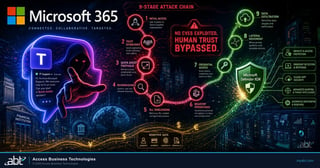
Teams Help Desk Impersonation: The 9-Stage Attack Chain
How a fake IT support chat becomes an intrusion, and the Teams settings that break the chain at each stage.
Read the guide
Defender for Office 365 Anti-Phishing for Financial Institutions
The six anti-phishing controls to verify in Defender for Office 365, and a 30-day plan to roll them out.
Read the guideAnswered
Teams user reporting, answered
Verify it yourself
Where the facts on this page come from
Every Microsoft date, figure, and quotation above was read from the Microsoft sources listed here on October 24, 2026.
- Microsoft 365 Message Center post MC1478463, Microsoft Defender for Office 365: Teams user reporting enabled by default, plan for change, major change, published September 24, 2026. Source for the October 25, 2026 default, the opt-out, the dedicated Defender portal page from October 7, 2026, settings carrying over, changes after migration taking until the week of October 15, 2026, the licensing line, and the late October rollout. Visible to administrators in your own Microsoft 365 admin center.
- Microsoft Learn, User reported settings in Microsoft Teams, last updated October 5, 2026. Source for the four reportable items and the clients that support them, the two separate settings, the Teams admin center toggles, the Teams user reported settings page, the PowerShell values for each destination, what a report sends to Microsoft, the fifteen-message context, Microsoft personnel reading submissions, USA storage and deletion, Microsoft's use of AI on submissions, the three destinations and the global admin default mailbox, the online mailbox requirement, the four alert policies and meeting reports sharing the call alerts, sender and caller notification, shared channels, and the U.S. Government cloud exclusion.
- Microsoft Learn, End user reporting for Teams meetings, last updated September 22, 2026. Source for reporting a meeting during or after it, reporting a participant from the tile or the roster, and the Allow users to report meetings policy.
- Microsoft Learn, User reported settings, last updated September 28, 2026. Source for the reporting mailbox requirements: an Exchange Online mailbox, no distribution groups or external or on-premises routing, the SecOps mailbox setting in the advanced delivery policy, the data loss prevention exclusion, and the phishing simulation training assignment note.
- Microsoft Learn, Submit messages, URLs, and attachments for analysis in the Microsoft Defender portal, last updated July 30, 2026. Source for admin submission of user-reported Teams messages from the User reported tab, and Microsoft's note that submission of Teams messages to Microsoft is in Preview, isn't available in all organizations, and is subject to change.
- Microsoft Learn, Microsoft Defender for Office 365 support for Microsoft Teams, last updated October 5, 2026. Source for the Teams protection features by license level.
- Microsoft Learn, Microsoft Defender for Office 365 service description, last updated July 17, 2026. Source for Plan 1 being included in Microsoft 365 Business Premium and, effective July 1, 2026, in Office 365 E3 and Microsoft 365 E3.
- Microsoft Security Blog, Email threat landscape: Q2 2026 trends and insights, July 23, 2026. Source for the Teams vishing growth figures, the separate Teams phishing figures, the mid-2025 baseline comparison, the help desk impersonation lure, the 52% generic display name finding, and Teams traffic bypassing secure email gateways.
- Microsoft Security Blog, Storm-2372 conducts device code phishing campaign, February 13, 2025. Source for device code phishing through a legitimate sign-in page, the Teams-style lures, and Microsoft's recommendation to block device code flow wherever possible.
A reported Teams call is an early warning.
Make sure it reaches someone.
Reading where Teams reports go is a short piece of work. Once it is settled, reports land with the people you chose to receive them.
Tell us a little about your environment and we will come back with what we would check first.
What should we look at? Optional.
Encrypted. Private.
Thank you. That is with us.
An ABT specialist will be in touch shortly. If reports in your tenant go to a mailbox nobody reads today, say so in your reply and we will move it to the front.
