


An email went to your staff in your CEO's name. The clock started before you read it.
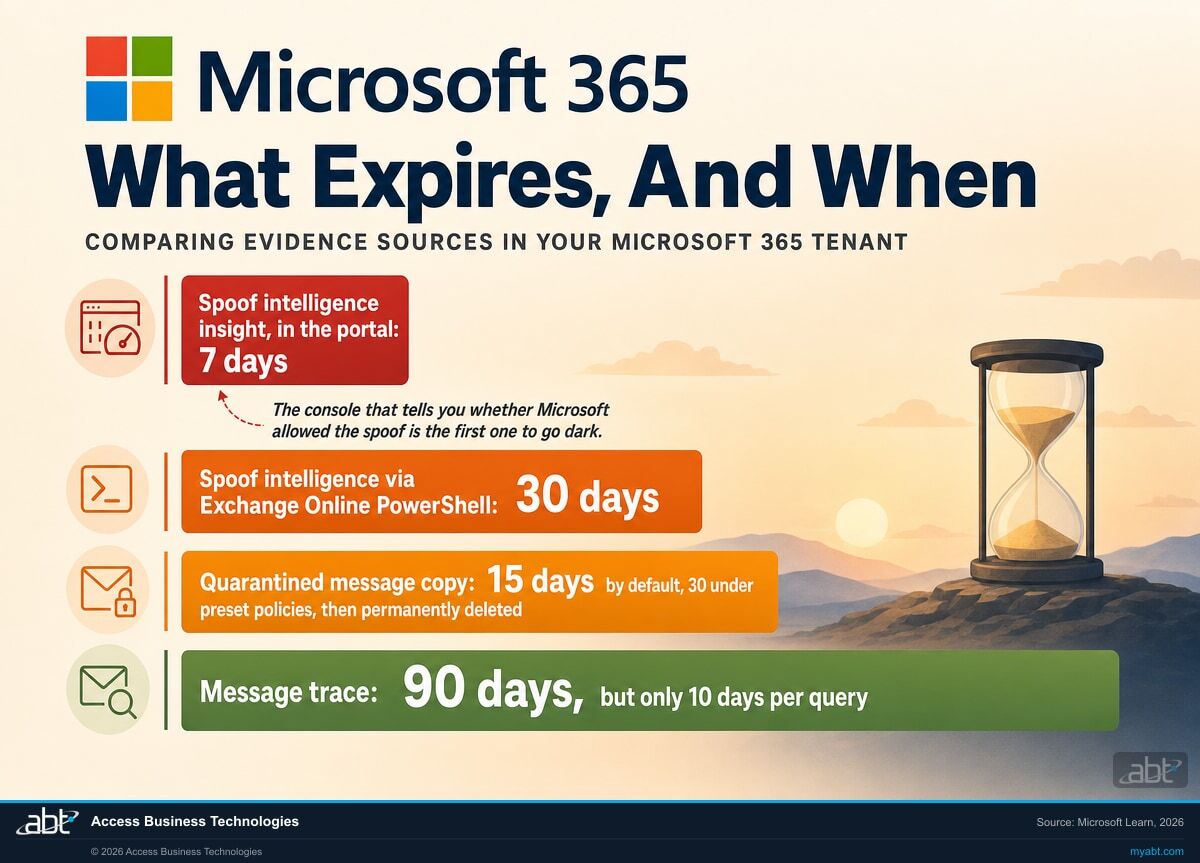
The console that tells you what Microsoft decided about that message, and whether it treated the spoof as permitted, holds seven days of data. The copy of the message itself is deleted permanently after fifteen days on the default policy, thirty under the presets. Blocking the sender costs you nothing and can happen right away. Overriding the spoof verdict, emptying quarantine, and purging mailboxes each remove something you may be asked for later. If money is moving, contain it now. Then read before you clean up.
- What to read first, and why the order is not arbitrary
- Six sources of evidence, and not one of the windows lines up
- Why an empty screen is a coverage question, not an all-clear
What happened when an email arrived from your own domain
Before anything else, work out which of three different things happened, because they lead to different work and only the first is what this page covers.
1. A spoof of your own domain
The From address is genuinely your domain, and nobody with an account sent it. Microsoft calls this an Internal spoof. The spoof intelligence insight is where the answer lives, and the rest of this page applies.
2. A lookalike domain or display name
The address is not your domain, it just reads like it, or the display name says your executive while the address is a free mail account. The evidence clocks and the ordered sequence below still apply. The spoof intelligence insight may not, because your domain was never spoofed.
3. A real account, in the wrong hands
The message came from the actual mailbox because somebody signed in to it. Nothing was spoofed, so no spoof control was ever going to see it. That is an account compromise, and it needs identity containment first: revoke sessions, reset credentials, and check for mail rules.
The first sentence of the answer, for case one: somebody sent mail that claims to come from an address inside your organization, and it was not sent from inside your organization. Microsoft has a name for this shape. In the Defender portal it is a spoof with a spoof type of Internal, which Microsoft defines as a case where "the spoofed sender is in a domain that belongs to your organization." That is your own accepted domain, worn by somebody who does not have an account in it.
Case one is the version that lands hardest. A lookalike domain gets caught by a person who reads the address carefully. A message that says it is from your chief executive, at your real domain, arriving in the inbox rather than the junk folder, does not trip that instinct. It arrives holding the one thing every phishing awareness program teaches people to look for, and it is genuine.
The question everyone asks first is why it was not blocked. The honest answer is that Microsoft may have inspected it and let it through. Microsoft's own documentation is direct about the case:
"The domain failed explicit email authentication checks SPF, DKIM, and DMARC. However, the domain passed our implicit email authentication checks (composite authentication). As a result, no anti-spoofing action was taken on the message."
Microsoft Learn, definition of the Allowed verdict in the spoof intelligence insight
Read that carefully, because it is the sentence the rest of this page turns on. A message can fail every published email authentication check you have configured and still be delivered without any anti-spoofing action, because a separate implicit check decided the sender looked legitimate. There are real reasons for the behaviour: payroll platforms, survey tools, marketing services and internal applications all routinely send mail wearing a customer's domain, and blocking all of it would break more than it protects.
The consequence is that "our email security is turned on" and "this message was inspected and permitted" are both true at the same time. Your job in the next few hours is to find out which of those two things happened, and the record that answers it starts expiring immediately.
The first hour, and why the order is not arbitrary
Steps one to four are reads. None of them changes a setting, empties quarantine, or purges a mailbox. Blocking the sender is not on this list because it removes nothing and needs no wait: do it whenever you like. What step five defers is only the cleanup that destroys something.
Read this part first if money is moving
This sequence is about preserving evidence, and it assumes the immediate danger is handled. It is not a reason to leave an active fraud running. If a payment, a wire, or a change of bank details is in flight, or an account looks compromised, contain that now. Call the bank, stop the payment, disable the account, revoke the sessions. None of those actions touch the spoof intelligence insight or the quarantined copy, so containment and preservation are not in competition.
What the order below protects you from is the cleanup reflex: overriding the spoof verdict and purging mailboxes in the first ten minutes, before anyone has read what the service actually did. Contain in parallel, clean up afterwards.
Read the spoof intelligence insight before you touch anything
This is the single screen that tells you whether Microsoft classified the message as a spoof at all, and if it did, whether the verdict was Allowed or Blocked. It also names the sending infrastructure, which is the reverse DNS name of the sending server, or the source address range when there is no reverse DNS record, or a verified DKIM domain. That is the closest thing you have to an origin.
Read it first because it holds seven days, and because overriding the verdict erases the entry. Microsoft is explicit that when you override a spoof verdict, "the entry is removed from the Spoof intelligence insight page." The screen you need is deleted by the button most people press within the first ten minutes.
Microsoft Defender portal, Tenant Allow/Block Lists, Spoofed senders tabExport the message trace to a file you own
Message trace tells you who received it, when, and what the service did with each copy: delivered, quarantined, filtered as spam, or failed. Ninety days are available, but only ten days can be returned per query, results cap at five thousand, and Microsoft states plainly that "pagination isn't supported in this cmdlet." A single wide query silently gives you a partial answer that looks complete.
Export it rather than reading it on screen. The trace is the backbone of every later question, including the ones your carrier and your examiner will ask, and it is the cheapest thing on this list to preserve.
Exchange Online, message trace or Get-MessageTraceV2Export the quarantined copies before they expire
If any copies were quarantined, that is the actual message, headers and all, and it is on the shortest fuse of anything in this list. Under the default anti-spam policy it is held fifteen days. Under the Standard or Strict preset security policies it is thirty. After that, in Microsoft's words, the messages "are permanently deleted and can't be recovered."
Fifteen days is shorter than most incident reviews. If the message might matter to an insurance claim, a regulator, or a conversation with counsel, download it out of quarantine to a file you control. Do not rely on a retention hold to catch it: holds are designed around mailbox content, and a message sitting in quarantine has not been delivered to a mailbox. Exporting it is one action and it removes the question entirely.
Microsoft Defender portal quarantine, download to a file you controlFind out who replied, forwarded, or acted
Delivery is not the incident. The incident is what a person did next. Look for replies to the spoofed address, forwards outside the organization, and any change to a payment instruction, a wire, or a vendor bank detail in the same window. The mail flow record shows what left the building; the people involved will tell you the rest faster than any console.
Purview audit records are the longer-lived source here. Audit (Standard) retains 180 days by default. Audit (Premium) holds Exchange Online, SharePoint, OneDrive and Microsoft Entra records for one year, though Microsoft gates that on the user holding an E5 or Purview Suite licence, and non-E5 users fall back to 180 days.
Microsoft Purview Audit, plus the people on the threadThen do the destructive cleanup
Four different actions get bundled together as "blocking and cleaning up". They are not the same, and only one of them is free:
- Adding a block entry for the sender. Removes nothing. Safe at any point, including immediately.
- Overriding the spoof verdict. Microsoft removes the entry from the Spoof intelligence insight page, so the record of what the service decided goes with it.
- Deleting the message from quarantine. Destroys the quarantined copy, which for an undelivered message is the authoritative one.
- Purging mailboxes. Removes the copies that were delivered, from a different store than quarantine.
Read the insight before you override it, and export from quarantine and from the mailboxes before you empty either. The block entry needs no such wait.
Reading first costs you an hour. Overriding the verdict and emptying the stores first can cost you the answer. Once the evidence is collected and exported, block the domain and sending infrastructure pair, remove the delivered copies from mailboxes, clear quarantine if you need to, and move to the configuration questions with a complete picture in hand.
Tenant Allow/Block List, Spoofed senders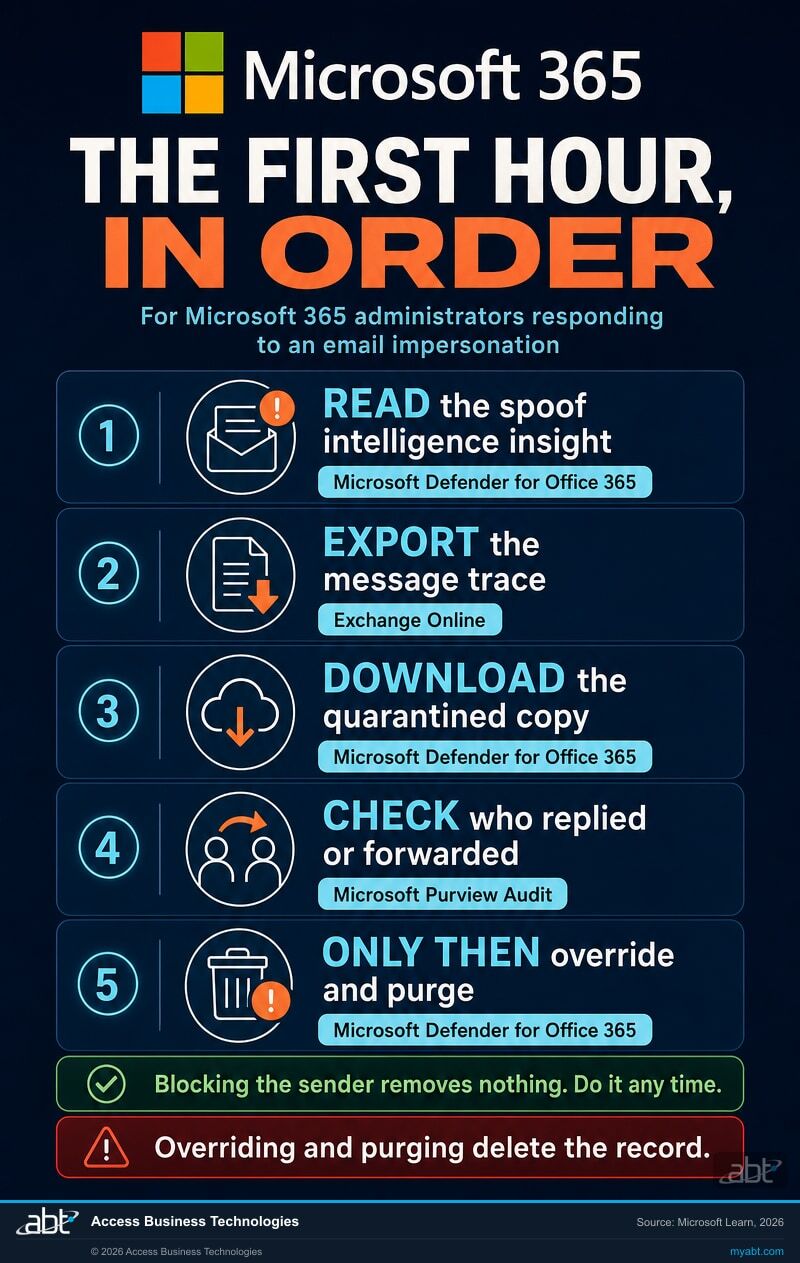
What expires, and when
Six sources, six windows, none of them aligned. The column that matters is the last one, because it decides what you will still be able to show somebody in a month.
| Evidence | How long it lasts | What it answers | What happens at the end |
|---|---|---|---|
| Spoof intelligence insight Defender portal |
7 days | Whether Microsoft saw it as a spoof, whether the verdict was Allowed or Blocked, and the sending infrastructure behind it | The detection rolls out of the window. Overriding the verdict also removes the entry immediately. |
| Spoof intelligence via PowerShell Get-SpoofIntelligenceInsight |
30 days | The same detections as the portal, over four times the history | Rolls out of the window. This is the reason to reach for PowerShell on day eight. |
| The quarantined message Defender portal quarantine |
15 days default 30 under presets |
The message itself, with full headers, for anything that was not delivered to a mailbox | Microsoft: the messages "are permanently deleted and can't be recovered" from quarantine. Download a copy before then. |
| Message trace Exchange Online |
90 days 10 days per query |
Every recipient, every delivery outcome, in and out | Rolls out of the window. Results also cap at 5,000 with no pagination, so a wide query truncates quietly. |
| Purview Audit (Standard) | 180 days | What people did afterwards: access, changes, rule creation, forwarding | Rolls out of the window. Records generated before 17 October 2023 were kept 90 days. |
| Purview Audit (Premium) | 1 year | The same, across Exchange Online, SharePoint, OneDrive and Microsoft Entra | Licence-gated. Microsoft applies the one year default only to users with E5 or a Purview Suite licence; other users fall back to 180 days. |
Retention values are Microsoft defaults and can differ in your tenant. Quarantine retention is configurable from 1 to 30 days in the default and custom anti-spam policies, and is fixed inside the Standard and Strict preset security policies. Confirm your own values rather than assuming the defaults, because a tenant configured to a shorter quarantine period has a shorter evidence window than this table implies.
Find out what your tenant would be able to tell you
Our engineers read your Microsoft 365 tenant and report what is switched on, what is not, and how much history you would actually have if this happened on a Friday afternoon. No cost, no obligation.
Was it allowed, and had it been allowed before?
The spoof intelligence insight has a column called Action, and it holds one of two values. Most people read Allowed as a failure and Blocked as a success. Neither reading is quite right, and Microsoft says so plainly: the Action value refers to spoof detection, meaning whether the message was identified as spoofed, and Microsoft notes that this value "doesn't necessarily affect the overall filtering of the message." A message can be marked as a detected spoof and still be filtered elsewhere, and a message can be Allowed for spoofing and still be handled by another control.
What Allowed does tell you is specific and useful. It means the sender failed SPF, DKIM and DMARC, passed composite authentication, and was therefore not acted on as a spoof. If the pair that impersonated your executive is sitting in that list with an Allowed verdict, then the pattern was not new to your tenant on the morning it mattered. It had been observed, assessed, and permitted before the morning it mattered. Whether anyone had reviewed that decision is a separate question, and the answer is usually in whether the entry is a Microsoft detection or a manual override somebody created.
An allow is narrower than people assume, and this is worth understanding before you decide what to change. Microsoft scopes it to a pair: "messages from an allowed spoofed sender are allowed only using the combination of the spoofed domain and the sending infrastructure." Your domain from one sending infrastructure being permitted says nothing about your domain from a different one. So the correct question is not whether spoofing of your domain is allowed. It is which specific pairs are allowed, and whether you recognize every one of them.
The review that should have happened before today
Open the Spoofed senders tab and read the Internal entries. Read the Action column on each one. The entries marked Allowed are senders permitted to send mail wearing your domain while failing your published authentication records. The ones marked Blocked are the opposite, and they are useful too, because they show what the service is already catching. Some will be legitimate and forgotten: an old payroll platform, a survey tool, a marketing service somebody set up three years ago. Some will be nothing you recognize.
This is a fifteen minute read and it needs no licence you do not already have. Microsoft grants read-only access to it through the Global Reader, Security Reader, and View-Only Organization Management roles, so the person who reviews it does not need the ability to change anything.
Three consoles, and what each one cannot tell you
An empty screen is the most misread result in this entire process. Each of these tools has a documented blind spot, and in each case the blind spot looks exactly like good news.
Spoof intelligence insight
Names the spoofed domain, the sending infrastructure, the message count, and the Allowed or Blocked verdict. It is the fastest way to understand what the service decided.
Message trace
The record of every recipient and every outcome. This is where you learn how many copies landed in inboxes rather than quarantine, and whether anything went back out.
Quarantine
Holds the message itself with its headers intact, which is the authoritative copy of anything that was not delivered. Every action taken on a quarantined message is audited, so releases and deletions leave a trail.
The discipline these three share is the same one that governs any search of a system you do not control: a query that found nothing has told you about the query, not about the world. Before you report that nothing else happened, be able to say what you actually looked at, over what window, and what that window could not have contained. That sentence is worth more to a regulator, a carrier, or a board than a confident all-clear that turns out to have been scoped to seven days and one console.
By default, the person being targeted can release it themselves
Microsoft splits quarantined mail into two groups. For the most dangerous verdicts, only administrators can act. Microsoft is specific: "only admins can work with messages that were quarantined as malware or high confidence phishing."
Everything else is different. In Microsoft's words, "by default, users can work with their messages that were quarantined as spam, bulk, phishing, spoof, user impersonation, domain impersonation, or mailbox intelligence." Read that list and find the two entries that describe the message on your desk this morning: spoof, and user impersonation.
So on this specific attack, the standard configuration allows the recipient to go to their quarantine, see a message that appears to be from the chief executive, and release it into their own inbox. The control that stopped the attack hands the decision to reverse it to exactly the person the attacker chose. This is not a defect and it is not hidden. It is the historical default, and it is adjustable through quarantine policies, which is a fifteen minute change that almost nobody has made.
Worth knowing alongside it: quarantine cannot be switched off. Microsoft states that "you can't completely turn off quarantine in Microsoft 365" because malware and high confidence phishing are always quarantined to protect the service. What you control is who can act on what, and how long it is kept.
Who can release what
Quarantine policies decide whether a user can release a message, request its release, or only see that it exists. The defaults are permissive on exactly the verdicts this attack produces.
Microsoft Defender for Office 365How long it is kept
Configurable from 1 to 30 days in the default and custom anti-spam policies. Fixed at 30 inside the Standard and Strict presets. A shorter setting is a shorter evidence window.
Anti-spam policy, QuarantineRetentionPeriodWhat gets recorded
Microsoft audits every action taken on a quarantined message by an administrator or a user. If somebody released it, that is a fact you can establish rather than a question you have to ask.
Microsoft Purview AuditWhat you can say on day one, and what has to wait
Two audiences need something from you quickly, and they need different things.
Your staff need one message, fast, and it is not a warning about clicking links. Tell them a message went out wearing an executive's name, that it did not come from that person, and give them a single named human to contact if they replied, forwarded it, or acted on it. The purpose is not education. It is to make the fourth step of the first hour possible, because the people who acted are the fastest source of that answer and they will only come forward if it is obviously safe to do so.
Leadership, counsel, and your carrier need scope, not reassurance. How many copies were delivered, how many were quarantined, what the sending infrastructure was, whether anyone acted, and what you have preserved. Resist the pull toward an early all-clear. An all-clear given on day one and withdrawn on day four costs far more credibility than a day one answer that says which questions are still open.
On the question everyone asks first, whether this has to be reported: that is not an engineering determination and this page will not pretend otherwise. Notification duties turn on what information was involved and how many people it touched, and different regulators run different clocks. ABT's role is to establish the technical facts and hand them over quickly enough to be useful. Whether those facts trigger a notification obligation is a decision for your counsel, your compliance officer, and your carrier. What a written plan should already say about who decides, and what each regulator expects to see, is in our incident response playbook for financial institutions.
The one thing to fix this week, whatever else you do
Publish and enforce email authentication for your own domain. SPF, DKIM, and a DMARC policy that actually tells receivers what to do with mail that fails. This is the control that turns "the service made a judgment call about a message wearing your name" into "receivers had an instruction from you and followed it."
It is also the change with the most ways to go wrong, because a strict policy published before every legitimate sender is authenticated will break real mail on the day you turn it on. Inventory your senders first, then tighten in stages. We walk through the sequence in SPF, DKIM, and DMARC for financial institutions.
Where ABT fits
Access Business Technologies is a Tier-1 Microsoft Cloud Solution Provider. We have worked with Microsoft technology since 1999, and today we manage Microsoft 365 tenants for credit unions, banks, and mortgage companies. Reading a tenant after something like this, and reading it before, is ordinary work here rather than a special engagement.
The free security assessment is a read of your tenant, not a sales call with a report attached. Our engineers look at what your anti-phishing and anti-spam policies actually do, which spoofed senders are currently permitted to wear your domain, how long your quarantine and audit retention would give you in an incident, whether your published email authentication matches the senders you really use, and who can release a quarantined message. You get what is switched on, what is not, and what each finding would mean on a bad morning. There is no cost and no obligation.
ABT also operates M365 Guardian, its managed security service for credit unions, banks, and mortgage companies.
If something is happening in your tenant right now, the assessment is the wrong front door. Say so when you get in touch and we will treat it as an incident rather than a review.
Where the facts on this page come from
Every retention figure, quoted sentence, and product behaviour on this page was read from Microsoft's current documentation on 30 August 2026. Where Microsoft is quoted, the quotation is verbatim.
- Microsoft Learn, Review and manage spoof intelligence insight in Microsoft Defender for Office 365. Source of the seven day and thirty day figures, the definition of the Allowed and Blocked verdicts, the composite authentication sentence, the Internal spoof type, the DMARC p=reject and p=quarantine exclusion, the domain and sending infrastructure pairing, the read-only role list, and the behaviour when a verdict is overridden. learn.microsoft.com
- Microsoft Learn, Quarantined email messages in Microsoft 365. Source of the quarantine retention table, the statement that expired messages are permanently deleted and cannot be recovered, the default user and admin permissions by verdict, the fact that quarantine cannot be turned off, and the statement that all quarantine actions are audited. learn.microsoft.com
- Microsoft Learn, Get-MessageTraceV2 cmdlet reference. Source of the 90 day window, the 48 hour default, the 10 day per query limit, the 1,000 and 5,000 result limits, and the statement that pagination is not supported. learn.microsoft.com
- Microsoft Learn, Manage audit log retention policies in Microsoft Purview. Source of the 180 day Audit (Standard) default, the one year Audit (Premium) default across Exchange Online, SharePoint, OneDrive and Microsoft Entra, and the licence conditions attached to it. learn.microsoft.com
Nothing on this page is legal advice, and nothing on it is a determination that any particular event is reportable. Retention and policy values are Microsoft defaults that can be changed and are frequently different in a given tenant. Confirm your own configuration before relying on any figure here.
Before it happens, and after
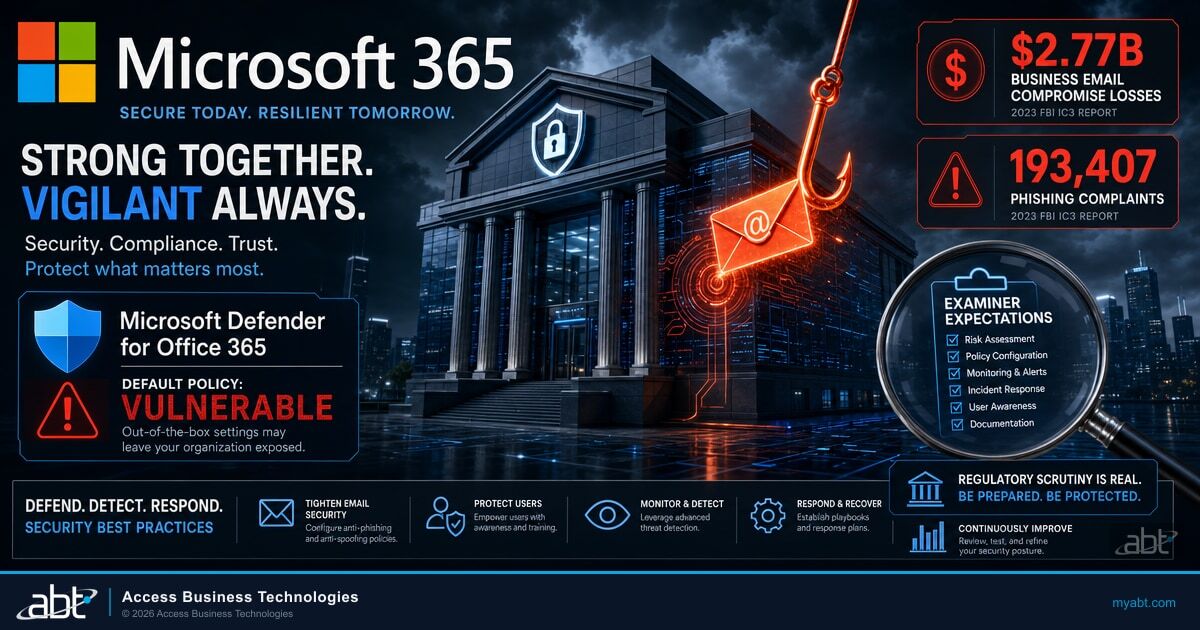
The Anti-Phishing Settings That Decide This In Advance
Impersonation protection is off in the default policy. This is the configuration work that changes the outcome before anyone has to triage it.
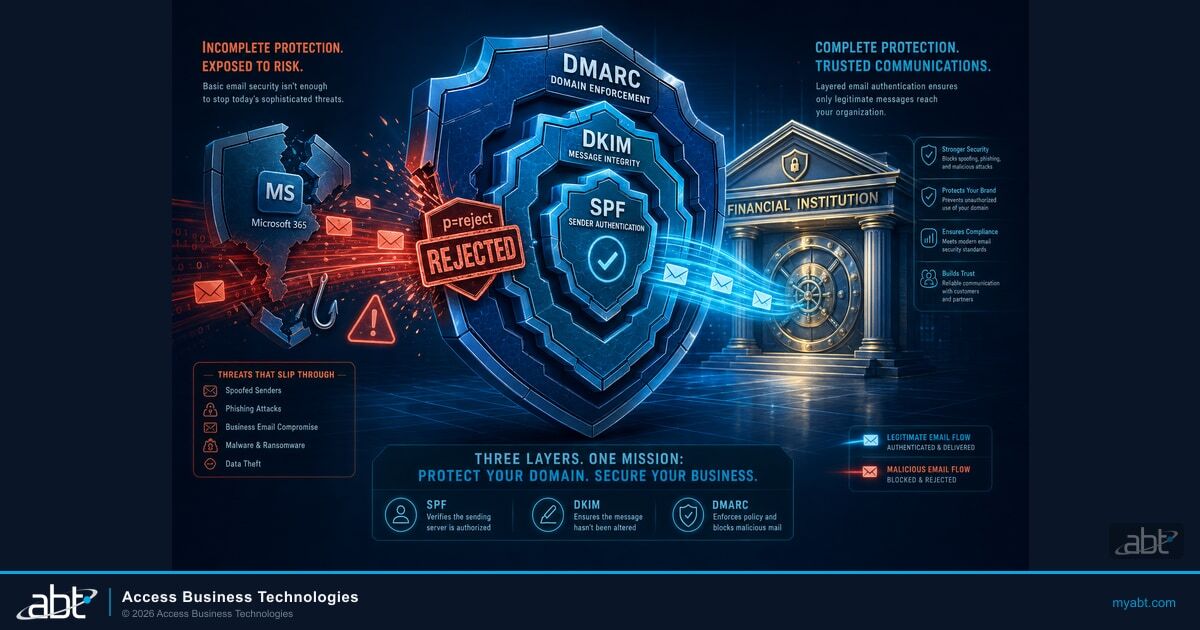
SPF, DKIM, and DMARC Without Breaking Real Mail
The root-cause fix, and the staged rollout that keeps payroll and marketing mail flowing while you tighten the policy.
The Written Plan an Examiner Expects to See
Who decides, who is called, and what each regulator wants documented before an incident rather than during one.
Answered from Microsoft's documentation
Find out what your tenant
could actually tell you.
Tell us roughly how many mailboxes you run and whether anything has already happened. Our engineers will read the tenant and come back with what is switched on, which senders are permitted to wear your domain, and how much history you would really have on a bad morning.
