


Microsoft Purview · Microsoft Entra ID · MC1508238
Sensitivity labels reach Entra security groups in January 2027. Choose each group's label before the first one sticks.
Microsoft Purview sensitivity labels already govern Microsoft 365 groups, Teams and SharePoint sites. Starting in mid-January 2027, administrators can apply the same labels to Microsoft Entra cloud security groups, and the label enforces membership and guest access policies on the group. One detail sets this apart from labels on Microsoft 365 groups: once a label is on a security group, Microsoft says it cannot currently be changed or removed. This page covers what changes, how it compares with the labels you use today, and the six decisions a credit union, bank, or mortgage company should make before general availability.
- General availability begins mid-January 2027, moved from mid-November 2026, per Microsoft Message Center MC1508238
- A label applied to a security group stays in place until Microsoft ships support for changing it
- Security groups get their own tenant setting, switched on separately from Microsoft 365 groups
The change
What is Microsoft changing with sensitivity labels for security groups?
Microsoft published Message Center notice MC1508238 on October 14, 2026, and updated its timeline on November 13, 2026. Message Center is in the Microsoft 365 admin center. The same feature is Microsoft 365 Roadmap item 568217. Here is the change in one place.
The change in brief
- What
- Published Microsoft Purview sensitivity labels can be applied to Microsoft Entra cloud security groups, extending the label-based protection already available for Microsoft 365 groups and SharePoint sites.
- Effect
- The label automatically enforces organizational membership and guest access policies when a group is created or labeled.
- When
- General availability begins in mid-January 2027 and is expected to complete in mid-January 2027.
- Limit
- Once applied to a security group, a label cannot currently be changed or removed. Microsoft says support for changing assigned labels will come in a future update.
- Setup
- Labels published with the Groups & Sites scope, up to 24 hours to sync, and a tenant setting for cloud security groups that is separate from the one for Microsoft 365 groups.
Microsoft announces the feature
Message Center notice MC1508238 introduces sensitivity labels for Microsoft Entra security groups.
The timeline moves
Microsoft updates the notice and moves general availability from mid-November 2026 to mid-January 2027.
General availability
Administrators can label cloud security groups once the separate tenant setting is on and labels have synced.
Changing assigned labels
Until it ships, the first label you apply to a security group is the one it keeps.
"Once a sensitivity label is applied to a security group, the label cannot currently be changed or removed."
Microsoft Message Center, MC1508238, updated November 13, 2026Container labels are the part of Microsoft Purview that governs workspaces: groups, teams and sites. On Microsoft 365 groups, Teams and SharePoint sites, a label can set privacy, decide whether owners can add guests, limit external sharing from a site and restrict access from unmanaged devices. Security groups are a common way to grant access to apps, SharePoint sites and files, and until now they sat outside that model. The Microsoft 365 Roadmap entry puts the change plainly: the same labels you publish for groups and sites "apply automatically to cloud security groups, with no separate label configuration required."
The difference that matters is permanence. On a Microsoft 365 group, Microsoft Learn says a label can be swapped at any time, and removed from the group's properties. On a security group, the label stays where it is until Microsoft ships support for changing it. Microsoft's general advice for container labels points the same way: avoid changing a label's group settings after it is applied, and expect a change to the external user access setting to reach new users while existing guests keep their access. Taken together, the label and its settings are a decision to settle before you apply them. Our page on the Entra memberOf dynamic group change covers another recent change to how Entra groups behave.
Side by side
How do labels on security groups compare with labels on Microsoft 365 groups?
Microsoft's documentation for Microsoft 365 groups next to its notice for cloud security groups. Each row reflects Microsoft documentation or MC1508238; the callout below the table is our recommendation.
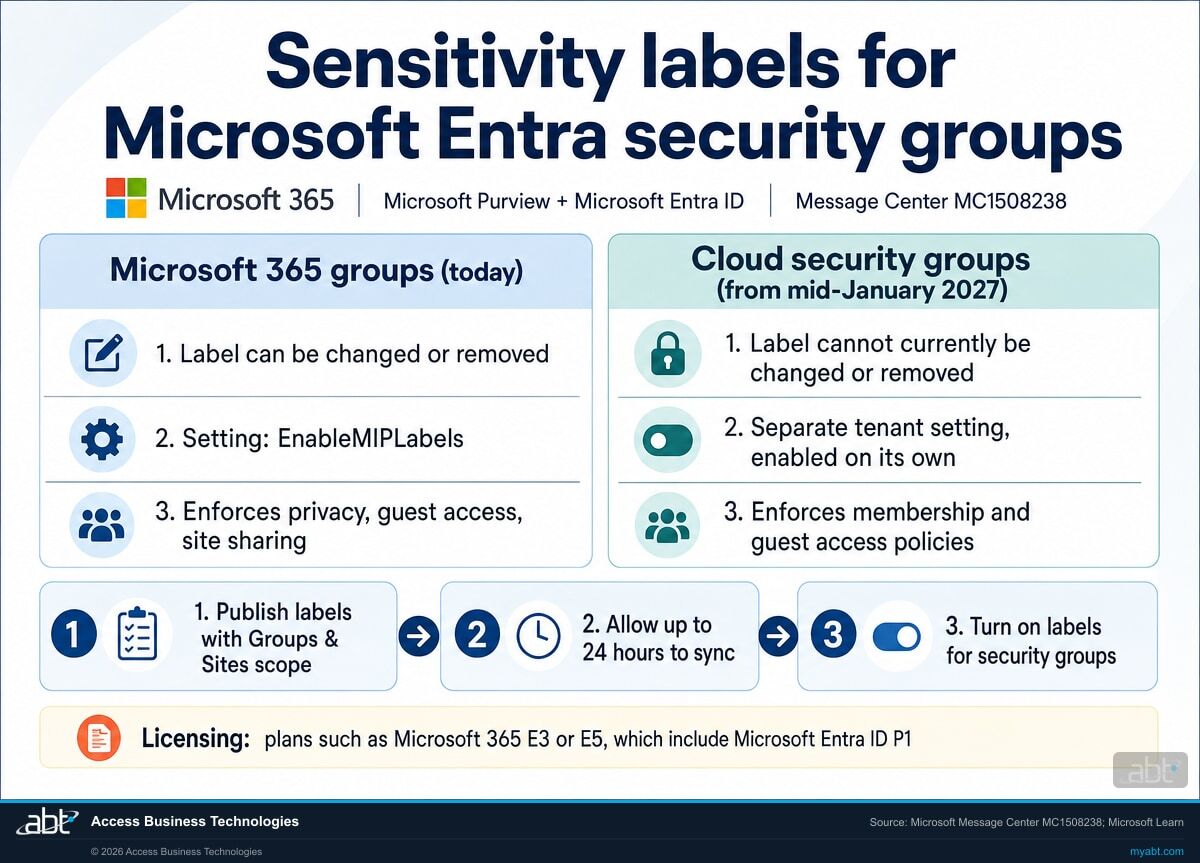
| Question | Microsoft 365 groups (today) | Cloud security groups (from mid-January 2027) |
|---|---|---|
| What can the label enforce? | Privacy, external user access, external sharing from SharePoint sites, access from unmanaged devices, authentication contexts and more | Organizational membership and guest access policies |
| Can the label be changed or removed? | Yes: swap it at any time, or remove it from the group's properties | Not currently; Microsoft plans support for changing assigned labels in a future update |
| How is label support switched on? | EnableMIPLabels set to True in the Entra group settings | A separate setting for cloud security groups, enabled independently |
| Which labels can be applied? | Published labels with the Groups & Sites scope | The same published labels, with no separate label configuration |
| How long until a new label is available? | Up to 24 hours after synchronizing labels to Entra ID | Up to 24 hours for labels to synchronize and become available |
| Where is the label applied? | Entra admin center, Teams, Outlook, SharePoint and other supported apps | Entra admin center, Azure portal, PowerShell and Microsoft Graph |
| What licensing does Microsoft name? | At least one active Microsoft Entra ID P1 license | Eligible licensing such as Microsoft 365 E3 or E5, which includes Microsoft Entra ID P1 |
Test each label on its own disposable group
Because a label on a security group stays in place until Microsoft ships label changes, the first label you apply to a production group is one you live with. After general availability, create a separate disposable test security group for each candidate label, apply that one label, and confirm what members and guests are able to do. Then label real groups in order, starting with the groups that grant access to member and borrower information. For a credit union, bank, or mortgage company, that order puts the label on the groups an examiner would ask about first.
List the security groups that grant sensitive access, map a label to each, and plan the pilot before January
ABT works with your team to inventory your cloud security groups, review your Groups & Sites labels, draft the label-to-group mapping, and check licensing and the separate tenant setting, as part of a free security assessment.
Request the free assessmentThe work
How do you prepare security groups for sensitivity labels?
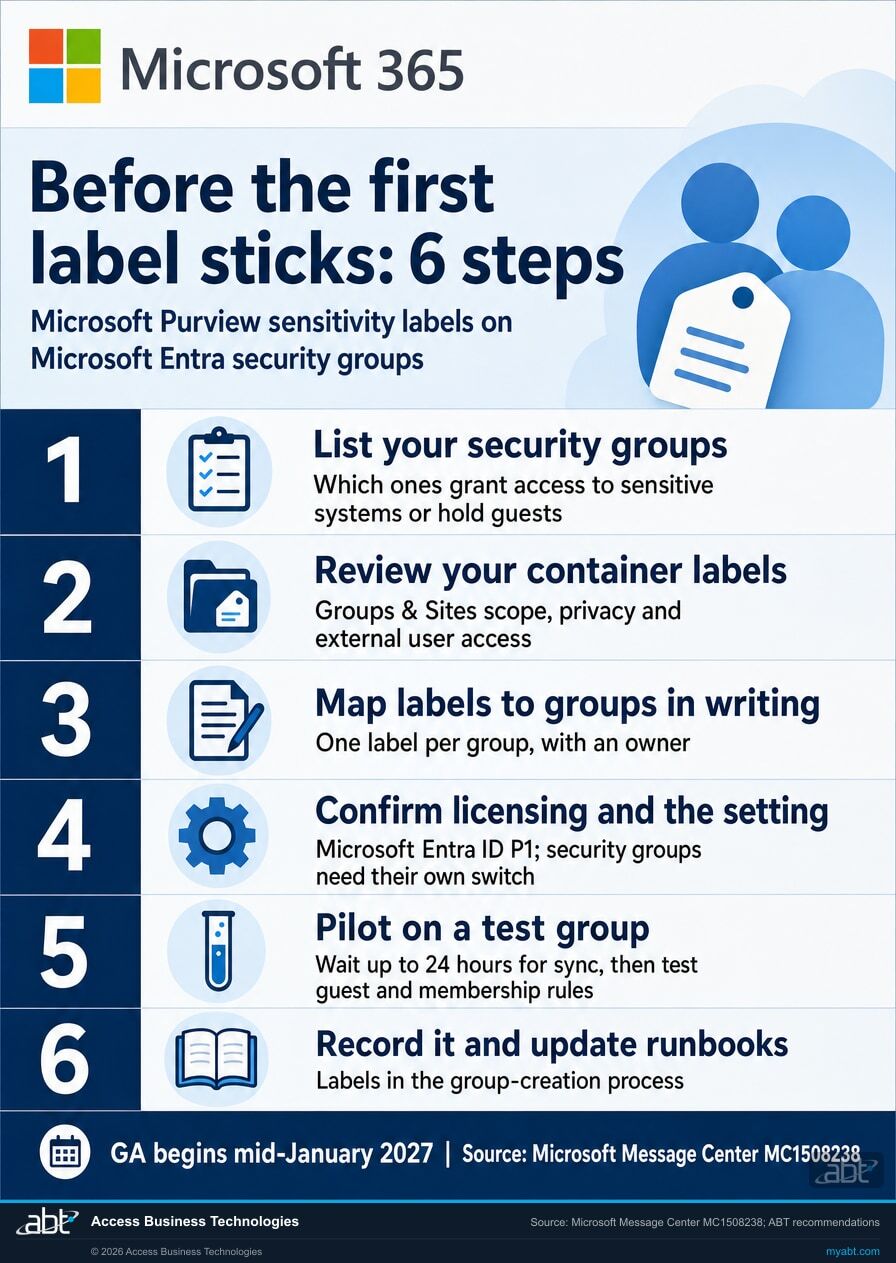
Six steps built on Microsoft's recommendations in MC1508238. Steps 1 to 3 happen now, before general availability. Steps 4 to 6 happen around it.
List your cloud security groups and mark the sensitive ones
Filter for security groups and record what each one grants access to, who owns it, and whether it has guest members. Microsoft's notice covers cloud security groups, so keep groups synchronized from on-premises Active Directory on a separate list. Mark the groups that reach member and borrower information, lending and core systems, and finance shares.
Review the labels with the Groups & Sites scope
Open each label published with the Groups & Sites scope and read its privacy and external user access settings. Microsoft says these same labels apply to cloud security groups with no separate label configuration, so a label built for Teams and sites will also decide guest access on any security group that carries it.
Write down which label each group gets, and who decides
Give every sensitive group one label, a business owner and a one-line reason. Microsoft recommends reviewing your existing label policies and governance processes before enabling the feature, particularly because assigned labels cannot currently be changed or removed. A written mapping turns that advice into something your team can approve.
Confirm licensing and plan the separate tenant setting
Microsoft names eligible licensing such as Microsoft 365 E3 or E5, which includes Microsoft Entra ID P1. Labels for Microsoft 365 groups are switched on through the EnableMIPLabels setting; cloud security groups need their own setting, enabled independently. Decide who turns it on, and when.
Pilot each label on its own test group
Allow up to 24 hours for published labels to sync to Microsoft Entra ID. Create a separate disposable test security group for each candidate label, apply that one label, then try adding a guest and adding members, and confirm the result matches the label. Each label stays on its test group, so name every test group clearly and keep it out of any access path.
Record the decisions and add labels to group creation
Microsoft describes the feature as support for controlled self-service group creation. Add the label choice to your group request form or runbook, save the dated mapping with your access review records, and label production groups in the order you set in step 1.
Who notices
Who in the institution will notice labels on security groups?
Each card is a group of people who touch security groups, and what to agree with them before general availability.
Identity administrators
They create and maintain security groups in Microsoft Entra ID. Agree who turns on the tenant setting, who applies labels, and in what order.
Compliance and privacy
They usually own the label taxonomy in Microsoft Purview. Confirm which Groups & Sites labels are fit to govern access, and who signs the mapping.
The help desk
They field requests to add vendors, examiners or auditors to a group. Tell them which labeled groups accept guests and where to send exceptions.
Application owners
Owners of loan origination, core and document systems whose access runs through security groups. Confirm the label fits who those systems need to admit.
Your IT provider
If a provider manages your tenant, agree who applies labels and records the change, since a label on a security group stays in place once applied.
Leadership
The information security officer who answers for access to customer data. A dated label-to-group mapping shows how that access is classified.
For financial institutions
Why do labels on security groups matter at a credit union, bank, or mortgage company?
Because security groups often decide who reaches member and borrower data, and a label puts one rule on every group that carries it.
Teams create the groups they need, with the rule built in. Microsoft describes labels on security groups as support for controlled self-service group creation. When the label carries the guest and membership rule, a department can request or create a group for a new project and the policy arrives with it, with no separate ticket to lock it down.
Guest access set by the label. Vendors, auditors and examiners often need access to something, and guest accounts tend to collect in groups over time. A label that sets guest access on the group itself keeps that decision consistent across every group with the same label. Our page on Teams external chat file sharing covers another setting that decides what people outside the institution can reach.
A classification you can show. Examiners and auditors ask how access to customer information is granted, reviewed and removed. A dated mapping of labels to security groups, with an owner and a reason for each, helps document the answer, alongside your access reviews, in the same terms your Purview labels already use for files, sites and Teams.
Who is in the group decides who can see the data.
Our 20-second Short shows how a credential inside a document that Copilot summarizes can surface in a Teams chat that everyone in the conversation can read.
Membership works the same way at a larger scale. Microsoft 365 Copilot works with content each person already has permission to open, so the members and guests of a security group decide who can reach what that group unlocks. Our article on Copilot oversharing covers the access review, and our Copilot readiness page covers the rest of the preparation.
How ABT helps
A free security assessment
ABT is a Tier 1 Microsoft Cloud Solution Provider serving more than 750 financial institutions. It manages Microsoft 365 tenants and hosts Azure environments for credit unions, banks, and mortgage companies. Access to customer information is a common place for those reviews to start, and this assessment covers the security groups that grant it.
With your team, we list your sensitive security groups, map a label to each, and plan the pilot for general availability
The assessment is free and ends with written findings you keep. We work through it with an administrator on your team, and your team decides which labels go where and who applies them.
- The group list. Your cloud security groups, what each grants access to, its owner and its guest members.
- The label review. Each Groups & Sites label with its privacy and external user access settings.
- The mapping. A draft label for each sensitive group, with an owner and a reason.
- The prerequisites. Microsoft Entra ID P1 licensing and the separate tenant setting for security groups.
- The pilot plan. One disposable test group per candidate label, the checks to run, and the order for production groups.
- The record. A dated summary for your access review and information security program.
ABT also operates M365 Guardian, its managed security service for credit unions, banks, and mortgage companies. Learn about M365 Guardian
Related reading
If this opened a bigger question
Labels on groups sit next to the larger questions of how you classify data, who outside the institution can reach it, and what Copilot can surface.
Microsoft Purview Sensitivity Labels for Financial Institutions: Classifying and Protecting NPI
How banks and credit unions use sensitivity labels to classify and encrypt nonpublic personal information in Microsoft 365.
Read the article
Microsoft 365 Guest Access for Financial Institutions
What banks and credit unions should be able to show about who outside the institution can reach their data in Microsoft 365.
Read the article
Microsoft 365 Copilot Oversharing: How Financial Institutions Fix Data Access Before Rollout
How financial institutions review and tighten data access before a Microsoft 365 Copilot rollout.
Read the articleAnswered
Sensitivity labels for security groups, answered
Verify it yourself
Where the facts on this page come from
Every Microsoft date, setting name, licensing statement and quotation above comes from the sources listed here.
- Microsoft Message Center, MC1508238, "Microsoft Purview | Information Protection: Sensitivity labels for Microsoft Entra security groups," published October 14, 2026 and updated November 13, 2026, read in the Microsoft 365 admin center Message Center. Source for the feature, the membership and guest access policies, the rollout dates and the change from November, where labels are applied, the change-or-remove limitation, licensing, the Groups & Sites scope, the 24-hour sync, the separate tenant setting, self-service group creation and the recommendation to review label governance first.
- Microsoft 365 Roadmap, item 568217, Sensitivity Labels for Microsoft Entra Security Groups. Source for the January 2027 general availability listing and "no separate label configuration required."
- Microsoft Learn, Assign sensitivity labels to groups. Source for Microsoft 365 group labels: the Microsoft Entra ID P1 requirement, the EnableMIPLabels setting, label synchronization, and changing or removing a label on a group.
- Microsoft Learn, Use sensitivity labels to protect collaborative workspaces (groups and sites). Source for the container label settings, external user access, and the guidance on changing label settings after labels are applied.
- The callout, the six steps and their order, and the list of groups who notice are ABT's recommendations; everything else on this list is Microsoft's own.
A label on a security group stays in place once applied.
Map your labels before January.
The work starts with your list of cloud security groups and the Groups & Sites labels you already publish. The assessment ends with a written review you keep: which groups grant sensitive access, which label each should carry, what licensing and settings you need, and how you will pilot at general availability.
Tell us a little about your environment and we will come back with what we would check first.
What should we look at? Optional.
Encrypted. Private.
Thank you. That is with us.
An ABT specialist will be in touch shortly. If a particular group, label or guest question is what you are thinking about, say so in your reply and we will start there.
