


Microsoft Entra ID · memberOf rule operator (preview) · Updates stop after November 3, 2026
After November 3, Entra dynamic groups built on memberOf stop updating. Find each one and replace its rule before the date.
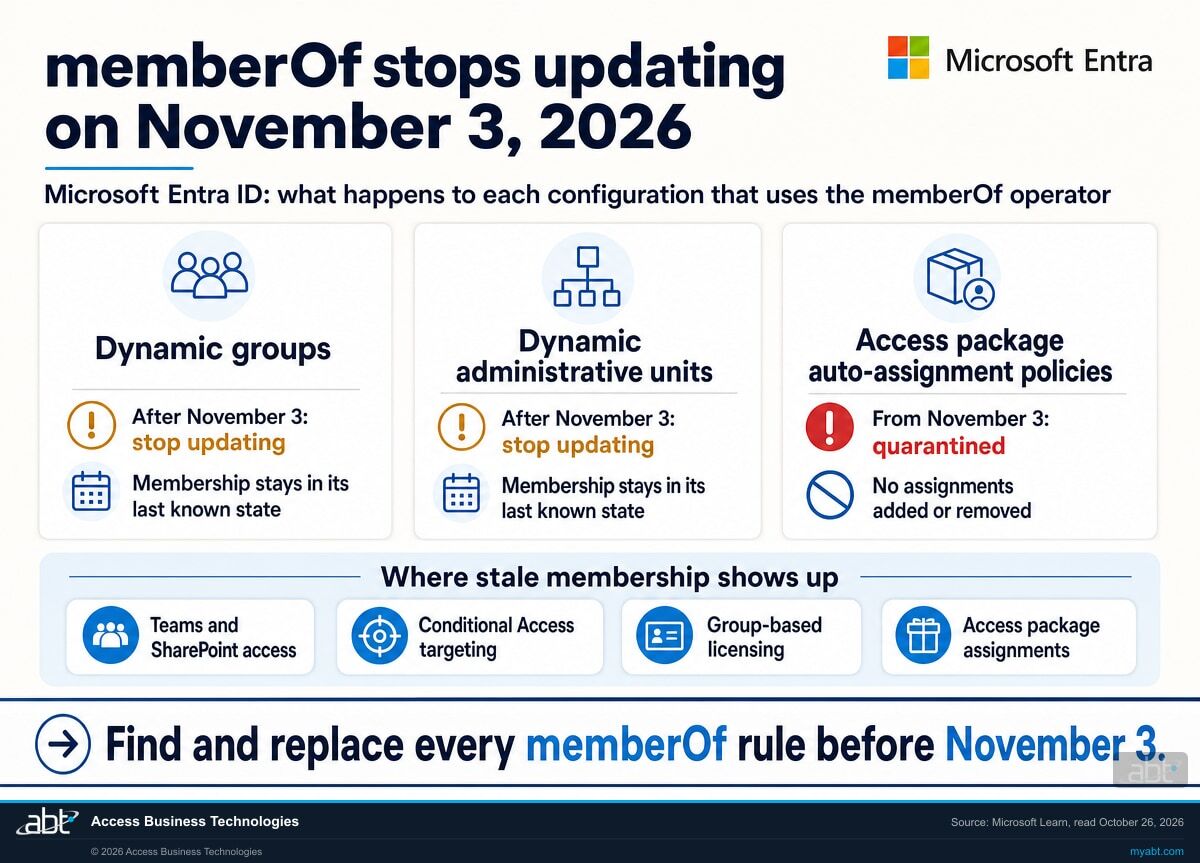
Dynamic groups are how a new hire gets the right licenses, Teams and SharePoint access in the first week, and how access follows people when they change roles. Some tenants built those groups with memberOf, a preview operator that fills one group from the members of others. Microsoft is ending the preview: after November 3, 2026, dynamic membership groups, dynamic administrative units and entitlement management auto-assignment policies that use memberOf stop updating and keep their last known state. Microsoft's examples of where that shows up are Teams and SharePoint access, Conditional Access targeting, group-based licensing and access package assignments. For a credit union, bank, or mortgage company, the work is an inventory, a replacement for each rule, and a dated record, finished before November 3.
- Dynamic groups and dynamic administrative units that use memberOf stop updating after November 3, 2026 and keep their last known members
- Access package auto-assignment policies that use memberOf are quarantined from November 3, with assignments held as they are until memberOf leaves the rule
- The notice covers configurations that use memberOf, so rules built on attributes such as department or job title sit outside it, and Microsoft says it is developing an alternative to memberOf
The change
What happens to memberOf groups after November 3, 2026?
Microsoft's memberOf article carries the notice in an Important box, and its access package article says the same for automatic assignment policies. Here is what each one says, and who it reaches.
The change in brief
- What
- The public preview of the memberOf rule operator ends. Dynamic membership groups and dynamic administrative units that use memberOf stop updating and keep their last known state. Entitlement management automatic assignment policies that use memberOf are quarantined: the policy remains, and assignment processing stops until memberOf leaves the rule.
- When
- After November 3, 2026 for groups and administrative units, and starting November 3, 2026 for automatic assignment policies. Microsoft asks for every memberOf configuration to be identified and replaced before that date.
- Who
- Any tenant with a dynamic group, dynamic administrative unit or automatic assignment policy whose rule uses memberOf. Microsoft's preview article lists memberOf as available only in the public cloud. Microsoft's notice names configurations that use the memberOf operator, and its access package article puts automatic assignment policies built on other attributes outside the change.
- Owner
- Your Microsoft Entra administrators: Microsoft's steps use at least Groups Administrator to change a group's membership type, Privileged Role Administrator for dynamic administrative units, and Identity Governance Administrator for automatic assignment policies.
- Action
- Find every memberOf rule, write down what each one licenses or protects, replace the rule, validate the new membership, and record the decision.
Inventory
Export dynamic groups from the Microsoft Entra admin center, list dynamic administrative units, and run Microsoft's read-only script for access package automatic assignment policies.
Replace and validate
Swap each memberOf rule for a supported operator, assign the license or app to the source groups directly, or convert the group to assigned membership, then check the members.
Quarantine starts, updates end
Automatic assignment policies that use memberOf are quarantined starting November 3, and groups and administrative units stop updating after it, keeping their last known members.
Drift until fixed
New hires stay outside a frozen group and people removed from a source group stay inside it. A quarantined policy holds its assignments until memberOf leaves its rule.
"The public preview of the memberOf rule operator is ending. After November 3, 2026, dynamic membership groups, dynamic administrative units, and entitlement management auto-assignment policies that use the memberOf operator stop updating and remain in their last known state. This can lead to stale access and enforcement gaps, including outdated Teams and SharePoint access, Conditional Access targeting, group-based licensing, and access package assignments."
Microsoft Learn, Configure dynamic membership groups with the memberOf operator in the Entra Admin Center (preview)memberOf let an administrator fill one dynamic group from the members of up to 50 other groups, with a rule written in the rule editor such as user.memberof -any (group.objectId -in ['groupId']). Microsoft's preview article describes the appeal: apps that could not read group-based membership "can now read the entire membership of these new memberOf groups," and "Not only can these groups be used for apps but they can also be used for licensing assignments." Licensing is one reason it mattered. Microsoft's licensing article says "Group-based licensing doesn't currently support nested groups," so a license assigned to a group of groups reaches only its first-level members. A memberOf group flattened several groups into one that licensing could use.
Microsoft gives its reason for ending the preview plainly: "During preview, we observed that using memberOf can slow dynamic membership processing for all groups in a tenant." It adds that it is "continuing to develop an alternative solution that meets these needs with the right level of scalability and reliability," and in the meantime asks administrators to "identify and replace every configuration that uses the memberOf operator before November 3, 2026."
One limit already applies today. Microsoft's preview article says membership of a memberOf dynamic group "doesn't automatically update when a child group is deleted or when members are removed from a child group," and the affected users or devices "remain members of the memberOf dynamic group until the rule is modified." A person removed from a source group last month may still sit in the memberOf group now, so the inventory below is worth running for that reason alone.
Your options
What can replace each memberOf rule?
The first four rows are choices for a dynamic group. The last two cover dynamic administrative units and access package automatic assignment policies. Pick per group, based on what the group licenses or protects.
| Option | Fits when | Effect on membership | Where you change it | What to weigh |
|---|---|---|---|---|
| Attribute rule, for example user.department -eq "Lending" or a -in list of values | The source groups line up with an attribute your HR or directory process keeps current | Members are evaluated from the attribute and follow it as it changes | Group > Properties > Add dynamic query, Rule syntax | The attribute has to be filled in and accurate for every person; compare members before and after |
| Assign the license or app to each source group directly | The memberOf group existed to license, or give app access to, several groups at once | Each source group's own members receive the license or assignment | Microsoft 365 admin center > Billing > Licenses, or the app's assignments | Group-based licensing reaches first-level members; when a person moves between licensed groups, add them to the new group before removing them from the old one |
| Convert to assigned membership | Membership is small or changes rarely, and a named person owns adds and removes | Membership changes only when an owner adds or removes someone | Group > Properties > Membership type: Assigned | Microsoft keeps the same group name and ID, so existing references to the group stay valid; check the member list and the access it grants after the change |
| Pause or delete | Nothing still depends on the group | Processing set to Paused, or the group removed | membershipRuleProcessingState: On or Paused | List what references the group first: licenses, policies, Teams, sites and apps |
| Dynamic administrative unit using memberOf | Replace the rule with supported logic, or set membership type to Assigned | Stops updating after November 3 until the rule is replaced | Administrative unit > Properties, or Microsoft Graph (membershipType dynamic or assigned) | Microsoft asks you to validate both membership and administrative scope; at least Privileged Role Administrator |
| Access package automatic assignment policy using memberOf | Rebuild the rule with an attribute-based operator, or add an alternative assignment method first | Quarantined from November 3: no assignments added or removed until memberOf leaves the rule | The access package's policy tab (an access package can hold several policies) | Put the alternative in place before removing the policy, so current assignments stay; at least Identity Governance Administrator |
What a frozen group does to access
A frozen group keeps the members it had when updates stopped. Without a replacement rule, a loan officer hired on November 10 stays out of it, so the license, the Teams team, the SharePoint site or the Conditional Access policy delivered through that group misses them unless something else grants it. Someone who leaves the department stays in it, along with whatever it grants. Microsoft puts both effects in two words: "stale access and enforcement gaps."
Exclusions deserve their own look. If a Conditional Access policy excludes a memberOf group, people keep being excluded after they leave the source group. Our article on Conditional Access exclusions covers how to review that list.
See every memberOf rule in your tenant and what each one controls
ABT reads your dynamic groups, dynamic administrative units and access package policies, marks every rule that uses memberOf, maps what each one licenses or protects, and leaves you a replacement plan, as part of a free security assessment.
Request the free assessmentThe work
How do you find and replace memberOf before November 3?
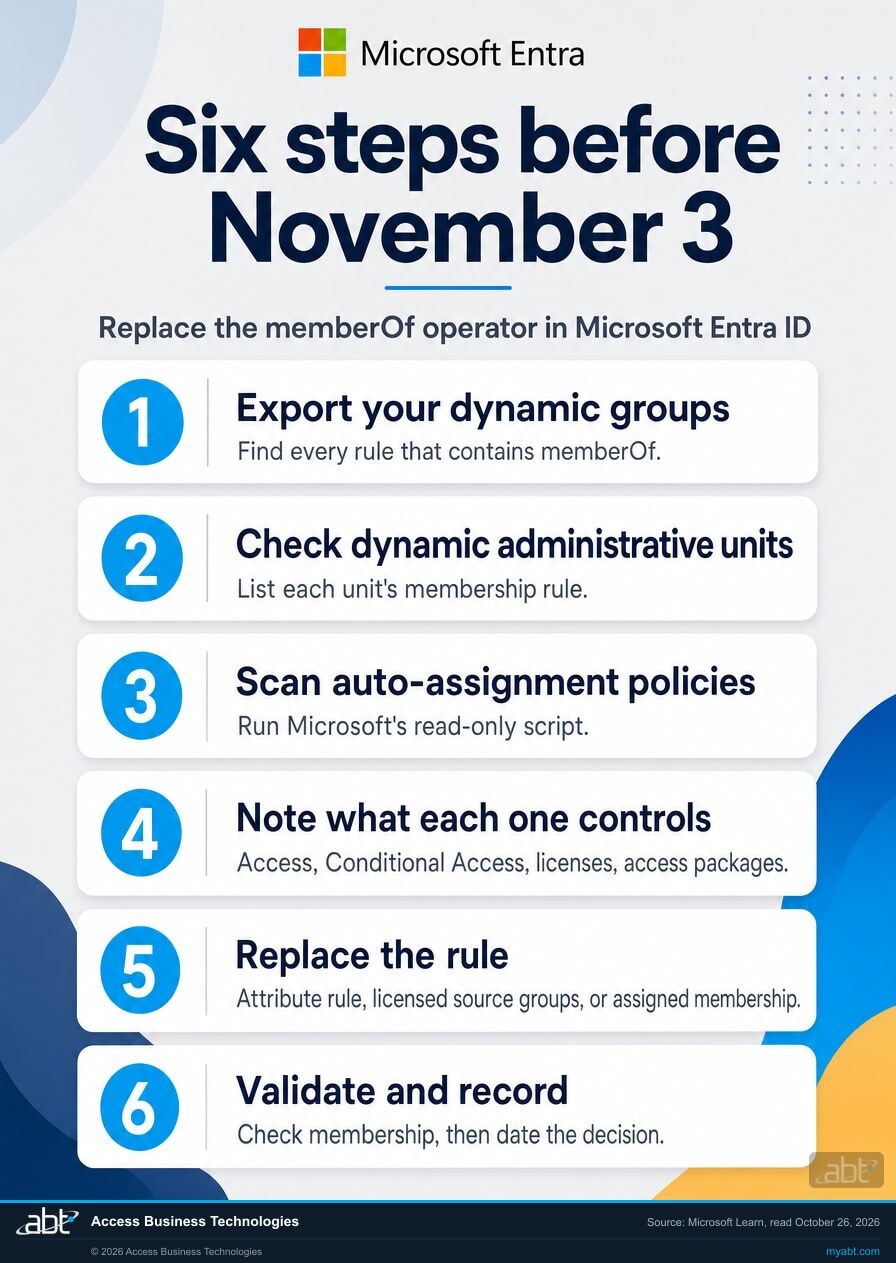
Six steps, in the order the decisions depend on each other. Steps 1 to 3 find every configuration. Step 4 shows what each one touches. Steps 5 and 6 replace and prove it.
Export your dynamic groups and find every rule that contains memberOf
Microsoft's first step for groups: "Export dynamic membership groups from the Microsoft Entra admin center and identify rules that contain memberOf." The same list comes from a read-only Microsoft Graph request, which we ran against our own tenant before publishing: GET https://graph.microsoft.com/v1.0/groups?$filter=groupTypes/any(c:c eq 'DynamicMembership')&$select=displayName,membershipRule,membershipRuleProcessingState. Follow each page link until the list ends, then search the membershipRule values for memberof in any capitalization. The membershipRuleProcessingState column shows On or Paused for each group.
List dynamic administrative units and read their rules
Microsoft points to Microsoft Graph PowerShell for this step: "Use Microsoft Graph PowerShell to identify dynamic administrative units that use memberOf rules." The equivalent Graph request returns each unit's membershipType, dynamic or assigned, and its membershipRule: GET https://graph.microsoft.com/v1.0/directory/administrativeUnits?$select=displayName,membershipType,membershipRule,membershipRuleProcessingState. Units whose type is dynamic and whose rule contains memberof go on the list.
Run Microsoft's read-only scan for access package automatic assignment policies
Microsoft publishes the script on its automatic assignment policy article. It reads every access package assignment policy, keeps the automatic ones, checks each membership rule for memberOf, and "always creates the CSV file, even when no policy matches," so keep the file with the time you ran it and the script's console output; an empty file from a clean run is your dated record. Automatic assignment policies come with Microsoft Entra ID Governance or Microsoft Entra Suite licensing, so this step matters most in tenants that hold either.
Write down what each one controls
For each group, note what points at it: licenses assigned to it, the Teams team or SharePoint site it opens, the Conditional Access policies that include or exclude it, the apps assigned to it, and the access packages it feeds. Microsoft's notice gives Teams and SharePoint access, Conditional Access targeting, group-based licensing and access package assignments as examples; app assignments and any other use of the group go on the same list. Add a column for the person who decides the replacement, and compare each group's members with its source groups while you are there, because of the preview limitation described above.
Replace each rule
Use the table above: an attribute rule where an attribute already tracks the population, the license or app assigned to each source group where the group existed for licensing or app access, or assigned membership with a named owner. Microsoft keeps the same group name and ID when the membership type changes, "so all existing references to the group are still valid." For an access package policy, rebuild the rule with an attribute-based operator, and where none fits, put the alternative assignment method in place before you remove the policy, "so that assignments aren't dropped."
Validate membership and record the decision before November 3
Microsoft ends each migration path with validation: group membership, administrative unit membership and scope, and access package assignments. Compare the new member list with the old one, explain each difference, and record the configuration, its replacement, who approved it and the date. Then run steps 1 to 3 again: the group export, the administrative unit list and Microsoft's access package scan. The result you want is zero memberOf rules on the groups, units and policies still in use, plus a recorded approval for any group you paused once nothing depended on it. Our article on Entra ID access reviews for financial institutions shows how to keep group membership reviewed after the deadline passes.
Before you change a rule
What else should you know before you replace memberOf?
Six facts from Microsoft's own documentation that shape the replacement in your tenant.
The roles for each change
Creating a memberOf group took at least User Administrator. Changing a group's membership type in the portal takes at least Groups Administrator, dynamic administrative units take at least Privileged Role Administrator, and automatic assignment policies take at least Identity Governance Administrator.
The licenses involved
Microsoft says dynamic membership groups require a Microsoft Entra ID P1 license, or an Intune for Education license, for each unique user who is a member of one or more dynamic groups. Automatic assignment policies require Microsoft Entra ID Governance or Microsoft Entra Suite licenses.
memberOf rules live in the rule editor
Microsoft says the rule builder and validate feature can't be used for memberOf, so these rules were written in the rule editor's advanced syntax. Read the rule text itself during the inventory; a group that looks simple in a list can carry a memberOf rule.
Direct members only
A memberOf group took only the direct members of each source group, and one memberOf group could not define another. An attribute rule or a licensed source group may reach a different set of people, so compare member lists when you switch.
Pausing is a recorded choice
Microsoft Graph shows each dynamic group's membershipRuleProcessingState as On or Paused, and Microsoft's migration steps list pausing or deleting a group once nothing depends on it. Record a pause the same way you record a replacement.
Move people between licensed groups in order
Microsoft's licensing article says that removing a user from one licensed group before adding them to the next can cause a brief loss of access while group-based licensing processes. Add to the new group first, then remove from the old one.
For financial institutions
Why does this matter at a credit union, bank, or mortgage company?
Because group membership decides who can work, what they can reach, and what an access review will find.
Keep people working. Groups carry the licenses, the Teams teams and the SharePoint sites a teller, a member service representative or a loan processor needs in their first week. A group that stops updating after November 3 can leave later hires without them until someone replaces its rule. Replacing the rule now keeps onboarding as quick as it is today.
Protect access. Microsoft names Conditional Access targeting among the effects. A policy that includes a frozen group misses new staff, and a policy that excludes one keeps excluding people who left the source group. The same applies to the group behind a sensitive SharePoint site: people who change roles keep their access. Our guide to Microsoft 365 employee offboarding for financial institutions covers the rest of what has to change when someone leaves.
Keep the record. An inventory of memberOf rules, a replacement for each, a validated member list and a dated approval make a short record your information security officer can hand to anyone who asks how group access was kept current through the change. The same groups come up again at the next access review, and a clean rule makes that review shorter.
Quiet identity changes keep arriving
In June, our channel flagged another one in a Short: "a quiet change inside of Microsoft's identity platform starts rolling out." That Short covered the June 15 change that could start prompting a specific slice of integrations for multifactor authentication.
memberOf is the same kind of change: a notice on a Microsoft Learn page, a date, and groups that behave differently afterwards. The fix is the same too: find what depends on it, replace it, and record what you did before the date arrives.
How ABT helps
A free security assessment
ABT is a Tier 1 Microsoft Cloud Solution Provider serving more than 750 financial institutions, and it manages Microsoft 365 tenants for credit unions, banks, and mortgage companies. Group rules decide who gets access, so the assessment starts with the groups.
We find every memberOf rule in your tenant, map what each one controls, and give you a replacement for each
The assessment is free and ends with written findings you keep. We work through it with an administrator on your team, and your team decides what changes and who makes each change.
- The group inventory. Every dynamic group with its rule and processing state, with the memberOf rules marked.
- Administrative units and access packages. Dynamic administrative units and automatic assignment policies that use memberOf, from read-only queries and Microsoft's scan script.
- The dependency map. The licenses, Teams and SharePoint access, Conditional Access policies and access packages tied to each memberOf configuration.
- The member check. People who sit in a memberOf group while missing from every source group it names.
- The replacement plan. An attribute rule, a direct source-group assignment or assigned membership for each one, with the role that makes the change.
- The record. A dated summary for your change record and your next access review.
ABT also operates M365 Guardian, its managed security service for credit unions, banks, and mortgage companies. Learn about M365 Guardian
Related reading
If this opened a bigger question
A group rule tends to surface the questions around it: who reviews access, how access ends when someone leaves, and which Conditional Access exclusions still make sense.

Entra ID Access Reviews for Financial Institutions
How Microsoft Entra ID access reviews map to what examiners expect, and what the licensing costs.
Read the article
Microsoft 365 Employee Offboarding for Financial Institutions
Revoke sessions, retain records, and reclaim the license and Copilot seat when an employee leaves.
Read the article
Conditional Access Exclusions: The List Nobody Reviews
A Conditional Access exclusion stays in place until someone removes it, and Microsoft names access reviews as the fix.
Read the articleAnswered
The end of the memberOf preview, answered
Verify it yourself
Where the facts on this page come from
Every Microsoft date, limit, role, license and quotation above was read from the sources listed here on October 26, 2026.
- Microsoft Learn, Configure dynamic membership groups with the memberOf operator in the Entra Admin Center (preview), retrieved October 26, 2026. Source for the November 3, 2026 notice, the four places stale membership shows up, the reason the preview ends, the alternative in development, the migration steps for groups, administrative units and automatic assignment policies, the preview limits, the child-group limitation, the prerequisites and the licensing use.
- Microsoft Learn, Configure an automatic assignment policy for an access package in entitlement management, retrieved October 26, 2026. Source for the quarantine from November 3, 2026, the alternative assignment method, the read-only scan script and its CSV, the minimum role, the licensing, and multiple policies per access package.
- Microsoft Learn, Manage rules for dynamic membership groups in Microsoft Entra ID, retrieved October 26, 2026. Source for the memberOf preview label, attribute rules and the -in operator, and the P1 license per unique member.
- Microsoft Learn, Manage users or devices for an administrative unit with rules for dynamic membership groups, retrieved October 26, 2026. Source for the Privileged Role Administrator requirement and the Dynamic or Assigned membership type.
- Microsoft Learn, Change static groups to dynamic membership groups in Microsoft Entra ID, retrieved October 26, 2026. Source for changing membership type in either direction, the unchanged group name and ID, and the Groups Administrator requirement.
- Microsoft Learn, Assign or unassign licenses to a group in the Microsoft 365 admin center, retrieved October 26, 2026. Source for nested groups and group-based licensing, and the order for moving a user between licensed groups.
- Microsoft Learn, group resource type and administrativeUnit resource type in the Microsoft Graph v1.0 reference, retrieved October 26, 2026. Source for membershipRule, membershipRuleProcessingState, groupTypes and membershipType. The two Graph requests in steps 1 and 2 were run read-only against ABT's own tenant on October 26, 2026 and returned successfully.
memberOf groups stop updating after November 3.
Find each one and replace its rule before then.
The work starts with the dynamic groups, dynamic administrative units and access package policies in your tenant. When it is done, you know which rules used memberOf, what each one licensed or protected, what replaced it, and where the decision is recorded.
Tell us a little about your environment and we will come back with what we would check first.
What should we look at? Optional.
Encrypted. Private.
Thank you. That is with us.
An ABT specialist will be in touch shortly. If a particular group, policy or access package is the one you are thinking about, say so in your reply and we will start there.
