


Microsoft Sentinel leaves the Azure portal on March 31, 2027. Some tenants move sooner.
The destination is a better place to work. One queue holds your SIEM and your Defender alerts together, they correlate automatically, and an investigation stops at one console instead of two. The risk sits in the crossing. If your institution runs more than one Sentinel workspace, one of them becomes primary and the rest become secondary, and Microsoft is explicit about what that does to the rules you built on Defender data in the others.
- Two Microsoft changes, two different populations, and which one you are in
- Primary against secondary workspace, capability by capability, in a table
- The five data connectors that disconnect themselves the moment you onboard
Two Microsoft changes landed at once, and they do not apply to the same people
The retirement applies to everyone
Microsoft states it in the same sentence on two separate customer-facing pages: after March 31, 2027, Microsoft Sentinel will no longer be supported in the Azure portal and will be available only in the Microsoft Defender portal.
The same page adds that all customers using Microsoft Sentinel in the Azure portal will be redirected to the Defender portal and will use Microsoft Sentinel in the Defender portal only. There is no opt-out and no extended-support tier described anywhere in the documentation.
If you use Sentinel at all, this date is yours.
The automatic wave applies to managed customers
The September 9, 2026 Partner Center announcement is addressed to managed security service providers and partners managing Microsoft Sentinel customers. What it describes is Microsoft automatically onboarding managed customers that did not move on their own.
Microsoft says it will manage the scheduling, the customer notifications and the technical onboarding. Separately, Azure Lighthouse-delegated users are excluded from automatic onboarding in Microsoft's own table.
If a provider runs your Sentinel, the date may already be set.
There is a third thing worth knowing, because it explains why this does not feel like a new policy to some institutions and does to others. Automatic onboarding has been happening quietly for over a year. Microsoft's retirement-timeline section says that starting July 2025, new customers onboarding their first workspace, who hold subscription Owner or User Access Administrator permissions and are not Azure Lighthouse-delegated users, have their workspaces automatically onboarded to the Defender portal together with onboarding to Microsoft Sentinel. Existing customers adding a workspace to a tenant that already runs Sentinel are not auto-onboarded, and the same table says those users do not see redirection links either.
So the population that has been carrying this the longest is the one that never chose the Defender portal and never noticed it had been chosen for them. The population being addressed this month is the one whose provider has been putting it off. And the population with the most work in front of it is neither: it is the multi-workspace institution that is about to discover which of its workspaces Microsoft considers the important one.
Earlier, nearer retirement dates for the Azure portal experience are still circulating in articles, vendor briefings and search summaries, sometimes in the same paragraph as the correct one. If a document in front of you says Sentinel left the Azure portal in mid-2026, check it against Microsoft directly. The date this page carries, March 31, 2027, is the one on Microsoft Learn today, and anything recommending urgency on the strength of an earlier deadline deserves a second look.
What actually changes when one workspace is named primary
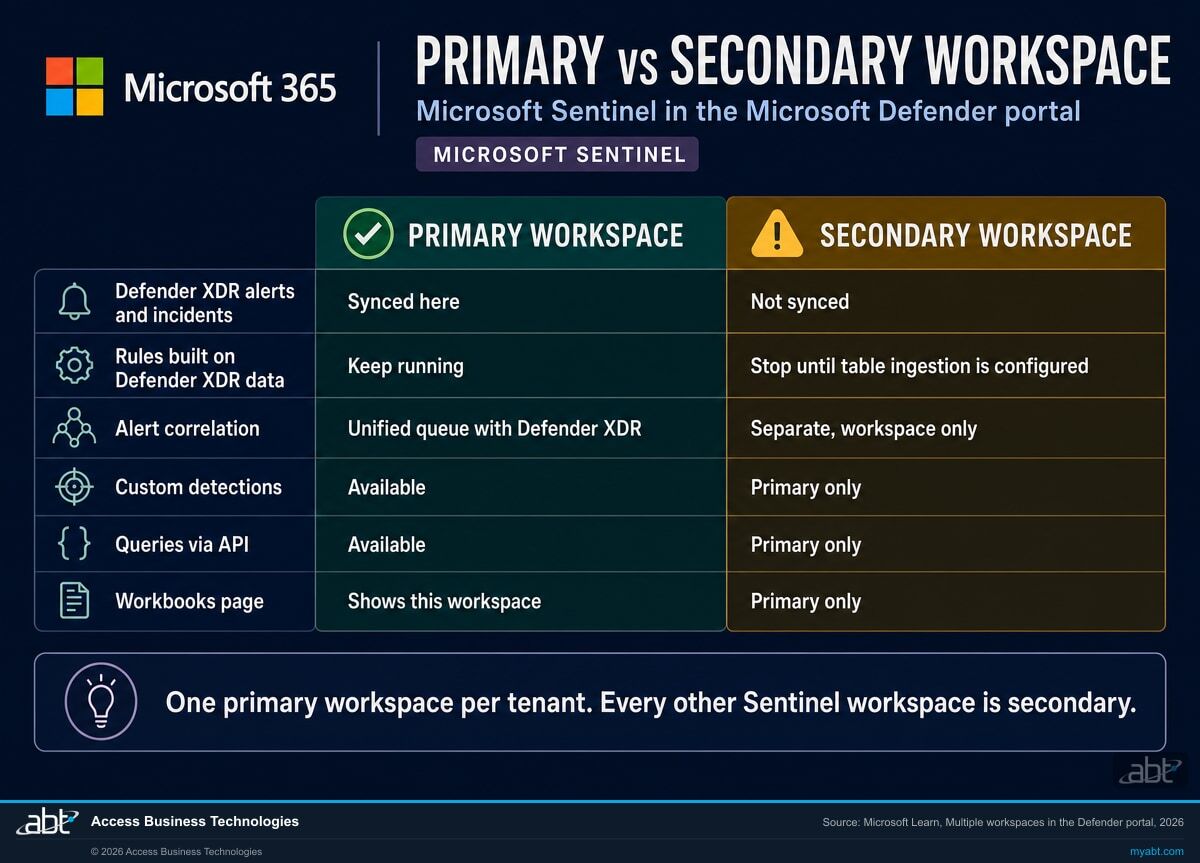
| Capability | Primary workspace | Secondary workspace |
|---|---|---|
| Defender XDR alerts and incidents | All Defender XDR alerts and incidents are synced here. The Defender XDR data connector for incidents and alerts is connected to the primary workspace only. | Not synced Defender incidents and alerts are not synchronized with secondary workspaces, though they can still ingest Defender table data if that is configured. |
| Analytics rules and automation built on Defender XDR data | Continue to run against the Defender XDR data flowing into this workspace. | Stop Microsoft's wording: rules and automation previously configured on Defender XDR data no longer function until you configure table ingestion. |
| Incident creation and alert correlation | Alerts correlate with Defender XDR data, and incidents include alerts from both the primary workspace and Defender XDR in a unified queue. | Kept separate. Incidents in secondary workspaces do not include data from any other workspace, or from Defender XDR. |
| Custom detections | Available. | Primary only Creating custom detections is listed as limited to the primary workspace. |
| Queries via API | Available. | Primary only Also listed as limited to the primary workspace, which matters to anything automated that reads Sentinel programmatically. |
| Workbooks page | Shows this workspace's data. | Primary only The Workbooks page only shows data associated with the primary workspace. |
| Insider Risk Management alerts | Correlated here, provided Insider Risk Management was connected to the Defender XDR connector in this workspace before onboarding. | Correlated to the primary only. A direct Insider Risk Management connector on a secondary workspace must be disconnected before that workspace onboards. |
| Advanced hunting | Full, including custom detections and API queries. | Selectable, and queryable across workspaces using the workspace operator, subject to Log Analytics cross-workspace limitations. Query results do not show a workspace name or identifier. |
| Access for a user with rights to this workspace | Read and manage data from the workspace and from Defender XDR. | Read and manage data from that workspace only. |
| Bi-directional incident sync with the Azure portal | Status, closing reason and assignment changes on a Defender XDR incident update in both queues. | Alerts and incidents sync between that workspace in the Azure and Defender portals. Data in a workspace is only synced to the workspace in the other portal. |
| Global search, entity pages and SOC optimization | These aggregate across every workspace you have permission to view, which is the one place the primary and secondary distinction genuinely does not bite. | |
Read that table as a question about your detections rather than about your console. Every row that says primary only is a place where a control you believe is running may not be running where you think it is. For a credit union, bank or mortgage company, that is not a preference issue. It is the gap between what your monitoring program says you do and what your tenant is actually doing on a Tuesday afternoon, and the two are supposed to match when somebody asks.
Microsoft supplies the remedy in the same document, and it is worth stating plainly because it keeps this from being a scare story. Secondary workspaces can ingest Defender table data, configured either through the Microsoft XDR connector in the Sentinel portal in Azure, or under Microsoft Sentinel, then Configuration, then Tables in the Defender portal. Rules stop until that is configured. They do not stop permanently.
There is also a reasonable design intent behind the model, which Microsoft describes with a global security operations center in mind: an organization with several autonomous workspaces may want them to stay autonomous rather than have every one of them land in the global queue. Microsoft's own recommendation, where you have multiple Sentinel workspaces in one tenant, is to use the primary workspace for your global security operations center. That is a sensible default. It is only a problem when nobody chooses it and the choice gets made anyway.
We will read your tenant and tell you which workspace is about to become the important one
How many Sentinel workspaces you actually have, which ones are connected to the Defender XDR connector today, which analytics rules and automation depend on that data, where your standalone connectors sit, and what a move would take. Written up, in your hands, whether or not you engage us for anything afterwards.
Get a free security assessmentFive connectors disconnect themselves, and the rest are your job
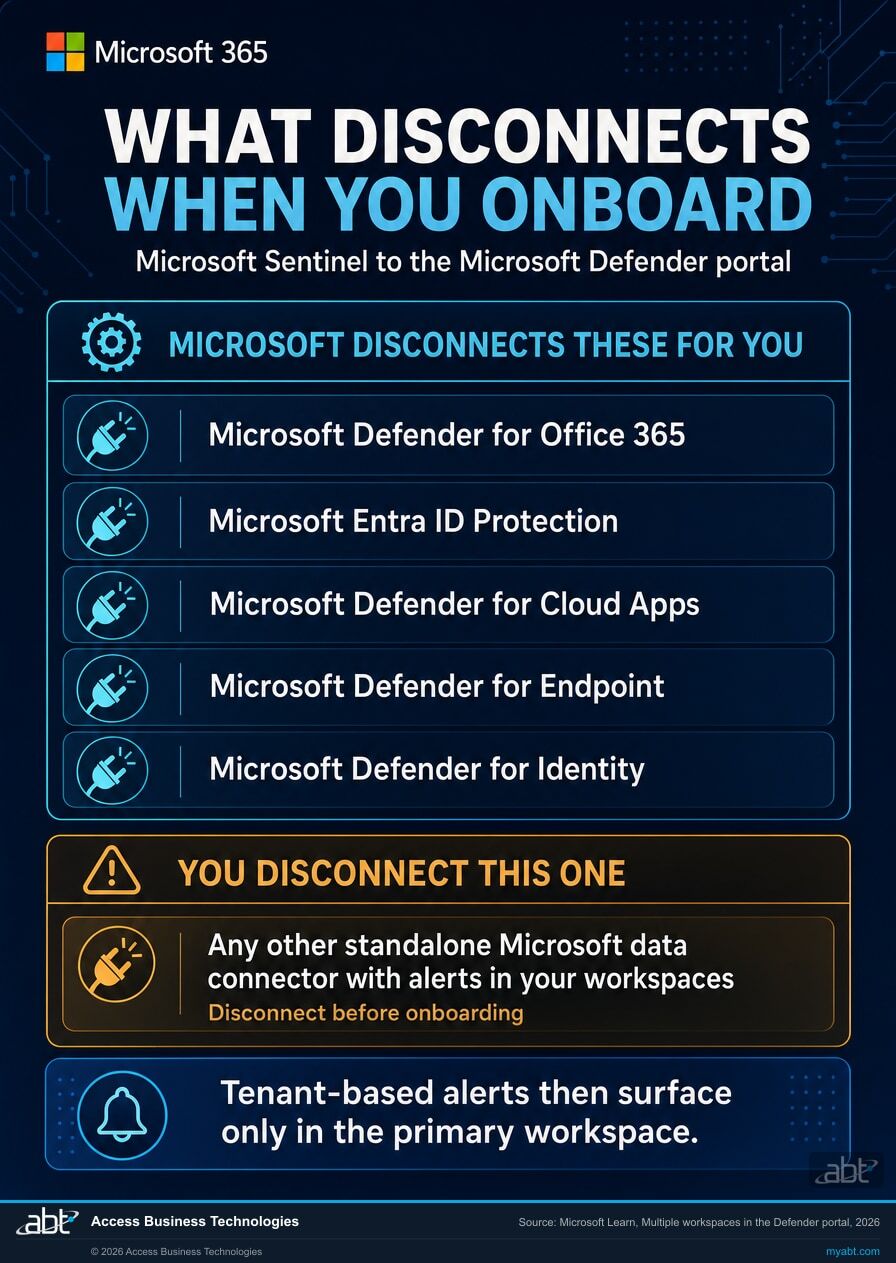
Microsoft's wording is that to prevent duplication across workspaces, any direct standalone data connectors for these services must be disconnected from Microsoft Sentinel in secondary workspaces, which results in tenant-based alerts surfacing only in the primary workspace. Then it names them:
- Microsoft Defender for Office 365, which for most institutions is the mail security signal
- Microsoft Entra ID Protection, which carries risky sign-in and risky user detections
- Microsoft Defender for Cloud Apps, the cloud application activity signal
- Microsoft Defender for Endpoint, the device signal
- Microsoft Defender for Identity, which watches on-premises Active Directory
Those five are handled for you. Microsoft's phrasing is that upon onboarding, standalone data connectors for those services are automatically disconnected. Anything else is not, and Microsoft describes it as an open category rather than a sixth product: if you have other standalone Microsoft data connectors with alerts in your workspaces, Microsoft says to make sure to disconnect them before onboarding to the Defender portal. How many that turns out to be is a per-tenant question, which is why it is a task rather than a checklist item.
An automatic disconnection can be invisible in exactly the way that matters. It is a documented, intended behavior rather than a failure, so it need not surface as an error or a ticket. A connector that was feeding a workspace simply stops feeding that workspace, and unless somebody is watching ingestion volume per workspace rather than in aggregate, the first symptom is a query that returns fewer rows than it used to and an analyst who assumes it was a quiet week.
That is ABT's reading rather than a Microsoft statement, and it is the reason the pre-onboarding inventory below exists.
If your institution has spent the last two years tightening identity monitoring, this is the section to sit with. Entra ID Protection and Defender for Identity are the two connectors most likely to be feeding a detection that somebody wrote by hand, and handwritten detections are precisely the ones that nobody rebuilds automatically. The same logic applies to the exclusions and enforcement states in your access policies, which is a separate and equally quiet problem covered in the list nobody reviews.
The work that has to happen before onboarding, not after
Count the workspaces, and decide which one should be primary
Not which one is biggest. Which one your security operations actually run out of. Microsoft's own recommendation, where several Sentinel workspaces sit in one tenant, is to use the primary workspace for your global security operations center. If the answer is obvious to your team, write it down, because the next step depends on having an answer before somebody else supplies one.
If a provider manages your Sentinel, ask them for your onboarding date
Microsoft says affected tenant administrators receive an in-portal banner and an admin email about 30 days before their onboarding date, so the notice does reach the institution rather than only the provider. Asking anyway is the difference between thirty days of planning and thirty days of assuming somebody else planned. Microsoft's stated route for special handling, or to request a different primary workspace, is an email to MSSP-Sentinel-Support@microsoft.com with the tenant identifier and the preferred workspace resource identifier.
Inventory every analytics rule and automation that reads Defender XDR data
This is the list that determines how much of the table above applies to you. A workspace with no Defender-XDR-derived rules has nothing to migrate under this heading, though the other secondary-workspace limits in the table still apply to it. A workspace whose detections were built on that data has migration work waiting on top of them. Microsoft's guidance for keeping content from secondary workspaces is to migrate the affected analytics rules, automation rules, playbooks and workbooks to the primary workspace.
Settle Insider Risk Management before you touch anything else
This one is a genuine prerequisite in Microsoft's wording rather than a recommendation. Insider Risk Management alerts correlate to the primary workspace only, and Microsoft states you must connect it to the Defender XDR connector in your primary workspace before onboarding that workspace, to ensure the alerts and incidents are available there. If a direct Insider Risk Management connector is attached to any secondary workspace, it must be disconnected before that workspace onboards.
Find the standalone Microsoft connectors Microsoft will not disconnect for you
The five named services are handled automatically. Anything else standalone and alert-producing is yours to disconnect first. In practice this means walking the data connector list in each workspace rather than trusting an inventory written when the workspace was built, because connectors get added during incidents and rarely get written down.
Check who can actually perform the onboarding
The permissions are more specific than most tenants expect. Onboarding a primary workspace calls for at least a Security Administrator in Microsoft Entra ID plus either Owner, or User Access Administrator together with Microsoft Sentinel Contributor. Microsoft adds that for onboarding, the Owner role assignment must be unconditional at the subscription scope. In an institution with properly separated duties, that combination may not currently sit with one person, and discovering it during the change window is the expensive way to find out.
Record the before-state while it still exists
Ingestion volume per workspace, the connector list per workspace, and which rules are enabled where. Not because Microsoft asks for it, but because without it the question that comes later gets much harder to answer: did anything stop, and when. ABT's practice note, and the one item on this list that costs nothing and cannot be recovered afterwards.
The Microsoft dates that land on your tenant whether or not you scheduled them
What the move gives you, and what it takes away
The gains are real and most of them are about time. Microsoft's comparison describes a unified incident queue for SIEM and XDR against a Sentinel queue kept separate from Defender, automatic cross-domain correlation against separate correlation for each, and an attack story with an incident graph and unified entity pages against log-centric workflows. Advanced hunting covers the SIEM, Defender and the data lake in one place, and existing Sentinel workspace queries and functions can be reused. Case management, which Microsoft lists as not available in the Azure portal, exists in the Defender portal. For a small security team, closing two consoles into one is not a cosmetic change.
Two rows in that comparison deserve to be read together by anyone still deciding whether this is urgent. Microsoft describes the Azure portal's innovation focus as maintenance and parity only, and the Defender portal as the primary innovation surface, all new Sentinel experiences land here first. A supported product that receives no new capability is a product with a direction, and the direction is already public.
The loss is Workspace manager. In Microsoft's navigation table for the Defender portal, it appears with two words next to it: Not available. So does News and guides, which nobody will miss. Workspace manager is a different matter for an organization that used it to push content centrally across workspaces, and it is the single clearest thing to check before assuming this migration is purely additive.
There is a second, conditional loss worth naming because it depends on how you are licensed. Microsoft states that when you onboard Sentinel to the Defender portal without enabling Defender capabilities or other services, three things are limited or unavailable: Microsoft Security Exposure Management, custom detection rules provided by Microsoft Defender, and the Action center. That is a description of a Sentinel-only tenant. If your institution runs Defender alongside Sentinel, which most regulated institutions on Microsoft 365 do, this paragraph is not about you. If it does not, this is the paragraph to raise with whoever owns the licensing conversation.
The primary workspace choice is reversible. Microsoft documents that after onboarding you can change the primary workspace, and that when you switch it, the Defender XDR connector is connected to the new primary and disconnected from the former one automatically. The path is System, then Settings, then Microsoft Sentinel, then Workspaces.
And the September announcement is explicit that existing third-party connectors, content, and data remain in place, and that no action is required for other managed customers. This is a change to where correlation happens, not a data migration. Anyone telling you that your logs are at risk in this move is describing a different event.
A vendor-scheduled change is still a change to your control environment
Everything above is a technical story. This section is the part that only matters if you are regulated, and for a credit union, bank or mortgage company it is the part that outlives the migration.
Your monitoring program almost certainly contains a sentence describing how security events are collected, correlated and reviewed. If a workspace becomes secondary and its Defender-XDR-derived rules stop functioning, that sentence quietly stops being true, and it stops being true on a date you did not pick, in a change you did not raise, with no ticket in your change management system. Nothing about that is a compliance failure by itself. Vendors change their products and institutions adapt. What tends to attract a finding is the absence of a record showing you knew, and that is ABT's reading of examination cycles rather than a rule any agency publishes.
The record is not complicated. It is the onboarding date, the workspace chosen as primary and why, the rules and automation identified as affected, what happened to them, the connectors that were disconnected and when, and a before-and-after read of ingestion per workspace. Written at the time, that is a change-management artifact any examiner would recognize. Reconstructed a year later from memory, it is a story.
This is the same discipline that makes an incident response plan hold up, which is why the two documents tend to be maintained by the same person. If yours is due a look, the examiner-ready playbook covers what a defensible one contains, and the companion piece on audit log retention covers the related question of how far back your evidence actually reaches, which is a separate limit with its own clock.
One boundary, stated plainly. Whether a given change requires a formal change-management entry, a risk assessment update or board notification is a determination for your institution and your regulator. ABT produces the technical read of what changed in the tenant. That is a different thing from a compliance opinion, and this page is not one.
We read the tenant and tell you what this migration will actually touch
The assessment answers the questions this page raises, against your environment rather than in general. How many Microsoft Sentinel workspaces exist and which subscriptions they sit in. Which of them are connected to the Defender XDR connector today, and therefore which ones the primary and secondary distinction will act on. Which analytics rules, automation rules, playbooks and workbooks read Defender XDR data, listed by name, so the migration list in step three above is a document rather than an intention. Which standalone Microsoft data connectors are live per workspace, separated into the five Microsoft disconnects for you and the ones you have to handle yourself. Where Insider Risk Management is attached. And whether the permission combination Microsoft requires for onboarding currently sits with anyone in your organization.
You get it in writing, in language you can put in front of a board or an examiner, with the workspace-by-workspace view of what a move would change. Where something cannot be answered from the tenant, we say so rather than filling the gap, because a migration plan built on a guess is worse than one with an honest hole in it.
The written output is yours whether or not you engage us for anything afterwards. ABT manages Microsoft 365 tenants and hosts Azure environments for more than 750 financial institutions, so a vendor-scheduled change landing inside a regulated environment is the situation we work in rather than an occasional project. ABT also operates M365 Guardian, its managed security service for credit unions, banks, and mortgage companies.
Microsoft Sentinel workspaces are Azure resources, so this work sits on the Azure side of the house rather than in the Microsoft 365 tenant, and the assessment says which side each finding belongs to. That distinction matters more than it sounds like it should when two different teams own the two environments.
Where the facts on this page come from
What the queue feeds, what it retains, and the alert that already moved
Microsoft 365 Incident Response Plan for Financial Institutions
The document your incident queue exists to serve. Worth re-reading in the same month the queue changes shape.
Read the article ›
Entra Risk Policies Retire Oct 1, 2026: What Banks Must Do
Microsoft Entra ID Protection is on the auto-disconnect list above, and it has a second deadline of its own arriving first.
Read the article ›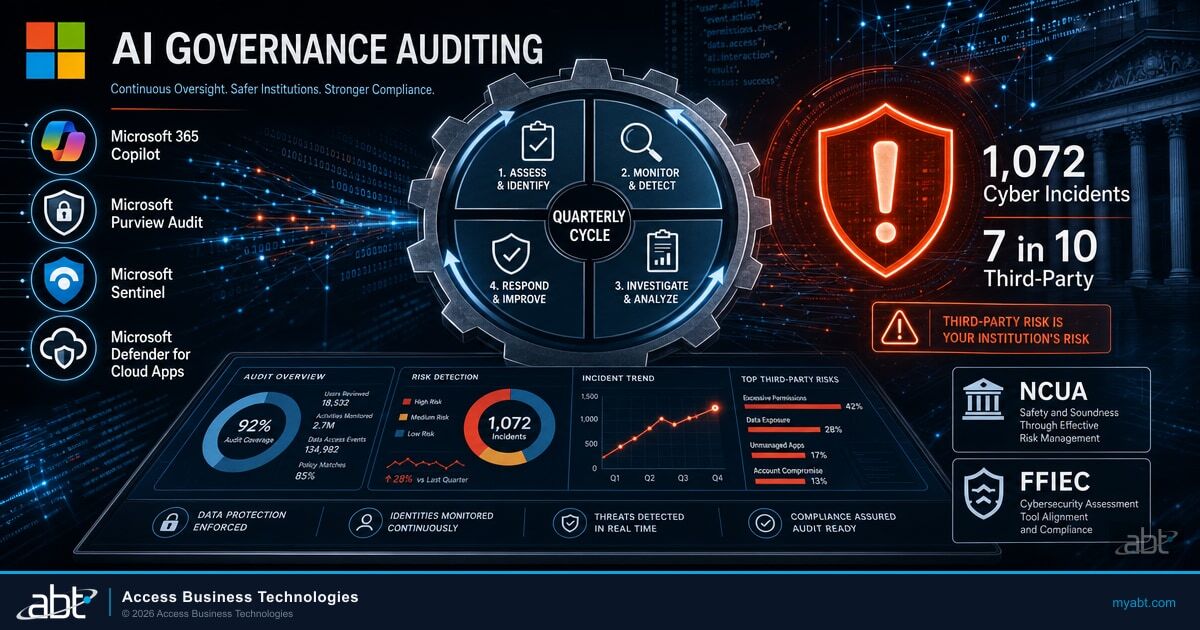
AI Governance Auditing: The Microsoft Purview and Sentinel Quarterly Cycle
A worked example of Sentinel carrying a recurring governance obligation, which is the kind of workload a workspace change lands on.
Read the article ›Answered from Microsoft's own documentation
After March 31, 2027. Microsoft states on two separate customer-facing pages that after that date, Microsoft Sentinel will no longer be supported in the Azure portal and will be available only in the Microsoft Defender portal, and that all customers using Microsoft Sentinel in the Azure portal will be redirected to the Defender portal and will use Microsoft Sentinel in the Defender portal only. Earlier and nearer retirement dates for the Azure portal experience still appear in circulating articles and search summaries, so if a document in front of you says that experience ended in mid-2026, check it against Microsoft Learn rather than acting on it.
It depends which population you are in, and this is the single most commonly confused point. Microsoft announced on September 9, 2026 that starting in September 2026 it will begin automatically onboarding managed customers that did not move to the unified Microsoft Sentinel experience, and that it will manage the scheduling, customer notifications and technical onboarding. That announcement is addressed to managed security service providers and partners managing Microsoft Sentinel customers, so it describes managed customers rather than every Sentinel customer. Separately, since July 2025, new customers onboarding their first workspace who hold subscription Owner or User Access Administrator permissions, and who are not Azure Lighthouse-delegated users, have had their workspaces automatically onboarded. Everyone else schedules the move themselves, and the outside limit for doing so is March 31, 2027.
Microsoft says affected tenant administrators receive an in-portal banner and an admin email about 30 days before their onboarding date. The notice reaches the institution's own administrators rather than only the managing partner, so if your Sentinel is managed for you and nobody has mentioned a date, the first place to look is the mailbox of whoever holds tenant administrator rights. Microsoft also gives a route for special handling or to request a different primary workspace: email MSSP-Sentinel-Support@microsoft.com with the tenant identifier and the preferred workspace resource identifier.
Microsoft describes the Defender portal as supporting one primary workspace and, in its words, an unlimited number of secondary workspaces per tenant, while its separate service-limits page documents ceilings on concurrent use: 100 workspaces displayed at once in the incident view, 100 in a log query, and 20 per analytics-rule query. The primary is where the Defender XDR data connector for incidents and alerts is connected, so it is where Defender XDR alerts and incidents sync, where they correlate with your Sentinel alerts in a unified queue, and where several capabilities are available exclusively. Custom detections, queries via API and the Workbooks page are all documented as limited to the primary workspace. Insider Risk Management alerts correlate to the primary only. If you run a single Sentinel workspace, none of this is a decision, because that workspace becomes the primary. If you run several, the choice determines where your correlated detection actually happens, and Microsoft's own recommendation is to use the primary workspace for your global security operations center.
Microsoft's wording is specific. Any other workspaces that were previously connected to the Defender XDR connector are disconnected and function as secondary workspaces, and any analytics rules and automation that you had previously configured based on Defender XDR data no longer function until you configure table ingestion. Incidents in secondary workspaces do not include data from any other workspace, or from Defender XDR. Defender incidents and alerts are not synchronized to secondary workspaces. Separately, standalone data connectors for Microsoft Defender for Office 365, Microsoft Entra ID Protection, Microsoft Defender for Cloud Apps, Microsoft Defender for Endpoint and Microsoft Defender for Identity are automatically disconnected upon onboarding, so those tenant-based alerts surface only in the primary workspace. The remedy is in the same document: secondary workspaces can still ingest Defender table data if that is configured, either through the Microsoft XDR connector in the Sentinel portal in Azure or under Microsoft Sentinel, Configuration, Tables in the Defender portal.
Yes. Microsoft documents that after you onboard Microsoft Sentinel to the Defender portal you can change the primary workspace, and that when you switch it, the Defender XDR connector is connected to the new primary and disconnected from the former one automatically. The path is System, then Settings, then Microsoft Sentinel, then Workspaces. The permissions are the part worth checking in advance: changing the primary workspace calls for at least a Security Administrator in Microsoft Entra ID plus either Owner, or User Access Administrator together with Microsoft Sentinel Contributor. For onboarding specifically, Microsoft adds that the Owner role assignment must be unconditional at the subscription scope. In an institution with separated duties, that combination may not currently sit with any one person.
No. The September 2026 announcement states that existing third-party connectors, content, and data remain in place, and that no action is required for other managed customers. This is a change to where alerts correlate and which console you work in, rather than a data migration. What can change is whether a specific analytics rule or automation continues to run, and that is a configuration question with a documented fix rather than a data-loss question. If someone is describing this migration as putting your logs at risk, they are describing a different event.
Two things are documented by Microsoft as before-not-after. First, Insider Risk Management: you must connect it to the Microsoft Defender XDR connector in your primary workspace before onboarding that workspace, to ensure its alerts and incidents are available there, and if a direct Insider Risk Management connector is attached to any secondary workspace it must be disconnected before that workspace onboards. Second, standalone connectors beyond the five Microsoft handles automatically: if you have other standalone Microsoft data connectors with alerts in your workspaces, Microsoft says to make sure to disconnect them before onboarding. Beyond those two, the practical pre-work is deciding which workspace should be primary, listing the analytics rules and automation that read Defender XDR data so you know what needs migrating, and recording ingestion volume per workspace while the before-state still exists.
One thing, plainly, and one more that depends on your licensing. Microsoft's navigation table for the Defender portal lists Workspace manager as not available, alongside News and guides. Workspace manager matters to organizations that used it to push content centrally across workspaces, so it is the clearest item to check before assuming the move is purely additive. The conditional one: Microsoft states that when Sentinel is onboarded to the Defender portal without enabling Defender capabilities or other services, Microsoft Security Exposure Management, custom detection rules provided by Microsoft Defender, and the Action center are limited or unavailable. That describes a Sentinel-only tenant. An institution already running Defender alongside Sentinel is not affected by that paragraph.
Find out which of your workspaces is about to become the primary one.
Tell us roughly how many users you have and how your security monitoring is set up today. Our engineers read the environment and come back in writing on the scope set out above: how many Sentinel workspaces exist and where, which are connected to the Defender XDR connector, which analytics rules and automation depend on that data listed by name, which standalone connectors are live in each workspace and which of them Microsoft will disconnect for you, where Insider Risk Management is attached, and whether anyone in your organization currently holds the permission combination Microsoft requires to onboard. Anything that cannot be answered from the environment is reported as a gap rather than filled in.
ABT manages Microsoft 365 tenants and hosts Azure environments for more than 750 financial institutions. The assessment is a technical review and is not legal or compliance advice.
Get a free security assessment
A read of your Sentinel workspaces, your Defender XDR connections and the rules a portal migration would touch, written up workspace by workspace.
